How to Define a Sales Organization in SAP SD (OVX5)
sales organization is the top-level organizational unit in SAP Sales and Distribution, and getting it configured correctly is one of the first steps in any new SD implementation. This guide walks through transaction OVX5 using the copy-reference method, explains what actually happens behind the scenes when you copy a sales organization, and covers the assignments you still need to complete afterward before the new sales organization can be used on a live sales document. If you run into any errors while following along, feel free to send a screenshot to pramod@learntosap.com for help.
✅ What Is a Sales Organization in SAP SD?
sales organization is a distinct, self-contained organizational unit within SAP Sales and Distribution that represents the part of the business responsible for selling and distributing products or services, negotiating sales terms, and taking legal responsibility for the goods it sells. It sits at the top of the SD organizational hierarchy, above distribution channel and division, and every sales document in SAP is ultimately created against a sales area that includes a sales organization.
Sales organizations exist so that a company can run genuinely independent sales operations under one SAP system. Each sales organization can have its own pricing strategy, its own distribution channels, its own document number ranges, and its own reporting structure, which makes it possible for a single client to sell the same products through different regions, business units, or customer segments without those operations interfering with one another.
Structurally, a sales organization must be assigned to exactly one company code, since every sales document eventually needs to post financially to a single company code for accounting purposes. A company code, on the other hand, can have several sales organizations assigned to it - a common setup when one legal entity sells through multiple regional sales organizations, or when a company separates domestic and export sales into different sales organizations for reporting clarity.
📋 Where Sales Organization Fits in the SD Organizational Structure
Sales organization is only one layer of the broader SD organizational structure. Understanding how it relates to the layers above and below it makes the rest of this configuration - and the assignments that follow OVX5 - much easier to follow.
| Organizational Unit | Role | Typical Transaction |
|---|---|---|
| Company Code | The legal entity that sales organization must be assigned to for financial posting. | OX02 |
| Sales Organization | The top-level SD unit responsible for selling and distributing goods; created and copied here. | OVX5 |
| Distribution Channel | Describes how goods reach the customer - for example wholesale, retail, or direct sales. | OVXK / OVXI |
| Division | Groups materials or services into product lines for sales and reporting purposes. | OVXB |
| Sales Area | The combination of sales organization, distribution channel, and division actually used on sales documents. | OVXG |
Because sales area is the level actually referenced by sales orders, deliveries, and billing documents, defining the sales organization in OVX5 is really only the first of several configuration steps. It is, however, the step everything downstream depends on, since distribution channel and division assignments cannot be completed for a sales organization that does not exist yet.
🔧 Step-by-Step: Defining a Sales Organization Using OVX5
The fastest and most reliable way to create a new sales organization is to copy an existing one rather than build a blank record from scratch. Copying automatically brings along number ranges, pricing procedure determination, and other dependent configuration tied to the source sales organization, which otherwise has to be rebuilt manually table by table.
Run transaction OVX5 directly, or follow the IMG path: SPRO → Enterprise Structure → Definition → Sales and Distribution → Define, Copy, Delete, Check Sales Organization.

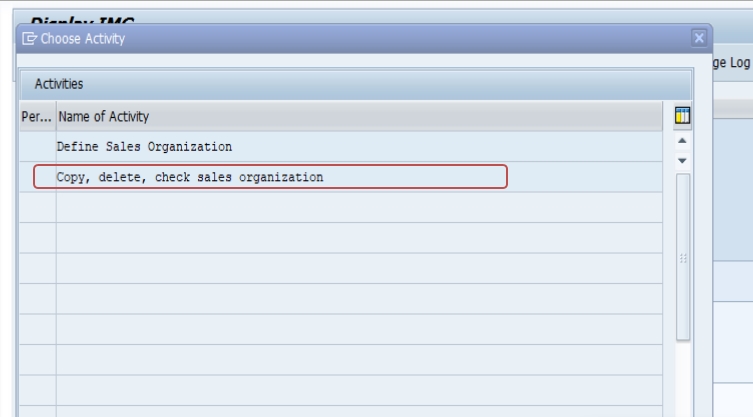
From the activity list, select Copy, Delete, Check Sales Organization. Choosing the copy activity - rather than the plain "Define Sales Organization" option - is what triggers SAP to duplicate the reference sales organization's dependent configuration automatically.
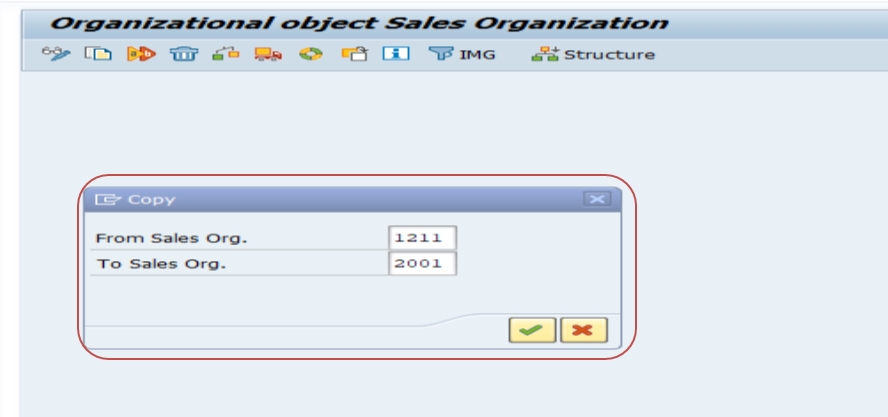
Choose the Copy function (F5) and enter the source and target sales organizations - in this example, copying from Sales Organization 1211 (an existing, already-configured sales organization) to the new Sales Organization 2001.
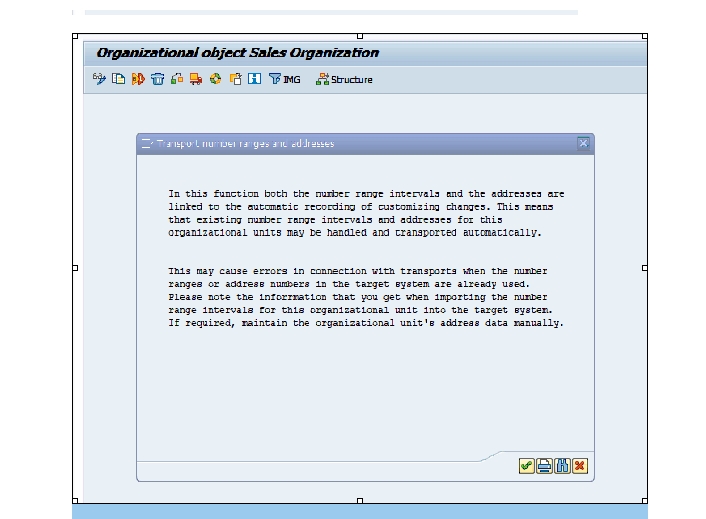
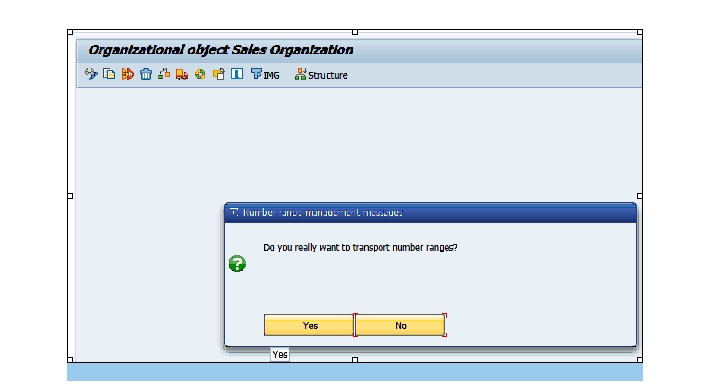
SAP prompts for confirmation before copying every dependent table linked to the source sales organization. Select Yes to proceed with the full copy.
Once the copy completes, open the new sales organization 2001 and edit the details that should not simply be inherited from the reference - most importantly the organization's name and address, since these should reflect the new sales organization's own identity rather than duplicating the source.
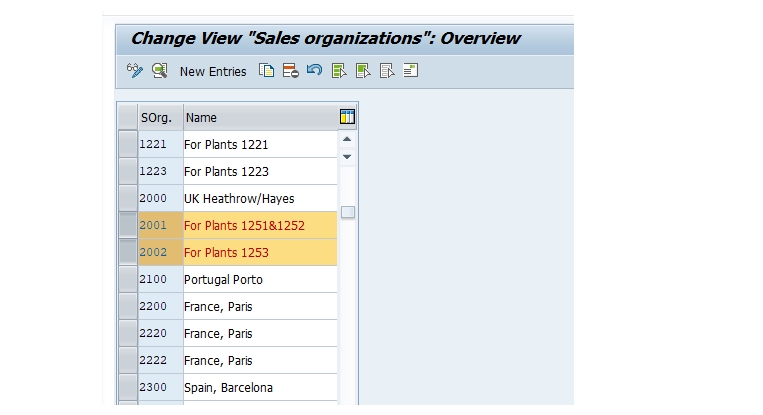

Review the address fields, statistics currency, and any organization-specific settings, then Save. The sales organization itself now exists in the system, though it is not yet usable on sales documents until the assignments in the next section are completed.
🔍 What Actually Gets Copied Behind the Scenes
The copy-reference method in OVX5 is convenient precisely because a sales organization is never configured in isolation - dozens of downstream customizing tables reference the sales organization key, and rebuilding all of them manually for a brand-new sales organization would take far longer than copying an existing one.
When you copy sales organization 1211 to 2001 and confirm the copy-all prompt, SAP duplicates entries such as internal document number ranges, the pricing procedure determination that controls which condition technique applies to documents created under the new sales organization, and various other control table entries keyed to the source sales organization. This is also exactly why choosing a good reference sales organization matters: whatever pricing logic, number range assignment, and control settings the source sales organization uses will initially apply to the new one as well, and any settings that should genuinely differ - such as address, or later, distribution channel and division assignments - have to be adjusted deliberately after the copy finishes.
It's worth being clear that copying a sales organization does not automatically assign it to a company code, distribution channel, or division. Those are separate configuration steps performed in different transactions, described below, and none of them happen automatically just because the sales organization record itself was created.
📋 What to Configure Next After OVX5
Defining the sales organization is the first step, not the last. Before sales documents can actually be created against sales organization 2001, three further assignments are required:
- Assign the sales organization to a company code using transaction OVX3, since every sales organization must belong to exactly one company code for financial posting to work correctly.
- Assign a distribution channel to the sales organization using transaction OVXK, defining how goods will reach the customer under this sales organization - for example, wholesale or direct sales.
- Build the sales area using transaction OVXG, combining the sales organization with a distribution channel and a division. The resulting sales area is what actually gets assigned to customer master records and referenced on sales orders, deliveries, and billing documents.
Only after all three of these assignments are complete can end users select the new sales organization when creating a sales document. Trying to use a sales organization that exists in OVX5 but has not yet been assigned to a company code or built into a sales area typically results in the sales area not appearing as a valid selection at all, rather than a clear error message pointing back to the missing configuration.
💼 Real-World Scenario: Setting Up a New Regional Sales Organization
Smita Patil, an SAP SD consultant at Learn Pharmaceutcals in Pune, was asked to set up a new sales organization for the company's expansion into a new distribution region. Rather than building the sales organization from a blank record, Smita chose to copy the company's existing, well-tested sales organization 1211 into a new sales organization 2001, since 1211 already had years of correctly configured pricing procedure determination and number range settings that the new region could reuse as a starting point.
Suresh Mehta, the project lead, initially asked whether it would be safer to build the new sales organization manually so that nothing unwanted would carry over from the old one. Smita explained that the copy method was actually the safer and faster option here, since it guaranteed that critical dependent tables like number ranges and pricing determination would not be missed - the kind of gap that is easy to overlook when configuring dozens of related tables by hand, and difficult to trace once a sales order later fails during pricing or billing document creation.
After completing the copy in OVX5 and confirming it in a sandbox client, Smita updated the new sales organization's name and address to reflect the new region, then handed the sales organization off to Pooja Mishra to complete the company code assignment in OVX3 and the sales area build in OVXG. Manisha T., from the customer master team, was then able to create customer records against the new sales area only once all three follow-up assignments were finished - confirming for the whole team that the sales organization record created in OVX5 was genuinely just the starting point of a multi-step setup, not a complete configuration on its own.
📋 Number Ranges and Pricing Determination Tied to Sales Organization
Two of the most consequential things a sales organization brings with it, whether copied or built manually, are its internal document number range assignment and its role in pricing procedure determination. Sales organization is one of the key fields SAP uses, alongside distribution channel, division, document pricing procedure, and customer pricing procedure, to determine which pricing procedure applies when a sales order is created. Get the sales organization's configuration wrong or leave it incomplete, and every sales order created under it can pick up the wrong pricing procedure - a problem that often is not obvious until pricing on a live order looks incorrect.
Document number ranges work similarly: each sales organization, combined with the sales document type, determines which internal number range a new sales order, delivery, or billing document draws from. When a sales organization is copied in OVX5, its number range assignments are copied along with it, which is convenient, but it also means two sales organizations copied from the same source will initially share number range logic unless someone deliberately separates them afterward. For companies that need to report by sales organization using document number as a quick visual cue, or that need genuinely separate number ranges for regulatory or audit reasons, this is a configuration detail worth reviewing explicitly rather than assuming the copy handled it exactly the way the business needs.
Because both of these areas are easy to configure incorrectly and hard to diagnose after the fact - a wrong pricing procedure determination often just produces unexpected pricing rather than a clear error message - it's worth testing a sample sales order against the new sales organization specifically to confirm both the document number range and the resulting price calculation look correct before considering the setup complete.
📝 Naming Conventions and Governance for New Sales Organizations
Sales organization codes are typically four characters in SAP, and while the technical field accepts almost any combination, most SD teams adopt an internal naming convention so the code itself communicates something meaningful - a country code, a business unit abbreviation, or a sequential block reserved for a particular region. Choosing 2001 as a new sales organization code, as in this guide's example, only makes sense within whatever numbering scheme your organization has already agreed on; teams that skip this step often end up with sales organization codes that are difficult to interpret at a glance a year or two later, once several more have been added.
Governance matters just as much as naming. Because creating a sales organization by copying a reference brings that reference's number ranges, pricing determination, and other control settings along with it, many organizations restrict who can execute OVX5 in a production or even a development client, and require that new sales organizations go through a change request that documents the business justification, the chosen copy reference, and the planned company code and sales area assignments before configuration begins. This is not bureaucracy for its own sake - it is what keeps a growing SAP landscape's organizational structure understandable, rather than accumulating sales organizations that nobody remembers the original purpose of.
A related governance question worth deciding early is whether a new sales organization genuinely needs to be a new sales organization at all, or whether the same business requirement could be met with a new distribution channel or division under an existing sales organization instead. Because sales organization is the heaviest of the three levels to set up correctly - carrying its own number ranges, pricing determination, and company code assignment - reserving it for cases that genuinely need an independent top-level selling entity, rather than defaulting to a new sales organization for every new business requirement, keeps the organizational structure easier to maintain as the SD landscape grows.
✅ Validating the New Sales Organization Before Go-Live
Once OVX5, OVX3, OVXK, and OVXG are all complete, it's worth running through a short validation checklist before considering the sales organization ready for end users. Confirm the sales organization appears correctly when creating or displaying a customer master record with transaction XD01 or XD02, restricted to the intended sales area. Create a test sales order using a representative material and customer to confirm pricing calculates as expected and the document number falls within the correct range. Check that the sales organization's address and statistics currency display correctly on printed or emailed sales documents, since these are the fields most commonly left unedited after a straight copy. Finally, confirm with the finance team that the company code assignment lines up with how the business expects revenue from the new sales organization to post, since this assignment cannot be easily changed once transactional data exists against the sales organization.
Skipping this validation step is one of the more common reasons a newly configured sales organization generates a support ticket in its first week of live use - usually for a mismatched number range, an unexpected price, or an address field that was never updated from the copy source - all of which are far faster to catch in a short test than to trace back after go-live.
❗ Common Mistakes When Defining a Sales Organization
- Building a new sales organization from a blank record instead of copying a well-configured reference, resulting in missing number ranges or pricing procedure determination that only surface later, during actual document creation.
- Choosing a poorly configured or outdated sales organization as the copy reference, which passes its own configuration gaps along to the new sales organization.
- Forgetting to update the new sales organization's name and address after copying, leaving it displaying the source organization's identity on documents and reports.
- Assuming the sales organization is ready to use immediately after OVX5, without completing the company code assignment (OVX3), distribution channel assignment (OVXK), and sales area build (OVXG).
- Copying a sales organization directly in a production client instead of testing the copy in a sandbox or development client first, making it harder to review exactly what was duplicated before it affects live data.
✅ Best Practices for Sales Organization Setup
- Always create a new sales organization using the copy method in OVX5 rather than a blank record, so number ranges and pricing determination are inherited automatically.
- Choose a reference sales organization whose pricing logic and number range strategy genuinely fit the new sales organization's business, not just the most convenient existing one.
- Document which sales organization was used as the copy source for every new sales organization, so later troubleshooting can trace configuration back to its origin.
- Immediately after copying, review and update the name, address, and any organization-specific settings that should not simply match the reference.
- Treat OVX3, OVXK, and OVXG as required next steps, not optional follow-ups, and confirm all three before releasing the sales organization for use.
- Test the full setup in a sandbox or development client, including creating a sample sales order against the new sales area, before migrating the configuration to production.
📱 This Configuration in SAP S/4HANA
Transaction OVX5 and the copy-reference method for defining a sales organization work the same way in SAP S/4HANA as in classic ECC, since sales organization remains a foundational SD organizational element unaffected by the Universal Journal or the simplified data model. The downstream assignments in OVX3, OVXK, and OVXG are also unchanged. What differs in S/4HANA is mainly on the Fiori side: apps such as Manage Sales Organizations and related organizational structure Fiori apps can be used alongside the classic SPRO transactions to review or cross-check the configuration, but the underlying customizing steps described in this guide apply without modification.
📋 Related SAP Transactions
| Transaction | Purpose |
|---|---|
| OVX5 | Define, copy, delete, and check sales organizations. |
| OVX3 | Assign a sales organization to a company code. |
| OVXK | Assign a distribution channel to a sales organization. |
| OVXG | Set up a sales area by combining sales organization, distribution channel, and division. |
| OVXB | Define a division used within a sales area. |
| XD01 | Create a customer master record, referencing a completed sales area. |
🎓 Interview-Style Questions and Answers
Q: Why is sales organization considered the top-level unit in the SD organizational structure?
Because every other SD organizational element - distribution channel, division, and sales area - is defined relative to a sales organization, and every sales document ultimately references a sales area built on top of one specific sales organization.
Q: What is the advantage of using the copy method in OVX5 instead of creating a sales organization manually?
Copying automatically duplicates dependent configuration such as number ranges and pricing procedure determination from the reference sales organization, avoiding the risk of missing one of the many tables that would otherwise need to be configured by hand.
Q: Can a sales organization created in OVX5 be used immediately on a sales order?
No. It must first be assigned to a company code in OVX3, assigned a distribution channel in OVXK, and built into a sales area in OVXG before it can be selected on customer master records or sales documents.
Q: What two areas of configuration are copied along with a sales organization in OVX5 that most often get overlooked?
Internal document number ranges and pricing procedure determination are both tied to the sales organization and copied along with it, but they are also the two areas most likely to need deliberate review afterward, since an incorrect or unreviewed copy in either area often does not surface as an error - it just produces the wrong number range or the wrong price on a live document.
📚 Quick Glossary of Terms Used in This Guide
- Sales Organization: The top-level SD organizational unit responsible for selling and distributing goods or services.
- Distribution Channel: Describes how goods reach the customer, such as wholesale, retail, or direct sales.
- Division: A grouping of materials or services into product lines for sales and reporting purposes.
- Sales Area: The combination of sales organization, distribution channel, and division actually referenced on sales documents.
- Company Code: The legal entity a sales organization must be assigned to for financial posting.
- Copy-Reference Method: Creating a new organizational unit by duplicating an existing, already-configured one rather than starting from a blank record.
- Pricing Procedure Determination: The configuration logic, based partly on sales organization, that decides which pricing procedure applies to a given sales document.
- Number Range: The block of internal document numbers a sales organization and document type combination draws from when a new sales order, delivery, or billing document is created.
📈 When Does a Business Actually Need a New Sales Organization?
Not every new market, product line, or customer segment justifies a brand-new sales organization. Because sales organization is the heaviest of the three SD organizational levels to configure - carrying its own number ranges, pricing procedure determination, and company code assignment - it is generally reserved for cases where the business genuinely operates as an independent selling entity: a distinct legal or regulatory sales channel, a fully separate regional business unit with its own reporting requirements, or a subsidiary that negotiates its own terms of sale.
Many requirements that look at first like they need a new sales organization can instead be met with a new distribution channel or division under an existing sales organization - for example, adding an online sales channel alongside an existing retail channel, or separating two product lines for reporting purposes, without duplicating number ranges and pricing configuration unnecessarily. Deciding this correctly up front, before running OVX5, saves the governance and validation overhead described earlier in this guide and keeps the overall SD organizational structure easier for the whole team to reason about as the system grows.
🎯 Conclusion
Defining a sales organization in OVX5 is a short transaction on the surface, but it sets the foundation for everything downstream in SAP SD - number ranges, pricing determination, distribution channels, divisions, and ultimately every sales document created against it. Copying from a well-configured reference sales organization, rather than starting from a blank record, is almost always the safer approach, and the follow-up assignments in OVX3, OVXK, and OVXG are not optional extras but required steps before the new sales organization can actually be used. Keep this guide handy the next time your project needs a new sales organization, whether for a new region, a new business line, or a new distribution strategy.