Valuation Class 3000 Not Allowed for Material Type SAMSUNG RAW MATERIAL - SAP Solution
This error means the valuation class you're trying to assign on a material master isn't included in the list of valuation classes permitted for that material's material type, based on configuration. This guide covers the exact fix, then goes deeper into what an account category reference actually is, why SAP restricts valuation classes per material type at all, a real business scenario, and a full troubleshooting checklist.
✅ Understand the Issue
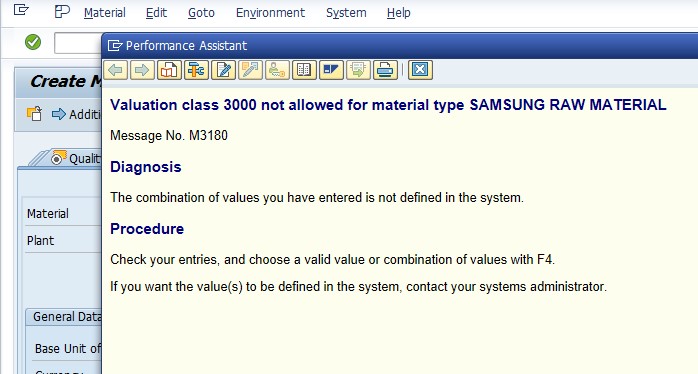
SAP restricts which valuation classes can be assigned to which material types through a configuration link called the Account Category Reference. If the valuation class you're trying to enter isn't linked to the same account category reference as the material's material type, SAP blocks the assignment with this error.
🔧 Solution: Define Valuation Classes
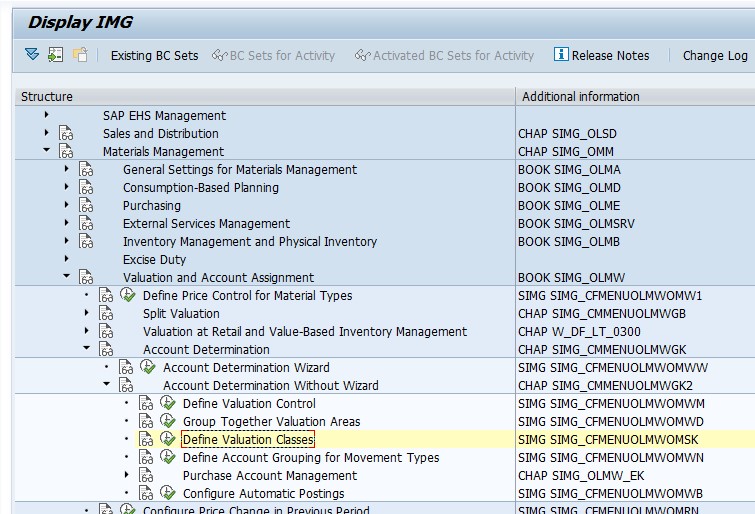
Path: SPRO → Materials Management → Valuation and Account Assignment → Account Determination → Account Determination Without Wizard → Define Valuation Classes.
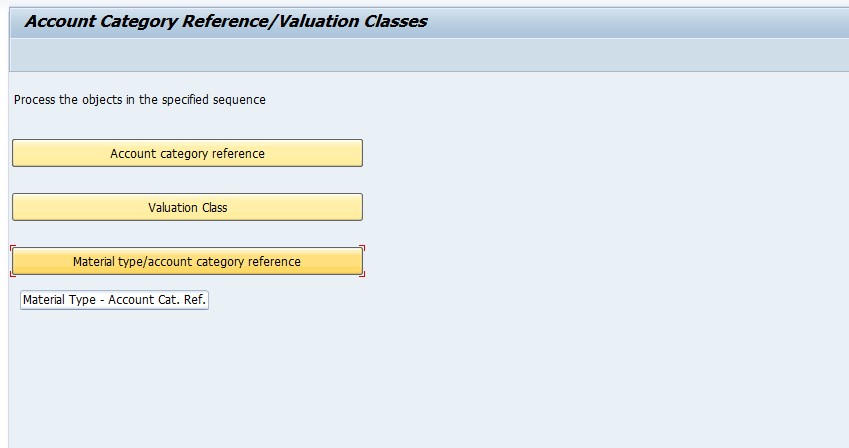
Select Material Type/Account Category Reference.
Select Material Type - SACR (or the material type shown in your error); Account Category Reference - 0001.
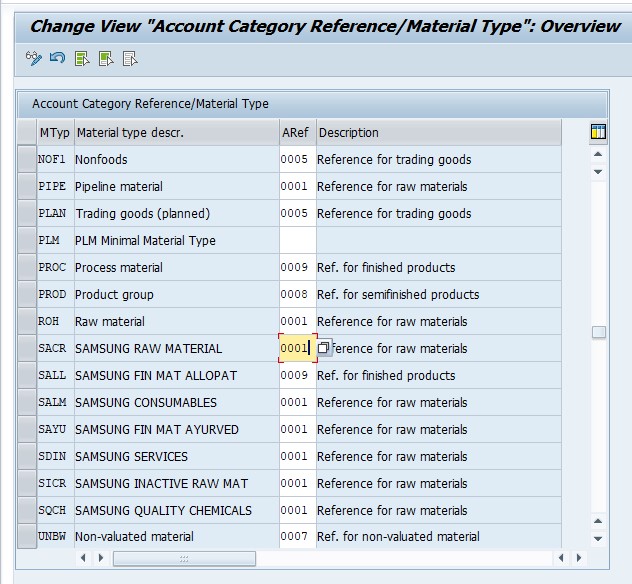
Save.
🔍 What Account Category Reference Actually Does
An Account Category Reference (configured in transaction OMSK) is the linking object that determines which valuation classes are valid for which material types. Rather than a direct one-to-one link between material type and valuation class, SAP uses this intermediate object: one or more valuation classes are grouped under a single account category reference, and one or more material types are also linked to that same account category reference. A valuation class is only assignable to a material if the material's material type shares the same account category reference as that valuation class.
This indirection exists to make configuration manageable at scale - rather than maintaining a direct many-to-many list of every valid material-type-to-valuation-class combination individually, an account category reference lets you group related valuation classes once (say, all raw-material-appropriate valuation classes under one reference) and link every material type that should have access to that group in a single step.
❓ Why SAP Restricts Valuation Classes by Material Type
This restriction exists specifically to prevent mismatched, nonsensical, or accounting-incorrect combinations - for example, accidentally assigning a finished-goods valuation class to a raw material, or a trading-goods valuation class to a piece of equipment meant to be capitalized as an asset. Without this control, a data entry mistake during material creation could route that material's inventory postings to a balance sheet category that doesn't reflect what the material actually is, distorting inventory reporting and potentially causing incorrect account determination downstream through OBYC/OMWB, since valuation class also drives BSX/GBB account determination as covered in related guides on this site.
In effect, this error is an early, upstream safeguard: by catching an inappropriate valuation class assignment right at the point of entering it on the material master, SAP prevents a much harder-to-trace account determination or balance sheet classification problem from surfacing later, once transactions have already started posting against the material.
📋 How Material Type, Account Category Reference, and Valuation Class Relate
| Object | Where Configured | Role |
|---|---|---|
| Material Type | OMS2 | Classifies materials broadly (raw material, finished goods, trading goods, etc.) and controls number ranges, quantity/value updating, and other high-level behavior |
| Account Category Reference | OMSK (Account Category Reference view) | The linking object connecting material types to the set of valuation classes they're permitted to use |
| Valuation Class | OMSK (Valuation Class view) | Groups materials for account determination purposes, assigned to one or more account category references |
When troubleshooting this error, the fastest path is confirming both ends of the chain: which account category reference the material type is linked to, and which account category reference(s) the desired valuation class is linked to. If they don't match, that mismatch is the entire cause, and the fix is either adding the valuation class to the material type's account category reference, or reconsidering whether a different, already-permitted valuation class is actually more appropriate.
✅ Prevention Checklist for MM Configuration Teams
- Whenever a new material type is created, immediately decide and configure its account category reference, including which valuation classes it needs access to, rather than leaving it incomplete until the first material creation attempt fails.
- Document which account category reference each material type uses, and why, so future valuation class additions are evaluated against the original intent rather than made ad hoc.
- Before adding a valuation class to a new account category reference, confirm with finance whether a genuinely new, dedicated valuation class would better represent the new material category.
- Periodically review account category reference assignments to catch overly broad configurations that may have accumulated valuation classes beyond what's actually appropriate.
- Test material creation for any new material type in a sandbox before relying on it in production, to catch valuation class restrictions early.
📱 This Error in SAP S/4HANA
Account category reference, valuation class, and material type configuration all work identically in SAP S/4HANA as in ECC, since this is foundational Materials Management master data configuration rather than something restructured by the Universal Journal. On the interface side, the Fiori app "Manage Product Master Data" or "Manage Material Master" exposes the same valuation class field with the same underlying account category reference validation, so this error can appear identically whether your team creates materials through classic MM01/MM02 or through Fiori.
📑 Similar-Looking SAP Material Master / Valuation Errors
| Error | Root Cause | Typical Fix |
|---|---|---|
| Valuation class not allowed for material type | Material type and valuation class not linked to the same account category reference | Correct the OMSK account category reference link, or use an already-permitted valuation class |
| Account determination for entry ENER BSX not possible | No G/L account configured in OBYC for the valuation class under this grouping code | Maintain the missing BSX mapping in OBYC |
| Account assignment mandatory for material (enter acc. ass. cat.) | Material isn't set up for automatic inventory valuation at this plant | Enter an account assignment category in ME21N, or fix OMS2 if the material should be stock-managed |
| Account determination for entry NCAN GBB BSA 7900 not possible | No offsetting G/L account configured for a specific GBB general modification | Maintain the missing GBB mapping for that general modification in OMWB |
This error is unique among these in that it occurs at the material master level, before any transaction or posting is even attempted - it's a data-entry-time validation, whereas the others surface only once a goods movement or purchase actually tries to post. Recognizing that distinction helps clarify why this specific error demands a material-type-level configuration fix rather than a transaction-key-level one.
💼 Real-World Scenario: Onboarding a New Supplier's Product Line
Pooja Mishra, an SAP MM analyst, was creating material masters for a new line of components sourced from a new supplier, using a custom material type the company had recently set up specifically for this supplier's raw materials. When he tried assigning what seemed like the logical valuation class for raw materials, SAP blocked it with exactly this error.
Investigating in OMSK, Pooja found that the new material type had been created with its own dedicated account category reference - a deliberate choice from the original configuration team to keep this supplier's materials accounting-separable from other raw materials - but nobody had yet linked the standard raw material valuation class to that new account category reference. Rather than assuming this was an oversight to simply "fix" by adding the standard valuation class, he checked with the finance team, who confirmed the intent had actually been to use a new, dedicated valuation class for this supplier's line, which just hadn't been created yet. Once the new valuation class was created and correctly linked to the new material type's account category reference, material creation proceeded as intended - this time with the accounting separation the team had actually wanted from the start.
❗ Common Mistakes When Fixing This Error
- Assuming the fix is always "add this valuation class to the material type" without first checking whether a different, already-permitted valuation class is actually the correct one for this material.
- Expanding an account category reference's allowed valuation classes broadly, undermining the accounting separation it may have been deliberately set up to enforce.
- Not consulting finance before deciding which valuation class or account category reference change is appropriate for a new material type.
- Confusing account category reference (linking material type to valuation class) with valuation grouping code (linking plants for OBYC account determination) - they're separate configuration objects serving different purposes.
- Fixing the immediate error for one material without checking whether other materials under the same new material type will need the same valuation class access.
📈 Troubleshooting Decision Tree
- Identify the material type and valuation class named in the error.
- Check the material type's account category reference in OMSK (Material Type/Account Category Reference view).
- Check the valuation class's account category reference(s) in OMSK (Valuation Class view).
- Confirm whether the mismatch is a genuine gap (the valuation class should be usable for this material type) or a sign that a different valuation class should be used instead.
- Make the appropriate configuration change - either link the valuation class to the correct account category reference, or guide the user toward the correct existing valuation class.
📋 Related SAP Transactions
| Transaction | Purpose |
|---|---|
| OMSK | Configure valuation classes, account category references, and their material type links. |
| OMS2 | Configure material types, including quantity/value updating. |
| MM01 / MM02 | Create or change a material master, including the valuation class field on the Accounting view. |
| OBYC / OMWB | Configure automatic account determination, which relies on valuation class once correctly assigned. |
| MM60 | List materials by material type, useful to check how many materials use a given type. |
🎓 Interview-Style Questions and Answers
Q: What is the role of Account Category Reference in SAP material master configuration?
It links material types to the specific valuation classes they're permitted to use, acting as an intermediate grouping object rather than a direct material-type-to-valuation-class mapping.
Q: Why might SAP block a seemingly reasonable valuation class from being assigned to a material?
Because the material's material type isn't linked to the same account category reference as that valuation class, even if the valuation class conceptually seems appropriate - the configuration link must exist explicitly.
Q: What's the difference between account category reference and valuation grouping code?
Account category reference links material types to valid valuation classes; valuation grouping code groups valuation areas (plants) for OBYC account determination purposes. They're both part of the valuation configuration chain but serve entirely different linking roles.
📚 Quick Glossary of Terms Used in This Guide
- Account Category Reference: The configuration object linking material types to the valuation classes they're permitted to use.
- Valuation class: A material master field grouping materials for account determination purposes.
- Material type: A broad classification of materials (raw material, finished goods, trading goods, etc.) controlling number ranges and other high-level behavior.
- OMSK: The SAP transaction used to configure valuation classes and account category references.
- Valuation grouping code: A separate configuration object grouping plants for OBYC account determination, not to be confused with account category reference.
🎯 Conclusion
"Valuation class not allowed for material type" is SAP protecting against a material being routed to accounting treatment that doesn't match what it actually is. By understanding the account category reference link between material type and valuation class, and asking whether the fix should be linking a new valuation class or simply using an already-permitted one, you can resolve this error correctly rather than loosening a restriction that may have been deliberately designed. If you hit an error like this and want a second opinion, feel free to send a screenshot to pramod@learntosap.com.