SAP MM Credit Memo & Return Purchase Order: How to Return Goods and Post a Credit Memo
A Credit Memo is issued by a vendor to correct a previously recorded invoice or to compensate for returned goods. A Return Purchase Order is used when you need to return goods to a vendor. This guide covers the Step-by-Step Process for both the standard procurement flow and the Return PO process, including how to record the return goods movement and post the resulting Credit Memo. If you encounter any errors while following along, feel free to send a screenshot to pramod@learntosap.com, and I will help you resolve the issue.
✅ What is a Credit Memo in SAP?
Credit Memo Process: A credit memo is issued by a vendor to correct a previously recorded invoice or to compensate for returned goods. It works as the mirror image of a standard invoice - instead of recording an amount the organization owes the vendor, it records an amount the vendor owes back, whether because goods were returned, an invoice was overbilled, or a pricing error needs correcting after the fact.
Return Purchase Order (PO): A Return PO is used when you need to return goods to a vendor. It follows the same basic transaction (ME21N) used to create any Purchase Order, but with the Return Item indicator ticked, which flips the expected direction of the goods movement and the resulting financial posting compared to a normal purchase.
It helps to see why these two documents typically travel together. Simply sending goods back to a vendor doesn't, by itself, correct the accounting - if an invoice has already been posted for the original quantity, that invoice needs to be adjusted to reflect that some of what was ordered is coming back. The Return PO handles the physical and quantity side of that correction, while the Credit Memo handles the financial side, together closing out the loop that a standard Purchase Order, Goods Receipt, and Invoice opened.
📋 The Standard Procurement Flow Before a Return
Here's how to process a credit memo, starting from the standard flow that normally precedes a return.
Step 1: Create a Purchase Order
Enter transaction code ME21N to create a new PO. Fill in the required information, including vendor, material, quantity, and price. Save the PO.
Step 2: Record Goods Receipt (GR)
Use transaction code MIGO to record a goods receipt for the PO. Enter the PO number and other relevant information. Save the GR document.
Step 3: Invoice
Use transaction code MIRO to post the invoice. Enter the PO number and other invoice details. Save the invoice.
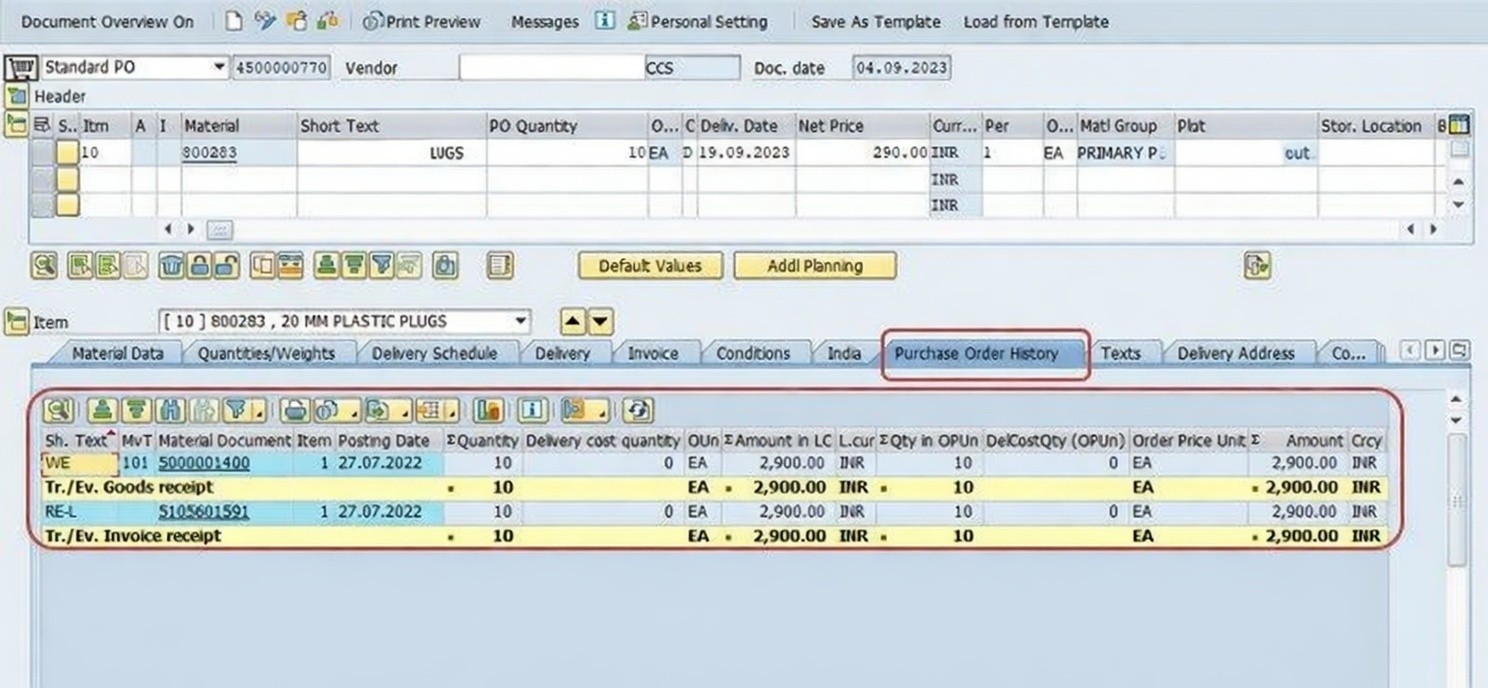
🔧 Step-by-Step: Creating a Return PO in SAP
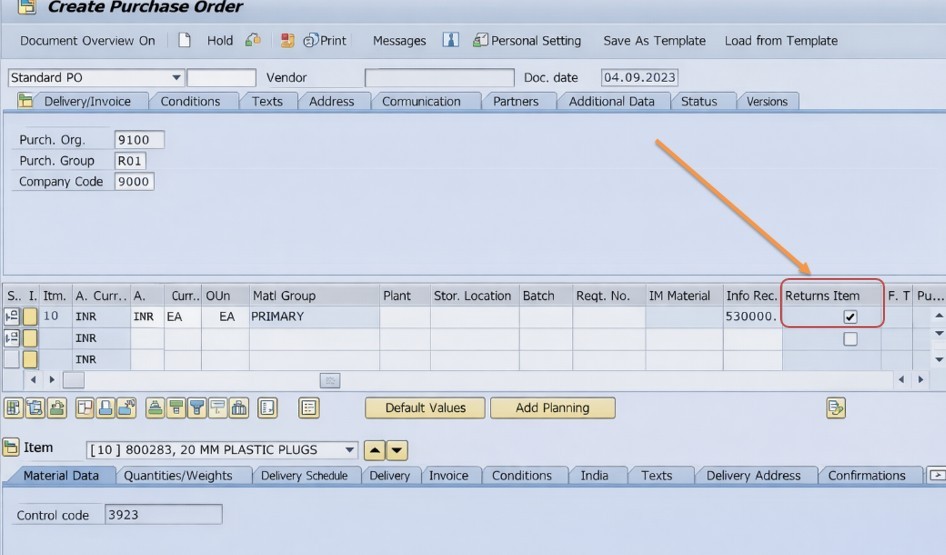
Then Select New PO - ME21N. Run transaction ME21N to begin creating the Return Purchase Order, using the same transaction as a standard PO.
Fill in the required information, including vendor, material, quantity, and price. Enter these fields exactly as you would for a normal Purchase Order, reflecting the material and quantity that is actually being returned.
Select Return Item (tick). Ticking the Return Item indicator on the line item is what tells SAP this Purchase Order represents goods going back to the vendor, rather than goods coming in. This single flag reverses the expected goods movement and financial direction for this line.
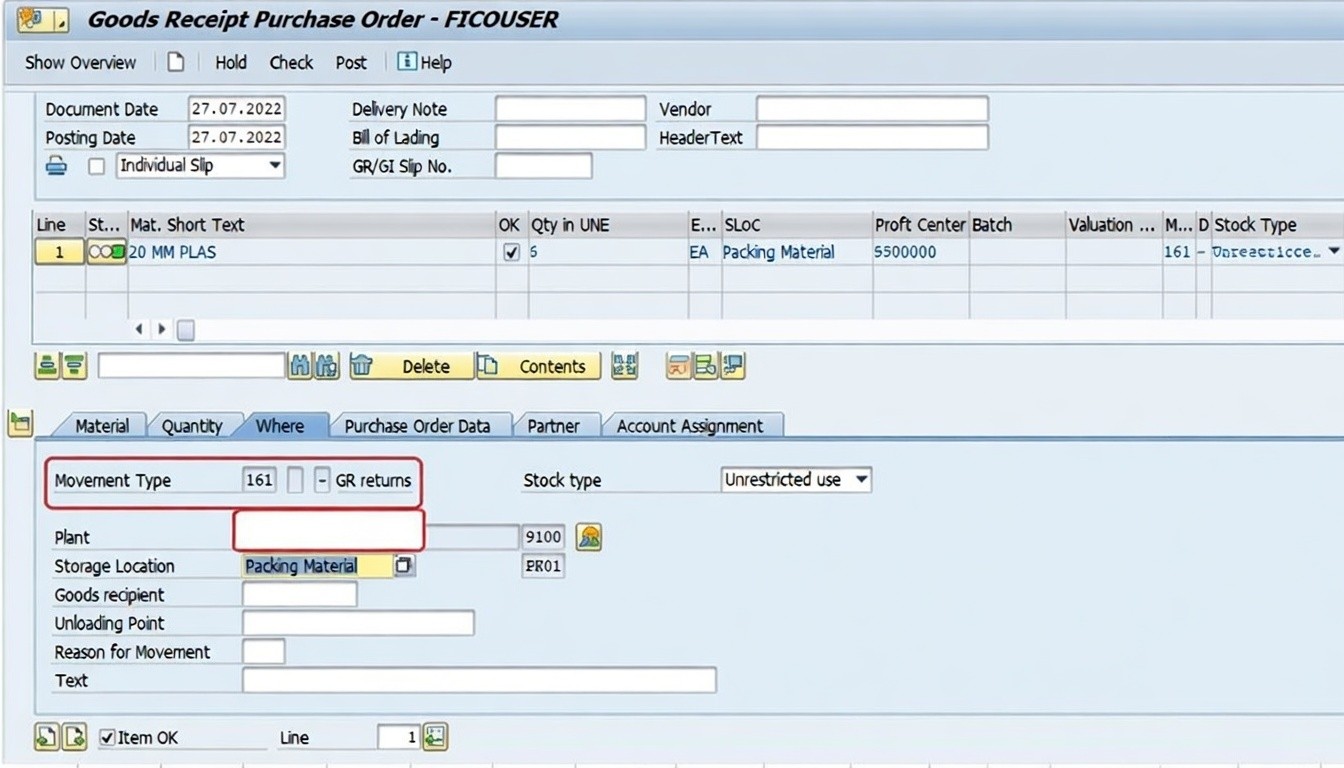
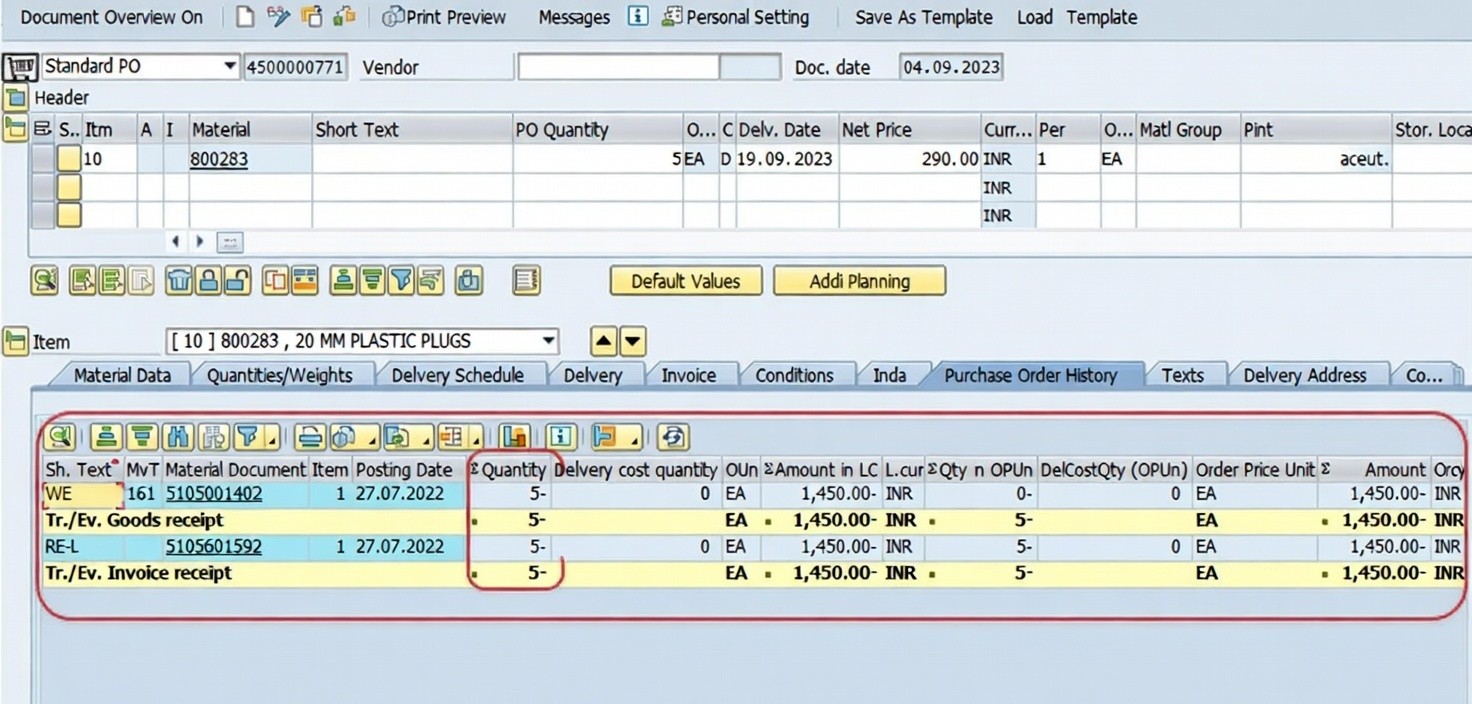
Then Select MIGO (GR) - Movement Type 161. Post the return goods movement using MIGO with movement type 161, which records that the material is being physically sent back to the vendor and reduces on-hand stock accordingly.
Then Select MIRO (Invoice) - Credit Memo. Open transaction MIRO, select transaction type Credit Memo instead of Invoice, and reference the Return Purchase Order so the value being returned is recorded correctly against the vendor's account. Post the document once the details are confirmed.
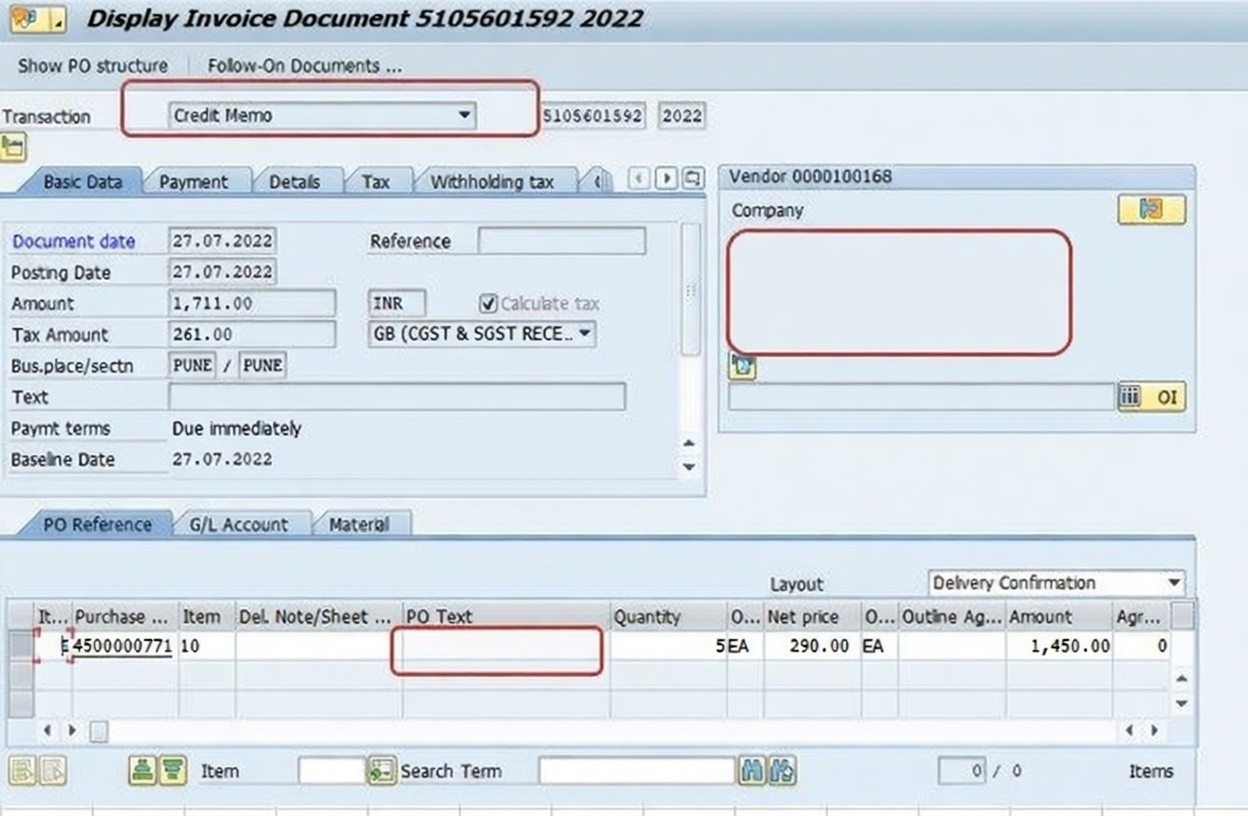
📋 Key Fields Involved in the Return and Credit Memo Process
| Field | What It Captures |
|---|---|
| Return Item Indicator | Flags a Purchase Order line as a return, reversing the expected direction of the goods movement and posting. |
| Movement Type 161 | Records the goods movement for a return delivery to a vendor, reducing on-hand stock. |
| Credit Memo Transaction Type | Selected in MIRO instead of Invoice, recording an amount owed back from the vendor. |
| Reference Purchase Order | The Return PO the Credit Memo is posted against, linking the financial adjustment to the correct goods movement. |
| GR/IR Clearing | The account balance that must reflect the reversal correctly once both the return movement and Credit Memo are posted. |
📋 Related SAP Transactions
| Transaction | Purpose |
|---|---|
| ME21N | Create a Purchase Order, or a Return Purchase Order with the Return Item indicator ticked. |
| MIGO | Post a goods receipt, or a return goods movement using movement type 161. |
| MIRO | Post a vendor invoice, or a Credit Memo when goods are being returned. |
| MIR4 | Display an invoice or Credit Memo document that has already been posted. |
| ME22N | Change an existing Purchase Order or Return PO if details need correction. |
| MB51 | Display material document lists, useful for reviewing return goods movements. |
❗ Common Mistakes in the Return and Credit Memo Process
- Forgetting to tick the Return Item indicator when creating the Return PO, causing the transaction to process as a normal purchase instead of a return.
- Using the wrong movement type in MIGO instead of 161, which can distort inventory and financial records for the return.
- Posting the MIRO document as a regular Invoice instead of selecting Credit Memo, reversing the intended financial direction.
- Referencing the wrong Purchase Order in MIRO, disconnecting the Credit Memo from the actual return it is meant to correct.
- Returning a different quantity than was actually shipped back to the vendor, creating a mismatch between physical and system records.
- Delaying the return goods movement or Credit Memo well after the physical return has already happened, complicating reconciliation.
- Not communicating with the vendor about the expected credit, leading to disputes if their records don't match what SAP shows.
✅ Best Practices for Processing Returns and Credit Memos
- Always double-check the Return Item indicator is ticked before saving a Return Purchase Order, since this single flag drives everything downstream.
- Use movement type 161 consistently for return goods movements, and confirm the quantity matches exactly what is physically being shipped back.
- Select Credit Memo, not Invoice, in MIRO whenever processing a return, and always reference the correct Return PO.
- Coordinate timing between the physical return shipment, the MIGO posting, and the MIRO Credit Memo so all three stay closely aligned.
- Notify the vendor promptly once a Credit Memo has been posted, so their own records reconcile with what SAP shows.
- Reconcile GR/IR clearing after processing a return to confirm the reversal has been recorded accurately.
- Keep supporting documentation - such as the reason for the return or a quality inspection result - attached to the Return PO for audit purposes.
📈 How Returns and Credit Memos Affect Downstream Records
A Return PO and its associated Credit Memo touch nearly every record the original Purchase Order, Goods Receipt, and Invoice had already updated. Inventory quantities are reduced to reflect the material physically leaving the organization again. The GR/IR clearing account, and eventually the vendor's open item balance, are adjusted to reflect that less is now owed than the original invoice suggested. And if the material was already consumed in production or costed into inventory value, the return can also trigger adjustments to standard cost variances or inventory valuation, depending on configuration.
This is why an inconsistency introduced anywhere in the return flow - a missing Return Item flag, the wrong movement type, a Credit Memo posted as a regular Invoice - tends to surface not as an obvious error message, but as a reconciliation discrepancy in inventory, accounts payable, or vendor statements well after the return was processed.
✅ Validating a Return and Credit Memo Before Closing It Out
Before considering a return fully processed, it's worth running through a short validation checklist. Display the Return PO (ME23N) and confirm the Return Item indicator is set and the quantity matches what was physically shipped back. Confirm the return goods movement was posted with movement type 161 and matches the Return PO quantity. Display the Credit Memo (MIR4) and confirm it references the correct Return PO and reflects the expected value. Finally, reconcile the GR/IR clearing account to confirm the reversal has landed correctly in the accounting records.
Skipping this validation is one of the more common reasons a vendor statement and internal SAP records disagree about an outstanding balance - usually traceable to a return step that was posted incorrectly or referenced the wrong document.
🎓 Interview-Style Questions and Answers
Q: What is the difference between a standard Purchase Order and a Return Purchase Order?
Both are created using ME21N, but a Return Purchase Order has the Return Item indicator ticked, which reverses the expected direction of the goods movement and the resulting financial posting compared to a standard purchase.
Q: What does movement type 161 represent in SAP MM?
Movement type 161 is used in MIGO to post the goods movement for returning material to a vendor, reducing on-hand stock to reflect the physical return.
Q: How does a Credit Memo differ from an Invoice in MIRO?
An Invoice records an amount owed to the vendor, while a Credit Memo, selected as a separate transaction type in MIRO, records an amount owed back from the vendor, typically issued to correct an invoice or account for returned goods.
Q: Why does GR/IR clearing matter in a return scenario?
GR/IR clearing must accurately reflect that goods originally received have now been returned, so the clearing account balance isn't left overstated after the return goods movement and Credit Memo have both been posted.
📚 Quick Glossary of Terms Used in This Guide
- Credit Memo: A document issued by a vendor, or posted in SAP against a vendor, to correct a previous invoice or reflect the value of returned goods.
- Return Purchase Order: A Purchase Order with the Return Item indicator ticked, used to formally document goods being sent back to a vendor.
- Return Item Indicator: A flag on a Purchase Order line that reverses the expected direction of the goods movement and financial posting.
- Movement Type 161: The SAP movement type used to post a return delivery to a vendor, reducing on-hand stock.
- GR/IR Clearing Account: A temporary account holding the value of goods received but not yet invoiced, which must be adjusted correctly when a return occurs.
- Vendor Open Item: The outstanding balance owed to or from a vendor, adjusted when a Credit Memo is posted against a prior invoice.
📝 Governance Around Returns and Credit Memos
Because returns and Credit Memos directly affect inventory accuracy and vendor payable balances, most organizations maintain governance around who is authorized to create a Return PO, what documentation - such as a quality rejection or damage report - must accompany a return, and how quickly the return goods movement and Credit Memo should be posted relative to the physical shipment. This matters because procurement, warehouse operations, and accounts payable each rely on the same return documentation for different purposes: procurement to manage the vendor relationship, the warehouse to keep physical and system stock aligned, and accounts payable to keep vendor balances accurate.
Data quality governance for returns follows the same underlying logic as elsewhere in the procurement cycle: a return processed carelessly - the Return Item flag forgotten, the wrong movement type used, a Credit Memo posted as an Invoice - tends to surface as a reconciliation discrepancy or a vendor dispute well after the physical goods have already left the building, at which point it is considerably more disruptive to untangle. A clear returns checklist, consistently applied, keeps this process reliable even as return volume grows.
Many organizations also tie return governance to root-cause tracking - recording not just that a return happened, but why: a quality failure, a shipping error, a wrong quantity delivered, or a change in the requesting department's needs. Capturing this reason code alongside the Return PO gives procurement and quality teams a dataset they can later analyze to spot recurring vendor issues, rather than treating each return as an isolated transaction. Over time, a vendor with a disproportionate share of quality-related returns becomes visible in that data well before it would surface through informal conversation alone, giving procurement a concrete basis for renegotiating terms or reconsidering the relationship entirely.
💼 Real-World Scenario: Returning Defective Raw Material to a Vendor
Warehouse supervisor Neha Kulkarni at Learn Pharmaceuticals discovered that a portion of a recent raw material delivery had failed quality inspection and needed to be returned to the vendor. The original Purchase Order had already been received through MIGO and invoiced through MIRO weeks earlier, so a simple cancellation wasn't an option - the return needed to be processed as its own documented flow.
Neha's team created a new Purchase Order in ME21N, entering the same vendor, material, and price as the original order, but this time for just the defective quantity, and carefully ticked the Return Item indicator before saving. She then posted the return goods movement in MIGO using movement type 161, physically confirming the defective stock was leaving the warehouse and reducing on-hand inventory accordingly.
Once the material had shipped back to the vendor, accounts payable clerk Anita Shah opened MIRO, selected Credit Memo instead of Invoice, and referenced the Return Purchase Order to record the value being returned. After posting, she reconciled the GR/IR clearing account to confirm everything had landed correctly, and notified the vendor that a Credit Memo had been issued - so both sides' records matched cleanly, with the defective quantity properly reflected as returned rather than lingering as an unexplained discrepancy on either side.
📱 This Process in SAP S/4HANA
The underlying Return Purchase Order, movement type 161, and Credit Memo logic work largely the same way in SAP S/4HANA as in classic ECC, since returns remain a core Materials Management and Financial Accounting integration point. What has evolved in S/4HANA is the availability of Fiori apps such as "Manage Supplier Invoices," which support Credit Memo entry alongside regular invoices in a more modern, list-based interface, along with improved visibility into return-related material documents and their downstream financial impact. Many S/4HANA implementations continue to use ME21N, MIGO, and MIRO for detailed return processing, while Fiori-based apps are increasingly favored for monitoring return status and Credit Memo posting across a broader vendor base.
🎯 Conclusion
Returning goods to a vendor and correcting the resulting invoice is a two-part process in SAP MM - a Return Purchase Order to handle the physical and quantity side, and a Credit Memo to handle the financial side - and getting each step right keeps inventory and vendor balances accurate. Ticking the Return Item indicator, posting the return goods movement with movement type 161, and selecting Credit Memo rather than Invoice in MIRO are what separate a clean return process from one that leaves inventory, GR/IR clearing, or vendor balances quietly out of sync. Keep this guide handy the next time your organization needs to return goods and correct an invoice in SAP.