SAP XD01: How to Create a Customer Master Record – Step-by-Step
Among enterprise resource planning (ERP) systems, SAP stands as one of the most prominent and widely used platforms. One essential aspect of SAP is the management of customer data through transactions like XD01, which allows users to create and maintain customer master records. This guide walks you through the XD01 transaction, exploring each view of customer master data it offers and understanding the significance of each view in the context of business operations. If you run into any errors while following along, feel free to send a screenshot to pramod@learntosap.com for help.
✅ What is Customer Master in SAP?
Among enterprise resource planning (ERP) systems, SAP stands as one of the most prominent and widely used platforms. One essential aspect of SAP is the management of customer data through transactions like XD01, which allows users to create and maintain customer master records. In this guide, we will delve into the XD01 transaction, exploring each view of customer master data it offers and understanding the significance of each view in the context of business operations.
It helps to understand upfront why the Customer Master carries so much weight inside SAP Sales and Distribution. Nearly every order-to-cash activity - an inquiry, a quotation, a sales order, a delivery, a billing document - references the customer master record behind the scenes. A customer with incomplete or incorrect master data can quietly block or distort several of these processes at once, which is exactly why getting the initial creation right in XD01 matters far more than its relatively simple set of screens suggests.
XD01 is a centralized transaction, meaning it lets you maintain General Data, Company Code Data, and Sales Area Data together in a single session, rather than jumping between separate SD-only and FI-only transactions. This is what makes XD01 the preferred entry point for most organizations that need a customer to be usable for both sales and accounting purposes from day one.
TCode XD01 – Create Customer Master
| Transaction | Purpose |
|---|---|
| XD01 | Create a new Customer Master record centrally. |
| XD02 | Change / modify an existing Customer Master record. |
| XD03 | Display a Customer Master record without allowing changes. |
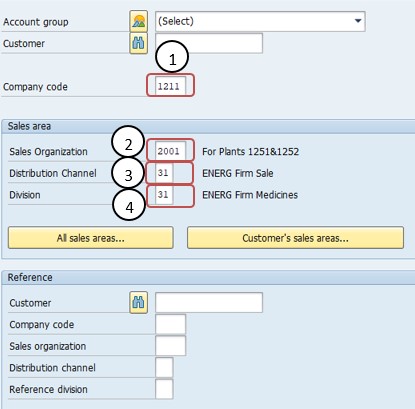
🔧 Organizational Data – Sales Organization, Distribution Channel, Division
Creating a customer master begins with organizational data, entered before any of the detailed content views appear, since this data determines which sales-area-specific fields and views the system will present next.
Sales Organization. This field specifies the sales organization responsible for the customer relationship. In a complex organization, different sales organizations might cater to different markets or regions.
Distribution Channel. The distribution channel defines the way the products reach the customer. For instance, it could be through a direct sales team, an online store, or retail partners.
Division. The division helps categorize products or services within an organization. It aids in organizing sales and marketing efforts according to the nature of the products.
Together, Sales Organization, Distribution Channel, and Division make up the "sales area" - the combination that determines exactly which Sales Area Data view fields will be relevant for this particular customer relationship.
📋 Create Customer Master in SAP – XD01 Step-by-Step Views
Follow the path: SAP Easy Access → Logistics → Sales and Distribution → Master Data → Business Partner → Customer → Create → Complete, or run transaction XD01 directly. Once the organizational data is entered, the system presents a series of views, each capturing data relevant to a specific business process.
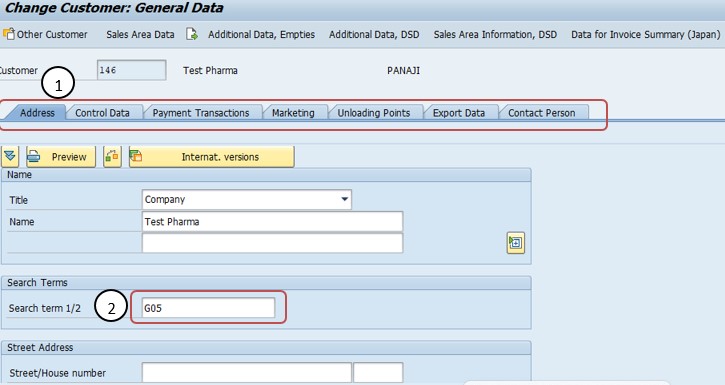
General Data View. The General Data View in the SAP XD01 transaction contains basic information about the customer. This includes the customer's name, address, contact details, and other general information. Key fields in this view might include the customer's name, address, communication details, and other basic identification data.
Address View. Within General Data, the Address view captures the customer's full postal address, including street, city, region, postal code, and country - the details that feed directly into delivery documents and correspondence.
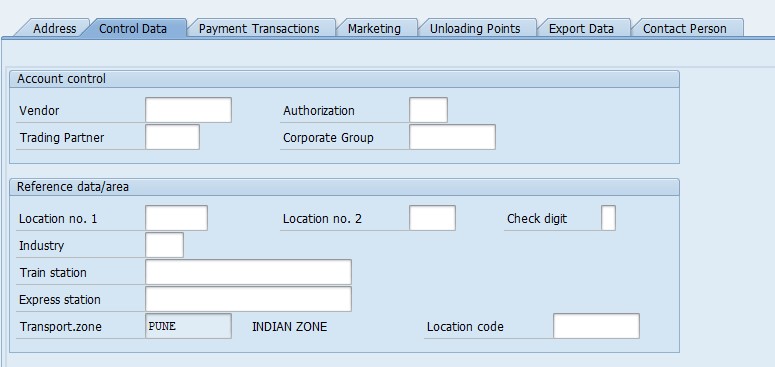
Control Data View. The Control Data view in SAP XD01 provides crucial information about a customer's financial and general control settings. This includes the customer's account group, payment terms, reconciliation account, and credit control area. These settings are essential for maintaining a clear financial picture of the customer and managing credit limits effectively.
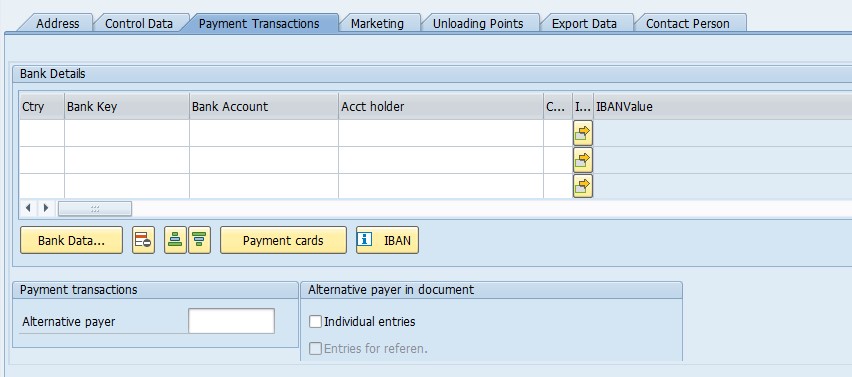
Payment Transaction View. Efficient payment processing is critical in any business relationship. The Payment Transaction view within XD01 encompasses data related to payment methods, bank details, and other financial specifics. This ensures smooth and accurate payment handling, reducing errors and maintaining a reliable transaction process.
Marketing View. Understanding your customers' preferences and behaviors is vital for effective marketing strategies. The Marketing view in XD01 allows you to store and access information related to the customer's industry, potential sales volume, and other marketing-related data. This information aids in tailoring your marketing efforts to suit each customer's unique needs.
Unloading Point View. For businesses involved in shipping and logistics, managing delivery locations efficiently is crucial. The Unloading Point view enables you to specify different delivery addresses for a customer, making it easier to route orders to the correct destinations. This feature is particularly useful for companies with multiple shipping points or distribution centers.
Export Data View. In the global marketplace, managing international customers requires additional considerations. The Export Data view in XD01 provides fields for storing data relevant to export processes, such as customs information, export control codes, and other compliance-related data. This ensures seamless international trade operations.
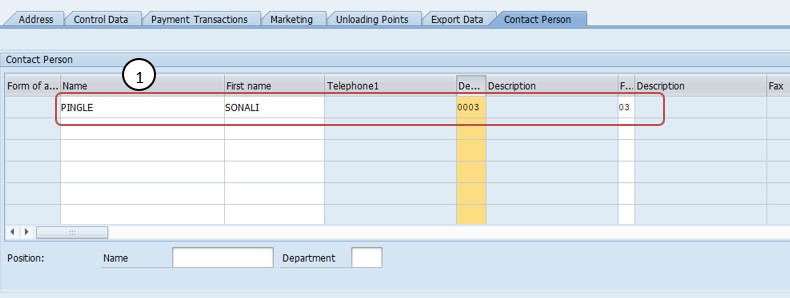
Contact Person View. Maintaining clear communication with your customers is essential. The Contact Person view allows you to store details about key individuals within the customer's organization, including their names, contact information, and roles. This information facilitates effective communication and builds stronger business relationships.
📋 Why Account Group and Sales Area Matter So Much
Before General Data even appears, XD01 asks for an account group and, for Sales Area Data, the sales organization, distribution channel, and division. These initial selections look like simple entry fields, but they have an outsized influence on everything that follows in the customer creation process, which is why they're captured before any of the detailed content views appear.
| Selection | What It Determines |
|---|---|
| Account Group | Which fields are mandatory, optional, or suppressed on the customer master, and the number range the customer number draws from. |
| Sales Organization | Which entity within the company is commercially responsible for the customer relationship and its sales figures. |
| Distribution Channel | Which route - direct sales, online, retail partners - is used to get the product to this customer. |
| Division | Which product line or category grouping the customer's sales activity is organized under. |
Because account group in particular affects the field status and number range so significantly, changing it after a customer has already been created and used in transactions is generally not straightforward - it's a decision worth getting right at creation time, rather than treating as easily reversible later.
📋 The Key Views Involved in a Complete Customer Master
After account group and sales area data are entered, SAP presents a selection of views to maintain - each one capturing the data relevant to a specific business process the customer participates in. Not every customer needs every view maintained; which views are relevant depends on how the customer is actually used.
- General Data: Client-level information - name, address, communication details - that applies across the entire organization regardless of company code or sales area.
- Address: The customer's full postal address, feeding directly into delivery documents and correspondence.
- Control Data: Financial and general control settings such as account group, payment terms, reconciliation account, and credit control area.
- Payment Transactions: Bank details and payment methods that ensure payments from the customer are processed accurately and efficiently.
- Marketing: Industry, potential sales volume, and other data used to tailor marketing efforts to the customer.
- Unloading Point: Delivery addresses used to route orders to the correct destination, especially useful for customers with multiple shipping points.
- Export Data: Customs information, export control codes, and other compliance data relevant to international customers.
- Contact Person: Names, contact information, and roles of key individuals within the customer's organization.
Selecting only the views genuinely needed for how a customer will be used - rather than maintaining every available view regardless of relevance - keeps the creation process efficient and avoids populating fields with meaningless placeholder data just to get past a screen.
📋 Related SAP Transactions
| Transaction | Purpose |
|---|---|
| XD01 | Create a new Customer Master record centrally (General Data, Company Code Data, and Sales Area Data together). |
| XD02 | Change an existing Customer Master record. |
| XD03 | Display a Customer Master record without allowing changes. |
| XD04 | Display changes made to a Customer Master record. |
| XD06 | Flag a Customer Master record for deletion. |
| VD01 | Create a customer from the Sales and Distribution (SD) side only, without company code data. |
| FD01 | Create a customer from the Financial Accounting (FI) side only, without sales area data. |
🎓 Interview-Style Questions and Answers
Q: What is the Customer Master, and why is it so central to SAP Sales and Distribution processes?
The Customer Master is the fundamental data record describing a buyer's identity, financial settings, and sales terms across every relevant order-to-cash process - inquiry, quotation, sales order, delivery, and billing - which is why nearly every downstream SD and FI transaction references it.
Q: What is the difference between General Data and Sales Area Data?
General Data is client-level information such as name and address that is shared across the whole system. Sales Area Data is specific to a combination of sales organization, distribution channel, and division, and covers fields like pricing, delivery, and marketing settings relevant to that particular sales context.
Q: Why does Control Data exist separately from General Data?
Because Control Data governs financial risk and accounting behavior - account group, credit control area, reconciliation account - which needs to be reviewed and maintained by finance-oriented roles, separately from the purely descriptive General Data.
Q: Why shouldn't every available view be maintained on every customer?
Because not every customer participates in every business process - maintaining irrelevant views adds unnecessary data entry and risks populating fields with meaningless placeholder values that can confuse later analysis or reporting.
📚 Quick Glossary of Terms Used in This Guide
- Customer Master: The central data record in SAP describing a buyer's identity, financial settings, and sales terms, used across order-to-cash and accounts receivable processes.
- Account Group: A classification determining a customer's field status and number range.
- Sales Area: The combination of Sales Organization, Distribution Channel, and Division for which sales-relevant customer data is maintained.
- Credit Control Area: The organizational unit used to monitor and manage a customer's credit limit.
- Reconciliation Account: The general ledger account that automatically reflects a customer's open balance whenever a posting is made to that customer.
- Unloading Point: A specific delivery location within a customer's site used to route goods to the correct destination.
📝 Governance for Customer Master Creation
Because customer master data feeds so many downstream processes, most organizations maintain a documented governance process around who can create customers, which account groups and views are appropriate for which business scenarios, and how address, credit, or export compliance data should be verified consistently. This is particularly important in larger organizations where multiple teams - sales, credit control, logistics, export compliance - may all rely on the same customer record but care about different views within it.
Data quality governance matters here for the same reason it does for vendor master data: a customer master created quickly, with only the bare minimum fields filled in, tends to surface as a data quality or credit-risk problem later - once the customer is already referenced by live sales orders or open invoices. Establishing a clear creation checklist, including credit and export compliance checks, tailored to the account groups a business actually uses, keeps customer master quality consistent across a large user base over time.
📋 Common SAP Customer Account Groups Explained
Recognizing SAP's standard delivered customer account groups helps with choosing the right one confidently, rather than guessing or defaulting to whichever option happens to be listed first.
| Account Group | Typical Use |
|---|---|
| 0001 (Sold-to party) | The customer who places the order and is commercially responsible for it. |
| 0002 (Ship-to party) | The location that physically receives the delivered goods, which may differ from the sold-to party. |
| 0003 (Payer) | The party responsible for settling the invoice, which may be a separate entity such as a head office. |
| 0004 (Bill-to party) | The party to whom the invoice document itself is sent. |
Each account group carries its own field status and number range behavior, which is exactly why choosing correctly at the start of XD01 - as the real-world scenario below illustrates - shapes the entire rest of the creation process rather than being a minor preliminary detail.
💼 Real-World Scenario: Onboarding a New Retail Customer
Pooja Mishra, an SAP SD consultant at Learn Pharmaceuticals, was asked to create the customer master for a new retail buyer ahead of an upcoming sales order. Sales manager Rajesh Pawar explained that the customer needed to be usable for order entry immediately, while also being ready for accounts receivable to process the first invoice correctly.
Working with FI consultant Priya Patil, Pooja used XD01, selecting account group 0001 - Sold-to party and entering the relevant sales organization, distribution channel, and division together in the same session. Since the business used internal number assignment for this account group, Pooja left the customer number field blank, letting the system assign the next number automatically.
Business analyst Anita Shah then worked with Pooja to identify which views the new customer genuinely needed - General Data, Address, Control Data (including credit control area), Payment Transactions, and the core Sales Area Data, given the customer would be placing standard sales orders right away. Skipping the Export Data view for the initial creation, since the customer was domestic and export compliance data wasn't required, kept the creation process focused and avoided unnecessary data entry. Once saved, the new customer was immediately usable on a test sales order, confirming the initial customer master setup had captured everything the onboarding actually depended on.
❗ Common Mistakes When Creating a Customer Master
- Selecting the wrong account group, which affects the number range and mandatory fields - difficult to correct after the customer is already in use.
- Leaving the credit control area unassigned or set inconsistently, making credit limit monitoring unreliable.
- Maintaining every available view regardless of relevance, populating fields with placeholder data just to move past a mandatory-looking screen.
- Skipping views that are genuinely needed, only to discover the gap later when a downstream process - a sales order, a delivery, an invoice - fails for lack of the missing data.
- Entering an incomplete or inconsistent address, which can cause delivery documents to fail or shipments to be misrouted.
- Creating customers directly in a production client instead of testing the full creation and a sample sales order in a sandbox or development client first.
✅ Best Practices for Customer Master Creation
- Confirm the correct account group before starting, since it shapes so much of what follows and is difficult to change later.
- Verify address and contact details directly with the customer before saving, especially for delivery-relevant fields.
- Select only the views genuinely relevant to how the customer will actually be used, rather than maintaining every available view by default.
- Use an existing, similar customer as a reference where one exists, to speed up creation and maintain consistency in field values.
- Coordinate with the teams who will actually use the customer - sales, credit control, logistics - to confirm which views and fields matter for their processes.
- Test the new customer with a sample sales order relevant to its intended use before considering the creation complete.
📈 How Customer Master Data Powers Downstream Processes
The Customer Master's influence extends across nearly every core SAP order-to-cash process, which is exactly why getting the initial XD01 creation right pays off well beyond the creation screen itself. A customer's Sales Area Data feeds directly into sales order pricing, delivery scheduling, and shipping point determination; its Control Data governs how invoices are posted and how the customer's balance is monitored against the credit control area; its Payment Transactions data determines how and when payments are collected; and its Unloading Point and Contact Person data control where deliveries are physically routed and who is contacted when a clarification is needed.
Because so many processes depend on this single record, incomplete or inconsistent customer master data is one of the most common root causes behind confusing errors elsewhere in the system - a sales order that won't price correctly, a delivery that can't be created, or a billing document that fails can very often be traced back to a gap or inconsistency in the customer master itself, rather than a problem with the sales, shipping, or billing configuration in isolation.
✅ Validating the New Customer Master Before Go-Live
Once a customer master is created and saved, it's worth running through a short validation checklist before relying on it in live processes. Display the customer (XD03) and confirm all the views intended to be maintained were saved correctly with accurate data. Create a test sales order to confirm the customer is selectable and behaves as expected for the relevant sales area. Create a test delivery, if appropriate, and confirm the unloading point and shipping data route correctly. Finally, confirm the customer's credit control area and payment terms are correct by checking a sample billing document before including the customer in live order processing.
Skipping this validation step is one of the more common reasons a newly created customer causes confusion or delay during its first use - usually a missing view that wasn't initially selected, or a field within a maintained view that was left at a default value instead of being set correctly for the customer's actual intended use.
📱 This Configuration in SAP S/4HANA
In SAP S/4HANA, the classic Customer Master concept has been technically merged into the Business Partner (BP) model, so customer creation is increasingly performed through transaction BP with the appropriate Business Partner role, such as FLCU00 or FLCU01, rather than XD01 directly. That said, many S/4HANA implementations still expose XD01 as a compatible transaction that internally maps to the Business Partner architecture, particularly where established process familiarity favors the classic transaction during a transition period. Regardless of which entry point is used, the underlying logic - General Data, Control Data, and Sales Area Data driving sales and accounting behavior - remains conceptually the same.
🎯 Conclusion
Creating a Customer Master record in XD01 is a foundational step that shapes how a buyer behaves across nearly every SAP sales and accounts receivable process for as long as it remains in use. Choosing the correct account group, entering accurate General and Address data, maintaining sound Control Data - especially the credit control area and reconciliation account - and populating only the Sales Area views genuinely relevant to the customer's intended use are what separate a customer master that supports smooth, reliable order processing from one that generates confusing errors downstream. Keep this guide handy the next time your project needs to onboard a new customer, whether a sold-to party, a ship-to party, or a payer.