SAP MM01: How to Create a Material Master Record – Step-by-Step
In the world of SAP (Systems, Applications, and Products), the Material Master is a fundamental data element that serves as the backbone of various business processes, including procurement, inventory management, production planning, and sales. This guide walks you through the process of creating a Material Master in SAP using transaction MM01, covering material type, industry sector, and material number, along with the wider set of views involved in a fully maintained material record. If you run into any errors while following along, feel free to send a screenshot to pramod@learntosap.com for help.
✅ SAP Material Master Creation – MM01 / MM02 / MM03
In the world of SAP (Systems, Applications, and Products), the Material Master is a fundamental data element that serves as the backbone of various business processes, including procurement, inventory management, production planning, and sales. In this blog post, we will walk you through the process of creating a Material Master in SAP, guiding you step by step.
It's worth understanding upfront why the Material Master carries so much weight in SAP. Almost every business process that touches a physical or service item - purchase orders, sales orders, production orders, inventory movements, invoices - references the material master record behind the scenes. A material with incomplete or incorrect master data can quietly block or distort several of these processes at once, which is exactly why getting the initial creation right in MM01 matters far more than its relatively simple screen suggests.
Three closely related transactions work together across a material's lifecycle: MM01 creates a new material, MM02 changes an existing one, and MM03 displays a material without allowing changes. This guide focuses on MM01, the creation step, since everything else in a material's life depends on that foundation being set up correctly.
🔧 Create Material Master in SAP – MM01 Step-by-Step
Creating a material master involves entering organizational and classification data first, before the system presents the detailed content views where the bulk of the material's actual data is maintained.
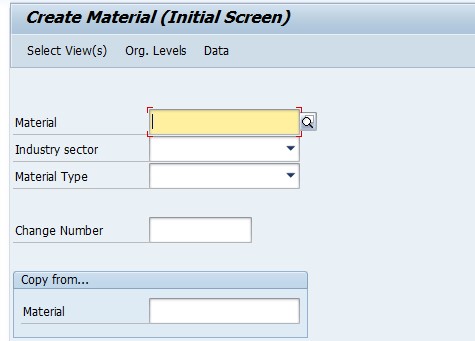
Access the Transaction Code. To start creating a Material Master, you need to access the relevant transaction code in SAP. The most common transaction code for this purpose is MM01 for creating a new material.
Follow the path: SAP Easy Access → Logistics → Material Master → Create (General) → MM01.
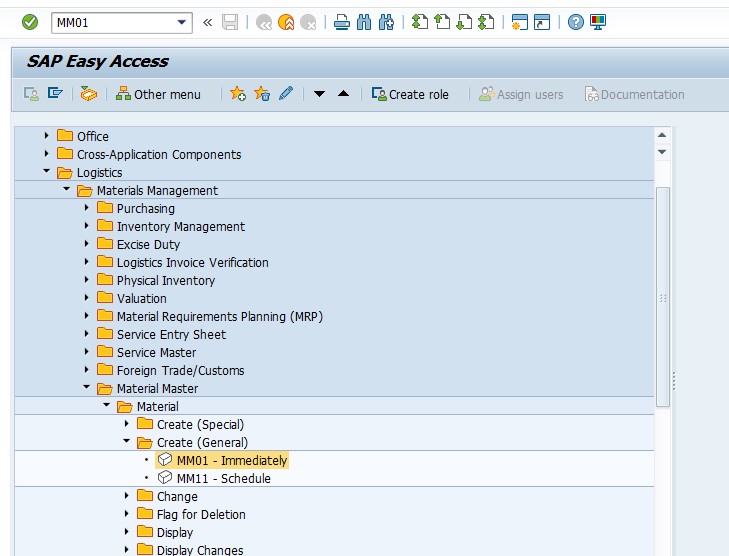
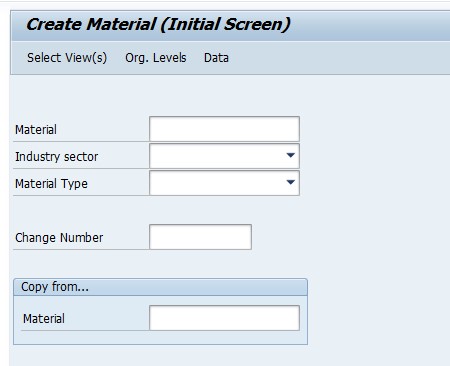
Enter Basic Data. Once you are in the Material Master creation screen, begin by entering the basic data of the material.
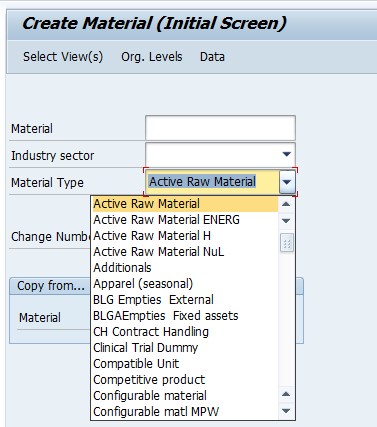
Material Type. Select the appropriate material type that best represents the characteristics and behavior of the material (e.g., Finished Product, Raw Material, Spare Part).
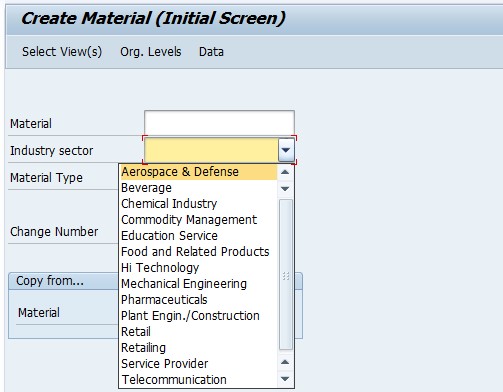
Industry Sector. Specify the industry sector your material belongs to (e.g., Pharmaceuticals, Electrical Engineering).
Material Number. Provide a unique identifier for the material. If your system is set up to generate automatic material numbers, leave this field blank.
📋 Why Material Type and Industry Sector Matter So Much
These two initial selections look like simple dropdown choices, but they have an outsized influence on everything that follows in the material creation process, which is why they're entered before any of the detailed content views even appear.
| Selection | What It Determines |
|---|---|
| Material Type | Which views are available for the material, the number range it draws from, default account determination behavior, and whether the material is relevant for quantity or value updates. |
| Industry Sector | Which industry-specific fields and views appear, tailoring the material master screen to the kind of business the material genuinely belongs to. |
Because material type in particular affects the number range and available views so significantly, changing it after a material has already been created and used in transactions is generally not straightforward - it's a decision worth getting right at creation time, rather than treating as easily reversible later.
📋 The Key Views Involved in a Complete Material Master
After material type, industry sector, and material number are entered, SAP presents a selection of views to maintain - each one capturing the data relevant to a specific business process the material participates in. Not every material needs every view maintained; which views are relevant depends on how the material is actually used.
- Basic Data: Core descriptive information - description, base unit of measure, weight, and general classification data applicable across all organizational levels.
- Purchasing: Data relevant to procurement, such as purchasing group and order unit, needed if the material will be purchased from a vendor.
- Sales: Data relevant to selling the material, including sales-area-specific pricing references and delivery details, needed if the material appears on sales orders.
- MRP: Material Requirements Planning data - reorder points, lot sizing, and planning strategy - needed if the material's stock is planned automatically.
- Accounting: Valuation and costing data, such as price control and standard price, needed for the material to be valuated in inventory.
- Storage: Warehouse and storage-location-specific data, relevant where physical stock movements need to be tracked in detail.
Selecting only the views genuinely needed for how a material will be used - rather than maintaining every available view regardless of relevance - keeps the creation process efficient and avoids populating fields with meaningless placeholder data just to get past a screen.
📋 Common SAP Material Types Explained
Recognizing SAP's standard delivered material types helps with choosing the right one confidently, rather than guessing or defaulting to whichever option happens to be listed first.
| Material Type | Typical Use |
|---|---|
| FERT (Finished Product) | A completed product ready for sale, typically produced in-house. |
| ROH (Raw Material) | An input material consumed in production, typically purchased from a vendor. |
| HALB (Semi-Finished Product) | An intermediate product used in further production steps, neither raw material nor fully finished. |
| HAWA (Trading Goods) | A material purchased and resold without further processing. |
| ERSA (Spare Part) | A component kept for maintenance or repair purposes. |
| DIEN (Service) | A non-physical service item, typically not stock-managed. |
Each material type carries its own default view selection and number range behavior, which is exactly why choosing correctly at the start of MM01 - as this guide's Learn Pharmaceuticals example does with Finished Product - shapes the entire rest of the creation process rather than being a minor preliminary detail.
💼 Real-World Scenario: Onboarding a New Finished Product
Pooja Mishra, an SAP MM consultant at Learn Pharmaceuticals, was asked to create the material master for a new finished product line ahead of its launch. Sales manager Rajesh Pawar explained that the product needed to be fully sellable through the existing sales organization from day one, while also being trackable through standard inventory valuation.
Working with functional consultant Priya Patil, Pooja used MM01, selecting material type Finished Product and industry sector Pharmaceuticals to match the product line. Since the business used internal number assignment for finished products, Pooja left the material number field blank, letting the system assign the next number in the correct range automatically.
Business analyst Anita Shah then worked with Pooja to identify which views the new material genuinely needed - Basic Data, Sales, Purchasing (for any inbound raw material tracking), Accounting, and MRP, given the business planned to forecast demand for the new product. Skipping Storage view for the initial creation, since detailed storage-location tracking wasn't yet required, kept the creation process focused and avoided unnecessary data entry. Once saved, the new material was immediately usable on a test sales order, confirming the initial material master setup had captured everything the launch actually depended on.
❗ Common Mistakes When Creating a Material Master
- Selecting the wrong material type, which affects the number range, available views, and account determination behavior in ways that are difficult to correct after the material is already in use.
- Entering a material number manually when the material type is configured for internal assignment, or leaving it blank when external assignment is expected.
- Maintaining every available view regardless of relevance, populating fields with placeholder data just to move past a mandatory-looking screen.
- Skipping views that are genuinely needed, only to discover the gap later when a downstream process - a purchase order, a sales order, an MRP run - fails for lack of the missing data.
- Choosing an industry sector inconsistent with how similar materials are already classified, making reporting and cross-material comparisons harder.
- Creating materials directly in a production client instead of testing the full creation and a sample transaction in a sandbox or development client first.
✅ Best Practices for Material Master Creation
- Confirm the correct material type before starting, since it shapes so much of what follows and is difficult to change later.
- Check whether the material type uses internal or external number assignment before deciding whether to enter or leave blank the material number field.
- Select only the views genuinely relevant to how the material will actually be used, rather than maintaining every available view by default.
- Use an existing, similar material as a reference (via the "Copy From" functionality in MM01) where one exists, to speed up creation and maintain consistency.
- Coordinate with the teams who will actually use the material - sales, purchasing, production planning - to confirm which views and fields matter for their processes.
- Test the new material with a sample transaction relevant to its intended use before considering the creation complete.
📈 How Material Master Data Powers Downstream Processes
The Material Master's influence extends across nearly every core SAP logistics process, which is exactly why getting the initial MM01 creation right pays off well beyond the creation screen itself. A material's Sales view data feeds directly into sales order pricing and delivery scheduling; its Purchasing view data governs how purchase orders are created and processed; its MRP view data determines whether and how the system automatically plans replenishment; and its Accounting view data controls how the material is valuated in inventory and reflected in financial reporting.
Because so many processes depend on this single record, incomplete or inconsistent material master data is one of the most common root causes behind confusing errors elsewhere in the system - a sales order that won't price correctly, a purchase order that can't be created, or an MRP run that produces unexpected results can very often be traced back to a gap or inconsistency in the material master itself, rather than a problem with the sales, purchasing, or planning configuration in isolation.
✅ Validating the New Material Master Before Go-Live
Once a material master is created and saved, it's worth running through a short validation checklist before relying on it in live processes. Display the material (MM03) and confirm all the views intended to be maintained were saved correctly with accurate data. Create a test purchase order or sales order, depending on the material's intended use, to confirm the material is selectable and behaves as expected. If MRP is relevant, run a test planning cycle and confirm the material's planning parameters produce sensible results. Finally, confirm the material's valuation and accounting data is correct by checking its stock value after a sample goods movement.
Skipping this validation step is one of the more common reasons a newly created material causes confusion during its first use - usually a missing view that wasn't initially selected, or a field within a maintained view that was left at a default value instead of being set correctly for the material's actual intended use.
📱 This Configuration in SAP S/4HANA
Transaction MM01 and the underlying material master creation process work largely the same way in SAP S/4HANA as in classic ECC, since the Material Master remains a foundational logistics data object. What has changed meaningfully in S/4HANA is the simplified data model behind material master tables and the introduction of the Material Master Fiori apps, which offer a more modern, guided creation experience alongside the classic MM01 transaction. Many S/4HANA implementations still rely on MM01 for material creation, particularly where bulk creation or established process familiarity favor the classic transaction, while newer Fiori-based tools are increasingly used for day-to-day material master maintenance.
📋 Related SAP Transactions
| Transaction | Purpose |
|---|---|
| MM01 | Create a new Material Master record. |
| MM02 | Change an existing Material Master record. |
| MM03 | Display a Material Master record without allowing changes. |
| MM06 | Flag a material for deletion. |
| MMBE | Display stock overview for a material across plants and storage locations. |
| OMS2 | Define material types, including their number range and view configuration. |
🎓 Interview-Style Questions and Answers
Q: What is the Material Master, and why is it so central to SAP logistics processes?
The Material Master is the fundamental data record describing a material's characteristics and behavior across every relevant business process - procurement, sales, inventory, and production - which is why nearly every downstream logistics transaction references it.
Q: What is the difference between material type and industry sector?
Material type classifies the material by its business role, such as Finished Product or Raw Material, and determines the number range and available views. Industry sector classifies the material by industry context, determining which industry-specific fields and views appear.
Q: When should the material number field be left blank during creation?
Only when the material type is configured for internal number assignment, meaning the system automatically issues the next available number. If external assignment is configured, a valid number must be entered manually.
Q: Why shouldn't every available view be maintained on every material?
Because not every material participates in every business process - maintaining irrelevant views adds unnecessary data entry and risks populating fields with meaningless placeholder values that can confuse later analysis or reporting.
📚 Quick Glossary of Terms Used in This Guide
- Material Master: The central data record in SAP describing a material's characteristics, used across procurement, sales, inventory, and production processes.
- Material Type: A classification determining a material's business role, number range, and available views.
- Industry Sector: A classification determining which industry-specific fields and views appear for a material.
- View: A grouping of material master fields relevant to a specific business process, such as Basic Data, Purchasing, or Sales.
- Internal Number Assignment: Number assignment where the system automatically issues the next available material number.
- External Number Assignment: Number assignment where the user manually enters a material number.
📝 Governance for Material Master Creation
Because material master data feeds so many downstream processes, most organizations maintain a documented governance process around who can create materials, which material types and views are appropriate for which business scenarios, and how naming or numbering conventions should be applied consistently. This is particularly important in larger organizations where multiple teams - sales, purchasing, production - may all rely on the same material record but care about different views within it.
Data quality governance matters here for the same reason it does for customer master data: a material master created quickly, with only the bare minimum fields filled in, tends to surface as a data quality problem later - once the material is already referenced by live purchase orders, sales orders, or stock. Establishing a clear creation checklist, tailored to the material types a business actually uses, keeps material master quality consistent across a large user base over time.
🎯 Conclusion
Creating a Material Master record in MM01 is a foundational step that shapes how a material behaves across nearly every SAP logistics process for as long as it remains in use. Choosing the correct material type and industry sector, understanding whether the material number is internally or externally assigned, and selecting only the views genuinely relevant to the material's intended use are what separate a material master that supports smooth, reliable processing from one that generates confusing errors downstream. Keep this guide handy the next time your project needs to onboard a new material, whether a finished product, a raw material, or a service item.