Fix SAP Error: No Schedule Lines Due for Delivery Up to the Selected Date
This common error message typically appears in SAP when you are running a delivery-related transaction (for example VL01N, VL10, or VL04) but no sales order schedule lines are due for delivery within the selected date range. This guide covers the exact fix, then goes deeper into what schedule lines actually are, how the availability check (ATP) determines a confirmed date, the difference between VL10, VL01N, and VL04, delivery blocks, a real business scenario, and a full troubleshooting checklist.
✅ Fixing "No Schedule Lines Due for Delivery up to the Selected Date" in SAP SD
Common Reasons
- No open sales orders or schedule lines exist for the selected material.
- Schedule lines do exist, but the requested delivery date is outside the selected range.
- There could be issues with the availability check, meaning no delivery dates were confirmed.
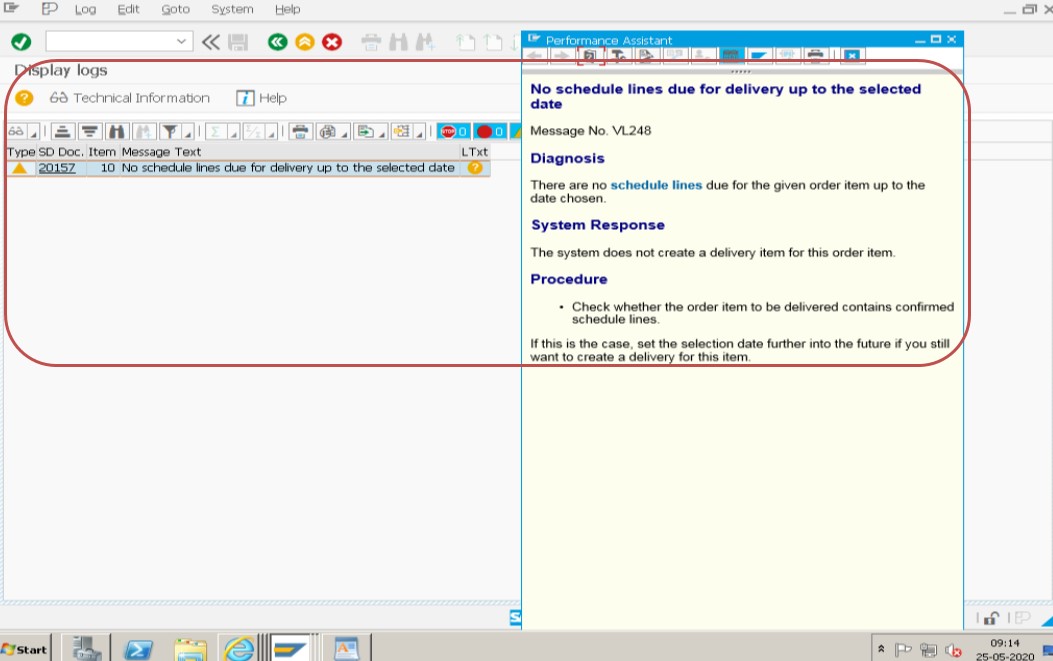
Solution: the delivery date required or order date must be the same, e.g. today.
Example: Date -25.05.2020 and Required Delivery Date -25.05.2020.
🔧 Follow These Steps
- Check the date range in the selection order (VA01).
- Check that there are open sales orders (VA01) or deliveries (VL01N) that fall within the selected date.
- Check that the materials and customers in the sales orders (VA01) are correct.
- Check that the availability check and ATP (Available to Promise) settings are properly configured.
Save.
🔍 What Are Schedule Lines, and Why Does This Error Happen?
A schedule line is the part of a sales order item that carries the delivery-relevant data: a requested quantity, a confirmed quantity, and a confirmed delivery date, generated as a result of the availability check when the order is created or changed. A single order line item can have several schedule lines if the requested quantity can't be fully confirmed for one date and gets split across multiple future dates instead.
Delivery-creation transactions like VL10, VL01N, and VL04 work by selecting from exactly these schedule lines -they don't look at the order quantity in isolation, they look for schedule lines whose confirmed date falls within whatever date range you specify on the selection screen. If no schedule line meets that condition -because none exist, because their confirmed dates fall outside your range, or because nothing was confirmed at all -the transaction has nothing to build a delivery from, and returns exactly the message this guide is about.
📑 VL10 vs VL01N vs VL04 -What's the Difference?
| Transaction | Purpose | Best For |
|---|---|---|
| VL10 (VL10A/VL10B/VL10C...) | Collective delivery due list; selects many eligible orders across a date range and shipping point | Daily bulk delivery creation runs by a shipping team |
| VL01N | Create a delivery manually for one specific sales order | One-off or urgent deliveries, or troubleshooting a single order |
| VL04 | Another collective delivery creation transaction, often used similarly to VL10 depending on configuration | Background/batch delivery creation jobs |
Because all three ultimately read the same underlying schedule line data, this error can appear in any of them under the same root causes -the difference is only in how you select and process the eligible orders, not in what makes an order eligible in the first place.
📊 How the Availability Check (ATP) Decides What Gets Confirmed
The Available-to-Promise (ATP) check runs at sales order entry (and can be re-triggered later) to determine how much of the requested quantity can realistically be confirmed, and for what date, based on existing stock, planned receipts (purchase orders, production orders), and other demand already competing for the same supply. The result of this check is exactly what populates the schedule line's confirmed quantity and confirmed date -if ATP cannot confirm anything within the checking horizon, the schedule line is created with a confirmed quantity of zero, and nothing about it will ever appear in a delivery due list no matter what date range you select, because there's genuinely nothing confirmed to deliver.
ATP configuration itself is controlled by the checking group (on the material master) and the checking rule (tied to the transaction), which together determine which stock and supply elements are included, whether replenishment lead time is considered, and whether the check even runs at all for that material. A material with checking group "no check" or "no ATP check" will always confirm the full requested quantity immediately at order entry, so if you're seeing unconfirmed schedule lines unexpectedly, checking group and checking rule configuration is one of the first things worth reviewing with your MM/SD consultant.
🚫 Delivery Blocks: A Frequently Overlooked Cause
Even when a schedule line is confirmed for the right date, a delivery block set at the sales order header or item level will still keep that order out of the delivery due list entirely. Delivery blocks are commonly applied automatically -for example, when a customer's credit limit is exceeded, triggering a credit hold -or manually, by a sales or shipping coordinator who wants to hold an order for review before it ships.
Because a delivery block doesn't change anything visible about the schedule line's date or confirmed quantity, it's easy to overlook when troubleshooting this error purely by checking dates. Always check the order's header (Sales Order → Header → Shipping tab) and item-level delivery block fields in VA02 alongside the schedule line and ATP checks covered above; clearing a delivery block that shouldn't be there is sometimes the entire fix.
💼 Real-World Scenario: A Date Range Mismatch During Month-End
Riya Al-Sayed, a shipping coordinator at a distribution company, ran VL10 at the start of a busy month and was surprised to see almost none of the orders she expected appear in the delivery due list, each returning this exact error when she tried creating deliveries individually. Rather than assuming stock was short across the board, she opened one of the missing orders in VA02 and checked its Schedule Lines tab, where the confirmed delivery date showed three days later than she expected.
Investigating further, she found that a recent change to the plant's factory calendar had shifted several working days, which pushed ATP-confirmed dates later than the team's usual planning assumptions. The orders weren't actually short of stock or genuinely blocked -the VL10 selection date range she was using simply didn't extend far enough to catch the newly shifted confirmed dates. Widening the selection date range in VL10 immediately brought the missing orders back into the due list. This is a common, easy-to-miss cause: the error can be entirely correct and expected behavior when the underlying confirmed dates have moved, and the fix is adjusting your selection range to match reality rather than assuming something is broken.
🔄 Rescheduling and Backorder Processing
When new supply becomes available after a sales order was originally confirmed with a zero or partial quantity, SAP doesn't automatically re-check and re-confirm every affected order on its own. Rescheduling (transaction V_V2 or the SD backorder processing report) needs to be run to re-evaluate open schedule lines against current stock and planned receipts, updating confirmed quantities and dates where more supply is now available. If your team resolved a stock shortage but the affected orders still don't appear in the delivery due list, running rescheduling before re-checking VL10 is often the missing step, since the order's confirmed date may simply not have been recalculated yet.
This is a useful thing to build into a standard operating procedure: whenever a significant goods receipt or production confirmation happens for a material that had unconfirmed backorders, triggering rescheduling for that material (or including it in a regularly scheduled background rescheduling job) ensures affected sales orders pick up the new supply automatically rather than sitting invisible to the delivery due list indefinitely.
🚚 Shipping Point and Route: A Second, Easy-to-Miss Filter
Beyond the date range, VL10 and similar transactions are frequently run with an additional selection restricted to a specific shipping point, route, or delivery type. An order whose schedule line is perfectly confirmed and within date, but whose automatically-determined shipping point or route differs from what the person running the report expects, will simply not appear -not because anything is wrong with the order, but because the selection criteria on the report itself excluded it.
Shipping point determination is driven by the combination of the shipping condition (from the customer master), loading group (from the material master), and plant, while route determination adds departure country/zone, shipping condition, transportation group, and weight group into the mix. If an order seems to vanish from a due list scoped to "your" shipping point, it's worth checking the order's actual determined shipping point on the Shipping tab before assuming a date or ATP problem -the underlying master data driving that determination may have changed since the order was created.
📑 Similar-Looking SAP SD Delivery Errors and How They Differ
| Error / Symptom | Root Cause | Typical Fix |
|---|---|---|
| No schedule lines due for delivery up to the selected date | No confirmed schedule line falls within the selection date range, an ATP shortfall, or a delivery block | Check VA02 schedule lines, widen date range, resolve ATP or delivery block |
| Delivery block set for the customer/order | Credit hold or manual shipping block on the order | Clear the block once the underlying reason is resolved |
| Item is not relevant for delivery | Item category configuration marks the item as not delivery-relevant (e.g. a text or value item) | Confirm the item category is correct for what's actually being sold |
| Route could not be determined | Missing or incomplete route determination master data | Maintain the relevant route determination condition records |
All of these can present as "the delivery just isn't happening," which is why isolating the exact message and checking the schedule line data directly, rather than guessing from the symptom alone, is the fastest path to the correct fix.
✅ Prevention Checklist for Shipping Teams
- Standardize on checking the Schedule Lines tab in VA02 as the first troubleshooting step for any "missing" delivery, before assuming stock or configuration is at fault.
- Run rescheduling (V_V2) on a regular schedule, or immediately after a significant goods receipt, so newly available supply reaches previously unconfirmed orders.
- Keep VL10 selection variants documented (which shipping points, routes, and delivery types each variant covers) so a "missing" order can quickly be checked against the right variant.
- Review delivery block reason codes periodically to catch orders sitting on holds longer than intended.
- Confirm checking group and checking rule settings are reviewed whenever a new material or plant combination goes live, to avoid unexpected ATP shortfalls.
❗ Common Mistakes When Troubleshooting This Error
- Only checking the sales order's requested date, not the schedule line's actual confirmed date after the ATP check ran.
- Assuming the error means "no stock" when it could equally mean a delivery block, a too-narrow date range, or an unconfigured availability check.
- Re-running VL10 repeatedly with the same date range instead of opening the specific order in VA02 to see what's actually happening at the schedule line level.
- Overlooking a delivery block because the schedule line itself looks perfectly confirmed and correctly dated.
- Not checking whether the material's checking group even performs an ATP check at all, which changes where to look for the root cause entirely.
📈 Troubleshooting Decision Tree
- Open the order in VA02/VA03 and check the Schedule Lines tab for the confirmed quantity and confirmed date.
- Is the confirmed quantity zero? The availability check didn't confirm supply -investigate stock, planned receipts, and checking group/rule configuration.
- Is the confirmed date outside your selection range? Widen or correct the date range in VL10/VL04 rather than assuming the order is broken.
- Is there a delivery block on the order? Check the header and item Shipping tab; clear the block if appropriate (e.g. once a credit hold is resolved).
- Is the shipping point, route, or plant on the order correct? A misassigned shipping point can also cause an order to be excluded from a due list scoped to a specific shipping point.
📱 This Error in SAP S/4HANA
The schedule line and ATP logic behind this error are unchanged in SAP S/4HANA for classic ATP; however, S/4HANA also introduces Advanced Available-to-Promise (aATP) as an optional, more powerful alternative, with its own product allocation, backorder processing, and alternative-based confirmation logic. If your organization has activated aATP, an unconfirmed or oddly-dated schedule line may be driven by aATP-specific rules (such as product allocation running out for a category) rather than the classic checking group/rule logic described above -worth confirming which ATP engine is active before spending time in classic ATP configuration transactions.
On the interface side, the Fiori app "Create Deliveries" and related delivery-processing apps provide the same collective and single-document delivery creation as VL10/VL01N, reading from the same underlying schedule line data, so the troubleshooting steps in this guide apply equally whether your team works in the classic GUI or through Fiori.
📋 Related SAP SD Transactions
| Transaction | Purpose |
|---|---|
| VA02 / VA03 | Change or display a sales order, including the Schedule Lines tab. |
| VL10 / VL10A | Collective delivery due list for creating deliveries in bulk. |
| VL01N | Create a delivery manually for a single sales order. |
| VL04 | Collective delivery processing, often used for batch delivery creation. |
| CO09 | Check ATP availability overview for a material. |
| OVZ9 / OVZ2 | Configure checking rules and checking groups for the availability check. |
🎓 Interview-Style Questions and Answers
Q: What determines whether a schedule line appears in a delivery due list?
Its confirmed quantity and confirmed date, set by the availability check, must fall within the date range being selected, and the order must have no active delivery block.
Q: If a sales order shows the correct requested delivery date but doesn't appear in VL10, what's the first thing to check?
Open the order in VA02 and check the Schedule Lines tab -the confirmed date after the availability check often differs from the originally requested date, and it's the confirmed date that VL10 actually uses.
Q: What is the difference between the checking group and the checking rule in ATP configuration?
The checking group is set on the material master and determines whether and how that material is checked at all; the checking rule is tied to the transaction (sales order vs. delivery, for example) and determines which additional inward/outward movements are included in that specific check.
📚 Quick Glossary of Terms Used in This Guide
- Schedule line: The delivery-relevant component of a sales order item, carrying requested quantity, confirmed quantity, and confirmed date.
- ATP (Available to Promise): The availability check that determines how much of a requested quantity can be confirmed, and for what date, based on stock and planned supply.
- Checking group: A material master setting controlling whether and how the availability check runs for that material.
- Checking rule: A transaction-specific setting controlling which supply and demand elements are included in a given availability check.
- Delivery block: A header or item-level flag on a sales order that prevents a delivery from being created until removed.
🎯 Conclusion
"No schedule lines due for delivery up to the selected date" is almost never a system malfunction -it's SAP correctly reporting that nothing meets the specific conditions you've asked it to select. By checking the schedule line's confirmed date and quantity first, then working through date range, ATP configuration, and delivery blocks in turn, you can resolve this error confidently instead of guessing. Keep the troubleshooting decision tree above bookmarked for the next time a delivery run comes back emptier than expected.