SAP VOK0: How to Define Pricing Procedure in SAP SD (Step-by-Step)
Pricing procedures in SAP SD define the sequence of steps involved in determining the final price during sales order creation. These steps include condition types, sequences, and calculation formulas, ensuring accurate and consistent pricing based on various factors such as quantity, discounts, and surcharges. This guide walks through the full VOK0 pricing configuration end to end - from a test customer through condition tables, access sequences, condition types, the pricing procedure itself, and finally its determination - using one worked example throughout. If you run into any errors while following along, feel free to send a screenshot to pramod@learntosap.com for help.
✅ What Is a Pricing Procedure in SAP SD?
Pricing procedures in SAP SD define the sequence of steps involved in determining the final price during sales order creation. These steps include condition types, sequences, and calculation formulas, ensuring accurate and consistent pricing based on various factors such as quantity, discounts, and surcharges.
Think of a pricing procedure as a recipe - an ordered list of condition types, each one contributing a piece of the final price calculation: a base price, a customer-specific discount, a freight surcharge, a tax condition, and so on. The procedure defines not just which conditions apply, but the order they're calculated in, which subtotals get carried forward, and which conditions are mandatory versus optional. Getting this recipe right is what stands between a sales order showing the correct, expected price and one showing something confusing or wrong.
Because pricing touches so many other pieces of configuration - condition tables, access sequences, condition types, and the determination logic that ties them all to a specific customer and sales document - VOK0 isn't really a single transaction so much as a central hub linking to each of these related configuration areas. This guide works through that full chain, in the order it's typically configured, using one consistent example throughout.
📋 The Building Blocks of SAP Pricing
Before diving into the step-by-step configuration, it helps to see how the pieces relate to one another - each one is defined separately, but they all connect into a single working chain by the end of this guide.
| Element | What It Does |
|---|---|
| Condition Table | Defines the combination of fields (e.g. sales organization, customer, material) used to look up a specific price or discount. |
| Access Sequence | An ordered list of condition tables the system checks, from most specific to most general, to find a valid condition record. |
| Condition Type | Represents a specific pricing element - such as base price, discount, or freight - and is linked to an access sequence. |
| Pricing Procedure | The full calculation schema listing every condition type in sequence, along with subtotals and calculation rules. |
| Pricing Procedure Determination | The logic that decides which pricing procedure applies to a given sales document, based on sales area, customer, and document type. |
This guide builds each of these pieces in turn, starting with a test customer to configure against, and finishing with the determination step that ties everything together.
🔧 Sap Pricing Procedure Configuration – Full VOK0 Walkthrough
Because pricing configuration spans several related transactions, this walkthrough is organized as ten sequential steps, each building on the one before it.
Create a test customer. Using transaction XD01, create a customer selecting account group Bill-to Party, company code 1211, sales organization 2001, distribution channel 31, and division 31. This customer will be used throughout the rest of the configuration to test that pricing behaves as expected once everything is connected.


Create the Document Pricing Procedure. In VOK0, select Pricing Procedure → Doc. Pricing Procedure → Maintain.

Select New Entries and create a new document pricing procedure - in this example, TEST DPP. The document pricing procedure is what will later be linked to a sales document type, so orders created under that type know which pricing logic to apply.

Create the Customer Pricing Procedure. Still within VOK0, select Pricing Procedure → Cust. Pricing Procedure, then New Entries and create TEST CPP. This is the customer-side counterpart to the document pricing procedure created in the previous step - together, the two form half of the four-part combination used later in determination.


Create the condition table. Select Environment → Condition Table → Create. Custom condition tables must use a number between 600 and 999, since SAP reserves numbers below 600 for its own standard, delivered tables.


Create the access sequence. Navigate to Access Sequences within VOK0.
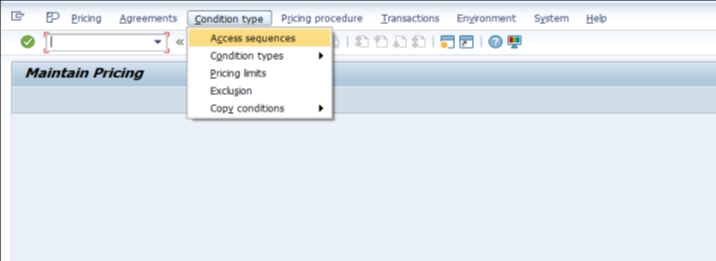
Select New Entries and create a new access sequence - in this example, EPR0, representing Energy Unit Price.


Select Accesses, then select Fields to link the condition table created in Step 4 into this access sequence, defining which fields the system checks when searching for a valid condition record.


Define the condition type. Under Condition Types → Definition, create or configure the condition type EPRO, linking it to the access sequence EPR0 created in the previous step. The condition type is what will actually appear as a pricing element - such as a line item - on the sales order once everything is connected.


Create the pricing procedure. Copy the standard pricing procedure RVAA01 to create a new, custom pricing procedure, then add the new condition type EPRO into the copied procedure's calculation schema at the appropriate step.


Assign the Customer Pricing Procedure to the customer. Go to XD02 and update the test customer created in Step 1, assigning the new Customer Pricing Procedure, TEST CPP, on the sales area data screen.

Assign the Document Pricing Procedure to the sales document type. Go to VOV8 and select the sales document type EOR (Energy Standard Order), assigning the Document Pricing Procedure, TEST DPP, created in Step 2.

Complete pricing procedure determination. Back in VOK0, go to Pricing Procedure Determination and create the combination linking sales organization 2001, distribution channel 31, division 31, the Customer Pricing Procedure (TEST CPP), and the Document Pricing Procedure (TEST DPP) to the new pricing procedure created in Step 7.

Select Save. The system will usually prompt for a transport request if the system is configured to require one, which is standard practice for configuration changes so they can be tracked and migrated through the landscape (Development → Quality → Production) in a controlled way.
📋 Why Pricing Procedure Determination Needs Four Inputs
Step 10's determination combination can look like a lot of moving parts for what feels like a single lookup, but each of the four inputs serves a genuinely distinct purpose, which is why all four are needed together rather than any one being sufficient on its own.
| Input | What It Represents |
|---|---|
| Sales Organization + Distribution Channel + Division | The sales area context - which business entity and route to market the order belongs to. |
| Customer Pricing Procedure | A customer-level classification, allowing different customer segments to use different pricing logic even within the same sales area. |
| Document Pricing Procedure | A document-type-level classification, allowing different order types (standard order, rush order, return) to use different pricing logic. |
Together, these four inputs let a single sales area support multiple pricing procedures simultaneously, varying by customer type and document type - which is exactly the flexibility most real businesses need, since a standard customer's rush order often needs different pricing treatment than the same customer's regular monthly order, and a VIP customer's regular order may need different treatment again.
💼 Real-World Scenario: A New Unit Pricing Condition for the Energy Division
Pooja Mishra an SAP SD consultant at Learn Pharma, was asked to introduce a new pricing element specifically for the company's energy division - a unit price condition that needed its own dedicated calculation logic, separate from how pricing worked for the rest of the business. Sales manager Rajesh Wagh explained that energy products were priced per unit in a way the existing standard pricing procedure didn't cleanly support.
Working with functional consultant Priya Patil, Pooja worked through the full chain - creating a test customer under the Bill-to Party account group, then building a dedicated document and customer pricing procedure pairing (TEST DPP and TEST CPP) specifically for testing. He created a new condition table within the customer-reserved 600-999 range, built an access sequence, EPR0, around it, and defined a new condition type, EPRO, representing Energy Unit Price.
Rather than building an entirely new pricing procedure from nothing, Pooja copied the standard RVAA01 procedure and added the new EPRO condition type into its calculation schema. Business analyst Anita Shah then confirmed the determination combination - sales organization 2001, distribution channel 31, division 31, alongside the new customer and document pricing procedures - correctly pointed to the new pricing procedure. Once assigned to the EOR sales document type via VOV8 and tested with a sample order, the new unit price condition appeared exactly where expected, confirming the full chain, from condition table through determination, was working correctly end to end.
❗ Common Mistakes When Configuring Pricing Procedures
- Creating a condition table number below 600, which conflicts with SAP's own reserved standard table numbering.
- Forgetting to link the access sequence to the condition type, leaving the condition type unable to find any valid condition records.
- Building a pricing procedure entirely from scratch instead of copying a proven standard like RVAA01, risking missed subtotals or requirement routines that other processes depend on.
- Completing the pricing procedure itself but forgetting the determination step, leaving the new procedure correctly built but never actually assigned to any sales area or document combination.
- Mismatching the customer and document pricing procedures used in determination against what's actually assigned to the test customer and sales document type.
- Making pricing configuration changes directly in a production client instead of testing a full sample order in a sandbox or development client first.
✅ Best Practices for Pricing Procedure Configuration
- Always create custom condition tables within the reserved 600-999 range, and document each table's purpose clearly.
- Copy an existing, proven pricing procedure like RVAA01 as the starting point for a new one, rather than building the calculation schema field by field.
- Test with a dedicated customer and document pricing procedure pairing during development, exactly as shown in this guide, before rolling changes into procedures already used by live customers.
- Complete pricing procedure determination immediately after building a new procedure, rather than treating it as a separate, later task.
- Document the business reason behind every custom condition type and pricing procedure, so future consultants understand why each piece exists.
- Test a full sample sales order through to pricing and billing in a sandbox or development client before moving configuration to production via transport request.
✅ Validating the New Pricing Procedure Before Go-Live
Once determination is complete, it's worth running through a short validation checklist before considering the pricing setup ready for wider use. Create a test sales order (VA01) using the test customer and the EOR document type, and confirm the new pricing procedure is picked up automatically. Confirm the new condition type appears correctly in the order's pricing conditions, with the expected value calculated from the condition record. Test with a condition record actually maintained (via VK11) to confirm the access sequence correctly finds and applies it. Finally, process the order through to billing and confirm pricing carries through correctly to the invoice.
Skipping this validation step is one of the more common reasons a newly configured pricing procedure looks correct in configuration but produces unexpected results on a live order - usually a missing condition record, an access sequence field mismatch, or a determination combination that doesn't quite match the customer and document type actually being tested.
📱 This Configuration in SAP S/4HANA
Transaction VOK0 and the underlying pricing configuration chain - condition tables, access sequences, condition types, pricing procedures, and determination - work the same way in SAP S/4HANA as in classic ECC, since pricing remains a foundational, largely unchanged SD element. What has evolved in S/4HANA is mainly the availability of newer pricing capabilities alongside the classic condition technique, such as more advanced configurable pricing scenarios in specific industries, but the classic VOK0-based configuration shown in this guide remains the standard approach for the vast majority of implementations.
📋 Related SAP Transactions
| Transaction | Purpose |
|---|---|
| VOK0 | Central pricing configuration area covering condition tables, access sequences, condition types, and pricing procedures. |
| V/06 | Define condition types directly. |
| V/07 | Maintain access sequences directly. |
| V/08 | Maintain pricing procedures directly. |
| VK11 / VK12 | Create or change condition records used by condition types. |
| VOV8 | Define sales document types, including the document pricing procedure assignment. |
🎓 Interview-Style Questions and Answers
Q: What is the relationship between condition table, access sequence, and condition type?
A condition table defines the key fields used to look up a price; an access sequence is an ordered list of condition tables the system checks, from specific to general; and a condition type represents the actual pricing element, linked to an access sequence so it knows where to search for a valid record.
Q: Why does custom condition table numbering start at 600?
SAP reserves table numbers below 600 for its own standard, delivered condition tables, so customer-created tables use 600 to 999 to avoid conflicting with current or future SAP-delivered content.
Q: What four elements combine in pricing procedure determination?
Sales organization, distribution channel, and division (together forming the sales area), plus the customer pricing procedure and the document pricing procedure, combine to determine which pricing procedure applies to a given sales document.
Q: Why is RVAA01 commonly copied when creating a new pricing procedure?
RVAA01 is SAP's proven standard pricing procedure, already containing a sensible sequence of condition types, subtotals, and requirement routines - copying it as a base reduces the risk of missing something that downstream processes, like tax or freight calculation, may depend on.
📚 Quick Glossary of Terms Used in This Guide
- Condition Table: Defines the combination of fields used to look up a specific price or discount record.
- Access Sequence: An ordered list of condition tables checked, from specific to general, to find a valid condition record.
- Condition Type: A specific pricing element, such as base price or discount, linked to an access sequence.
- Pricing Procedure: The complete calculation schema listing every relevant condition type in sequence, with subtotals and calculation rules.
- Document Pricing Procedure: A classification assigned to a sales document type, used as one input in pricing procedure determination.
- Customer Pricing Procedure: A classification assigned to a customer, used as another input in pricing procedure determination.
📝 Naming and Governance for Pricing Configuration
Because pricing configuration involves several interconnected pieces - condition tables, access sequences, condition types, and procedures - most SD teams agree on a consistent naming convention across all of them before configuration begins, so a consultant reviewing the system later can recognize related pieces by their naming pattern alone, much as EPR0 (access sequence) and EPRO (condition type) are clearly related in this guide's example.
Governance matters especially for the pricing procedure itself and its determination, since these directly affect what price a customer sees on every order. Changes to a live pricing procedure - adding, removing, or reordering condition types - can affect every open order still being priced under it, which is why most organizations require careful testing and sign-off before modifying a pricing procedure already in production use, rather than treating it as a routine configuration change.
🎯 Conclusion
Defining a pricing procedure in VOK0 touches more pieces of configuration than almost any other area of SAP SD, but each piece follows a logical sequence - condition table, access sequence, condition type, pricing procedure, and finally determination - that becomes straightforward once the full chain is understood. Testing with a dedicated customer and document pricing procedure pairing before rolling changes into live procedures, copying a proven base like RVAA01, and validating the complete chain with a real sample order are what separate a pricing setup that looks correct on paper from one that genuinely prices orders the way the business expects. Keep this guide handy the next time your project needs to introduce a new pricing element or condition into the sales process.