SAP Error: Field Selection for Movement Type 601 / Account 410004 Differs for Customer Goods Movement (015)
This error occurs because the field selection (field status group) assigned to movement type 601 and the field selection assigned to G/L account 410004 don't agree with each other for the specific customer goods movement scenario referenced as (015). SAP will not let a posting proceed when two different field status assignments genuinely conflict - for example, one marking a field as required while the other suppresses it entirely. This guide covers the exact configuration fix using OMJJ, then goes deeper into what field status groups are, why this specific conflict happens with movement type 601, and how to prevent it recurring on other movement type/account combinations.
✅ 601 Movement Type: Resolving This Field Selection Error and Account Assignment Conflict
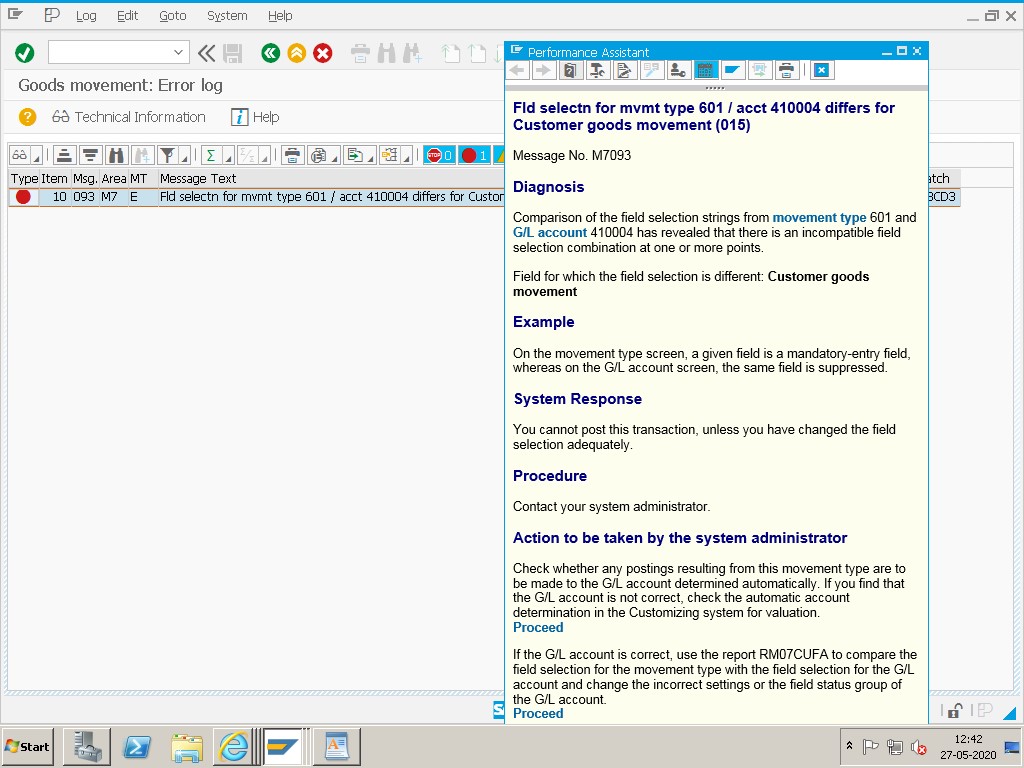
Solution: Use transaction OMJJ (Change Movement Type) to align the field selection for movement type 601 with the field status group required by the G/L account.
🔧 Follow These Steps
Go to SPRO → Materials Management → Inventory Management and Physical Inventory → Movement Types → Copy, Change Movement Type, or navigate directly to transaction OMJJ.
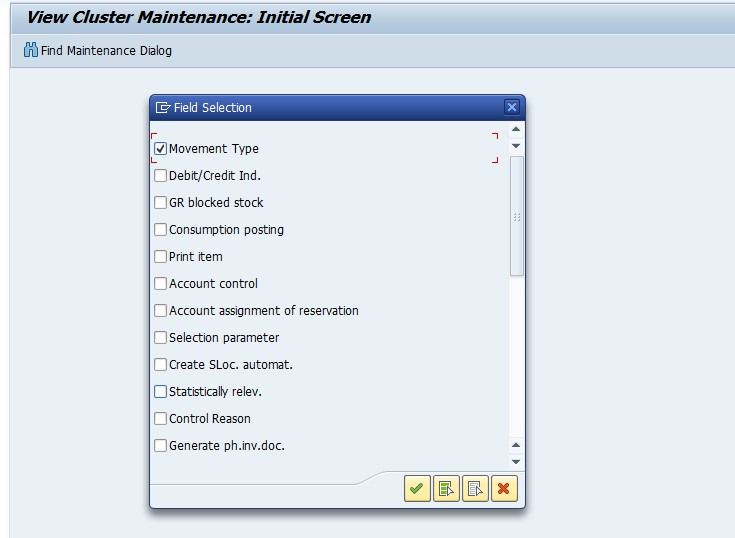
Select Field Status Group - G01, and tick Post Automatically Only if the account should only receive automatic postings from this movement type.

Save the configuration change, then retest the original customer goods movement posting.
🔍 What "Field Selection Differs" Actually Means
Every SAP posting screen, whether it's a goods movement, a journal entry, or an invoice, dynamically shows, hides, requires, or grays out fields based on a field status group. A field status group is a reusable configuration object where each field on the posting screen is marked as one of four things: required entry, optional entry, suppressed (hidden entirely), or display-only.
Two different objects in a goods movement posting can each carry their own field status assignment: the G/L account being posted to (assigned directly on the account's Create/Bank/Interest tab in FS00) and the movement type's account modification key (assigned via OMJJ's field selection settings). When these two field status groups disagree about a specific field - one saying it's required, the other saying it should be suppressed - SAP cannot render a screen that satisfies both rules simultaneously, and rather than guessing which one should win, it stops the posting with this error, naming both the movement type/account combination and the internal reference number (015) it used to compare them.
📋 Why This Happens Often With Movement Type 601
Movement type 601 is used for a goods issue for a delivery in Sales and Distribution - the movement that reduces inventory and posts cost of goods sold when a delivery is picked, packed, and goods-issued against an outbound delivery. Because this movement type sits at the intersection of SD (the delivery document) and MM/FI (the inventory and accounting posting), it's especially prone to field status conflicts: SD-side configuration and FI-side G/L account configuration are often maintained by different teams or at different times, and a change on one side - say, a new required field added to a cost of goods sold account's field status group - can silently create a conflict with a movement type's field selection that hasn't been updated to match.
This is exactly why the fix is a coordination exercise, not just a technical toggle: whoever adjusts the movement type's field selection in OMJJ should confirm with whoever owns the G/L account's field status group in FS00/OBC4 that the two are being brought into alignment deliberately, rather than one side's requirement simply being suppressed to make the error disappear.
📑 Where Field Status Comes From: The Full Picture
| Source | Where It's Set | Applies To |
|---|---|---|
| G/L Account Field Status Group | FS00, Create/Bank/Interest tab | Every manual and automatic posting to that specific account |
| Movement Type Field Selection | OMJJ, via the account modification / field selection screen | Every goods movement using that specific movement type |
| Posting Key Field Status | OB41 | Every posting using that specific posting key, independent of account or movement type |
| Field Status Variant | OBC4 | The set of field status groups available to a company code, defining the master list both accounts and movement types draw from |
A posting can technically be affected by up to three of these layers at once (account, movement type, and posting key), which is why field status conflicts can sometimes take a bit of investigation to trace back to their exact source - the error message naming both the movement type and account, as it does here, is actually a helpful shortcut that narrows the search to just those two configuration objects.
📈 Troubleshooting Decision Tree
- Identify both objects named in the error - the movement type and the G/L account - before changing anything.
- Check the G/L account's field status group in FS00 (Create/Bank/Interest tab) to see exactly which fields it requires or suppresses.
- Check the movement type's field selection in OMJJ to see how it currently treats the same fields.
- Identify the specific conflicting field(s) - usually the fastest way is comparing the two field status groups side by side in OBC4.
- Decide which side reflects the correct current business requirement, and update the other side to match, rather than arbitrarily loosening either one.
- Test against multiple real transactions using that movement type and account before considering the fix complete.
📱 This Error in SAP S/4HANA
Field status groups, movement type field selection, and the underlying OMJJ/FS00/OBC4 configuration transactions are unchanged in SAP S/4HANA, since this is core Materials Management and Financial Accounting configuration rather than something tied to the Universal Journal. One S/4HANA-specific nuance worth knowing: because S/4HANA can merge the G/L account master with the cost element master for accounts flagged as both a G/L account and a primary cost element, a field status conflict can sometimes now also involve cost-element-specific fields (such as cost center or profit center) that weren't part of the classic ECC field status picture in the same way. If this error appears on an account that was recently converted or newly created as part of an S/4HANA migration, it's worth double-checking whether merged cost-element attributes introduced a new required field that the movement type's field selection hasn't been updated to expect.
📑 Similar-Looking SAP Field/Configuration Errors and How They Differ
| Error | Root Cause | Typical Fix |
|---|---|---|
| Field selection for movement type X/account Y differs | Movement type field selection (OMJJ) and G/L account field status group (FS00) conflict | Align both field status groups in OMJJ/FS00 for the shared fields |
| Account can only be posted to internally | "Post Automatically Only" ticked on the G/L account | Use the correct automatic-posting transaction, or untick with sign-off |
| Field XYZ is a required field for G/L account | Field status group requires a field the transaction hasn't supplied | Fill in the required field, or adjust the field status group if the requirement is wrong |
| Rules for posting key X and account Y set incorrectly | Posting key field status (OB41) conflicts with the account's field status group | Align the posting key's field status with the account's requirements in OB41 |
All four of these are variations on the same underlying theme - two independently configured field status sources disagreeing with each other - which is why understanding the field status hierarchy covered earlier in this guide equips you to resolve any of them, not just the specific 601/410004 combination this page is about.
💼 Real-World Scenario: A Configuration Change Breaks an Existing Movement Type
Pooja Mishra, an SAP MM consultant, was called in after a client's warehouse team suddenly started seeing this field selection error on deliveries that had been posting without issue for months. Investigating the change log, he found that the finance team had recently updated the field status group on account 410004 to make a new cost center field mandatory, as part of a broader initiative to improve cost center reporting accuracy across all COGS-related postings.
That change was entirely correct from finance's perspective, but nobody had checked whether movement type 601's field selection in OMJJ was compatible with a now-mandatory cost center field - and it wasn't, since the movement type's field selection had been configured years earlier under a different reporting requirement. Vikram's fix wasn't to revert finance's change, but to update movement type 601's field selection in OMJJ so it also required the cost center field, bringing the two configurations back into agreement. This is a common real-world pattern: this error is very often the system correctly catching a side effect of an FI-side configuration change that MM-side movement type settings simply hadn't kept pace with.
❗ Common Mistakes When Fixing This Error
- Suppressing a required field on one side just to make the error disappear, without understanding why that field was made mandatory in the first place.
- Changing the movement type's field selection without coordinating with whoever owns the G/L account's field status group configuration.
- Assuming the fix only affects the one transaction that failed, when a movement type's field selection change affects every posting using that movement type going forward.
- Not testing the change against other scenarios that also use the same movement type or account before considering the fix complete.
- Treating this as an end-user fixable issue rather than escalating to whoever has SPRO access for movement type and field status configuration.
✅ Prevention Checklist for Configuration Teams
- Whenever a G/L account's field status group changes, review which movement types post to that account (via OBYC account determination) and confirm their field selections remain compatible.
- Document the field status group assigned to each movement type alongside the reason it was configured that way, so future changes can be evaluated against the original intent.
- Test field status changes in a sandbox or quality system against real transaction scenarios before moving them to production.
- Establish a simple communication step between FI and MM configuration teams whenever G/L account or movement type field status changes are planned.
- Periodically audit field status group assignments across commonly-used movement types (601, 101, 261, 311) against their linked accounts to catch drift before it causes a production error.
📋 Related SAP Transactions
| Transaction | Purpose |
|---|---|
| OMJJ | Change movement type configuration, including account modification and field selection. |
| FS00 | Display or change a G/L account master record, including its field status group. |
| OBC4 | Maintain field status variants and field status groups. |
| OB41 | Maintain posting key field status. |
| OBYC | Configure automatic account determination, useful to confirm which accounts a movement type posts to. |
| VL02N | Change an outbound delivery, where a movement type 601 goods issue is typically triggered. |
🎓 Interview-Style Questions and Answers
Q: What are the two configuration objects that must agree for a goods movement posting to succeed without a field selection conflict?
The field status group assigned to the G/L account (FS00) and the field selection assigned to the movement type's account modification key (OMJJ) must be compatible for every field involved in that specific posting.
Q: If a field is required by the G/L account but suppressed by the movement type, what happens?
SAP cannot render a consistent posting screen and blocks the transaction with a field selection differs error, rather than guessing which requirement should take precedence.
Q: Why might this error suddenly appear on a movement type that has worked correctly for years?
Most commonly because a field status group was changed on one side - usually the G/L account, less often the movement type - without checking whether the other side's configuration remained compatible with the change.
📚 Quick Glossary of Terms Used in This Guide
- Field Status Group: A configuration object defining whether each field is required, optional, suppressed, or display-only for a given posting.
- Account modification key: A configuration element linking a movement type to specific G/L account determination and field selection rules.
- Movement type 601: The SAP movement type used for a goods issue against an outbound delivery in Sales and Distribution.
- Field status variant: The company-code-level grouping of field status groups available for use across accounts and postings.
- Post Automatically Only: A G/L account setting restricting the account to automatic postings, such as those generated by a movement type.
🎯 Conclusion
A "field selection differs" error is SAP correctly refusing to guess between two conflicting configuration instructions rather than a bug to work around. By understanding that both the G/L account and the movement type carry their own field status assignment, and that these two need to be deliberately kept in sync, you can resolve this error confidently through OMJJ while also preventing it from resurfacing the next time either side's configuration changes. Keep the field status hierarchy table above bookmarked as a quick reference for tracing similar conflicts on other movement type and account combinations.