SAP FI Error: Account 102102 Can Only Be Posted to Internally in Company Code 1213
This error message indicates that account 102102 has been configured in SAP to only allow internal (automatic) postings in company code 1213. This typically happens due to the account's settings in the master data or system configuration. Below, this guide covers the exact fix using FS00, then goes deeper into why this restriction exists, how reconciliation accounts work, what the "Post Automatically Only" checkbox actually controls, and a full troubleshooting checklist so you can decide with confidence whether to change the setting or use a different transaction entirely.
✅ Possible Causes
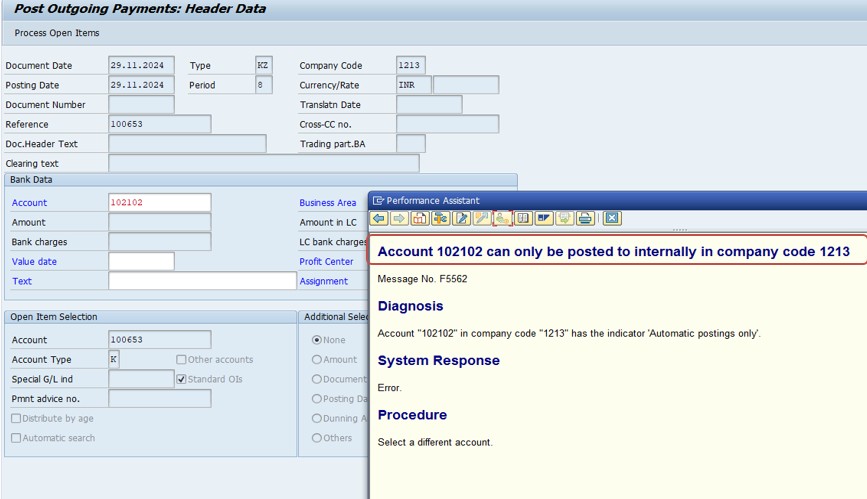
- The "Post Automatically Only" checkbox may be selected in the G/L master record.
- The account could be a reconciliation account, which restricts manual postings.
- Certain posting keys may only be allowed for internal transactions.
🔧 Solution: FS00 (Go to the G/L Account) -102102
Check G/L Master Data and untick "Post Automatically Only."
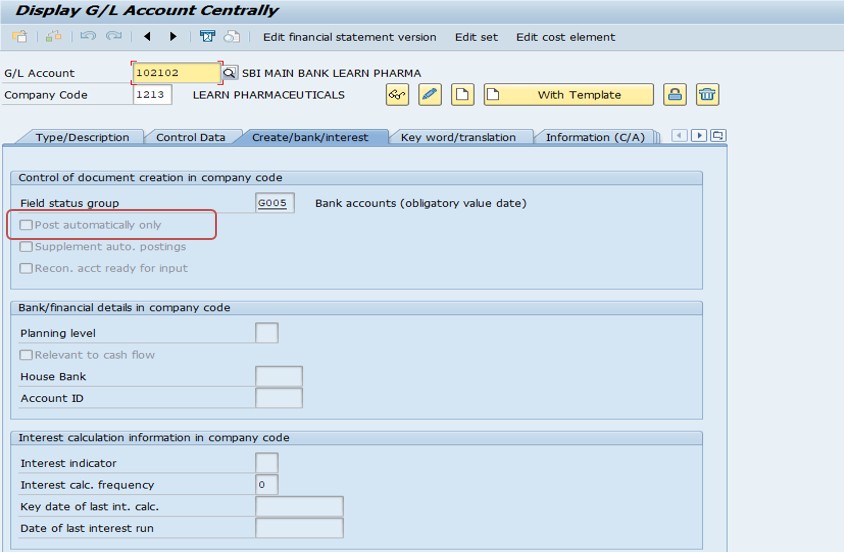
Use transaction FS00 (G/L account master control).
- If "Post Automatically Only" is selected, it restricts manual postings -do not simply untick it without checking why it was set first.
- Field Status Group: Check the field status group assigned in the account master data.
- Ensure the required fields for your transaction are not suppressed.
Save the change once you have confirmed it is appropriate to allow manual posting on this account.
🔍 What the "Post Automatically Only" Checkbox Actually Does
On the Control Data tab of the G/L account master (FS00), the "Post Automatically Only" indicator tells SAP that the account should never receive a manual journal entry through standard posting transactions such as FB50, FB01, or F-02. Instead, the account is meant to be updated exclusively by automatic postings generated by other processes -account determination during goods movements or invoice verification in MM, tax calculation, foreign currency valuation runs, automatic clearing programs, or postings generated from other integrated modules like SD.
This setting exists to protect data integrity. Accounts flagged this way are usually reconciliation-style or automatically-determined accounts where a stray manual entry could break the link between a subledger and the general ledger, or bypass a calculation the system is supposed to perform consistently (like tax or currency revaluation). The error message you're seeing is not a bug -it is SAP correctly enforcing a control that someone in your organization's finance or MM configuration team deliberately set up.
📋 Reconciliation Accounts: Why They Block Manual Postings
A reconciliation account is a special type of G/L account linked to a subledger -most commonly customer accounts (accounts receivable) or vendor accounts (accounts payable) -configured on the customer or vendor master record. Every posting made to an individual customer or vendor automatically updates the corresponding reconciliation account in the general ledger, so the G/L balance always represents the total of every open and cleared subledger item.
If manual postings were allowed directly to a reconciliation account, the G/L balance could be changed without any corresponding change in the subledger, permanently breaking the reconciliation between "what the G/L says the company owes or is owed" and "what the individual customer or vendor records actually show." This is precisely why SAP hard-codes reconciliation accounts as not directly postable -it isn't even something the "Post Automatically Only" checkbox needs to enforce separately in that case; account type "Reconciliation account" itself blocks direct FB50/FB01 entry, and the correct way to post is always through the subledger transaction (e.g. FB70/F-22 for customers, FB60/F-43 for vendors).
📑 "Post Automatically Only" Accounts vs Reconciliation Accounts
These two mechanisms are often confused because they both block manual postings, but they work differently and are configured differently.
| Aspect | Post Automatically Only | Reconciliation Account |
|---|---|---|
| Set on | Control Data tab of any G/L account, as a checkbox | Account type field on the Type/Description tab |
| Typical use | Tax accounts, clearing accounts, accounts fed by MM account determination | Customer (AR) or vendor (AP) control accounts |
| How it's updated | Automatic postings from integrated processes (MM, tax, valuation, clearing programs) | Automatic postings from subledger transactions (customer/vendor invoices, payments) |
| Correct way to post | Use the originating transaction (e.g. MIRO for invoice verification) rather than a direct G/L posting | Use the subledger transaction (FB70/F-22 for customers, FB60/F-43 for vendors) |
Whichever mechanism is blocking your posting, the underlying principle is the same: SAP wants a specific business process, not a free-form manual entry, to be the source of truth for what happens to that account.
⚙️ Field Status Groups: The Next Thing to Check
Once you've confirmed manual posting is genuinely appropriate for an account and unticked "Post Automatically Only," a second, related issue commonly appears next: a field status error, or fields that seem to be missing or unexpectedly locked on the entry screen. This is controlled by the Field Status Group assigned to the account on the Create/Bank/Interest tab in FS00, which in turn is linked to a field status variant maintained in customizing.
The field status group determines, field by field, whether something like cost center, profit center, text, or assignment number is a required entry, an optional entry, a suppressed field, or display-only when posting to that account. If your transaction seems to be missing a field you expect, or is demanding one you don't have data for, checking the field status group -rather than assuming the transaction itself is broken -is the fastest way to diagnose it.
🔑 How Posting Keys Add a Second Layer of Restriction
The "Post Automatically Only" checkbox and the reconciliation account type both work at the account level, but SAP also enforces restrictions at the posting key level, and it's worth understanding both because they can combine to produce similar-looking errors. A posting key is the two-digit code (such as 40 for a G/L debit or 50 for a G/L credit) entered at the start of every line item, and it determines not just debit/credit direction but also which account types that key is even allowed to post to, and its own field status settings configured in transaction OB41.
In some configurations, certain posting keys are deliberately reserved for automatic postings only, separate from the account-level restriction -meaning even an account without "Post Automatically Only" ticked could still reject a manual entry if the specific posting key being used is itself restricted. If you've confirmed the account-level settings look fine in FS00 but still can't post, checking the posting key's own configuration in OB41 is the next place to look, since posting key restrictions and account restrictions are configured independently of one another.
🔎 How to Identify Which Process Feeds an "Automatic Only" Account
Before deciding whether to change the restriction, it helps to actually confirm what has historically been posting to the account. Running FBL3N for the account and reviewing the document types and posting sources of recent line items is the fastest way to do this -a pattern of documents all created by the same background job, batch input session, or a consistent document type (such as WA for goods movements or RE for invoice verification) tells you exactly which business process depends on that account staying automatic.
Another useful check is the account determination configuration itself, if the account appears to be MM-driven: transaction OBYC lets you search which transaction/event keys (such as BSX, WRX, or GBB) map to that G/L account, confirming whether goods movements or invoice postings are what's supposed to hit it. Similarly, for tax-related accounts, transaction OB40 shows which tax accounts are assigned to which tax codes. Taking five minutes to trace the account's actual source of postings before changing anything avoids the common mistake of disabling a control that a different, unrelated team is quietly depending on.
📋 Checking the Account's Change History Before Modifying It
SAP keeps a full change history for G/L account master records, accessible from FS00 via Environment → Account Changes, which lists every field that has been changed on the account, who changed it, and when. Before unticking "Post Automatically Only" on an account you didn't originally configure, reviewing this history is good practice -if the restriction was set recently and deliberately, rather than inherited from years-old default configuration, that's a strong signal someone had a specific, current reason for it, and it's worth reaching out to them (or checking related change requests/tickets) before reversing their decision.
This is especially important in regulated industries or larger organizations with formal change management, where a G/L account restriction may exist specifically to satisfy an internal control or audit requirement (for example, segregation of duties between who can create a manual journal entry and who can approve one). Removing that restriction without going through the same change process that put it there can create a compliance gap even if it technically "fixes" your immediate posting problem.
📱 This Error in SAP S/4HANA
The underlying logic -the "Post Automatically Only" indicator, reconciliation account restrictions, and field status groups -is unchanged in SAP S/4HANA, since it is core G/L account master configuration rather than something tied to the Universal Journal or Fiori. What has changed is that S/4HANA merges the classic G/L account master (FS00) with the cost element master into a single object for accounts flagged as both a G/L account and a primary cost element, meaning the restriction you see here can now also interact with controlling-relevant settings on the same account. If an account behaves unexpectedly after an S/4HANA conversion despite no visible change in FS00, it's worth checking whether its merged cost-element attributes changed as part of the migration.
On the interface side, the Fiori app "Manage G/L Account Master Data" exposes the same Control Data fields, including Post Automatically Only, through a web-based screen for organizations that have adopted Fiori for finance master data maintenance, alongside the classic FS00 transaction which remains fully supported.
📑 Similar-Looking SAP FI Errors and How They Differ
| Error / Message | Root Cause | Typical Fix |
|---|---|---|
| Account can only be posted to internally | "Post Automatically Only" ticked on the G/L account | Use the correct automatic-posting transaction, or untick with sign-off if manual posting is genuinely needed |
| Account is a reconciliation account, posting not possible | Account type set to reconciliation account for a customer/vendor | Post through the subledger transaction (FB70/F-22, FB60/F-43) instead of the G/L |
| Field XYZ is a required field for G/L account | Field status group requires a field the transaction hasn't supplied | Fill in the required field, or adjust the field status group in OBC4 if the requirement is wrong |
| Posting only possible in periods X and Y | Posting period variant restricts the fiscal period being posted to | Open the correct period in OB52, or post with the correct document date |
Recognizing which of these you're actually facing saves time, since each has a genuinely different fix despite all four presenting as a blocked posting at first glance.
✅ Prevention Checklist for FI Teams
- Document, on the account master or in a configuration wiki, why each "Post Automatically Only" account was restricted and which process feeds it.
- Train new team members to check FS00 and FBL3N before assuming a posting restriction is a bug.
- Use a formal change request process for any modification to reconciliation, automatic, or field status settings on G/L accounts.
- Periodically review "Post Automatically Only" accounts against actual posting activity in FBL3N to confirm the restriction still matches how the account is really used.
- Keep account determination documentation (OBYC assignments) up to date so tracing an automatic account back to its source process doesn't require guesswork.
💼 Real-World Scenario: A New Accountant Hits This Error
Pooja Mishra, newly onboarded into the finance team at a manufacturing company, was asked to post a manual correction entry to account 102102 in company code 1213 to fix what looked like a small rounding discrepancy. When she tried FB50, the system immediately threw the "can only be posted to internally" error. Rather than escalating straight to Basis or IT, she opened FS00 for account 102102, checked the Control Data tab, and confirmed "Post Automatically Only" was ticked.
Before simply unticking the box, she checked with her team lead, who explained that account 102102 was the automatic clearing account fed by the company's bank reconciliation program and was deliberately locked to prevent manual entries from breaking the automated matching logic. The actual rounding discrepancy Priya was trying to fix belonged on a different, manually postable suspense account instead. This is a common real-world outcome: the error is often not a technical problem to override, but a signal that the posting itself was headed to the wrong account, and understanding why the restriction exists usually points you toward the correct account rather than toward disabling the control.
📈 Troubleshooting Decision Tree
- Is the account a reconciliation account? If yes, do not attempt to post directly -use the correct subledger transaction (FB70/F-22 for customers, FB60/F-43 for vendors).
- Is "Post Automatically Only" ticked in FS00? If yes, find out which automatic process feeds this account before considering a change.
- Was this account recently reassigned or repurposed? Check the change history (Environment → Account Changes in FS00) to see who set the restriction and when.
- Is there a more appropriate account for this specific posting? Often the fix is choosing the correct account, not unlocking the restricted one.
- If manual posting truly is required, get sign-off from whoever owns chart-of-accounts configuration before unticking the checkbox, and document why.
❗ Common Mistakes When Handling This Error
- Unticking "Post Automatically Only" as a quick fix without understanding what automatic process depends on it, risking broken reconciliation or duplicate postings.
- Attempting to post directly to a reconciliation account instead of using the subledger transaction.
- Assuming the error is a system bug rather than intentional configuration.
- Changing the field status group broadly to "make an error go away" instead of checking which specific field is causing the immediate issue.
- Not documenting or communicating a configuration change to the account, leaving the next person confused about why the restriction disappeared.
📋 Related SAP FI Transactions
| Transaction | Purpose |
|---|---|
| FS00 | Display or change a G/L account master record, including Post Automatically Only and field status group. |
| FB50 | Post a manual G/L journal entry (blocked if the account restricts manual posting). |
| FB70 / F-22 | Post a customer invoice (correct way to update an AR reconciliation account). |
| FB60 / F-43 | Post a vendor invoice (correct way to update an AP reconciliation account). |
| OB41 | Configure posting key field status. |
| OBC4 | Configure field status groups and variants. |
| FBL3N | Display G/L account line items, useful to confirm what has actually posted to the account historically. |
🎓 Interview-Style Questions and Answers
Q: What is the purpose of the "Post Automatically Only" indicator on a G/L account?
It restricts the account so only automated system processes -such as MM account determination, tax calculation, or clearing programs -can post to it, protecting the account from manual entries that could break automated logic or reconciliation.
Q: Why can't you post directly to a reconciliation account?
Because the reconciliation account's balance is meant to always equal the sum of its linked subledger accounts; a direct manual posting would create a mismatch between the G/L and the subledger.
Q: If you see this error, what is the first thing you should check before changing any configuration?
Confirm why the restriction was set -check the account type, whether it's fed by an automatic process, and its change history -before unticking any checkbox, since the restriction is usually intentional.
📚 Quick Glossary of Terms Used in This Guide
- Post Automatically Only: A G/L account setting that blocks manual document entry, restricting the account to automatic postings from system processes.
- Reconciliation account: A G/L account type linked to a subledger (customer or vendor) that automatically reflects the total of subledger postings and cannot be posted to directly.
- Field Status Group: A configuration object controlling which fields are required, optional, suppressed, or display-only when posting to a given account.
- Posting key: A two-digit code used in document entry that determines debit/credit direction and account type, and can itself carry field status settings.
- Subledger: A detailed account (such as an individual customer or vendor) whose postings are summarized into a reconciliation account in the general ledger.
🎯 Conclusion
The "account can only be posted to internally" error is SAP working exactly as designed -a deliberate control protecting the integrity of accounts that are meant to be updated only by automated processes or subledger transactions. Before changing any configuration, always confirm what automatic process feeds the account and whether a different, correctly postable account is what you actually needed. When manual posting truly is required, make the change in FS00 with sign-off, then verify the field status group so the posting screen behaves as expected.