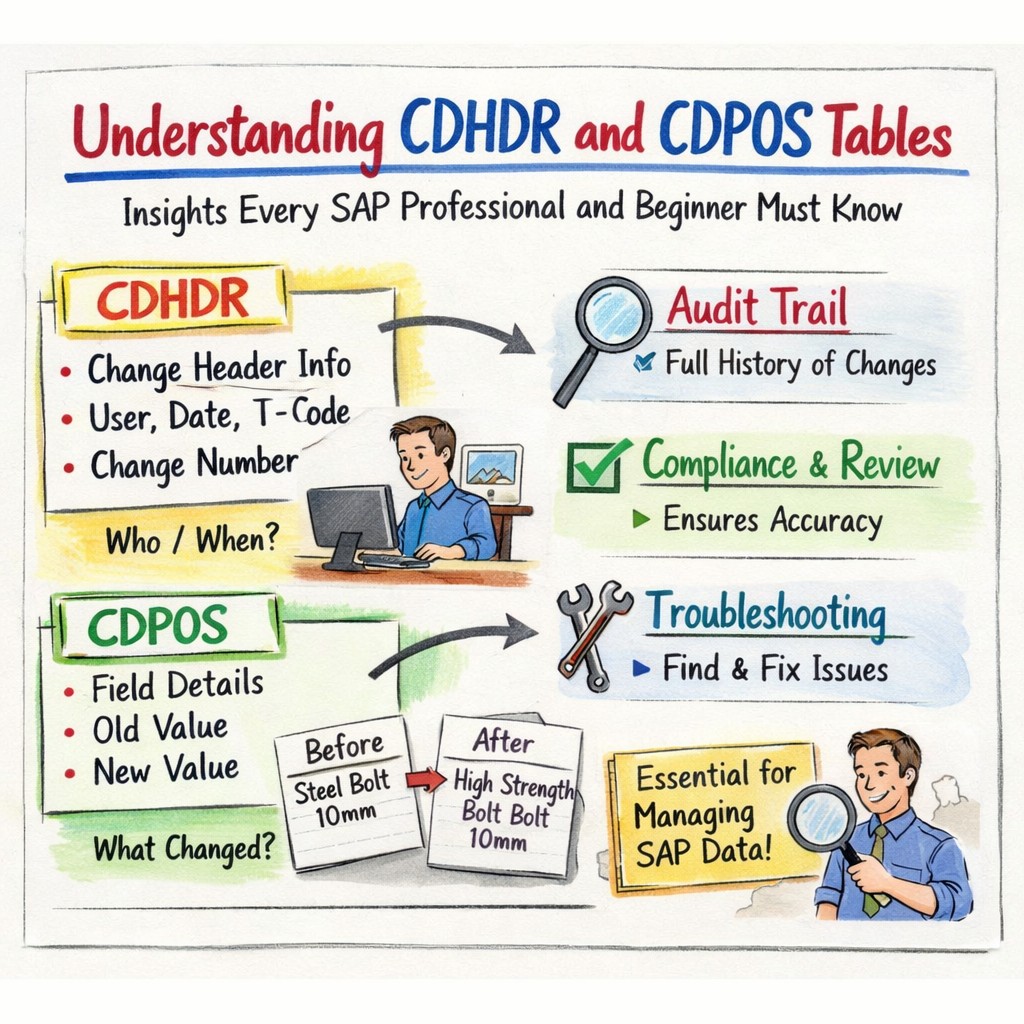
Today we are discuss Understanding CDHDR and CDPOS Tables. These two tables work together to record every change made to important business objects across SAP modules. Whether a user updates a material master record, modifies a sales order, or changes a vendor detail, SAP stores the change history in these tables. For developers, functional consultants, auditors, and SAP administrators, knowing how these tables work can greatly improve troubleshooting, reporting, and compliance efforts. This tutorial or document breaks down the process step by step, using simple language and real-world examples to help you master the skill.
📘 Introduction to SAP Change Document Tables
In SAP when a user modifies data in SAP, the system logs these changes automatically if change document tracking is enabled for that object. — Two primary tables store this information.
SAP Change Document concept -
1) CDHDR (Change Document Header)
2) CDPOS (Change Document Position)
📘 What is the CDHDR Table?
The CDHDR table stores the header-level information about a change event. Also each entry in CDHDR represents a single change event
📘 Example-
1) A user changes the material description in a material master record.
2) SAP creates one header record in the CDHDR table that stores information such as the username, date, time, and object class.
3) The specific field that was changed (old value and new value) is recorded in the CDPOS table, which links to the CDHDR entry using the change document number.
| Field Name | Description |
|---|---|
| OBJECTCLAS | Change document object class |
| OBJECTID | Unique ID of the business object |
| OBJECTID | Object ID — the primary key value of the changed business object |
| CHANGENR | Change document number |
| USERNAME | User who made the change |
| UDATE | Date of the change |
| UTIME | Time of the change |
| TCODE | Transaction used |
CDHDR and CDPOS: — Change tracking must be activated to store history in CDHDR/CDPOS.
📘 What is the CDPOS Table?
The CDPOS table stores detailed field-level changes for objects recorded in SAP change documents. It keeps information about which field changed, including the previous value and the updated value.
📘 Example-
1) Field name- Field Name in CDPOS identifies the exact database field that was modified. It shows which attribute of the object changed, such as price, description, quantity, or status.
2) Old value- Old Value column stores the previous value of the field before the change occurred. It helps users track historical data and understand what information existed before the update.
3) New value- The New Value column stores the updated value after the change is saved. It allows users to compare old and new data and clearly see what modification was made.
| Field Name | Description |
|---|---|
| OBJECTCLAS | Object class |
| OBJECTID | Object identifier |
| CHANGENR | Change document number |
| TABNAME | Table name |
| FNAME | Field name |
| VALUE_OLD | Old value |
| VALUE_NEW | New value |
📘 Common SAP Modules Using CDHDR and CDPOS
1) Usage in Materials Management- In Materials Management, CDHDR and CDPOS track changes to material master data, purchase orders, and vendor records. They store who made the change, when it occurred, and which fields were modified.
📘 Example-
I) Material master changes: When a user updates material description, price, or unit of measure, SAP records the change in CDHDR and field details in CDPOS.
II)Purchase order modifications: If quantity, delivery date, or price changes in a purchase order, SAP logs the change for audit and tracking purposes.
III)Vendor data updates: Changes in vendor address, payment terms, or contact information are recorded to maintain a history of modifications.
2) Usage in Sales and Distribution- In Sales and Distribution, CDHDR and CDPOS record changes made to sales transactions and customer-related data. This helps track modifications in sales orders, pricing conditions, and customer master records.
📘 Example-
I)Sales order updates: When order quantity, delivery schedule, or item details change, SAP stores the change event and field-level details for tracking.
II)Pricing changes: Updates to pricing conditions, discounts, or surcharges are recorded so businesses can review historical pricing adjustments.
III)Customer data changes: If customer address, payment terms, or contact details are modified, SAP logs these changes for transparency and auditing.
3) Usage in Financial Accounting- n Financial Accounting, CDHDR and CDPOS maintain records of important financial data changes. They help auditors and accountants track adjustments made to accounting documents and master data.
📘 Example-
I)Document adjustments- When accounting documents are changed or reversed, SAP records the change event and the modified fields.
II)Vendor payment modifications: Updates to payment terms, bank details, or payment methods are logged for financial transparency.
III)General ledger updates: Changes to G/L account master data, such as descriptions or account settings, are stored for historical reference.
📘 Advantages of Using CDHDR and CDPOS Tables
📘 1)Who changed data?- CDHDR and CDPOS tables help identify which user made a change in the SAP system. Each change record stores the user ID, allowing administrators and auditors to track responsibility for data modifications.
📘 2)When the change occurred- These tables record the exact date and time when a change happened. This helps organizations analyze system activities, investigate issues, and understand the sequence of changes made to important business data.
📘3)What value was modified?- CDPOS stores detailed information about field-level changes. It shows the old value and the new value of a field, helping users clearly understand what specific data was modified in the system.
📘 Scenario Background: Example
Scenario -
📘 www.learntosap.com company uses SAP to manage Material Master Data. A user updates the material description from “Plastic cover” to “Plastic cover 10mm” in the system.
📘 Process-
1) User Makes a Change - The user opens the Material Master transaction (for example MM02) and updates the material description.
2) SAP Detects the Change ince the material master is configured for change tracking, SAP automatically records this modification.
3) Entry Created in CDHDR (Header Information)- AP stores general information about the change in the CDHDR table, such as
User who made the change
Date and time of the change
Transaction code used
Change document number
4)Entry Created in CDPOS (Detailed Information)-SAP stores the detailed change in the CDPOS table, including
Table name
Field name that was changed
Old value (Steel Bolt 10mm)
New value (High Strength Steel Bolt 10mm)
5)Link Between Tables - Both CDHDR and CDPOS records are connected using the Change Document Number (CHANGENR)
6) Result an auditor or SAP consultant wants to check what happened, they can look at CDHDR for the summary and CDPOS for the exact field changes to see who changed the data, when it was changed, and what value was updated
⚠️ Change Document Not Activated
Activate change document tracking using SCDO transaction and assign the required tables and fields..
Ensure the field is included in the Change Document Object configuration..
Modify the custom program to trigger change document functions properly.
Developers query CDHDR or CDPOS using an incorrect OBJECTID format.
🔍 Diagnosis for Issues Related to CDHDR and CDPOS Tables
Click each symptom to expand and learn more:
Use SE16 or SE16N then Enter the table name CDHDR then Filter using:-OBJECTCLAS,OBJECTID,Date (UDATE)
Use the CHANGENR (Change Document Number) from CDHDR- then Search the same number in the CDPOS table
Check user authorizations-Verify if old data has been archived
Check if it calls change document function modules
📝 Quick Knowledge Check
1. Is CDHDR used to store header information of change documents in SAP?
2.Are CDHDR and CDPOS tables linked using the CHANGENR (Change Document Number)?
3. Is the USERNAME field in CDHDR used to identify who made the change?