Today we discuss How SAP Tables Are Connected — fundamental for anyone working with SAP systems, including developers, functional consultants, data analysts, and end users. SAP is built on a highly structured relational database where business data is stored across thousands of tables. Each table holds a specific type of data, such as customer details, sales orders, materials, or financial records. These tables are linked together through relationships that allow SAP to retrieve, process, and analyse business information efficiently. These connections enable SAP to maintain data consistency, scalability, and high performance.
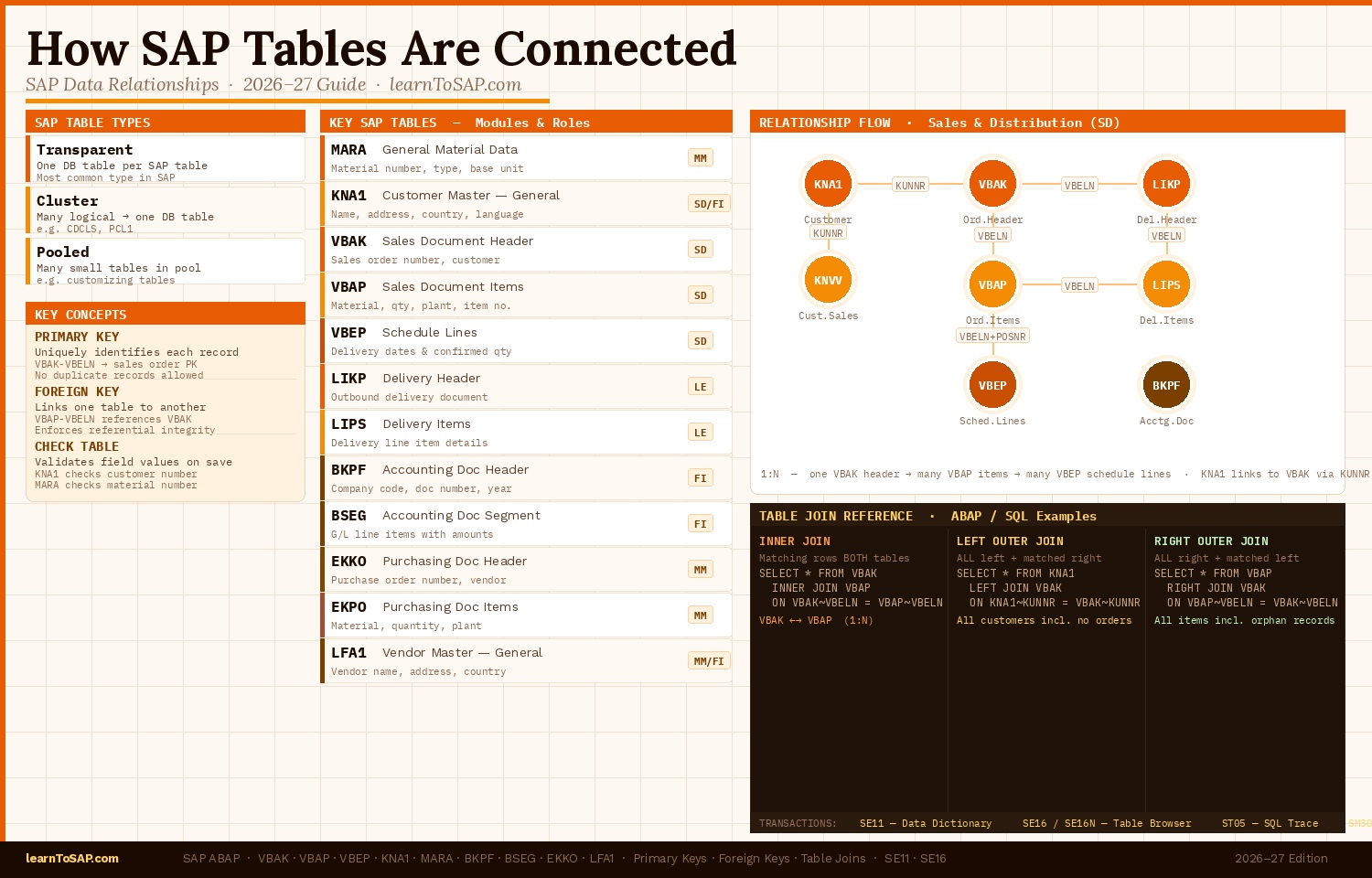
📘 SAP Uses Different Types of Tables for Storing Data
In SAP, tables are structured data storage units used to store and manage business information. They organise data into rows (records) and columns (fields).
| Table Type | Description |
|---|---|
| Transparent Tables | Stored directly in the database — one SAP table maps to one database table. Most common type used in SAP. |
| Cluster Tables | Multiple logical tables stored together in a single database table. Used for related data like payroll or document change history. |
| Pooled Tables | Multiple small tables stored in a single pool table. Used for control and customising data with short, frequently accessed records. |
📘 What Are SAP Tables?
SAP tables are the building blocks of business data storage. Each module (SD, MM, FI, etc.) uses its own set of tables to store transactional and master data.
| Table | Description | Module |
|---|---|---|
| MARA | General material master data — material number, type, base unit of measure, industry sector | MM / Cross |
| KNA1 | General customer master — name, address, country, language | SD / FI |
| VBAK | Sales document header — sales order number, customer, sales org, document date | SD |
| VBAP | Sales order items — material, quantity, item number, plant, pricing references | SD |
🔑 Key Concepts Behind How SAP Tables Are Connected
Primary Keys
A primary key uniquely identifies each record in a table. It ensures no duplicate records exist, enables fast database access, and creates reliable table relationships.
| Field | Description | Role |
|---|---|---|
| VBELN | Sales document number | Primary Key — uniquely identifies each sales order in the system |
Foreign Keys
Foreign keys link one table to another. They enforce data integrity by ensuring that referenced values exist in the target table before a transaction can be saved.
| Table | Field | References | Meaning |
|---|---|---|---|
| VBAP | VBELN | VBAK | Every sales order item must belong to a valid sales order header |
VBAP-VBELN → VBAK-VBELN is one of the most common foreign key relationships in SAP SD. SAP will reject the record if VBELN does not exist in VBAK.
Check Tables
SAP uses check tables to validate field values before data is saved:
| Field | Check Table | Purpose |
|---|---|---|
| Customer Number | KNA1 | Ensures the customer exists before a sales order is created |
| Material Number | MARA | Ensures the material exists before adding it to a purchase order |
🔗 Types of Relationships Between SAP Tables
One-to-One
One record in a table corresponds to exactly one record in another table.
One-to-Many
One record in the parent table links to many records in the child table. Most common in SAP.
Many-to-Many
Multiple records in one table relate to multiple records in another. Uses intermediate tables.
| Sales Order (VBAK — VBELN) | Item (VBAP — POSNR) | Relationship |
|---|---|---|
| 500001 | Item 10 | One header → many items |
| 500001 | Item 20 | Same header, second item |
| 500001 | Item 30 | Same header, third item |
🔍 Understanding Table Joins in SAP
When retrieving data from multiple connected tables, SAP uses joins.
Inner Join
Returns records where values match in both tables.
SELECT * FROM VBAK
  INNER JOIN VBAP
    ON VBAK~VBELN = VBAP~VBELN.
Left Outer Join
Returns all records from the left table and matching records from the right.
SELECT * FROM VBAK
  LEFT OUTER JOIN VBAP
    ON VBAK~VBELN = VBAP~VBELN.
| Join Type | Returns | Common Use Case |
|---|---|---|
| INNER JOIN | Rows matching in both tables | Sales orders with items (VBAK + VBAP) |
| LEFT OUTER JOIN | All left rows + matching right rows | All customers including those with no orders |
| RIGHT OUTER JOIN | All right rows + matching left rows | All items including unlinked orphan records |
🛒 SAP Tables Connected in Sales and Distribution (SD)
Customer Master Tables
| Table | Description | Key Field |
|---|---|---|
| KNA1 | General customer data — name, address, country | KUNNR |
| KNVV | Sales area data — pricing, delivery terms, sales org | KUNNR + VKORG + VTWEG + SPART |
| ADRC | Address data — street, city, postal code | ADDRNUMBER |
Sales Document Tables
| Table | Description | Key Field | Links To |
|---|---|---|---|
| VBAK | Sales order header — one record per order | VBELN | KNA1 (via KUNNR) |
| VBAP | Sales order items — one record per line item | VBELN + POSNR | VBAK (via VBELN) |
| VBEP | Schedule lines — delivery dates and quantities | VBELN + POSNR + ETENR | VBAP (via VBELN + POSNR) |
Connection chain in SD:
VBAK-VBELN = VBAP-VBELN
VBAP-VBELN + VBAP-POSNR = VBEP-VBELN + VBEP-POSNR
| Table | Full Name | Module | Key Field(s) | Links To | Relationship |
|---|---|---|---|---|---|
| MARA | General Material Data | MM / Cross | MATNR | MARD, MARC, MAKT | 1 : N — one material → many plants/stocks |
| MARC | Plant Data for Material | MM | MATNR + WERKS | MARA, MARD | N : 1 — many plant records → one material |
| MARD | Storage Location Stock Data | MM / WM | MATNR + WERKS + LGORT | MARA, MARC | N : 1 — many storage locs → one plant record |
| KNA1 | Customer Master — General | SD / FI | KUNNR | KNVV, VBAK, BSID | 1 : N — one customer → many sales areas & orders |
| KNVV | Customer Master — Sales Data | SD | KUNNR + VKORG + VTWEG + SPART | KNA1 | N : 1 — many sales areas → one customer |
| VBAK | Sales Document Header | SD | VBELN | VBAP, KNA1, VBUK | 1 : N — one order header → many items |
| VBAP | Sales Document Item | SD | VBELN + POSNR | VBAK, MARA, LIPS | N : 1 — many items → one order header |
| VBEP | Sales Document Schedule Lines | SD | VBELN + POSNR + ETENR | VBAP | N : 1 — many schedule lines → one order item |
| LIKP | Delivery Header | SD / LE | VBELN | LIPS, VBAK | 1 : N — one delivery → many delivery items |
| LIPS | Delivery Item Data | SD / LE | VBELN + POSNR | LIKP, VBAP, MARA | N : 1 — many delivery items → one delivery |
| BKPF | Accounting Document Header | FI | BUKRS + BELNR + GJAHR | BSEG, BSIS, BSAS | 1 : N — one doc header → many line items |
| BSEG | Accounting Document Segment | FI | BUKRS + BELNR + GJAHR + BUZEI | BKPF, SKA1, KNA1 | N : 1 — many line items → one doc header |
| SKA1 | G/L Account Master | FI | KTOPL + SAKNR | SKB1, BSEG | 1 : N — one G/L account → many company codes |
| EKKO | Purchasing Document Header | MM | EBELN | EKPO, LFA1 | 1 : N — one PO header → many PO items |
| EKPO | Purchasing Document Item | MM | EBELN + EBELP | EKKO, MARA | N : 1 — many PO items → one PO header |
| LFA1 | Vendor Master — General | MM / FI | LIFNR | LFB1, EKKO, BSIK | 1 : N — one vendor → many company code records |
Tip: Use transaction SE11 to view table structures and foreign key definitions. Use SE16 to browse live table data.
🛠️ Tools to Analyse SAP Table Connections
Data Dictionary (SE11)
- View full table structures and field definitions
- Check foreign key definitions between tables
- Analyse check tables and domain values
- View technical settings and delivery class
Table Browser (SE16 / SE16N)
- View live table data with key filters
- Test table relationships by matching keys
- Explore records and check row counts
- Export table data for further analysis
📝 Quick Knowledge Check
1. Is VBELN the primary key used to connect VBAK and VBAP tables?
2. Is the One-to-Many relationship the most common type in SAP?
3. Can transaction SE11 be used to view foreign key relationships between SAP tables?
📘 Featured SAP Tutorials
SAP MM Configuration
Complete MM configuration guide covering procurement cycle and system settings.
Read TutorialSAP FICO Training 2025
Career paths, certification guide, and hands-on FICO module training.
Read TutorialPython Tutorial
Master Python from the ground up — syntax, loops, functions and more.
Read Tutorial