SAP TUTORIALS-
SAP Transport Lifecycle Tutorial: SE09/SE10 Complete Process with STMS
Introduction-
✅ Complete Guide to SAP Transport Lifecycle: From DEV to PRD with T-Codes
In SAP ERP End-to-End SAP Transport Lifecycle is a structured process that controls how changes move across SAP systems. In simple terms, it check that developments created by consultants or developers are safely transferred from one system to another without breaking OR Error business operations. Also a small configuration change can impact all SAP modules like finance, logistics, or human resources. That’s why SAP uses a controlled transport system sooner than direct changes in production systems. This lifecycle work a main role in maintaining system stability, examine, and Availability.
✅ Understanding the SAP System Landscape
✅ 1)Development System (DEV)-The development system is where all changes begin. Developers write ABAP code, and functional consultants configure business processes here. Any change made in DEV is automatically recorded in a transport request.
✅ 2)Quality Assurance System (QAS)-The quality system is used for testing. Business users, testers, and consultants validate whether the transported changes work as expected. Only approved and tested changes move forward.
✅ 3)Production System (PRD)-The production system is the live environment. End users perform daily business operations here. Direct changes are restricted, making transports the only safe way to introduce updates.
SAP Joule,- Joule is designed to its work to across business roles, making complicated SAP systems feel as easy as chatting with a workmate.
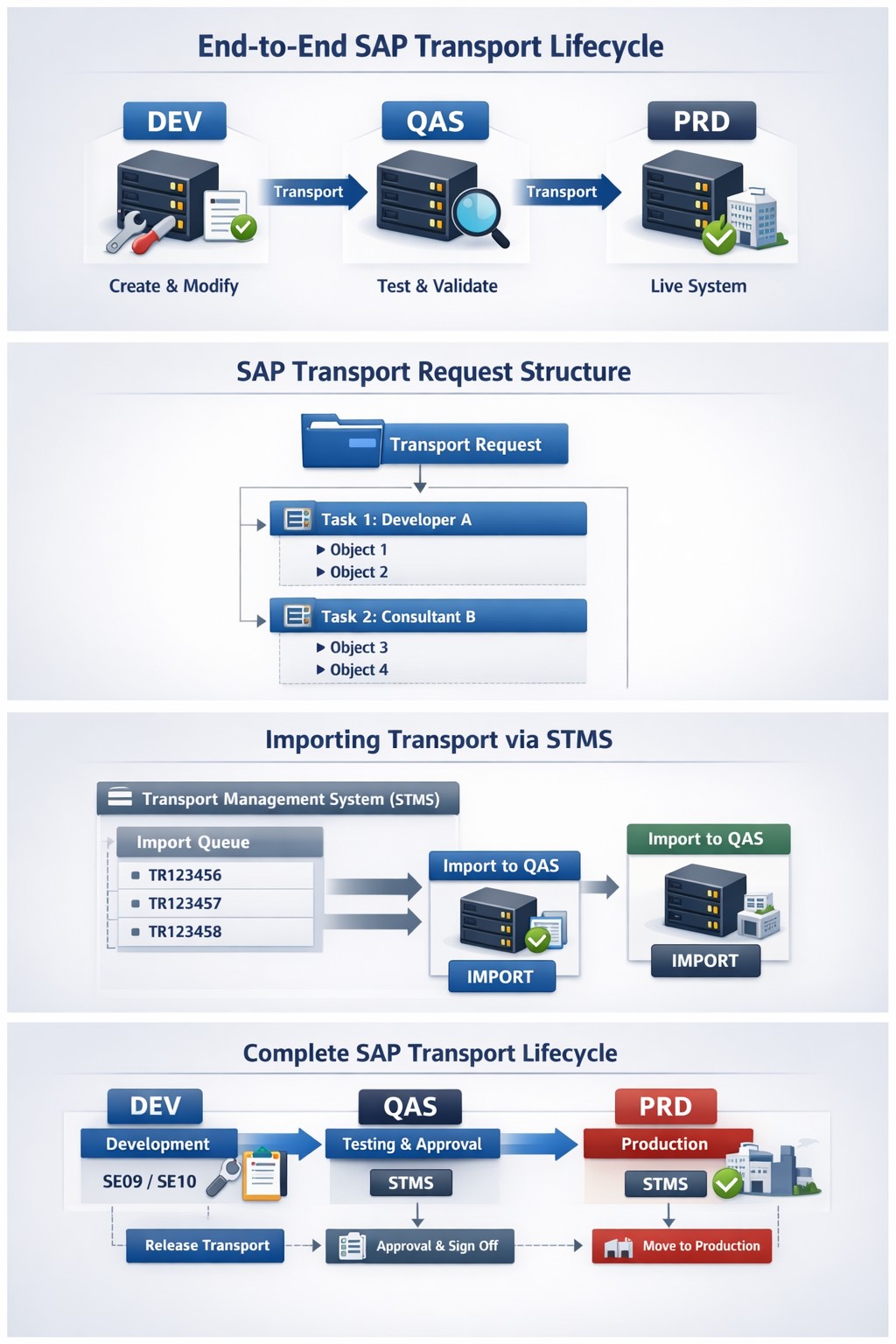
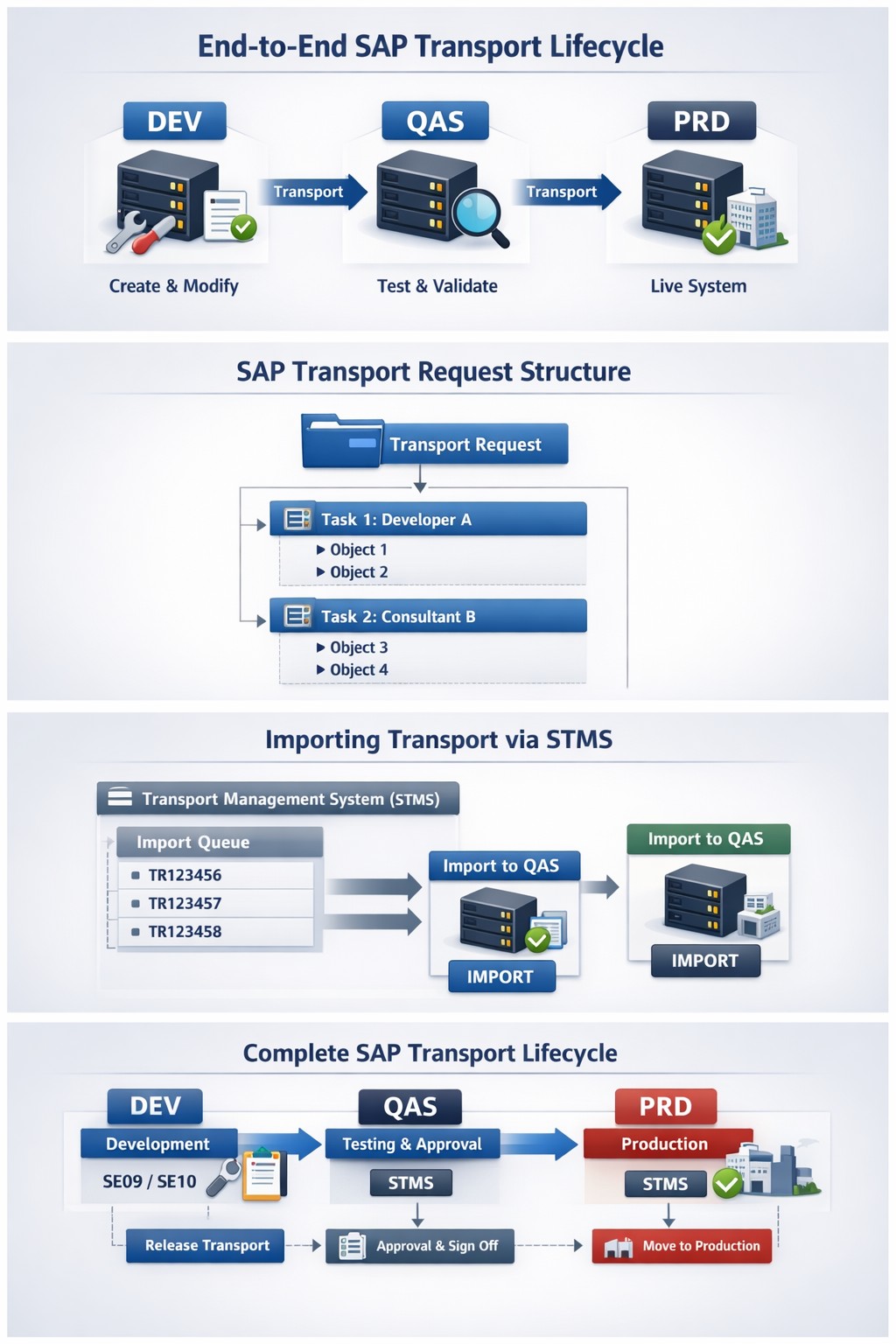
✅What Is an SAP Transport Request:-
In SAP transport request is a container that stores changes made in an SAP system. It acts like a delivery package that moves objects between systems during the End-to-End SAP Transport Lifecycle.
✅ Types of SAP Transport Requests.
1) Customizing Requests- These store configuration changes such as organizational structures, pricing rules, or account determination.
2) Workbench Requests- Workbench requests hold repository objects like ABAP programs, function modules, reports, and data dictionary objects.
3) Transport of Copies- These are temporary transports used mainly for testing or urgent fixes without affecting the main transport sequence.
✅ SAP Transport Request-
✅ Follow Steps-
✅ SELECT T-Code- SE09/SE10 -Transport Organizer
✅ Step 1-Create Change in Development System (DEV)
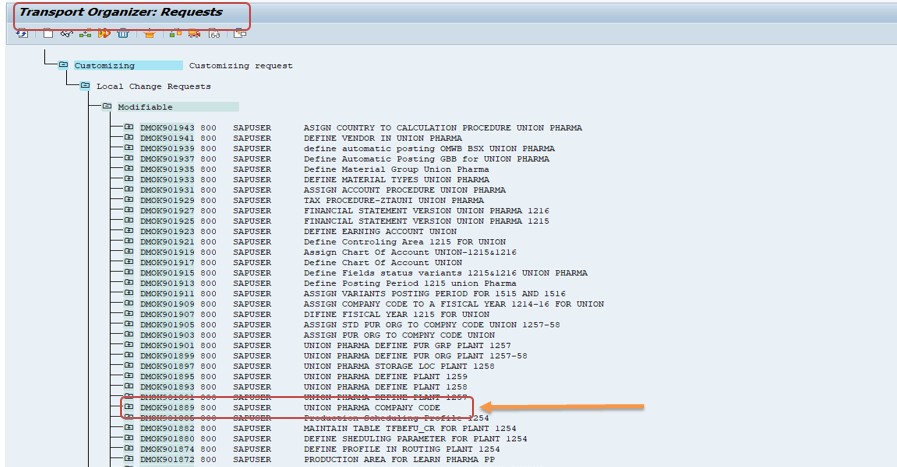
✅ Step 2-Click ON Release BUTTON- Then Check Option Which You Want -
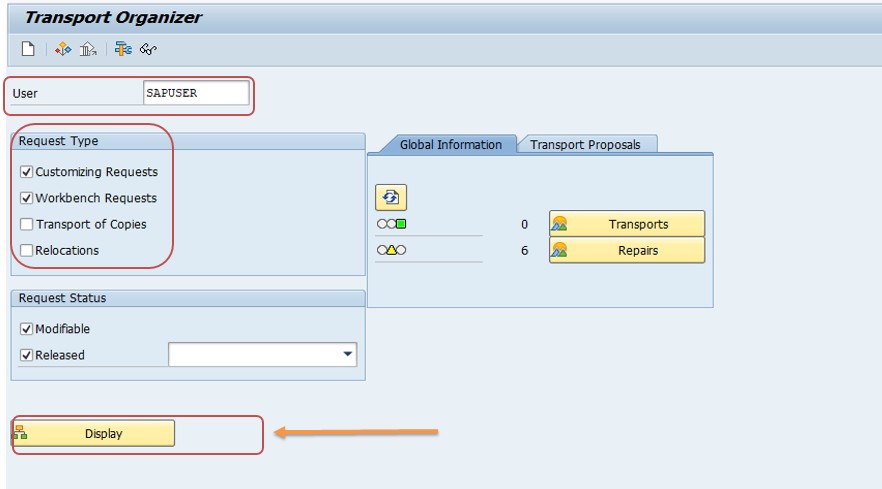
✅ Then Select USER- SAPUSER
✅ Then Select Request Type- Tick (Which You Want)
✅ Then Select Request Status- Tick
✅ Then Click on Display Button-
✅ Step 3- Then Check All Transport Request-
1)- First-Display objects
2)- Then- Verify completeness
3)- Next- Ensure no unrelated objects
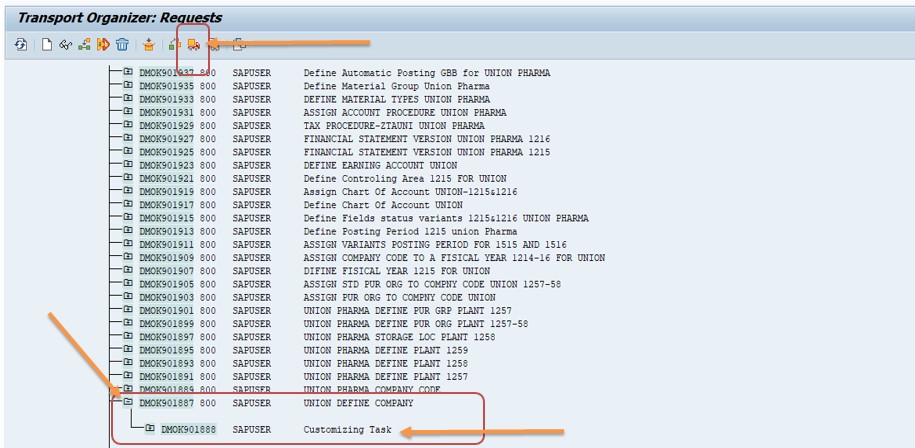
✅ Step 4- Then Correct Release Sequence-
1)- Note -Can Not Release Main TRANSPORT REQUEST
2)- Then- First release the sub-transport request. Expand the Main Request, select the required sub-transport, and release it.
3)- Next- Ensure no unrelated objects
3)- Next- Then Select Release Directly Button
3)- Next- You can chek Green Tick mark -mening of this you are Sub Transport Request Is Released
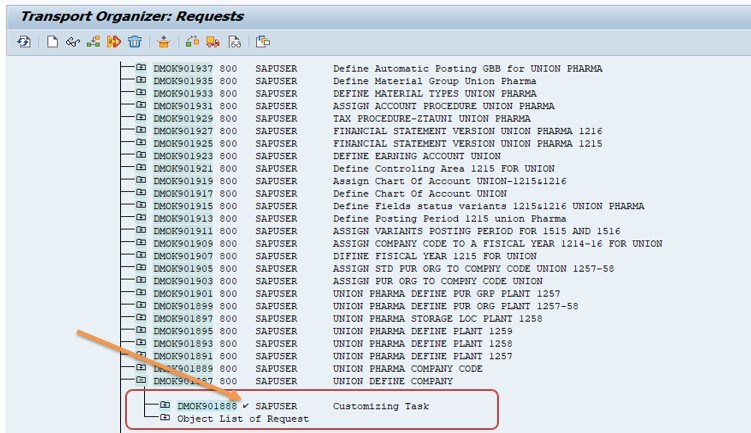
✅ Then Next Release Main Transport Request
✅ Then Select Release Directly Button-
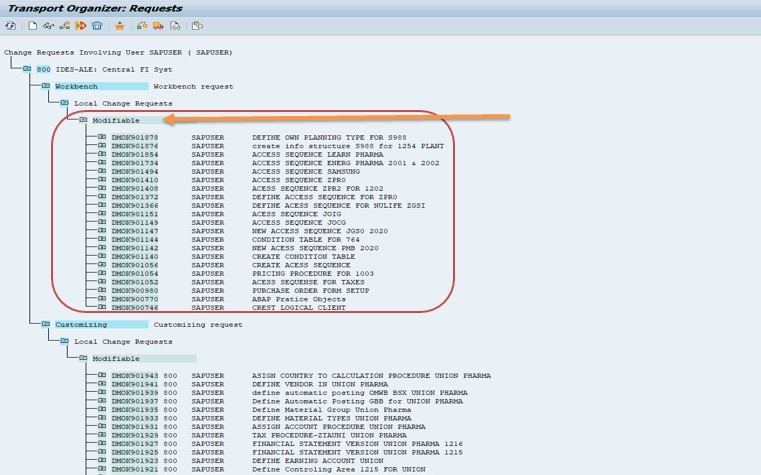
✅ Once you Release Main Transport Request Then Don Not Seen MODIFIABLE
✅ Once you Release Main Transport Request Then Don Not Seen MODIFIABLE
✅ Check Status Down Side - Release Or Not
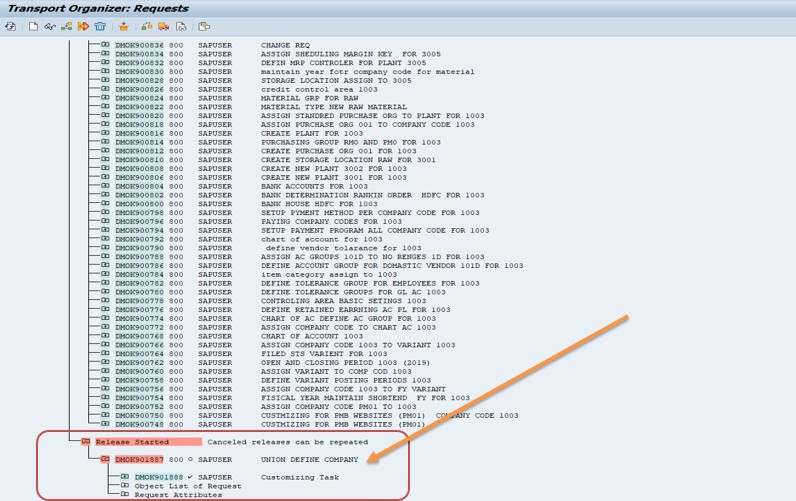
✅ Step 5: Transport Management System (STMS)
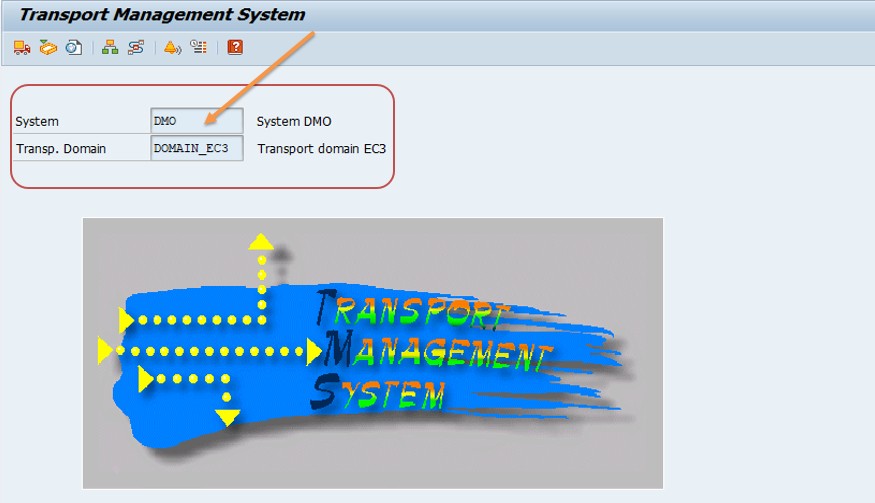
✅ STMS is the central tool for managing transports across the SAP landscape-
1) Define transport routesn
2) View import queues and Monitor transport status
3) Define transport routesn-
✅ Step 6: Import into Quality System (QAS)
✅ Basis or authorized users import the transport into QAS using STMS.
1)Testing- Functional testing , Integration testing, User Acceptance Testing (UAT)
2) Any issues are found - Then Fix is done in DEV Server and New transport is created
✅ Step 7: Approval Process
✅ After Creating successful testing-
1)Business users Check and approve the change
2)Change ticket is updated (ChaRM / ServiceNow)
✅ Step 8: Import into Production (PRD SERVER)
✅ This Function Done only by SAP Basis team-
1)System becomes live with new changes
2)Monitoring and Validation-After import, logs must be checked.
✅ Monitoring T-Codes
1)STMS – Transport logs
2)SM21 – System logs
3)SLG1 – Application logs
1.Does SAP automatically prompt for a transport request when changes are made in DEV?.
2.Can a transport request be released before all tasks are released?
3.Is STMS used to import transports into QAS and PRD?
-How To Create Debit Memo Request