SAP Error Fix: Invalid Factory Calendar or Error in the Factory Calendar
Example message: "Invalid factory calendar or error in the factory calendar 28.11.2019"-the exact date in your own error will differ, but the diagnostic steps below are identical.
This error typically occurs when there is an issue with the factory calendar assigned to a plant, company code, or work center. Unlike a simple "calendar needs extending" issue, this message covers a broader family of problems-the calendar might be completely missing, expired, or genuinely misconfigured. This guide covers the exact fix using OX10 and SCAL, then goes deeper into how to tell these three causes apart, a real business scenario, and a full diagnostic checklist.
✅ Possible Reasons
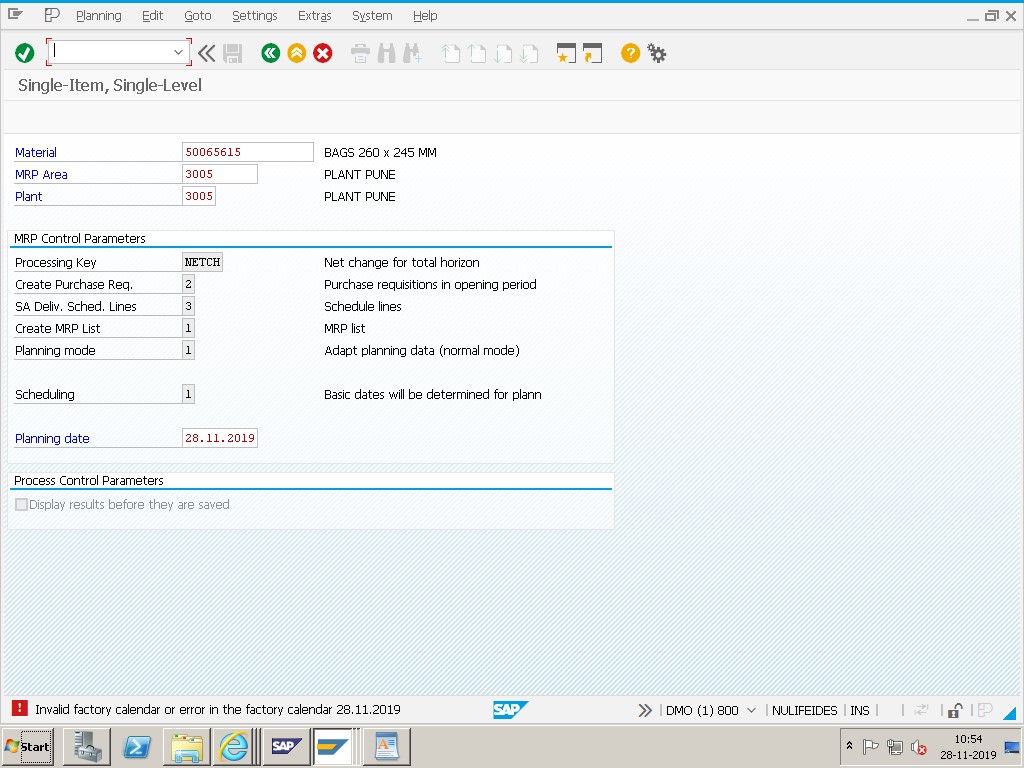
- Factory Calendar is Missing or Not Assigned-the plant or company code has no factory calendar ID selected at all.
- Factory Calendar is Expired-a calendar ID is assigned, but its validity period doesn't extend far enough to cover the required date.
- Factory Calendar is Incorrectly Configured-the calendar exists and is valid, but has genuine configuration issues, such as a missing or incorrect holiday calendar link.
🔧 Follow These Steps
Solution: Go to SAP transaction SCAL (or OP03).
Open the Factory Calendar and check:
- If the calendar assigned to your plant/company is valid.
- If the dates (especially the date shown in your error) are correctly maintained as working or non-working days.
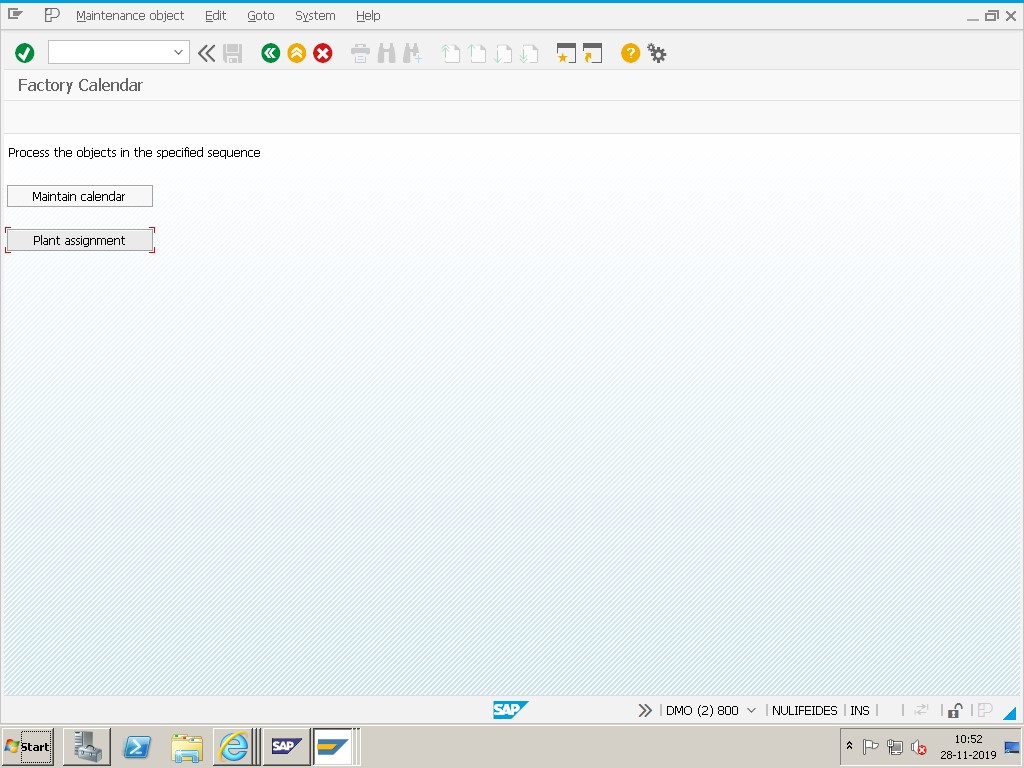
Check Factory Calendar Assignment-Transaction: OX10 / OX18, then select Plant Assignment.
Select Calendar-choose the correct, valid factory calendar ID for the plant.
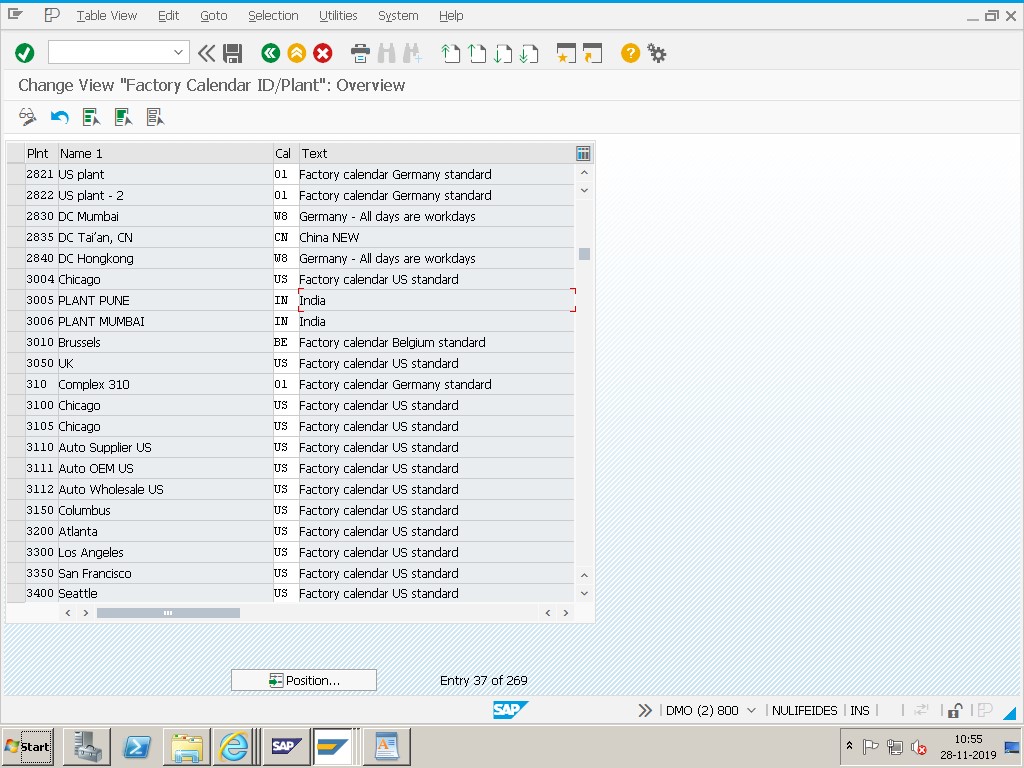
Save.
🔍 Three Distinct Causes Hiding Behind One Error Message
This error message is intentionally broad, which is helpful for catching a class of problems but unhelpful for immediately knowing which specific problem you're facing. It's worth walking through each of the three possible causes separately, since the fix genuinely differs between them.
| Cause | What's Actually Wrong | Where to Check | Fix |
|---|---|---|---|
| Missing Assignment | The plant/company code has no factory calendar ID assigned at all | OX10 (Plant Assignment) | Select and assign a valid factory calendar ID |
| Expired Calendar | A calendar is assigned, but its validity period doesn't reach the required date | SCAL, checking the calendar's validity period fields | Extend the validity period and regenerate |
| Misconfigured Calendar | The calendar is assigned and valid, but has genuine configuration problems (missing holiday link, incorrect workday rules) | SCAL, reviewing the calendar's holiday calendar reference and workday rule settings | Correct the holiday calendar link or workday rule configuration |
A quick way to narrow it down: if OX10 shows no calendar at all in the plant's Factory Calendar field, you're dealing with a missing assignment. If a calendar is shown but the error references a date far in the future, it's likely expired (see the related guide on that specific scenario linked below). If a calendar is shown, is within its validity period, and the date in question still causes problems, you're likely looking at a genuine misconfiguration within the calendar itself.
📑 OX10 (Assignment) vs SCAL (Calendar Content)-Two Different Places to Look
It's worth being clear about what each transaction actually controls, since confusing them wastes troubleshooting time. OX10 (and the related OX18 for plant/company code assignment) is where you tell SAP which factory calendar a specific plant should use-it's a pointer, a simple assignment field, not the calendar's actual content. SCAL is where the calendar itself lives-its validity period, its workday rules, and which public holiday calendar it references.
A plant can have a perfectly valid, well-configured calendar ID pointed to in OX10, and still hit this error if that same calendar ID has a problem in SCAL-meaning both transactions genuinely need to be checked, not just one. Conversely, if OX10 shows no calendar assigned at all, there's no point investigating SCAL for that plant until an assignment is made first, since there's nothing yet for SCAL-level issues to even apply to.
🛠️ Which SAP Processes Are Affected When a Plant's Calendar Is Invalid
Because working-day calculation touches nearly every date-sensitive process, an invalid factory calendar at a plant can surface as several different-looking symptoms depending on which process reaches the calendar first. MRP scheduling for that plant will fail or produce unreliable planned order dates, since lead time offsets depend on counting working days. Production and process order scheduling at the plant will similarly be affected, as basic start/finish dates rely on the same calendar. Capacity planning at any work center belonging to that plant cannot calculate correctly, since work center capacity is defined per working day. Sales and Distribution processes-route determination and delivery scheduling-for shipping points tied to the plant can also be affected if they reference the same calendar.
This wide-reaching impact is exactly why a missing or broken calendar assignment at a newly created plant tends to surface quickly and in multiple places at once, often confusing troubleshooters who see several seemingly unrelated errors (an MRP failure here, a scheduling issue there) that actually share the same single root cause.
📱 This Error in SAP S/4HANA
Factory calendar assignment (OX10) and calendar content maintenance (SCAL) work identically in SAP S/4HANA as in ECC, since this is foundational Basis-level configuration shared across all modules rather than something restructured by the Universal Journal. Fiori apps that surface scheduling or capacity information for a plant will read from the same underlying calendar assignment and content, so a missing or broken calendar will affect Fiori-based scheduling views exactly the same way it affects classic SAP GUI transactions.
One point worth checking specifically after any S/4HANA system conversion or new plant creation via a migration cockpit or LSMW-style load: automated plant creation processes sometimes complete the bulk of plant master fields correctly but miss less obviously "critical" fields like factory calendar assignment, since the load may not fail outright without it-it simply leaves the field blank until someone notices via exactly this kind of error.
📑 Similar-Looking SAP Factory Calendar Errors and How They Differ
| Error | Root Cause | Where to Look First |
|---|---|---|
| Invalid factory calendar or error in the factory calendar | Missing assignment, expired calendar, or genuine misconfiguration (broadest message) | OX10 first, then SCAL |
| Date comes after end of factory calendar with ID X | Specifically a validity period that doesn't extend far enough forward | SCAL, validity period fields |
| 12-28.11.2019 date comes after end of valid factory calendar (please correct) | Same family as the validity-range issue above, phrased slightly differently by the calling transaction | SCAL, validity period fields |
If your specific error message clearly and only references a date being beyond the calendar's end, the dedicated guide on that scenario (linked below) walks through the SCAL validity extension in full detail. This page is the right starting point when you're not yet sure which of the three underlying causes you're actually facing.
💼 Real-World Scenario: A New Plant With No Calendar Assigned
Pooja Mishra, a Basis administrator, was asked to investigate why MRP runs kept failing with this error at a newly created plant, while every other plant in the same company code ran without issue. Her first instinct, based on similar tickets she'd resolved before, was to check SCAL for validity period problems-but the calendar's validity looked perfectly fine when she checked it in isolation.
The actual issue turned out to be simpler than she expected: when checking OX10 specifically for the new plant, the Factory Calendar field was completely blank. Whoever had set up the new plant's master data had copied most settings from an existing plant template but had missed completing the factory calendar assignment step-a field that's easy to overlook since plant creation involves dozens of other configuration fields. Assigning the correct, already-valid calendar ID to the new plant in OX10 resolved the error immediately, with no changes needed in SCAL at all. This is a useful reminder that this broader "invalid factory calendar" error often has a much simpler root cause than the more specific "date comes after end of calendar" error-always rule out a missing OX10 assignment before diving into SCAL configuration details.
❗ Common Mistakes When Troubleshooting This Error
- Jumping straight into SCAL to check validity periods without first confirming in OX10 that a calendar is assigned at all.
- Assuming this error is identical to "date comes after end of factory calendar," when it's actually a broader message covering missing assignments and configuration issues too.
- Fixing the calendar assignment for one plant without checking whether other newly created plants have the same gap.
- Not checking the underlying public holiday calendar's own validity when a factory calendar references one, since a broken link there can also trigger this error.
- Overlooking factory calendar assignment as a standard step in new plant setup checklists.
📈 Troubleshooting Decision Tree
- Check OX10 for the affected plant. Is a factory calendar ID assigned at all? If not, assign one and save.
- If a calendar is assigned, open it in SCAL and check its validity period against the date referenced in the error.
- If the validity period looks adequate, check the calendar's linked public holiday calendar for its own validity and correctness.
- Check whether the specific date is deliberately marked as a working or non-working day and whether that matches business expectations.
- Compare against a working plant with a similar business calendar to spot configuration differences.
✅ Prevention Checklist for Basis and MM Teams
- Add "factory calendar assigned in OX10" as an explicit, checked-off item on every new plant creation checklist.
- Periodically audit all plants for blank or clearly incorrect factory calendar assignments.
- Extend factory calendar validity periods generously (5-10 years) as part of annual system maintenance, as covered in this site's related guide on that specific error.
- Document which factory calendar ID each plant is meant to use, and why, so misassignments are easy to spot during review.
- Test date-sensitive processes (MRP, capacity planning, scheduling) for any newly created plant before go-live, rather than discovering calendar gaps reactively.
📋 Related SAP Transactions
| Transaction | Purpose |
|---|---|
| OX10 | Assign a factory calendar to a plant. |
| OX18 | Assign plants to company codes, related to overall plant master configuration. |
| SCAL | Maintain factory calendars and public holiday calendars, including validity periods. |
| OP03 | Alternative path to factory calendar maintenance, often used in older documentation alongside SCAL. |
| CR02 | Check or change the factory calendar assigned to a work center's capacity data. |
| MD01N / MD02 | Run MRP, which relies on the plant's factory calendar for scheduling. |
🎓 Interview-Style Questions and Answers
Q: What are the three broad categories of factory calendar problems in SAP?
A missing assignment (no calendar ID selected for the plant), an expired calendar (validity period doesn't reach the required date), and a misconfigured calendar (assigned and valid, but with genuine configuration issues like an incorrect holiday calendar link).
Q: What is the difference between OX10 and SCAL in the context of this error?
OX10 controls which factory calendar ID a plant is assigned to-it's a pointer. SCAL is where the calendar's actual content (validity period, workday rules, holiday calendar reference) is maintained.
Q: Why is it good practice to check OX10 before SCAL when troubleshooting this error?
Because a missing assignment in OX10 is a simpler, faster fix than most SCAL-level configuration issues, and there's no point investigating a calendar's internal configuration in SCAL if no calendar is even assigned to the plant in the first place.
📚 Quick Glossary of Terms Used in This Guide
- Factory calendar assignment: The link, maintained in OX10, between a plant and the specific factory calendar ID it should use.
- Factory calendar content: The actual working-day/non-working-day data and validity period, maintained in SCAL.
- Public holiday calendar: A list of specific holiday dates, referenced by one or more factory calendars.
- Validity period: The date range for which a factory calendar has been generated and can be used in scheduling calculations.
- OX10: The SAP transaction used to assign a factory calendar to a plant.
🎯 Conclusion
"Invalid factory calendar or error in the factory calendar" is a broader message than it might first appear, covering everything from a simple missing assignment to genuine calendar misconfiguration. Starting with a quick OX10 check before diving into SCAL saves significant troubleshooting time, since a missing assignment (the simplest cause) is also one of the most common. If your specific error instead clearly points to a validity range issue, this site's related guide on "date comes after end of factory calendar" covers that scenario in full depth.