Fix SAP Error: Date Comes After End of Valid Factory Calendar
Example message: "28.11.2019 date comes after end of valid factory calendar. (Please correct)" - the exact date in your own error will differ, but the two-part fix below is identical.
This guide covers two related fixes together, because they're often needed side by side: first, confirming the factory calendar is correctly linked to the right country's public holiday calendar (using SCAL), and second, extending the calendar's validity period so it covers the date range your business actually needs. This guide walks through both, then goes deeper into why holiday calendar linking matters for multi-country organizations, a real business scenario, and a full troubleshooting checklist.
✅ Solution 1: SCAL - Select and Confirm the Holiday Calendar
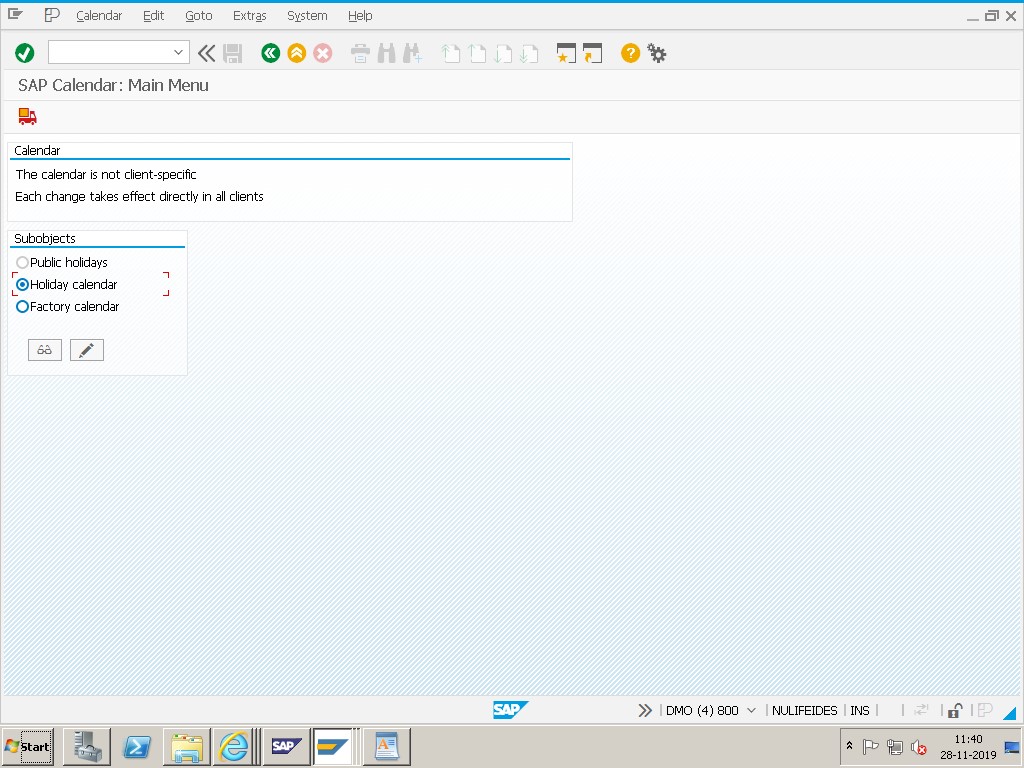
Step 1: Check Factory Calendar
Enter your calendar ID (e.g., IN, US, etc.) and click Change.
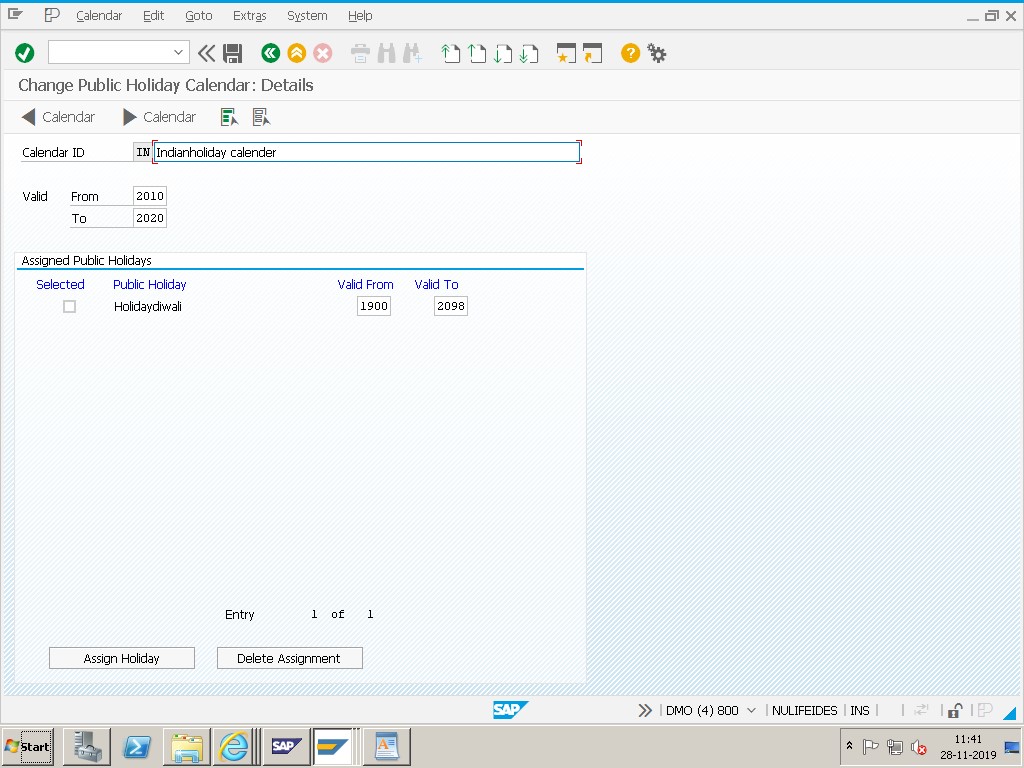
From 2010 to 2020 - check the currently maintained validity range.
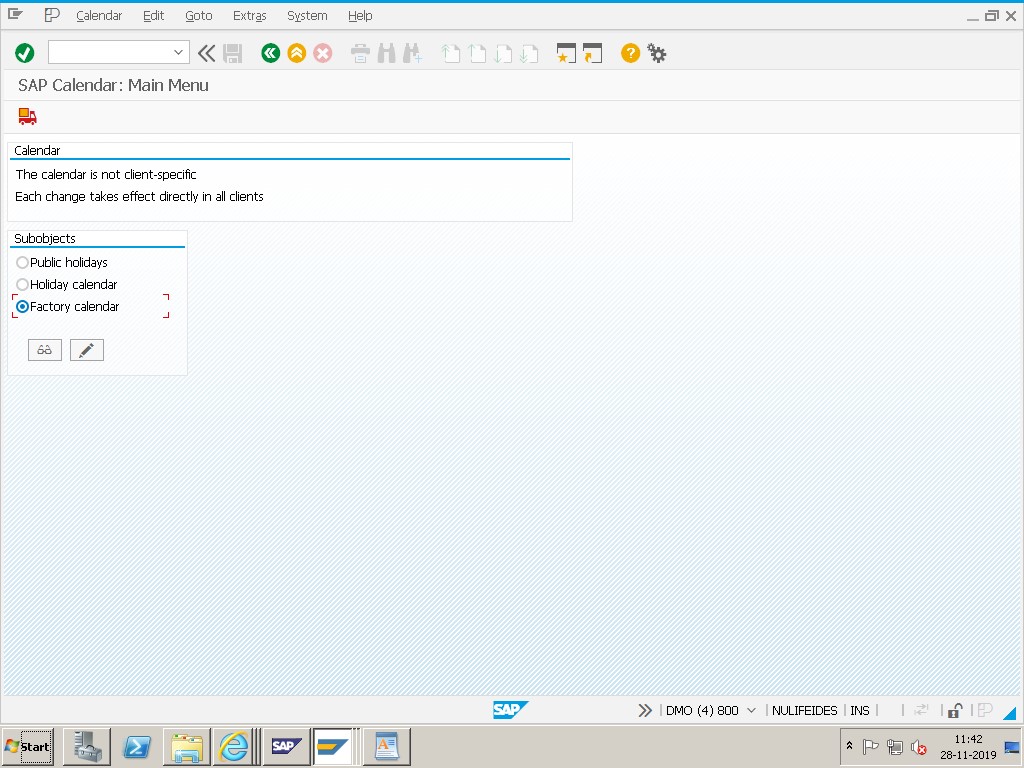
🔧 Then Select Factory Calendar and Link the Correct Holiday Calendar
Then select Factory Calendar, then select IN – India (or the appropriate country/region for your plant).
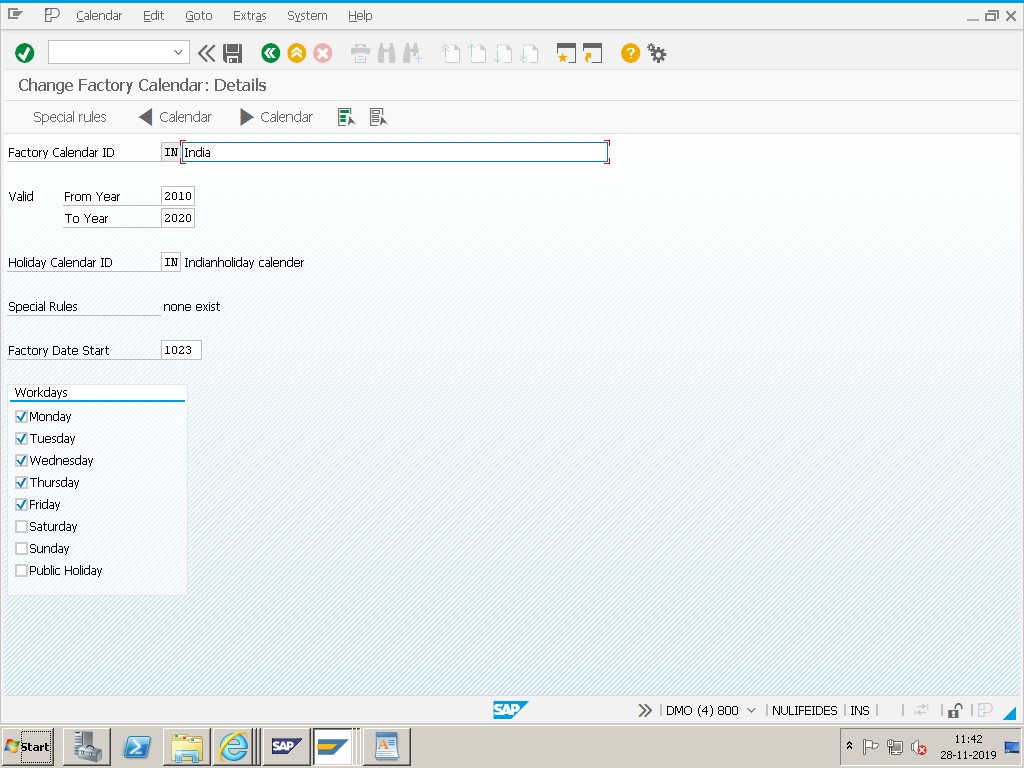
Save.
✅ Solution 2: Extend Calendar Year
Calendar → Change → Validity
Valid To Year → e.g., 2025 / 2030
Save and regenerate the calendar, then retest the original transaction.
🔍 Why Two Separate Fixes Are Covered Together Here
These two solutions address genuinely different aspects of the same underlying problem, and it's worth understanding why both matter. Solution 1 (linking the correct public holiday calendar) ensures the factory calendar's content is accurate - that it correctly reflects the actual holidays observed at that plant's location. Solution 2 (extending validity) ensures the calendar's date range is long enough to be useful for whatever scheduling or planning calculation is trying to use it.
A calendar can have one of these two things wrong without the other: it might be perfectly linked to the right country's holidays but simply not extended far enough into the future (a pure Solution 2 case), or it might have plenty of validity range remaining but be linked to the wrong country's holiday calendar entirely - for example, a plant in India accidentally referencing a US holiday calendar, which wouldn't necessarily throw this exact date-range error but would produce incorrect working-day calculations for every date. Checking both, as this guide does, gives you a complete picture rather than fixing only the symptom that happened to trigger the error message.
📋 Why Holiday Calendar Linking Matters for Multi-Country Organizations
A factory calendar's working-day/non-working-day data isn't invented independently - it's built by combining a public holiday calendar (a list of specific holiday dates for a country or region) with workday rules (typically which weekdays are non-working by default). This means the factory calendar is only as accurate as the holiday calendar it's linked to.
For organizations operating in a single country, this linking step is usually set once during initial system configuration and rarely revisited. But for organizations with plants across multiple countries - as the "select IN – India" step in this guide illustrates - each country typically needs its own factory calendar, correctly linked to that country's specific public holiday calendar, since national holidays (Independence Day, religious observances, regional holidays) differ significantly between countries and even between states or regions within a country. A single shared factory calendar across multiple countries would inevitably get some holidays wrong for at least one location.
| Scenario | Recommended Approach |
|---|---|
| Single-country operations | One factory calendar per plant, linked to that country's public holiday calendar |
| Multi-country operations | A separate factory calendar per country (or region, if holidays vary within a country), each correctly linked |
| Multiple plants within one country | Plants can often share one factory calendar if they observe identical holidays, or use separate calendars if local/regional holidays differ |
🛠️ Which SAP Processes Are Affected by an Inaccurate or Expired Calendar
Because working-day calculation underlies so much of SAP's date logic, both problems covered in this guide - insufficient validity and an incorrect holiday calendar link - ripple into several processes at once. MRP scheduling, production and process order dates, capacity planning, route and shipping point scheduling in SD, and purchasing lead time calculations all depend on the plant's factory calendar being both long enough in range and accurate in content. A validity gap tends to produce hard failures (like the error this guide addresses); an incorrect holiday calendar link tends to produce quieter, harder-to-notice scheduling inaccuracies - dates that are technically valid but wrong, like the real scenario described above.
This is worth keeping in mind when prioritizing a fix: a validity error is impossible to ignore because it blocks the transaction outright, while a holiday calendar mismatch can silently produce incorrect schedules for months before someone notices a pattern of orders landing on days the plant is actually closed.
✅ Prevention Checklist for Basis and Planning Teams
- Whenever extending a factory calendar's validity, also verify (don't just assume) the correct country/region holiday calendar is linked.
- Maintain factory calendars with validity extending 5-10 years into the future as standard practice, reviewed annually.
- For multinational organizations, maintain a documented list of which factory calendar ID corresponds to which country/region, and confirm each plant references the correct one.
- Spot-check known national holidays against the generated calendar after any holiday calendar link change, rather than assuming the link alone guarantees correctness.
- Include factory calendar validity and holiday accuracy checks in an annual year-end system maintenance checklist, alongside fiscal year and period configuration reviews.
📱 This Error in SAP S/4HANA
Factory calendar validity, holiday calendar linking, and the SCAL transaction all work identically in SAP S/4HANA as in ECC, since this is foundational Basis-level configuration shared across every module rather than something restructured by the Universal Journal. Fiori apps that surface scheduling, capacity, or delivery date information all read from the same underlying calendar data, so both the validity and holiday-accuracy issues covered in this guide affect Fiori-based views exactly the same way they affect classic SAP GUI transactions.
📑 How This Page Relates to Other Factory Calendar Guides on This Site
| Guide | Focus |
|---|---|
| This page (mmerrorpage12) | Validity extension paired specifically with confirming the correct country holiday calendar is linked (the "IN – India" linking step) |
| Invalid Factory Calendar or Error in the Factory Calendar | Broader diagnostic guide covering missing OX10 assignment, expired validity, and misconfiguration as three separate possible causes |
| Date Comes After End of Factory Calendar (Detailed Guide) | Deep dive specifically on validity period mechanics, fixed vs movable holiday rules, and long-term planning implications |
All three guides address closely related symptoms, but each emphasizes a different practical angle. If you've already extended validity and the error persists, or if you suspect a holiday accuracy issue rather than a pure date-range problem, this page's holiday calendar linking steps are the most direct next step to check.
💼 Real-World Scenario: A Calendar Extension That Didn't Fully Fix the Problem
Pramod Behera, an SAP Basis consultant, was asked to resolve this exact error for a company's India plant. He extended the factory calendar's validity in SCAL from 2020 through 2030, which immediately resolved the specific error message the planner had reported. A few weeks later, though, the same planner flagged a different, subtler issue: MRP was treating a known Indian public holiday as a working day, causing a planned order to be scheduled on a date the plant would actually be closed.
Investigating further, Pramod found that while the validity extension had fixed the date-range problem, the calendar's link to the IN (India) public holiday calendar had never actually been confirmed - it turned out the factory calendar had been linked to a generic or default holiday calendar during initial setup years earlier, one that didn't include several India-specific holidays. Correcting the holiday calendar link, as covered in Solution 1 of this guide, fixed the underlying scheduling accuracy issue that the validity extension alone hadn't touched. This is exactly why both fixes are covered together in this guide: resolving the visible error message doesn't guarantee the calendar's actual content is correct.
❗ Common Mistakes When Fixing This Error
- Extending validity and considering the issue fully resolved, without separately confirming the correct holiday calendar is linked.
- Extending the calendar by only a few years, requiring the same fix to be repeated again soon.
- Using a generic or default holiday calendar for a specific country's plant instead of confirming the correct country-specific one is selected.
- Not regenerating the calendar after making changes, leaving the underlying date table unchanged.
- Fixing one plant's calendar without checking whether other plants share the same underlying calendar ID and needed the same correction.
📈 Troubleshooting Decision Tree
- Open SCAL for the calendar ID referenced in the error and check its current validity period against the failing date.
- Extend validity generously (5-10 years forward) if the range doesn't cover the required date, then save and regenerate.
- Separately check which public holiday calendar is linked to this factory calendar, and confirm it matches the plant's actual country/region.
- If the holiday calendar is wrong or missing, correct the link and regenerate.
- Spot-check a few known holidays for the plant's location against the regenerated calendar to confirm accuracy, not just validity.
📋 Related SAP Transactions
| Transaction | Purpose |
|---|---|
| SCAL | Maintain factory calendars and public holiday calendars, including validity periods and holiday calendar linking. |
| OX10 | Assign a factory calendar to a plant. |
| OP03 | Alternative path to factory calendar maintenance, referenced in older documentation. |
| CR02 | Check or change the factory calendar assigned to a work center's capacity data. |
| MD01N / MD02 | Run MRP, sensitive to both calendar validity and holiday calendar accuracy. |
| MS31 / MS32 | Long-term planning, often the first process to expose a validity range that's too short. |
🎓 Interview-Style Questions and Answers
Q: What two separate things does a factory calendar depend on being correct?
Its validity period (the date range it's been generated for) and the accuracy of the public holiday calendar it's linked to - a calendar can have one correct and the other wrong.
Q: Why might a multinational company need several factory calendars instead of one?
Because national and regional holidays differ significantly between countries, a single factory calendar can't accurately represent working days for plants in different countries - each typically needs its own calendar linked to the correct local holiday calendar.
Q: If a validity extension resolves the error message but a known holiday still shows as a working day, what's the likely next step?
Check the holiday calendar link for that factory calendar in SCAL - the date-range problem and the holiday-accuracy problem are separate issues that can exist independently of each other.
📚 Quick Glossary of Terms Used in This Guide
- Factory calendar: A working-day/non-working-day schedule assigned to plants and work centers, combining a public holiday calendar and workday rules.
- Public holiday calendar: A list of specific holiday dates for a country or region, referenced by one or more factory calendars.
- Validity period: The date range for which a factory calendar has been generated and can be used in scheduling calculations.
- Holiday calendar linking: The configuration step in SCAL connecting a factory calendar to the specific public holiday calendar it should use.
- SCAL: The SAP transaction used to maintain both factory calendars and public holiday calendars.
🎯 Conclusion
"Date comes after end of valid factory calendar" is usually fixed by extending validity, but a thorough fix also confirms the calendar is linked to the correct country or region's holiday calendar - otherwise, you may resolve the visible error while leaving a quieter, harder-to-spot scheduling accuracy problem behind. Treat both solutions in this guide as a package, especially the first time you touch a given plant's factory calendar, and extend validity generously so you're not repeating this exercise again next year.