SAP Error: Date Comes After End of Factory Calendar with ID 01 - Solution Guide
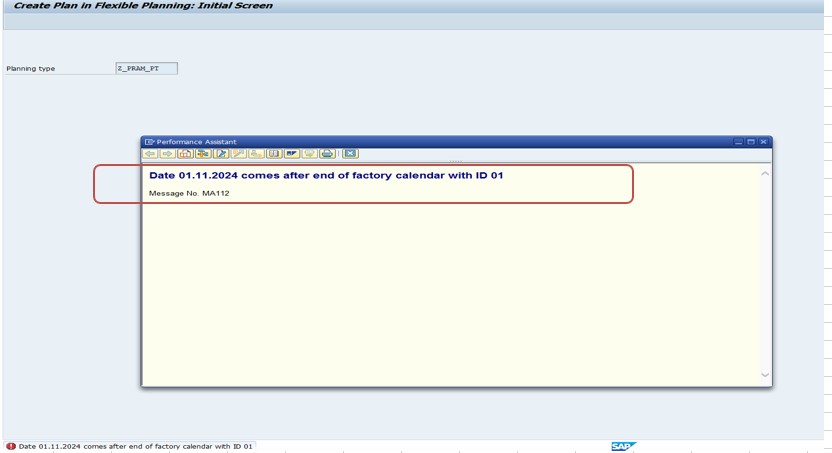
Example message: "Date 01.11.2024 comes after end of factory calendar with ID 01" - the exact date and calendar ID in your own error will differ, but the fix below is identical.
This common error means that the factory calendar (ID 01 in this example) assigned to your system does not include the date being referenced. This guide covers the exact fix using SCAL, then goes deeper into what a factory calendar actually is, how it differs from a public holiday calendar, which SAP processes depend on it, a real business scenario, and a full prevention checklist so this doesn't keep recurring year after year.
✅ Possible Causes
- Factory calendar ID 01 has not been maintained beyond a certain date.
- The year in question might not be included in the working days for this calendar.
- The calendar may need updating with additional public holidays or validity extensions.
🔧 Follow These Steps
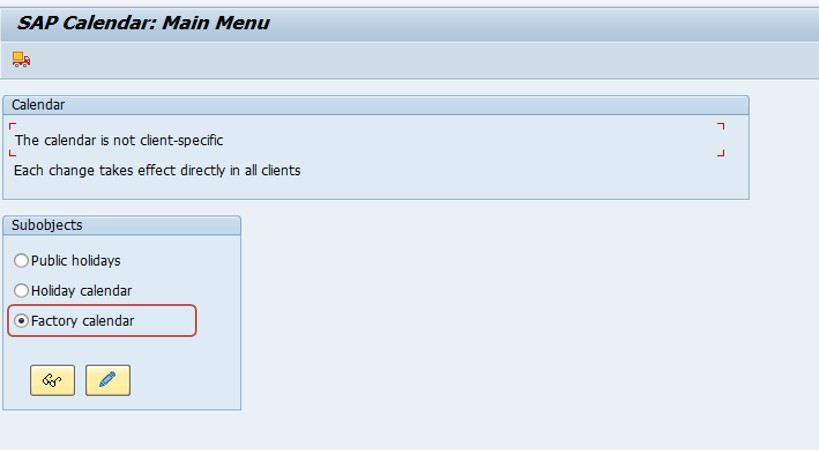
Solution: Go to SAP transaction SCAL (Factory Calendar Maintenance).
Go to transaction SCAL (Factory Calendar Maintenance).
Locate Factory Calendar ID 01 and click Change (Edit mode).
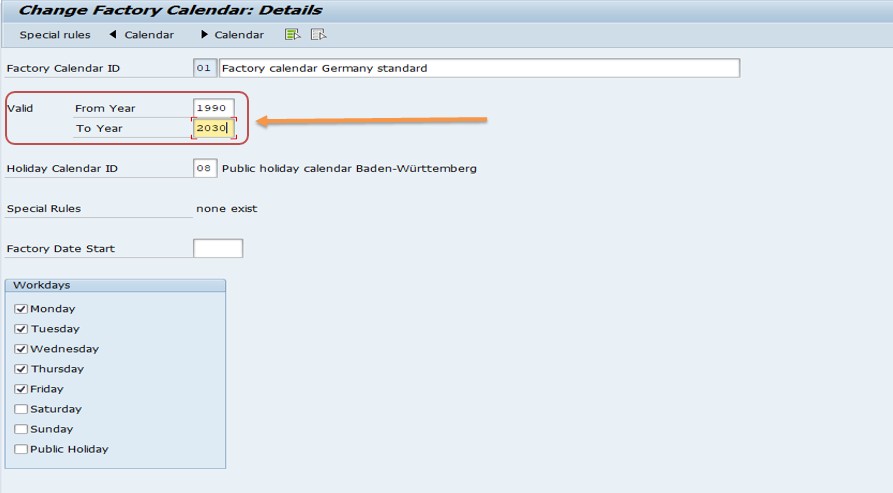
Extend the validity period - for example, update it to cover 1990 to 2030 - then save.
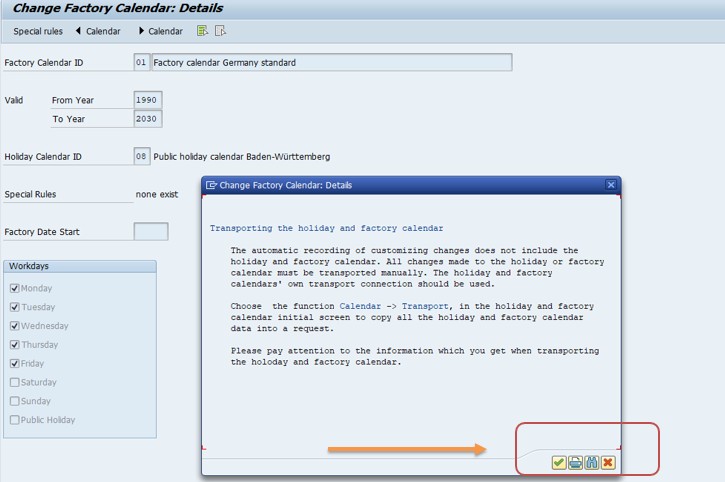
Save and retest the original transaction that raised the error.
🔍 What a Factory Calendar Actually Is, and Why It Has an End Date
A factory calendar in SAP defines which calendar dates count as working days and which count as non-working days for a specific plant, work center, or business process. It's built from two components: a public holiday calendar (a list of specific holiday dates, either fixed to a date every year or tied to a movable date rule) and a set of workday rules (typically which weekdays, like Saturday and Sunday, are treated as non-working by default). Both of these are maintained together in transaction SCAL.
Crucially, a factory calendar is not open-ended - it is generated with an explicit validity period, meaning SAP calculates and stores the working-day status for every date within that range when the calendar is generated, rather than calculating it on the fly indefinitely into the future. This is a deliberate design choice for performance and predictability, but it means that once your business processes need to schedule or calculate a date beyond that pre-generated range, SAP has nothing to reference and raises exactly the error this guide addresses.
📑 Factory Calendar vs Public Holiday Calendar - What's the Difference?
| Aspect | Public Holiday Calendar | Factory Calendar |
|---|---|---|
| What it defines | A list of specific holiday dates (fixed or rule-based, e.g. "second Monday of October") | A complete working-day/non-working-day schedule combining holidays and weekday rules |
| Where it's maintained | SCAL, Public Holidays tab | SCAL, Factory Calendar tab, referencing a holiday calendar |
| What it's assigned to | Nothing directly - it's a building block | Plants, work centers, and other date-sensitive master data |
| Has a validity period? | Yes, per holiday rule | Yes, and this is the validity period referenced in this error |
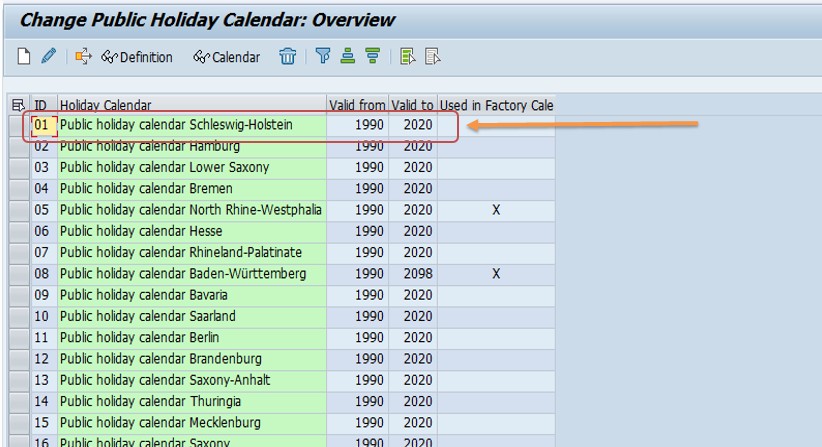
In practice, when this error appears, the actual object that needs extending is always the factory calendar itself (via its own dedicated validity fields in SCAL), not the underlying public holiday calendar - though if the holiday calendar it references also has a shorter validity period, that may need extending too for the factory calendar regeneration to succeed cleanly.
🛠️ Which SAP Processes Depend on the Factory Calendar
Because working-day calculation touches almost every date-sensitive process in SAP, a factory calendar running out of validity can surface in several different-looking errors depending on which process hits the limit first.
- MRP scheduling: Planned order dates, lead time offsets, and requirement dates are all calculated in working days, not calendar days, so MRP runs referencing a date beyond the calendar's validity will fail or produce incorrect scheduling.
- Production and process orders: Order scheduling (basic dates, in-house production time) relies on the plant's factory calendar to skip non-working days when calculating start and finish dates.
- Capacity planning: Work center capacity is defined per working day, so capacity evaluations and leveling for dates beyond the calendar's range cannot be calculated.
- Sales and Distribution: Route and shipping point scheduling, and delivery date calculations, also depend on factory calendars assigned to shipping points and routes.
- Purchasing: Planned delivery time calculations for purchase orders and scheduling agreements use the vendor's or plant's factory calendar as well.
This is exactly why extending a factory calendar's validity period is not a narrow, one-off fix for a single error message - it's effectively a piece of ongoing system maintenance that keeps a wide range of planning and scheduling processes working correctly.
📅 How Public Holidays Are Defined: Fixed vs Movable Rules
When maintaining the underlying public holiday calendar in SCAL, each holiday can be defined one of two ways, and understanding the difference helps when troubleshooting why a specific date is or isn't treated as a holiday after an extension. A fixed date holiday falls on the same calendar date every year (for example, a national day always on a specific day and month), and SAP simply repeats it automatically for every year within the calendar's validity period. A movable holiday is defined by a rule rather than a fixed date - for example, "Easter Sunday plus one day," or "the fourth Thursday of November" - and SAP calculates the actual date for each year based on that rule.
This matters for troubleshooting because a factory calendar extension can sometimes reveal that a movable holiday rule was configured incorrectly or is missing entirely for the newly extended years, especially for holidays tied to lunar or other non-Gregorian calculations that some organizations maintain manually rather than through a built-in SAP rule. If a newly extended calendar year shows a working day where a known holiday should fall, checking the specific holiday rule in SCAL - not just the factory calendar's overall validity - is the next place to look.
📈 Troubleshooting Decision Tree
- Identify the exact calendar ID and date named in the error message.
- Open SCAL and check the factory calendar's current validity period against the date that triggered the error.
- Extend the validity period generously (5-10 years forward is a common standard) rather than just past the immediate failing date.
- Check the underlying public holiday calendar's own validity if the factory calendar references one, since it may also need extending.
- Regenerate the factory calendar after saving the extension - this step is easy to forget and leaves the error unresolved even after the validity fields are updated.
- Check other plants/work centers using the same calendar ID, or a similarly short-validity calendar, to catch the same issue proactively elsewhere.
📱 Factory Calendars in SAP S/4HANA
Factory calendar maintenance via SCAL, and the underlying concept of a validity-bound, pre-generated working-day schedule, is unchanged in SAP S/4HANA - this is foundational Basis-level configuration shared across all SAP modules rather than something tied to the Universal Journal or Fiori. Fiori apps that surface scheduling, capacity, or delivery date information (such as production scheduling boards or the Manage Production Orders app) all read from the same underlying factory calendar data, so a validity gap will surface consistently whether your team works in classic SAP GUI or through Fiori.
One S/4HANA-adjacent consideration: if your organization has adopted Advanced Available-to-Promise (aATP) or advanced production scheduling tools that run further-out simulations by design, factory calendar validity gaps can surface earlier and more visibly than they did under classic ECC processes, simply because these newer planning tools are more likely to reach further into the future during normal operation. It's worth proactively extending factory calendars well ahead of adopting any new long-range planning or scheduling tool.
📑 Similar-Looking SAP Factory Calendar Errors and How They Differ
| Error | Root Cause | Typical Fix |
|---|---|---|
| Date comes after end of factory calendar with ID X | The calendar's validity period doesn't extend far enough forward | Extend the validity period in SCAL and regenerate |
| Invalid factory calendar or error in the factory calendar | The calendar itself may be incompletely configured, corrupted, or missing a required holiday rule | Review the calendar's configuration in SCAL for missing or invalid entries, not just its date range |
| Date comes after end of valid factory calendar (please correct) | Functionally the same family of issue as this page's error, just phrased slightly differently depending on the calling transaction | Same fix: extend validity in SCAL |
These three messages are closely related and sometimes confused with one another because they all originate from the same underlying factory calendar logic - if extending the validity period doesn't resolve your specific error, it's worth checking whether you're actually facing a configuration completeness issue (missing holiday rules or an incorrectly assigned holiday calendar) rather than a pure validity range problem.
💼 Real-World Scenario: A Long-Term Planning Run Fails Unexpectedly
Pooja Mishra, a production planner at a heavy equipment manufacturer, was running a long-term planning (LTP) simulation to forecast capacity needs three years out, as part of an annual budgeting exercise. The simulation failed midway through with a factory calendar error referencing a date well beyond what she expected to be an issue, since day-to-day MRP runs had never shown any calendar problems.
Investigating with her Basis team, she learned that the plant's factory calendar had been generated years earlier with a validity period ending just two years into the future - comfortably enough for normal day-to-day scheduling, but not nearly far enough for a multi-year long-term planning simulation. The team extended the calendar's validity to run a full decade forward in SCAL, regenerated it, and reran the simulation successfully. This is a common pattern: short-range operational processes can run for years without ever hitting a calendar's end date, while a longer-range planning, forecasting, or reporting exercise can suddenly expose a validity gap nobody had reason to notice before.
❗ Common Mistakes When Fixing This Error
- Extending the calendar by only a few months or a year, which just delays the same error resurfacing again soon.
- Forgetting to regenerate the calendar after extending its validity period, leaving the underlying date table unchanged.
- Not checking whether the underlying public holiday calendar referenced by the factory calendar also needs its own validity extended.
- Fixing only the specific calendar ID named in the error without checking whether other plants or work centers share the same or a similarly short-validity calendar.
- Treating this as a one-time fix rather than adding factory calendar validity checks to a periodic system maintenance schedule.
✅ Prevention Checklist for Basis and PP Teams
- Maintain factory calendars with a validity period extending at least 5-10 years beyond the current date, not just a year or two.
- Review and extend all factory calendars as part of an annual system maintenance or year-end checklist.
- Check every plant and work center for which factory calendar it's assigned to, and confirm none are pointing to a calendar nearing its end date.
- Include factory calendar validity checks before running long-term planning (LTP) simulations or multi-year forecasting exercises.
- Document who owns factory calendar maintenance (typically Basis or an MM/PP configuration team) so extension requests have a clear owner.
📋 Related SAP Transactions
| Transaction | Purpose |
|---|---|
| SCAL | Maintain factory calendars and public holiday calendars, including validity periods. |
| OX10 | Check which factory calendar is assigned to a plant. |
| CR02 | Check or change the factory calendar assigned to a work center's capacity data. |
| MD01N / MD02 | Run MRP, which relies on the plant's factory calendar for scheduling. |
| MS31 / MS32 | Create or change a long-term planning scenario, sensitive to factory calendar validity for multi-year simulations. |
| CM01 / CM07 | Capacity evaluation and leveling, dependent on factory calendar working days at work centers. |
🎓 Interview-Style Questions and Answers
Q: Why does a factory calendar have a defined validity period instead of calculating working days indefinitely?
SAP pre-generates and stores the working-day status for every date within the calendar's validity range for performance and consistency, rather than recalculating holiday and weekday rules on the fly for every date lookup, which means the calendar must be periodically extended and regenerated to remain useful.
Q: What is the relationship between a factory calendar and a public holiday calendar?
A factory calendar combines a public holiday calendar (specific holiday dates) with workday rules (which weekdays are working days) into a single, plant- or work-center-assignable calendar with its own validity period.
Q: If MRP fails with a factory calendar error but day-to-day operations have been fine, what's the likely explanation?
The calendar's validity period likely covers near-term dates comfortably but doesn't extend far enough for whatever longer-range calculation MRP (or a related process like long-term planning) is now trying to perform, such as a long lead time offset or a multi-period planning horizon.
📚 Quick Glossary of Terms Used in This Guide
- Factory calendar: A working-day/non-working-day schedule assigned to plants and work centers, combining a public holiday calendar and workday rules.
- Public holiday calendar: A list of specific holiday dates, fixed or rule-based, referenced by one or more factory calendars.
- Validity period: The date range for which a factory calendar has been generated and can be used in scheduling calculations.
- SCAL: The SAP transaction used to maintain both factory calendars and public holiday calendars.
- Long-term planning (LTP): A simulative MRP scenario used to forecast material and capacity needs, often requiring calendar validity further into the future than day-to-day operations.
🎯 Conclusion
"Date comes after end of factory calendar" is a routine maintenance issue, not a system malfunction - SAP factory calendars are deliberately generated with a fixed validity period, and that period simply needs periodic extension as time passes. By understanding what a factory calendar actually represents, which processes depend on it, and extending it generously rather than just enough to silence today's error, you can turn this from a recurring annual annoyance into a fix you make once and revisit only during scheduled maintenance.