SAP Fix: Interval Does Not Exist for Object RF_BELEG
The error "Interval [X] does not exist for object RF_BELEG, company code [Y]" means the specific number range interval needed to assign a document number for that company code hasn't been created yet. This guide covers the fix using FBN1, then explains why a specific interval number can be missing even when other intervals already exist, and how document type assignment connects to this. If you encounter any errors in SAP, feel free to send a screenshot to pramod@learntosap.com for help.
✅ Interval Does Not Exist for Object RF_BELEG, Company Code
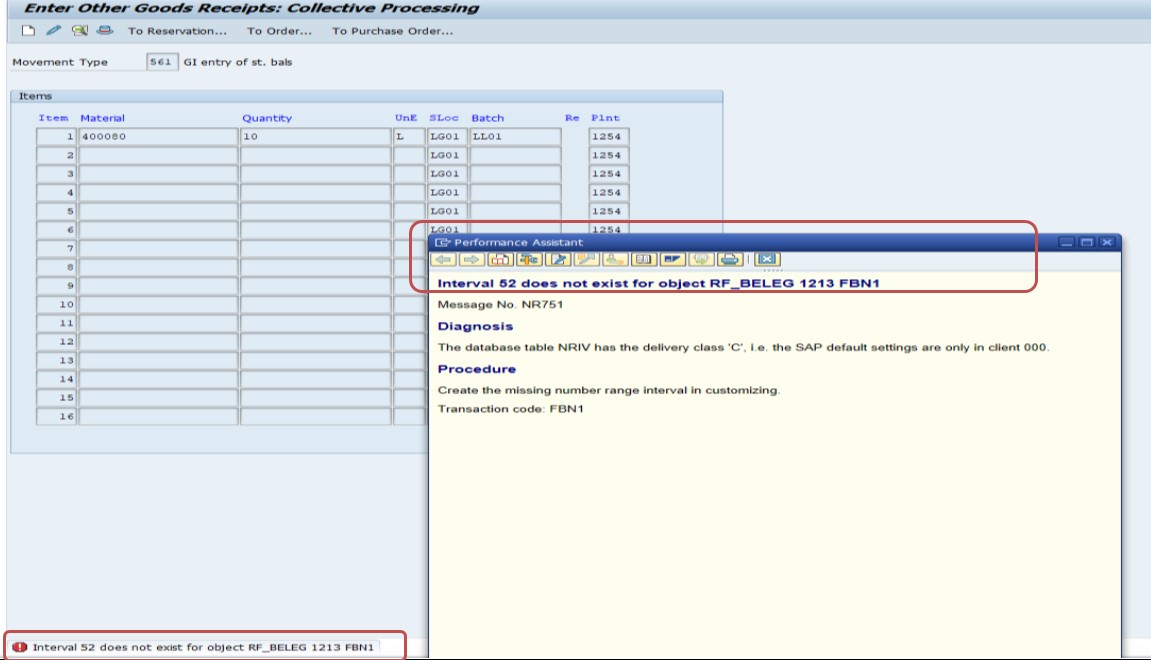
This error is related to document number range configuration in SAP. It typically occurs during document posting when the system cannot find the correct number range interval for the object RF_BELEG, which is used for Financial Accounting document numbers.
🔧 Solution: Create the Missing Interval in FBN1
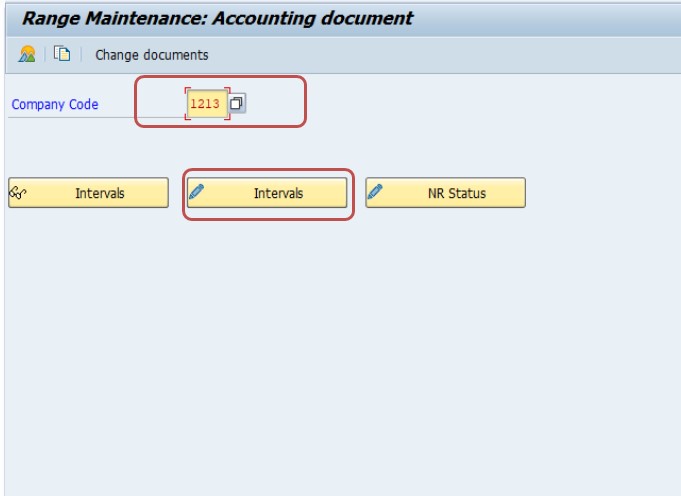
Go to transaction FBN1 and enter the relevant company code (from the error message).
Select the company code, then select the Intervals button and Add New Row.
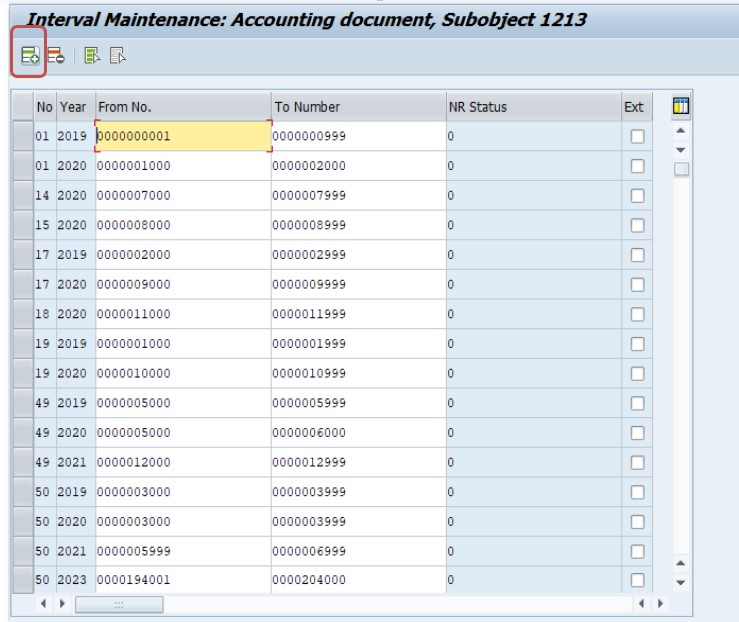
Enter the missing interval number (for example, 52) along with a valid from/to range - for example, 0000194000 to 0000196000. Confirm any overlap warning if prompted.
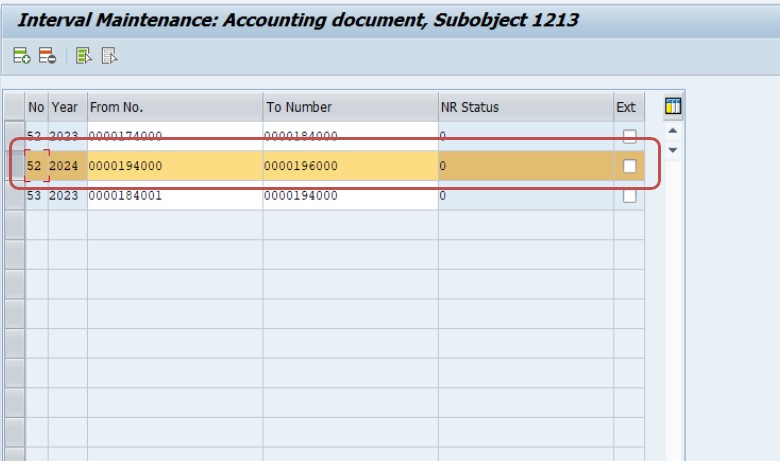
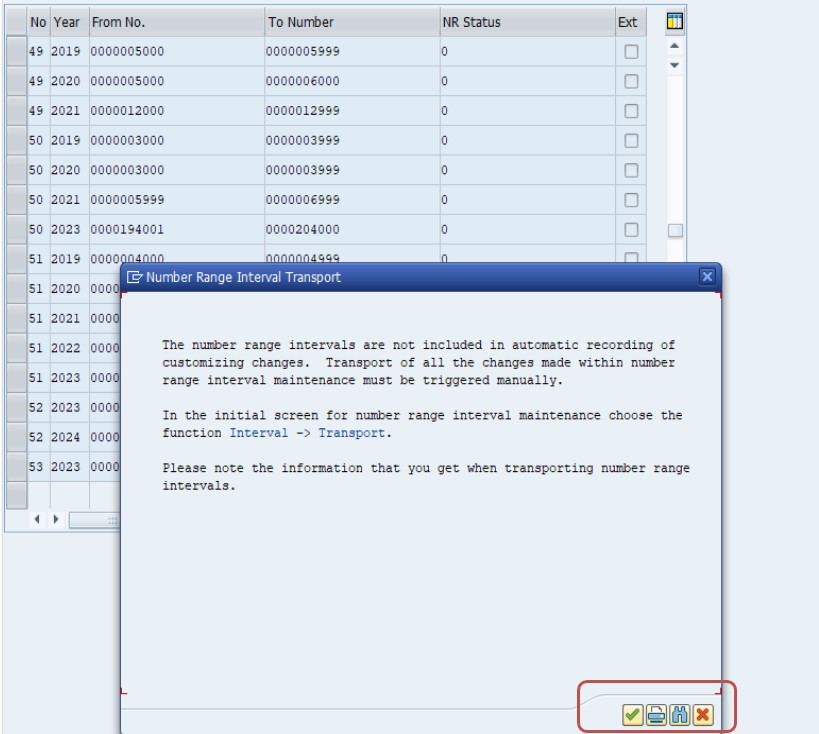
Save. Retry the original document posting.
🔍 What RF_BELEG Is, and Why a Specific Interval Can Be Missing
RF_BELEG is the number range object underlying Financial Accounting document numbers - essentially the master pool of number ranges that every FI document (invoices, journal entries, clearing documents, and more) draws its document number from, maintained per company code via FBN1. Rather than one single number range for the entire company code, RF_BELEG is split into multiple numbered intervals (like the interval 52 in this guide's example), each typically assigned to a specific document type or group of document types via transaction OBA7.
This is precisely why a specific interval number can go missing even when a company code clearly has other, working intervals - each interval is created individually, and if a new document type is configured (or an existing document type's number range assignment is changed) to reference an interval number that was never actually created in FBN1, this mismatch produces exactly the error covered in this guide. The document type "knows" which interval it wants to use, but that interval simply doesn't exist yet as an actual entry in FBN1.
📋 How Document Types Connect to Number Range Intervals
Understanding the connection between document types and number range intervals helps explain both why this error happens and how to prevent it. In transaction OBA7, every FI document type (SA for general postings, KR for vendor invoices, DZ for customer payments, and so on) is assigned a specific number range interval it should draw its document numbers from. That interval - identified by a two-digit number like 52 - is what actually gets created and maintained in FBN1.
The two configuration steps are independent, which is exactly the trap this error represents: someone can create a new document type in OBA7 and assign it interval 52, fully intending to also create interval 52 in FBN1 as a follow-up step, but if that follow-up step is missed or delayed, any attempt to post a document using the new document type immediately fails with this error - the document type is correctly configured, but the interval it depends on genuinely doesn't exist yet.
| Configuration Step | Transaction | What It Does |
|---|---|---|
| 1. Create the number range interval | FBN1 | Defines the actual number range (interval number, from/to range, internal/external) for a company code |
| 2. Assign a document type to that interval | OBA7 | Tells SAP which interval a specific document type (like KR or SA) should draw its numbers from |
Both steps need to be completed, in either order, before a document type can successfully post - but step 2 referencing a not-yet-created interval from step 1 is exactly the scenario producing this guide's error.
💼 Real-World Scenario: A New Document Type Configured Before Its Number Range
Prashant Saste, an SAP FI configuration consultant, was setting up a new document type specifically for intercompany journal entries as part of a broader intercompany process improvement project. She configured the document type in OBA7, assigning it to draw document numbers from interval 52 - a number she'd chosen deliberately to keep it visually distinct from the company's other, more established document type ranges.
During testing, the very first attempt to post using the new document type failed immediately with "Interval 52 does not exist for object RF_BELEG, company code 1213." Prashant initially double-checked her OBA7 configuration, confirming the document type was correctly pointing to interval 52 - which was true, but beside the point, since she hadn't yet completed the second half of the setup: actually creating interval 52 itself in FBN1. She'd planned to do this as a follow-up step but the project's testing phase had started before that step was completed.
Once Prashant created interval 52 in FBN1 with an appropriate from/to range (following the exact steps in this guide's core solution), the test posting succeeded immediately. This scenario illustrates the two-step nature of number range setup covered above - a new document type's OBA7 configuration can look completely correct while still failing, because the interval it depends on is a separate, independent configuration step that's easy to sequence incorrectly or simply forget during a busy setup process.
🔒 Who Should Maintain Number Range Intervals
Number range configuration in FBN1 and document type assignment in OBA7 are typically restricted to FI configuration consultants, separate from general transaction posting access, since an incorrectly sized or overlapping interval can affect document numbering integrity across an entire company code - a concern with real audit and compliance implications, not just a technical inconvenience. Some jurisdictions have specific legal requirements around sequential, gapless document numbering for certain document types, making number range configuration a genuinely compliance-sensitive area rather than a purely technical setting.
Because of this, many organizations require number range changes to go through a documented change request, referencing the specific document type and business justification, rather than allowing ad hoc interval creation - this is particularly important for external number ranges, where manual entry discipline also matters for maintaining true sequential numbering.
🧪 Testing Checklist for New Document Type and Number Range Setup
- Complete both OBA7 and FBN1 in the same setup session, as recommended in the prevention checklist below, rather than treating them as separate to-do items.
- Test an actual document posting using the new document type in a sandbox environment, confirming a document number is successfully assigned, not just that the configuration screens show expected values.
- Verify the assigned number falls within the expected interval range, catching a case where the document type might be pointing to the wrong interval number entirely.
- Test across every company code where the new document type will be used, since number range intervals are maintained independently per company code.
- If using an external number range, test that manual number entry outside the configured range is correctly rejected, confirming the boundary enforcement works as expected.
💼 A Second Scenario: An Interval Exhausted Rather Than Missing
Ruchi Pore, an SAP FI support analyst, was troubleshooting what looked like the same error - a document posting failing with a number range message - but on closer inspection, the actual cause was subtly different from the standard "interval never created" scenario covered throughout this guide. Interval 52 for company code 1213 did exist; it had simply run out of available numbers, having reached its configured upper bound after years of steady document volume.
The symptom looked similar enough to the missing-interval error that the first support analyst who picked up the ticket spent time in FBN1 confirming interval 52 existed, only to be confused when it clearly did - checking further, Ruchi realized the from/to range configured years earlier had simply not been sized with enough headroom for the document volume the business now generated annually. Rather than creating an entirely new interval, which would require reassigning the associated document types in OBA7 and add configuration complexity, Ruchi extended the existing interval's upper bound (a straightforward FBN1 change, as long as the extended range didn't overlap with any other interval) to provide substantial additional headroom.
This scenario is a useful reminder that "number range problems" in SAP aren't always the missing-interval pattern this guide's core fix addresses - an exhausted interval produces a related but distinct message, and the fix (extending an existing interval's range) is different from creating a brand-new one. When troubleshooting, confirming whether the interval exists but is exhausted, versus genuinely missing entirely, points to a different specific fix.
🏢 Number Range Strategy Across Multiple Company Codes
For organizations running several company codes in one SAP system, it's worth deciding deliberately whether number ranges should be shared or kept separate across company codes, since this affects both how errors like this one are diagnosed and how document numbers are interpreted downstream in reporting. Some organizations use identical interval numbers with distinct from/to ranges per company code (interval 52 exists in every company code, but with a different, non-overlapping number range each time), while others assign entirely different interval numbers per company code to make it immediately obvious from the document number alone which company code a document belongs to.
Neither approach is inherently correct - it depends on organizational reporting preferences and how document numbers are used downstream, for example in consolidated reporting or cross-company code reconciliation - but whichever strategy is chosen, it's worth documenting explicitly and applying consistently, since an ad hoc mix of approaches makes exactly the kind of troubleshooting covered in this guide more confusing: a support analyst investigating a missing interval for one company code might reasonably but incorrectly assume the same interval number should already exist in every other company code, when in fact the organization's actual number range strategy treats each company code independently.
❗ Common Mistakes When Fixing This Error
- Assuming the error is a display/screen issue rather than a genuine missing configuration entry, and retrying the same posting repeatedly without checking FBN1.
- Creating a new interval with a from/to range that overlaps an existing interval, triggering a separate SAP validation error rather than successfully saving the new interval.
- Creating the interval only in the wrong company code, when the error message names a specific company code that needs to be checked precisely.
- Not verifying the OBA7 document type assignment actually matches the interval number just created, in case the original configuration mistake was choosing the wrong interval number rather than simply never creating it.
- Choosing a new interval's number range too narrow for expected volume, requiring a follow-up expansion sooner than necessary - it's worth sizing a new interval generously from the start.
✅ Prevention Checklist for New Document Type Setup
- Treat OBA7 (document type/interval assignment) and FBN1 (interval creation) as a single combined setup task whenever introducing a new document type, completing both before considering the change done.
- Test an actual document posting using the new document type immediately after setup, rather than only reviewing the configuration screens.
- Size new number range intervals generously from the start, considering realistic future volume rather than a minimal range that will need expansion sooner than expected.
- Document which interval number is assigned to which document type as part of standard FI configuration documentation, making future troubleshooting and new setups faster.
- Coordinate number range interval creation across company codes if a new document type is being rolled out to multiple company codes at once, since each company code maintains its own independent set of intervals in FBN1.
📑 Similar-Looking SAP Number Range Errors and How They Differ
| Error / Symptom | Root Cause | Typical Fix |
|---|---|---|
| Interval [X] does not exist for object RF_BELEG | The interval was never created in FBN1, even though a document type references it | Create the missing interval in FBN1 (this guide's core fix) |
| Number range interval is used up / No more numbers available | An existing interval has reached its configured upper bound (the second scenario above) | Extend the existing interval's range in FBN1, checking for overlap first |
| Number range for trans./event type WA in year [X] does not exist | A similar missing-interval pattern, but for the separate Materials Management number range object (movement/material documents) rather than RF_BELEG | Maintain the missing interval for the relevant MM number range object |
| Number range not defined for object [X] | A more general message indicating an entire number range object hasn't been configured for a company code at all, broader than a single missing interval | Complete the full number range object setup, typically a larger configuration task |
The third row is worth highlighting since it looks superficially similar to this guide's error but concerns an entirely different module and number range object - Materials Management's own document numbering is separate from RF_BELEG, and confusing the two leads to checking the wrong transaction for the fix.
📊 Proactively Monitoring Number Range Usage
Beyond fixing individual missing or exhausted intervals reactively, periodically reviewing number range consumption across all active intervals - particularly for high-volume document types - helps catch an interval approaching exhaustion (as in the second scenario above) before it actually blocks a live posting.
- Review current number status directly in FBN1 for each interval, comparing the current number against the upper bound of the range to estimate remaining headroom.
- Estimate consumption rate based on typical monthly or annual document volume for that document type, projecting roughly when an interval might reach exhaustion.
- Extend intervals proactively with generous headroom well before they're projected to run out, rather than waiting for a live posting failure to prompt an urgent fix.
- Include number range review as a standard step whenever a new document type is introduced or an existing one's usage pattern changes significantly (for example, after a business expansion or a new interface generating a higher volume of automated postings).
This kind of proactive monitoring is particularly valuable for number ranges tied to automated, high-volume interfaces, since an exhausted interval in that context can silently block an entire batch of automated postings rather than affecting a single manually-entered document, making early detection considerably more valuable than for a lower-volume, manually-posted document type.
📱 This Error in SAP S/4HANA
The RF_BELEG number range object, FBN1, and OBA7 document type assignment are unchanged in SAP S/4HANA, since document number range configuration is foundational Financial Accounting behavior rather than something restructured by the Universal Journal or simplified data model. S/4HANA users can also review number ranges through Fiori apps for FI configuration in some releases, but the underlying FBN1 transaction and interval logic covered in this guide remain the standard, authoritative way to maintain them.
🔗 Cross-Module Impact: Why This Also Affects MM-Triggered Postings
Although RF_BELEG and FBN1 are FI configuration, this error frequently surfaces during Materials Management transactions - a goods receipt, invoice verification, or any MM posting that generates a corresponding FI accounting document. This is exactly why this error can appear to an MM end user as an "MM error" even though the root configuration gap is entirely on the FI side, similar to the way account determination errors covered elsewhere on this site span both modules. Recognizing that a number range error appearing during an MM transaction still needs an FI-side fix (FBN1, not any MM transaction) helps route the ticket to the right configuration team faster.
📋 Related SAP Transactions
| Transaction | Purpose |
|---|---|
| FBN1 | Maintain number range intervals for FI documents (object RF_BELEG). |
| OBA7 | Assign document types to specific number range intervals. |
| FB03 | Display a posted FI document to confirm its assigned document number. |
| SNRO | General number range object maintenance, useful for reviewing number range objects beyond RF_BELEG. |
| MIRO | A common MM transaction that can trigger this FI-side error if the relevant document type's interval is missing. |
🎓 Interview-Style Questions and Answers
Q: What is RF_BELEG in SAP?
RF_BELEG is the number range object for Financial Accounting document numbers - every FI document draws its document number from an interval configured under this object, per company code, maintained via FBN1.
Q: How does a document type know which number range interval to use?
Through configuration in transaction OBA7, which assigns each document type to a specific interval number; that interval itself must be separately created in FBN1, and a mismatch between the two - an assigned interval that was never actually created - produces this error.
Q: Why might this error appear during an MM transaction like MIRO rather than a pure FI transaction?
Because MM transactions with a financial impact (invoice verification, certain goods movements) generate a corresponding FI accounting document behind the scenes, which still needs a valid number range interval - the error surfaces wherever the FI document creation is triggered, even if that's from an MM screen.
📚 Quick Glossary of Terms Used in This Guide
- RF_BELEG: The SAP number range object used for Financial Accounting document numbers.
- Number range interval: A defined range of document numbers (identified by a two-digit interval number) that documents of a certain type draw from.
- FBN1: The transaction for maintaining number range intervals under RF_BELEG, per company code.
- OBA7: The transaction for assigning FI document types to specific number range intervals.
- Internal number range: A number range where SAP automatically assigns the next available document number.
- External number range: A number range where the user manually enters a document number within the configured range.
🎯 Conclusion
"Interval does not exist for object RF_BELEG" comes down to a document type (configured in OBA7) referencing a number range interval that was never actually created in FBN1. The fix is straightforward - create the missing interval with an appropriate from/to range - but the real lesson is treating document type setup and number range interval creation as a single combined task, rather than two steps that can be completed out of order or forgotten, as the real-world scenario in this guide illustrates. Keep this guide bookmarked for the next new document type rollout.