SAP ME31K: How to Create a Purchasing Contract – Step-by-Step
Contracts play a crucial role in ensuring clear communication, defining expectations, and establishing terms for collaboration. In the realm of enterprise resource planning (ERP), SAP offers two distinct types of contracts: Quantity Contracts and Value Contracts. These contracts help streamline procurement processes, manage relationships with suppliers, and ensure that both parties are aligned in terms of quality and value expectations. This guide walks you through the meaning of contracts within the context of SAP and explores the specifics of Quantity Contracts and Value Contracts. If you encounter any errors while following along, feel free to send a screenshot to pramod@learntosap.com, and I will help you resolve the issue.
✅ SAP ME31K Tcode – Contract & Agreement Guide
Contracts play a crucial role in ensuring clear communication, defining expectations, and establishing terms for collaboration. In the realm of enterprise resource planning (ERP), SAP offers two distinct types of contracts: Quantity Contracts and Value Contracts. These contracts help streamline procurement processes, manage relationships with suppliers, and ensure that both parties are aligned in terms of quality and value expectations. In this guide, we'll delve into the meaning of contracts within the context of SAP and explore the specifics of Quantity Contracts and Value Contracts.
It helps to understand upfront why a Contract carries so much weight inside SAP Materials Management. A Contract is a type of Outline Agreement - a longer-term purchasing arrangement negotiated once with a vendor and then released against repeatedly through individual purchase orders, rather than renegotiating terms every time a purchase is needed. This is exactly what makes contracts valuable for recurring procurement needs: pricing, delivery terms, and overall value or quantity ceilings are agreed upfront, and day-to-day buyers simply create release orders against the existing contract.
It's also worth distinguishing a Contract from a standalone Purchase Order at the outset, since the two are easy to confuse for anyone new to SAP procurement. A Purchase Order is a one-off (or scheduled) commitment to buy a defined quantity at a defined price on a defined date. A Contract, by comparison, carries no delivery schedule of its own - it simply holds the negotiated terms open for a validity period, and actual deliveries only happen once a buyer creates a release order (a Purchase Order with reference to the contract) against it. This separation of "negotiate once, order many times" is precisely what makes contracts so useful for materials or services purchased repeatedly throughout the year.
Related Transaction Codes
| Transaction | Purpose |
|---|---|
| ME31K | Creating Contract. |
| ME32K | Modify Contract. |
| ME33K | Display Contract. |
🔧 SAP Contract Creation Process
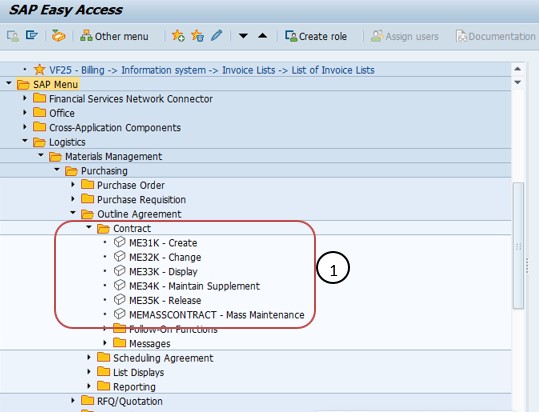
Following Path: Logistics → Materials Management → Purchasing → Outline Agreement → Contract → Create, or run transaction ME31K directly.
📋 Two Types of Contract
Contracts are long-term agreements specifying terms such as pricing, quantities, and delivery schedules. They are often used for recurring procurement needs over a specified period, providing stability in procurement planning.
- 1) Quantity Contract
- 2) Value Contract
Quantity Contract – Quantity Contract is a type of Outline Agreement in SAP Materials Management (MM) where the vendor agrees to supply a specific quantity of material over a specified period of time at pre-defined conditions (price, delivery terms, etc.).
Value Contract – Quantity-based contracts are agreements where the procurement is based on specific quantities of materials or services. This type of contract is suitable when the company has a clear idea of the quantities it needs to procure. A Value Contract, by contrast, works against a negotiated target monetary value rather than a fixed material quantity, which suits situations where the exact materials or mix of items purchased against the agreement may vary over time, as long as the cumulative released value stays within the agreed target.
| Contract Type | Basis of Agreement | Best Suited For |
|---|---|---|
| Quantity Contract | A fixed quantity of a specific material over the validity period. | Repeat purchases of a well-defined material with predictable volume needs. |
| Value Contract | A target monetary value that releases can draw down against. | Vendors supplying a mix of materials or services where exact quantities vary. |
🔧 Create a Quantity Contract – ME31K Step-by-Step
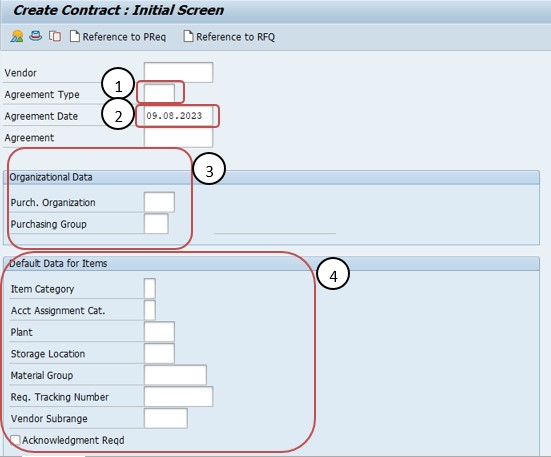
Following Path: Go to path, enter transaction code ME31K.
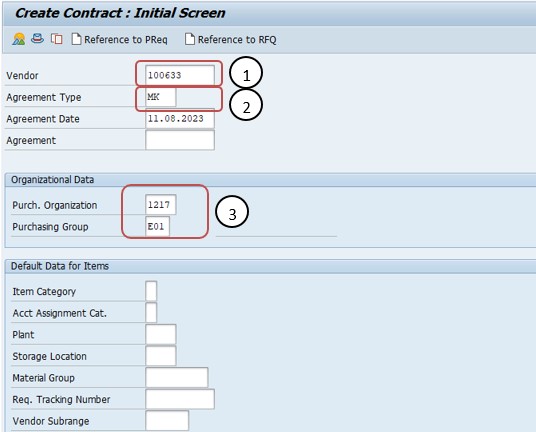
Enter the Vendor Number. Enter the vendor number (e.g., 100633) for whom the contract is being created.
Click on Agreement Type. Click on Agreement Type (MK) Quantity Contract.
Select the Agreement Date. Select the Agreement Date (MK) Quantity Contract.
Select on Purchase Org and Purchasing Group. Select the purchasing organization and purchasing group responsible for this contract.
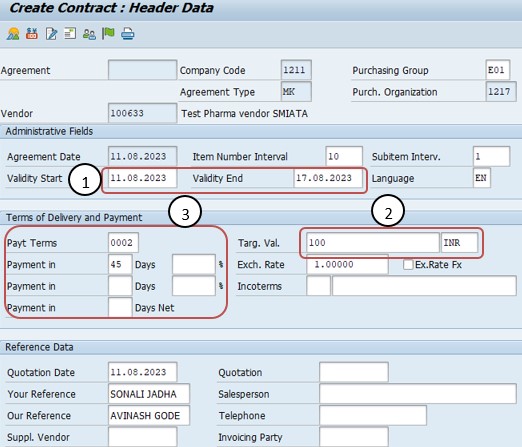
Select Validity Date. Select the validity start and end dates that define the period during which the contract can be released against.
Maintain Target Value. Maintain the target value (or target quantity, for a Quantity Contract) that represents the overall commitment under the agreement.
Maintain Payment Terms. Maintain the payment terms that will apply to purchase orders released against this contract.
Select Vendor Address. Confirm or select the vendor address that will appear on the contract document and any releases created against it.
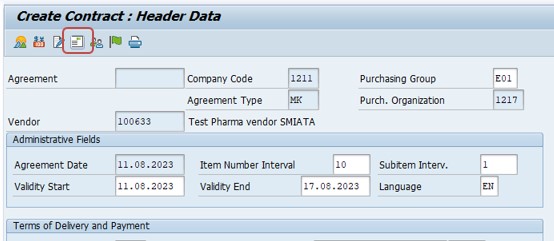
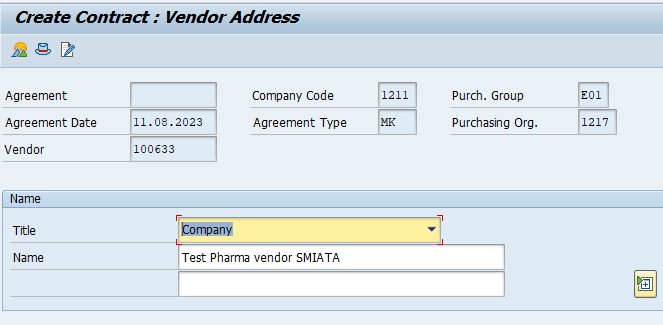
Maintain Material and Select Item Details. Enter the material to be covered by the contract and move into the item detail screen to maintain material-specific terms.
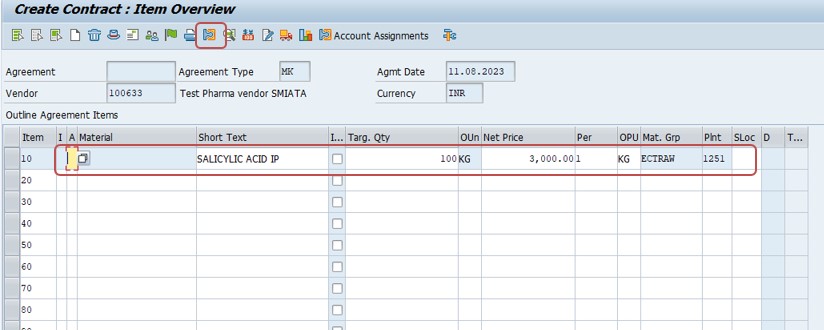
Select Item Details. Review and complete the item detail data - target quantity, net price, and delivery conditions - before saving the contract.
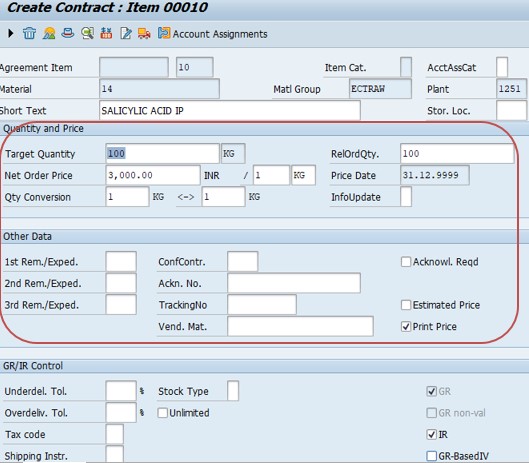
Once the target quantity, net price, and delivery conditions look correct at item level, saving the contract generates a contract document number that release buyers will reference on every subsequent purchase order. It is worth double-checking the item's plant and material group assignment at this point as well, since these fields influence which buyers and cost centers are even permitted to release against the agreement later.
📋 Contract Header Fields at a Glance
Before moving into item details, it helps to have a quick reference for the main header-level fields captured on the ME31K initial and header screens.
| Field | What It Captures |
|---|---|
| Vendor | The supplier the contract is negotiated with; drives the address and default terms proposed on the agreement. |
| Agreement Type | MK for Quantity Contract or WK for Value Contract, determining how fulfilment is tracked. |
| Purchasing Organization | The organizational unit responsible for negotiating and owning the contract. |
| Purchasing Group | The buyer or buying team assigned day-to-day responsibility for the agreement. |
| Validity Start / End | The date range during which release orders can be created against the contract. |
| Target Value / Quantity | The overall ceiling the agreement is negotiated for, tracked down as releases are made. |
| Payment Terms | The default payment terms proposed on every release order created against the contract. |
📋 Why Agreement Type and Organizational Data Matter So Much
These initial selections - vendor, agreement type, purchasing organization, and purchasing group - look like simple entry fields, but they have an outsized influence on everything that follows in the contract creation process, which is why they're entered before any of the item detail screens even appear.
| Selection | What It Determines |
|---|---|
| Vendor | Who the contract's terms and target value or quantity apply to, and whose address populates the contract document. |
| Agreement Type | Whether the contract behaves as a Quantity Contract (MK) tracking material quantity, or a Value Contract (WK) tracking a target monetary value. |
| Purchasing Organization / Group | Which part of the buying organization is responsible for the contract and can release purchase orders against it. |
Because agreement type in particular affects how the system tracks fulfilment - by quantity or by value - changing it after a contract has already been released against is generally not straightforward, so it's a decision worth getting right at creation time.
📋 Related SAP Transactions
| Transaction | Purpose |
|---|---|
| ME31K | Create a new purchasing Contract. |
| ME32K | Change / modify an existing Contract. |
| ME33K | Display a Contract without allowing changes. |
| ME35K | Release a Contract that requires release strategy approval. |
| ME31 | Create a Scheduling Agreement, another type of Outline Agreement. |
| ME21N | Create a Purchase Order, including releases created with reference to a Contract. |
🎓 Interview-Style Questions and Answers
Q: What is a Contract, and why is it useful in SAP procurement?
A Contract is a type of Outline Agreement that establishes long-term terms - pricing, quantities or value, delivery terms - with a vendor, so day-to-day purchase orders can be released against it without renegotiating terms each time, providing stability in procurement planning.
Q: What is the key difference between a Quantity Contract and a Value Contract?
A Quantity Contract commits the vendor to supplying a specific quantity of a defined material over a period at pre-defined conditions. A Value Contract instead sets a target monetary value that purchase order releases draw down against, suiting situations where the exact materials purchased may vary.
Q: What happens when a contract's target value or quantity is fully released?
Once the target value or quantity is reached, or the validity period ends, the system will no longer allow further releases against that contract unless it is changed via ME32K to extend validity or increase the target.
Q: Why does purchasing organization matter when creating a contract?
Because it determines which part of the buying organization owns the agreement and is authorized to create release orders against it, keeping accountability and reporting aligned with the correct procurement unit.
📚 Quick Glossary of Terms Used in This Guide
- Contract: A type of Outline Agreement in SAP that sets long-term purchasing terms with a vendor, released against repeatedly through individual purchase orders.
- Quantity Contract: A contract where the vendor agrees to supply a specific quantity of material over a defined period at pre-defined conditions.
- Value Contract: A contract based on a target monetary value that purchase order releases can draw down against, rather than a fixed material quantity.
- Outline Agreement: A general term in SAP MM covering both Contracts and Scheduling Agreements - longer-term purchasing arrangements negotiated once and used repeatedly.
- Release Order: A purchase order created with reference to an existing contract, drawing down its target quantity or value.
- Release Strategy: An approval workflow that can be configured to require sign-off before a contract becomes usable for release orders.
📝 Governance for Contract Creation
Because contracts commit an organization to pricing and terms over an extended period, most organizations maintain a documented governance process around who can create contracts, which agreement types and target values require managerial or release strategy approval, and how contract terms should be reviewed before releases are permitted against them. This is particularly important in larger organizations where procurement, finance, and legal teams may all have an interest in the same agreement but care about different aspects of it.
Data quality and commercial governance matter here for the same reason they do for vendor master data: a contract created quickly, with loosely defined validity dates or an unclear target value, tends to surface as a compliance or overspend problem later - once purchase orders have already been released against it. Establishing a clear contract creation and review checklist keeps agreements consistent and enforceable across a large buying organization over time.
💼 Real-World Scenario: Negotiating an Annual Raw Material Contract
Pooja Mishra, an SAP MM consultant at Learn Pharmaceuticals, was asked to set up a one-year purchasing contract with an existing raw material supplier ahead of the new fiscal year. Purchasing manager Rajesh Pawar explained that the business wanted predictable pricing for the year, with buyers able to release individual purchase orders against the agreement as production needs arose, rather than negotiating price every time.
Working with procurement lead Priya Patil, Pooja used ME31K, entering the vendor number and selecting agreement type Quantity Contract (MK), since the business already knew the annual volume of raw material it expected to consume. She selected the relevant purchasing organization and purchasing group, set the validity period to run for the full fiscal year, and maintained the negotiated target quantity and payment terms.
Business analyst Anita Shah then worked with Pooja to confirm the vendor address, maintain the material and net price at item level, and verify the contract's release strategy before making it available to buyers. Once saved, the new contract was immediately usable as a reference for release purchase orders, confirming the year's pricing and volume commitment had been captured correctly from the very first release order.
❗ Common Mistakes When Creating a Contract
- Selecting the wrong agreement type - Quantity Contract instead of Value Contract, or vice versa - which changes how fulfilment is tracked and is difficult to correct once releases have been made.
- Setting an unrealistic or overly short validity period, forcing an early renegotiation or a gap in coverage once purchase orders need to be released.
- Leaving the target value or target quantity vague or inconsistent with the actual negotiated terms, creating disputes later about how much can still be released.
- Skipping item-level details such as net price or delivery conditions, only to discover the gap later when a release order can't be created correctly.
- Not aligning the purchasing organization and purchasing group with the team that will actually manage releases against the contract.
- Creating contracts directly in a production client instead of testing the full creation and a sample release order in a sandbox or development client first.
✅ Best Practices for Contract Creation
- Confirm the correct agreement type - Quantity Contract or Value Contract - before starting, since it shapes how the system tracks the agreement's fulfilment.
- Align validity dates with the actual negotiated commercial term, rather than defaulting to a generic period.
- Maintain accurate target values or quantities that match the signed agreement, to avoid disputes later about remaining balance.
- Coordinate with the teams who will actually release orders against the contract - purchasing, finance, the requesting department - to confirm item-level terms are correct.
- Use release strategy where appropriate for high-value contracts, so agreements are reviewed and approved before being usable.
- Test the new contract with a sample release purchase order before considering the creation complete.
📈 How Contract Data Powers Downstream Processes
A Contract's influence extends across the procurement cycle for as long as the agreement remains valid, which is exactly why getting the initial ME31K creation right pays off well beyond the creation screen itself. The contract's target value or quantity and item-level pricing feed directly into every release order created against it, meaning pricing errors or an incorrect target at contract level will surface repeatedly across many purchase orders rather than just once. The contract's validity dates determine the window during which releases are even possible, and its release strategy, if configured, determines whether the agreement is usable at all before the required approvals are completed.
Because so many purchase orders can be released against a single contract, an inconsistency in the contract itself - a wrong price, an incorrect target value, a misaligned purchasing organization - is one of the more common root causes behind repeated pricing or release errors elsewhere in the system, rather than a problem with the purchase order configuration in isolation.
✅ Validating the New Contract Before Go-Live
Once a contract is created and saved, it's worth running through a short validation checklist before relying on it in live procurement. Display the contract (ME33K) and confirm the header data, validity dates, target value or quantity, and item-level pricing were all saved correctly. Create a test release purchase order to confirm the contract can actually be referenced and that pricing flows through as expected. If a release strategy is configured, confirm the approval workflow triggers correctly before the contract is used for live releases. Finally, confirm the remaining target value or quantity displays accurately after the test release, to make sure fulfilment tracking is working as intended.
Skipping this validation step is one of the more common reasons a newly created contract causes confusion during its first use - usually an incorrect item price, a validity date typo, or a target value that doesn't match the negotiated agreement.
📱 This Configuration in SAP S/4HANA
Transaction ME31K and the underlying purchasing Contract creation process work largely the same way in SAP S/4HANA as in classic ECC, since Outline Agreements remain a core Materials Management concept. What has changed in S/4HANA is the availability of Fiori apps such as "Manage Purchase Contracts," which offer a more modern, guided creation and monitoring experience alongside the classic ME31K transaction, along with improved analytics on contract consumption and remaining target value. Many S/4HANA implementations continue to rely on ME31K for contract creation, particularly where established process familiarity favors the classic transaction, while Fiori-based tools are increasingly used for day-to-day contract monitoring and release order review.
🎯 Conclusion
Creating a Contract in ME31K is a foundational step that shapes procurement terms with a vendor for as long as the agreement remains valid. Choosing the correct agreement type - Quantity Contract or Value Contract - entering accurate validity dates and a realistic target value, and maintaining correct item-level pricing are what separate a contract that supports smooth, predictable release ordering from one that generates pricing disputes or compliance gaps downstream. Keep this guide handy the next time your project needs to negotiate and set up a new long-term purchasing agreement, whether a quantity-based commitment or a value-based one.