Warehouse Numbers Do Not Exist for This Material
In SAP ECC 6.0, "Warehouse numbers do not exist for this material" generally means the material in question is not assigned to a warehouse in the system. This error often appears in SAP's Warehouse Management (WM) or Extended Warehouse Management (EWM) module when you're trying to perform activities like stock transfers or goods receipts that require a warehouse assignment. Follow the steps below to resolve it using MB50. This guide also explains the difference between a storage location and a warehouse number, walks through a real business scenario, lists related transactions, and gives you a prevention checklist.
"If you encounter any errors in SAP, send me a screenshot at pramod@learntosap.com, and I will help you resolve the issue."
🔍 Understanding This Error in Detail
The message "Warehouse numbers do not exist for this material" is one of those SAP errors that sounds like a configuration problem but is almost always a material master data gap instead. SAP is telling you that when it tried to determine which warehouse number applies to the material and plant you are working with, it found nothing -the material has simply never been extended with the Warehouse Management view that carries that assignment.
This distinction matters because it changes where you go to fix it. A true configuration problem would require SPRO changes made by a Basis or WM configuration consultant. This error, in the overwhelming majority of cases, is fixed at the material master level by any user with material master maintenance authorization, using a straightforward material extension in MB50 -no configuration change required.
⚠ Common Reasons

The most direct cause is exactly what the message says: the material was never extended with a Warehouse Management view for the plant and warehouse number in question. This typically happens in a few common situations.
- The material was created only with Basic Data, MRP, and Accounting views, without ever going through material extension for Warehouse Management.
- The material is new to a plant that uses WM, but the extension step to that plant's warehouse number was missed during setup.
- The warehouse number field in the Warehouse Management 1 view was left blank or was cleared during a data correction.
- The storage location assigned to the transaction has never been linked to a warehouse number in configuration, so even a correctly maintained material cannot resolve one.
📦 Storage Location vs Warehouse Number -Why the Difference Matters
A lot of confusion around this error comes from treating "storage location" and "warehouse number" as the same thing. They are related but distinct organizational units in SAP, and understanding the difference makes the fix much more intuitive.
| Concept | Module | What It Tracks |
|---|---|---|
| Storage Location | Inventory Management (MM) | Basic stock quantities within a plant, without bin-level detail |
| Warehouse Number | Warehouse Management (WM) | Detailed bin-level storage, picking, and put-away across one or more storage locations |
One or more storage locations are linked to a single warehouse number through configuration. A material can happily have stock and transactions at the storage-location level in plain Inventory Management while still triggering "Warehouse numbers do not exist for this material" the moment a WM-specific transaction -like a transfer order -tries to process it, simply because the material's Warehouse Management 1 view was never maintained.
💼 Real-World Scenario: How Pooja Mishra Hit This Error
Pooja Mishra, a materials planner at Pramod Industries in Pune, had just finished creating a new raw material record, material number 400080, for plant 1254. Basic Data, Purchasing, and Accounting views were all filled in, and the first goods receipt posted without any issue. A few days later, when the warehouse team tried to generate a transfer order to move the received stock into a storage bin, SAP threw "Warehouse numbers do not exist for this material."
Pooja Mishra checked the material master and realized the Warehouse Management view had never been added -it simply was not part of the standard view selection she used when creating the material. Her colleague Jagidsh Pete walked her through MB50: select Status, enter plant 1254 and material 400080, execute, then open the material, go to Org Levels, and enter warehouse number WH9 before continuing into the Warehouse Mgmt 1 tab to confirm and save. The moment she saved, the warehouse team was able to generate the transfer order without any further error -a clean illustration of how a material can be fully functional for purchasing and accounting while still missing the one view WM specifically needs.
✅ Follow Steps -Solution: MB50
Check Material Master Data
Check the material master data includes the necessary views related to Warehouse Management, especially if your system requires it for the warehouse functionality -for example, the warehouse number field.
Extend Material -MB50
- Select Status, Plant = 1254, Material No = 400080
- Execute
- Go to Material 400080, select Org Levels, edit Warehouse No = WH9
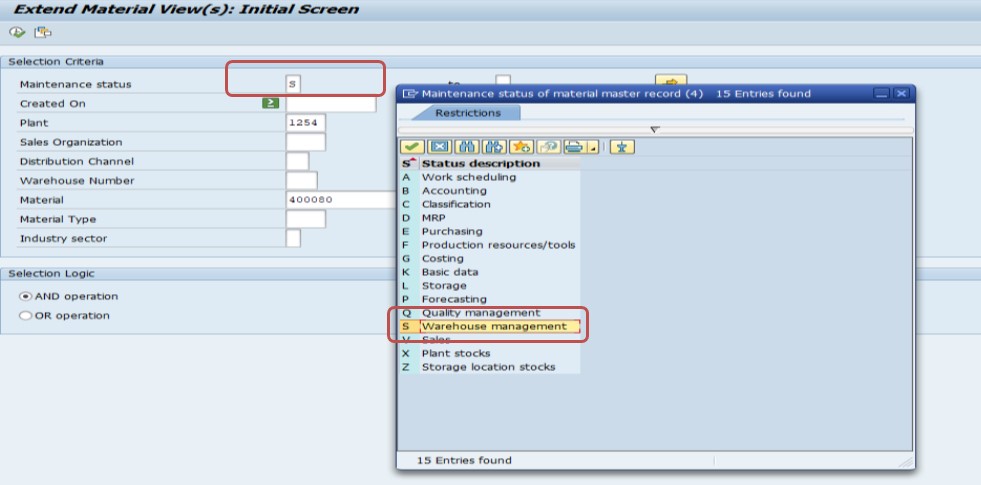

This is the core of the fix: MB50 lets you extend an existing material to a new organizational level -in this case, a warehouse number -without recreating the material from scratch. Entering the warehouse number at the Org Levels screen tells SAP which Warehouse Management-specific views to open next, so make sure the warehouse number you enter (WH9 in this example) is the one actually linked to the storage location your transaction is using; entering the wrong warehouse number will extend the material to the wrong WM organizational unit and the error will persist for the storage location you actually need.
Go to Material Master and Warehouse Mgmt 1 Tab -Check Whse No
Go to the material master and the Warehouse Mgmt 1 tab, then check that Whse No shows WH9. Save.
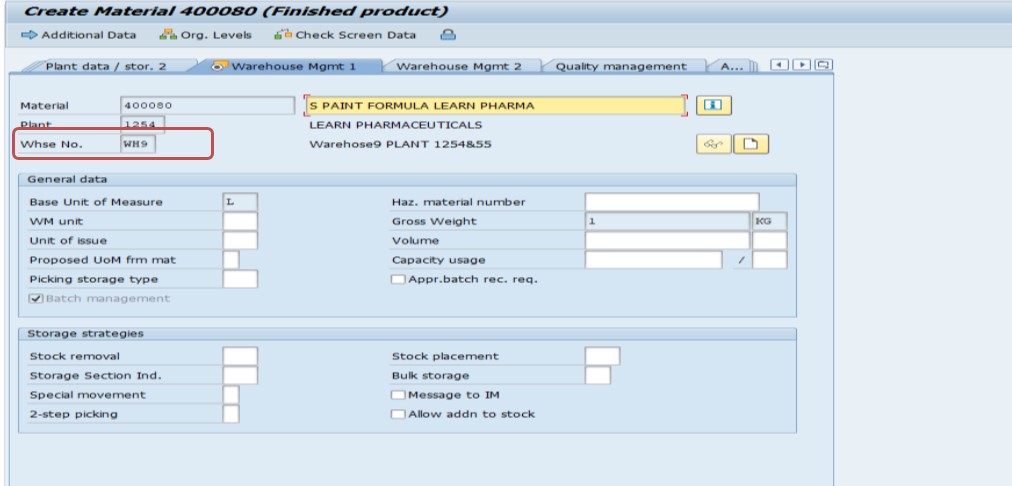
This second check matters because the Org Levels entry in Step 1 only sets up which warehouse-specific views become available -it does not, by itself, guarantee every field on those views is populated correctly. Opening the Warehouse Mgmt 1 tab directly and confirming the Whse No field explicitly shows the expected warehouse number is the final verification that the assignment actually took, before you save and consider the fix complete.
📋 Related and Alternative Transactions Every WM User Should Know
MB50 handles the material extension itself, but a well-rounded SAP MM/WM user should also recognize these related transactions, since they come up constantly when diagnosing or preventing this error.
| Transaction | Purpose |
|---|---|
| MM01 | Create a new material, including selecting the Warehouse Management views up front so this error never occurs for materials created going forward. |
| MM02 | Change an existing material, another route to add a missing Warehouse Management view besides MB50. |
| MM03 | Display material master data, useful for confirming which views currently exist before attempting an extension. |
| MB50 | Extend a material to a new plant, storage location, or warehouse number, and display warehouse stock. |
| OMS2 | Configuration transaction to check which views are relevant for a given material type -useful if WM views are consistently missing across many materials of the same type. |
| LS01N | Create a storage bin in Warehouse Management, needed once a material's warehouse assignment is in place and bins must be defined. |
| MMBE | Stock overview, useful to confirm which plant and storage location combination the material is actually being processed against. |
If your organization sees this error repeatedly across newly created materials, it is worth reviewing the material type's field selection in OMS2 or updating the standard material creation checklist so the Warehouse Management view is never skipped in the first place.
❗ Common Mistakes That Cause This Error to Reappear
- Entering the wrong warehouse number at the Org Levels screen in MB50, extending the material to a warehouse number that does not match the storage location actually being used.
- Assuming that because a material has stock and purchasing history, all its master data views are complete -stock existing at the storage-location level says nothing about whether the WM view has been maintained.
- Saving the material extension without opening the Warehouse Mgmt 1 tab to actually verify the Whse No field populated correctly.
- Extending the material for one plant while the actual delivery, transfer order, or goods movement is happening against a different plant.
- Not checking whether the storage location itself has ever been linked to a warehouse number in configuration -if that link is missing at the configuration level, no amount of material extension will resolve the error.
🔧 Does This Error Also Happen in SAP EWM?
Yes, conceptually the same issue can occur in Extended Warehouse Management, though the mechanics differ slightly. In classic WM, the warehouse number and Warehouse Management 1 view live directly on the ECC material master. In EWM, the equivalent warehouse-relevant data sits on the product master within the EWM system itself, and depending on your landscape (decentralized EWM on a separate system, or embedded EWM within S/4HANA), that data may need to be maintained separately from, or kept in sync with, the ECC or S/4HANA material master through the Core Interface (CIF).
If you are on an EWM landscape and see a similar warehouse-assignment error, the diagnostic mindset is the same as this guide: confirm the product has been extended with the warehouse-relevant organizational data for the specific EWM warehouse number in question, rather than assuming the material's ECC-side views alone are sufficient.
📋 Related SAP Error Messages You May Also Encounter
| Error / Message | Typical Cause |
|---|---|
| Warehouse numbers do not exist for this material | Material never extended with a Warehouse Management view for the plant/warehouse |
| Storage type does not exist | Warehouse number assigned correctly, but the specific storage type referenced is missing in configuration |
| Plant/storage location combination not maintained | Basic Inventory Management extension missing, a level below WM entirely |
| No storage bin found for placement in storage type | Material and warehouse are correctly assigned, but no suitable empty bin exists during putaway |
If you land on this page after searching for one of these related messages, the troubleshooting order is the same each time: confirm the storage location, then the warehouse number assignment on the material, then the storage type and bin configuration, working from the most basic organizational level up to the most detailed.
💡 Best Practices to Prevent This Error From Recurring
- Standardize a material creation checklist in MM01 that always includes the Warehouse Management 1 view for any plant that uses WM, rather than leaving it optional.
- Where possible, adjust the material type's field selection in OMS2 so the Warehouse Management view is mandatory rather than optional for plants using WM.
- Train new materials planners on the difference between storage location and warehouse number early, since this is the single biggest source of confusion behind this error.
- Run a periodic report comparing materials with stock at a WM-relevant storage location against materials that actually carry a Warehouse Management 1 view, to catch gaps before they surface as a transaction-time error.
- Document your site's warehouse number mapping (which storage locations map to which warehouse numbers) so users extending materials in MB50 always enter the correct value.
🧠 A Quick Troubleshooting Decision Tree
When this error appears, work through these questions in order rather than jumping straight to material extension -it takes less than a minute and confirms you are fixing the right layer.
- Step A -Does the material have a Warehouse Management 1 view at all? Check with MM03. If the view is missing entirely, go straight to MB50 and extend it.
- Step B -If the view exists, does the Whse No field actually show a value? A view can exist as a placeholder without the warehouse number field itself being populated -check this specifically, not just whether the tab is present.
- Step C -If a warehouse number is populated, is it the correct one for the storage location your transaction is using? Cross-check your site's storage-location-to-warehouse-number mapping; a material extended to the wrong warehouse number will still throw this error for the storage location you actually need.
- Step D -If the warehouse number is correct and populated, is that storage location actually linked to that warehouse number in configuration? This is the one layer material master maintenance cannot fix -if the link itself is missing at the configuration level, escalate to your WM configuration consultant.
- Step E -If everything above checks out, is the transaction referencing the correct plant? A material extended correctly for one plant will still throw this error if the actual goods movement or transfer order is posted against a different plant number.
Walking through these five checkpoints turns a vague configuration-sounding error into a specific, fast diagnostic -and in the large majority of cases, you will land on Step A or B and be done within a couple of minutes.
⚙ Why Material Type Field Selection Matters Here
One detail that often surprises newer SAP users is that whether the Warehouse Management view even appears as an option during material creation depends on the material type's field selection configuration, maintained in transaction OMS2. Each material type (such as ROH for raw materials, FERT for finished goods, or a custom Z-material type) has its own rule for whether the Warehouse Management views are optional, hidden, or mandatory during MM01 creation.
If your organization's material type has Warehouse Management views set to optional rather than mandatory, it becomes very easy for a user creating a material quickly -especially someone focused on getting Basic Data, Purchasing, and Accounting views right first -to simply skip past the WM view screen without realizing it was available. This is exactly the gap that later surfaces as "Warehouse numbers do not exist for this material" once the warehouse team tries to process the item. If this error keeps happening across many newly created materials of the same type, the most effective long-term fix is not repeatedly running MB50 after the fact, but adjusting the field selection in OMS2 so the Warehouse Management view becomes mandatory at the point of creation for any material type used in a WM-managed plant.
It is worth noting that this configuration change affects material creation going forward only -it does not retroactively add the missing view to materials that already exist. Existing materials still need the MB50 extension covered earlier in this guide; the OMS2 change simply prevents the same gap from being created again for every new material introduced after the change is made.
📈 Business Impact If Left Unresolved
This error tends to surface at the worst possible moment -right when a warehouse team is trying to receive or move stock for a newly introduced material, often during a product launch or a new supplier onboarding. If materials planning and warehouse extension are handled by different people or teams, a missing Warehouse Management view can sit undetected until the very first transfer order attempt fails, which is exactly when operational pressure to resolve it quickly is highest.
Beyond the immediate delay, a pattern of materials missing their WM view is often a sign of a gap in the new-material creation process rather than a series of unrelated one-off mistakes. Left unaddressed, it tends to keep resurfacing every time a new material is introduced to a WM-managed plant, creating a steady trickle of avoidable support tickets and warehouse delays that a small process change -making the Warehouse Management view mandatory at creation -would eliminate entirely.
✅ How to Verify the Fix
After extending the material and saving, do not assume the fix worked just because MB50 completed without an error. Run MM03 to display the material master, navigate to the Warehouse Mgmt 1 view, and confirm the Whse No field shows the expected warehouse number. Then retry the original transaction that triggered the error -typically a transfer order creation or a goods movement -and confirm it now processes without the warehouse number message.
If the error persists even after the material extension appears correct, check whether the storage location involved in your transaction has actually been linked to that warehouse number in configuration. A material can be perfectly extended to warehouse number WH9, but if the specific storage location your transaction is using is not assigned to WH9 in the underlying configuration, SAP will still be unable to resolve a valid warehouse number for that combination, and the fix at that point shifts from material master maintenance to a configuration check best handled by your Basis or WM consultant.
📚 Quick Glossary of Terms Used in This Guide
- Warehouse Number: A Warehouse Management organizational unit that manages detailed, bin-level storage for one or more linked storage locations.
- Storage Location: An Inventory Management organizational unit that tracks basic stock quantities within a plant.
- Material Extension: The process of adding new organizational-level views (plant, storage location, or warehouse number) to an existing material master record.
- Warehouse Management 1 View: A material master view storing WM-specific control data, including the warehouse number and storage-type unit-of-measure settings.
- Org Levels: The material master screen where you select which plant, storage location, or warehouse number the extension applies to before entering view-specific data.
🎯 Conclusion
"Warehouse numbers do not exist for this material" looks like a system configuration failure the first time you see it, but it is almost always a simple material master gap: the material was never extended with a Warehouse Management view. Running MB50 to add the warehouse number at the Org Levels screen, then confirming it on the Warehouse Mgmt 1 tab, resolves the overwhelming majority of cases in a couple of minutes. Keep the storage-location-versus-warehouse-number distinction, the related transactions, and the prevention checklist above in mind, and this error becomes a quick, confident fix rather than a recurring interruption every time a new material reaches the warehouse.
This guide is written for the full range of people who typically land on this page: materials planners like Pooja Mishra extending a material for the first time, SAP MM and WM/EWM consultants setting up new plants, SAP end users troubleshooting a transfer order that will not create, and students learning the relationship between Inventory Management and Warehouse Management for the first time. Whichever group you fall into, the same core principle applies -this error simply means the material and the warehouse have not been formally introduced to each other yet, and MB50 is how you make that introduction.
If you support a landscape with many plants and warehouse numbers, it is worth keeping a short internal reference sheet mapping which plants use Warehouse Management at all, which warehouse number applies to each plant's storage locations, and which material types have mandatory versus optional WM views. New team members who encounter this error for the first time can resolve it in minutes with that reference on hand, rather than needing to reverse-engineer the storage-location-to-warehouse-number relationship from scratch every time it comes up.