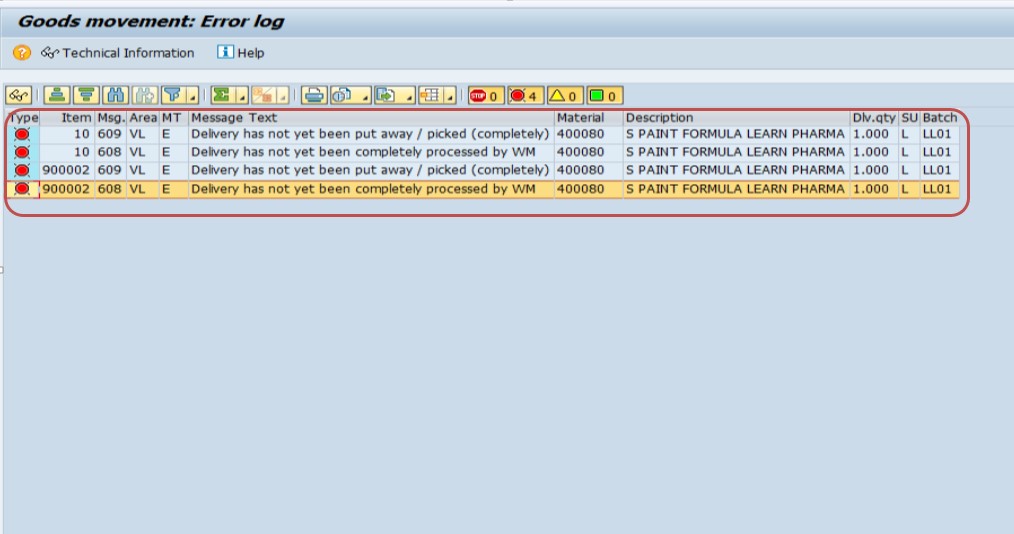
Delivery has not yet been put away / picked (completely)
Delivery has not yet been completely processed by WM
This error appears when trying to post goods issue for an outbound delivery that has pending Warehouse Management activities. Follow the steps below to resolve it using transactions LT03 and LT12. This guide also explains exactly why SAP raises this error, walks through a real business scenario, compares Lean WM with standard WM, lists related transactions and error messages, and gives you a prevention checklist so the error does not keep coming back.
🔍 Understanding the SAP VL609 Error in Detail
SAP message VL609 – "Delivery has not yet been put away/picked (completely)" is one of the most common roadblocks that SD consultants, warehouse users, and shipping clerks run into when they try to post a goods issue in VL02N. The message is triggered by the Warehouse Management (WM) module, not by Sales and Distribution itself, which is exactly why it confuses so many SD-focused users the first time they see it. SAP is telling you, in plain terms, that the delivery document exists, the picking quantity has been determined, but the physical movement of stock inside the warehouse has not been recorded as complete in the system.
In a standard order-to-cash cycle, once a sales order is created and an outbound delivery is generated using VL01N, the delivery does not automatically know that goods have physically left the storage bin. SAP WM sits between the delivery and the actual movement of material, and it insists on proof - in the form of a confirmed Transfer Order - before it lets you post the goods issue. If that proof is missing, incomplete, or only partially confirmed, the system blocks the goods issue and throws VL609.
This is a control mechanism, not a bug. Without it, a company could post financial goods issue entries in SAP even though the physical stock was still sitting on a shelf, which would break the link between what SAP believes is in stock and what is actually on the warehouse floor. Once you understand that VL609 exists purely to protect inventory accuracy, the fix becomes intuitive: complete the missing warehouse step, and the error disappears on its own.
📦 How SD and WM Integration Works - Why This Error Occurs
To fully understand VL609, it helps to see the four-stage journey a single outbound delivery item takes before it can leave the warehouse in SAP:
- Stage 1 - Sales Order (VA01): The customer requirement is captured, and the delivering plant and warehouse number are determined from the shipping point and storage location.
- Stage 2 - Outbound Delivery (VL01N): SAP copies the order quantity into a delivery document and calculates the picking quantity, but does not yet reserve a physical bin.
- Stage 3 - Transfer Order (LT03): Warehouse Management determines exactly which storage bin the stock should be picked from, based on the picking strategy assigned to the storage type (for example FIFO, LIFO, or fixed bin).
- Stage 4 - Transfer Order Confirmation (LT12): The warehouse worker confirms that the pick actually happened, and only then does SAP update the delivery as "completely processed by WM."
VL609 appears whenever Stage 3 or Stage 4 has not happened, or has only happened for part of the delivery. This is why simply re-saving the delivery, re-running availability check, or reprocessing the sales order never fixes the error - those actions touch stages 1 and 2, while the actual problem lives in stage 3 or 4.
💼 Real-World Scenario: How Learn Pharma Hit the VL609 Error
Pooja Mishra, a warehouse executive at Learn Pharma in Pune, was closing the day's dispatches when he tried to post goods issue for delivery number 80018045 against plant 1254 using VL02N. Instead of the usual green success message, SAP threw the error "Delivery has not yet been completely processed by WM." Vikram double-checked the delivery quantity, the batch, and even the customer's shipping address, but everything looked correct on the SD side.
His colleague Surekha Raje, who handles SAP Basis and configuration, pointed out that the warehouse number WH9 used Lean WM, and that Vikram's team had only created the picking request, not confirmed it. Vikram ran LT03, generated the Transfer Order item, and then ran LT12 to confirm it with the "Pick + Transfer" option. The moment he saved the confirmation, the VL609 error disappeared and the goods issue posted cleanly. This exact sequence - create with LT03, confirm with LT12 - is the fix for the overwhelming majority of VL609 cases, and it is exactly what this guide walks you through below.
⚠ Common Reasons for This Error
- Transfer Order for picking has not been created in WM (LT03 not executed)
- Transfer Order was created but not confirmed (LT12 confirmation pending)
- Lean WM is not activated for the warehouse number in configuration
- Only partial picking was done - some delivery items remain unprocessed
- Incorrect warehouse number or plant assignment in the delivery
Beyond these five most frequent causes, a few less obvious situations can also trigger VL609. A Transfer Order can be created against the wrong delivery item if the delivery was split across multiple shipping points. A confirmation can silently fail if the confirmed quantity does not match the requested quantity, leaving the item flagged as open. And in warehouses that combine Lean WM with serial or batch management, a missing batch determination on the delivery item can prevent LT03 from proposing a bin at all, which in turn blocks confirmation and keeps the delivery stuck at VL609.
✅ Step-by-Step Solution
Activate Lean WM for your Warehouse Number
Go to SPRO > Logistics Execution > Warehouse Management > Interfaces > Shipping > Define control parameters and number ranges for warehouse number.
Select your warehouse number (WH9) and tick Lean WM Active. Save.
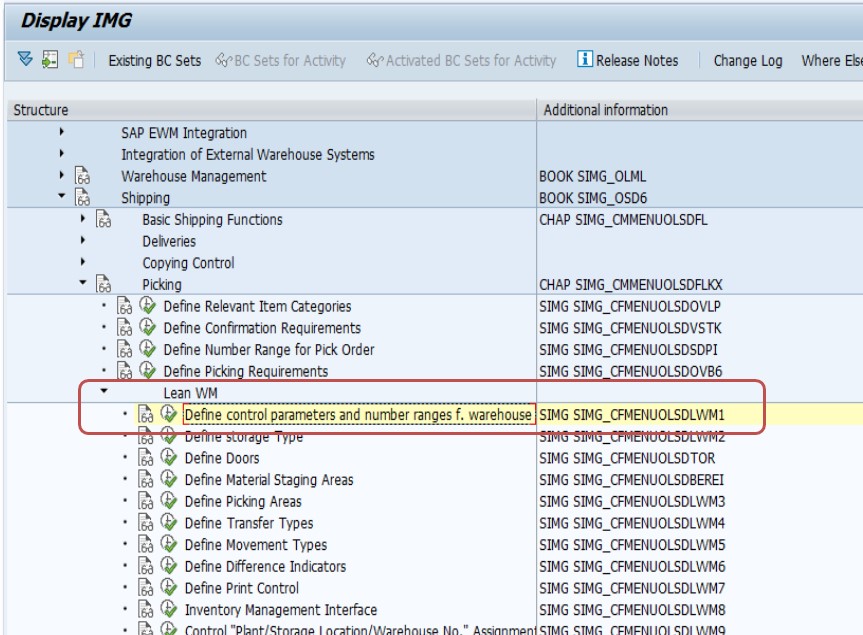
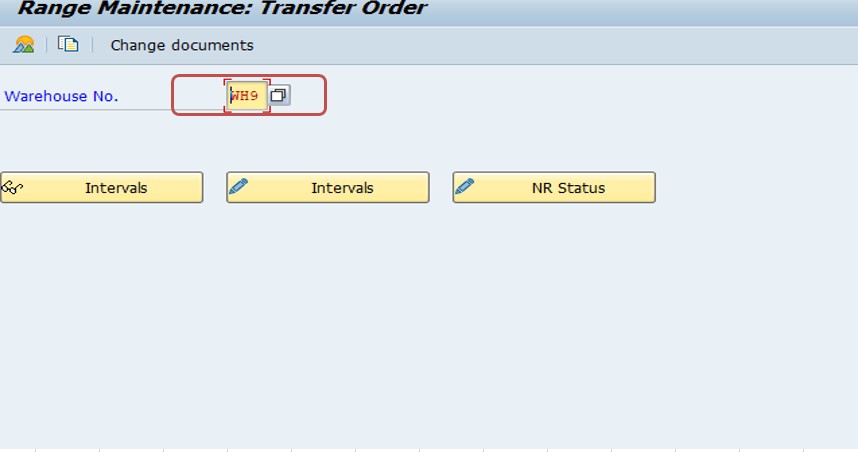
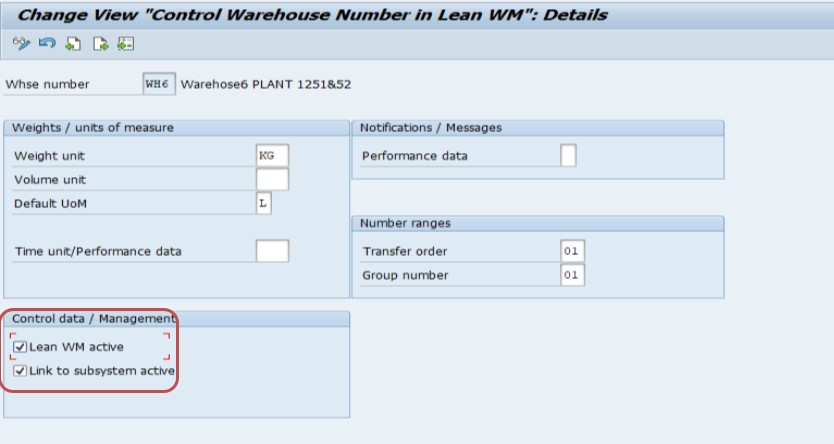
This configuration step is a one-time setup per warehouse number and is usually done by the SAP Basis or MM/WM configuration consultant, not by the day-to-day warehouse user. Once "Lean WM Active" is ticked and saved, every future delivery routed through this warehouse number will require a Transfer Order before goods issue, which is what gives SAP the control it needs over physical stock movement. If this checkbox is missing, LT03 may still let you create a Transfer Order, but the system-level linkage between the delivery and WM confirmation status will not behave as expected, and VL609 can reappear even after you think you have picked everything.
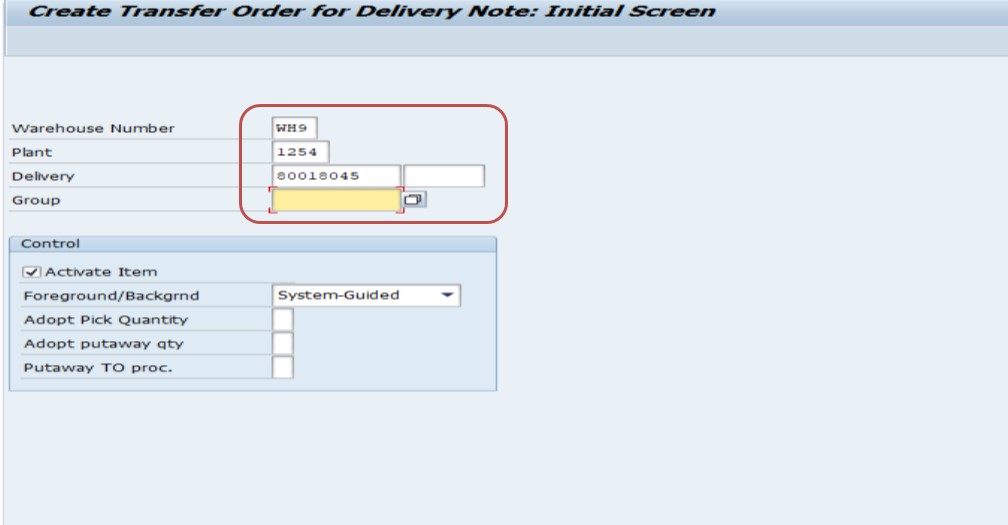
Create Transfer Order for Picking - LT03
Transaction LT03 creates a Transfer Order (TO) for picking based on your outbound delivery. SAP proposes the storage location, storage type, and bin from current stock.
- Select Warehouse No: WH9
- Select Plant: 1254
- Select Delivery No: 80018045
- Click Generate TO Item
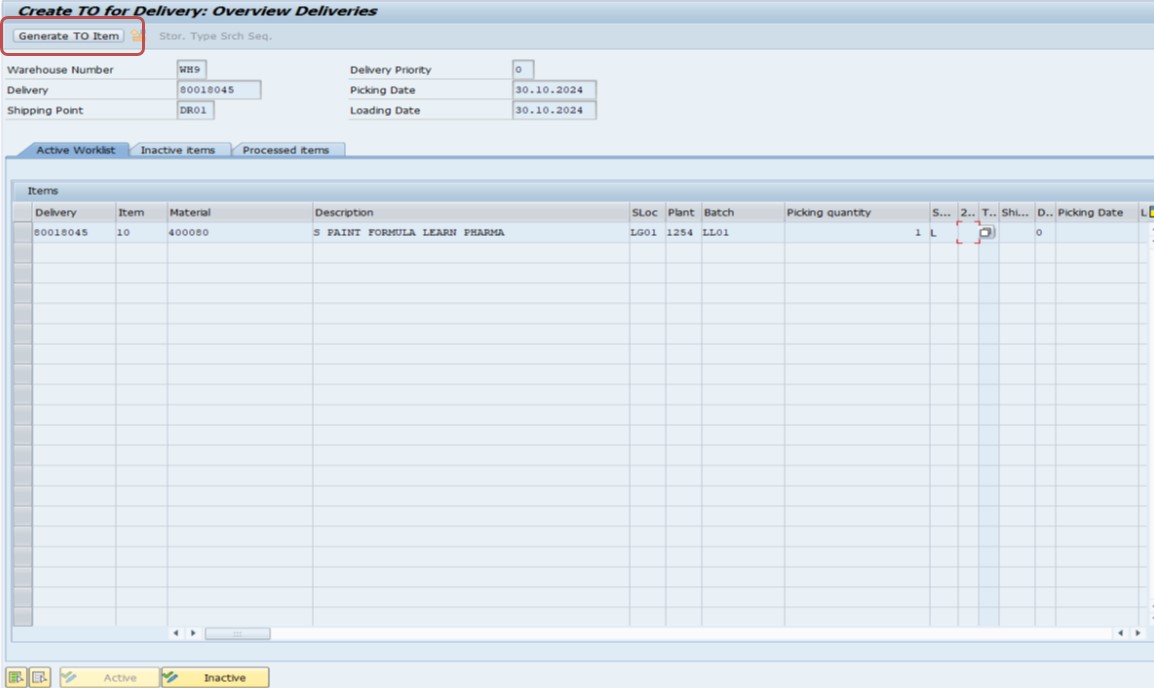
Behind the scenes, LT03 reads the picking strategy assigned to the source storage type - commonly FIFO (first-in, first-out) for perishable or batch-managed material, or fixed-bin for high-turnover items - and proposes the bin that best matches that strategy. If SAP cannot find enough available stock in any bin, LT03 will either propose a partial quantity or fail to generate the TO item entirely, in which case you should check stock availability using LS24 or MMBE before trying again. It is also worth noting that a single delivery can generate multiple Transfer Orders if the required stock is split across several storage bins or storage types; in that case, every one of those Transfer Orders must be confirmed before VL609 clears.
Confirm the Transfer Order - LT12
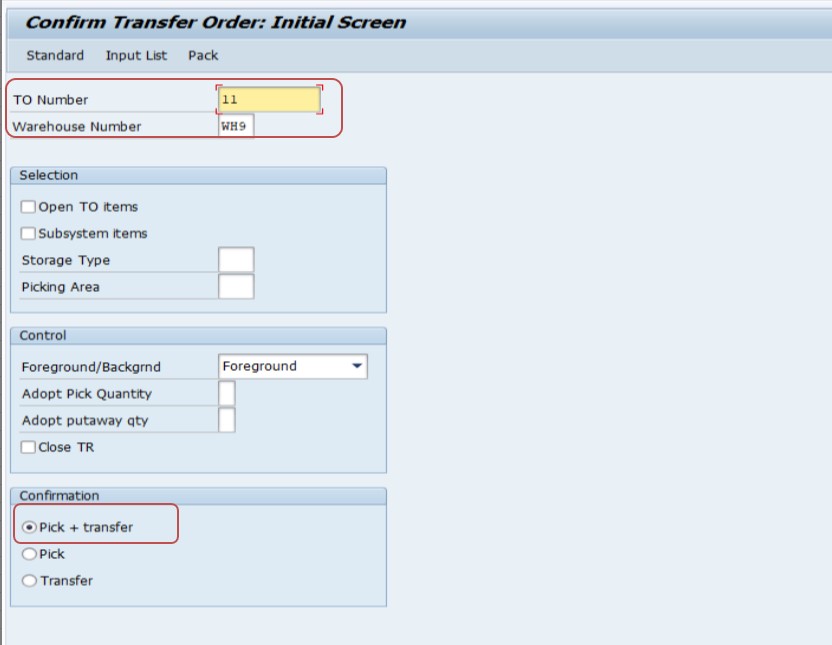
After creating the TO, confirm it using LT12 to complete the WM processing.
- Select TO No: 11
- Select Warehouse No: WH9
- Set Confirmation: Pick + Transfer
- Click Confirm Internally button
- Click Save
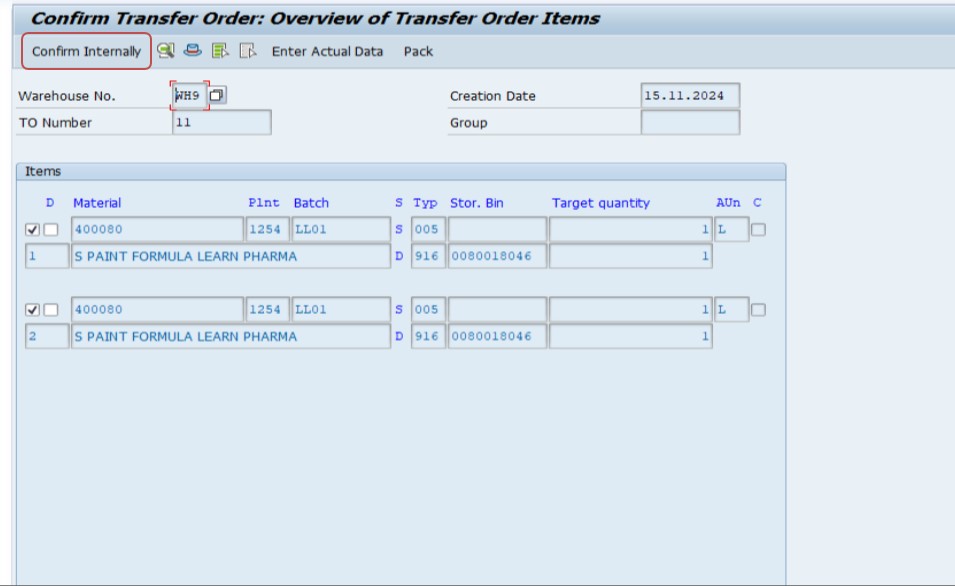
After confirming in LT12 and saving, the delivery is fully processed in WM. You can now post the Goods Issue in VL02N without the VL609 error.
The "Pick + Transfer" confirmation type tells SAP that both the physical pick from the source bin and the placement into the staging or interim area happened in one step, which is standard for Lean WM setups. If your warehouse uses two-step confirmation, you may instead see separate confirmation types for picking and put-away, and both steps need to be confirmed independently. Always double check the confirmed quantity against the requested quantity before saving - a partial confirmation will clear the error for the confirmed portion of stock but will leave the remaining open quantity blocking goods issue, which is one of the most common reasons users see VL609 return after they believe the issue is already fixed.
📋 Related and Alternative Transactions Every WM User Should Know
LT03 and LT12 solve most VL609 cases, but a well-rounded SAP WM user should also recognize these related transactions, since they come up constantly when diagnosing why a Transfer Order will not generate or confirm cleanly.
| Transaction | Purpose |
|---|---|
| LT03 | Create a Transfer Order for picking against an outbound delivery. |
| LT12 | Confirm an existing Transfer Order (single TO, by number). |
| LT1B | Confirm a Transfer Order using the delivery number instead of the TO number - useful when the TO number is not on hand. |
| LT0A | Create a Transfer Order for put-away, typically used for inbound deliveries and goods receipts. |
| LT1A | Confirm a put-away Transfer Order created for goods receipt. |
| LT21 / LT22 | Display single or multiple Transfer Orders to check their current status (open, partially confirmed, or fully confirmed). |
| VL06P | List of outbound deliveries for picking - shows which deliveries still require a Transfer Order. |
| VL06O | Outbound delivery monitor covering picking, packing, and goods issue in one worklist. |
| LX02 | Display bin status report to confirm whether stock is physically available in the proposed storage bin. |
| LS24 | Display warehouse stock by storage type and bin, useful for verifying available quantity before running LT03. |
If you regularly work with high delivery volumes, VL06P and VL06O are particularly useful because they let you spot every delivery still pending a Transfer Order in one screen, rather than checking deliveries one at a time in VL02N and reacting to VL609 individually.
❗ Common Mistakes That Cause VL609 to Reappear
- Creating the Transfer Order in LT03 but forgetting the confirmation step in LT12 entirely.
- Confirming only part of the requested quantity, leaving the remaining quantity open and unconfirmed.
- Running LT12 against the wrong Transfer Order number after a delivery generated multiple TOs.
- Trying to post goods issue immediately after LT03, without realizing that creation and confirmation are two separate SAP steps.
- Assuming that reprocessing the delivery or re-running the availability check in VA02/VL02N will "refresh" the WM status - it will not, because WM status only updates through LT12 confirmation.
- Overlooking that Lean WM was never activated for a newly created warehouse number, so LT03 behaves inconsistently.
- Not checking bin-level stock with LX02 or LS24 before running LT03, leading to a Transfer Order that proposes less quantity than the delivery requires.
📦 Put-Away vs Picking: Understanding Both Sides of VL609
The exact wording of message VL609 covers two mirrored situations, and it is worth understanding both even if you only ever encounter one of them in daily work:
| Scenario | Delivery Type | What Is Missing | Transactions to Use |
|---|---|---|---|
| "Not yet been picked" | Outbound delivery (goods issue to customer) | Items still need to be picked from a storage bin and moved to the staging area | LT03 to create, LT12 to confirm |
| "Not yet been put away" | Inbound delivery (goods receipt from vendor or plant) | Items still need to be moved from the goods receipt area into a storage bin | LT0A to create, LT1A to confirm |
Both scenarios share the same root cause: WM requires physical proof of stock movement, captured through a Transfer Order, before the corresponding financial and inventory posting is allowed to go through. The direction of the movement - into storage for inbound, or out of storage for outbound - determines which pair of transactions you use, but the underlying logic and the fix are identical.
📋 Related SAP Error Messages You May Also Encounter
| Message No. | Short Text | Typical Cause |
|---|---|---|
| VL609 | Delivery has not yet been put away/picked (completely) | Transfer Order missing or unconfirmed |
| VL211 | No transfer order could be created for the delivery | No available stock found in any proposed bin |
| VL212 | Delivery item is blocked | Delivery blocked at header or item level before WM processing can start |
| VL262 | Deficit of stock for delivery item | Insufficient stock quantity available at the storage location |
| L0114 | No storage bin found for placement in storage type | Storage type search strategy could not find a suitable empty bin |
If you land on this page after searching for one of these related codes, the troubleshooting mindset stays the same: identify which WM stage - creation or confirmation - is incomplete, then use LT03/LT0A and LT12/LT1A (or the stock and bin display transactions above) to close the gap.
💡 Best Practices to Prevent VL609 From Recurring
- Build a daily VL06P/VL06O worklist review so pending Transfer Orders are caught before the end-of-day goods issue rush.
- Train warehouse staff to treat "create TO" and "confirm TO" as two mandatory, separate actions rather than a single combined step.
- Set up a background job or a custom ALV report to flag deliveries where a Transfer Order has been open (created but unconfirmed) for more than a defined number of hours.
- Verify Lean WM activation immediately after any new warehouse number is configured, as part of the standard cutover checklist.
- Encourage staff to check bin-level stock with LS24 or LX02 before attempting LT03 on high-value or fast-moving materials, to avoid partial Transfer Orders.
- Document the confirmation type convention (Pick + Transfer vs separate picking/put-away confirmation) used at your site so new team members do not guess.
📈 Business Impact If VL609 Is Left Unresolved
It is tempting to treat VL609 as a minor pop-up that a warehouse clerk will eventually clear, but an unresolved Transfer Order has real downstream consequences across the order-to-cash cycle. Until goods issue is posted, the delivery cannot be billed, which means the customer invoice cannot be created in VF01. For companies that are close to a month-end or quarter-end cutoff, a stack of deliveries stuck at VL609 can directly delay revenue recognition, since billing documents cannot reference a delivery that has not completed its WM processing.
There is also a warehouse-accuracy angle. SAP's inventory records will continue to show the stock as available in the source bin, even though it has physically been staged, packed, or loaded onto a truck. Anyone running a stock report such as MMBE or LS24 during that window will see a mismatch between system stock and shop-floor reality, which can lead to double-picking, incorrect cycle-count adjustments, or confusion during a physical inventory count. In transportation-heavy operations, an unconfirmed Transfer Order can also block the transportation and shipment completion status, delaying proof-of-delivery documentation for the carrier.
Because of these ripple effects, most well-run warehouses treat "no Transfer Order older than a few hours without confirmation" as a daily housekeeping metric, not just an error message to react to when it appears.
🧠 A Quick Troubleshooting Decision Tree for VL609
When VL609 appears, work through these questions in order rather than jumping straight to reconfiguration - the vast majority of cases are resolved by question two or three.
- Step A - Does a Transfer Order exist for this delivery at all? Check with LT22 or the WM tab of the delivery. If none exists, go straight to LT03.
- Step B - If a Transfer Order exists, is it confirmed? LT22 will show the status as open or confirmed. If open, run LT12 (or LT1B using the delivery number) to confirm it.
- Step C - If it shows as confirmed but VL609 still appears, is the confirmed quantity equal to the delivery quantity? A partial confirmation leaves the remainder open. Create and confirm a second Transfer Order for the outstanding quantity.
- Step D - If LT03 will not generate a Transfer Order at all, is there enough available stock in the proposed storage bin? Check with LS24 or LX02; if stock is short, resolve the physical stock discrepancy or trigger a replenishment before retrying LT03.
- Step E - If none of the above explains it, is Lean WM actually activated for this warehouse number? Confirm in SPRO configuration; if it was recently deactivated or never activated, WM processing will behave inconsistently regardless of what LT03 and LT12 show.
Walking through these five checkpoints in sequence turns VL609 from a confusing red error into a two-minute diagnostic checklist, and it is the same sequence experienced SAP WM consultants use instinctively once they have seen the error enough times.
🔧 VL609 in Batch-Managed and Serial-Managed Materials
Materials that carry batch or serial number management add an extra layer to this error. For batch-managed material, LT03 needs a valid batch determination on the delivery item before it can propose a bin, because stock in WM is tracked at batch level within each storage bin. If the delivery item shows no batch, or an expired or blocked batch, LT03 may fail to generate a Transfer Order item, which then leaves the delivery permanently stuck at VL609 until the batch issue on the delivery itself is corrected in VL02N.
Serial-managed material behaves similarly but at the individual unit level - each serial number effectively needs its own confirmed movement, so a Transfer Order confirmation that captures only some of the required serial numbers will leave the remaining serialized units open. In both cases, the underlying fix is the same two-step LT03/LT12 process described above, but the diagnostic step of checking batch or serial assignment on the delivery item should happen first, before troubleshooting the Transfer Order itself.
💳 How VL609 Affects Downstream Billing and Financial Postings
Since goods issue is the trigger event for both inventory reduction and, in many pricing configurations, the point at which billing becomes possible, an open VL609 error effectively pauses everything downstream of the delivery. The billing due list in VF04 will not offer the delivery for invoicing, because SAP requires the delivery to be marked as goods-issue-complete first. Accounting teams reconciling goods-issue-to-invoice timing during month-end close should treat a growing backlog of VL609 deliveries as an early warning sign, since it directly foreshadows a billing backlog a few days later.
For controlling and costing purposes, cost of goods sold (COGS) postings that are tied to the goods issue movement type will also not occur until the Transfer Order is confirmed, which can distort short-period profitability reporting if a large batch of deliveries is left unresolved across a reporting cutoff. This is one more reason the prevention checklist earlier in this guide - daily worklist review, staff training on the two-step create-and-confirm process, and monitoring for stale open Transfer Orders - is worth implementing rather than treating VL609 purely as a one-off error to fix when it happens to appear.
✅ How to Verify the Fix and Test It Like a Consultant
Once you have created the Transfer Order with LT03 and confirmed it with LT12, do not simply assume the error is gone - verify it the way an experienced SAP consultant would before signing off on the ticket. Start by re-opening the delivery in VL02N and checking the WM status field on the item's Picking tab; it should now read as fully picked rather than partially or not picked. Next, attempt the goods issue posting again. If it goes through cleanly and generates a material document number, the underlying WM processing is genuinely complete, not just visually cleared.
For a more thorough check, especially in a testing or UAT environment, run LT22 against the delivery number and confirm that every Transfer Order tied to that delivery shows a status of fully confirmed, with no residual open quantity. If the delivery originally generated more than one Transfer Order - which happens whenever required stock was split across multiple storage bins or storage types - it is easy to confirm one TO, see the error clear temporarily, and then have it reappear once SAP re-evaluates the remaining open TO during the next goods issue attempt. Cross-checking with LT22 avoids that surprise.
If you are testing this fix as part of a broader SD-WM integration test script, also validate the knock-on steps: confirm that the delivery now appears in the billing due list in VF04, and that a stock report such as MMBE reflects the reduced quantity in the source storage location. A fix that clears VL609 but does not flow correctly into billing or stock reporting usually points to a separate configuration issue - for example, a missing movement type assignment or an incorrect storage location determination - rather than a true VL609 root cause, and should be escalated to the WM configuration team rather than repeated with LT03/LT12 alone.
Finally, if you support multiple warehouse numbers or plants, keep a short internal note of which warehouses use Lean WM versus standard WM, and which confirmation type convention (combined Pick + Transfer versus separate picking and put-away confirmation) applies to each. This single piece of documentation saves significant troubleshooting time for new team members who encounter VL609 for the first time and are not yet familiar with site-specific WM configuration choices.
❓ Frequently Asked Questions
📚 Quick Glossary of Terms Used in This Guide
- Transfer Order (TO): A WM document instructing warehouse staff to move a specific quantity of material from one bin to another.
- Storage Type: A logical grouping of storage bins that share the same picking or put-away strategy, such as bulk storage or high-rack storage.
- Storage Bin: The smallest physical storage unit in WM, identified by a bin coordinate, where stock physically sits.
- Confirmation: The act of telling SAP that a Transfer Order's movement has physically taken place, which updates both the TO status and the delivery's WM status.
- Lean WM: A simplified WM configuration that uses Transfer Orders without full bin-level quant management.
- Goods Issue: The posting that reduces inventory and creates the accounting entry once stock physically leaves the warehouse.
🎯 Conclusion
SAP message VL609 looks intimidating the first time it appears, but it almost always comes down to one missing action: a Transfer Order that has either not been created or not been confirmed in Warehouse Management. By working through the three steps in this guide - activating Lean WM where needed, creating the Transfer Order with LT03, and confirming it with LT12 - you resolve the vast majority of cases in under fifteen minutes. Keep the related transactions, common mistakes, and prevention checklist above bookmarked, and this error will move from being a recurring interruption to a two-minute routine check during your daily dispatch process.
This guide is written for the full range of people who typically land on this page: warehouse executives like Pooja Mishra who need a fast fix during daily dispatch operations, SAP SD and MM functional consultants configuring a new plant rollout, SAP end users preparing for interview questions on WM integration, and students learning the order-to-cash cycle for the first time. Whichever group you fall into, the same core principle applies - VL609 is SAP's way of protecting inventory accuracy by requiring proof of physical stock movement before it allows a financial goods issue posting, and closing that proof with LT03 and LT12 is, in almost every case, all it takes to move forward.