Deficit of BA Unrestricted-use 1 L : 400080 1254 LG01 LL01
This error appears when you try to issue, consume, or transfer stock that is not available in unrestricted-use status for the material, plant, storage location, and batch shown in the message. Follow the steps below to resolve it using MMBE, MB1C, and MIGO. This guide also explains what unrestricted-use stock actually means, walks through a real business scenario, compares SAP's stock categories, lists related transactions and error messages, and gives you a prevention checklist so the deficit does not keep coming back.
"if you encounter any errors in SAP, send me a screenshot at pramod@learntosap.com, and I will help you resolve the issue."
🔍 Understanding SAP Error M7021 in Detail
SAP common error message: you are trying to issue (consume or transfer) stock that is not available in Unrestricted-use stock for the material and location specified.
Note: The SAP error is stock that is not available in unrestricted-use stock for the material and location. In plain terms, whenever you post a goods issue to a production order, a delivery, a transfer posting, or a consumption entry, SAP checks how much freely usable stock actually exists in the system for that exact material, plant, storage location, and batch combination. If the quantity you are trying to move is greater than what SAP finds sitting in unrestricted-use status, the system stops the posting immediately and raises message M7021 rather than letting the stock quantity go negative.
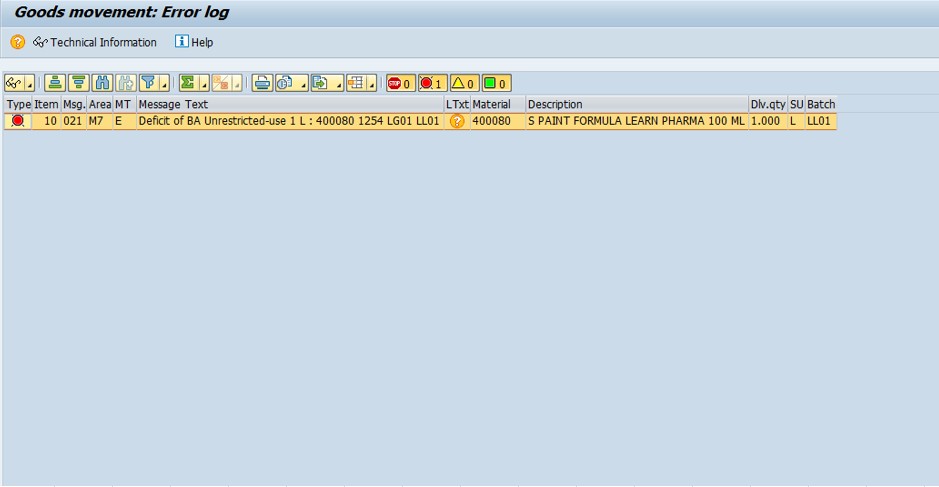
This is not a bug or a random glitch -it is a deliberate inventory control built into SAP MM. Unrestricted-use stock is the only category the system will automatically issue from without an extra approval or transfer step, so SAP refuses to let that number drop below zero. The error is effectively SAP telling you "the stock you are asking me to remove simply is not sitting where you expect it to be right now," and the fix is always some combination of checking where the stock actually is and either releasing it or genuinely adding it.
📦 SAP Stock Categories -Why "Unrestricted-Use" Matters
To understand M7021 properly, it helps to know that SAP MM tracks inventory across several distinct status categories for the same material, plant, and storage location. A material can physically exist in the warehouse and still trigger this deficit error if the stock sits in the wrong category.
| Stock Category | Meaning | Can It Be Issued Directly? |
|---|---|---|
| Unrestricted-use | Freely available stock, cleared for any business use | Yes |
| Quality inspection | Received but pending quality check before release | No -must transfer first |
| Blocked stock | Flagged as unusable, damaged, or under hold | No -must be released or scrapped |
| Stock in transit | Moving between plants or storage locations, not yet received | No -must complete the goods receipt first |
| Restricted-use | Batch-specific hold, often tied to shelf life or customer restriction | No -must be released at batch level |
M7021 fires specifically against the unrestricted-use bucket. If your material actually has plenty of stock, but that stock is parked in quality inspection or blocked status, MMBE will show a healthy total quantity while the unrestricted-use column reads zero or low -and that mismatch is exactly what causes confusion for users who assume "I have stock" automatically means "SAP will let me issue it."
💼 Real-World Scenario: How Pooja mishra Hit the M7021 Error
Pooja mishra, a stores executive at Learn Pharma in Pune, was processing a goods issue for a production order that needed material 400080 from plant 1254, storage location LG01, batch LL01. The moment she confirmed the quantity of 1 L (litre), SAP threw message M7021 -"Deficit of BA Unrestricted-use 1 L: 400080 1254 LG01 LL01." She was confused because the goods receipt for that exact batch had been posted only two days earlier, so surely the stock should be sitting right there.
Her supervisor, Vikram Nair, asked her to run MMBE for material 400080 at plant 1254. The stock overview showed the total quantity was correct, but almost all of it was sitting in quality inspection stock, not unrestricted-use -the batch had not yet been released after incoming quality inspection. Rather than manually creating new stock, Vikram guided Anita to use MIGO with transfer posting movement type 321 to move the inspected batch from quality into unrestricted-use. Once that transfer posted, the original production order goods issue went through without any error. This is the most common real-world pattern behind M7021: the stock exists, but it is sitting in the wrong status category, and the fix is a transfer posting rather than a stock creation.
⚠ SAP Error Common Reasons
- No stock available in unrestricted-use stock
- Stock not available at the specified storage location
Beyond these two headline reasons, a few less obvious situations commonly sit behind them. The batch may exist but still be waiting on quality inspection release, which keeps it out of unrestricted-use even though the material master and total quantity look fine. Stock may have been received into a different storage location or plant than the one referenced in your transaction, which is easy to miss when a company runs several storage locations for the same material. And if the material is batch-managed, a typo in the batch number during data entry will make SAP look for stock in a batch that genuinely has zero unrestricted quantity, even while the correct batch sits fully stocked one row away in MMBE.
✅ How to Solve This Error -Solution
First Check Stock -MMBE or MB52
- Enter Material No = 400080
- Enter Plant = 1254
- Enter Storage location = LG01
- Enter Batch = LL01
- Execute -stock is 0 or less than 1 L → that's the issue of error.
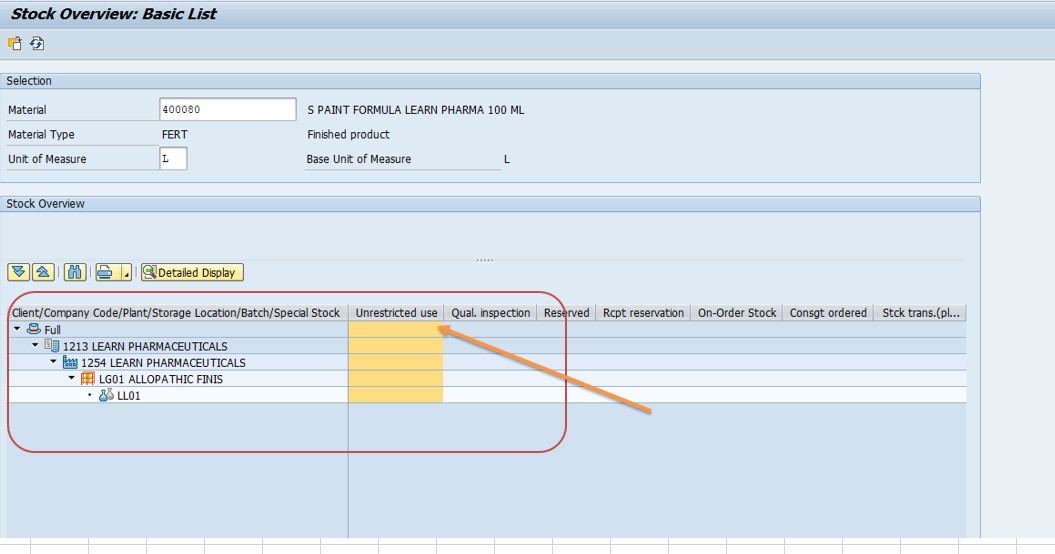
MMBE gives you a full stock overview across plants, storage locations, and batches, broken down by category -unrestricted, quality inspection, blocked, and in-transit -in a single screen, which makes it the fastest first stop for diagnosing M7021. MB52 is the report-style alternative and is more convenient when you need to check several materials at once, for example if a batch job or interface just processed a large number of goods movements and you want to identify every material that now shows a deficit. Whichever transaction you use, the key number to look at is specifically the unrestricted-use column -total stock across all categories can look healthy while unrestricted-use alone reads zero, and that gap is the actual root cause of the error.
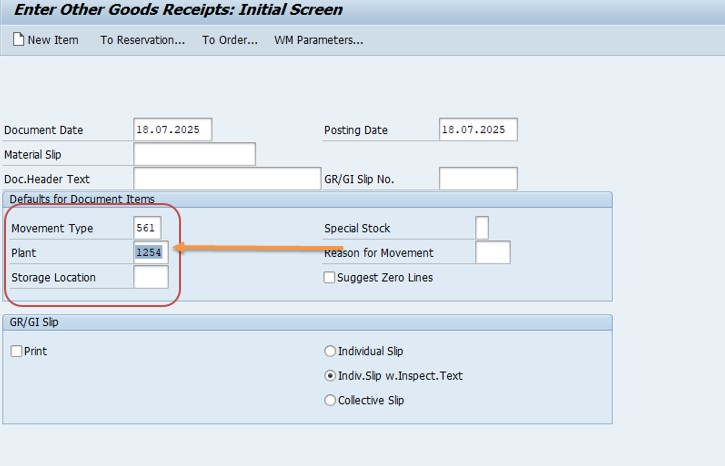
Add Stock Manually -MB1C
- Enter Movement Type = 561
- Enter Plant = 1254
- Enter Material No = 400080
- Enter Qty = 25
- Enter Storage location = LG01
- Enter Batch = LL01
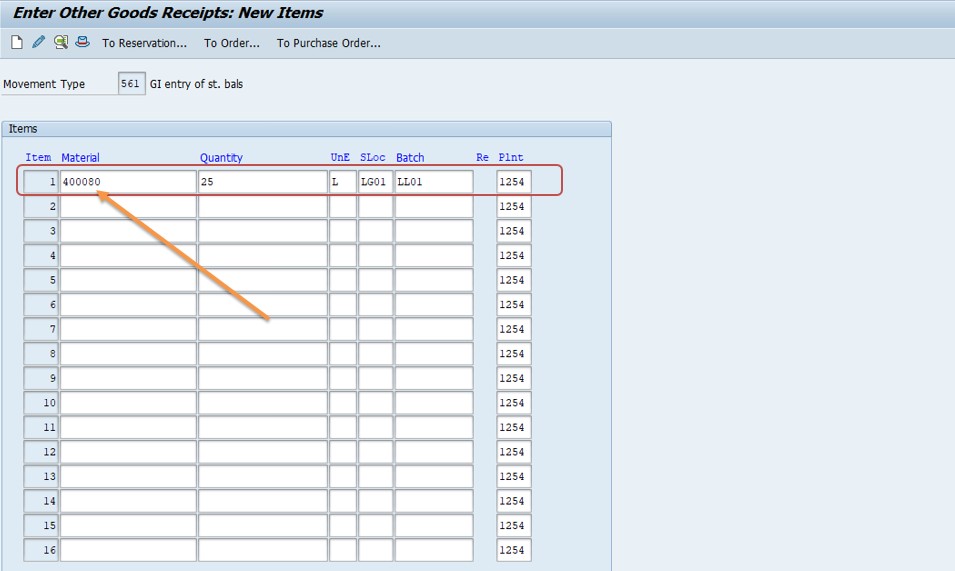
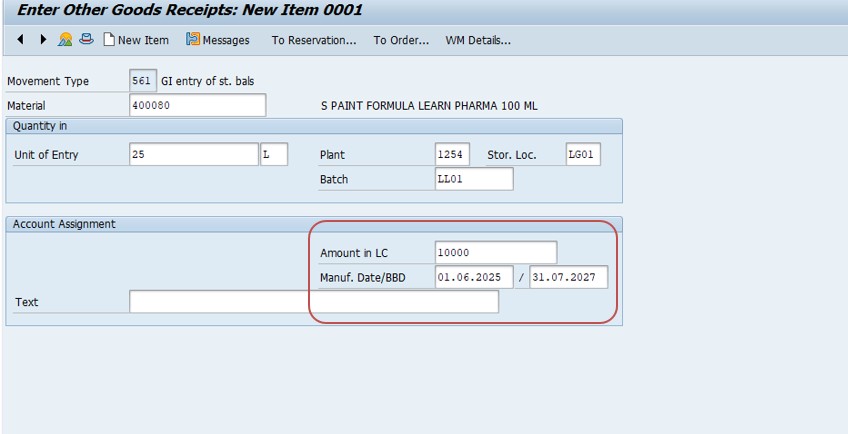
Then check stock added or not -go to transaction MMBE.
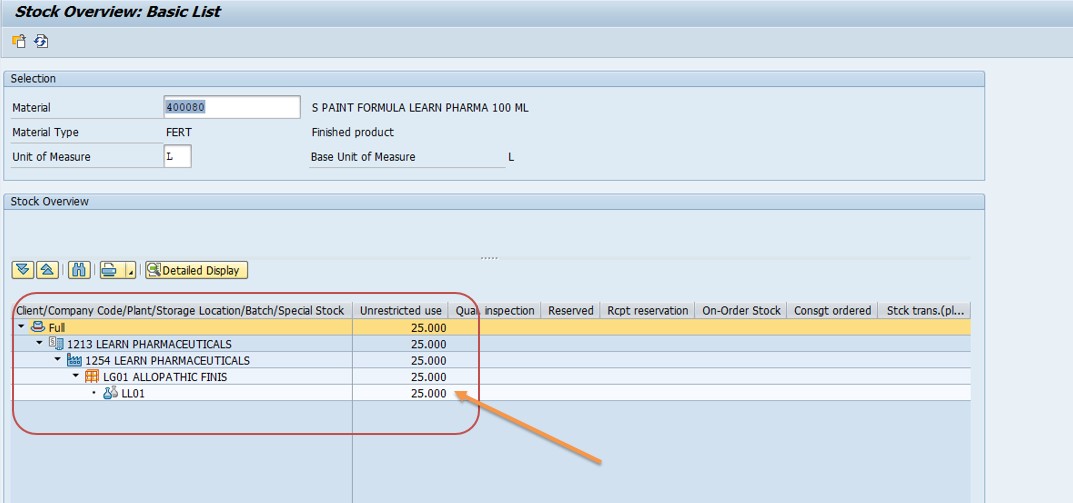
Movement type 561 posts stock directly into unrestricted-use without any reference to a purchase order, production order, or goods receipt document. This makes it powerful for correcting genuine inventory discrepancies or loading opening balances during a system cutover, but it should be used carefully -every 561 posting creates real inventory value on the books, so it needs to be backed by an actual physical stock count or an approved correction process, not used as a routine shortcut to make an error disappear.
Transfer from Quality to Unrestricted Use -MIGO
- Select Transfer Posting
- Movement Type: 321 (Quality → Unrestricted)
- Material: 400080
- Enter Batch = LL01
- Plant: 1254, SLoc: LG01 and Quantity: 1 -Post
In most real-world cases, this is the correct fix rather than Step 2, because the stock already physically exists -it is simply sitting in quality inspection status waiting for release. Movement type 321 reclassifies the batch from quality inspection into unrestricted-use without creating any new inventory value, which keeps your stock ledger accurate. If your organization uses formal quality management with inspection lots (transaction QA32 or QA33), the usage decision recorded there may need to be completed first before MIGO will allow the 321 transfer; check the inspection lot status if the transfer posting itself gets blocked.
📋 Related and Alternative Transactions Every MM User Should Know
MMBE, MB1C, and MIGO solve most M7021 cases, but a well-rounded SAP MM user should also recognize these related transactions, since they come up constantly when diagnosing why stock is not sitting where a posting expects it.
| Transaction | Purpose |
|---|---|
| MMBE | Stock overview across plants, storage locations, and batches, broken down by stock category. |
| MB52 | Warehouse stock list report, useful for checking multiple materials at once. |
| MB1C | Post an initial entry or correction directly into stock, most often with movement type 561. |
| MIGO | Universal goods movement transaction -used here for transfer postings such as movement type 321. |
| MB1B | Transfer posting between storage locations, plants, or stock categories using a movement type screen instead of MIGO. |
| MB1A | Goods issue for a reservation or cost center, another common trigger point for M7021. |
| QA32 / QA33 | Display or process a quality inspection lot; the usage decision here often gates the 321 transfer. |
| MSC3N | Display batch master record to check batch status, shelf life, and classification data. |
| MB5B | Stock on posting date report, useful for confirming exactly when a batch's unrestricted quantity changed. |
If your organization runs frequent stock corrections, keeping a short reference list like this on hand saves significant time compared to searching for the right movement type each time a deficit error appears.
❗ Common Mistakes That Cause M7021 to Reappear
- Using MB1C to manually create stock when the real fix was a transfer posting from quality or blocked stock -this inflates inventory value without a matching physical basis.
- Checking total stock instead of the unrestricted-use column specifically, and concluding stock is available when it is actually sitting in quality inspection or blocked status.
- Entering the wrong storage location or plant on the transaction, especially in multi-storage-location plants where similar materials are split across several SLocs.
- Mistyping the batch number, which causes SAP to check an entirely different (and empty) batch than the one that actually has stock.
- Attempting the 321 transfer posting before the quality inspection lot's usage decision has been completed, which MIGO will block.
- Forgetting that stock in transit between plants is not yet available for issue at the destination plant until the receiving goods movement is posted.
🔧 Root Cause Categories Behind a Stock Deficit
| Root Cause | How to Confirm | Typical Fix |
|---|---|---|
| Batch pending quality release | MMBE shows quantity in quality inspection stock | MIGO transfer posting, movement type 321 |
| Batch or material genuinely short | MMBE shows zero or low total quantity across all categories | Trigger procurement, or MB1C correction if a physical count confirms the stock exists |
| Wrong storage location entered | Stock exists at a different SLoc for the same plant and material | Re-enter the correct storage location, or MB1B transfer between locations |
| Batch number mismatch | MSC3N shows the correct batch has stock but a different batch was referenced | Correct the batch entry on the original transaction |
| Stock in transit not yet received | Stock overview shows quantity "in transit" rather than at the destination plant | Complete the goods receipt at the destination plant first |
| Blocked stock due to hold or damage | MMBE shows quantity in blocked stock category | Release the block per company policy, or scrap if genuinely unusable |
📋 Related SAP Error Messages You May Also Encounter
| Message No. | Short Text | Typical Cause |
|---|---|---|
| M7021 | Deficit of BA Unrestricted-use | Not enough unrestricted-use stock for the posted quantity |
| M7020 | Deficit of stock (general) | Insufficient total stock, not category-specific |
| M7022 | Deficit of SL Unrestricted-use | Same deficit issue, referencing a specific special stock indicator |
| M7024 | Deficit of stock in transfer | Insufficient stock in transfer/blocked status for the movement |
| M7053 | Negative stock not allowed for this material/plant | Negative stock configuration disabled and quantity would drop below zero |
If you land on this page after searching for one of these related codes, the troubleshooting mindset stays the same: confirm exactly which stock category and batch is short using MMBE or MB52, then either release existing stock through the correct transfer posting or add genuinely missing stock through an approved correction.
💡 Best Practices to Prevent M7021 From Recurring
- Run a daily or shift-wise quality inspection lot review so batches do not sit in quality status longer than necessary before being released to unrestricted-use.
- Train stores and production staff to check the unrestricted-use column specifically in MMBE, not just the total quantity, before attempting a consumption or issue posting.
- Restrict MB1C movement type 561 postings to authorized inventory-control staff, with a documented reason for every manual stock correction.
- Standardize storage location naming and material master settings across plants to reduce data-entry mismatches on multi-location sites.
- Set up a periodic batch reconciliation report comparing MSC3N batch status against MMBE stock category to catch quality-hold batches proactively.
- Where volumes are high, consider a background job that flags any batch sitting in quality inspection beyond an agreed SLA, so it gets released before it blocks a downstream posting.
📈 Business Impact If M7021 Is Left Unresolved
A stock deficit error is easy to dismiss as a minor speed bump, but a recurring M7021 across a production line or dispatch operation has real downstream consequences. On the shop floor, a production order that cannot post its component goods issue cannot be confirmed, which stalls the entire order and can cascade into a missed production schedule if the same material feeds multiple work centers. In distribution, a delivery that cannot consume stock for picking or goods issue directly delays customer shipments, and repeated occurrences on the same material often point to a systemic quality-release bottleneck rather than a one-off data entry mistake.
There is also an inventory-accuracy angle worth taking seriously. Every time a team reaches for MB1C to "just add the stock" instead of diagnosing where the real stock is sitting, the on-hand inventory value in SAP grows disconnected from the physical warehouse. Over a few months, this kind of habitual shortcut is exactly what causes large, hard-to-explain variances during a physical inventory count or cycle count reconciliation, and it is far more time-consuming to unwind after the fact than it would have been to diagnose the root cause correctly the first time.
Finance and controlling teams should also care about this error pattern, even though it surfaces as an MM message. Every unrestricted-use deficit that gets "solved" with an unjustified MB1C stock creation quietly inflates inventory valuation on the balance sheet, since SAP posts a corresponding value entry the moment the movement is confirmed. If this happens repeatedly across a plant without a documented reason code, month-end inventory valuation reports and standard cost variance analysis can both start drifting away from physical reality, and auditors reviewing inventory controls will typically flag a pattern of unexplained 561 postings as a control weakness. Building the habit of diagnosing root cause first -checking whether stock is simply sitting in quality or blocked status -protects both the shop floor schedule and the accuracy of the books.
🧠 A Quick Troubleshooting Decision Tree for M7021
When M7021 appears, work through these questions in order rather than jumping straight to MB1C -the majority of cases are resolved by question two or three.
- Step A -Does the material have any stock at all in MMBE for this plant? If total stock across all categories is genuinely zero, this is a real supply shortage, not a status issue -check procurement or production status instead.
- Step B -If total stock exists, which category is it sitting in? Expand the MMBE stock category breakdown. If it is in quality inspection, use MIGO movement type 321 to transfer it. If it is blocked, follow your site's block-release process.
- Step C -Is the batch number on your transaction correct? Cross-check with MSC3N; a simple typo in the batch field is one of the most common and fastest-to-fix causes.
- Step D -Is the storage location correct? Multi-SLoc plants often split the same material across two or three storage locations; confirm the one referenced in your posting actually holds the stock.
- Step E -If none of the above explains it, is the stock currently in transit between plants or storage locations? Check the stock-in-transit category and complete the receiving movement first if so.
- Step F -Only if all of the above are ruled out, and a physical count confirms real stock exists that SAP does not reflect, use MB1C with an approved, documented correction.
Walking through these six checkpoints in sequence turns M7021 from a confusing red error into a quick diagnostic checklist, and keeps manual stock corrections limited to the cases that genuinely need them.
✅ How to Verify the Fix and Test It Properly
Once you have either transferred stock with MIGO or added a correction with MB1C, do not simply assume the deficit is cleared -verify it the way an experienced SAP consultant would before closing the ticket. Re-run MMBE for the same material, plant, storage location, and batch, and confirm that unrestricted-use stock now shows a quantity equal to or greater than what the original transaction needed. Only after that check passes should you retry the original goods issue, consumption, or transfer posting.
If you used a transfer posting from quality inspection, also confirm the quality inspection lot in QA33 shows the usage decision as complete, since an incomplete usage decision can sometimes allow a partial transfer while leaving a residual quantity stuck. If you used MB1C to add stock, cross-check the posting against a physical stock count or a signed correction request, and make sure the transaction was recorded with a clear reason code or note in the material document header, both for audit purposes and so the next person who investigates a related discrepancy can see why the correction was made.
Finally, if this material or batch has triggered M7021 more than once, treat that repetition as a signal worth escalating -either to the quality team if inspection releases are consistently slow, or to the MM configuration team if storage location or batch determination settings need review. A guide like this one solves the immediate error quickly, but a pattern of repeat deficits on the same material is usually pointing at a process gap upstream that is worth fixing once rather than working around every time.
📚 Quick Glossary of Terms Used in This Guide
- Unrestricted-use stock: Inventory freely available for any business transaction without an extra release step.
- Quality inspection stock: Stock received but pending a quality check before it can be released to unrestricted-use.
- Blocked stock: Stock flagged as unusable, damaged, or held pending a decision.
- Batch: A specific, traceable production or delivery lot of a material, tracked separately in SAP when batch management is active.
- Movement type: A three-digit code in SAP that defines the nature of a stock movement, such as 561 for stock entry or 321 for a quality-to-unrestricted transfer.
- Transfer posting: A stock movement that changes category, location, or plant without a purchase order or sales reference, typically posted through MIGO or MB1B.
🎯 Conclusion
SAP message M7021 looks alarming the first time it appears, but it almost always comes down to one simple fact: the stock you are trying to issue is either genuinely short, or it exists but is sitting in the wrong category. By working through the steps in this guide -checking stock with MMBE or MB52, and then either transferring existing quality or blocked stock with MIGO or, where truly justified, correcting stock with MB1C -you resolve the vast majority of cases in under fifteen minutes. Keep the related transactions, root-cause table, and prevention checklist above bookmarked, and this error will move from being a recurring interruption to a quick, confident routine check.
This guide is written for the full range of people who typically land on this page: stores and production executives like Pooja mishra who need a fast fix during daily operations, SAP MM and QM functional consultants configuring plant and quality settings, SAP end users preparing for interview questions on inventory management, and students learning stock categories for the first time. Whichever group you fall into, the same core principle applies -M7021 is SAP's way of protecting inventory accuracy by refusing to issue stock that is not genuinely free to use, and diagnosing exactly where that stock sits is, in almost every case, all it takes to move forward.
❓ Frequently Asked Questions
📝 Practice -Yes/No Quiz
1. Can you extend a material to a new plant using MM02?
2. Can one material have multiple material types?
3. Is MARA the table for general material data?