VOV7 – SAP Item Category Configuration Explained (Step-by-Step Guide)
Item categories are components that define the nature of items in a sales order. Each item category is associated with specific business functionalities, and processes such as pricing, delivery, and billing. A well-configured item category ensures that sales orders are processed accurately and in alignment with business requirements. This guide walks through transaction VOV7, using the standard item category TAN as the working example, and explains what each field actually controls once an item category is live on a sales document. If you run into any errors while following along, feel free to send a screenshot to pramod@learntosap.com for help.
✅ What Is an Item Category in SAP SD?
Item categories are components that define the nature of items in a sales order. Each item category is associated with specific business functionalities, and processes such as pricing, delivery, and billing. A well-configured item category ensures that sales orders are processed accurately and in alignment with business requirements.
Where a sales document type, covered elsewhere on this site through VOV8, governs the behavior of the sales document as a whole, item category governs the behavior of each individual line item within that document. A single sales order can carry several line items, and not every item necessarily behaves the same way - a standard product line needs pricing and delivery, a free sample might need neither, and a text-only line item needs no logistics processing at all. Item category is what lets SAP distinguish between these very different kinds of line items within the same order.
This guide uses the standard item category TAN as its working example - the item category most SAP SD consultants encounter first, since it's the default proposed on a standard order for a normal, sellable material.
📋 What an Item Category Actually Controls
An item category is really a bundle of individual switches, each governing one specific aspect of how a line item behaves. Understanding these individually is what makes the difference between recognizing why TAN behaves the way it does versus treating it as an unexplained default.
| Setting | What It Controls |
|---|---|
| Item Type | Whether the item is a standard item, a text item, or a value item, among other classifications. |
| Completion Rule | How the system determines when an item is considered fully processed, relevant for quotations and contracts. |
| Billing Relevance | Whether the item is relevant for billing at all, and if so, based on the order quantity or the delivered quantity. |
| Pricing | Whether pricing is carried out for this item, and whether it's included in the overall document pricing. |
| Schedule Line Allowed | Whether the item can carry a schedule line, which is required for any item that needs a delivery. |
| Business Item | Whether business data (e.g. shipping, billing details) can be maintained separately at the item level. |
TAN, as a standard sales item, is configured as pricing relevant, billing relevant based on order quantity, and schedule line allowed - together making it suitable for a normal product sale that needs to be priced, delivered, and invoiced in the usual way.
🔧 How to Use VOV7 Transaction Code – SAP SD Configuration Guide
Reviewing or adjusting an item category in VOV7 is a short transaction, but each field is worth understanding individually, since together they determine exactly how a line item under that category will behave across the entire order-to-cash cycle.
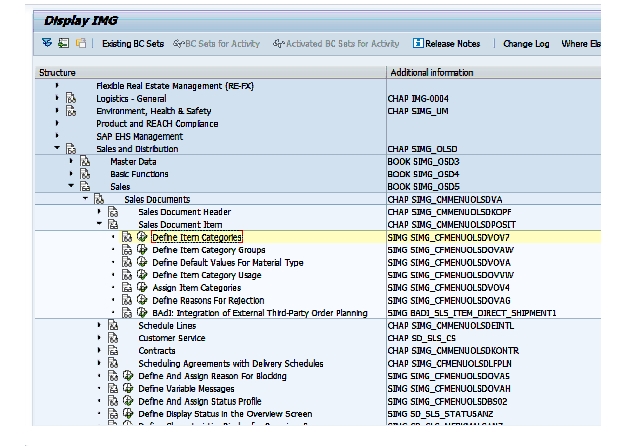
Run transaction VOV7 directly, or follow the IMG path: SPRO → Sales and Distribution → Sales → Sales Documents → Sales Document Item → Define Item Categories.
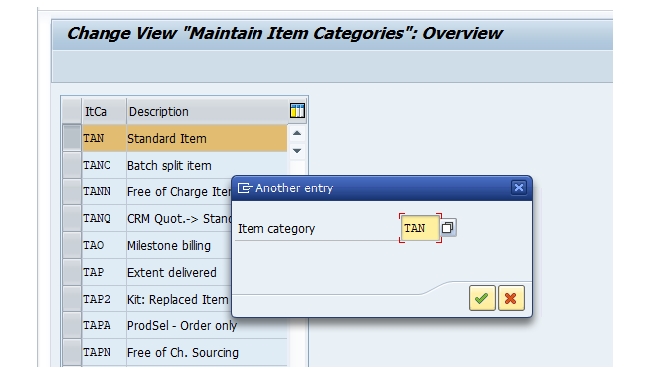
From the overview list, select TAN - Standard Item to review its configuration. This is the item category most sales orders use by default for a normal, sellable material.
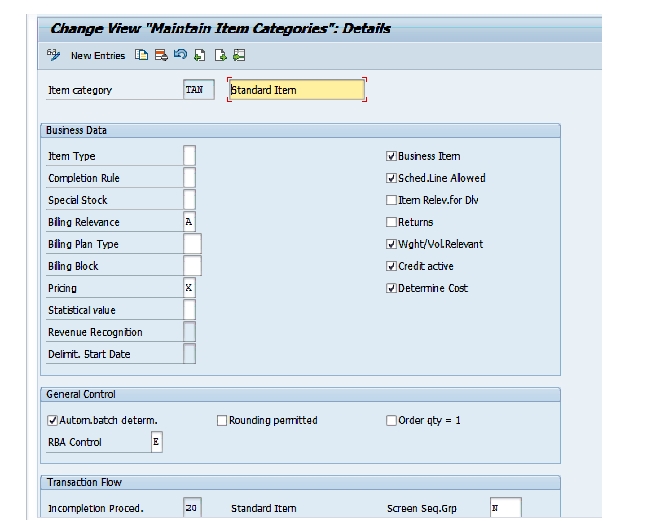
Select Save. If any settings were adjusted, the system will usually prompt for a transport request if the system is configured to require one, which is standard practice for configuration changes so they can be tracked and migrated through the landscape (Development → Quality → Production) in a controlled way.
📋 Common SAP Item Categories Explained
TAN is the most familiar item category, but SAP delivers several standard ones, each suited to a different kind of line item scenario. Recognizing these helps when deciding whether an existing standard category already fits a business need, or whether a custom one - typically copied from the closest standard match - is genuinely required.
| Item Category | Typical Use |
|---|---|
| TAN | Standard item - a normal, sellable material relevant for pricing, delivery, and billing. |
| TANN | Free of charge item - relevant for delivery but not for pricing or billing. |
| TAX | Item not relevant for billing - used where a line item should process through delivery but not generate an invoice. |
| TAD | Service item - used for non-stock service items that don't require a delivery. |
| TATX | Text item - carries no pricing, delivery, or billing relevance, used for informational text lines only. |
Each of these standard categories represents a distinct, proven combination of the field settings described earlier - copying the closest match, rather than building a new item category's fields from scratch, is the same approach recommended elsewhere on this site for sales document types and pricing procedures.
📋 How Item Category Determination Actually Works
VOV7 defines an item category's individual behavior, but it doesn't decide which item category is proposed on a given line item - that's a separate configuration step, item category determination, maintained in transaction VOV4. Determination combines several inputs to look up the correct item category automatically:
- Sales Document Type - the document type the order is being created under, such as OR (standard order) or the custom EOR type covered elsewhere on this site.
- Item Category Group - a field on the material master that classifies the material for item category purposes, such as NORM for a standard material.
- Usage - an optional further qualifier, used in specific scenarios like text items or certain configurable materials.
- Higher-Level Item Category - relevant for sub-items, such as components of a bill of materials, which may need a different item category than their parent item.
Understanding this distinction is genuinely important: a line item showing the wrong item category on a sales order is very rarely a problem with the item category's own VOV7 settings, and almost always a problem with the determination rule in VOV4 pointing to the wrong category for that specific document type and material combination.
💼 Real-World Scenario: Introducing a Free Sample Item Category
Pooja Mishra, an SAP SD consultant atLearn Pharma, was asked to support a new promotional process where sales reps could include a free sample product alongside a customer's regular order, without that sample affecting the invoice total. Sales manager Rajesh Wagh explained that the sample still needed to appear on the delivery, so the warehouse knew to pack and ship it, but it absolutely should not generate a billing line.
Working with functional consultant Priya Patil, Pooja reviewed TAN's configuration in VOV7 to understand its baseline settings, then identified that the standard free-of-charge item category, TANN, already matched the business requirement almost exactly - relevant for delivery, but not for pricing or billing. Rather than building a new item category from scratch, Pooja confirmed TANN's field settings fit the need and worked with Anita Shah, the business analyst, to update item category determination in VOV4 so that a specific item category group on sample materials would automatically propose TANN instead of TAN.
Once tested with a sample order, sales reps could add the promotional item and see it correctly flow through to delivery while remaining excluded from the invoice - confirming that recognizing an existing standard item category's fit, rather than assuming a custom one was required, had solved the business need with a fraction of the configuration effort a from-scratch item category would have needed.
❗ Common Mistakes When Configuring Item Categories
- Assuming a custom item category is needed without first checking whether an existing standard category, like TANN or TAX, already covers the requirement.
- Changing a field on TAN or another widely used standard item category directly, rather than copying it into a new category, which risks affecting every existing order type that already relies on the original behavior.
- Confusing item category configuration (VOV7) with item category determination (VOV4) - adjusting the wrong transaction when the actual issue is which category gets proposed, not how that category behaves once selected.
- Setting billing relevance incorrectly, causing an item that should generate an invoice to be silently excluded, or an item that shouldn't bill to appear on an invoice unexpectedly.
- Forgetting to review schedule line category settings alongside item category, since the two work together to determine whether and how an item is actually delivered.
- Making item category changes directly in a production client instead of testing a full sample order in a sandbox or development client first.
✅ Best Practices for Item Category Configuration
- Review the existing standard item categories - TAN, TANN, TAX, TAD, TATX - before assuming a custom one is needed.
- When a custom item category genuinely is required, copy the closest standard match rather than building field settings from a blank entry.
- Keep item category configuration (VOV7) and item category determination (VOV4) conceptually separate when troubleshooting - check determination first if the wrong category is appearing, and configuration only if the category itself behaves incorrectly once selected.
- Document the business reason behind any custom item category, so future consultants understand why it exists alongside the standard categories.
- Test a full sample order - pricing, delivery, and billing - under any new or modified item category before considering the configuration complete.
- Move configuration changes like this through a transport request and test them in the Quality system before they reach Production, the same as any other configuration change.
📈 How Item Category Shapes the Order-to-Cash Process
Item category's influence extends well beyond the sales order screen itself - it's one of the settings that determines how a line item flows through the entire order-to-cash process. Whether an item generates a delivery, whether that delivery is required before billing can occur, and whether the item contributes to the document's overall pricing total are all decided at the item category level, which means a single misconfigured or mis-determined item category can quietly disrupt delivery scheduling, billing accuracy, or both.
This is also why item category, together with schedule line category, is one of the first things experienced consultants check when troubleshooting an order that isn't behaving as expected - a missing delivery, an unexpected invoice, or a pricing total that doesn't match expectations can very often be traced back to the item category assigned to the specific line item in question, rather than a problem elsewhere in the pricing or delivery configuration.
✅ Validating Item Category Behavior Before Go-Live
Once an item category is configured or a new determination rule is in place, it's worth running through a short validation checklist rather than assuming the settings alone guarantee correct behavior. Create a test sales order (VA01) using the material and document type expected to trigger the item category in question, and confirm the correct category is proposed automatically. Confirm pricing behaves as expected - present for a pricing-relevant category, absent for one that isn't. Process the order through to delivery, if the category allows schedule lines, and confirm the item appears correctly. Finally, bill the order and confirm the item is included or excluded from the invoice exactly as its billing relevance setting intends.
Skipping this validation step is one of the more common reasons an item category issue only surfaces at billing, well after the order was created - usually a billing relevance setting that didn't match what the business actually expected, or a determination rule pointing to the wrong category for a specific material and document type combination.
📱 This Configuration in SAP S/4HANA
Transaction VOV7 and the underlying concept of item category configuration work the same way in SAP S/4HANA as in classic ECC, since item categories remain a foundational, largely unchanged SD element. Standard item categories like TAN, TANN, and TAX continue to behave identically, and the same determination logic in VOV4 continues to govern how they're automatically proposed. What has evolved in S/4HANA is mainly the surrounding reporting and Fiori app ecosystem, which increasingly exposes item category as a standard dimension in embedded analytics, making it easier to see, for example, how much revenue is flowing through pricing-relevant versus non-billable item categories without custom reporting.
📋 Related SAP Transactions
| Transaction | Purpose |
|---|---|
| VOV7 | Define and configure item categories. |
| VOV4 | Configure item category determination for a sales document type. |
| VOV6 | Define schedule line categories, which work alongside item category for delivery processing. |
| VOV8 | Define sales document types, one of the four inputs to item category determination. |
| MM01 / MM02 | Create or change a material master, including its item category group. |
| VA01 / VA02 / VA03 | Create, change, or display a sales order, where item category becomes visible on each line. |
🎓 Interview-Style Questions and Answers
Q: What is the difference between item category configuration and item category determination?
Item category configuration, in VOV7, defines how a given item category behaves - pricing, billing, schedule lines, and so on. Item category determination, in VOV4, decides which item category is automatically proposed for a given sales document type, material, and usage combination.
Q: Why is TAN typically the first item category a new SD consultant learns?
Because it's the default item category for a normal, sellable material on a standard order, making it the most commonly encountered category and the natural baseline for understanding how the other standard categories differ from it.
Q: What does TANN's configuration change relative to TAN?
TANN is configured as relevant for delivery but not for pricing or billing, making it suitable for free-of-charge items that still need to be shipped but shouldn't appear on an invoice.
Q: If a sales order line shows the wrong item category, where should a consultant look first?
Item category determination in VOV4 first, since an unexpected category on an order is far more often a determination rule issue - the wrong category being proposed for that document type and material combination - than a problem with the item category's own field settings in VOV7.
📚 Quick Glossary of Terms Used in This Guide
- Item Category: A configuration element defining how a sales document line item behaves, covering pricing, billing, delivery, and completion rules.
- TAN: The standard SAP item category for a normal, pricing-relevant, delivery-relevant sales item.
- Item Category Group: A field on the material master used, alongside document type and usage, to determine which item category is proposed.
- Billing Relevance: The item category setting that decides whether, and how, a line item is included in billing.
- Schedule Line Category: A related configuration element working alongside item category to control delivery and requirements processing.
- Item Category Determination: The configuration, maintained in VOV4, that automatically proposes an item category based on document type, item category group, usage, and higher-level item category.
📝 Naming and Governance for Custom Item Categories
Because item category codes are short - typically four characters, often following a recognizable pattern like TAN, TANN, and TAX - most SD teams follow SAP's own naming convention when creating custom categories, using a Z-prefix or similarly clear marker to distinguish custom categories from SAP-delivered standards at a glance. This keeps the distinction between standard and custom configuration clear for anyone reviewing the system later.
Governance also matters because item categories, once assigned to live sales document types through determination, are used across a large volume of daily transactions. Changing a widely used item category's field settings - particularly billing or pricing relevance - can affect every open order still referencing it, which is why most organizations treat such changes as reviewed and carefully tested, rather than routine configuration updates, especially for high-usage categories like TAN.
🎯 Conclusion
Item category configuration in VOV7 is a short transaction on the surface, but it governs some of the most consequential behavior on every sales document line item - whether it's priced, whether it's delivered, and whether it's billed. Understanding TAN's baseline settings, recognizing when an existing standard category like TANN or TAX already fits a business need, and keeping configuration (VOV7) conceptually separate from determination (VOV4) when troubleshooting are what separate a confident item category setup from one that causes confusing, hard-to-trace order processing issues. Keep this guide handy the next time your project needs to introduce a new kind of line item behavior into the sales process.