How to Define Sales Order Document Type: Return Order in SAP SD (VOV8 Step-by-Step)
Sales Return Order Document Types define the nature of sales transactions related to returns. Common document types include standard ones like RE and customized ones based on business needs. Configuring a Sales Return Order Document Type ensures accurate processing of return transactions. This guide walks through transaction VOV8, explains why most implementations copy the standard RE document type rather than building one from scratch, and covers the number range and field settings worth reviewing once the new type is created. If you run into any errors while following along, feel free to send a screenshot to pramod@learntosap.com for help.
✅ What Is a Sales Return Order Document Type?
Sales Return Order Document Types define the nature of sales transactions related to returns. Common document types include standard ones like OR and customized ones based on business needs. Configuring a Sales Return Order Document Type ensures accurate processing of return transactions. Example: RE to ERE.
Every sales document created in SAP SD - a standard order, a quotation, a credit memo request - is governed by a document type that controls its behavior: which number range it draws from, which item categories it proposes, whether pricing is redetermined, and how it flows into delivery and billing. A return order needs its own document type precisely because returns behave differently from a normal sale in almost every one of those respects - stock typically moves back into inventory rather than out, billing often results in a credit rather than an invoice, and the whole document exists specifically to reference an original sale that's being reversed or corrected.
SAP delivers a standard return order document type, RE, out of the box, already configured with the settings a returns process generally needs. Many businesses copy this standard type rather than configuring one from nothing, since RE already carries proven item category determination and returns-specific document flow settings that would otherwise need to be rebuilt manually.
📋 Why Copy the Standard RE Document Type Instead of Building One From Scratch
VOV8 technically allows a completely new document type to be created field by field, but in practice, almost every SD consultant copies an existing, well-behaved document type as the starting point rather than building one from a blank screen. For return orders, that starting point is almost always the standard RE type.
| What Copying RE Brings Across | Why It Matters |
|---|---|
| Item category determination | Ensures line items on the return default to a returns-appropriate item category rather than a standard sales item category. |
| Returns-specific document flow | Preserves the expected linkage back to the original sales order or billing document being referenced. |
| Negative quantity and value handling | Return quantities and values are treated correctly in reporting and stock movement, rather than behaving like a standard positive sale. |
| Proven configuration baseline | Reduces the risk of missing an obscure setting that only becomes apparent once return processing is already live. |
Building a custom document type on top of this proven baseline, rather than from an empty screen, is exactly why the example in this guide copies RE into a new type called ERE, rather than starting VOV8 with a blank entry.
🔧 Step-by-Step to Configure Return Order Document Type (VOV8)
The transaction itself is short, but each field carried over from the copied RE type is worth a quick review before saving, since these settings govern how every return order created under the new type will behave.
Run transaction VOV8 directly, or follow the IMG path: SPRO → Enterprise Structure → Sales and Distribution → Sales → Sales Document → Sales Document Header → Define Sales Document Types.
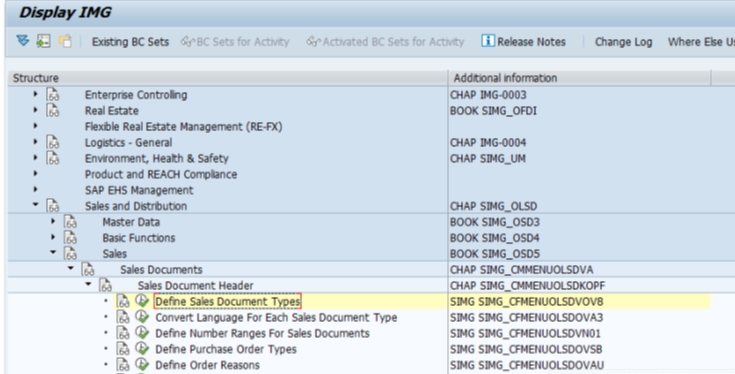
Select the standard return document type RE in the overview list and use Copy As to create a new entry based on it, rather than starting from a blank row.
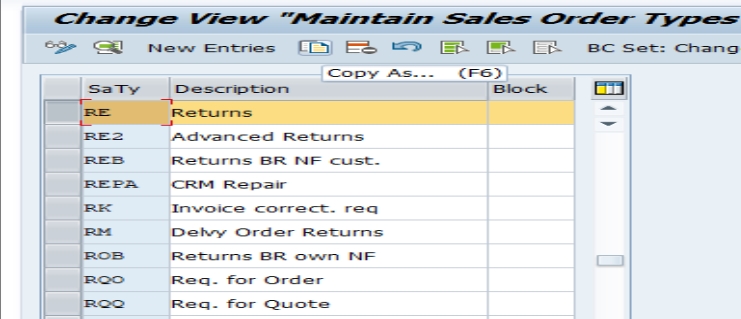
Rename the copied entry to the new document type code - in this example, ERE, standing for Energy Standard Order Return - and save. Review the number range, item category determination, and other field settings that copied across from RE to confirm they still fit the new type's intended use.
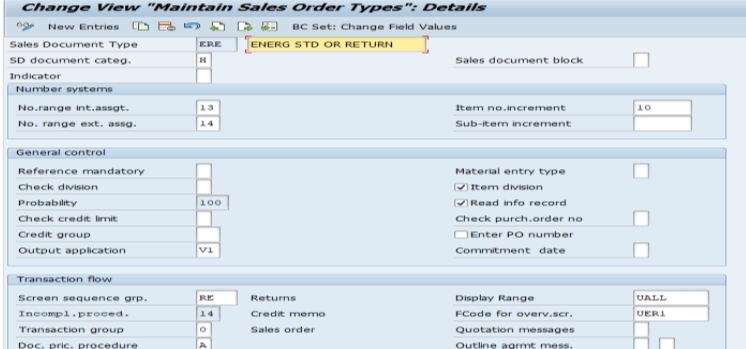

Select Save. The system will usually prompt for a transport request if the system is configured to require one, which is standard practice for configuration changes so they can be tracked and migrated through the landscape (Development → Quality → Production) in a controlled way.
📋 Key Fields Worth Reviewing After the Copy
Copying RE gets the new document type most of the way there, but a handful of fields are worth a deliberate look rather than accepting the copied default without checking, since they directly shape how the new type behaves in daily use.
- Number range: Most implementations assign a distinct internal or external number range to the new return type, so return orders are easy to identify and report on separately from standard sales orders sharing the same series.
- Sales document category: Confirms the new type is still correctly recognized by the system as a returns-category document, which governs quantity and value sign handling.
- Item category determination: Worth double-checking if the business plans to sell different material types through this return process than the ones RE was originally designed around.
- Billing document type: Confirms return orders under the new type generate the correct credit memo type when billed, rather than defaulting to a standard invoice type.
- Reference mandatory settings: Determines whether a return order must reference an original sales order or billing document, which most businesses require to prevent returns being created without a valid original transaction.
💼 Real-World Scenario: A Dedicated Return Type for the Energy Division
Pooja Mishra, an SAP SD consultant at Learn Pharma, was asked to set up a dedicated return order document type for the company's energy products division, separate from the standard RE type used across the rest of the business. Sales manager Suresh Mehta explained that energy product returns needed their own number range and reporting visibility, since regulatory reporting for that division tracked returns separately from general merchandise.
Working with functional consultant Priya Mehta, Pooja used VOV8 to copy the standard RE document type into a new type, ERE, standing for Energy Standard Order Return. Rather than rebuilding item category determination and document flow settings from scratch, copying RE brought across the proven returns behavior immediately. Business analyst Anita Shah then confirmed the new number range assigned to ERE, so energy division returns would be visually and numerically distinct from general returns in reporting.
Once saved and tested with a sample return order, Suresh's team could see energy division returns flowing through their own document type, with the expected credit memo generated on billing and the correct number range applied - confirming that copying RE rather than starting from scratch had preserved the returns behavior the business depended on, while still delivering the separate reporting visibility that prompted the request in the first place.
❗ Common Mistakes When Defining a Return Order Document Type
- Building a new return document type from a blank entry instead of copying RE, which risks missing item category determination or document flow settings that aren't obvious until returns processing already misbehaves.
- Forgetting to assign a distinct number range, leaving return orders numbered indistinguishably alongside standard sales orders in reporting.
- Not reviewing the billing document type carried over from the copy, which can result in return orders generating a standard invoice instead of the expected credit memo.
- Leaving reference mandatory settings unchecked, allowing return orders to be created without pointing back to a genuine original sales order or billing document.
- Assuming the document type alone is sufficient for full return processing, without also confirming item categories, schedule line categories, and copy control are correctly configured.
- Making this configuration directly in a production client instead of testing a full sample return in a sandbox or development client first.
✅ Best Practices for Return Order Document Type Setup
- Always start from the standard RE document type using Copy As, rather than configuring a new type field by field.
- Assign a clear, distinct number range so return orders are identifiable in reporting without additional filtering logic.
- Confirm the billing document type generates the correct credit memo, not a standard invoice, before considering the setup complete.
- Keep reference mandatory settings enabled unless the business has a genuine, documented reason to allow standalone returns without an original document.
- Document the business reason for creating a separate return document type - such as a distinct division, region, or regulatory requirement - so future consultants understand why it exists alongside the standard RE type.
- Test the full return cycle - order, delivery (if applicable), and billing - in a sandbox or development client before moving the configuration to production via transport request.
📋 What Else Return Processing Depends On
Defining the document type in VOV8 is the foundation of return order processing, but it is only one piece of a larger configuration picture. A handful of related settings, usually reviewed in the same project phase, determine whether returns actually process correctly end to end.
| Configuration Area | What It Controls |
|---|---|
| Item Category Determination | Which item category (typically REN for returns) is proposed on line items under the new document type. |
| Schedule Line Category | Whether the returned goods trigger a goods movement back into inventory automatically or require manual posting. |
| Copy Control | Governs which fields and quantities carry over when a return order is created with reference to an original sales order or billing document. |
| Billing Document Type | Confirms return orders generate a credit memo (typically type RE) rather than a standard invoice when billed. |
A return document type configured correctly in VOV8 but paired with incomplete settings in any of these related areas will often still let a user create the order, only to fail or behave unexpectedly at delivery or billing - which is why experienced consultants treat VOV8 as the starting point of a small configuration cluster rather than a standalone task.
📋 Common Business Scenarios Behind Custom Return Types
Businesses rarely create a custom return document type without a specific operational reason behind it. A few patterns come up repeatedly across implementations, and recognizing which one applies helps confirm the new type is actually solving the right problem.
| Scenario | Why a Dedicated Return Type Helps |
|---|---|
| Regulatory or divisional reporting | A specific division or product line, such as energy products, needs returns tracked separately for compliance or internal reporting. |
| Different approval workflow | High-value or specialized returns need a distinct approval or release process not required for general merchandise. |
| Different credit memo handling | Returns for a specific business line post to different general ledger accounts or require a different billing document type. |
| Warranty or defect returns | Returns tied to product defects need distinct reason codes and reporting, separate from customer-initiated returns. |
Whichever scenario applies, the VOV8 configuration itself follows the same pattern shown in this guide - copy the standard RE type, rename it, and review the fields that matter for that specific business reason. Documenting which scenario prompted the custom type is worth doing at configuration time, so the reasoning isn't lost once the original project team has moved on.
✅ Validating the New Document Type Before Go-Live
Once the new return document type is saved, it's worth running through a short validation checklist rather than assuming the copy alone guarantees correct behavior. Create a test return order (VA01) using the new document type, referencing a genuine original sales order or billing document, and confirm the correct item category and negative or return-appropriate quantity handling appear. If goods movement is expected, confirm the return correctly posts stock back into inventory. Process the return through to billing and confirm a credit memo is generated, using the credit memo document type rather than a standard invoice. Finally, run a basic report filtered by the new document type to confirm it's reporting separately as intended.
Skipping this validation step is one of the more common reasons a newly configured return type produces confusing results in its first weeks of use - usually a billing document type that wasn't fully reviewed after the copy, or copy control settings that weren't adjusted for the new type's specific needs.
📱 This Configuration in SAP S/4HANA
Transaction VOV8 and the underlying concept of copying an existing document type to create a new return order type work the same way in SAP S/4HANA as in classic ECC, since sales document type configuration remains a foundational SD element unaffected by the Universal Journal or the simplified data model. What differs in S/4HANA is mainly on the reporting side: embedded analytics and Fiori apps in the launchpad make it considerably easier to track return volumes and reasons by document type in near real time, which raises the practical value of assigning a clean, distinct number range and document type from the outset rather than retrofitting reporting separation after go-live.
📋 Related SAP Transactions
| Transaction | Purpose |
|---|---|
| VOV8 | Define sales document types, including the return order type. |
| VOV4 | Assign item category determination for a sales document type. |
| VOV6 | Define schedule line categories used in return processing. |
| VTAA / VTFA | Maintain copy control between sales documents and between sales and billing documents. |
| VA01 / VA02 / VA03 | Create, change, or display a sales order, including a return order under the new type. |
| VF01 | Create a billing document, generating the credit memo from a completed return. |
🎓 Interview-Style Questions and Answers
Q: Why is RE typically copied rather than a new document type built from scratch?
Because RE already carries proven settings for item category determination, returns-specific document flow, and negative quantity handling - copying it preserves that proven behavior and reduces the risk of missing an obscure setting that only surfaces once returns are already live.
Q: What is the risk of not assigning a separate number range to a new return document type?
Return orders would be numbered within the same series as other document types sharing that range, making it harder to identify and report on returns separately without additional filtering logic.
Q: Does creating the return document type alone enable end-to-end return processing?
No. The document type is the foundation, but item category determination, schedule line categories, and copy control also need to be reviewed and, where necessary, adjusted for the new type to behave correctly through delivery and billing.
Q: What typically goes wrong if the billing document type isn't reviewed after copying RE?
Return orders can end up generating a standard invoice instead of the expected credit memo, which is confusing for both the customer and the finance team reconciling the return against the original sale.
📚 Quick Glossary of Terms Used in This Guide
- Sales Document Type: The configuration entry that controls the behavior of a category of sales document, including number range, item category defaults, and pricing behavior.
- RE: The standard SAP sales document type for return orders, commonly used as a copy source for custom return types.
- Copy As: The VOV8 function used to duplicate an existing document type as the starting point for a new one, carrying across its configured settings.
- Item Category Determination: Configuration that decides which item category, such as REN for returns, is proposed on a document type's line items.
- Copy Control: Settings governing which data and quantities transfer when one sales document is created with reference to another.
- Credit Memo: The billing document typically generated from a completed return order, reversing the value of the original sale.
📝 Naming and Governance for Custom Document Types
Because document type codes are short - typically up to four characters - most SD teams agree on a naming convention before creating custom types, so codes like ERE remain self-explanatory to anyone reviewing the configuration later. A short prefix or suffix tied to the business reason for the custom type, as with ERE representing the energy division's return process, keeps the enterprise structure legible as more custom document types accumulate over a system's lifetime.
Governance also matters because document types, once in live use, accumulate real transaction history. Changing a document type's number range, billing type, or reference settings after go-live can affect historical reporting and open documents already created under it - which is why most organizations treat changes to a live document type as a reviewed, documented decision rather than a routine configuration update, in the same way they would for any other enterprise structure element already carrying production data.
🎯 Conclusion
Defining a return order document type in VOV8 is a short configuration step on the surface, but it is the foundation every downstream return process setting - item categories, schedule lines, copy control, and billing - ultimately builds on. Copying the standard RE type rather than starting from scratch, reviewing the number range and billing document type carried over from the copy, and testing a full sample return before go-live are what separate a document type that looks correctly configured from one that genuinely processes returns the way the business expects. Keep this guide handy the next time your project needs a dedicated return process for a new division, region, or product line.