SAP FAGLB03: How to Display G/L Account Balance in S/4HANA
G/L accounts are the central elements in Financial Accounting and Controlling. They are used to record financial transactions and classify them into categories such as assets, liabilities, income, and expenses. G/L account balances represent the financial status of each account, showing the current position of the organization. In SAP FICO, FAGLB03 lets users access and analyze these balances efficiently, period by period, for one account or a whole range at once. This guide covers the full selection screen, drill-down navigation, how FAGLB03 compares to FBL3N, a real reconciliation scenario, common troubleshooting, and a prevention checklist.
✅ Step-by-Step Guide to Display G/L Account Balances (FAGLB03)
What Is G/L Account Balance in SAP FI?
G/L accounts are the central elements in financial accounting and controlling. They are used to record financial transactions and classify them into different categories, such as assets, liabilities, income, and expenses. G/L account balances represent the financial status of each account, indicating the current position of the organization. In SAP FICO, FAGLB03 allows users to access and analyze these balances efficiently. Read more about the G/L account master data if you need a refresher on how accounts are created and configured before working with balances.
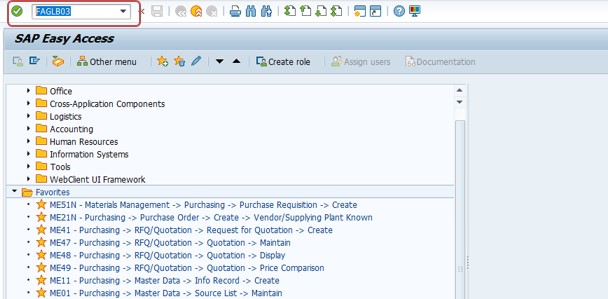
Go to Transaction -FAGLB03
Follow menu path: Accounting → Financial Accounting → General Ledger → Information System → General Ledger Reports (New) → Balances → G/L Account Balances (New).
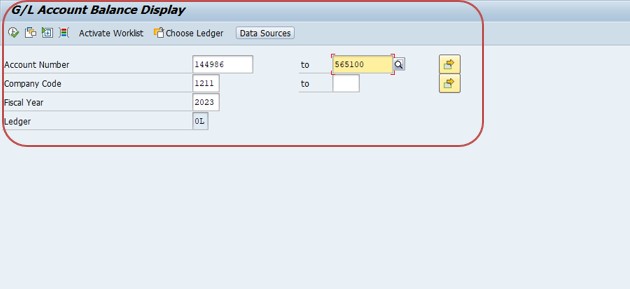
- Select Account Number = 144986 to 565100
- Select Company Code = 1211
- Select Fiscal Year = 2023
- Select Execute button -F8
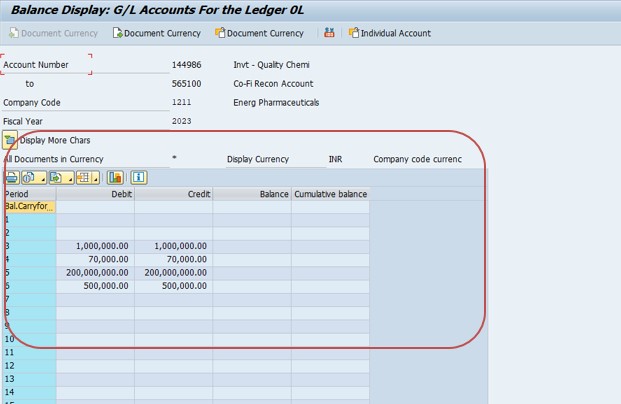
Select -Save
Saving the layout or variant here means the same account range, company code, and column arrangement is available the next time you run the report, without re-entering every field.
🔍 Understanding FAGLB03 in Detail
FAGLB03 belongs to the New General Ledger (New G/L) reporting family in SAP, introduced to replace the classic G/L balance display transactions FS10N used for the older ledger structure. Functionally, both transactions answer the same basic question -"what is the balance of this G/L account, period by period, for this fiscal year?" -but FAGLB03 is built to read from the New G/L totals table and therefore reflects any parallel ledgers, segment reporting, or additional characteristics your organization has configured as part of New G/L. In SAP S/4HANA, the underlying reporting layer has moved to the Universal Journal (table ACDOCA), but FAGLB03 remains fully supported and continues to return accurate, real-time balances since ACDOCA is updated the instant a document posts -there is no batch job delay between posting a journal entry and seeing it reflected in FAGLB03.
The report itself is organized as a balance carried forward from the previous fiscal year, followed by twelve (or more, depending on your fiscal year variant) period columns showing debit postings, credit postings, and the resulting period balance. A cumulative balance column typically runs alongside this, so a controller or accountant can see both "what moved this month" and "where does the account stand today" without switching reports. This period-by-period structure is exactly what makes FAGLB03 the natural starting point for month-end close activities, balance sheet review, and any reconciliation task where you need to explain a swing in an account's balance between two points in time.
📋 FAGLB03 Selection Screen -Every Field Explained
The selection screen looks simple, but each field controls exactly what the report includes, and getting one wrong is the most common reason a balance appears to be missing.
| Field | What It Controls | Common Mistake |
|---|---|---|
| G/L Account | Single account or a from/to range of account numbers to include | Entering a range that excludes the specific account you need, especially in charts of accounts with non-sequential numbering |
| Company Code | The legal entity whose ledger you are reading | Running the report against the wrong company code when a group has several codes sharing similar account numbers |
| Fiscal Year | Which year's balance carried-forward and period postings to display | Checking the current year when the posting in question actually landed in the prior fiscal year |
| Ledger | Which ledger (leading or non-leading, e.g. for parallel accounting) the balance is read from | Leaving the leading ledger selected when the posting you're chasing was only made to a non-leading ledger |
| Business Area / Segment | Optional further restriction if your organization reports below company code level | Leaving a stale business area filled in from a previous report, silently narrowing the result set |
A good habit before troubleshooting a "missing" balance is to clear every optional field back to blank and re-run with only account, company code, and fiscal year populated -that isolates whether a forgotten filter is the cause before you investigate anything more complex.
🔎 Drill-Down Navigation: From Balance to Line Item
The real analytical power of FAGLB03 is not the summary screen itself but what you can reach by drilling into it. Double-clicking any period's debit, credit, or balance figure opens a detailed line-item list of exactly the documents that make up that number, which is the fastest way to move from "the balance is higher than I expected" to "here is the specific document that caused it." From that drilled-down list, a further double-click on any line opens the original posted document (via FB03-style document display), showing the full accounting entry, reference, and any text or attachments recorded at the time of posting.
This drill-down chain -balance report → line items → source document -is worth teaching to anyone new to SAP FI, because it replaces a huge amount of guesswork. Rather than asking a colleague "why does this account show this balance," a user can self-serve the answer in under a minute by drilling down two levels from FAGLB03 itself, which is one of the main reasons this transaction is used daily by AP, AR, and general ledger accountants alike.
📑 FAGLB03 vs FBL3N -Which One Should You Use?
These two transactions are the most commonly confused pair in SAP FI reporting, because both ultimately show you what happened in a G/L account, but they answer different questions.
| Transaction | Shows | Best For |
|---|---|---|
| FAGLB03 | Period-by-period summary balance for one or more accounts | Month-end trend review, spotting which period a swing occurred in, checking many accounts at once |
| FBL3N | Every individual line item posted to one account, with full document detail | Investigating a specific balance, open-item management, clearing, and detailed audit trails |
A typical real workflow uses both together: start in FAGLB03 to spot which period looks unusual, drill down (or switch to FBL3N with the same account, company code, and period) to see every line item in that period, then open the specific document that looks wrong. Trying to use FBL3N alone for a twelve-month trend view is painfully slow because you must manually total line items yourself; trying to use FAGLB03 alone to find one specific posting is equally painful because you cannot search by reference or text at the summary level. Knowing when to switch between the two is a core FI skill.
💼 Real-World Scenario: Reconciling a Bank G/L Account with FAGLB03
Pooja Mishra, a general ledger accountant at a manufacturing company Learn Pharma in Pune, was asked to explain why the company's main bank G/L account balance jumped by an unusually large amount in period 9 compared to every prior month of the fiscal year. Rather than scrolling through hundreds of individual bank statement line items, she opened FAGLB03, entered the bank account number, company code 1211, and fiscal year 2023, and executed the report. The period-wise view immediately showed that period 9's debit column was roughly triple the normal monthly average, while the credit column looked ordinary.
Double-clicking the period 9 debit figure drilled her straight into the line items for that period, where a single large document stood out -a customer advance receipt that had been posted to the wrong bank G/L account by a colleague covering for someone on leave. Rather than researching the whole account balance manually, Ananya had isolated the exact document causing the swing in under two minutes, and could route it to the right person for a reclassification journal entry with the document number already in hand. This is the everyday value of FAGLB03: it turns "something looks off this month" into "here is the exact document" almost immediately, as long as you know to drill into the period that stands out first.
⚠ Common Issues When Running FAGLB03
- Wrong fiscal year selected, so postings from the correct year never appear in the report
- Wrong or missing company code, especially in multi-entity landscapes with overlapping account ranges
- Balance appears zero because postings were only made to a non-leading ledger while the leading ledger is selected by default
- Account range entered too narrowly, silently excluding the specific account needed
- Business area or segment filter left over from a previous report, narrowing results without an obvious warning
- Expecting individual document detail from FAGLB03 directly, when that level of detail only appears after drilling down or switching to FBL3N
📅 Fiscal Year Variants and Period Considerations
FAGLB03's period columns are driven directly by the company code's assigned fiscal year variant, so the report will look different depending on whether your organization uses a standard calendar-year variant (K4, twelve periods matching January to December) or a non-calendar variant with a different start month, additional special periods for year-end adjustments, or a 4-4-5 retail-style calendar. If you are new to a company code and the period totals look unfamiliar, checking the fiscal year variant assigned in the company code global settings will usually explain the layout before you assume the report itself is wrong.
Special periods (typically periods 13 through 16 in a standard variant) deserve particular attention because they are reserved for year-end closing and audit adjustment entries rather than ordinary business transactions. A balance that looks correct through period 12 but shifts again in a special period is often a legitimate closing adjustment -an accrual reversal, a tax true-up, or an auditor-requested reclassification -rather than a data error, and drilling into that specific special period will usually show a small number of large, clearly-labeled closing entries rather than routine transactional postings.
💰 Currency Types and FAGLB03
Most G/L accounts in a multinational company carry balances in more than one currency simultaneously: the transaction currency each document was originally posted in, the company code's local currency, and often a group or hard currency used for consolidated group reporting. FAGLB03 lets you choose which currency type to display the balance in via the selection screen, and it is worth being deliberate about this choice rather than accepting whatever default appears.
A balance that looks stable in local currency can still move noticeably in group currency purely due to exchange rate fluctuation between periods, with no underlying transaction explaining the change -a common point of confusion for finance teams reviewing group-currency reports without realizing translation effects are in play. When reconciling or explaining a balance movement, always confirm which currency type you and the person you're explaining it to are both looking at before concluding a discrepancy is a posting error rather than a currency translation effect.
📱 What Changes for FAGLB03 in SAP S/4HANA
FAGLB03 continues to work in SAP S/4HANA exactly as FI users expect from ECC with New G/L active, but a few things are worth knowing. Because S/4HANA's Universal Journal (ACDOCA) merges what used to be separate FI and CO totals tables into a single line-item table, the balance FAGLB03 shows is always current to the last posted document, with no overnight batch reconciliation step needed between FI and CO reporting. SAP has also introduced Fiori apps such as "Display G/L Account Balances" and "Display G/L Account Line Items" that surface the same underlying data with a more modern, filterable interface and easier export to spreadsheet formats, for organizations that have rolled out Fiori launchpad access to their finance teams. The classic GUI transaction FAGLB03 and the newer Fiori app are reading from the same ACDOCA-based balances, so the numbers always match -the choice between them is purely about interface preference, not data accuracy.
📋 Related SAP FI Transactions Every User Should Know
| Transaction | Purpose |
|---|---|
| FAGLB03 | Display G/L account balance, period-wise, for one or more accounts. |
| FBL3N | Display all line items posted to a G/L account, with full document detail. |
| FS10N | Classic G/L account balance display, still used in some non-New-G/L landscapes. |
| FB03 | Display an individual posted accounting document. |
| FS00 | Display or maintain a G/L account master record. |
| F.01 | Financial statement / balance sheet and P&L report drawing on the same underlying balances. |
| FAGLL03 | Display G/L account line items using the New G/L line-item report. |
💡 Best Practices for Using FAGLB03 During Month-End Close
- Save a standard layout or variant with the account ranges you review every month so close activities don't require re-entering the same selection each time.
- Always confirm the fiscal year variant and current open period before comparing balances across companies with different fiscal calendars.
- Check both leading and any relevant non-leading ledger when parallel accounting is in use, since a balance can look incomplete if only one ledger is checked.
- Drill down into any period that deviates meaningfully from its trailing average before assuming the swing is a data or posting error.
- Cross-check group-currency balance movements against exchange rate changes before flagging them as unexplained variances.
🎓 Interview-Style Questions and Answers on FAGLB03
Q: What is the practical difference between FAGLB03 and FS10N?
FAGLB03 reads from the New General Ledger totals structure and supports parallel ledgers and additional New G/L characteristics, while FS10N is the classic G/L balance display built for the older ledger structure. In SAP S/4HANA, both ultimately draw on the Universal Journal, but FAGLB03 is the standard, recommended transaction going forward.
Q: How would you investigate an unexpected balance in a G/L account?
Start in FAGLB03 to identify which period the unexpected movement occurred in, drill down into that period's line items, then open the specific document to review the posting detail, reference, and text before deciding whether a correction is needed.
Q: Why might two people looking at the "same" FAGLB03 report see different numbers?
The most likely causes are a different currency type selected, a different ledger selected in a parallel accounting setup, or one person having an extra business area or segment filter applied that the other does not.
📚 Quick Glossary of Terms Used in This Guide
- G/L account: A record in the chart of accounts used to classify and accumulate financial transactions, such as an asset, liability, income, or expense account.
- Leading ledger: The primary ledger used for a company code's main accounting principle, typically local GAAP or IFRS.
- Non-leading ledger: An additional parallel ledger used to report the same transactions under a different accounting principle.
- Universal Journal (ACDOCA): The single line-item table in SAP S/4HANA that merges FI and CO postings, underlying all real-time balance reporting including FAGLB03.
- Special period: A reserved period (beyond the normal 12) used for year-end closing and audit adjustment postings.
🎯 Conclusion
FAGLB03 is one of the most frequently used transactions in day-to-day SAP FI work because it answers a question every accountant and controller needs to ask constantly: what is the current balance of this account, and how did it get there? By understanding the selection screen fields, using drill-down navigation to move from balance to line item to source document, and knowing when to switch to FBL3N for detailed investigation, you can turn a routine balance check into a fast, confident reconciliation workflow. Keep the related transactions and troubleshooting checklist above bookmarked, and FAGLB03 will move from being a transaction you look up each time to a quick, everyday habit.