SAP Cash Journal Entry: FBCJ Step-by-Step Petty Cash Process (Petty Cash)
Petty cash is a small cash fund for minor, everyday expenses, and the cash journal is the ledger that keeps it under control. This guide shows how to post a cash receipt from the bank with transaction FBCJ, using company code 9000, cash journal PUNF, an amount of 50000 and the original screenshots. It explains how the cash journal is built, the accounting entries, receipts and vouchers, cash counting, a real scenario, common mistakes, troubleshooting and month-end checks. If you encounter any errors in SAP, send a screenshot to pramod@learntosap.com and I will help you resolve the issue.
✅ SAP Fico Cash Journal Entry Tutorial – FBCJ
Cash Journal Entry (Petty Cash): A Step-by-Step Guide
Every office has a small box of cash for tea, courier charges, stamps and other minor costs. Even small cash needs proper records, because small amounts add up and auditors expect them to be accounted for. SAP supports this with the cash journal, which keeps a running record of every receipt and payment of a cash fund. This guide shows how to record a cash receipt from the bank with FBCJ using the original screenshots, and then explains how the cash journal works, which checks to run and how to avoid common mistakes.
In simple words, the cash journal is the notebook of the petty cash box, kept inside SAP.
📝 Cash Journal Entry (Petty Cash)
Petty cash represents a small amount of cash funds that a business keeps on hand to cover minor, everyday expenses. These expenses typically include small purchases, reimbursements, and miscellaneous costs that are impractical to process through regular accounting procedures.
Without a cash journal, petty cash is hard to control. Money disappears, receipts get lost and the cash count never matches the books. With a cash journal, every movement is a document, the balance is calculated by the system and the person responsible can compare it with the real cash at any time.
💰 Accounting Entries Behind a Cash Receipt from the Bank
The table shows the effect of the posting in this guide. The exact accounts depend on your chart of accounts.
| Line | Account | Debit / Credit | Meaning |
|---|---|---|---|
| 1 | Cash account of journal PUNF | Debit | The cash on hand increases by 50000. |
| 2 | Bank account | Credit | The bank balance decreases by 50000. |
No expense is recorded at this point. The movement only transfers money from the bank to the cash box. Expenses are recorded later, when cash is paid out for a specific purpose.
📦 Typical Business Transactions in the Cash Journal
| Business Transaction | What Happens | Cash Balance |
|---|---|---|
| Cash receipt from bank | Money is withdrawn from the bank into the cash fund. | Increases. |
| Cash payment (expense) | Money is paid out for a cost. | Decreases. |
| Cash revenue | Money is received from a sale. | Increases. |
| Cash payment to bank | Surplus cash is deposited in the bank. | Decreases. |
| Cash vendor or customer payment | A small payment to or from a business partner. | Changes. |
The names of the business transactions depend on your configuration. This guide uses the cash receipt from the bank, as in the original steps.
📝 Cash Journal Transactions at a Glance
GO TO TCODE FBCJ
| Transaction | Purpose |
|---|---|
| FBCJ | Post and display cash journal entries (used in this guide). |
| FB03 | Display an accounting document. |
| FBL3N | Display G/L account line items, such as the cash account. |
| FS00 | Create or check the G/L cash account. |
| FB50 | Post a G/L journal entry. |
| FF67 | Process a manual bank statement. |
🔧 What You Need Before You Post in the Cash Journal
- A cash journal, here PUNF, set up for company code 9000 by the configuration team.
- A G/L cash account linked to the journal.
- The business transactions your company needs, such as cash receipt from bank.
- An open posting period and authorization to post in the cash journal.
- A person responsible for the physical cash and the receipts.
If the cash journal is not set up, the posting cannot be made. Ask the configuration team to create it first.
🔧 Step-by-Step: Cash Journal Entry with FBCJ
SAP Fico Cash Journal Entry Example
GO TO TCODE FBCJ.
Follow Path: Accounting > Financial Accounting > General Ledger > Document Entry > Cash Journal Posting.
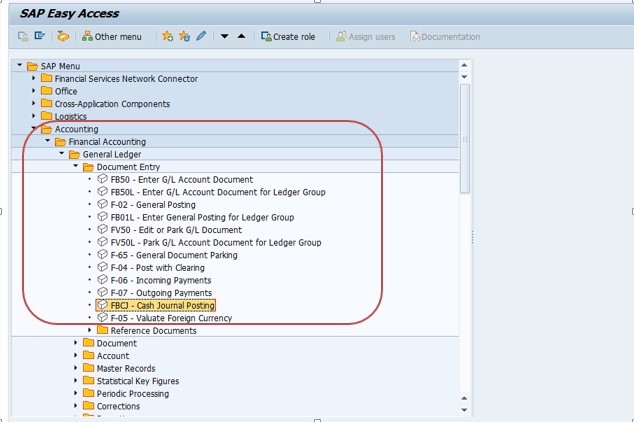
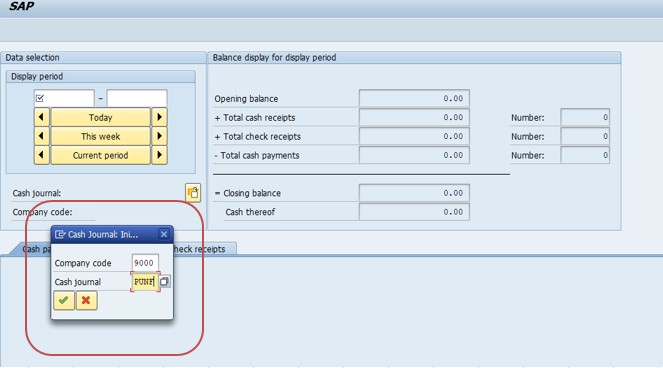
Select the company code. Company Code: 9000.
Select the cash journal. Cash Journal: PUNF.
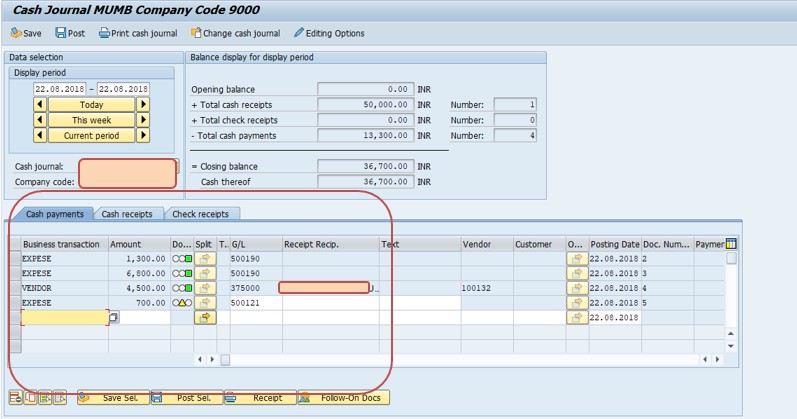
Select the cash journal entry. Open the cash journal and start a new entry.
Select the cash receipt. Business Transaction: Cash Receipt – Receipt from Bank. Amount: 50000. Then enter the G/L account.
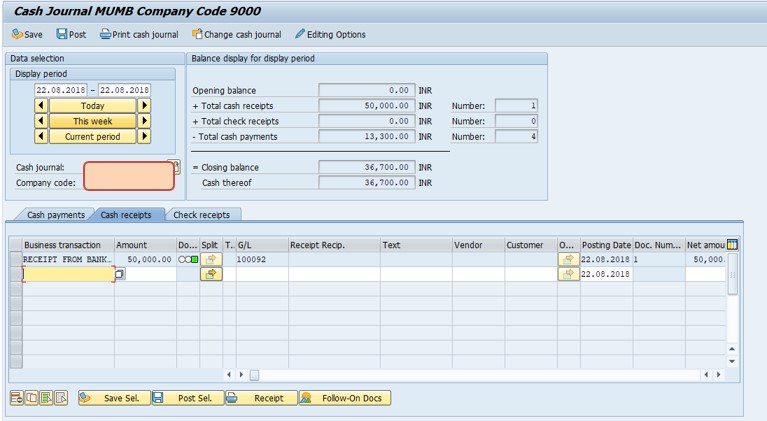
Select the Post button. SAP shows a message with the number of the new cash document.
📋 Values Used in This Tutorial at a Glance
The table below summarizes every value from the steps above, so you can compare it with your own screen before you post.
| Field | Value Used | Note |
|---|---|---|
| Transaction | FBCJ | Cash journal |
| Company code | 9000 | Use your own company code |
| Cash journal | PUNF | Set up by configuration |
| Business transaction | Cash receipt from bank | Money from bank into cash |
| Amount | 50000 | Amount taken from the bank |
| G/L account | Bank account | Enter the account for your bank |
| Final action | Post | Creates the cash document |
📖 How the Cash Journal Is Built
A cash journal is more than a posting screen. It is a small ledger with its own number, here PUNF. It belongs to one company code and uses one G/L cash account and one currency. Each cash document is a line in the journal, and the system keeps an opening balance, the movements and a closing balance for each day or period.
This design makes control easy. The person responsible counts the cash in the box, compares it with the closing balance in the journal and reports any difference. Because the cash account in the general ledger and the journal always agree, the accountants can trust the balance sheet figure for cash on hand.
📝 Receipts, Vouchers and Proof
Every payment from the cash box should have a receipt or a voucher. For small payments without a receipt, many companies use a signed voucher that states the date, the amount, the purpose and the person who received the money. The voucher number can be entered in the reference field of the cash document, so that the document and the paper can be matched later.
Keep the vouchers together with the cash journal printout of the period. When the auditor asks about a payment, the voucher and the posting answer most questions. A simple rule that no money leaves the box without a voucher prevents most disputes and missing cash.
💼 Real-World Scenario: Filling the Petty Cash Box at Learn Pharma, Pune
At Learn Pharma in Pune, the petty cash box of the office was almost empty, and the office manager needed money for courier charges and refreshments. Finance executive Pooja Patil took 50,000 rupees from the bank, with the approval of finance lead Sameer Joshi.
She opened FBCJ, entered company code 9000 and cash journal PUNF, started a new entry, chose the business transaction Cash Receipt from Bank, typed the amount 50000, entered the bank G/L account and pressed Post. SAP created the cash document, and the balance of the journal increased by the same amount.
Sameer checked the posting with FB03 and compared the journal balance with the cash that Pooja put in the box. Pooja added the steps to her work instruction, so a new colleague could refill the cash box in the same way.
❗ Common Mistakes with the Cash Journal
- Taking cash from the bank without recording the receipt in the cash journal.
- Entering the wrong bank account, so the bank reconciliation shows a difference.
- Posting payments without receipts or vouchers.
- Letting the cash balance grow far above the approved limit.
- Not counting the cash regularly and comparing it with the journal.
- Posting into a closed period.
🔧 Troubleshooting: When the Cash Journal Does Not Work
| Symptom | Likely Cause | What to Check |
|---|---|---|
| Cash journal not found. | Not created for the company code. | Ask the configuration team. |
| Business transaction not offered. | Not defined for the journal. | Check the cash journal setup. |
| Cannot post the entry. | Posting period closed or missing authorization. | Check open periods and roles. |
| Balance differs from the cash count. | Missing or wrong entries. | Compare vouchers and journal lines. |
| Bank balance does not match. | Wrong G/L account on the receipt. | Check the account and the bank statement. |
✅ Best Practices for Petty Cash
- Keep the cash fund small and set a maximum balance.
- Name one person responsible for the cash box.
- Require a voucher or receipt for every payment.
- Count the cash at least weekly and compare it with the journal.
- Refill the fund only against a request that shows what was spent.
- Review the cash journal every month with the finance lead.
🛒 Counting the Cash and Handling Differences
| Step | Action |
|---|---|
| 1 | Count the cash in the box in front of a second person. |
| 2 | Compare the total with the closing balance of the cash journal. |
| 3 | If they differ, check the vouchers and the entries of the period. |
| 4 | Post a correction, with approval, for a confirmed difference. |
| 5 | Record the count, the difference and the explanation. |
Differences should be rare and small. Large or repeated differences point to a problem with the process or with people, and they should be investigated by the finance lead.
📅 Month-End Checks for the Cash Journal
| Check | Done When |
|---|---|
| Cash count | The physical cash agrees with the journal. |
| Vouchers | Every payment has a voucher. |
| Bank | Receipts from the bank agree with the bank statement. |
| Limits | The cash balance is within the approved limit. |
| Documentation | Counts and approvals are filed. |
A short checklist at month end finds small problems before they turn into audit findings and keeps the cash figures reliable.
📱 Cash Journal in SAP S/4HANA
The cash journal remains available in SAP S/4HANA, where some companies also use a Fiori app for cash journal postings. FBCJ may still be available in your release. Screens differ from the classic examples used here, so confirm the exact steps in your own system before you train users. The business principle does not change: every cash movement is recorded in the journal, and the balance is checked against the real cash.
🎓 Interview-Style Questions and Answers
Q: What is FBCJ used for?
To record cash receipts and payments of a petty cash fund.
Q: What is petty cash?
A small amount of cash kept for minor, everyday expenses.
Q: What does a cash receipt from the bank do?
It increases the cash balance and decreases the bank balance.
Q: Why do you need vouchers?
As proof of each payment for audits and disputes.
Q: How do you check the journal?
By counting the cash and comparing it with the closing balance.
📚 Quick Glossary of Terms Used in This Guide
- Cash Journal: A ledger of the cash movements of one cash fund.
- Petty Cash: A small cash fund for minor expenses.
- Business Transaction: A predefined type of cash posting, such as receipt from bank.
- Voucher: A signed note that proves a cash payment.
- Closing Balance: The cash balance at the end of the period.
- Company Code: The smallest unit for which a complete set of accounts can be drawn up.
🎯 Conclusion
The cash journal gives a small cash fund the same discipline as the bank. Open FBCJ, enter company code 9000 and cash journal PUNF, start a new entry, choose Cash Receipt from Bank, type the amount 50000, enter the G/L account and press Post. Then count the cash, keep the vouchers and review the journal every month. If you encounter any errors in SAP, send a screenshot to pramod@learntosap.com and I will help you resolve the issue.