SAP Error: Movement Type 161 Is Not Allowed
The error "Movement type 161 is not allowed" appears when a Return to Vendor posting - typically through MIGO with reference to a purchase order - is attempted before movement type 161 has been activated for that transaction in OMJJ. This guide covers the exact fix, then goes deeper into what movement type 161 actually does, how it differs from related return movement types, and a full prevention checklist. If you encounter any errors in SAP, feel free to send a screenshot to pramod@learntosap.com for help.
✅ Fix: Movement Type 161 Is Not Allowed
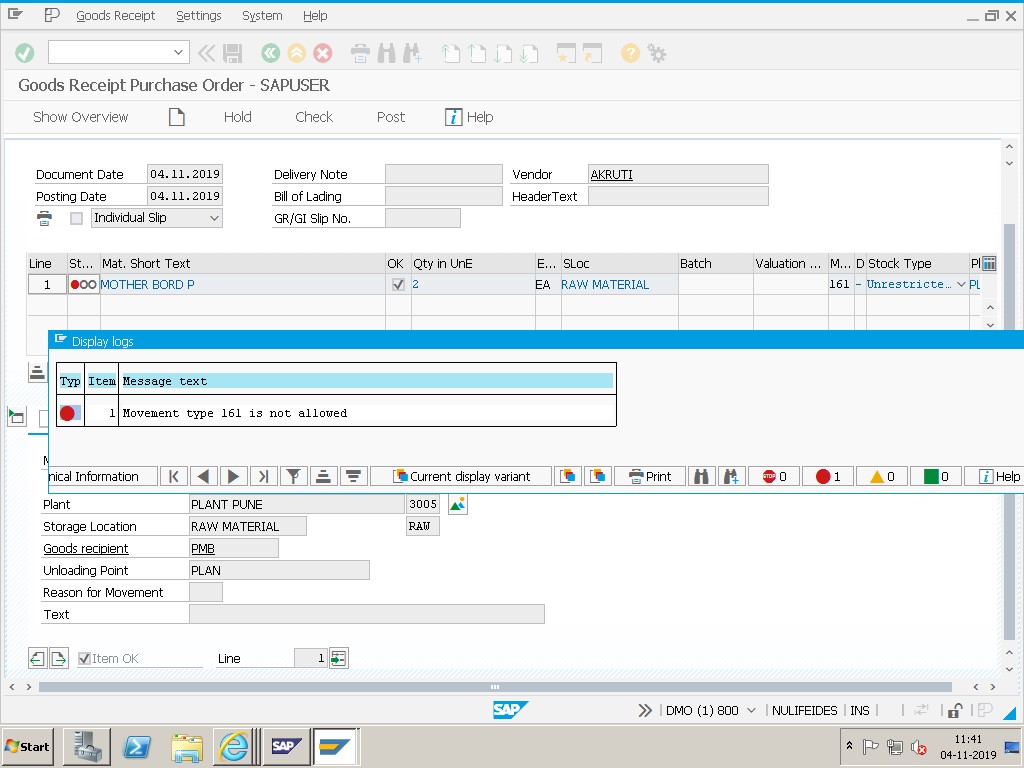
🔧 Solution: Activate Movement Type 161 in OMJJ
Go to transaction OMJJ and select Movement Type.
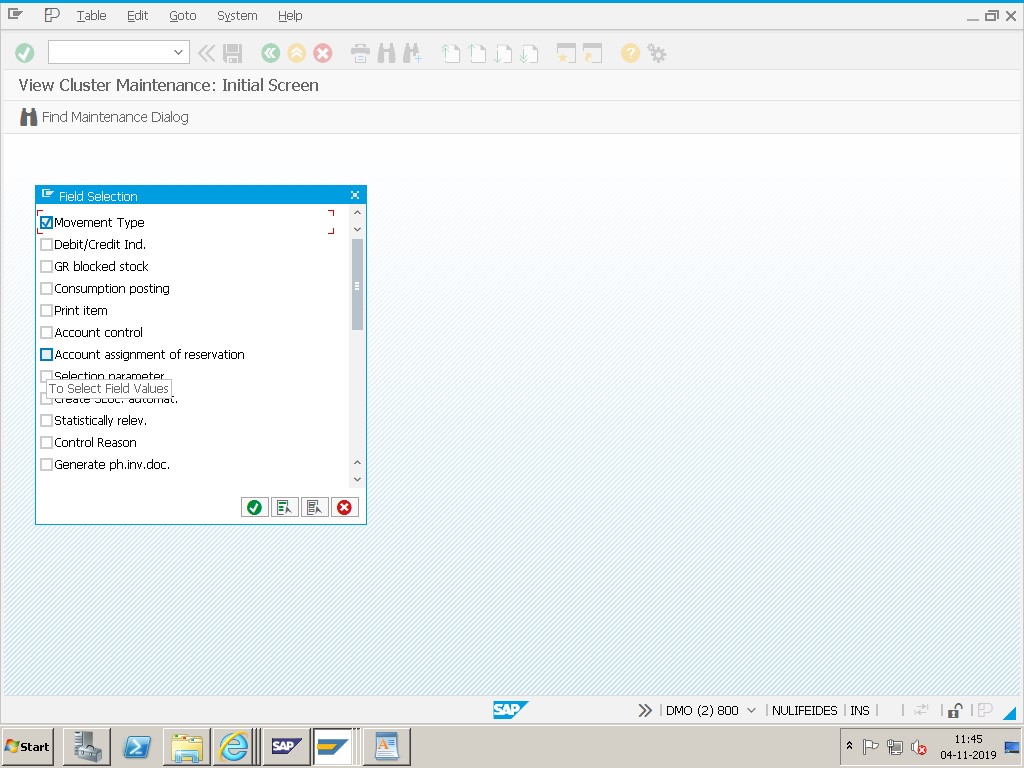
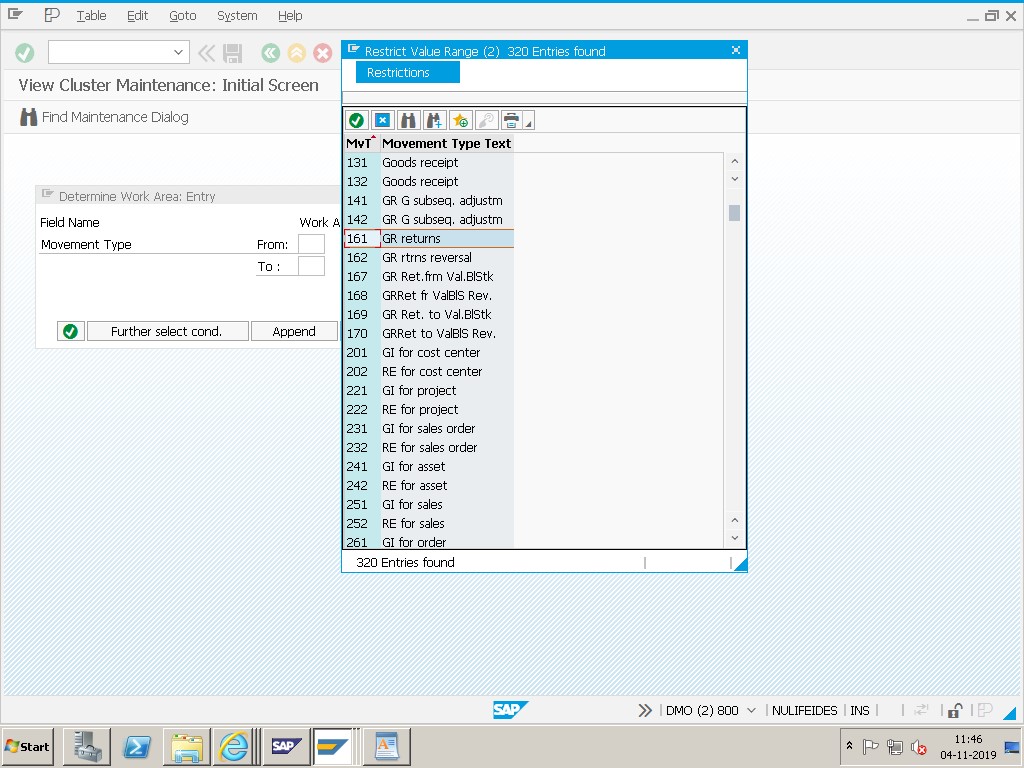
Select movement type 161 - GR Returns from the list.
On the next screen, select Allowed Transactions and create a New Entry.
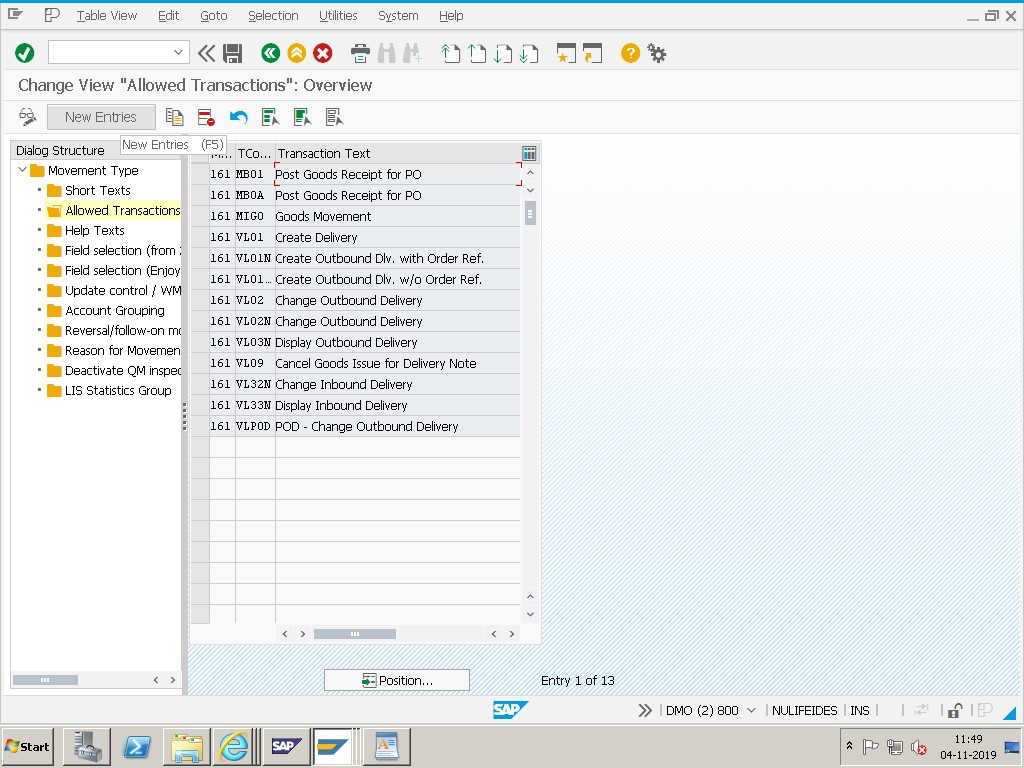
Enter the new entries: 161 - MIGO and 161 - MB1C, then save.
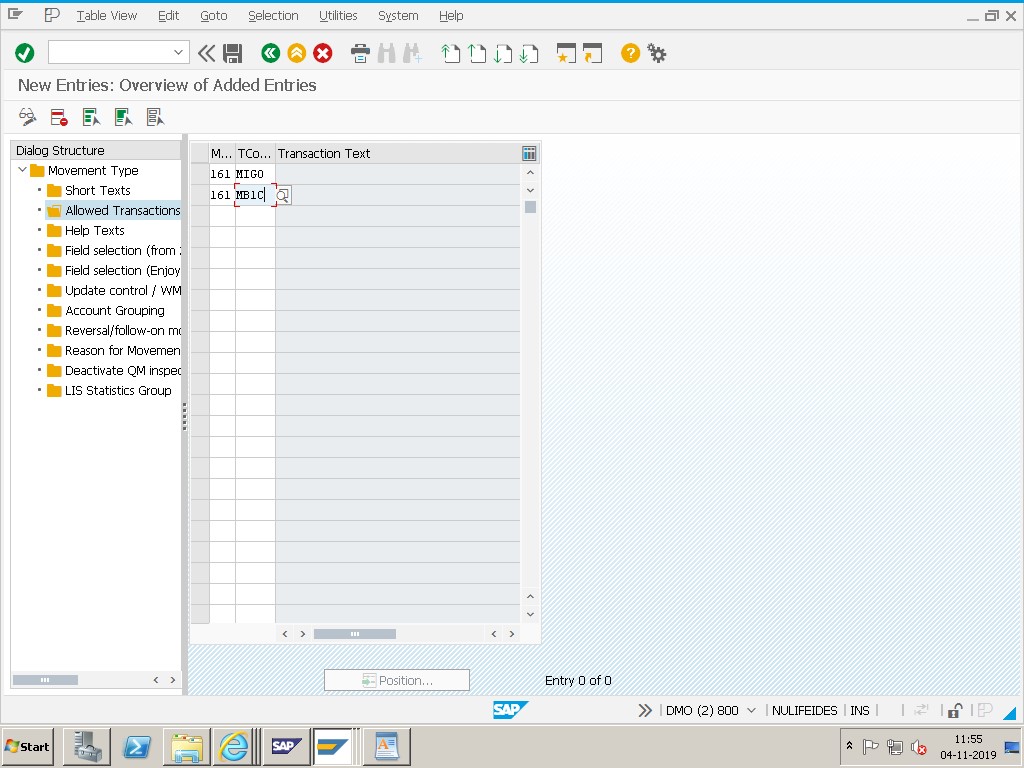
Save.
🔍 What Movement Type 161 Actually Does
Movement type 161 posts a Return to Vendor with reference to a purchase order - commonly called "GR Returns" since it's the logical reversal of the original goods receipt (movement type 101) against that same PO. Rather than being a standalone stock adjustment, 161 is tied directly to the original purchasing document, meaning the return quantity, price, and vendor are all inherited from the PO rather than entered fresh, and the posting typically flows through to generate a debit memo relevant document reducing what's owed to (or increasing what's owed by) the vendor for the returned quantity.
This PO-reference design is exactly why 161 needs to be explicitly allowed for the transactions used to post it - MIGO (the standard goods movement transaction, used when referencing a specific PO directly) and MB1C (a more general goods movement entry transaction, sometimes used for returns processed outside the standard PO-referenced MIGO flow) - since SAP treats "which movement types can be posted through which transactions" as a deliberate, configurable control rather than something universally open by default.
📋 Movement Type 161 vs. Related Return Movement Types
| Movement Type | Name | PO Reference? | Typical Use |
|---|---|---|---|
| 161 | Return to Vendor (GR Returns) | Yes, references the original PO | Returning goods that were received against a specific purchase order, most common return scenario |
| 122 | Return Delivery to Vendor (without PO) | No | Returning goods received without a formal PO reference, such as free samples or informal deliveries |
| 162 | Reversal of 161 (Cancel Return to Vendor) | Yes, references the original 161 document | Correcting a 161 posted in error, reversing the return |
| 101 | Goods Receipt for Purchase Order | Yes | The original receipt that a 161 return typically reverses |
Confusing 161 and 122 is a common early-career mistake - if a return needs to reference and reduce against a specific purchase order (the far more common scenario in most procurement processes), 161 is the correct movement type; 122 is reserved for the less common case where no PO exists to reference at all. Using the wrong one doesn't just risk a similar "movement type not allowed" error - it can also mean the return doesn't correctly reduce the right purchasing document's received quantity, causing reconciliation issues later.
🔒 Why SAP Restricts Movement Types to Specific Transactions
The "Allowed Transactions" configuration this guide's fix walks through isn't a technical quirk - it's a deliberate governance mechanism. SAP lets an organization decide precisely which movement types end users can post through which specific transactions, rather than making every movement type universally available everywhere by default. This matters because different transactions carry different levels of built-in validation and different user populations: MIGO is a controlled, PO-referenced entry screen typically used by warehouse or receiving staff following a specific business process, while MB1C is a more general-purpose entry transaction that, depending on configuration, might be accessible to a broader group of users for various stock adjustments.
Restricting movement type 161 (or any movement type) to only the specific transactions genuinely needed for its real business use - rather than blanket-allowing it everywhere the first time this error appears - preserves the intent of this control. A movement type accidentally left available through an overly broad set of transactions can end up being used in ways the original process design never intended, which is why the prevention checklist later in this guide recommends deliberate, scoped configuration rather than reflexively allowing everything to make an error disappear quickly.
💼 Real-World Scenario: A New Plant's Warehouse Team Blocked on Day One
Priya Mehata, an SAP MM support consultant, was contacted urgently on the first day of operations at a newly opened warehouse. The receiving team had successfully posted goods receipts (movement type 101) against several purchase orders throughout the morning without issue, but when a shipment turned out to be damaged and needed to go back to the vendor, their attempt to post a return via MIGO immediately failed with "Movement type 161 is not allowed."
Checking OMJJ, Priyafound that when the new plant's document types and movement type configuration had been copied from an existing reference plant during setup, the copy process had captured most commonly-used movement types correctly - including 101 for receipts - but had missed the "Allowed Transactions" entry for 161 specifically, since it hadn't come up during earlier testing (the test scripts for the new plant's go-live had focused on receipts and issues, not returns). Priyaadded the missing entries for 161 under MIGO and MB1C, and the return posted successfully on retry.
This scenario reflects a common real-world pattern: this error often surfaces not because 161 was deliberately excluded, but because a new plant, company code, or configuration copy simply never exercised the return-to-vendor process during initial testing, leaving a gap that only becomes visible the first time an actual return is needed - sometimes weeks or months after go-live. It's a strong argument for including a genuine end-to-end return-to-vendor test, not just receipts and issues, in any new plant's go-live testing checklist.
🔒 Who Should Have Access to Change OMJJ Settings
Because a movement type's Allowed Transactions list controls a genuine business process control - not just a technical toggle - most organizations restrict OMJJ access to a small group of MM configuration consultants, separate from general warehouse or purchasing transaction access. A movement type that's too broadly enabled undermines the deliberate scoping this control is meant to provide, while a movement type that's too narrowly enabled (as in this guide's core error) blocks legitimate business activity.
Some organizations require a documented business justification before adding a new Allowed Transactions entry - naming the specific process (in this case, return-to-vendor via MIGO) the change supports - so that a future reviewer understands why 161 is enabled for MIGO and MB1C specifically, rather than everywhere. This kind of lightweight documentation discipline pays off particularly during audits or when troubleshooting an unrelated movement type issue years later, when the original reasoning behind a configuration choice might otherwise be lost.
🧪 Testing Checklist for New Plant or Company Code Movement Type Setup
Given how often this error traces back to an incomplete configuration copy during new plant setup - exactly as in the real-world scenario in this guide - a deliberate test pass covering less-common movement types avoids discovering the gap only once a genuine business need arises in production.
- Test a full return-to-vendor cycle (161 via MIGO, referencing a real test PO) for every new plant, not just receipts (101) and issues (201/261).
- Confirm the resulting financial posting generates correctly, reducing the amount owed to the vendor as expected, not just that the MM-side posting succeeds.
- Test movement type 122 (return without PO reference) separately if your organization's process genuinely uses both scenarios, since they're configured independently.
- Test movement type 162 (reversal of 161) to confirm a mistaken return can actually be corrected, not just that the original return works.
- Compare the new plant's OMJJ Allowed Transactions configuration against a reference plant's directly, rather than relying purely on functional testing to catch every gap.
💼 A Second Scenario: A Broadly-Scoped Fix Causing an Unrelated Problem Later
Jonas Weber, an SAP MM administrator, was asked to quickly resolve a movement type 161 error for a warehouse user under pressure to process an urgent return before end of day. Working quickly, Jonas allowed movement type 161 not just for MIGO and MB1C as this guide recommends, but broadly across several additional transactions the warehouse used regularly, reasoning that a wider fix would prevent any similar error from coming up again in the future for that team.
Several months later, an internal audit flagged an unusual pattern: return-to-vendor postings had started appearing through a batch-input transaction typically reserved for routine stock adjustments, bypassing the more controlled MIGO flow that normally required a specific purchase order reference and warehouse supervisor review. Investigating further, the audit team traced this back to Jonas's earlier fix - by broadly allowing 161 across additional transactions "to be safe," he had inadvertently opened a path for returns to be posted without going through the process controls the organization had originally intended, including reference to a genuine, reviewed purchase order.
The fix was straightforward once identified - narrowing OMJJ's Allowed Transactions for 161 back down to only MIGO and MB1C, matching the organization's actual intended process - but the audit finding and subsequent review of exactly which returns had gone through the unintended path took considerably longer than the original quick fix. This scenario reinforces the point made earlier in this guide's "Allowed Transactions" section: OMJJ changes should be scoped precisely to the specific transactions genuinely needed, resisting the temptation to broaden a fix "just in case" under time pressure.
📦 Returning Goods from Quality Inspection or Blocked Stock
Movement type 161 as covered throughout this guide assumes the returned stock is coming from unrestricted-use status, which is the most common scenario. In practice, a meaningful share of real return-to-vendor postings actually originate from stock sitting in quality inspection or blocked status - for example, a batch that failed incoming quality inspection and needs to go straight back to the vendor without ever being released to unrestricted-use stock at all.
SAP handles this with movement type variants tied to the originating stock status - a return from quality inspection stock typically uses a distinct movement type (such as 351 in some configurations) rather than 161 directly, and similarly for blocked stock. If your organization's return process regularly involves quality-rejected or blocked stock rather than unrestricted-use stock, it's worth confirming the correct movement type variant for that specific scenario is also properly configured in OMJJ's Allowed Transactions - fixing 161 alone, as this guide's core solution covers, resolves returns from unrestricted-use stock, but a parallel gap can still exist for quality or blocked stock returns if they use a different movement type entirely.
This is worth checking specifically if your organization's return process is quality-driven - for example, in industries with strict incoming inspection requirements - since the receiving team's typical workflow (reject at inspection, return immediately) may never touch unrestricted-use stock or movement type 161 at all, meaning this guide's core fix alone might not fully resolve every return scenario your business actually needs.
❗ Common Mistakes When Fixing This Error
- Confusing movement type 161 with 122, using the wrong one for a PO-referenced return and encountering a similar but distinct configuration or process issue.
- Allowing 161 broadly across many transactions "just to be safe" rather than scoping the fix to the specific transactions (MIGO, and MB1C if genuinely needed) actually used for returns in your organization's process.
- Assuming a new plant's movement type configuration is complete simply because receipts and issues work, without specifically testing less-common but still important processes like returns.
- Not testing the actual return posting after the OMJJ fix, only confirming the configuration screen shows the new entry.
- Overlooking that 161 needs the original purchase order to still be referenceable - if the PO itself has issues (fully invoiced, blocked, or closed), a separate error can appear even after 161 is correctly allowed.
✅ Prevention Checklist for New Plant or Company Code Setup
- Include a genuine return-to-vendor test (movement type 161 via MIGO, referencing a real test PO) in every new plant's go-live testing checklist, not just receipt and issue tests.
- When copying movement type configuration from a reference plant, explicitly review the Allowed Transactions list for every movement type your organization actually uses, rather than assuming a copy captures everything correctly.
- Scope OMJJ changes to the specific transactions genuinely needed for each movement type's real business use, avoiding overly broad "allow everywhere" fixes that undermine the control's original purpose.
- Document which movement types are expected to be available through which transactions as part of your organization's standard MM configuration documentation, making future reviews and new plant setups faster.
- Periodically test less-common but still important processes (returns, transfers, scrapping) across all active plants, not just the frequently-exercised receipt and issue flows, to catch configuration gaps before they block a real business transaction.
📑 Similar-Looking SAP Movement Type Errors and How They Differ
| Error / Symptom | Root Cause | Typical Fix |
|---|---|---|
| Movement type 161 is not allowed | 161 not added to Allowed Transactions for MIGO/MB1C in OMJJ | Add the missing entry in OMJJ |
| Movement type 122 is not allowed | Same root cause as 161, but for the non-PO-referenced return | Add 122 to Allowed Transactions for the relevant transaction |
| No stock posting possible for this material (M7097) | The material type itself lacks Quantity/Value Update, a layer above movement type restrictions entirely | Enable Quantity/Value Update in OMS2, not an OMJJ change |
| Deficit of BA unrestricted-use stock (M7021) | Insufficient stock in the specific category the movement expects, unrelated to Allowed Transactions | Check MMBE by status/batch, transfer or correct stock |
These can look similar since they all block a goods movement, but each traces back to a distinct configuration layer - movement type/transaction restriction (OMJJ), material type-level posting restriction (OMS2), or genuine stock availability. Confirming exactly which layer is in play before troubleshooting saves considerable time.
📊 Auditing Movement Type Configuration Across Your Landscape
Beyond fixing a single failed posting reactively, periodically reviewing which movement types are allowed for which transactions - particularly after a new plant go-live, a system consolidation, or any project involving configuration copying - helps catch both types of gap discussed in this guide: movement types missing from transactions that genuinely need them, and movement types too broadly allowed in ways that undermine intended process controls.
- Review table T158B (or the equivalent Allowed Transactions configuration table) via SE16N, comparing movement type/transaction combinations across plants or company codes to spot inconsistencies.
- Cross-reference against actual business processes in use at each plant, confirming every movement type genuinely needed (receipts, issues, transfers, returns) has appropriate transaction coverage.
- Flag any movement type allowed through an unusually broad set of transactions, as in the second scenario above, for a deliberate review of whether that scope was intentional or an artifact of a rushed earlier fix.
- Document the intended scope for each movement type's Allowed Transactions configuration, making future audits and new plant setups faster and less error-prone.
This kind of periodic movement type configuration audit is particularly valuable after any project involving configuration copying between plants or company codes, since - as this guide's real-world scenario illustrates - a copy process can look complete on the surface while quietly missing entries for less-frequently-used but still important movement types.
📱 This Error in SAP S/4HANA
Movement type logic and OMJJ configuration, including the Allowed Transactions control this guide's fix relies on, are unchanged in SAP S/4HANA - this remains foundational Materials Management configuration rather than something restructured by the simplified data model. S/4HANA users can post returns through the same MIGO transaction in SAP GUI, or through the Fiori "Post Goods Movement" app, which reads the same underlying OMJJ configuration, so the fix in this guide applies identically regardless of which interface is used to post the return.
🔗 Cross-Module Impact: How a 161 Return Touches FI and Procurement
Although movement type 161 is posted through MM, it has direct downstream effects in both Financial Accounting and the original purchasing document. On the FI side, a 161 posting typically generates a debit memo relevant document reducing the amount owed to the vendor, following the same account determination logic (OBYC, transaction key BSX and related keys) as the original goods receipt, just in reverse. On the procurement side, the return reduces the "delivered quantity" tracked against the original purchase order line, which can affect purchase order history reporting, open quantity calculations for any remaining expected delivery, and in some cases retroactively affect invoice verification if the vendor's invoice hasn't yet been processed.
Because of this cross-module reach, a genuinely large or unusual return - particularly one crossing a period boundary, as covered in a related guide on this site about MM period closing - is worth coordinating with the accounts payable team before posting, since the resulting financial adjustment needs to land in the correct, currently open period alongside the original transaction it's reversing.
📋 Related SAP Transactions
| Transaction | Purpose |
|---|---|
| OMJJ | Configure movement types, including which transactions are allowed to post each one. |
| MIGO | Post goods movements, including a PO-referenced return with movement type 161. |
| MB1C | General goods movement entry transaction, sometimes used for returns outside the standard MIGO flow. |
| ME23N | Display the purchase order being referenced by the return, to confirm it's still valid for the transaction. |
| MB51 | Review material document history, useful for confirming a 161 return posted correctly against the expected PO. |
🎓 Interview-Style Questions and Answers
Q: What is the purpose of movement type 161, and how does it differ from 122?
161 is a Return to Vendor posted with reference to the original purchase order, reducing the delivered quantity on that PO. 122 is a return without a PO reference, used when no formal purchasing document exists to reference, such as for free samples.
Q: Why would SAP block a movement type even though it's a standard, valid SAP movement type?
Because OMJJ's Allowed Transactions configuration deliberately restricts which specific transactions can post each movement type - a movement type being valid in SAP generally doesn't mean it's been explicitly enabled for every transaction in a given system.
Q: If a new plant's receipts and issues work fine but returns fail with this error, what's the likely cause?
The movement type configuration copy used to set up the new plant likely didn't include the Allowed Transactions entry for 161, often because return-to-vendor wasn't part of initial go-live testing, which typically focuses on higher-frequency receipt and issue processes.
📚 Quick Glossary of Terms Used in This Guide
- Movement type: A three-digit code in SAP defining the nature of a stock movement, such as 161 for a PO-referenced return to vendor.
- OMJJ: The SAP configuration transaction for maintaining movement types, including which transactions are allowed to post each one.
- Allowed Transactions: The specific configuration within OMJJ controlling which transactions (e.g. MIGO, MB1C) can post a given movement type.
- Return to Vendor: The business process of sending previously received goods back to a supplier, typically due to damage, quality issues, or excess quantity.
- GR Returns: Another common name for movement type 161, reflecting that it's the reversal counterpart to the original goods receipt (movement type 101).
- Debit memo: The financial document typically generated by a return posting, reducing the amount owed to the vendor for the returned quantity.
🎯 Conclusion
"Movement type 161 is not allowed" almost always comes down to one thing: 161 hasn't yet been added to the Allowed Transactions list for MIGO (and sometimes MB1C) in OMJJ, most often because a new plant's setup never explicitly tested the return-to-vendor process. Adding the missing entries resolves it in minutes. Keep this guide bookmarked for the next time a new plant or company code hits this error on its first real return.