Unit of Measure KG Not Supported for Material 800061 in Plant 1213
The unit KG (Kilogram) is not maintained or allowed for this material. SAP only allows the Base Unit of Measure and Alternative Units explicitly maintained in the material master. Follow the steps below to resolve it using MM02. This guide also explains the difference between base and alternative units of measure, walks through a real business scenario, lists related transactions, and gives you a prevention checklist.
"If you encounter any errors in SAP, send me a screenshot at pramod@learntosap.com, and I will help you resolve the issue."
🔍 Understanding This Error in Detail
The unit KG (Kilogram) is not maintained or allowed for this material. SAP only allows the Base Unit of Measure and Alternative Units maintained in the material master to be used in any transaction -if a user, an interface, or a report tries to reference a unit that has never been explicitly added to the material, SAP blocks it rather than silently accepting an unrecognized unit.
This is a data completeness issue rather than a configuration bug. The material master simply has not been told that this material can also be measured in kilograms alongside whatever its base unit is (liters, in this example). Adding KG as an alternative unit with a correctly maintained conversion factor is what teaches SAP the relationship between the two units for this specific material.
📦 Base Unit vs. Alternative Unit of Measure: How Conversion Works
Every material in SAP has exactly one Base Unit of Measure, set during creation, which is the unit used for stock valuation and the reference point every other unit converts against. Alternative Units of Measure are additional units -as many as the business needs -each maintained with a specific conversion factor back to the base unit.
| Concept | Example for Material 800061 |
|---|---|
| Base Unit of Measure | L (Liter) - the material's primary stocking and valuation unit |
| Alternative Unit Needed | KG (Kilogram) - needed for a specific transaction, such as a vendor invoicing by weight |
| Conversion Factor | A specific ratio (e.g. 1 KG = 0.95 L, depending on the material's density) that must be maintained accurately for this exact material |
Until that conversion factor is explicitly maintained for material 800061, SAP has no way to know how many liters a kilogram of this specific material represents -and rather than guessing or applying a generic assumption, it simply blocks any transaction attempting to use KG until the relationship is defined.
⚠ The Error

✅ Root Cause and Solution
Root Cause - The unit KG (Kilogram) is not maintained or allowed for this material.
SAP only allows Base Unit of Measure and Alternative Units maintained in material master.
This is worth confirming before making any change: open the material in MM03 (display mode) and check its Additional Data - Units of Measure screen to see exactly which units are currently maintained. If KG genuinely does not appear there at all, the fix below is exactly what is needed.
MM02 → Additional Data → Units of Measure → Add KG → Maintain Conversion → Save
Adding KG here and maintaining an accurate conversion factor relative to the material's base unit is the core fix. Double-check the conversion factor against the material's actual physical specification (density, standard packaging weight, or whatever relationship genuinely applies) rather than entering an approximate figure just to clear the error -an inaccurate conversion factor will not trigger this error again, but it will silently produce wrong quantities in every future transaction that uses KG for this material.
Solution - Go to Plant Data → Unit of Issue - KG, & Base Unit of Measure - L

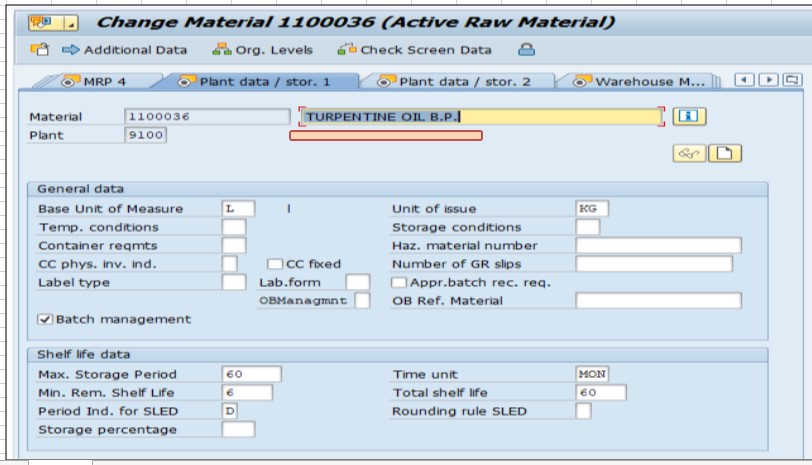
Save.
This plant-specific step confirms that at plant 1213 specifically, goods issue transactions for this material should default to KG, while the material's overall base unit remains L. Since Unit of Issue is maintained per plant, other plants using the same material can retain a different unit of issue if their local process requires it, without affecting this plant's configuration.
💼 Real-World Scenario: How Anita Reddy Hit This Error
Anita Reddy, a procurement executive at Learn Pharma in Pune, was processing a goods receipt for material 800061 at plant 1213 when the vendor's delivery note listed the quantity in kilograms, but SAP threw "Unit of measure KG not supported for material 800061 in plant 1213" the moment she tried to enter the receipt that way. The material's base unit was liters, and nobody had ever needed to reference it by weight before this particular vendor relationship began.
Working with Rajesh Jadhavar, Anita opened MM02, navigated to Additional Data - Units of Measure, and added KG as an alternative unit. Suresh confirmed the correct conversion factor by checking the material's technical specification sheet, since guessing a rough figure would have silently distorted every future quantity calculation using KG. After maintaining the accurate conversion factor and setting the Unit of Issue to KG on the plant data view for plant 1213, the goods receipt processed correctly, converting the vendor's kilogram-based delivery note into the correct liter-based stock quantity automatically.
📋 Related Transactions Every MM User Should Know
| Transaction | Purpose |
|---|---|
| MM02 | Change an existing material master, including adding alternative units of measure and plant-specific unit of issue. |
| MM03 | Display a material master, useful for confirming which units are currently maintained before troubleshooting. |
| CUNI | Maintain the system-wide unit of measure itself (dimension, decimal places, language text) - a separate configuration layer from a material's own unit assignments. See this site's dedicated guide on the related "Unit is not created in language" error for more detail. |
| MMPUR | Central purchasing material master overview, useful for reviewing unit of measure settings across multiple materials at once. |
| ME21N / MIGO | Purchase order and goods movement transactions where a missing alternative unit typically surfaces to end users. |
Keeping this list handy helps you distinguish "this specific material is missing an alternative unit" (fixed in MM02) from "this unit code itself has a system-wide configuration gap" (fixed in CUNI) -two related but genuinely different problems that can look similar at first glance.
❗ Common Mistakes When Fixing This Error
- Entering an approximate or convenient conversion factor just to clear the error, rather than verifying the actual physical relationship between the two units for this specific material.
- Adding the alternative unit at the material level but forgetting to also set Unit of Issue correctly at the plant level where it is actually needed.
- Assuming a conversion factor that works for one material will work for a similar material -density and packaging can vary between materials even within the same product category.
- Not testing the fix with a real transaction (like a goods receipt) after saving, missing a chance to catch a conversion factor mistake before it affects live stock data.
- Confusing this material-specific unit gap with a system-wide unit configuration issue that would actually need fixing in CUNI instead.
📋 Related SAP Error Messages You May Also Encounter
| Error / Message | Typical Cause |
|---|---|
| Unit of measure KG not supported for material in plant | Alternative unit never added to the material master with a conversion factor |
| Unit ... is not created in language EN | A different, system-wide unit configuration gap - see this site's dedicated CUNI guide |
| Conversion factor for unit XX is not maintained | The unit is added to the material but no conversion factor has been entered |
| Unit of measure does not match with material's base unit | A transaction is trying to use a unit incompatible with the material's assigned dimension |
If you land on this page after searching for one of these related messages, the diagnostic order is the same: confirm the unit exists at all in the material master, then confirm a conversion factor is properly maintained for it.
💡 Best Practices to Prevent This Error From Recurring
- During material creation, proactively add every alternative unit of measure the business anticipates needing -purchasing units, sales units, and issue units -rather than adding them reactively as errors surface.
- Maintain a documented source (technical specification sheets, standard density tables) for conversion factors, so they can be verified rather than estimated whenever a new alternative unit is needed.
- Review Unit of Issue settings at each plant when a material is extended to a new plant, since different plants may have different operational needs for how a material is issued.
- Train procurement and warehouse staff to recognize this error as a material master data gap, and to escalate to whoever owns material master maintenance rather than attempting a workaround transaction.
- Periodically audit materials with frequent vendor or customer unit mismatches to proactively add commonly needed alternative units before they cause a transaction failure.
⚙ Why You Can't Just Convert Between Any Two Units
An important nuance worth understanding: not every pair of units can have a meaningful conversion factor at all. Weight-based units (kilogram, gram, pound) belong to one dimension, while volume-based units (liter, milliliter, gallon) belong to a different one. Converting between units within the same dimension, like kilograms to grams, is a fixed, universal ratio that never changes regardless of the material. Converting between units across dimensions, like kilograms to liters, is only meaningful because of a material-specific physical property -density -which is why this conversion factor must be maintained per material rather than being a fixed system-wide constant.
This is exactly why material 800061's KG-to-L conversion factor cannot simply be copied from a different material, even one that seems similar. Two liquids with different densities will have different weight-to-volume ratios, and using the wrong material's conversion factor will produce a plausible-looking but incorrect result -one that will not throw any error, making it especially important to source the correct factor from the material's actual technical specification rather than from a convenient shortcut.
🌐 Common Cross-Dimension Unit Conversion Scenarios
Material 800061's KG-to-L conversion is one specific example of a broader pattern that shows up across many industries, each with its own reason for needing a material-specific conversion factor.
| Industry | Typical Cross-Dimension Conversion | Why It's Needed |
|---|---|---|
| Chemicals / Liquids | Kilogram to Liter | Vendors invoice by weight, but the material is stocked and consumed by volume |
| Food and Beverage | Kilogram to Each/Unit | Bulk ingredients purchased by weight, but recipes or packaging measured per unit |
| Textiles | Meter to Kilogram | Fabric rolls tracked by length, but shipping and duty calculations based on weight |
| Construction Materials | Cubic Meter to Kilogram | Materials like sand or aggregate priced by weight but consumed by volume |
In every one of these scenarios, the underlying lesson is the same: whenever a business needs to bridge two units from different dimensions for the same material, someone with genuine knowledge of that material's physical properties needs to supply and verify the conversion factor -it is never a value SAP can infer or a generic industry-standard number that applies safely across all similar materials.
✅ A Practical Checklist for Auditing Unit of Measure Data
- List every material that has ever triggered a unit-of-measure-not-supported error, and confirm each one's conversion factor has since been verified against its actual technical specification.
- Spot-check a sample of existing alternative unit conversion factors against source documentation, especially for high-value or high-volume materials.
- Confirm Unit of Issue settings are appropriate at every plant a material is used in, not just the plant where the original gap was discovered.
- Review whether commonly needed alternative units (weight equivalents for volume-based materials, or vice versa) are proactively added during material creation for new products in the same category.
- Document the source of each cross-dimension conversion factor (density table, technical data sheet, lab test result) so future reviewers can verify it was not just estimated.
Building this kind of periodic review into standard material master governance catches inaccurate conversion factors before they accumulate into a meaningful stock valuation or costing discrepancy, rather than only ever being discovered reactively when the next similar error appears for a different material.
📈 Why Getting the Conversion Factor Right Matters More Than Clearing the Error
It is tempting to treat this error as solved the moment SAP stops blocking the transaction, but the real risk in this category of fix is not the error message itself -it is what happens after a conversion factor is entered. Every future transaction using KG for this material will silently apply whatever ratio was maintained, whether or not it is actually correct. An error message will never appear again even if the factor is wrong, which is exactly why this kind of mistake tends to go unnoticed for a long time.
The consequences compound quietly: incorrect stock quantities appearing in inventory reports, MRP planning working from wrong available-quantity figures, and -if the material is priced per unit -potentially significant cost miscalculations on purchase orders and invoices that use the alternative unit. This is why the fix in this guide's real-world scenario deliberately involved checking the material's actual technical specification rather than entering a plausible-looking number, and why that same diligence is worth applying every time this error appears for a different material.
✅ How to Verify the Fix
After adding the alternative unit and conversion factor in MM02 and saving, retry the original transaction -typically a goods receipt or purchase order line item -using the KG unit. If it now processes without error, the immediate fix is confirmed. But do not stop there: check the resulting stock quantity in the material's base unit (via MMBE or MM03) and manually verify it matches what you would expect given the quantity entered in KG and the conversion factor maintained.
For materials where getting the conversion factor exactly right matters financially (which is most materials), it is worth having a second person -ideally someone with direct knowledge of the material's physical properties -independently verify the conversion factor before the fix is considered complete, rather than relying on a single person's data entry alone.
📚 Quick Glossary of Terms Used in This Guide
- Base Unit of Measure: The primary unit a material is stocked and valuated in, set once during material creation.
- Alternative Unit of Measure: An additional unit maintained for a material, usable in specific transactions once a conversion factor to the base unit is defined.
- Conversion Factor: The numeric ratio between an alternative unit and the base unit, specific to each material.
- Unit of Issue: A plant-specific setting defining the default unit used for goods issue transactions at that plant.
- Dimension: The broader category a unit belongs to (weight, volume, length), which determines which other units it can theoretically convert to.
🎯 Conclusion
"Unit of measure KG not supported for material 800061 in plant 1213" is a material master data gap, not a system configuration problem -the material simply has never been told it can also be measured in kilograms. Adding KG as an alternative unit with an accurate, verified conversion factor, and setting the plant-level Unit of Issue where relevant, resolves this error in a way that holds up correctly for every future transaction, provided the conversion factor itself is genuinely accurate rather than just plausible.
This guide is written for the range of people who typically land on this page: procurement executives like Anita Reddy hitting this error mid-transaction, MM consultants maintaining material master data for a growing product line, and students learning how base and alternative units of measure relate to each other in SAP. Whichever group you fall into, the same core principle applies -this error means the material and this unit of measure have not been formally introduced to each other yet, and MM02 is how you make that introduction, carefully.