Unit INR Is Not Created in Language EN
This error appears when a unit code has been referenced in a transaction, but its language-specific description has never been maintained for the language in use. Follow the steps below to resolve it using CUNI. This guide also explains how units of measure and dimensions work in SAP, walks through a real business scenario, lists related transactions, and gives you a prevention checklist so this error does not keep appearing for other units or languages.
🔍 Understanding This Error in Detail
The message "Unit INR is not created in language EN" points to a gap in SAP's units of measure configuration, maintained through transaction CUNI. SAP allows a unit code to be defined once at the technical level -its dimension, decimal places, and conversion factors -but requires a separate, language-dependent description to be maintained for every language the system needs to display that unit in. If a unit was created in one language but never given a description in another, any transaction running in the missing language will raise exactly this error.
This is conceptually similar to how material short texts work: a material or, in this case, a unit of measure can be technically complete while still being invisible in a specific language simply because nobody has translated its description yet. The fix is a straightforward configuration entry in CUNI, and while it is technically a cross-client change, it typically takes only a couple of minutes once you know exactly which unit and language are missing.
📦 How Units of Measure and Dimensions Work in SAP
To understand why this error occurs, it helps to know how SAP structures its units of measure configuration in CUNI.
| Concept | What It Controls |
|---|---|
| Unit of Measure | The individual unit code itself (e.g. KG, EA, L), including its decimal places and language-specific description. |
| Dimension | A grouping of related units that can be converted into one another, such as Weight (kg, g, lb) or Length (m, cm, in). |
| Language-Dependent Text | The commercial and technical description shown to users, maintained separately for each language the system supports. |
Every unit must belong to a dimension, since that is what allows SAP to convert between related units automatically -for example, converting a purchase order quantity in kilograms into a stock quantity maintained in grams. But belonging to the correct dimension does not automatically give a unit its description text in every language; that step is separate and is exactly what this error is flagging as incomplete.
⚠ Common Reasons
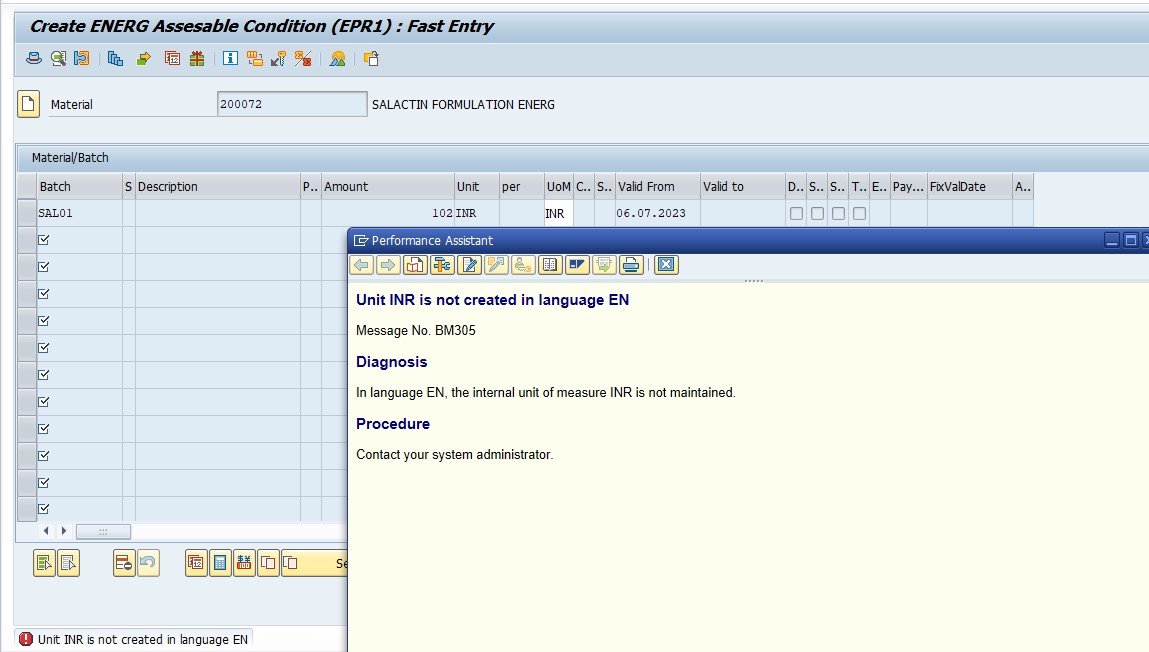
- The unit was created in one language (for example, the system's logon language during initial setup) but never given a description in the language now being used.
- The unit may exist technically (with a dimension and conversion factor) but is missing its commercial and technical description text entirely.
- A new language was added to the system after units of measure were originally configured, and the language rollout for units was never completed.
✅ How to Fix SAP Error: Unit INR Not Created in Language EN
Solution - TCode CUNI
Follow Steps:
- Go to TCode CUNI
- Select - Unit of Measurement
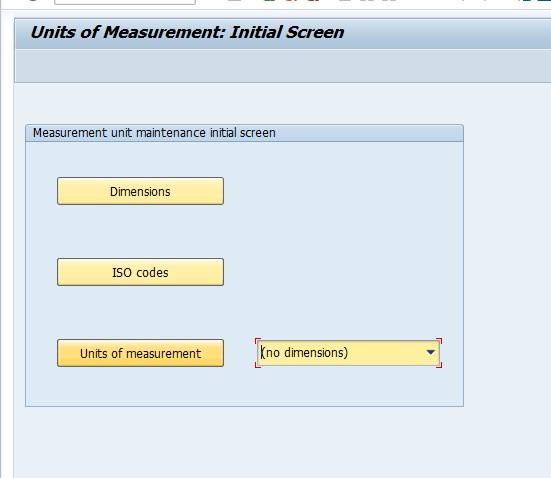
CUNI opens to a screen listing several configuration areas -Units of Measurement, Dimensions, and their associated settings. Selecting Units of Measurement takes you to the list of every unit code currently defined in the system, where you can see at a glance which units already have text maintained and which are missing it for the language you need.
Select - Create
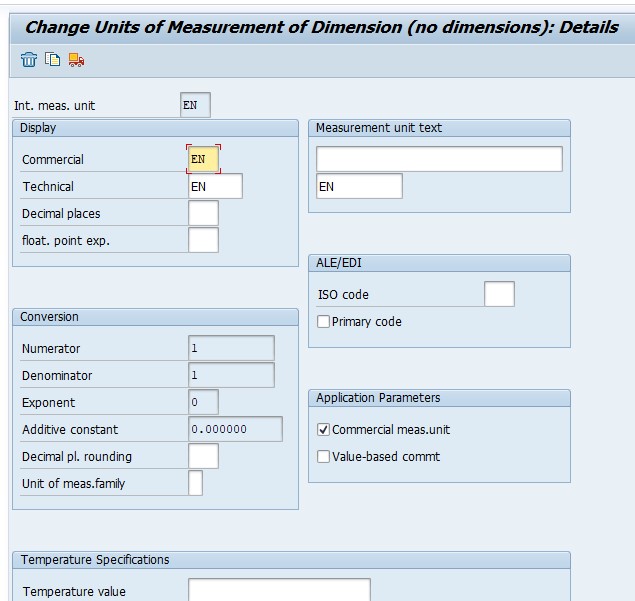
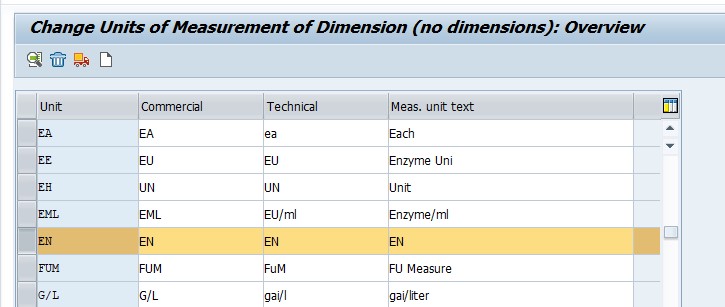
On the Create screen, enter the unit code exactly as referenced in your error message, assign it to the correct dimension, and fill in the commercial and technical descriptions for the language in question. If the unit already exists technically and only the language text is missing, some SAP versions let you add the missing language text directly against the existing unit rather than recreating the whole entry -check whether the unit already appears in the list before assuming a full create is needed.
Save
Saving commits the unit's language-dependent text, which is exactly what was missing. Because CUNI changes are typically cross-client, retry the original transaction that triggered the error immediately after saving -if it now completes without the unit-language error, the fix is confirmed for every client sharing this configuration, not just the one you were working in.
💼 Real-World Scenario: How Pooja Mishra Hit This Error
Pooja Mishra, working on a sales order at Learn Pharma in Pune, was entering a line item using a unit her team had recently started using for a new product line. The order was being processed in English, but the moment she tried to save it, SAP threw "Unit INR is not created in language EN." She checked the material master and the sales order fields and found nothing obviously wrong -the material itself and the sales area were both correctly extended.
Her colleague Suresh Jadhav explained that the unit itself had likely been set up quickly by someone using a different logon language during an earlier configuration session, and its English-language description text had simply never been added. Using CUNI, Suresh navigated to Units of Measurement, found the unit already existed with its dimension correctly assigned, and added the missing English commercial and technical description before saving. Pooja's sales order processed cleanly on the next attempt -a clear example of how a unit can be perfectly usable in the language it was originally created in while still blocking transactions in every other language until its text catches up.
📋 Related Transactions Every SD/MM User Should Know
| Transaction | Purpose |
|---|---|
| CUNI | Maintain units of measurement and dimensions, including language-dependent descriptions. |
| MM02 | Change a material master record, including its base unit of measure and additional units of measure conversion factors. |
| MM03 | Display a material master record, useful for confirming which unit of measure a material actually uses before troubleshooting a unit error. |
| SU01 | Display or change a user's logon language, useful for confirming which language a user was working in when they first encountered the error. |
| SMLT | Manage installed languages on the system, relevant if the error stems from a language that was only recently added. |
Because unit of measure text is genuinely a small, easy-to-overlook configuration detail, keeping this list handy helps distinguish "the unit is missing its language text" from "the material is using the wrong unit entirely," which look similar at first glance but require different fixes.
❗ Common Mistakes That Cause This Error to Reappear
- Creating a brand-new unit entry in CUNI when the unit already exists and only its language text was missing, resulting in duplicate or conflicting unit definitions.
- Assigning the new unit to the wrong dimension, which can prevent correct conversion behavior even after the language text issue is resolved.
- Fixing the error for one language while a multi-country rollout still has the same unit missing text in several other languages, leading to the same error resurfacing for different users.
- Making the CUNI change directly in production without testing in a sandbox first, given that CUNI changes are typically cross-client.
- Not documenting which units were added or corrected, making it hard for the next person to know whether a duplicate-looking unit was intentional or a mistake.
📋 Related SAP Error Messages You May Also Encounter
| Error / Message | Typical Cause |
|---|---|
| Unit is not created in language EN | Unit of measure exists technically but is missing language-dependent description text |
| Unit of measure XX is not defined | Unit does not exist at all, even at the technical/dimension level |
| Conversion factor for unit XX is not maintained | Unit exists and has language text, but conversion to the material's base unit is missing |
| Material short text missing for language EN | Same underlying pattern as this error, but on the material master rather than a unit of measure |
If you land on this page after searching for one of these related messages, the diagnostic order is the same: confirm whether the object (unit or material) exists at all, then confirm whether it is missing language text specifically, versus a genuinely missing technical definition or conversion factor.
💡 Best Practices to Prevent This Error From Recurring
- Whenever a new unit of measure is created, maintain its description text in every active language the system supports at the same time, rather than only the creator's logon language.
- When a new language is added to the system via SMLT, include a units-of-measure text review as part of the standard language rollout checklist.
- Restrict CUNI changes to Basis or configuration teams, given its typically cross-client scope, and always test in a sandbox system first.
- Keep a short internal reference list of custom units of measure your organization uses, along with which languages have been confirmed to have complete text.
- Periodically run a check across active languages to confirm no commonly used unit is missing text, rather than waiting for users to discover the gap through this error.
🧠 A Quick Troubleshooting Decision Tree
- Step A -Does the unit exist at all in CUNI's Units of Measurement list? If it does not appear at all, a full creation is needed, including dimension assignment and language text.
- Step B -If the unit already exists, does it have a dimension assigned? A unit without a dimension cannot be converted to related units, which can cause a separate, related error even after language text is added.
- Step C -If the unit exists with a dimension, is the language text specifically missing for the language referenced in the error? This is the most common scenario -check the existing entry's language tab rather than assuming a full recreation is needed.
- Step D -If the language text exists but the error still appears, is the transaction actually using a different, similarly-named unit? Case sensitivity and near-identical unit codes (such as a unit with a trailing space) can cause SAP to treat what looks like the same unit as two different entries.
Walking through these four checkpoints in order avoids the most common mistake with this error: creating a brand-new unit entry when the real issue was simply a missing language text on an already-existing one.
⚙ Decimal Places, Rounding, and Why They Matter Alongside Language Text
While this specific error is about missing language text, it is worth understanding the other settings maintained alongside a unit in CUNI, since they are commonly reviewed at the same time a language gap is being fixed. Each unit of measure carries a decimal places setting, controlling how many digits after the decimal point the system displays and stores for quantities in that unit -a unit like EA (each) typically has zero decimal places, while a unit like KG might allow two or three.
Getting decimal places wrong does not usually cause an error message the way missing language text does, but it can cause silent rounding issues downstream -a purchase order quantity that looks correct on screen but gets truncated or rounded unexpectedly during goods receipt or invoice verification. Since you are already in CUNI fixing the language gap, it costs very little extra time to double-check the unit's decimal places setting matches what your business actually needs, rather than discovering a rounding discrepancy separately, weeks later, during a stock reconciliation.
📦 How This Relates to a Material's Base Unit of Measure
It is worth being clear about the relationship between CUNI's system-wide unit configuration and a specific material's base unit of measure, maintained on the Material Master's Basic Data view (MM02). CUNI defines what a unit code means system-wide -its dimension, decimal places, and language text -while the Material Master simply references one of those units as the material's base unit, and can define additional units of measure with conversion factors relative to that base unit.
This means a material-specific unit conversion error (such as "conversion factor not maintained between EA and KG for material X") is a different problem from this one, even though both involve units of measure. This error is about the unit itself lacking language text at the system level, affecting every material and transaction that uses it, while a conversion factor error is scoped to one specific material's configuration. Recognizing which category an error falls into up front saves time -a missing conversion factor is fixed in MM02 on the specific material, while a missing language text is fixed once in CUNI and benefits every material and transaction using that unit going forward.
📈 Why This Small Gap Causes Outsized Frustration
On the surface, a missing language description for a unit of measure seems like a trivial configuration detail, but it tends to surface at the worst possible moment -mid-transaction, when a sales or purchasing user is trying to close out an order and has no visibility into why a seemingly unrelated unit code is blocking them. Because the error message references the unit and language directly, users without configuration access often cannot self-serve the fix and end up filing a support ticket for what is, in reality, a two-minute CUNI entry.
This pattern is especially common during multi-country rollouts, where a company expands from a single-language SAP instance into supporting several languages for different regional teams. If units of measure were only ever fully translated for the original rollout language, every additional language added afterward risks surfacing this exact error repeatedly, once per unit, as different regional teams start using the system and encounter units that were never translated for their language.
🌐 A Closer Look: Multi-Country and Multi-Language Rollouts
Companies expanding SAP usage across multiple countries often underestimate how many small, language-dependent configuration objects exist beyond the obvious ones like material short texts and customer names. Units of measure are one of the easiest categories to overlook, since they are configured once early in a project and rarely revisited unless something breaks. A project team focused on translating customer-facing documents and material descriptions can easily miss that the underlying unit of measure text was never extended to the new rollout language at all.
The most reliable way to avoid a drip-feed of this error across a multi-language rollout is to treat units of measure as a first-class item on the language rollout checklist, alongside material master texts, customer and vendor master texts, and any custom Z-table language-dependent content. Running a systematic check -listing every unit currently in active use across sales orders, purchase orders, and material masters, then confirming each has description text in every newly added language -up front during the rollout project is far less disruptive than fixing the same error piecemeal as individual users in different countries encounter it over the following months.
✅ How to Verify the Fix
After creating or updating the unit's language text in CUNI and saving, retry the original transaction that triggered the error -typically a sales order, purchase order, or material master entry using that unit. If it now saves without the language error, the fix worked for that specific unit and language combination.
Because CUNI changes are commonly cross-client, it is also worth confirming the fix from a different client or language logon if your landscape uses more than one, to ensure the change propagated as expected rather than being scoped more narrowly than anticipated. If your organization supports several languages, this is also a good moment to proactively check whether the same unit is missing text in any other active language, rather than waiting for the next user in a different region to hit the same error.
📚 Quick Glossary of Terms Used in This Guide
- Unit of Measure: A code representing a quantity measurement (such as KG, EA, or L), maintained with a dimension, decimal places, and language-dependent description text.
- Dimension: A grouping of related units of measure that can be converted into one another, such as Weight or Length.
- Language-Dependent Text: Descriptive text (commercial and technical descriptions, short texts) maintained separately for each language a system supports.
- Cross-Client Configuration: A configuration change that applies across every client on a system, rather than being scoped to a single client.
- Conversion Factor: The numeric relationship between two units within the same dimension, used to convert quantities automatically.
🎯 Conclusion
"Unit is not created in language EN" looks like a confusing, deeply technical error the first time you see it, but it almost always comes down to one simple, easily fixed gap: a unit of measure that is technically complete but missing its description text for a specific language. Running CUNI to add the missing language text -after confirming the unit does not already exist to avoid creating a duplicate -resolves the overwhelming majority of cases in a couple of minutes. Keep the dimension explanation, related transactions, and multi-language rollout checklist above in mind, and this error becomes a quick, confident fix rather than a recurring surprise every time a new language or region comes online.
This guide is written for the range of people who typically land on this page: sales and purchasing users like Pooja Mishra hitting this error mid-transaction, SAP Basis and configuration consultants managing multi-language rollouts, and students learning how SAP's language-dependent text architecture extends beyond just material and customer master data. Whichever group you fall into, the same core principle applies -this error simply means the unit and this particular language have not been formally introduced to each other yet, and CUNI is how you make that introduction.
If your organization operates across several languages, it is worth keeping a short internal reference sheet listing every custom or frequently used unit of measure alongside which languages have confirmed, complete text for each one. New consultants and support staff encountering this error for the first time can then check that reference, confirm whether the gap is a genuinely new unit or simply a missing translation on an existing one, and resolve it in minutes rather than needing to investigate the unit's full configuration history from scratch every time the message appears in a new region.