Batch Management Configuration in SAP: Step-by-Step Guide
Batch management configuration is used to manage products that are produced in batches, ensuring traceability and better control over inventory. This guide walks through the full configuration path -from creating characteristics and a class, through batch determination, access sequence, and search procedure, to creating and testing a batch -along with why traceability matters, a real-world scenario, related transactions, and a prevention checklist for common configuration mistakes.
"If you encounter any errors in SAP, send me a screenshot at pramod@learntosap.com, and I will help you resolve the issue."
✅ What is Batch Management in SAP?
Batch management in SAP is used to manage products that are produced in batches, ensuring traceability and better control over inventory. Rather than treating every unit of a material as identical, batch management lets SAP track stock at the level of a specific production lot or delivery lot -called a batch -so that quality attributes, expiry dates, and origin information can differ from one batch of the same material to the next.
This distinction matters enormously in practice. Two batches of the exact same material number can have different manufacturing dates, different quality inspection results, or different countries of origin, and a company needs to be able to tell them apart when picking stock for a customer, running a quality hold, or responding to a regulatory recall. Batch management is what makes that level of granularity possible inside SAP's inventory and quality management processes.
Why Batch Management Matters Beyond Basic Tracking
Companies in regulated or quality-sensitive industries -pharmaceuticals, food and beverage, chemicals, and increasingly electronics and automotive components -rely on batch management for reasons that go well beyond simple inventory bookkeeping:
- Traceability: Every unit of stock can be traced back to the exact batch it came from, and from there to the specific production run, raw material lot, or supplier delivery.
- Recall management: If a quality issue is discovered in one batch, only that batch's stock needs to be quarantined or recalled, rather than the entire material across all batches.
- Shelf-life and expiry control: Batches can carry expiry dates, enabling automatic enforcement of First-Expiry-First-Out (FEFO) picking strategies for perishable or shelf-life-sensitive materials.
- Quality-status-based stock control: Batches can be held in quality inspection status until a usage decision is made, preventing unreleased stock from being issued or shipped by mistake.
- Regulatory compliance: Many industries are legally required to maintain batch-level traceability records, and SAP's batch management functionality directly supports that documentation requirement.
✅ Follow Step-by-Step Configuration for Batch Management
Create characteristic -CT04
Create characteristics in SAP, which are used to define properties for objects such as batches, products, or materials, using transaction CT04. Characteristics are used when working with classification systems (example: batch classification in SAP).
1) Create -Z_Batch_abcd
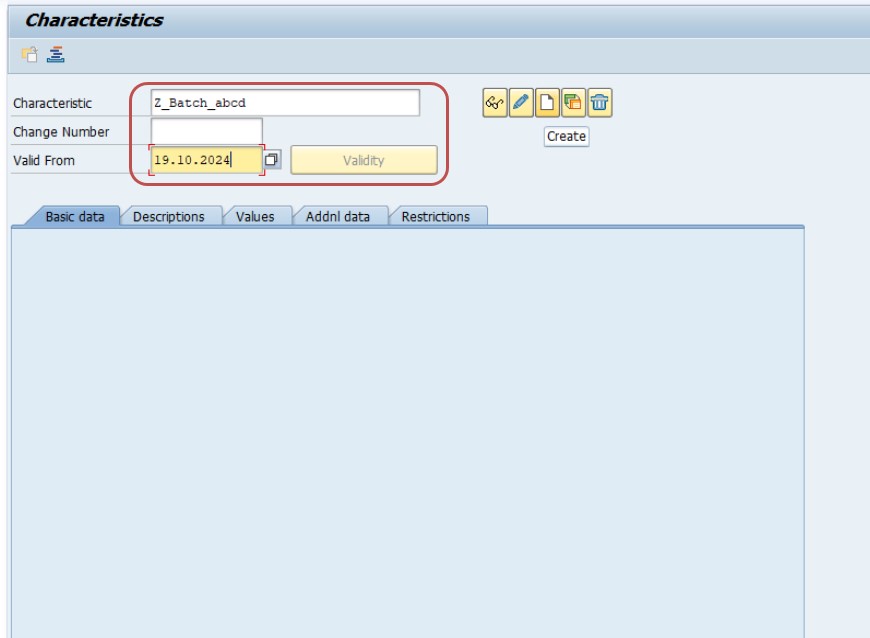
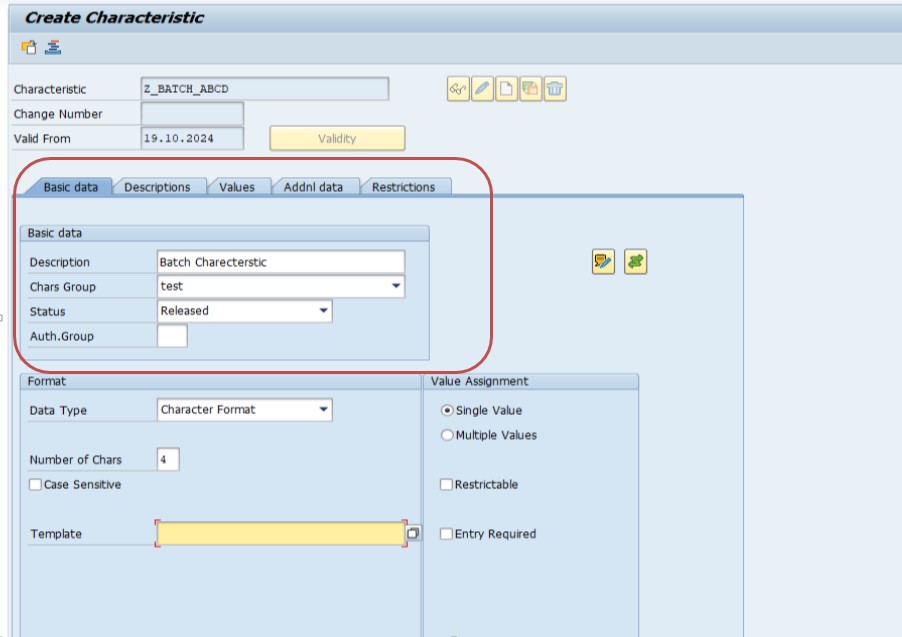
A characteristic in CT04 is the smallest building block of the whole configuration -it defines exactly one property, such as potency, color, or shelf-life days, along with its data type (character, numeric, or date) and any allowed values. Keep characteristic names consistent with your organization's naming convention (a Z-prefix is standard for customer-defined objects) since these names will be referenced again when building the class in the next step.
Create Class -CL02
In SAP, you use transaction CL02 to create a class. A class groups characteristics that describe objects, such as materials or batches. In the context of Batch Management, the class is used to assign multiple characteristics (like quality, shelf life, etc.) to batches or materials.
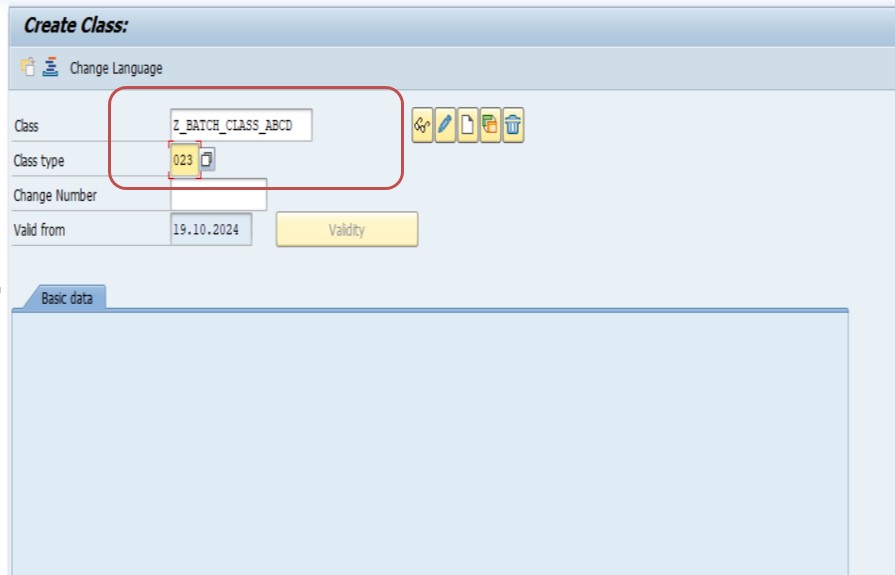
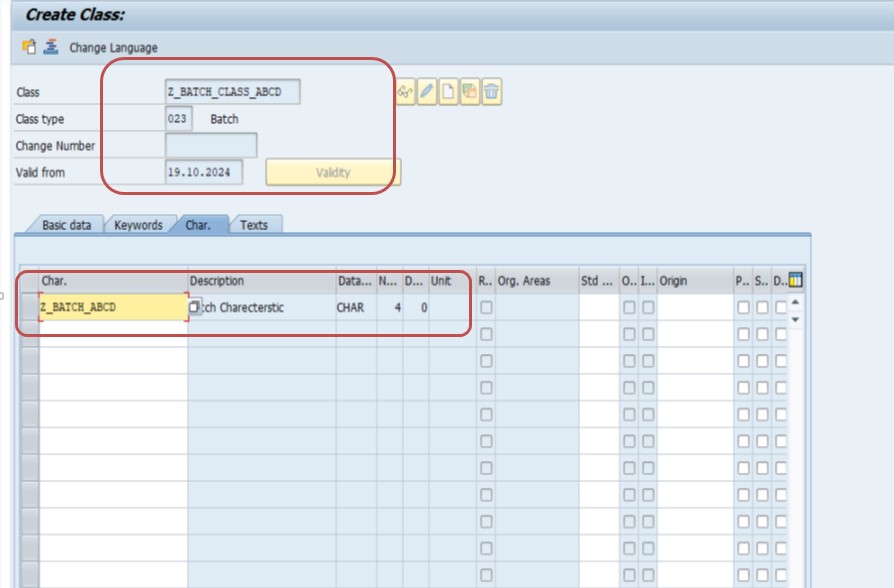
Classes in SAP use a class type -for batch classification, class type 023 (Batch) is the standard type used so the class becomes available for assignment to materials that are batch-managed. Once the class is created and the Z_Batch_abcd characteristic is assigned to it, every batch created for a material linked to this class will automatically inherit that characteristic as a field to be maintained.
Create Sort Sequence -CU70
1) Create -Z_SORT_SEQ
Sort Sequence is used in the Variant Configuration process to determine the order in which characteristics or values are processed. The sort sequence can be configured via transaction CU70.
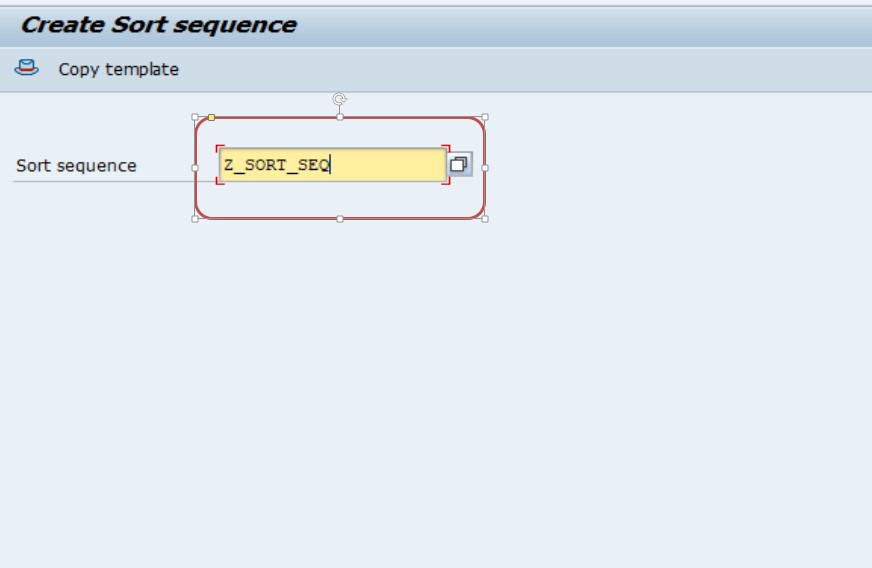
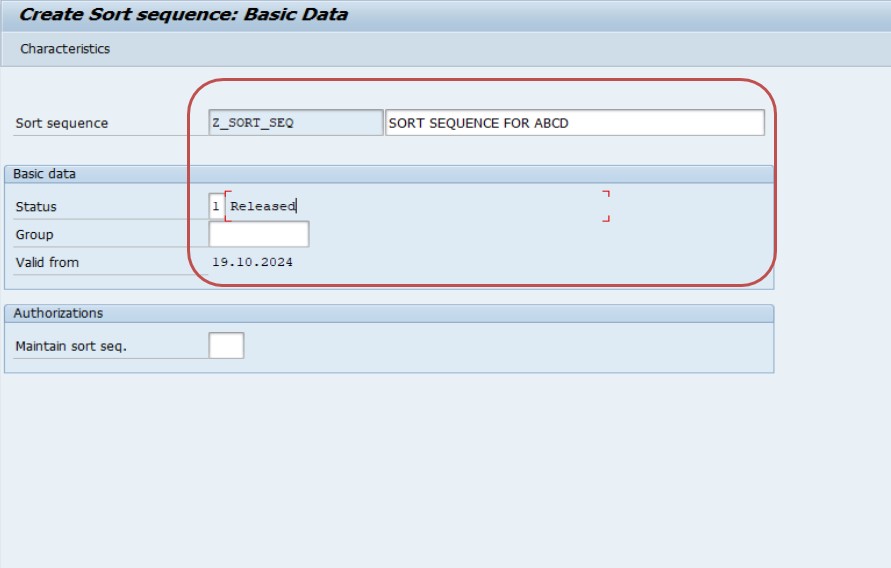
Click tab Characteristic -Define Z_BATCH_ABCD
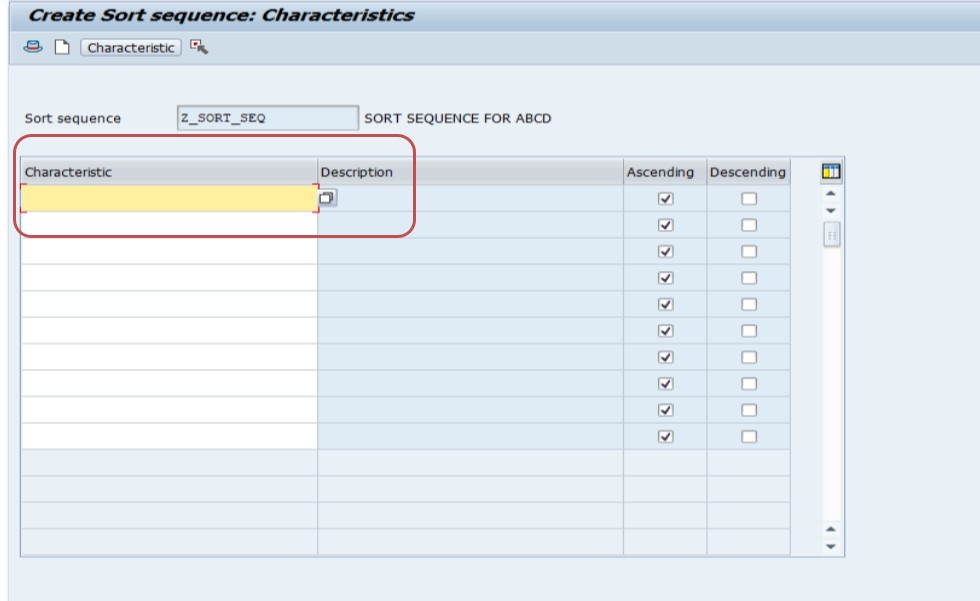
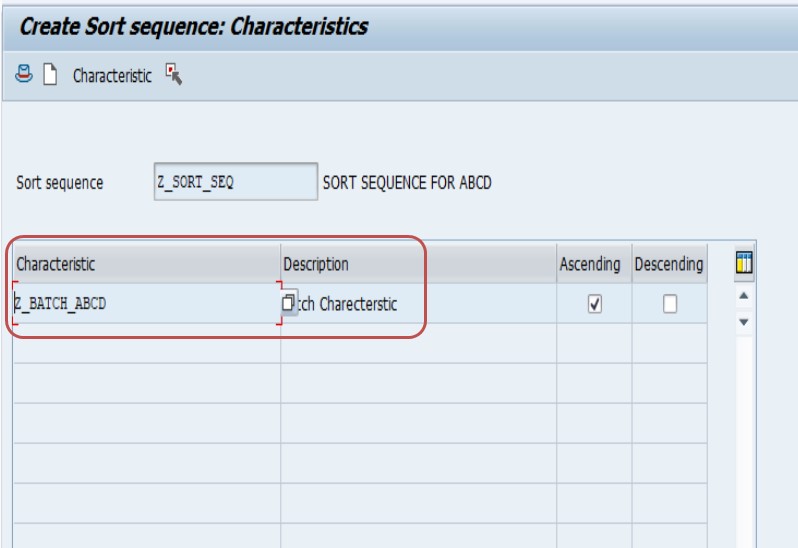
The sort sequence step is easy to underestimate, but it directly affects how batch determination results are ranked when multiple valid batches are found later -the characteristic assigned here (Z_BATCH_ABCD) determines the ordering logic used during evaluation, which matters when you need SAP to prioritize one batch attribute over another during automatic selection.
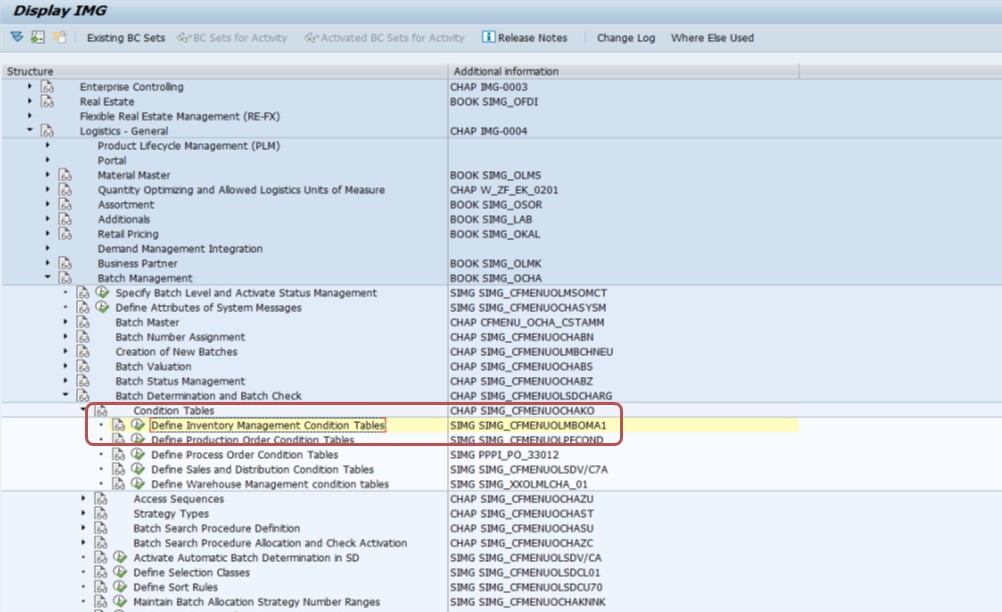
Batch Determination and Batch Check Configuration -OMA1
Path: Logistics General > Batch Management > Batch Determination and Batch Check — transaction OMA1.
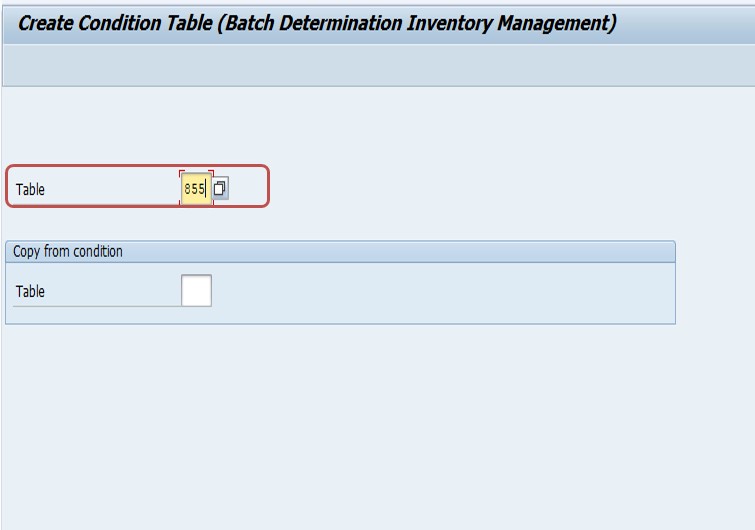
Generate -Select Field
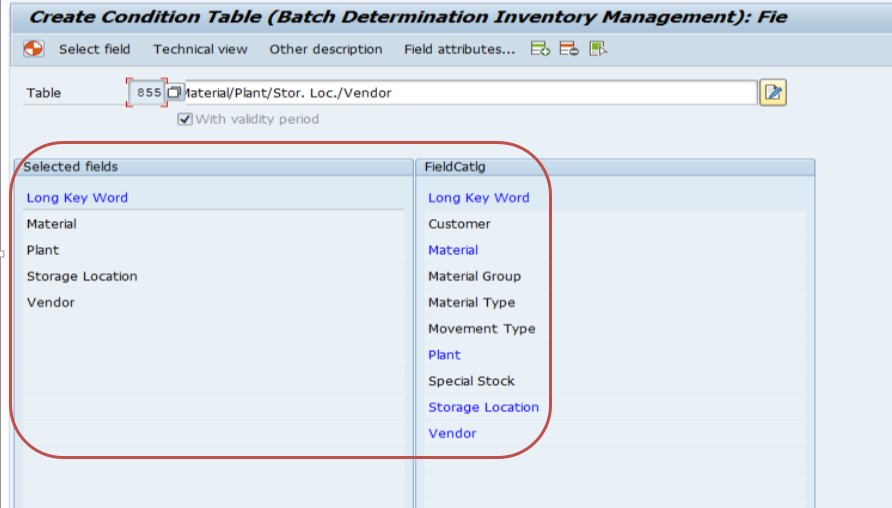
The 501-999 numbering convention exists specifically to keep customer-defined condition tables from colliding with SAP's own standard-delivered tables, which occupy the lower number range. The condition table defines which fields (plant, material, storage location, and so on) SAP will use as the key when searching for a matching batch during determination -get this field selection right, since it is the foundation every later access sequence and strategy type step builds on.
Create Access Sequence -OMCX
New Entry.
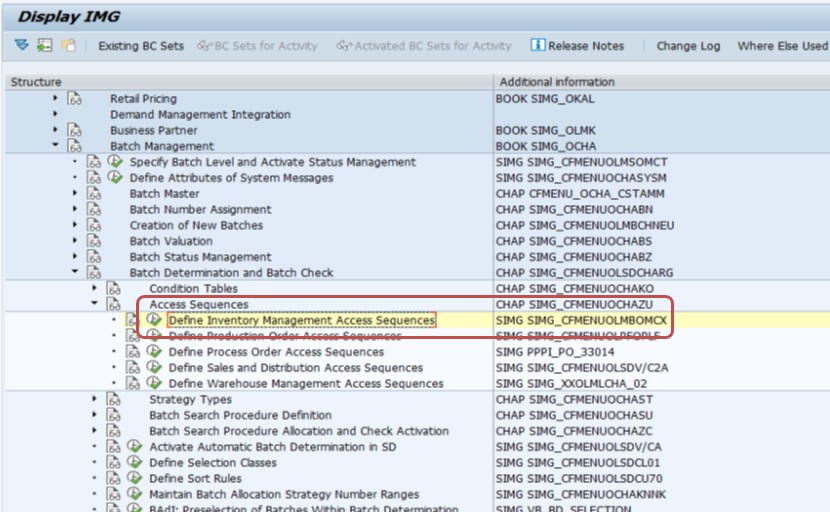
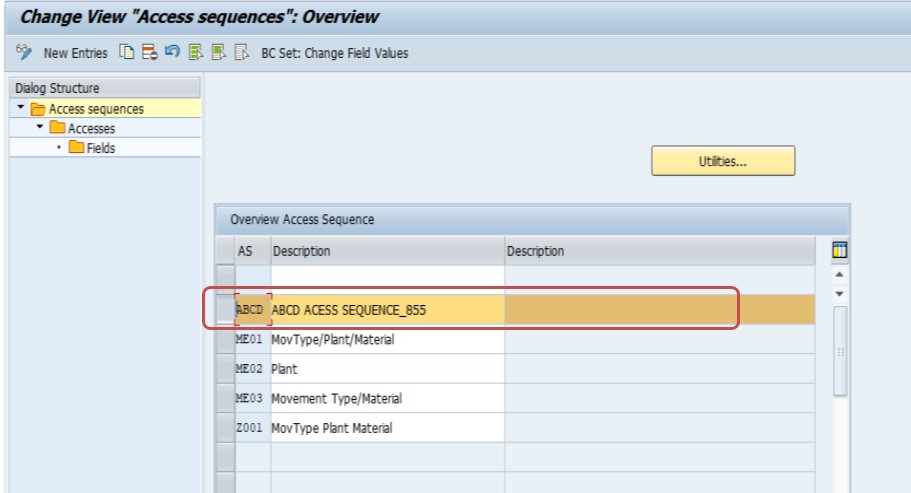
An access sequence defines the order in which SAP checks one or more condition tables when trying to find valid batch determination data -if you have created more than one condition table for different levels of specificity (for example, plant plus storage location versus plant alone), the access sequence controls which one gets checked first.
Create Strategy Type -OMCW
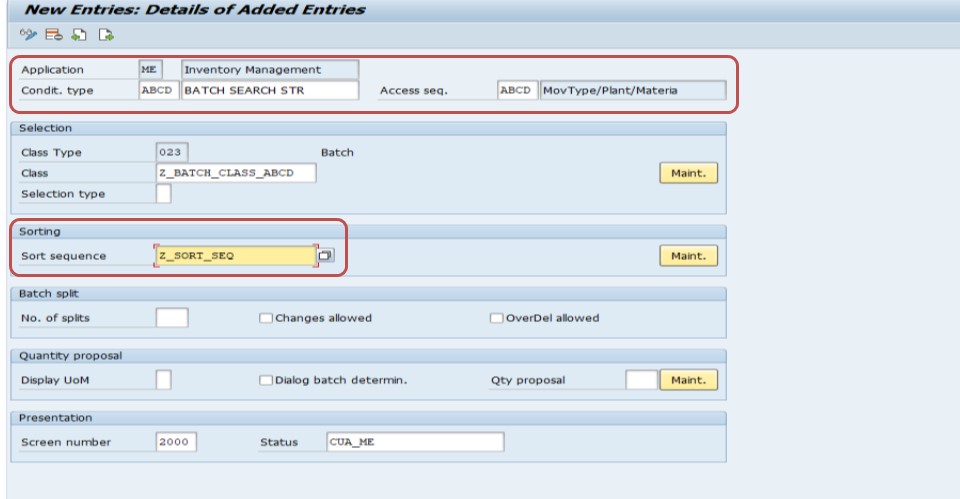
A strategy type links the access sequence to a specific batch determination strategy and controls behavior such as whether the system proposes one batch or a split across multiple batches. This is the step where the access sequence created above actually gets tied into a usable strategy that later steps can reference.
Create Batch Search Procedure -OMCY
New Entry.
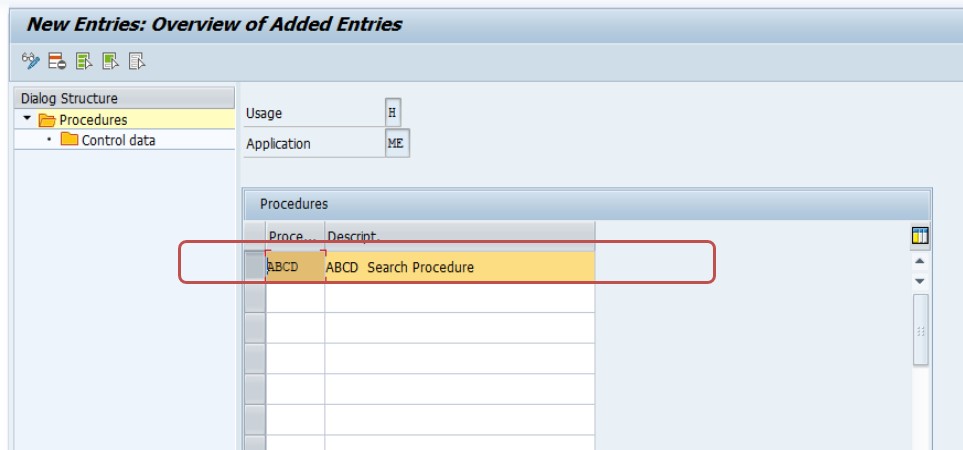
A batch search procedure groups one or more strategy types together into a sequence used for a specific business process, such as goods issue, delivery, or production order component withdrawal. This is the object that gets allocated to actual movement types in the next step, which is what finally makes batch determination trigger automatically during a real transaction.
Batch Search Procedure Allocation and Check Activation
Mvt Type: 101, 201, 501 — Search Proc: ABCD — tick Check Batch.
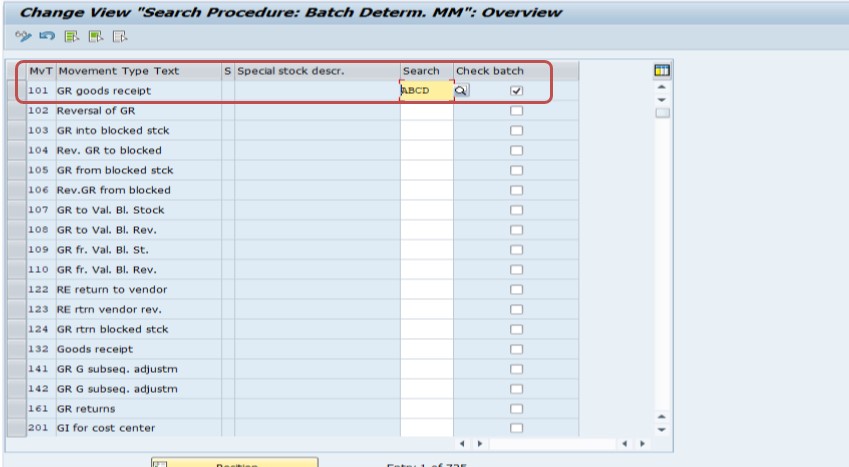
Allocate SD Search Procedure / Activate Check
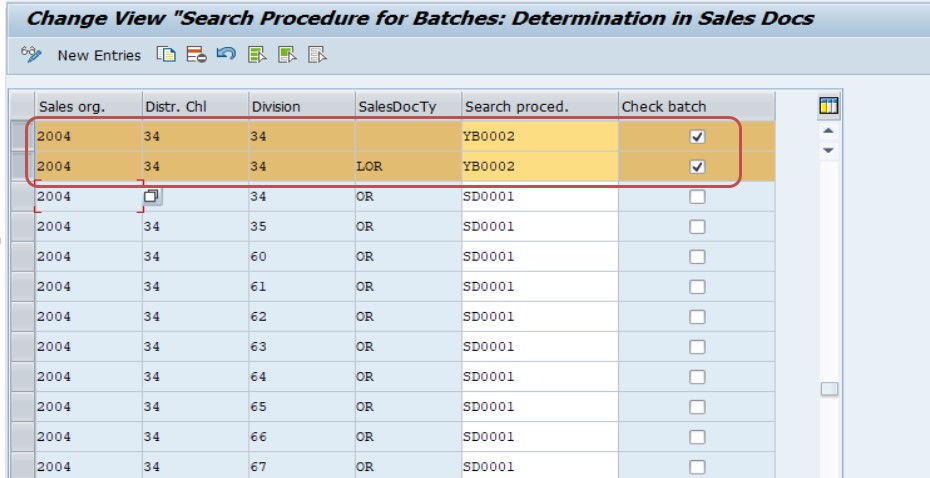
This is the step that actually switches batch determination on for real transactions. Movement types 101 (goods receipt), 201 (goods issue to cost center), and 501 (goods receipt without purchase order) are common candidates, but the exact list should match your organization's actual batch-relevant movement types -allocating the search procedure to a movement type that never handles batch-managed material adds unnecessary configuration without any functional benefit.
Try to Create Batch -MSC1N
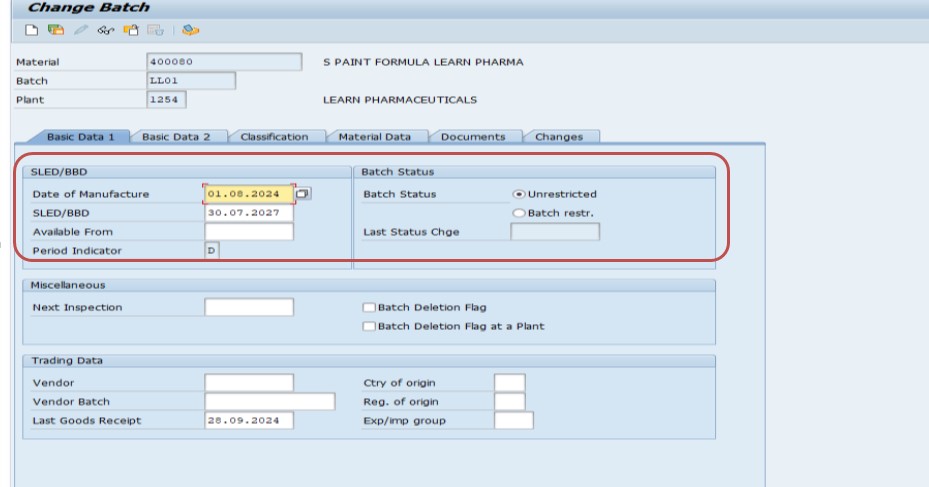
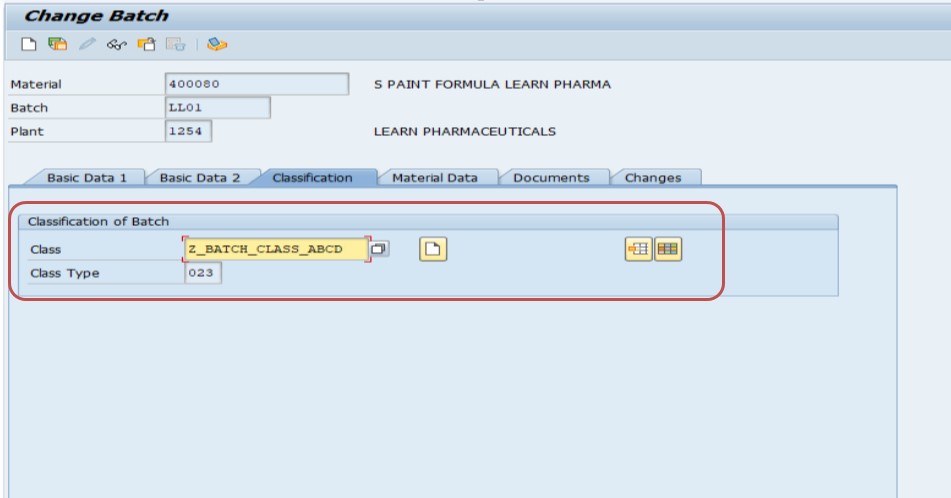
MSC1N is the practical test of everything configured so far. When you create a batch here for a material linked to the class from Step 2, the characteristic Z_Batch_abcd should appear on the classification tab ready to be maintained with a value, confirming the classification and batch configuration are correctly linked end to end.
Configure Customer and Material Info Record -VD51
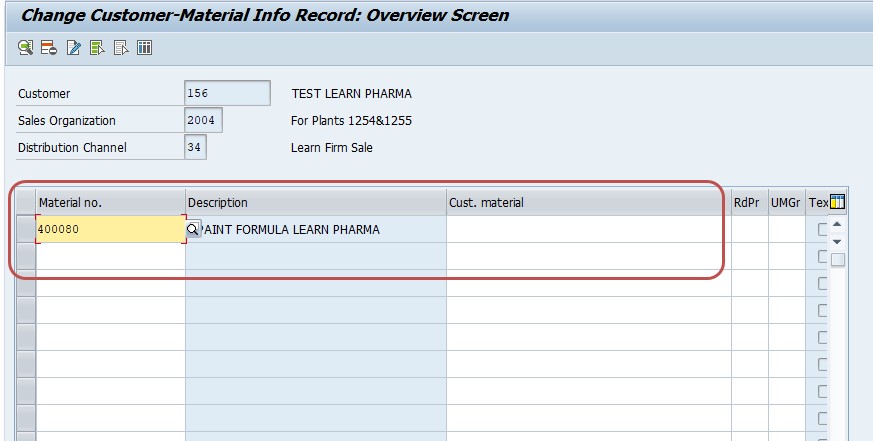
Save. The customer-material info record is optional but commonly used where a specific customer requires batch-related delivery preferences (such as a particular shelf-life buffer) different from the general default -maintaining it here ensures batch determination and delivery processing respect any customer-specific requirements alongside the general configuration completed in the previous steps.
💼 Real-World Scenario: How Learn Pharma Rolled Out Batch Management
Learn Pharma in Pune had recently started supplying a specialty chemical additive that customers required to carry a documented shelf life and batch traceability certificate with every shipment. Anita Shah, working with the SD and MM configuration team, was tasked with setting up Batch Management for this new product line from scratch.
She started by creating a characteristic in CT04 to capture expiry date sensitivity, then grouped it into a class using CL02 so every batch of the additive would carry that same classification data by default. Working through OMA1, OMCX, OMCW, and OMCY, she configured a batch search procedure and allocated it to the relevant goods issue and delivery movement types. When the warehouse team created the first batch in MSC1N and processed a test delivery, SAP automatically proposed the batch with the earliest expiry date first -exactly the FEFO behavior the customer contract required, without any warehouse staff needing to manually check expiry dates on the shop floor. This end-to-end setup, done once during configuration, has been quietly enforcing the correct picking behavior on every delivery since.
📋 Related Transactions Every Batch Management User Should Know
| Transaction | Purpose |
|---|---|
| CT04 | Create or change characteristics used in classification, including batch characteristics. |
| CL02 | Create or change a class that groups characteristics for assignment to materials or batches. |
| CU70 | Create a sort sequence controlling the processing order of characteristics. |
| OMA1 | Configure batch determination and batch check condition tables. |
| OMCX | Create an access sequence for batch determination condition tables. |
| OMCW | Create a strategy type linking access sequences to a batch determination strategy. |
| OMCY | Create a batch search procedure grouping strategy types for a specific process. |
| MSC1N | Create a new batch for a material and plant. |
| MSC2N | Change an existing batch's classification or master data. |
| MSC3N | Display an existing batch's master data and classification values. |
| VD51 | Maintain the customer-material info record, including batch-related delivery preferences. |
| QA32 / QA33 | Display or process a quality inspection lot tied to a specific batch. |
Keeping this list handy is useful because batch management configuration spans classification, logistics general, and quality management areas -transactions that a purely MM- or purely QM-focused consultant might not otherwise encounter together in one project.
❗ Common Mistakes in Batch Management Configuration
- Creating the condition table in OMA1 outside the 501-999 customer number range, risking a conflict with SAP standard-delivered tables.
- Forgetting to allocate the batch search procedure to all the movement types that actually need batch determination, leaving some transactions unaffected by the new configuration.
- Assigning the wrong class type (not 023 for Batch) when creating the class in CL02, which prevents the class from being usable for batch classification.
- Skipping the sort sequence step in CU70, which can leave batch determination results unpredictably ordered when multiple valid batches exist.
- Testing the configuration only in a sandbox with a single simple scenario, missing edge cases like partial stock across multiple batches or expired batches still sitting in the system.
- Not coordinating with the quality management team when batches also require a quality inspection lot, leading to a mismatch between batch status and quality release status.
📦 Batch Management vs Serial Number Management
Batch management is often mentioned in the same breath as serial number management, but the two solve different tracking problems and it is worth being clear on which one a given material actually needs.
| Aspect | Batch Management | Serial Number Management |
|---|---|---|
| Tracking Granularity | Groups of identical units sharing a production or delivery lot | Individual, uniquely identified units |
| Typical Use Case | Chemicals, pharmaceuticals, food, bulk raw materials | Equipment, machinery, high-value individually serviced items |
| Configuration Base | Classification (CT04, CL02) plus Logistics General batch determination | Serial number profiles assigned at material master level |
| Quantity Tracked | A batch quantity (e.g. 500 kg of Batch LL01) | Always quantity of 1 per serial number |
Some materials, particularly in equipment-heavy industries, actually use both simultaneously -a batch representing the production run a component came from, and a serial number identifying the individual unit within that batch for warranty and service history purposes. Understanding which combination your material genuinely needs prevents over-configuring a bulk chemical with unnecessary serial tracking, or under-configuring a serviceable asset that really does need individual unit identification.
🧠 Troubleshooting: Why Batch Determination Isn't Proposing the Expected Batch
Even after a correct configuration, it is common for a consultant or end user to run a transaction and find that batch determination proposes an unexpected batch, or no batch at all. Working through these checks in order usually identifies the gap quickly:
- Check 1 -Is the search procedure actually allocated to the movement type being used? A perfectly configured search procedure does nothing if it was never allocated to the specific movement type your transaction triggers.
- Check 2 -Does the batch actually have the classification data populated? If a batch was created in MSC1N but the characteristic values (such as expiry date) were left blank, batch determination has nothing to sort or filter on.
- Check 3 -Is the condition table's key combination actually matched by the transaction data? If the condition table requires plant plus storage location but the transaction only has plant populated at the point batch determination runs, no match will be found.
- Check 4 -Is more than one batch determination strategy competing for the same transaction? Overlapping configuration across MM and SD batch determination (both are configured separately) can sometimes produce conflicting results if not carefully scoped.
- Check 5 -Has the batch been blocked or is it in a quality status that excludes it from automatic proposal? A batch under quality inspection hold will correctly be excluded from unrestricted-use batch determination results.
Working through these five checks in sequence mirrors how experienced consultants debug batch determination issues in practice, and usually narrows the problem down to a specific missing link -most often Check 1 or Check 2 -within a few minutes.
⚙ A Closer Look at Classification: Characteristics, Classes, and Class Types
Because classification underpins the first two configuration steps in this guide, it is worth understanding it slightly more deeply than "characteristics go into a class." Every characteristic created in CT04 has a data type -character, numeric, date, or currency -and can optionally have a defined value range or list of allowed values, which SAP will enforce whenever that characteristic is maintained on a batch or material.
Classes, created in CL02, are always assigned a class type, and the class type determines what kind of object the class can be linked to. Class type 023 is specifically the Batch class type, distinct from class type 001 (Material) or 200 (Variant Configuration for sales), which is why selecting the correct class type during CL02 setup is not a minor detail -assigning the wrong class type will make the class technically valid but functionally unusable for batch classification purposes.
Once a class with the correct type is created and characteristics are assigned to it, that class is linked to relevant material master records (typically on the Classification view), and every batch created for those materials in MSC1N will inherit the same set of characteristic fields ready to be filled in. This chain -characteristic to class to material to batch -is the classification backbone that every later batch determination step in OMA1 through OMCY ultimately reads from.
📈 Business Benefits of a Well-Configured Batch Management Setup
Once batch management configuration is in place and working correctly, the benefits show up across several parts of the business simultaneously, not just in the warehouse. Quality teams gain the ability to place a hold on a single batch without disrupting the availability of every other batch of the same material. Customer service teams can answer batch-specific traceability questions from customers quickly, using MSC3N to pull up a batch's full classification and movement history rather than digging through generic material movement reports.
Sales and logistics teams benefit from automatic FEFO or FIFO enforcement during picking, which reduces the risk of shipping near-expiry stock ahead of fresher batches by mistake -a mistake that is easy to make manually under time pressure but essentially impossible once the batch search procedure is correctly configured and allocated. And for companies operating in regulated industries, a working batch management setup is often the difference between producing a traceability report in minutes during an audit versus reconstructing it manually from paper records or scattered spreadsheets.
💡 Best Practices for Batch Management Configuration
- Document your characteristic and class naming convention before starting configuration, so multiple consultants working on different product lines stay consistent.
- Reserve and record which condition table numbers (within the 501-999 range) are in use, to avoid accidental duplication as more batch determination scenarios are added over time.
- Test batch determination with realistic multi-batch scenarios -including expired batches, partially consumed batches, and quality-held batches -before considering the configuration complete.
- Coordinate with the quality management team early if any batches will also carry inspection lots, so batch status and quality release status stay aligned.
- Review movement type allocation periodically, especially after new plants or storage locations are added, to confirm batch checks remain active everywhere they are needed.
- Keep a short internal reference note describing which strategy type and search procedure apply to which business process, so future consultants do not need to reverse-engineer the setup from scratch.
📚 Quick Glossary of Batch Management Terms
- Batch: A specific, traceable production or delivery lot of a material, tracked separately from other lots of the same material.
- Characteristic: A single defined property (such as expiry date or quality grade) created in CT04 and used to describe batches or materials.
- Class: A grouping of characteristics, created in CL02, assigned to materials or batches as a set.
- Batch Determination: The automated process by which SAP proposes a batch for a transaction based on configured selection criteria.
- Access Sequence: The defined order in which condition tables are checked during batch determination, configured in OMCX.
- Search Procedure: A grouping of strategy types allocated to specific movement types, configured in OMCY, that activates batch determination for real transactions.
- FEFO: First-Expiry-First-Out, a stock rotation strategy that issues the batch with the earliest expiry date first.
🎯 Conclusion
Also Batch management configuration in SAP touches more transactions than most single-topic configurations -characteristics, classification, sort sequence, and Logistics General batch determination all need to work together before the first automatic batch proposal appears during a real transaction. But each individual step in this guide is straightforward on its own, and working through them in the order shown -CT04 through VD51 -mirrors exactly how experienced MM and QM consultants sequence a real batch management rollout. Once configured and tested with realistic multi-batch scenarios, this setup quietly enforces traceability, expiry control, and quality-status discipline on every relevant transaction going forward, with no extra manual effort from warehouse or sales staff.
This guide is written for the range of people who typically need this level of detail: MM and QM consultants configuring batch management for a new product line, warehouse and quality teams wanting to understand what is happening behind an automatic batch proposal, and students preparing for interview questions on SAP's classification and batch determination architecture. Whichever group you fall into, the ten steps above give you the complete configuration path from a bare characteristic definition to a working, tested batch creation.