SAP Fix: Batch Management Requirement Cannot Be Changed
The error "Batch management requirement cannot be changed; choose 'Display errors'" appears when SAP refuses to let you directly toggle batch management for a material - most commonly because the material's current material type is a value-only type that doesn't support batch tracking at all. This guide covers the fix using MMAM to convert the material type, then explains why SAP restricts this change so tightly, and what to check before attempting it. If you encounter any errors in SAP, feel free to send a screenshot to pramod@learntosap.com for help.
✅ Batch Management Requirement Cannot Be Changed
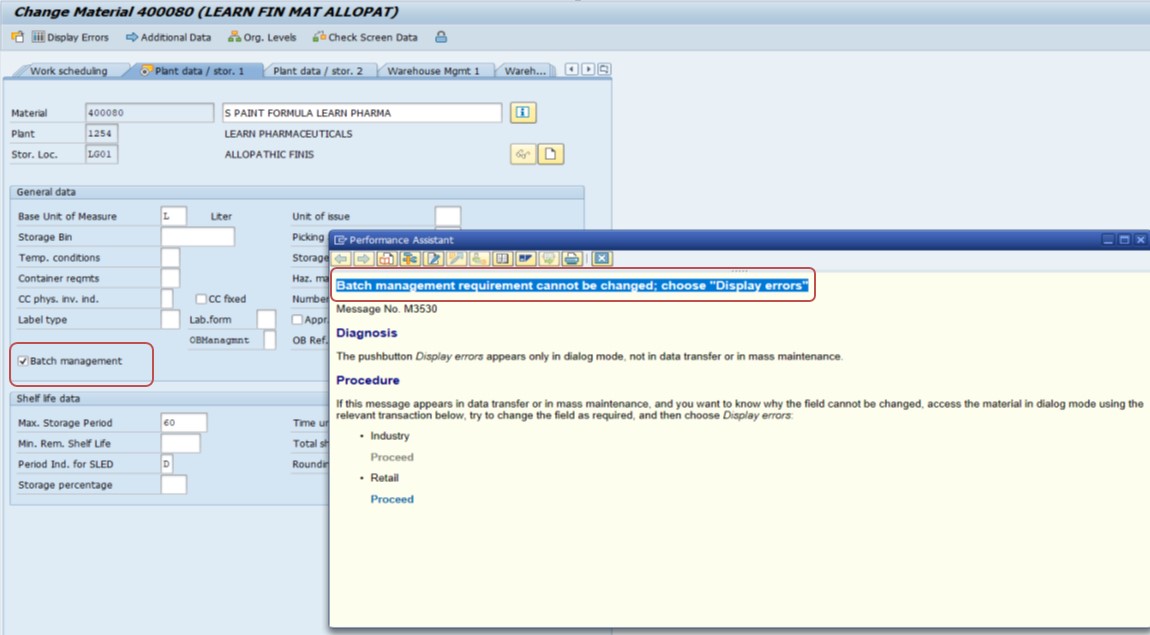
In SAP ERP, batch management is not allowed for value-only materials. Depending on your business requirement, one of the following solutions applies.
🔧 Solution: Change Material Type or Use a Different Material
Note: You cannot change the material type if there are any stocks, open transactions (purchase orders, etc.), or documents related to the material. You need to either clear the stock or ensure the material is not actively in use before proceeding.
If batch management is required and you're currently using a value-only material, you may need to switch the material to a standard material type (e.g., ROH for raw materials, FERT for finished products) that allows batch management. This will enable quantity and batch tracking.
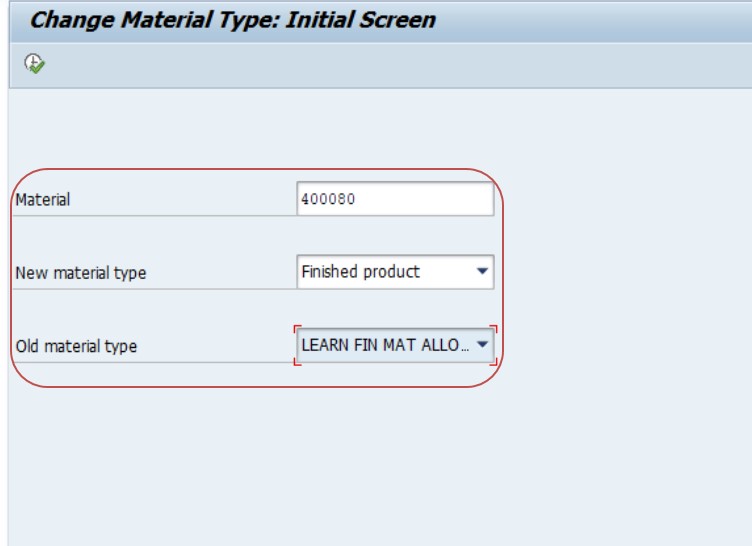
Run transaction MMAM and enter the material number - for example, 400080.
Select the New Material Type - for example, Finished Product (FERT). Select the Old Material Type - for example, a value-only type like LROH.
Select Execute.
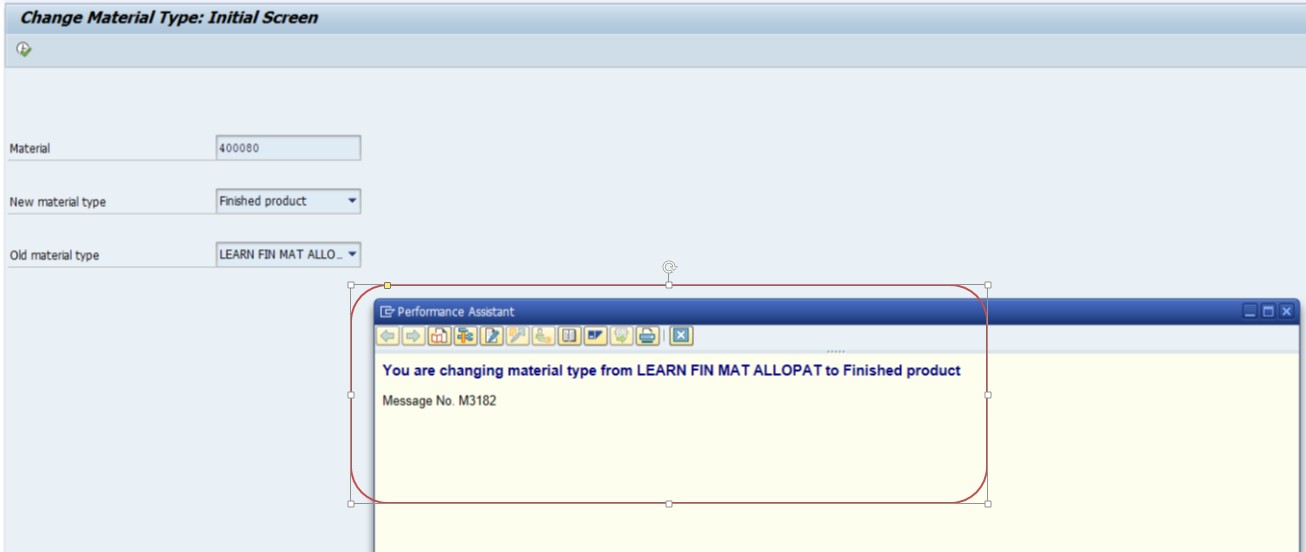
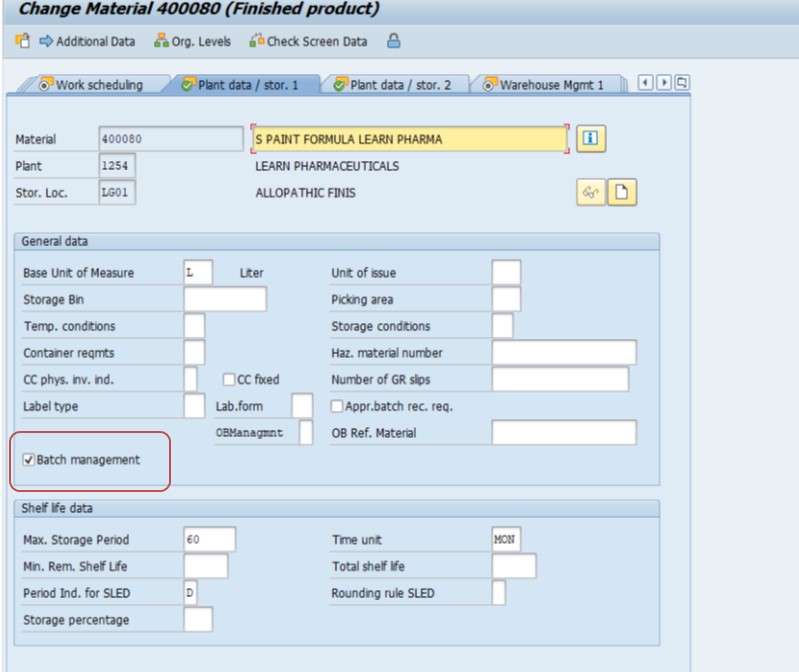
Save, then open the material master and try the batch management tick again.
🔍 Why SAP Restricts Direct Batch Management Changes
It's tempting to assume the batch management indicator on a material master is just a simple checkbox that should toggle freely, but SAP deliberately restricts this once a material has any meaningful history in the system. Batch management fundamentally changes how stock is tracked - splitting quantities into distinct, individually traceable lots rather than a single aggregated total per plant and storage location. Flipping this setting on a material with existing non-batch stock would leave SAP with no clean way to retroactively assign that existing stock to batches, creating an inconsistent, unreliable stock picture.
This is precisely why the error message points toward "Display errors" rather than simply blocking the change outright with no explanation - SAP is telling you it found a specific reason (in this case, most commonly the material type) preventing the direct change, and wants you to review exactly what that reason is rather than assuming it's a generic restriction. Understanding that this is a deliberate data-integrity safeguard, not an arbitrary limitation, helps explain why the fix (changing material type via MMAM, after clearing stock) is more involved than simply unchecking a restriction somewhere.
📋 What Is a Value-Only Material, and Why It Blocks Batch Management
A value-only material type is designed to track a material's financial value without tracking individual quantities or units in the same detailed way a standard material type does - common for material types representing bulk, non-discrete value (certain types of packaging materials, low-value consumables, or materials primarily relevant for cost accounting rather than physical inventory management). Since batch management exists specifically to track distinct, traceable quantities of stock - each batch representing a specific production lot, delivery, or quality status - the two concepts are fundamentally incompatible: you can't meaningfully split a value-only material's stock into individually traceable batches when the material type itself isn't built to track individual quantities with that level of granularity in the first place.
This is why the fix in this guide isn't "find a setting to force batch management onto a value-only material" - no such setting exists, because it would violate the basic design assumption behind value-only material types. The only path forward is converting the material to a material type that does support proper quantity-based, batch-trackable stock management, which is exactly what MMAM accomplishes.
💼 Real-World Scenario: A Material Reclassified From Value-Only to Finished Product
Smita Panda, an SAP MM analyst, was asked by the quality team to enable batch tracking for material 400080 - a component that had originally been set up as a value-only material type early in the company's SAP implementation, before the business realized it would eventually need lot-level traceability for regulatory reasons. When Smita attempted to tick the batch management indicator directly on the material master, SAP returned "Batch management requirement cannot be changed; choose 'Display errors.'"
Clicking through to the error details confirmed what Smita suspected: the material's current material type didn't support batch management at all. Before attempting the MMAM conversion, he checked for any existing stock or open purchase orders against material 400080 and found a small quantity of stock still on hand at one plant, along with two open purchase order line items. Working with the warehouse and procurement teams, he arranged for the existing stock to be consumed through normal operations and had the open POs either completed or cancelled, clearing the material for a clean material type change.
With no remaining stock or open documents, Smita ran MMAM, converting material 400080 from its original value-only type to FERT (finished product), which supports full quantity and batch tracking. After saving the material type change, he returned to the material master, ticked the batch management indicator on the relevant view, and saved successfully - the fix that had been blocked moments earlier now completed without issue. This scenario illustrates why the "clear stock and open transactions first" note in this guide's core solution isn't optional busywork - it's a genuine prerequisite that MMAM enforces, and skipping ahead to the material type change without it will simply produce a different blocking error.
🔒 Who Should Perform a Material Type Conversion
Because MMAM affects a material's fundamental data structure - valuation, quantity management, and now batch tracking - most organizations restrict this transaction to a small group of experienced MM configuration consultants, separate from general material master maintenance access (MM01/MM02). A material type conversion isn't a routine data entry task; it's closer in impact to the account-group-level restrictions covered in this site's guides on vendor and customer master data, where a single change affects the fundamental behavior of the object going forward.
Given the coordination required - confirming no stock or open documents remain, as covered in the real-world scenario above - many organizations also require sign-off from the material's business owner (procurement, planning, or quality, depending on the material) before executing a conversion, ensuring the broader operational impact is understood and planned for rather than executed as a purely technical fix in isolation.
🧪 Pre-Conversion Testing Checklist
- Confirm zero stock across every plant and storage location for the material (MMBE), not just the plant where the conversion is being requested.
- Confirm no open purchase orders, sales orders, or production orders reference the material (ME2M and equivalent reports for other document types).
- Check for any open reservations against the material, since these can also block or complicate a material type change even if stock itself is at zero.
- Test the conversion in a sandbox first for a representative material with a similar profile, confirming the new material type's account determination and other configuration-dependent behavior work as expected before touching the real production material.
- Test batch management activation immediately after the conversion, confirming the full end-to-end fix (not just the material type change) actually resolves the original issue.
💼 A Second Scenario: Discovering the Restriction Applied to an Entire Product Line
Pooja Mishra, an SAP MM lead at a consumer electronics company, was tasked with rolling out batch tracking across an entire product line following a new supplier traceability requirement - not just one material, but around forty related components that had all originally been set up under the same value-only material type years earlier, before batch tracking was ever anticipated as a business need.
Rather than converting materials one at a time as each individual request came in, Pooja recognized the scale of the change early and built a coordinated project plan: first, a report identifying every material under the affected material type with any current stock or open documents; second, a phased plan working with planning and procurement to naturally draw down stock and close out open orders for each material over the following weeks rather than forcing an artificial, disruptive stock-clearing exercise; and third, a batch conversion schedule executing MMAM for each material as it became eligible, followed immediately by batch management activation and a quick test transaction to confirm success.
This phased, planned approach avoided the kind of ad hoc, one-off troubleshooting that the single-material real-world scenario earlier in this guide illustrates, and completed the full forty-material conversion over about six weeks with minimal operational disruption - considerably smoother than if each material's conversion had been treated as an isolated support ticket handled reactively as batch tracking became urgently needed for each one individually. This scenario is a useful reminder that when this error (or the underlying need behind it) affects more than a single material, treating it as a coordinated project - rather than forty individual "fix this material" requests - saves considerable time and reduces the risk of rushed, incomplete stock-clearing under pressure.
📊 Proactively Identifying Materials That May Need This Conversion
Rather than waiting for this error to surface reactively - typically when a quality, regulatory, or traceability requirement suddenly makes batch tracking necessary for a specific material, as in both real-world scenarios in this guide - some organizations find it worthwhile to periodically review which value-only materials might be reasonable candidates for future batch tracking, before a business need makes the conversion urgent.
- Cross-reference materials under value-only material types (via a query against MARA filtered by material type) against categories where batch tracking commonly becomes necessary - components used in regulated products, materials sourced from multiple suppliers where lot-level quality issues matter, or anything subject to expiration or shelf-life tracking.
- Flag candidates for a proactive conversation with quality or regulatory teams, rather than only reacting once a specific compliance deadline or customer requirement forces an urgent, rushed conversion.
- Where a genuine future need is identified, plan the stock-clearing and conversion process on a comfortable timeline - similar to the phased approach in the second scenario above - rather than under the time pressure of an already-active compliance requirement.
This kind of proactive review won't eliminate every future instance of this error - new business requirements will always emerge that weren't anticipated - but for organizations in industries where batch tracking needs tend to expand over time (pharmaceuticals, food and beverage, and increasingly electronics with tightening supply chain traceability expectations), getting ahead of the conversion need rather than always reacting to it tends to produce a smoother, less disruptive outcome.
❗ Common Mistakes When Fixing This Error
- Attempting the MMAM material type change before clearing existing stock or open purchase orders, running into a second blocking error rather than a successful conversion.
- Choosing a new material type without confirming it's actually appropriate for the material's real business purpose - FERT and ROH are common examples, but the correct new type depends on what the material actually is.
- Assuming the material type change alone enables batch management automatically, when the batch management indicator still needs to be explicitly ticked and saved as a separate final step.
- Not coordinating with warehouse, procurement, and quality teams before clearing stock and open POs, since this can affect ongoing operational activity for that material.
- Overlooking that a material type change can affect other configuration-dependent behavior (valuation class options, account determination, availability check settings) beyond just enabling batch management, without reviewing those knock-on effects.
✅ Prevention Checklist: Getting Batch Management Right From the Start
- Decide whether a material will need batch tracking (now or in the foreseeable future, such as an anticipated regulatory requirement) at the time it's first created, choosing an appropriate material type from the outset rather than defaulting to value-only and needing a later conversion.
- Involve quality, regulatory, and traceability stakeholders early when creating materials for industries where batch tracking is likely to become a requirement, even if it isn't needed on day one.
- Document which material types in your system support batch management and which don't, as a quick reference for anyone creating new materials or considering a future conversion.
- When a material type conversion via MMAM is genuinely needed, plan for the stock-clearing and open-document-closing prerequisite as a distinct project step, not an afterthought discovered only when the conversion itself fails.
- Test the full conversion process (material type change plus batch management activation) in a sandbox environment for a representative material before applying it to a genuinely important production material.
📑 Similar-Looking SAP Material Master Errors and How They Differ
| Error / Symptom | Root Cause | Typical Fix |
|---|---|---|
| Batch management requirement cannot be changed | Material type doesn't support batch management, or stock/open documents block the change | Clear stock/documents, convert material type via MMAM |
| Valuation class not allowed for material type | The assigned valuation class isn't valid for the material's account category reference | Assign a valid valuation class, or extend the account category reference in OMSK |
| No stock posting possible for this material (M7097) | Quantity/Value Update disabled for the material type in the valuation area | Enable Quantity/Value Update in OMS2, unrelated to batch management |
| Material type cannot be changed (general MMAM block) | Additional blocking conditions beyond stock - open reservations, WM-managed stock, or other referencing documents | Identify and clear the specific blocking condition named in the MMAM error details |
These errors can look related since they all involve material type or master data restrictions, but each requires a different diagnostic path. Confirming exactly which message and underlying condition you're dealing with - rather than assuming every material master restriction is "the batch management issue" - saves troubleshooting time.
📋 Beyond MMAM: Other Approaches to Introducing Batch Tracking
MMAM's material type conversion, covered throughout this guide, is the standard path when the blocking issue is specifically that the current material type doesn't support batch management at all. It's worth knowing this isn't the only scenario where organizations need to introduce batch tracking - a few related but distinct situations call for a different approach entirely.
- If the material type already supports batch management but the indicator simply hasn't been activated yet, and the material has stock, some organizations use a controlled batch conversion process (sometimes involving a physical inventory count and a coordinated stock re-entry) rather than a full material type change, since the material type itself isn't the blocking issue.
- For a brand-new material that hasn't been created yet, simply selecting an appropriate batch-capable material type and activating batch management from the start avoids this error entirely - it only arises for existing materials needing a retroactive change.
- For a large-scale batch tracking rollout across many materials, as in the second scenario above, a phased project plan coordinating stock drawdown, MMAM execution, and batch activation across all affected materials is generally more efficient than a purely one-off, reactive approach to each individual material.
Recognizing which of these scenarios actually applies to your specific situation - a genuine material type incompatibility (this guide's focus), a simple unactivated indicator on an already-compatible material type, a new material, or a large-scale rollout - helps avoid applying the MMAM conversion process from this guide in situations where a lighter-weight approach would actually be more appropriate.
📱 This Error in SAP S/4HANA
The batch management restriction logic, material type concept, and MMAM conversion process are unchanged in SAP S/4HANA - this remains foundational Materials Management behavior rather than something restructured by the simplified data model. S/4HANA users can perform the material type conversion via the classic MMAM transaction in SAP GUI, and material master maintenance (including the batch management indicator) via either classic transactions or the Fiori "Manage Product Master Data" app, both reading and enforcing the same underlying restrictions covered in this guide.
🔗 Cross-Module Impact: How a Material Type Conversion Touches Other Areas
A material type conversion via MMAM isn't purely a batch management decision - changing material type can affect account determination (since valuation class assignment options are typically tied to material type), availability check configuration, and even which views are available on the material master going forward, similar to the account-group-level restrictions covered in other guides on this site for vendor and customer master data. Before converting a material's type purely to enable batch management, it's worth reviewing whether any of these related areas need adjustment as well - for example, confirming the new material type's valuation class options still align correctly with existing OBYC account determination configuration for that material category.
This cross-module consideration is exactly why the real-world scenario above involved coordination across multiple teams (warehouse, procurement, quality) rather than being treated as a purely technical MM configuration task - a material type conversion has ripple effects that benefit from broader visibility before execution, not just after something unexpected surfaces downstream.
📋 Related SAP Transactions
| Transaction | Purpose |
|---|---|
| MMAM | Change a material's material type, a prerequisite for enabling batch management on a value-only material. |
| MM02 | Change the material master, including ticking the batch management indicator after conversion. |
| MMBE | Check current stock for a material before attempting a material type change. |
| ME2M | Review open purchase orders for a material, another prerequisite check before MMAM. |
| MSC1N | Create a batch master record for a material once batch management is active. |
| OMS2 | Review material type attributes, including which types support batch-relevant quantity/value updating. |
🎓 Interview-Style Questions and Answers
Q: Why does SAP block a direct change to the batch management indicator on an existing material?
Because flipping batch management on a material with existing stock or transaction history could create an inconsistent stock picture - SAP has no clean way to retroactively assign existing non-batch stock into batches, so it blocks the direct change and requires a controlled path instead.
Q: What is a value-only material type, and why is it incompatible with batch management?
A value-only material type tracks financial value without detailed individual quantity tracking, which is fundamentally incompatible with batch management's purpose of tracking distinct, traceable quantities - the two concepts require different underlying data structures.
Q: What needs to be true before MMAM will allow a material type change?
The material must have no existing stock and no open transactions or documents (such as open purchase orders) referencing it, since the new material type may have entirely different quantity, valuation, and batch-handling rules that existing data couldn't cleanly map into.
📚 Quick Glossary of Terms Used in This Guide
- Batch management: A material master setting enabling stock to be tracked as distinct, individually traceable lots rather than one aggregated total.
- Value-only material: A material type tracking financial value without detailed individual quantity tracking, incompatible with batch management.
- MMAM: The SAP transaction for changing a material's material type.
- FERT: The standard SAP material type for finished products, supporting full quantity and batch tracking.
- ROH: The standard SAP material type for raw materials, also supporting quantity and batch tracking.
- Batch: A specific, traceable lot of a material, tracked separately from other stock of the same material once batch management is active.
🎯 Conclusion
"Batch management requirement cannot be changed" almost always traces back to the material being a value-only type that fundamentally doesn't support batch tracking. The fix isn't a hidden setting - it's a genuine material type conversion via MMAM, which first requires clearing existing stock and open transactions, then converting to a standard type like FERT or ROH, and finally activating batch management on the material master. Keep this guide bookmarked for the next material that needs to make this transition.