SAP M7097: No Stock Posting Possible for This Material
SAP error M7097, "No stock posting possible for this material," typically occurs because the material's material type is not properly configured to allow stock postings in the relevant valuation area (plant). This guide covers the exact fix using transaction OMS2, then goes deeper into what Quantity Update and Value Update actually mean, how material type configuration works, related causes beyond the basic fix, a real-world scenario, and a full troubleshooting checklist.
✅ Fixing "No Stock Posting Possible for This Material" (M7097)
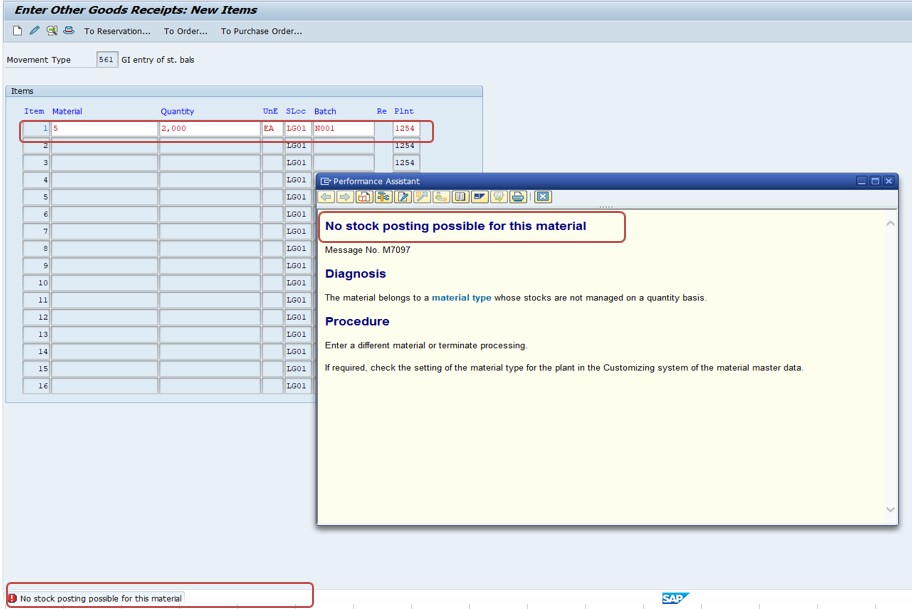
Common Reasons
- The material's material type is not configured to allow stock postings for the relevant valuation area (plant).
- The Quantity Update and/or Value Update settings for the material type are not enabled.
- A plant-specific override or valuation class inconsistency is blocking the posting even though the material type looks correctly configured.
Understand the issue: this is resolved by configuring the material type correctly - specifically the "Quantity/Value Updating" settings for your valuation area (plant).
🔧 Follow These Steps
Solution transaction: OMS2
Menu path: SPRO → Materials Management → Material Master → Basic Settings → Define Attributes of Material Types
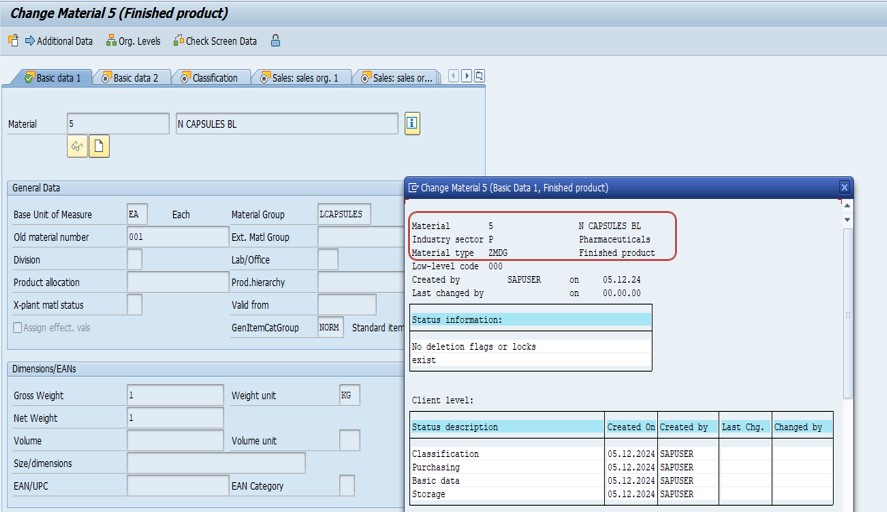
Find the relevant material type (for example, a custom type such as ZMDG) in the list and double-click it to open its configuration.
Quantity Update should be enabled if you want stock managed based on quantities. Value Update should be enabled if you want stock to be valued financially.
Tick both Quantity Updating and Value Updating for the relevant valuation area, then save.
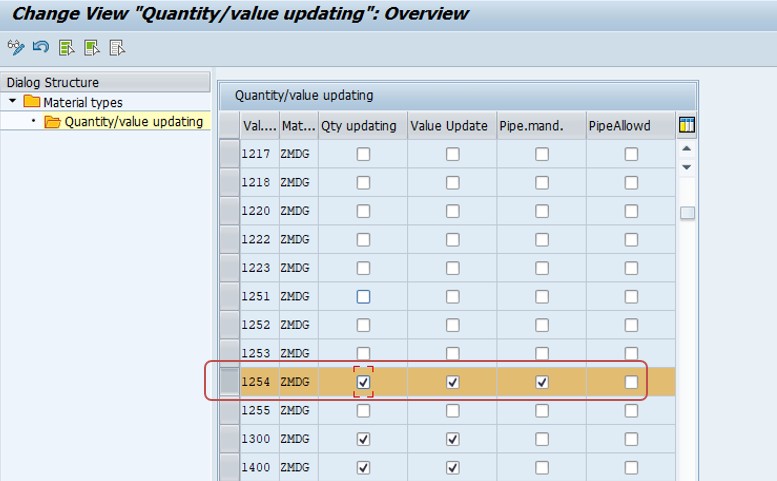
Retry the stock posting transaction (for example, a goods movement in MIGO or MB1C) and confirm it now posts successfully.
🔍 What Is a Material Type, and Why Does It Control Stock Posting?
A material type in SAP MM is a classification that groups materials sharing similar characteristics - raw materials, semi-finished goods, finished products, trading goods, and non-valuated materials are all common examples. The material type isn't just a label; it drives a wide range of behavior across the material master, including which views are relevant (Purchasing, MRP, Accounting, and so on), which number range is used, and, critically for this error, whether stock quantity and stock value are tracked at all for materials of that type.
SAP deliberately makes Quantity Update and Value Update configurable per material type and per valuation area because not every material needs both. A non-stock item used purely for internal documentation, or a material type representing services rather than physical goods, may have neither setting enabled by design, and attempting a genuine goods movement against such a material correctly produces M7097 - the error is SAP protecting data integrity by refusing to post a stock movement for a material type that was never intended to carry stock quantities or values in the first place.
This is exactly why the fix in this guide involves checking material type configuration rather than the individual material master record - the setting lives one level up, at the material type/valuation area combination, and affects every material assigned to that type in that plant, not just the one material that happened to trigger the error first.
📊 Quantity Update vs. Value Update - What Each One Actually Does
| Setting | What It Controls | Typical Use Case |
|---|---|---|
| Quantity Update | Whether SAP tracks the physical quantity of stock for this material type in the given valuation area, updating tables like MARD/MCHB (or MATDOC in S/4HANA) | Any material type representing real, countable physical inventory |
| Value Update | Whether SAP also tracks the financial value of that stock, posting automatic G/L account entries via account determination (transaction OBYC) at every relevant movement | Materials that need to appear on the balance sheet as valued inventory |
| Neither enabled | The material type is purely informational or non-stock relevant; no quantity or value is tracked at all | Non-stock materials, certain service or documentation material types |
| Quantity only, no Value | Physical quantity is tracked for planning and warehouse purposes, but no financial posting occurs | Less common; sometimes used for low-value consumables tracked by count but not individually valued |
Understanding this distinction matters beyond just fixing M7097 once - it explains why enabling only one of the two settings sometimes still leaves a related error waiting to surface. A material type with Quantity Update enabled but Value Update disabled will successfully update stock quantities on a goods movement, but any transaction expecting a corresponding financial posting (a goods receipt against a purchase order with account assignment, for example) can still fail or behave unexpectedly, since there is no value-side posting configured to complete that half of the transaction.
❗ Other Causes of M7097 Beyond Material Type Configuration
While the OMS2 fix covered above resolves the majority of M7097 occurrences, a smaller number of cases stem from related but distinct configuration gaps that are worth checking if the material type settings already look correct.
- Missing valuation class on the material master. Even with Value Update enabled at the material type level, an individual material missing a valuation class assignment on its Accounting 1 view can still fail to post, since the valuation class is what links the material to specific G/L accounts via account determination.
- Plant-specific or valuation-area-specific overrides. Some organizations configure Quantity/Value Update differently across valuation areas for the same material type, so a posting that works fine in one plant can still fail with M7097 in another if that plant's configuration wasn't updated consistently.
- A newly created custom material type copied incompletely. When a custom material type (like the ZMDG example referenced in the original fix) is created by copying an existing SAP standard type, it's possible for the copy to miss the Quantity/Value Update flags if they weren't explicitly re-checked after the copy, even though every other setting transferred correctly.
- Account determination configuration gaps (OBYC). If Value Update is enabled but the corresponding G/L account determination for the material's valuation class and transaction/event key isn't fully configured, the posting can fail with a related but distinct error rather than M7097 itself - worth ruling out once the OMS2 settings are confirmed correct.
🔒 Who Should Be Changing Material Type Settings, and Why It Matters
Because Quantity Update and Value Update apply to an entire material type across a valuation area - not to a single material - changing these settings in OMS2 affects every material assigned to that type in that plant, which makes it a meaningfully higher-impact change than editing a single material master record. Most well-governed SAP landscapes restrict OMS2 access to a small configuration or MM lead role, separate from the broader authorization to maintain individual material masters through MM01/MM02.
This governance matters in practice because flipping Value Update on for a material type that already has existing unvalued stock transactions can create genuine accounting inconsistencies - SAP does not retroactively recalculate historical postings to match a newly enabled setting, so a material type change made carelessly on a live production system can leave a gap between what was posted before and after the change. For this reason, any OMS2 change beyond an initial system build should go through the same test-in-a-sandbox-first discipline as other configuration changes, confirming the impact on a copy of production data before applying it live, and should ideally be accompanied by a short note in the change documentation explaining why the material type needed adjustment in the first place.
📱 This Error in SAP S/4HANA
The material type and Quantity/Value Update logic behind M7097 is unchanged in SAP S/4HANA - OMS2 remains the transaction for configuring these settings, and the underlying business rule (a material type must have the relevant update flag enabled before stock postings against it can succeed) is identical to classic ECC. What has changed is primarily where the resulting stock data is stored: S/4HANA's simplified data model reads and writes through the unified MATDOC table rather than the older MARD/MCHB structure, but this is purely a technical implementation detail and does not change how the error is diagnosed or fixed.
S/4HANA users can also review and adjust material type settings through the Fiori-based "Manage Material Types" app in some releases, which presents the same Quantity Update and Value Update flags in a more modern interface, though OMS2 continues to work identically in the SAP GUI for S/4HANA. The steps in this guide apply the same way regardless of which interface your organization uses to make the configuration change.
🔗 Cross-Module Impact: How Material Type Settings Touch FI and WM
Although M7097 is raised during an MM goods movement, the Quantity Update and Value Update settings behind it reach directly into Finance and, indirectly, into Warehouse Management, which is why resolving a material type misconfiguration sometimes benefits from more than an MM-only fix.
In Finance, Value Update is the setting that determines whether a goods movement generates an automatic financial document alongside the material document, posting to G/L accounts determined via account determination (transaction OBYC) based on the material's valuation class. A material type with Value Update disabled will never generate these financial postings, which is entirely correct behavior for genuinely non-valuated materials, but is a critical distinction for a finance team trying to reconcile inventory value on the balance sheet - if a material type that should be valued was set up without Value Update enabled, inventory for that material will simply be invisible to financial reporting until the configuration gap is found and corrected, potentially alongside a manual correction posting to true up the books once the setting is fixed.
In Warehouse Management, quantity tracking at the material type level is a prerequisite for meaningful warehouse task creation and bin-level stock visibility - a material type without Quantity Update enabled cannot be meaningfully managed in a WM or EWM environment at all, since there is no quantity-tracked stock for the warehouse system to move or place. This is occasionally the root cause when a newly onboarded material type works fine for basic MM transactions but behaves unexpectedly once it reaches a warehouse-managed storage location, and it is worth confirming Quantity Update is enabled before troubleshooting further at the WM configuration level.
📦 Valuated vs. Non-Valuated Material Types: Why Both Exist
It's worth understanding why SAP ships standard material types with different Quantity/Value Update combinations out of the box, rather than assuming every material type should simply have both enabled. Several standard material types are deliberately non-valuated, and recognizing this pattern helps distinguish a genuine configuration mistake from expected, by-design behavior.
| Material Type Pattern | Typical Update Setting | Why |
|---|---|---|
| Raw materials, finished goods, trading goods | Quantity Update + Value Update both enabled | Real physical inventory that needs both quantity tracking and financial valuation on the balance sheet |
| Non-valuated materials (e.g. certain low-value consumables, some UNBW-type configurations) | Quantity Update enabled, Value Update disabled | The business wants to track physical stock for planning purposes but does not want automatic G/L postings for low-value items |
| Documentary or service-type materials | Neither enabled | The "material" represents something non-physical, such as a service line or a document reference, with no stock concept at all |
Seeing a material type with Value Update deliberately disabled is not automatically a bug - the practical question during troubleshooting is always whether the specific material triggering M7097 genuinely belongs to a category that should never post stock value, or whether it's a valuated item that was simply assigned to, or configured under, the wrong material type by mistake.
🧪 Testing Checklist for New or Modified Material Types
Given the real-world scenario earlier in this guide, where a copied material type silently missed a Value Update flag, a short structured test pass for any new or modified material type catches this class of issue before it reaches production users.
- Test a full goods receipt and goods issue against a representative material of the new type, in every valuation area (plant) where it will be used, not just the first one configured.
- Confirm the resulting financial posting matches expectations. If Value Update is enabled, check that a corresponding accounting document was generated with the correct G/L accounts via account determination; if it's deliberately disabled, confirm no unexpected posting occurred either.
- Test at least one transfer posting between valuation areas if the material type will be used across multiple plants, to catch a plant-specific configuration inconsistency early.
- Verify the material master's Accounting 1 view has a valid valuation class assigned for any material of the new type intended to have Value Update enabled.
- If the material type will be warehouse-managed, test a basic putaway and pick task in a WM/EWM test environment to confirm quantity tracking flows through correctly.
Building this into a standard new-material-type checklist, alongside a documented sign-off from both MM and FI configuration owners, turns what would otherwise be a reactive discovery (a user hitting M7097 in production) into a proactive validation step completed well before go-live.
📊 Auditing Material Type Configuration Across Your Landscape
For organizations with many material types accumulated over years of configuration, periodically reviewing the full set of Quantity/Value Update settings - rather than only discovering a gap when M7097 fires - is a worthwhile housekeeping exercise, particularly after a merger, an S/4HANA migration, or any project that introduced new material types.
- Review table T134 (material types) alongside T134M (material type/valuation area attributes) directly via SE16N for a complete, side-by-side view of every material type's Quantity and Value Update flags across every configured valuation area, without needing to click through OMS2 one type at a time.
- Cross-reference against actual material master usage (table MARA grouped by material type) to identify material types with live stock but an unexpected or inconsistent Quantity/Value Update configuration.
- Flag any material type with Quantity Update enabled but Value Update disabled for a deliberate review, since this combination is less common and worth confirming it's intentional rather than an oversight from an incomplete setup.
- Document the review results alongside a short business justification for every non-standard configuration found, so a future reviewer (or auditor) understands the reasoning rather than needing to re-investigate from scratch.
This kind of periodic audit is particularly valuable ahead of a year-end close or an external audit, since a material type quietly missing Value Update - carrying real stock that never posts to the G/L - can represent a genuine, material misstatement risk in inventory valuation if it goes unnoticed for an extended period.
💼 Real-World Scenario: A New Custom Material Type Missing Value Update
Rajesh jadhavvaran, an MM configuration analyst at a mid-sized electronics distributor, was asked to set up a new material type, ZMDG, for a line of demo/display goods the company wanted to track separately from standard finished products. He copied the new type from an existing standard material type as a starting point, adjusted the number range and relevant views, and released it to the project team for testing.
During testing, a warehouse user attempting to post a goods receipt against a ZMDG material in MIGO immediately hit M7097. Rajesh initially assumed a number range or plant-assignment issue, since those were the areas he had actively customized, but a quick check in OMS2 revealed the real cause: when he copied the material type, the copy process had not carried over the Value Update flag for the specific plant being tested, even though Quantity Update had transferred correctly. Enabling Value Update for that valuation area and saving resolved the issue immediately, and the retry posted successfully.
This scenario illustrates a genuinely common trap during any custom material type setup - a copy-based creation process can silently miss a flag that isn't visible or obviously wrong anywhere else in the configuration, and the first sign of the gap is often exactly this error, surfacing only once someone actually attempts a real stock posting rather than during the configuration review itself. It's a strong argument for always testing an end-to-end goods movement against any newly created material type before considering the setup complete.
💼 A Second Scenario: A Finance-Side Discovery During Year-End Close
Pooja Mishra, a financial controller at a manufacturing company, was reconciling inventory value during year-end close when she noticed a material type used for a line of promotional giveaway items showed healthy stock quantities in MMBE but contributed nothing to the inventory G/L account balance. Since these items had real purchase cost associated with them, this discrepancy was unexpected and warranted investigation before the books could be closed.
Working with the MM configuration team, Priya traced the issue to OMS2: the material type for promotional items had been set up with Quantity Update enabled but Value Update deliberately left off, based on an early project decision that these items were "low-value and not worth valuing individually." That assumption no longer held - the promotional program had grown considerably, and the aggregate value of on-hand promotional stock was now material enough to require proper valuation on the balance sheet.
Rather than simply flipping Value Update on, which per the authorization and governance guidance earlier in this guide risks creating a jump in reported inventory value with no corresponding historical trail, the team planned the change carefully: they enabled Value Update in a sandbox client first, confirmed the expected behavior with a test posting, then coordinated with Priya's team on a manual correction journal entry to properly reflect the existing physical stock's value on the books at the point the setting changed, documenting the change and its financial impact for audit purposes. This scenario is a useful reminder that M7097 and its underlying material type settings aren't purely an MM technical concern - the same configuration decision has real financial reporting consequences that grow or shrink in importance as a business evolves, which is exactly why the periodic configuration audit described above is worth doing on a recurring basis, not just once at initial system setup.
📑 Similar-Looking SAP MM Stock Posting Errors and How They Differ
| Error / Symptom | Root Cause | Typical Fix |
|---|---|---|
| M7097 - No stock posting possible for this material | Material type's Quantity/Value Update not enabled for the valuation area | Enable Quantity Update and Value Update in OMS2 |
| Account determination for entry ... not possible | Missing or incomplete G/L account assignment in OBYC for the material's valuation class | Maintain the missing account determination entry |
| Valuation class not allowed for material type | The valuation class assigned to the material isn't in the valid list for that material type's account category reference | Assign a valuation class permitted for that material type |
| M7021 - Deficit of unrestricted-use stock | Attempting to consume more unrestricted stock than currently exists in that category | Transfer posting or genuine stock correction, not a material type change |
Distinguishing these matters because they look superficially similar (all block a goods movement) but require completely different fixes - spending time in OMS2 for an account-determination error, or vice versa, wastes troubleshooting time on the wrong configuration area entirely.
✅ Prevention Checklist for MM Configuration Teams
- Whenever creating a new material type by copying an existing one, explicitly re-verify Quantity Update and Value Update for every relevant valuation area rather than assuming the copy carried every flag correctly.
- Test at least one full goods movement (goods receipt and goods issue) against any newly created or modified material type before considering setup complete, rather than reviewing configuration screens alone.
- Restrict OMS2 access to a dedicated configuration or MM lead role, separate from general material master maintenance authorization, given the organization-wide impact of a material type change.
- Document the business reason for each material type's Quantity/Value Update configuration, so a future reviewer understands why a given type deliberately has one or both flags disabled.
- Test material type changes in a sandbox client against representative data before applying them to a production system that already has live transactions for that type.
❌ Common Mistakes When Troubleshooting M7097
- Assuming the error is specific to one material, when the actual setting lives at the material type/valuation area level and affects every material of that type.
- Changing Value Update on a material type that already has significant historical stock without first checking for potential valuation inconsistencies.
- Overlooking a plant-specific configuration difference, and only checking OMS2 settings for one valuation area when the material is used across several plants.
- Confusing M7097 with an account-determination error (OBYC) and spending time in the wrong configuration transaction entirely.
- Not testing an actual goods movement after a material type change, only confirming the OMS2 screen shows the expected flags.
🎓 Interview-Style Questions and Answers
Q: What is the root cause of SAP error M7097?
The material type is not configured with Quantity Update and/or Value Update enabled for the relevant valuation area, so SAP has no configured way to update stock quantity or value for that material there.
Q: Where do you configure Quantity Update and Value Update?
In transaction OMS2 (Define Attributes of Material Types), reachable via SPRO > Materials Management > Material Master > Basic Settings > Define Attributes of Material Types.
Q: Why might M7097 still occur even after confirming OMS2 settings look correct?
The specific material may be missing a valuation class on its Accounting 1 view, or a valuation-area-specific override may differ from the material type's general configuration, so both should be checked alongside OMS2.
Q: What risk does changing Value Update for an existing material type carry?
SAP does not retroactively recalculate prior postings to match a newly enabled setting, so changing it for a material type with existing transactions can create a valuation inconsistency between historical and future postings if not carefully tested first.
📚 Quick Glossary of Terms Used in This Guide
- Material type: A classification grouping materials with similar characteristics, controlling which views, number ranges, and stock-update behavior apply.
- Valuation area: The organizational level (usually plant) at which a material's stock is valuated in SAP.
- Quantity Update: A material type setting controlling whether SAP tracks physical stock quantity for that type in a given valuation area.
- Value Update: A material type setting controlling whether SAP tracks and posts the financial value of stock for that type.
- Valuation class: A material master field linking a specific material to G/L accounts via account determination.
- Account determination (OBYC): The configuration that maps transaction/event keys and valuation classes to specific G/L accounts for automatic postings.
🎯 Conclusion
SAP error M7097 almost always comes down to one thing: the material type isn't configured to allow stock postings in the relevant valuation area. Enabling Quantity Update and Value Update in OMS2 for the correct material type and plant resolves the vast majority of cases, and checking valuation class assignment and plant-specific overrides covers most of the rest. Keep this guide bookmarked the next time a new material type setup or a goods movement unexpectedly returns this message.