SAP MM042: The Internal Number Already Exists
This error appears during material creation in MM01, typically for a Finished Product (FERT) or similar material type, when the number SAP is about to assign - or that a user manually enters - already belongs to an existing material master record. This guide covers the fix using MMNR number range configuration, then explains the most common underlying causes: an exhausted number range, an overlapping interval, or a mismatch between internal and external number assignment. If you encounter any errors in SAP, feel free to send a screenshot to pramod@learntosap.com for help.
✅ The Internal Number Already Exists (Message No. MM042)
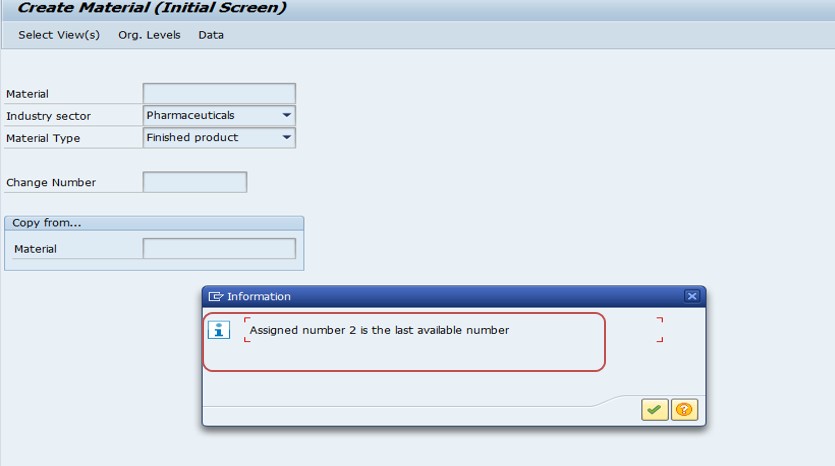
Common cause: "The internal number already exists" during the creation of a material in MM01 typically indicates that the number range interval assigned to that material type has an issue - either it's exhausted, it overlaps with another range, or there's a mismatch between how the material type is configured (internal vs. external number assignment) and what's actually being attempted during creation.
🔧 Solution: Review and Correct the Number Range in MMNR
Transaction: MMNR (Maintain Number Ranges for Material)
Menu path: SPRO → Logistics - General → Material Master → Basic Settings → Maintain Number Ranges
Go to MMNR and select Intervals.
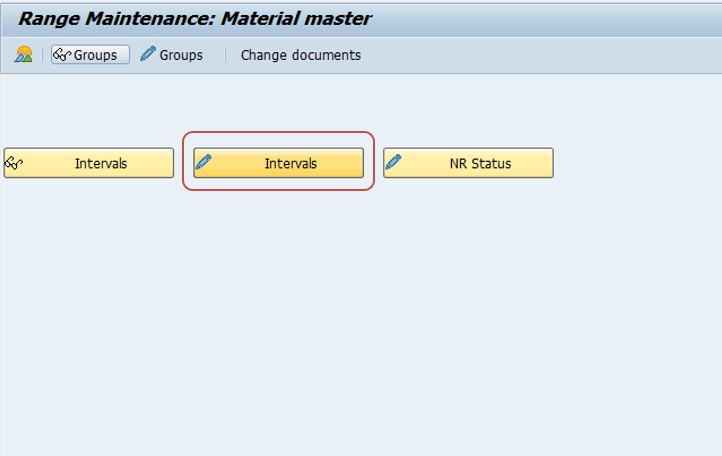
Review the interval assigned to the relevant material type. If needed, select Change Number Range (LICR).
Reassign or extend the number range if it has been exhausted or overlaps with another interval.
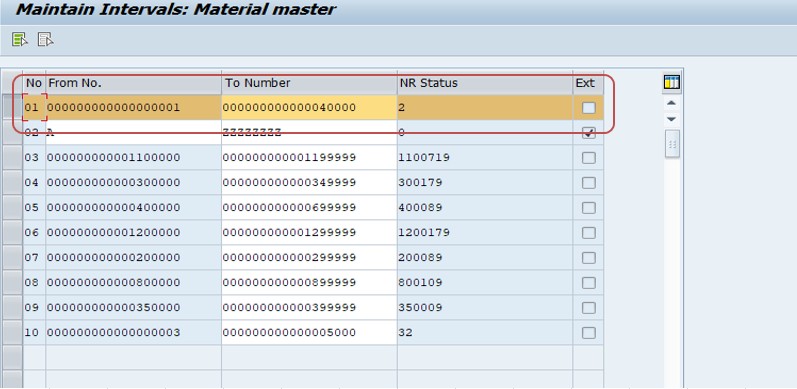
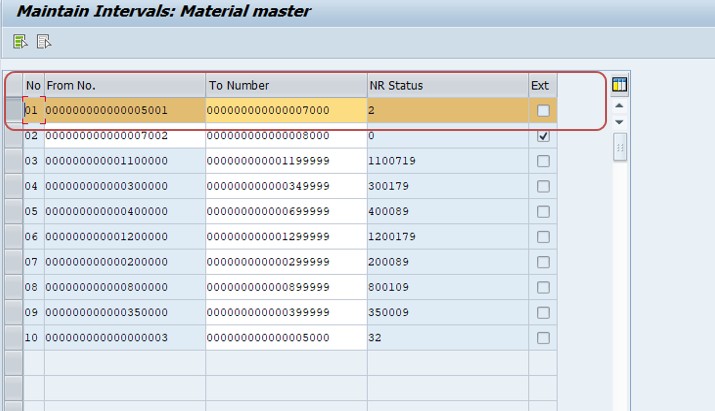
If creating a material manually, use a different material number that doesn't already exist. Check point: confirm the number range interval assigned to this material type, and if internal number assignment is required, ensure that interval is genuinely configured for internal assignment.
Save.
🔍 Internal vs. External Number Assignment, Explained
| Assignment Type | How It Works | Typical Use |
|---|---|---|
| Internal | SAP automatically assigns the next available number from the configured interval when a material is created; the user cannot choose the number | Materials where a consistent, system-generated numbering scheme is preferred (common for many finished products) |
| External | The user manually enters a material number within a defined valid range; SAP validates it doesn't already exist and falls within the configured boundaries | Materials needing a meaningful, human-readable numbering scheme, or migrated materials retaining a legacy number |
Each material type is configured for one or the other (or sometimes both, via separate number ranges) in MMNR. This error's underlying cause frequently traces back to one of three distinct scenarios, each needing a different specific fix even though they produce the identical message:
- An internally-assigned range has been exhausted - every number in the configured interval has already been used, and SAP has nowhere new to assign from, effectively "wrapping around" to numbers already in use.
- Two intervals overlap - a newer material type's interval was configured with a from/to range that accidentally overlaps an existing material type's range, causing a genuine number collision the first time both ranges are actively used near the overlap point.
- A user manually enters a number for external assignment that happens to already exist - straightforward human error, distinct from the two configuration-level causes above, and resolved simply by choosing an unused number rather than any MMNR change.
💼 Real-World Scenario: A Material Type's Range Quietly Running Out
Ankita Arora an SAP MM support analyst, received a ticket from a product development team unable to create new finished product (FERT) materials in MM01 - every attempt failed with MM042. Given the company had been actively creating FERT materials for several years without any known configuration changes, the team assumed something had recently broken.
Checking MMNR, Ankita Arorafound the actual cause was more mundane than a configuration bug: the FERT material type's internally-assigned number range interval, originally sized during initial SAP implementation years earlier, had simply been fully consumed after years of steady new-product creation. SAP had reached the upper bound of the configured range and had nowhere valid left to assign a new number from, producing MM042 on every subsequent creation attempt rather than a clearer "range exhausted" message.
Aiko's fix was to extend the existing interval's upper bound to provide substantial additional headroom, carefully checking first (as SAP itself validates on save) that the extended range didn't overlap with any other material type's interval. Once saved, material creation resumed immediately. This scenario illustrates a genuinely common, easy-to-overlook cause behind MM042: a range that worked fine for years can simply run out over time, and the fix isn't a broken configuration to repair, but a range that needs proactive expansion - exactly the kind of gradual exhaustion this guide's monitoring section below recommends catching before it blocks live material creation.
🔒 Who Should Have Access to MMNR
Because a number range interval change affects every material of a given type going forward - not just one material - most organizations restrict MMNR access to a small group of MM configuration consultants, separate from general material master maintenance access (MM01/MM02). Extending or reconfiguring a range incorrectly can create the exact overlap or exhaustion issues covered throughout this guide, so it deserves the same governance discipline as other high-blast-radius configuration areas like OBYC or OMWD covered in related guides on this site.
Some organizations also require a documented business justification before extending a number range, particularly when the extension is large or the material type is used across many plants or company codes, ensuring the change reflects a genuine, considered need rather than a reactive quick fix applied the moment MM042 first appears.
🧪 Testing Checklist Before and After an Interval Change
- Confirm the exact cause first - exhausted range, overlap, or manual entry error - before assuming which type of fix is needed, since each requires a different specific action.
- Check for overlap against every other material type's interval before saving an extended or new range, even though SAP validates this on save, as a proactive double-check.
- Test material creation immediately after the fix in a sandbox environment, confirming a new material actually creates successfully with the corrected range.
- Confirm the newly assigned number falls within the expected, intended range, catching a case where the fix might have inadvertently pointed the material type at the wrong interval.
- Review downstream systems or interfaces that might assume specific number range boundaries, as covered in the cross-module impact section below, before finalizing a significant range extension.
💼 A Second Scenario: An Overlap Introduced During a New Material Type Setup
Chirag Thakar, an SAP MM configuration consultant, was setting up a new material type for a client's expansion into a new product category. Working quickly to meet a tight project deadline, he assigned the new material type a number range interval without cross-checking it thoroughly against every existing interval already configured in the system - a step he intended to do as a final review but didn't complete before the configuration was transported to the test environment.
During testing, materials of the new type initially created without issue, but a few weeks into broader testing, MM042 began appearing intermittently - not for every material, but specifically once new material numbers within the new type's range began to reach a certain point that, it turned out, overlapped with the upper portion of an existing, older material type's range. Because the overlap was only in the upper portion of both ranges, the error hadn't appeared immediately during initial testing, which had happened to use lower numbers from both ranges that didn't yet collide.
Julien's fix required adjusting the new material type's range to a genuinely non-overlapping interval, then reviewing whether any materials already created under the overlapping portion needed remediation (in this case, testing hadn't yet reached far enough into the range to have created a genuine duplicate, so no data cleanup was needed - a fortunate timing rather than a guaranteed outcome). This scenario reinforces why the testing checklist above recommends confirming non-overlap thoroughly before relying on SAP's save-time validation alone - that validation catches an overlap only when both ranges are being actively compared at configuration time, and a subtle overlap in an unused upper portion of a range can pass initial review only to surface unpredictably later, once real usage reaches that specific number.
📦 A Special Case: MM042 During a Data Migration or Mass Material Load
MM042 deserves particular attention during a data migration or a large mass material load - via LSMW, the Migration Cockpit, or a batch input program - since these scenarios can consume a meaningful portion of a number range interval in a single event, rather than gradually over years of normal business operations as in this guide's core real-world scenario. A migration project loading tens of thousands of materials at once can genuinely exhaust an interval that would otherwise have lasted years under normal creation volume, if the interval wasn't specifically sized with the migration's expected volume in mind.
Before any large-scale material load, it's worth explicitly calculating the number of materials expected to be created per material type, comparing that against each relevant interval's remaining headroom, and extending ranges proactively where needed - rather than starting a migration only to have it fail partway through with MM042, which can leave a data load in a partially-completed, harder-to-troubleshoot state. This is a good example of why the proactive monitoring approach recommended above matters even for organizations that haven't yet experienced this error reactively - a migration project is exactly the kind of one-time event that can turn a previously comfortable range into an unexpectedly tight one almost overnight.
❗ Common Mistakes When Fixing This Error
- Assuming the error indicates a data corruption or system bug, rather than checking MMNR first for an exhausted or overlapping range.
- Extending an interval's range without checking for overlap with other material types, risking a rejected save or a future collision if the check is bypassed somehow.
- Manually working around the error by entering an arbitrary unused number for a material type configured for internal assignment, rather than fixing the underlying range configuration - this can create inconsistent numbering that confuses later reporting or reconciliation.
- Not checking whether the material type is genuinely meant to be internal or external, and assuming a mismatch is always the cause when it might simply be a straightforward exhausted range instead.
- Extending a range too narrowly, requiring another expansion again soon rather than providing meaningful headroom for foreseeable future growth.
✅ Prevention Checklist for Material Number Range Management
- Size new material type number ranges generously at initial configuration, accounting for realistic long-term material creation volume rather than a minimal starting range.
- Periodically review number range consumption for high-volume material types (via MMNR's current number status) to catch an interval approaching exhaustion before it actually blocks creation, as in the real-world scenario above.
- When creating a new material type, explicitly check its intended number range against all existing intervals to confirm no overlap, rather than relying solely on SAP's save-time validation to catch it.
- Document which material types use internal vs. external number assignment, and why, so future configuration changes or new material type setups have a clear reference point.
- Avoid ad hoc manual number entry as a workaround for an internally-assigned material type experiencing this error - fix the range instead, to keep numbering consistent.
📑 Similar-Looking SAP Number Range Errors and How They Differ
| Error / Symptom | Root Cause | Typical Fix |
|---|---|---|
| MM042 - The internal number already exists | Exhausted or overlapping material number range interval, or a manual entry error | Correct the interval in MMNR, or choose a valid unused number |
| Interval does not exist for object RF_BELEG | An FI document number range interval was never created for a document type expecting it | Create the missing interval in FBN1, a different number range object entirely (see this site's related guide) |
| Number range for trans./event type WA in year [X] does not exist | A missing interval for the Materials Management movement/material document number range object | Maintain the missing interval for the relevant year in the MM document number range transaction |
| Material [X] already exists | A straightforward duplicate - the exact material number was already created, unrelated to range exhaustion or overlap | Choose a different material number, or confirm whether the existing material should simply be reused |
The last row is worth distinguishing carefully from MM042 - a simple "material already exists" message for an exact number match is a much more straightforward duplicate check, while MM042 specifically points to a number range configuration issue (exhaustion or overlap) as the more likely underlying cause, particularly for internally-assigned material types where the user never manually chose a number at all.
📊 Proactively Monitoring Number Range Consumption
Given that a gradually exhausted range - as in this guide's real-world scenario - is one of the most common underlying causes of MM042, periodically reviewing number range consumption for high-volume material types is a worthwhile piece of standing MM housekeeping, rather than waiting for a live creation failure to prompt an urgent fix.
- Check the current number status directly in MMNR for each material type's interval, comparing the current position against the upper bound to estimate remaining headroom.
- Estimate consumption rate based on historical material creation volume for that type, projecting roughly when an interval might approach exhaustion.
- Extend intervals proactively with generous headroom well before they're projected to run out, particularly for material types tied to high-volume, ongoing product development.
- Review number range coverage whenever a new material type is introduced, confirming both adequate initial sizing and non-overlap with all existing intervals, following the caution illustrated in the second real-world scenario above.
- Build number range review into any broader data migration or system consolidation project plan, since a large one-time bulk material creation can consume far more of a range at once than years of normal, gradual usage.
This kind of proactive monitoring is particularly valuable for material types tied to fast-growing product lines or frequent new-product launches, where the pace of range consumption can accelerate well beyond what the original range sizing anticipated years earlier.
📱 This Error in SAP S/4HANA
Material number range configuration, MMNR, and the internal/external assignment concept are unchanged in SAP S/4HANA - this remains foundational material master configuration rather than something restructured by the simplified data model. S/4HANA users can maintain number ranges via classic MMNR in SAP GUI, or through the Fiori "Manage Product Master Data" app in some releases, both reading and enforcing the same underlying interval configuration, so the fix in this guide applies identically regardless of interface.
🔗 Cross-Module Impact: Why Number Range Planning Matters Beyond MM
Material number ranges aren't purely an MM concern - they affect any system or process that references material numbers downstream, including sales order line items, production orders, and any custom reporting or integration built around expected number ranges or formats. An unplanned interval extension, or a range that unexpectedly overlaps with another material type's numbers, can occasionally surface confusing symptoms in downstream reports or interfaces that assumed a specific numbering pattern would always hold, even though the core MM042 error itself is resolved cleanly through MMNR.
This is worth keeping in mind particularly for organizations with custom interfaces or reports that parse or validate material numbers based on assumed ranges (for example, "numbers starting with 4 are always finished products") - a range extension that technically resolves MM042 correctly can still require a downstream review if other systems made assumptions about the original, narrower range that no longer strictly hold after expansion.
📋 Related SAP Transactions
| Transaction | Purpose |
|---|---|
| MMNR | Maintain number range intervals for material types. |
| MM01 | Create a new material master record, where this error is encountered. |
| MM03 | Display an existing material master to confirm whether a specific number is already in use. |
| OMS2 | Review material type attributes, including which number range group a material type belongs to. |
| SNRO | General number range object maintenance, useful for reviewing number range objects beyond material master. |
🎓 Interview-Style Questions and Answers
Q: What are the three most common underlying causes of SAP error MM042?
An exhausted internally-assigned number range interval, an overlap between two material type intervals, or a user manually entering a material number for external assignment that already exists.
Q: What is the difference between internal and external material number assignment?
Internal assignment means SAP automatically assigns the next available number from the configured interval; external assignment means the user manually enters a number within a defined valid range, which SAP validates for uniqueness.
Q: Why might a material type that's been working fine for years suddenly start producing MM042?
Its internally-assigned number range interval may have gradually become exhausted after years of steady material creation, reaching its configured upper bound with no new numbers left to assign - a range simply running out over time, not a configuration bug.
📚 Quick Glossary of Terms Used in This Guide
- MMNR: The SAP transaction for maintaining number range intervals for material types.
- Internal number assignment: A number range configuration where SAP automatically assigns the next available number.
- External number assignment: A number range configuration where the user manually enters a number within a defined range.
- Interval: A specific from/to number range within a number range object, identified by an interval key.
- Exhausted range: A number range interval that has reached its upper bound, with no new numbers available for assignment.
- Overlapping range: Two number range intervals whose from/to boundaries intersect, which SAP validates against and rejects on save.
🎯 Conclusion
SAP error MM042 comes down to one of three related causes: an exhausted number range interval, an overlap between two intervals, or a manually-entered external number that already exists. Checking MMNR first, rather than assuming a system bug, quickly identifies which of the three applies - and as the real-world scenario in this guide illustrates, a range simply running out after years of steady use is a genuinely common, easy-to-overlook cause worth monitoring proactively. Keep this guide bookmarked for the next material creation that hits this message.