Acct.144997 for Trans./Event Key BSX Possible Directly
This message confirms that GL account 144997 is validly configured for direct posting under transaction/event key BSX in OBYC account determination. This guide explains what BSX actually does, why direct posting matters for inventory accounts, walks through the FS00 configuration step, and covers a real business scenario, related transaction/event keys, and a prevention checklist.
"If you encounter any errors in SAP, send me a screenshot at pramod@learntosap.com, and I will help you resolve the issue."
🔍 Understanding This Message in Detail
"Acct.144997 for trans./event key BSX possible directly" is a confirmation message rather than a blocking error. It appears while reviewing or testing OBYC (automatic account determination) configuration, and it tells you that GL account 144997 is correctly set up to receive direct postings under the BSX transaction/event key. Unlike most errors covered elsewhere on this site, there is nothing broken here -the message is SAP validating that the configuration is technically sound.
That said, seeing this message is often the trigger for a useful follow-up action: reviewing whether the account should also have Post Automatically Only ticked in FS00, so that this valid BSX-driven posting capability is not accidentally combined with the ability for a user to post to the same account manually and disrupt its role as an automatically-maintained inventory account.
📦 What Is BSX, and How Does OBYC Account Determination Work?
BSX is one of several transaction/event keys configured in transaction OBYC, SAP's central hub for automatic account determination in Materials Management. Each key handles a different accounting aspect of a goods movement, and together they determine every GL posting a single transaction generates.
| Transaction/Event Key | What It Controls |
|---|---|
| BSX | Inventory posting - updates the stock value GL account whenever a goods movement changes inventory quantity or value. |
| WRX | GR/IR clearing account - used to reconcile goods receipt against invoice receipt before the vendor invoice is posted. |
| GBB | Offsetting entry for inventory postings, further split by account modifier (e.g. AUA for order settlement, VBR for consumption). |
| PRD | Price differences - postings arising from standard cost versus actual cost variances. |
| KDM | Exchange rate differences on foreign currency procurement transactions. |
BSX is arguably the most fundamental of these keys, since almost every stock-affecting transaction touches it in some way -it is what keeps the GL's inventory value in sync with what MM believes is physically in stock. Confirming that a specific account is validly linked to BSX, as this message does for 144997, is a routine and reassuring part of reviewing or auditing account determination configuration.
⚠ The Message

✅ Solution - FS00: Tick Post Automatically Only
Follow Steps:
Go to TCode - FS00
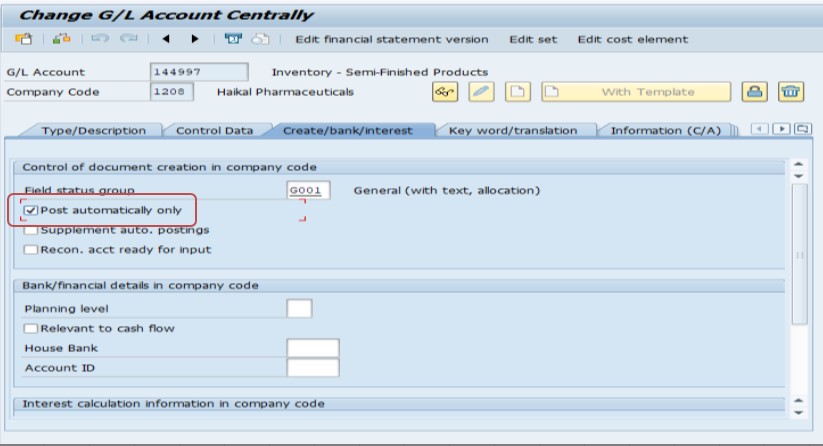
Save.
Opening FS00 for account 144997 and navigating to the Control Data tab lets you review and, if appropriate, tick Post Automatically Only. Since this account is confirmed as validly BSX-driven, restricting it to automatic postings only protects the inventory value it holds from being disturbed by an unrelated manual journal entry -the same logic covered in more detail on this site's guide to the "Account can only be posted to internally" error, which explains exactly why this restriction exists and what risk it prevents.
💼 Real-World Scenario: How Pooja Mishra Used This Confirmation
Pooja Mishra, reviewing OBYC configuration at Learn Pharma in Pune as part of a periodic account determination audit, came across the message confirming account 144997 was validly set up for direct posting under BSX. Rather than treating this as a one-off confirmation and moving on, he used it as a prompt to check the account's broader configuration in FS00.
He found that Post Automatically Only was not yet ticked on this account, even though it was clearly meant to function purely as an automated inventory posting account driven by goods movements. Suresh ticked the checkbox and saved, closing a small but meaningful gap -before this change, a user with GL posting authorization could technically have posted directly to this inventory account, bypassing the controlled, movement-driven process BSX was designed to enforce. This small follow-up action, prompted by a routine confirmation message, prevented what could have become a reconciliation headache months later if a manual entry had ever slipped through.
📋 Related Transactions Every MM/FI User Should Know
| Transaction | Purpose |
|---|---|
| OBYC | Central configuration transaction for automatic account determination, covering BSX, WRX, GBB, PRD, and other transaction/event keys. |
| FS00 | Display or change GL account master data, including the Post Automatically Only checkbox and field status group. |
| OMWB | Simulate account determination for a specific movement type and valuation class, useful for testing BSX and other key behavior before going live. |
| MMBE / MB5B | Stock overview and stock-on-posting-date reports, useful for confirming inventory value actually reflects expected BSX postings. |
| FBL3N | Display GL account line items, useful for reviewing the actual posting history of a BSX-linked inventory account. |
Keeping this list handy helps you move from "confirming this account is valid for BSX" to actually auditing whether its broader configuration (field status, posting restrictions) matches its intended role as an automated inventory account.
❗ Common Mistakes Around BSX-Linked Accounts
- Treating a BSX confirmation message as unimportant and not following up with a review of the account's Post Automatically Only setting.
- Allowing manual postings to a BSX-driven inventory account, which can silently create a mismatch between GL balance and actual stock value.
- Confusing this confirmation message with an actual account determination error, and spending time troubleshooting something that is not broken.
- Not documenting which accounts are intentionally BSX-only, making it harder for the next consultant to know whether manual posting was ever meant to be possible.
- Overlooking that BSX interacts with other keys (like GBB) for the same transaction -reviewing BSX in isolation without checking the offsetting entry can miss half the picture.
📋 Related SAP Messages You May Also Encounter
| Message | Typical Meaning |
|---|---|
| Acct.XXXXXX for trans./event key BSX possible directly | Confirmation that the account is validly configured for direct BSX posting |
| Account determination for entry ... BSX ... not possible | The opposite scenario - BSX account determination genuinely failing due to missing valuation class or account assignment |
| Account can only be posted to internally | Related restriction message when Post Automatically Only is ticked and a manual posting is attempted |
| No G/L account could be determined | A broader account determination failure, possibly involving BSX or another key entirely |
If you land on this page after searching for one of these related messages, note the direction of the message: "possible directly" is a positive confirmation, while "not possible" is the actual error scenario requiring configuration troubleshooting in OBYC.
💡 Best Practices for BSX and Inventory Account Configuration
- Whenever a new inventory-related GL account is introduced, confirm its BSX configuration in OBYC and its Post Automatically Only setting in FS00 together, as a paired review step.
- Periodically audit BSX-linked accounts for any recent manual postings via FBL3N, since their presence often signals a control gap worth closing.
- Document which accounts are intentionally BSX-only versus which allow manual posting for specific, approved reasons.
- Train new MM and FI consultants to recognize "possible directly" confirmation messages as a prompt for a quick posting-restriction review, not something to ignore.
- Use OMWB to simulate account determination for new movement types before go-live, catching BSX configuration issues proactively rather than reactively.
⚙ A Closer Look: How GBB Account Modifiers Work Alongside BSX
BSX rarely acts alone during a goods movement -it is almost always paired with an offsetting entry determined by the GBB transaction/event key, and understanding this pairing helps explain why account determination configuration can feel more layered than a single account lookup. While BSX determines the inventory (stock value) side of the posting, GBB determines the other side of the double-entry bookkeeping, and GBB itself is further split by account modifier depending on exactly what triggered the movement.
| GBB Account Modifier | Typical Scenario |
|---|---|
| AUA | Order settlement, goods movement tied to a production or process order settlement. |
| VBR | Internal goods issue, such as consumption to a cost center. |
| VAX | Goods issue for a sales order without a corresponding cost object. |
| ZOF | Goods receipt without a purchase order reference. |
| BSA | Initial stock entry / opening balance postings. |
Every one of these GBB modifiers pairs with a BSX-determined inventory account to complete a single goods movement's full accounting picture. When reviewing or troubleshooting account determination, it is rarely enough to look at BSX in isolation -checking which GBB modifier applies to your specific scenario, and confirming its target account is correctly configured too, gives you the complete picture rather than just half of it.
📦 How Valuation Class Connects a Material to BSX
The link between a specific material and the GL account BSX determines is the material's Valuation Class, maintained on the Accounting 1 view of the Material Master. OBYC configuration maps combinations of valuation class, chart of accounts, and (for some keys) valuation grouping code to specific GL accounts -so account 144997 being valid for BSX means at least one valuation class is mapped to it under this chart of accounts.
This is why two materials with different valuation classes can post to entirely different inventory GL accounts even though both movements use the exact same movement type and both go through the exact same BSX key -the valuation class is the deciding factor in which specific account gets hit. When reviewing why a particular material's goods movement landed on account 144997 specifically, checking its valuation class in the Material Master and cross-referencing that against the OBYC BSX configuration table is the direct path to understanding the connection.
✅ A Practical Checklist for Auditing BSX-Linked Inventory Accounts
- Confirm the account appears correctly in OBYC's BSX configuration for every valuation class expected to post to it.
- Check Post Automatically Only status in FS00 and confirm it matches the account's intended role (automated-only versus allowing approved manual corrections).
- Review recent line items via FBL3N for any manual postings that should not exist on a BSX-only account, and investigate their origin if found.
- Cross-check the paired GBB offsetting account for the same movement scenarios, confirming both sides of the posting are correctly configured together.
- Verify the field status group assigned to the account does not conflict with the movement types that post to it via BSX, avoiding the kind of field selection conflict covered in this site's guide to that separate error.
Working through this checklist periodically, rather than only when a message like this one prompts a one-off review, keeps inventory account controls consistently strong across an entire chart of accounts rather than only wherever someone happened to look recently.
📈 Why BSX Configuration Quality Affects Financial Reporting
It is easy to think of account determination as a purely technical MM configuration concern, but BSX-linked inventory accounts sit directly on the balance sheet, and their accuracy has real consequences for financial reporting. Inventory value is typically one of the larger balance sheet line items for any product-based business, and because BSX is the mechanism that keeps that GL balance synchronized with actual stock movements, any weakness in its configuration or in the posting controls around it can eventually surface as a balance sheet reconciliation issue during month-end or year-end close.
External auditors reviewing inventory controls as part of a financial statement audit will frequently ask specifically whether inventory GL accounts are restricted from manual posting, precisely because manual entries bypassing the automated BSX-driven process are a well-known risk point for inventory misstatement. Being able to demonstrate that inventory accounts are correctly configured with Post Automatically Only, and that any historical manual postings are documented and justified, is exactly the kind of control evidence that makes an inventory audit go smoothly rather than raising follow-up questions.
🧠 A Quick Reference: When BSX Confirmation Messages Warrant Action
- Scenario A -You are reviewing OBYC configuration for a new material type or plant rollout. Treat this confirmation as expected and proceed, but note it in your rollout documentation as evidence the configuration was checked.
- Scenario B -You are auditing an existing, long-standing inventory account. Use this confirmation as the trigger to also check Post Automatically Only status and recent posting history via FBL3N, since older accounts are more likely to have accumulated an undocumented manual posting exception.
- Scenario C -You are troubleshooting a different, unrelated account determination error. A BSX confirmation for one account does not resolve issues with a different key (like GBB or WRX) for the same transaction -continue checking the specific key actually causing your error.
- Scenario D -An external or internal auditor has specifically asked about inventory account controls. This is the moment to run the full audit checklist above systematically across every BSX-linked account, not just the one referenced in a single confirmation message.
Recognizing which scenario you are in determines whether this message is simply informational, or a prompt for a broader review -the message itself looks identical in every case, but the appropriate follow-up action differs significantly.
📈 Why Small Confirmations Like This One Deserve Attention
It is tempting to skim past a message that simply confirms configuration is valid and move on to the next task, but these confirmations are exactly the moments where a small, proactive control improvement is cheapest to make. Once an inventory account like 144997 has been in production use for months or years, going back to review and lock down its posting restrictions requires coordinating with whoever might currently rely on manual posting access, however rare that access is intended to be. Catching the gap during a routine configuration review, as in the Pooja Mishra scenario above, is far less disruptive than discovering it later during an audit or after a reconciliation issue has already occurred.
This pattern -using a routine, non-error confirmation as a trigger for a broader control check -is a habit worth building into any periodic OBYC or account determination review. The message itself asks nothing of you, but the account it references almost always benefits from the same follow-up: confirming Post Automatically Only is set correctly for its intended role.
✅ How to Verify the Configuration
After ticking Post Automatically Only in FS00 and saving, confirm the change took effect by attempting a manual posting to the account (in a sandbox system, not production) and verifying SAP now blocks it with the "Account can only be posted to internally" message. This confirms the restriction is active exactly as intended.
Then run a normal goods movement that should post to this account via BSX (such as a goods receipt in a test environment) and confirm it posts automatically without issue. Together, these two checks confirm the account correctly accepts automated BSX postings while blocking manual entries, which is the intended end state for a properly configured inventory account.
📚 Quick Glossary of Terms Used in This Guide
- BSX: The transaction/event key in OBYC responsible for inventory posting - updating GL stock value on goods movements.
- OBYC: SAP's central configuration transaction for automatic account determination in Materials Management.
- Transaction/Event Key: A configuration object in OBYC representing one specific accounting aspect of a goods movement (e.g. BSX, WRX, GBB).
- Post Automatically Only: A GL account master data flag restricting the account to system-generated postings only.
- Valuation Class: The Material Master field linking a material to a set of GL accounts through account determination, including BSX.
🎯 Conclusion
"Acct.144997 for trans./event key BSX possible directly" is good news, not a problem to solve -it confirms your account determination configuration is valid for this fundamental inventory-posting key. The real value in this guide is not in "fixing" anything broken, but in recognizing this confirmation as a natural prompt to review the account's broader posting controls, specifically whether Post Automatically Only should be ticked in FS00 to fully protect the account's role as an automated, BSX-driven inventory account.
This guide is written for the range of people who typically land on this page: MM and FI consultants like Pooja Mishra conducting a routine OBYC configuration review, students learning how transaction/event keys work together in account determination, and anyone auditing inventory account controls for the first time. Whichever group you fall into, the same core principle applies -a confirmation message like this one is an opportunity to strengthen a control, not just a checkbox to acknowledge and move past.
If you are responsible for a large chart of accounts with many BSX-linked inventory accounts, it is worth building the audit checklist above into a recurring, scheduled review rather than relying on ad-hoc confirmation messages to prompt it. A quarterly or annual pass through every inventory account's Post Automatically Only status, recent posting history, and paired GBB configuration catches drift early, well before an external auditor or a reconciliation discrepancy forces the same review under much more pressured circumstances.