SAP ME21N: Types of Purchase Orders – Standard, Subcontracting, Services, Asset
Purchase Order (PO) is a formal document issued by a buyer to a supplier, indicating the intent to purchase specific products or services at predefined terms and conditions. In SAP MM, the Purchase Order process is designed to ensure accurate ordering, efficient communication with suppliers, and seamless integration with other business processes. This guide walks you through the different types of Purchase Orders in SAP MM and how to create a Standard PO step by step using transaction ME21N. If you encounter any errors while following along, feel free to send a screenshot to pramod@learntosap.com, and I will help you resolve the issue.
✅ What is a Purchase Order (PO) in SAP?
Purchase Order (PO) is a formal document issued by a buyer to a supplier, indicating the intent to purchase specific products or services at predefined terms and conditions. In SAP MM, the Purchase Order process is designed to ensure accurate ordering, efficient communication with suppliers, and seamless integration with other business processes.
It helps to understand upfront where the Purchase Order sits in SAP's broader procure-to-pay cycle. It typically follows an approved Purchase Requisition and, often, a Request for Quotation (RFQ) comparison process, and it precedes the Goods Receipt and Invoice Verification steps. Because it's a binding commitment to a specific vendor at a specific price, getting the PO type and its details right matters more than almost any other document in the cycle - it's what the vendor actually ships against and what accounting ultimately reconciles the invoice to.
A Purchase Order can be created with or without reference to an earlier document. Creating it with reference - to a Purchase Requisition, a Contract, or, as this guide demonstrates, an approved Request for Quotation - lets the system carry forward already-verified data such as material, quantity, and negotiated price, reducing both effort and the risk of transcription errors. Creating a PO without reference is still possible for ad-hoc purchases, but it places the full burden of accuracy on whoever is entering the order, since there is no earlier approved document to check the entries against.
Related Transaction Codes
| Transaction | Purpose |
|---|---|
| ME21N | Create Purchase Order. |
| ME22N | Modify Purchase Order. |
| ME23N | Display Purchase Order. |
📋 Types of Purchase Orders in SAP
- 1) Standard PO
- 2) Service PO
- 3) Asset PO
- 4) Subcontracting PO
1) Standard Purchase Order (PO)
Standard PO is the most common type of purchase order used in SAP MM. It is used to procure materials or services from external vendors. This type of PO includes details such as material numbers, quantities, pricing, delivery dates, and vendor information. Standard POs are used for direct procurement of goods or services that are consumed within the organization.
2) Service Purchase Order (PO)
Service PO is used to procure services rather than physical goods. It is used when the organization needs to purchase non-material services, such as consulting, maintenance, or repair services. In a service PO, the description of the service, quantity (if applicable), unit of measure, and service provider information are specified.
3) Asset Purchase Order (PO)
Asset PO is used for procuring fixed assets or capital goods. These are items that the organization will use internally and are expected to have a longer useful life. Examples of fixed assets include machinery, equipment, vehicles, etc. Asset POs typically include details like the asset's description, quantity, value, and depreciation information.
4) Subcontracting Purchase Order (PO)
Subcontracting PO is used when an organization outsources a part of its manufacturing process to a subcontractor. The organization provides the subcontractor with the raw materials, and the subcontractor processes or assembles them to create a finished product. The PO includes the list of materials to be provided to the subcontractor, the quantities, processing charges, and delivery details.
| PO Type | Item Category | Typical Use |
|---|---|---|
| Standard PO | Blank (standard) | Direct procurement of materials or services from an external vendor. |
| Service PO | D (Service) | Procuring consulting, maintenance, or repair services rather than physical goods. |
| Asset PO | Blank, with Account Assignment A | Procuring fixed assets or capital goods with longer useful life, like machinery or vehicles. |
| Subcontracting PO | L (Subcontracting) | Outsourcing part of manufacturing, where raw materials are provided to a subcontractor to process into a finished product. |
🔧 Go To – ME21N Purchase Order Creation Path
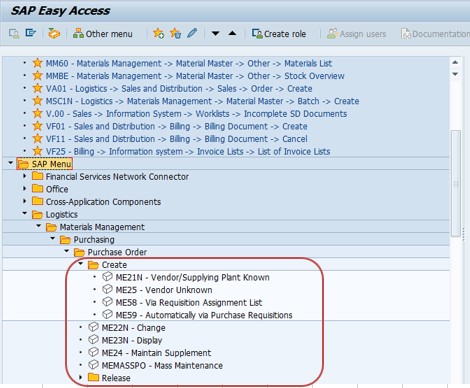
Go To: Logistics → Materials Management → Purchasing → Purchase Order → Create, or run transaction ME21N directly.
🔧 Follow Steps – Create a Standard Purchase Order (PO)
Go To Tcode ME21N. Run transaction ME21N to open the Purchase Order creation screen.
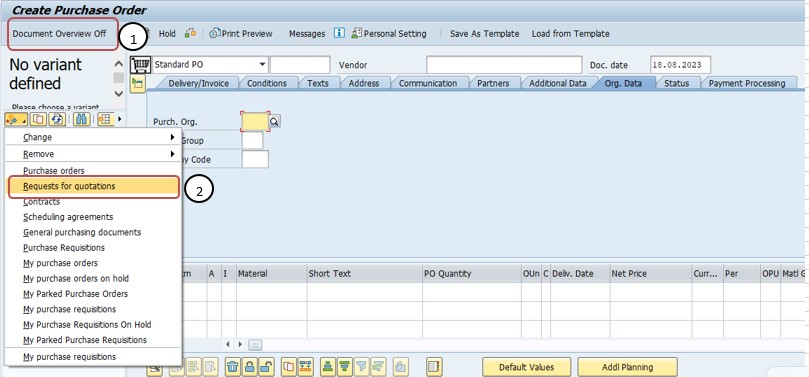
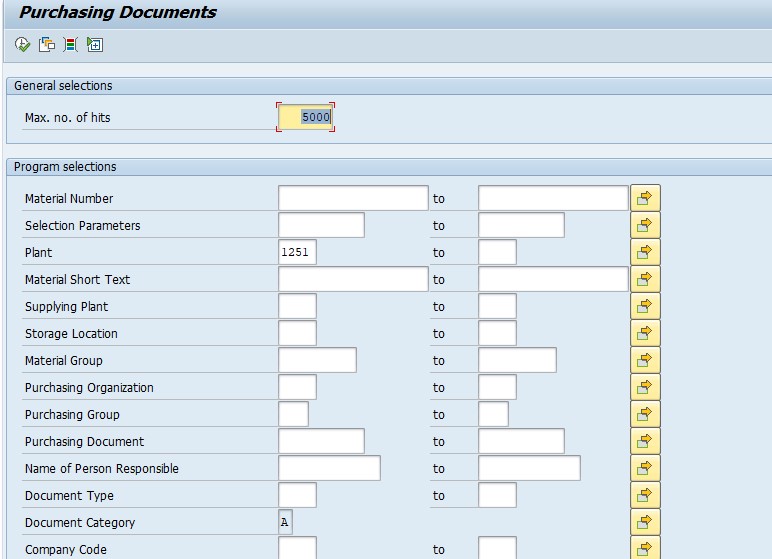
Click on Document Overview - Select Requests for Quotations - Click on Execute Button. This lets you pull up the list of RFQs already sent to vendors, so the PO can be created with reference to a quotation rather than entered from scratch.
Click on Doc No-6000000053 and Select - Adopt. Selecting Adopt pulls the chosen quotation's data directly into the new Purchase Order, rather than requiring it to be re-typed.
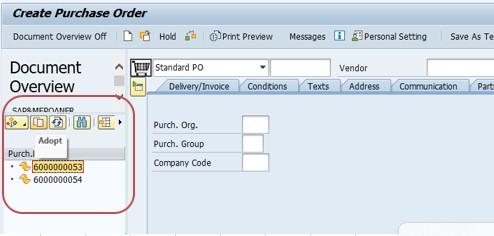
Standard PO - Automatic Selected All Data to Quotation - Material No, PO Qty, Delivery Date, Net Price, Plant, Storage Location, Info Record etc. Once adopted, the system automatically carries over the material number, PO quantity, delivery date, net price, plant, storage location, and info record from the quotation into the Purchase Order.
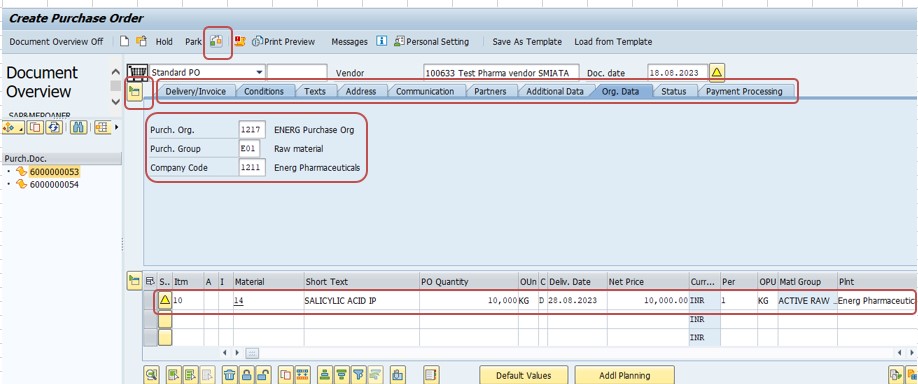
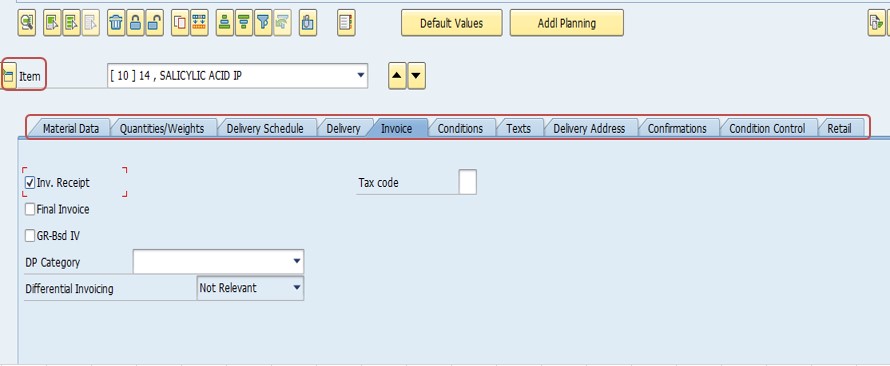
Select Check Button and Save PO. Running the Check function validates the completeness and consistency of the Purchase Order before it's saved and made available to the vendor and to downstream goods receipt and invoice verification processes.
📋 Why Choosing the Right PO Type Matters
The PO type selected at creation determines which fields are required, how the item is valuated, and how it flows through downstream processes such as goods receipt and invoice verification. Choosing incorrectly can mean the difference between a smooth transaction and one that generates account determination or valuation errors later.
| Selection | What It Determines |
|---|---|
| PO Type / Item Category | Whether the item is treated as a standard material purchase, a service, a subcontracting operation, or a capital asset acquisition. |
| Account Assignment Category | For Asset POs and non-stock items, which cost object - an asset number, cost center, or internal order - the purchase is charged against. |
| Material vs. Service Master Reference | Whether the PO line references a material master record or a service master / short text description, which affects mandatory fields and downstream goods receipt behavior. |
Because item category shapes so much of the downstream valuation and posting logic, changing a PO's type after goods receipt or invoice verification has already occurred is generally not possible without cancelling and recreating the affected line - a decision worth getting right before the PO is even saved.
📋 Related SAP Transactions
| Transaction | Purpose |
|---|---|
| ME21N | Create a new Purchase Order, of any type. |
| ME22N | Change an existing Purchase Order. |
| ME23N | Display a Purchase Order without allowing changes. |
| ME9F | Send or reprint a Purchase Order message to the vendor. |
| ME2M | List Purchase Orders by material. |
| ME2L | List Purchase Orders by vendor. |
🎓 Interview-Style Questions and Answers
Q: What is a Purchase Order, and how does it differ from a Purchase Requisition?
A Purchase Order is a formal, binding document issued to a specific vendor at agreed pricing and terms, whereas a Purchase Requisition is only an internal request that has not yet committed the organization to any external vendor.
Q: What distinguishes a Standard PO from a Service PO?
A Standard PO procures physical materials with a material number, quantity, and delivery date, while a Service PO procures non-material services such as consulting or maintenance, described by a service master or short text rather than a material number.
Q: Why would an organization use a Subcontracting PO instead of a Standard PO?
Because in subcontracting, the organization supplies raw materials to a vendor who processes them into a finished product, requiring the PO to track both the components provided and the processing charge, which a Standard PO cannot represent on its own.
Q: What is the benefit of creating a PO by adopting an RFQ?
Adopting an existing, already-compared Request for Quotation carries over material, quantity, and negotiated price automatically, reducing manual entry errors and ensuring the PO reflects exactly what was agreed during the quotation comparison.
📚 Quick Glossary of Terms Used in This Guide
- Purchase Order (PO): A formal, binding document issued to a vendor specifying materials or services, quantities, pricing, and delivery terms.
- Request for Quotation (RFQ): A document sent to one or more vendors inviting them to submit pricing and terms for a requested material or service.
- Adopt: The function that pulls an existing document's data - such as an RFQ's price and quantity - directly into a new Purchase Order.
- Item Category: A classification on a PO line item, such as Standard, Service (D), or Subcontracting (L), determining how the item is processed and valuated.
- Account Assignment Category: A field determining which cost object, such as an asset or cost center, a non-stock or Asset PO item's cost is charged against.
- Goods Receipt: The process of confirming physical receipt of ordered materials, which follows the Purchase Order in the procurement cycle.
📝 Governance for Purchase Order Creation
Because a Purchase Order represents a binding financial commitment to an external vendor, most organizations maintain a documented governance process around who can create POs of each type, which document types and account assignment categories are appropriate for which scenarios, and how release strategies should require approval based on value or PO type. This is particularly important for Asset POs and Subcontracting POs, which carry additional financial and inventory complexity compared with a Standard PO.
Data quality and commercial governance matter here for the same reason they do for contracts and requisitions: a PO created quickly, with the wrong item category or an incomplete account assignment, tends to surface as a posting or valuation problem later - once goods receipt or invoice verification is already underway. Establishing a clear PO creation checklist by type keeps procurement quality consistent across a large buying organization over time.
💼 Real-World Scenario: Converting an Approved Quotation into a Standard PO
Pooja Mishra, an SAP MM consultant at Learn Pharmaceuticals, was asked to convert an already-compared vendor quotation into a live Purchase Order after purchasing manager Rajesh Pawar confirmed the winning vendor and negotiated price. Rather than re-keying the material, quantity, and price from scratch, Pooja used ME21N and opened Document Overview to pull up the list of Requests for Quotations already on file.
She selected the relevant quotation - document number 6000000053 - and used the Adopt function, which carried the material number, PO quantity, delivery date, net price, plant, storage location, and info record straight into the new Purchase Order. Business analyst Anita Shah reviewed the adopted item data alongside the original quotation to confirm nothing had shifted in the transfer, since this cross-check is a routine safeguard against data entry drift between the RFQ comparison stage and the final PO.
Once the data was confirmed accurate, Pooja ran the Check function and saved the Purchase Order, generating a PO number the vendor could immediately reference upon delivery. Because the PO had been adopted directly from the approved quotation, the pricing and quantity matched exactly what was negotiated, avoiding any later dispute during invoice verification.
❗ Common Mistakes When Creating a Purchase Order
- Selecting the wrong PO type or item category, such as using a Standard PO for what should be a Service or Subcontracting PO, causing downstream posting errors.
- Re-typing quotation data manually instead of using Adopt, introducing pricing or quantity mismatches versus what was actually negotiated.
- Leaving the account assignment category incomplete on an Asset PO, which can block posting to the correct fixed asset.
- Omitting the components list on a Subcontracting PO, leaving the subcontractor without a clear record of what materials will be supplied.
- Skipping the Check function before saving, only to discover missing or inconsistent data once goods receipt or invoice verification begins.
- Creating high-value POs without going through the appropriate release strategy or approval process.
✅ Best Practices for Purchase Order Creation
- Confirm the correct PO type and item category before starting, since each type is processed and valuated differently downstream.
- Use the Adopt function whenever an approved RFQ or contract already exists, rather than re-entering data manually.
- Double-check account assignment details on Asset and Service POs, since these often require additional cost object information that Standard POs do not.
- Run the Check function before saving to catch missing or inconsistent data early.
- Coordinate with the requesting department and finance to confirm delivery dates, pricing, and account assignment are all correct before the PO is issued to the vendor.
- Apply release strategy consistently for high-value or unusual POs, so spend above a defined threshold always receives appropriate review.
📈 How Purchase Order Data Powers Downstream Processes
The Purchase Order's influence extends across the remainder of the procurement cycle, which is exactly why getting the initial ME21N creation right - including choosing the correct type - pays off well beyond the creation screen itself. A PO's material, quantity, and price feed directly into the Goods Receipt, determining what quantity is expected and at what value it should be posted. Its account assignment, for non-stock or Asset POs, determines which cost object ultimately absorbs the expense once the invoice is verified. And its vendor and pricing terms are what Invoice Verification cross-checks the vendor's actual invoice against.
Because so many downstream documents trace back to the Purchase Order, an inconsistency at this stage - a wrong item category, an incomplete account assignment, a pricing mismatch versus the approved quotation - is one of the more common root causes behind confusing errors during goods receipt or invoice verification, rather than a problem with those later processes in isolation.
✅ Validating the New Purchase Order Before Sending to the Vendor
Once a Purchase Order is created and saved, it's worth running through a short validation checklist before it's sent to the vendor. Display the PO (ME23N) and confirm the item category matches the intended PO type - Standard, Service, Asset, or Subcontracting. Confirm the material or service description, quantity, price, and delivery date all match what was actually negotiated with the vendor. For Asset or Service POs, confirm the account assignment category and cost object are complete and correct. Finally, if the PO was adopted from an RFQ, spot-check a couple of key fields against the original quotation to confirm nothing shifted during the Adopt step.
Skipping this validation step is one of the more common reasons a newly created Purchase Order causes confusion during goods receipt or invoice verification - usually a mismatched price, an incomplete account assignment, or the wrong item category for the intended procurement scenario.
📱 This Configuration in SAP S/4HANA
Transaction ME21N and the underlying Purchase Order creation process work largely the same way in SAP S/4HANA as in classic ECC, since Purchase Orders remain a core Materials Management document. What has changed in S/4HANA is the availability of Fiori apps such as "Create Purchase Order" and "Manage Purchase Orders," which offer a more modern, guided creation and monitoring experience alongside the classic ME21N transaction, along with improved analytics on order status and spend by PO type. Many S/4HANA implementations continue to rely on ME21N for power-user or bulk PO creation, particularly for scenarios like adopting quotations, while Fiori-based tools are increasingly favored for day-to-day monitoring and simpler order creation.
🎯 Conclusion
Creating a Purchase Order in ME21N - and choosing the correct type among Standard, Service, Asset, and Subcontracting - is a decisive step that shapes how smoothly the rest of the procurement cycle unfolds, from goods receipt through invoice verification. Selecting the right PO type and item category, adopting negotiated quotation data accurately rather than re-keying it, and completing account assignment correctly for non-stock and asset scenarios are what separate a Purchase Order that flows cleanly through the system from one that generates posting or valuation errors downstream. Keep this guide handy the next time your organization needs to issue a new purchase order, whether for straightforward materials, contracted services, a capital asset, or a subcontracted manufacturing operation.