SAP ME51N: How to Create a Purchase Requisition – Step-by-Step
Purchase Requisition (PR) is a formal request created by an internal department or user within an organization to procure goods or services. It's the initial step in the procurement process that triggers the procurement of materials or services from external vendors. This guide walks you through the Step-by-Step Process to Create a Purchase Requisition using transaction ME51N. If you encounter any errors while following along, feel free to send a screenshot to pramod@learntosap.com, and I will help you resolve the issue.
✅ Step-by-Step Process to Create Purchase Requisition (ME51N)
Purchase Requisition (PR) is a formal request created by an internal department or user within an organization to procure goods or services. It's the initial step in the procurement process that triggers the procurement of materials or services from external vendors.
It helps to understand upfront why the Purchase Requisition sits right at the start of SAP's procure-to-pay cycle. Nothing downstream - source determination, vendor selection, the Purchase Order, the goods receipt, the invoice, or the payment - happens without a requisition (or an equivalent triggering document) first confirming that a genuine internal need exists and has been approved. This is exactly why the requisition, despite being a relatively simple document to create, plays an outsized role in keeping procurement spend controlled and traceable back to a legitimate business need.
Related Transaction Codes
| Transaction | Purpose |
|---|---|
| ME51N | Creating Purchase Requisition. |
| ME52N | Modify Purchase Requisition. |
| ME53N | Display Purchase Requisition. |
📋 What is a Purchase Requisition in SAP? Follow Process
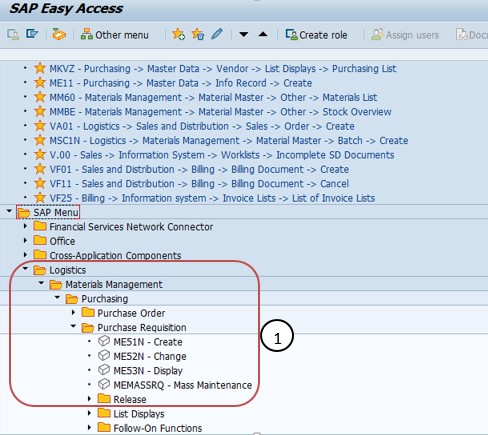
Go To: Logistics → Materials Management → Purchasing → Purchase Requisition → Create, or run transaction ME51N directly.
📋 The Purchase Requisition Process, End to End
Creation of Purchase Requisition: A Purchase Requisition is typically created by a user within an organization when there's a need for materials or services. The user provides details such as the material or service required, quantity, delivery date, and any specific requirements.
Release of Purchase Requisition: The PR usually goes through an approval process before it can be converted into a Purchase Order (PO). Different levels of management or responsible individuals review and approve the PR based on various factors like budget, necessity, etc.
Source Determination: After the PR is approved, the system determines the sources from which the material can be procured. This can include internal stock, existing purchase contracts, or a list of potential vendors.
Vendor Selection: If external procurement is required, the system helps in selecting the appropriate vendor based on predefined criteria such as price, lead time, and quality.
Purchase Order Creation: Once the vendor is selected, a Purchase Order (PO) is created based on the approved PR. The PO includes details like material specifications, quantity, price, delivery dates, and payment terms.
Goods Receipt and Invoice Verification: When the ordered materials arrive, the organization performs a Goods Receipt (GR) to acknowledge the receipt of goods. The invoice received from the vendor is verified against the PO and the actual goods received. Any discrepancies are addressed.
Payment to Vendor: Once the invoice is verified and approved, payment is processed to the vendor for the goods or services provided.
🔧 Create Purchase Requisition – ME51N Step-by-Step
Following Path:
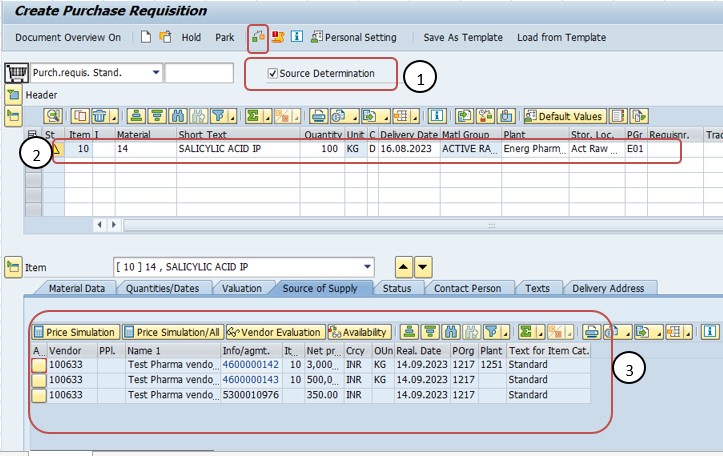
Enter Tcode ME51N. Run transaction ME51N to open the Purchase Requisition creation screen.
Select Order Type - NB Standard Order. Choose document type NB, the standard requisition type used for typical material and service requests.
Click on Source Determination - ON. Turning on Source Determination allows the system to automatically propose existing contracts, info records, or vendors relevant to the requisitioned material.
Enter Material No, Qty, Delivery Date, Plant, Storage Loc. Fill in the item-level details: the material number, the quantity needed, the desired delivery date, the receiving plant, and the storage location where the material should be booked in.
Click Check Button. Use the Check function to validate the entries for completeness and consistency before saving the requisition.
📋 Key Purchase Requisition Fields at a Glance
A quick reference for the main fields captured when creating a requisition in ME51N.
| Field | What It Captures |
|---|---|
| Document Type | NB (Standard) or another requisition type configured for special purchasing scenarios. |
| Material Number | The specific material or service being requested. |
| Quantity | How much of the material is needed to fulfill the internal requirement. |
| Delivery Date | The date by which the requesting department needs the material available. |
| Plant | The receiving location that will use or stock the material. |
| Storage Location | The specific storage area within the plant where the material should be booked in upon receipt. |
| Account Assignment Category | Determines whether the cost is charged to a cost center, an internal order, a project, or another object, required for non-stock or consumption-based items. |
| Purchasing Group | The buyer or buying team responsible for sourcing and processing the requisition into a Purchase Order. |
📋 Related SAP Transactions
| Transaction | Purpose |
|---|---|
| ME51N | Create a new Purchase Requisition. |
| ME52N | Change / modify an existing Purchase Requisition. |
| ME53N | Display a Purchase Requisition without allowing changes. |
| ME54N | Release (approve) a Purchase Requisition that requires release strategy approval. |
| ME21N | Create a Purchase Order, often with reference to an approved requisition. |
| ME2B | Display Purchase Requisitions by requirement tracking number or other selection criteria. |
🎓 Interview-Style Questions and Answers
Q: What is a Purchase Requisition, and why does it come before the Purchase Order?
A Purchase Requisition is an internal request to procure materials or services, confirming that a genuine business need exists before any external commitment is made. It precedes the Purchase Order so that budget, necessity, and approval checks happen before the organization commits externally to a vendor.
Q: What is Source Determination, and why is it useful?
Source Determination is the system function that identifies where a requisitioned material can be procured from - existing contracts, info records, or a list of vendors - helping buyers convert an approved requisition into a Purchase Order more efficiently.
Q: Why is Account Assignment Category important on a requisition?
It determines which cost object - a cost center, an internal order, a project, or similar - is charged for the material or service, which is essential for non-stock items where the cost needs to be tracked against a specific budget.
Q: What is the difference between ME51N, ME52N, and ME53N?
ME51N creates a new Purchase Requisition, ME52N changes an existing one, and ME53N displays a requisition without allowing any changes.
📚 Quick Glossary of Terms Used in This Guide
- Purchase Requisition: A formal internal request to procure goods or services, and the first step in the SAP procurement process.
- Source Determination: A system function that identifies possible procurement sources - contracts, info records, or vendors - for a requisitioned material.
- Release Strategy: An approval workflow that can require one or more levels of sign-off before a requisition can be converted into a Purchase Order.
- Account Assignment Category: A field determining which cost object a non-stock requisition item's cost is charged against.
- Purchasing Group: The buyer or buying team responsible for processing a requisition into a Purchase Order.
- Goods Receipt (GR): The process of confirming physical receipt of ordered materials, which follows successful conversion of the requisition into a Purchase Order.
📝 Governance for Purchase Requisition Creation
Because a Purchase Requisition is the trigger point for organizational spend, most companies maintain a documented governance process around who can create requisitions, which document types and account assignment categories are appropriate for which scenarios, and how release strategies should be configured to require the right level of approval based on value or category. This is particularly important in larger organizations where requesting departments, procurement, and finance all rely on the same requisition but care about different aspects of it - the requesting department cares about the material and delivery date, procurement cares about sourcing, and finance cares about the account assignment and budget impact.
Data quality governance matters here for the same reason it does for other master and transactional data: a requisition created quickly, with a vague delivery date or an incorrect account assignment, tends to surface as a budgeting or delivery problem later - once it has already been converted into a Purchase Order. Establishing a clear requisition creation checklist, tailored to the account assignment categories a business actually uses, keeps requisition quality consistent across a large user base over time.
💼 Real-World Scenario: Requesting Raw Material for an Urgent Production Run
Pooja Mishra, a production planner at Learn Pharmaceuticals, needed to request an urgent quantity of raw material to keep an upcoming production run on schedule. Purchasing manager Rajesh Pawar advised her to raise a Purchase Requisition through ME51N rather than contacting the supplier directly, so the request would go through the proper approval and sourcing process.
Pooja entered transaction ME51N, selected document type NB - Standard Order, and turned on Source Determination so the system could check for any existing contract with the usual raw material supplier. She entered the material number, the quantity needed, an urgent delivery date, the receiving plant, and the storage location where the material would be booked in, then ran the Check function to confirm everything was complete before saving.
Procurement lead Priya Patil reviewed the requisition as part of the release strategy, confirmed the delivery date and quantity against available budget, and approved it. Because Source Determination had already identified the existing contract as a proposed source, buyer Anita Shah was able to convert the approved requisition into a release Purchase Order quickly, keeping the urgent production run on track without delay.
❗ Common Mistakes When Creating a Purchase Requisition
- Selecting the wrong document type, which can route the requisition through the wrong approval or sourcing logic.
- Entering an unrealistic delivery date, either too aggressive for the vendor's actual lead time or too far out to satisfy the real business need.
- Leaving Source Determination off when a relevant contract or info record already exists, resulting in unnecessary manual vendor selection later.
- Choosing the wrong or an inconsistent account assignment category, which can misallocate cost against the wrong cost center, project, or internal order.
- Skipping the Check function before saving, only to discover missing or inconsistent data once the requisition reaches the approval stage.
- Bypassing the requisition process entirely for urgent needs, which removes budget and necessity checks that the process is designed to enforce.
✅ Best Practices for Purchase Requisition Creation
- Confirm the correct document type and account assignment category before entering item details, since they shape how the requisition is approved and costed.
- Turn on Source Determination whenever a relevant contract or info record might already exist, to save time at the vendor selection stage.
- Enter a realistic delivery date based on known vendor lead times, rather than an aspirational date that can't actually be met.
- Run the Check function before saving to catch missing or inconsistent data early.
- Coordinate with the requesting department to confirm material, quantity, and urgency are accurately reflected before submission for approval.
- Use release strategy appropriately for higher-value requisitions, so spend above a certain threshold always receives the right level of review.
📈 How Purchase Requisition Data Powers Downstream Processes
A Purchase Requisition's influence extends across the entire procure-to-pay cycle, which is exactly why getting the initial ME51N creation right pays off well beyond the creation screen itself. The requisition's material, quantity, and delivery date feed directly into the Purchase Order created from it; its account assignment category determines which cost object is ultimately charged once the invoice is verified; and its approval status, if a release strategy is configured, determines whether procurement is even allowed to act on it at all.
Because so many downstream documents trace back to the requisition, an inconsistency at this first step - a wrong material number, an unrealistic delivery date, an incorrect account assignment - is one of the more common root causes behind confusing errors or delays further along in the process, rather than a problem with the Purchase Order or invoice verification configuration in isolation.
✅ Validating the New Requisition Before Submission
Once a requisition is entered, it's worth running through a short validation checklist before submitting it for approval. Run the Check function and resolve any warnings or errors it surfaces. Display the requisition (ME53N) and confirm the material, quantity, delivery date, plant, and storage location were all saved correctly. If Source Determination was used, confirm the proposed source - contract, info record, or vendor - actually makes sense for this requirement. Finally, confirm the account assignment category and cost object are correct if the item is non-stock, so the eventual invoice posts against the right budget.
Skipping this validation step is one of the more common reasons a requisition gets sent back during approval or causes confusion once converted into a Purchase Order - usually a missing plant-material combination, an unrealistic delivery date, or an incorrect account assignment.
📱 This Configuration in SAP S/4HANA
Transaction ME51N and the underlying Purchase Requisition creation process work largely the same way in SAP S/4HANA as in classic ECC, since the requisition remains a core Materials Management document type. What has changed in S/4HANA is the availability of Fiori apps such as "Create Purchase Requisition" and "My Purchase Requisitions," which offer a more modern, self-service creation and tracking experience for casual requesters alongside the classic ME51N transaction, along with improved analytics on requisition approval status and cycle time. Many S/4HANA implementations continue to use ME51N for power-user or bulk requisition creation, while Fiori-based apps are increasingly favored for occasional requesters across the business.
🎯 Conclusion
Creating a Purchase Requisition in ME51N is the foundational first step of the SAP procurement cycle, and getting it right shapes how smoothly every subsequent stage - approval, source determination, vendor selection, Purchase Order, goods receipt, and payment - unfolds. Selecting the correct document type, entering accurate item details and a realistic delivery date, turning on Source Determination where relevant, and assigning the correct account assignment category are what separate a requisition that moves cleanly through approval and sourcing from one that generates delays or cost allocation errors downstream. Keep this guide handy the next time your organization needs to raise a new internal request for materials or services.