SAP ME47: How to Maintain Quotation in SAP – Step-by-Step
Quotation management in SAP MM involves the process of requesting, receiving, and analyzing quotations from various suppliers. This process helps organizations identify the best possible deals and make informed procurement decisions. SAP MM offers a user-friendly interface that facilitates the creation, maintenance, and comparison of quotations. This guide walks you through the Step-by-Step Process to Maintain a Quotation using transaction ME47. If you encounter any errors while following along, feel free to send a screenshot to pramod@learntosap.com, and I will help you resolve the issue.
✅ How to Maintain Quotation Using SAP ME47 – Complete Guide
Quotation management in SAP MM involves the process of requesting, receiving, and analyzing quotations from various suppliers. This process helps organizations identify the best possible deals and make informed procurement decisions. SAP MM offers a user-friendly interface that facilitates the creation, maintenance, and comparison of quotations, and ME47 sits at the heart of that interface - it is the transaction a buyer uses once a vendor has actually responded to an RFQ with pricing and terms.
It helps to understand where ME47 sits relative to the rest of the RFQ cycle. The Request for Quotation itself, created in ME41, is simply the invitation sent out to potential suppliers. ME47 is the step where the vendor's actual response - most importantly, the net price they are offering - gets recorded against that RFQ inside SAP, so it can later be compared fairly against quotations from other invited vendors. Without maintaining the quotation accurately in ME47, there is nothing meaningful for the buyer to compare, no matter how well the original RFQ was constructed.
Related Transaction Codes
| Transaction | Purpose |
|---|---|
| ME47 | Maintain Quotation. |
| ME48 | Display Quotation. |
📋 What is ME47 TCode in SAP? Step-by-Step: Maintain Quotation in SAP
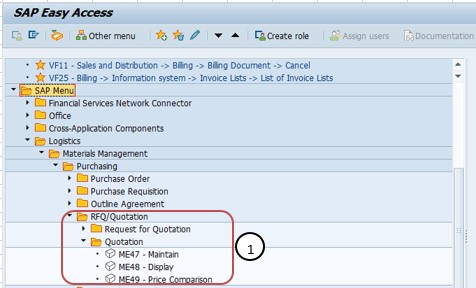
Go To: Logistics → Materials Management → Purchasing → RFQ/Quotation → Quotation, or run transaction ME47 directly.
📋 The Quotation Maintenance Process, End to End
RFQ Issued to Vendors: An RFQ is created and sent to multiple suppliers using ME41, inviting them to submit pricing and terms for a defined material or service requirement.
Vendor Responds with Pricing: Each invited vendor responds - by email, phone, portal, or paper - with their proposed net price, lead time, and any conditions attached to the offer.
Quotation Maintained in SAP (ME47): The buyer opens ME47, enters the RFQ number, and records the vendor's net price and any other quoted terms directly on the item detail tab, turning the vendor's external response into a structured SAP document.
Comparison Across Vendors: With each invited vendor's quotation maintained against the same RFQ, the buyer can compare price, terms, and other criteria across all responses side by side.
Selection and Rejection: The buyer selects the winning quotation based on price, quality, delivery terms, and other relevant criteria, and formally rejects the remaining ones.
Conversion to Purchase Order or Contract: The winning quotation is converted into a Purchase Order for a one-time need, or an outline agreement such as a Contract for a longer-term sourcing relationship.
🔧 Steps to Maintain a Quotation in SAP Using ME47
Following Path:
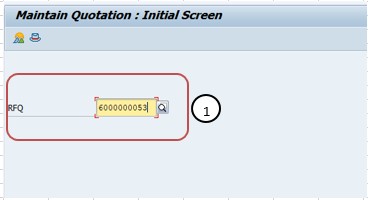
Go to Tcode ME47 and enter RFQ No - 6000000053. Run transaction ME47 and enter the number of the RFQ whose vendor quotation you are ready to maintain. This links the quotation you are about to enter directly back to the original request, so the buyer, the item details, and the deadline are already known to the system.
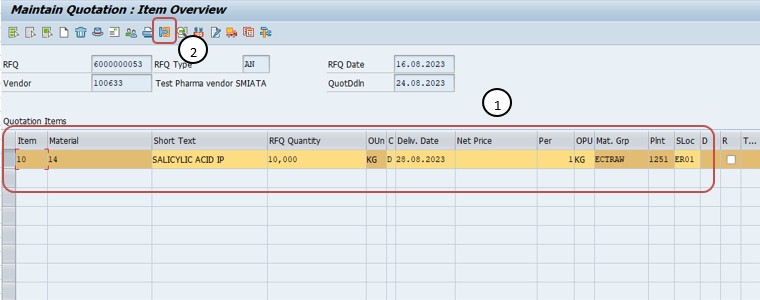
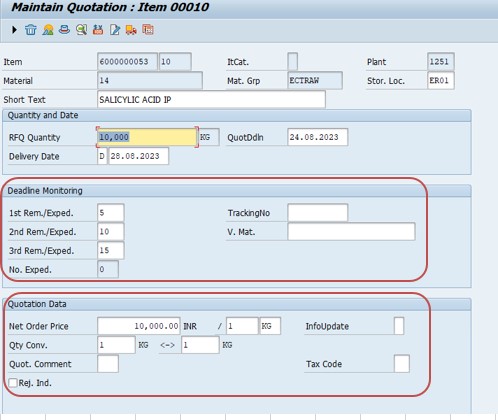
Click on Item Detail tab and maintain Net Price. Open the item detail tab for the RFQ line item and enter the net price the vendor has quoted, along with any other terms - such as delivery lead time or minimum order quantity - the vendor has communicated. Save once the entry is complete.
📋 Key Fields Involved in Maintaining a Quotation
A quick reference for the main fields captured or referenced when maintaining a vendor quotation in ME47.
| Field | What It Captures |
|---|---|
| RFQ Number | Links the quotation being maintained back to the original Request for Quotation and its item requirements. |
| Vendor | The supplier whose response is being recorded against this RFQ. |
| Item Detail Tab | Shows the requested line item's material, quantity, and delivery date alongside the space for the vendor's quoted terms. |
| Net Price | The vendor's quoted price per unit for the requested material or service, the key figure used in later comparison. |
| Delivery Date / Lead Time | The date or duration the vendor has committed to for delivering the material or completing the service. |
| Quotation Status | Tracks whether a maintained quotation is still under evaluation, has been selected, or has been formally rejected. |
📋 Related SAP Transactions
| Transaction | Purpose |
|---|---|
| ME41 | Create a Request for Quotation sent to potential vendors. |
| ME42 | Change an existing Request for Quotation. |
| ME43 | Display a Request for Quotation without allowing changes. |
| ME47 | Maintain a quotation, entering or updating the vendor's net price and terms. |
| ME48 | Display a maintained quotation without allowing changes. |
| ME21N | Create a Purchase Order, often based on the winning maintained quotation. |
| ME31K | Create a Contract, an alternative outcome for a longer-term sourcing decision. |
❗ Common Mistakes When Maintaining a Quotation
- Entering the net price against the wrong RFQ number or item, which quietly corrupts any later price comparison without an obvious error message.
- Recording a net price that does not match what the vendor actually quoted in writing, whether from a transcription slip or an outdated communication.
- Forgetting to maintain a quotation at all for a vendor who did respond, leaving that vendor's offer invisible during comparison even though they submitted one.
- Leaving delivery terms or lead time unrecorded, so the eventual comparison is based on price alone even when delivery reliability matters just as much.
- Maintaining a quotation well after the deadline has passed without flagging it, which can create confusion about whether a late response should still be considered.
- Not updating a quotation when a vendor revises their pricing before the deadline, leaving an outdated net price in the system.
✅ Best Practices for Quotation Maintenance
- Maintain each vendor's quotation as soon as it is received, rather than batching them all right before the comparison, to reduce the risk of missing one.
- Double-check the RFQ number and item before entering the net price, particularly when maintaining quotations for several RFQs in the same session.
- Record delivery lead time and any other quoted terms alongside net price, even if price will ultimately weigh most heavily in the decision.
- Keep a record outside SAP - such as the vendor's original email or quotation document - as backup evidence for the price entered, in case it needs to be verified later.
- Update a maintained quotation promptly whenever a vendor revises their offer before the deadline, so the comparison always reflects the vendor's latest position.
- Flag or note any quotation received after the stated deadline, so the eventual selection decision can account for it consistently rather than informally.
📈 How Quotation Data Powers the Sourcing Decision
Every quotation maintained through ME47 feeds directly into the comparison that determines which vendor ultimately wins the business. The net price recorded here is what buyers, and often finance or procurement leadership, will look at when weighing one vendor against another; the delivery terms recorded here influence whether "cheapest" and "best" actually point to the same vendor. Because the eventual Purchase Order or Contract is built entirely on whichever quotation is selected, any inaccuracy introduced at the maintenance stage - a mistyped price, a missed vendor, an unrecorded lead time - carries forward directly into that final sourcing decision.
This is why quotation maintenance, despite being a comparatively quick data-entry task, deserves the same care given to the original RFQ itself. A comparison built on carelessly maintained quotations can look perfectly clean on screen while actually resting on inaccurate underlying data, which is a much harder problem to catch than an obviously incomplete RFQ.
✅ Validating a Maintained Quotation Before Comparison
Before relying on maintained quotations to make a sourcing decision, it's worth running through a short validation checklist. Display the quotation (ME48) and confirm the net price matches the vendor's original written quote. Confirm the quotation is tied to the correct RFQ number and item. Check that every vendor who actually responded has a maintained quotation in the system - a missing one is easy to overlook. Finally, confirm delivery terms or lead time have been recorded where they were part of the vendor's offer, not just the price.
Skipping this validation is one of the more common reasons a sourcing decision later has to be revisited - usually because a vendor's price was mis-keyed, or a vendor who actually responded was never maintained and therefore never considered.
⚖ Evaluating Maintained Quotations Beyond Just Net Price
It's tempting to treat quotation comparison as a simple exercise in finding the lowest number in the net price column, but experienced buyers know that price alone rarely tells the whole story. A vendor quoting the lowest net price but a materially longer lead time may end up costing more once expediting fees, production delays, or safety stock adjustments are factored in. Similarly, a vendor with a slightly higher price but a strong on-time delivery history and consistent quality record can represent a lower total cost of ownership than the cheapest bid on paper.
When maintaining quotations in ME47, it is worth capturing more than the bare minimum the transaction strictly requires. Recording delivery lead time, minimum order quantities, payment terms, and any special conditions the vendor has attached to their offer means that when it's time to compare, the buyer isn't relying on memory or scattered emails to fill in the gaps - everything relevant sits alongside the net price in one place. This is particularly important in organizations where the person maintaining the quotations and the person making the final vendor selection are not the same individual, since the maintained record becomes the primary source of truth for the decision.
A few criteria worth weighing alongside net price during comparison include the vendor's historical on-time delivery percentage, any known quality issues from past deliveries, the currency and payment terms quoted (which matter more for international vendors), and whether the vendor has offered any volume-based pricing tiers that could apply if future order quantities increase. None of these show up automatically just from entering a net price, which is exactly why deliberately recording them during quotation maintenance - rather than trying to reconstruct them later from memory - makes for a far more defensible sourcing decision.
🎓 Interview-Style Questions and Answers
Q: What is the purpose of ME47 in the SAP procurement cycle?
ME47 is used to maintain a vendor's quotation against a Request for Quotation, recording the net price and terms the vendor has offered so it can be compared with other vendors' responses to the same RFQ.
Q: What is the difference between ME47 and ME48?
ME47 is used to maintain a quotation - entering or updating the vendor's net price and terms - while ME48 is used only to display a quotation that has already been maintained, without allowing any changes.
Q: Why does the net price matter so much in ME47?
The net price is the primary figure used to compare vendors against one another once all invited suppliers' quotations have been maintained, so any inaccuracy in this field directly distorts the sourcing decision that follows.
Q: What happens if a vendor's quotation is never maintained in ME47?
If a vendor's response is never entered into the system through ME47, that vendor's offer is effectively invisible during comparison, even though they may have submitted a competitive quotation.
📚 Quick Glossary of Terms Used in This Guide
- Quotation: A vendor's formal response to an RFQ, stating the price and terms at which they are willing to supply the requested material or service.
- Net Price: The vendor's quoted price per unit, entered on the item detail tab during quotation maintenance and used for comparison.
- Item Detail Tab: The screen area in ME47 where the requested line item's details and the vendor's quoted terms are recorded together.
- RFQ Number: The unique identifier of the original Request for Quotation that a maintained quotation is tied to.
- Quotation Comparison: The process of evaluating multiple maintained quotations against one another on price, terms, and other criteria.
- Winning Quotation: The vendor response selected as the basis for the resulting Purchase Order or Contract.
📝 Governance for Quotation Maintenance
Because quotation maintenance directly feeds the data used to select a vendor, most organizations maintain governance around who is authorized to enter or update a net price in ME47, how quickly a received quotation should be maintained after arrival, and what supporting documentation - such as the vendor's original email or signed quote - should be retained alongside the SAP entry. This matters because procurement leadership and, in some organizations, finance or audit teams rely on the maintained quotations as evidence that the eventual vendor selection was based on accurate, comparable data.
Data quality governance at this stage matters for the same underlying reason it does across the rest of the procurement cycle: a quotation maintained carelessly - a wrong price, a missed vendor, an unrecorded delivery term - tends to surface only once the sourcing decision is challenged or reviewed, at which point it is far more disruptive to correct than it would have been to catch during maintenance. A short, consistent quotation maintenance checklist keeps this stage reliable even as the number of RFQs and responding vendors grows.
💼 Real-World Scenario: Comparing Three Vendor Responses to an RFQ
Following on from an earlier scenario, buyer Pooja Mishra at Learn Pharmaceuticals had issued an RFQ to three vendors, including the incumbent supplier, seeking pricing for a raw material ahead of a contract renewal decision. As responses arrived over the following two weeks, Pooja's task shifted from sourcing to accurately recording what each vendor had actually quoted.
For each vendor, Pooja opened transaction ME47, entered the RFQ number 6000000053, and clicked into the item detail tab to maintain the vendor's quoted net price. For the incumbent, she also recorded the delivery lead time they had committed to, since it matched what the organization was already used to. For the two new vendors, she carefully cross-checked the net price against their written quotations before saving, since any transcription error at this stage would carry directly into the comparison that followed.
Once all three quotations were maintained, Pooja was able to compare them side by side purely from what was now recorded in SAP. One of the new vendors offered a lower net price but a longer lead time than the incumbent; the other new vendor's price was close to the incumbent's but with a shorter, more reliable lead time. Because every figure had been carefully maintained rather than approximated, procurement lead Priya Patil was able to make the final vendor selection with confidence that the comparison genuinely reflected what each vendor had offered.
📱 This Configuration in SAP S/4HANA
Transaction ME47 and the underlying quotation maintenance process work largely the same way in SAP S/4HANA as in classic ECC, since the quotation remains tied to the same RFQ document type used across both releases. What has changed in S/4HANA is the availability of Fiori apps that give buyers a more visual, list-based way to see which invited vendors have responded, maintain net prices inline, and move straight into a price comparison view without switching screens. Many S/4HANA implementations continue to use ME47 for detailed quotation maintenance, particularly when multiple items or complex terms are involved, while Fiori-based apps are increasingly favored for simpler, single-item quotation entry and status tracking.
🎯 Conclusion
Maintaining a quotation in ME47 is the step that turns a vendor's external response into structured, comparable data inside SAP, and getting it right is what makes the entire RFQ process worthwhile. Entering the correct RFQ number, carefully recording the net price and any other quoted terms on the item detail tab, and keeping every invited vendor's response up to date are what separate a sourcing decision built on accurate comparison from one built on incomplete or mistaken data. Keep this guide handy the next time your organization needs to record and compare quotations received from vendors.