Define Terms of Payment in SAP MM (T-code OME2) — Step-by-Step Guide
Every invoice SAP posts needs to know two things: when it's due, and whether paying early earns a discount. Terms of payment answer both questions automatically. This guide walks through the OME2 configuration path, the cash discount logic behind each term, and the mistakes that cause incorrect due dates later.
⚠ What Are Terms of Payment in SAP?
Terms of payment are agreements between a buyer and a seller that specify when and how an invoice should be settled. In SAP, this business agreement is translated into a short configuration key that captures the due date logic, any cash discount available for early settlement, and the reference date the whole calculation starts from. Once configured, that key is assigned on the vendor master or customer master and automatically defaults onto purchase orders, sales orders, and invoices, so nobody has to manually calculate a due date or discount deadline document by document.
Payment terms are configured centrally through transaction OME2 on the Materials Management side, though the exact same configuration table is also reachable through OBB8 on the Financial Accounting side - both transactions edit the identical payment terms table, just from different customizing menus.
Why Payment Terms Matter Beyond Simple Due Dates
A well-configured payment term does more than mark an invoice overdue. It shapes cash flow planning by giving finance predictable payment windows, it incentivizes early settlement through cash discounts that materially affect the bottom line on high-volume vendor relationships, and it feeds directly into dunning, ageing, and cash discount clearing reports that finance teams rely on every single month. Getting the underlying logic wrong doesn't just create a wrong date on a document - it can silently cost a company real money in missed discounts or trigger unnecessary vendor disputes over early or late payment.
📋 Where Terms of Payment Fit in the Procure-to-Pay Cycle
Payment terms sit quietly in the background of the procure-to-pay process, referenced at several points along the way.
| Stage | How Payment Terms Are Used |
|---|---|
| Vendor Master | A default payment term is assigned on the purchasing view, proposed automatically for every new purchase order raised against that vendor |
| Purchase Order | The payment term inherited from the vendor master (or manually overridden) is stored on the PO header and copied forward to the invoice |
| Invoice Verification | The system calculates the discount deadline and net due date from the payment term and the invoice's baseline date |
| Payment Run | The automatic payment program uses the calculated due date to decide which open items are eligible for payment on a given run date |
Because the same key travels through every one of these stages untouched, a single configuration mistake in OME2 can ripple all the way through to an incorrect payment run selection weeks later.
💼 Business Scenario: Why Payment Terms Configuration Matters
Picture a manufacturing company negotiating with a key raw-material supplier: pay within 14 days and receive a 2% cash discount, pay within 30 days for a smaller 1.5% discount, or settle the full amount with no discount by day 45. Manually tracking three different deadlines across hundreds of invoices a month is unrealistic for an accounts payable team. By configuring this exact structure as a payment term key in OME2 and assigning it to the vendor master, SAP calculates all three deadlines automatically on every invoice, and finance simply reviews an ageing report to decide which invoices to prioritize for early payment to capture the discount.
Get the configuration wrong - say, the discount days entered in the wrong sequence - and the company either loses genuine discount opportunities or accidentally pays vendors early without earning any discount at all, both of which quietly erode margin over a full fiscal year.
✅ Prerequisites Before Running OME2
- Confirm the exact payment terms your business has actually negotiated with vendors or customers, including every discount tier and the final due date, before creating a new key
- Check whether an existing standard term, such as 0001, 0002, or 0003, already matches the required structure, since reusing a standard key avoids unnecessary duplication
- Agree with the finance team on how the baseline date should be determined - document date, posting date, or a fixed calendar day - since this changes how every deadline is calculated
- Hold authorization to edit client-level customizing tables, since OME2 is a cross-client configuration change
- Understand whether the new term will be used for vendors, customers, or both, since payment terms are shared across purchasing and sales
🛠️ Step-by-Step: Defining Terms of Payment Using OME2
Open the Configuration Path
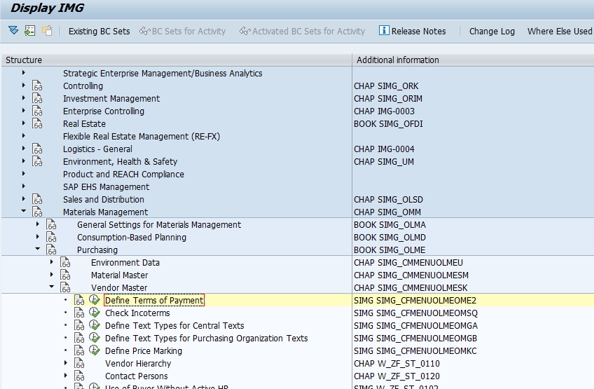
Log in with customizing access, then type OME2 directly into the transaction box, or follow SPRO > Materials Management > Purchasing > Master Data > Vendor Master > Define Terms of Payment.
Select New Entries, or Review an Existing Standard Term
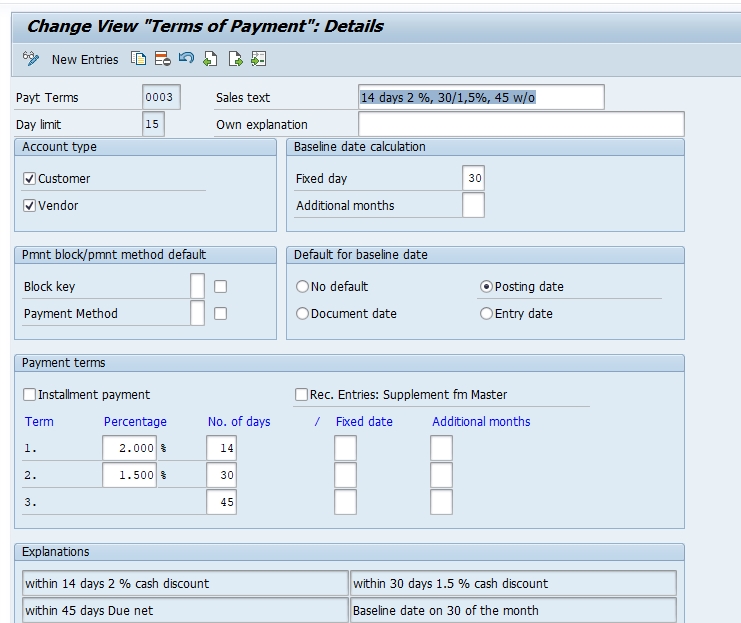
Click New Entries to define your own payment term specific to your project's requirements. Alternatively, select an existing standard term such as 0003 - 14 days 2%, 30 days 1.5%, 45 days net to review how a two-tier discount structure with 2% and 1.5% discount percentages is already built, and use it as a reference or starting copy.
Enter the Payment Term Key and Description
Assign a short, four-character key and a clear description that reflects the discount structure, for example "14 days 2%, 30 days 1.5%, 45 net," so anyone maintaining vendor master data later understands the term at a glance without opening the configuration screen.
Configure the Cash Discount Percentages and Days
Enter the first cash discount percentage and the number of days it remains valid from the baseline date, then repeat for a second discount tier if the business negotiated one. Finally, enter the net due days representing the absolute final deadline with no discount applied.
Set the Baseline Date Category
Choose the reference point SAP should use to start counting - typically the document date or posting date of the invoice - since every discount deadline and the net due date are calculated relative to this single starting point.
Save and Assign to a Transport Request
Click Save. SAP prompts you to capture the change under a customizing transport request. Assign it with a clear description, for example "Create payment term 14/2%,30/1.5%,45net for raw material vendors," and release it once testing is complete.
⚙️ Understanding the Cash Discount Structure
The payment term detail screen looks like a short row of numbers, but each field controls a distinct part of the due-date calculation.
| Field | Purpose |
|---|---|
| Cash Discount 1 %, Days | The first, usually largest, discount percentage and how many days from the baseline date it remains available |
| Cash Discount 2 %, Days | An optional second, smaller discount percentage with its own separate day window |
| Net Due Days | The final deadline by which the invoice must be paid in full, with no discount applied beyond this point |
| Baseline Date Category | Determines whether the countdown starts from the document date, posting date, or a fixed day of the month |
| Default for Baseline Date | An optional fixed calendar day, used for terms tied to a specific billing cycle rather than the invoice date itself |
Using the example shown in the screenshots above, a term offering 2% discount within 14 days, 1.5% within 30 days, and net payment due at 45 days gives the accounts payable team a clear, automatically calculated decision window on every single invoice tied to that vendor.
📦 Common Standard Payment Terms Delivered in SAP
Most implementations start from SAP's delivered payment terms before creating anything custom, since these already reflect widely used commercial patterns.
| Key | Typical Structure |
|---|---|
| 0001 | Payable immediately, due net, no discount |
| 0002 | 14 days 3% discount, 30 days net |
| 0003 | 14 days 2% discount, 30 days 1.5% discount, 45 days net |
| 0004 | Due net within 14 days, no discount tiers |
| ZB01 | A common custom pattern used for project-specific vendor agreements |
Custom payment terms, following the same naming logic, are usually created only when a genuinely distinct commercial agreement exists that none of the standard keys represent accurately.
⚠️ Common Errors and How to Resolve Them
"Payment term key already exists"
Another consultant may have already created a key with the same code, possibly with a different structure. Search the existing table first before assuming a new key is genuinely needed.
Due date on the invoice looks wrong
This almost always traces back to the baseline date category rather than the discount days themselves. Check whether the term is set to calculate from document date versus posting date, since a mismatch here shifts every deadline by the same number of days.
Cash discount not being offered during payment posting
Confirm the discount days on the payment term genuinely cover the date the payment is being posted, and check that the cash discount base amount and tax configuration in Financial Accounting aren't excluding the discount calculation for that document type.
Entry saves without a transport request
In a sandbox or standalone client, changes may save locally. In a proper landscape, always confirm the change was captured in a transport request, otherwise it won't migrate forward to quality assurance or production.
🔗 Related SAP Transaction Codes
| T-code | Purpose |
|---|---|
| OME2 | Define terms of payment (Materials Management path) |
| OBB8 | Define terms of payment (Financial Accounting path, same table) |
| OB42 | Configure document types linked to payment posting behavior |
| XK01/XK02 | Create or change vendor master, where a payment term default is assigned |
| MK02 | Change vendor master purchasing data, including payment terms |
| FBMP | Alternate access to the payment terms configuration table |
| ME21N | Create purchase order, where the payment term defaults from the vendor master |
Reviewing this table alongside your project's blueprint confirms every dependent configuration node has been completed before vendor master data loading begins.
🏢 Payment Terms in Purchasing vs Sales
Purchasing Side (Vendor Payment Terms)
On the purchasing side, terms of payment reflect what the company has agreed to pay its own suppliers. These get assigned on the vendor master purchasing view and default onto every purchase order, ultimately controlling when the company's accounts payable team schedules outgoing payment and whether the company can capture a cash discount for paying early.
Sales Side (Customer Payment Terms)
On the sales side, the same configuration table is used to define what the company offers its own customers - the terms under which incoming customer payments are expected. These are assigned on the customer master and default onto sales orders and billing documents, shaping the accounts receivable ageing and dunning process from the other direction.
Why the Shared Table Matters
Because purchasing and sales payment terms live in the exact same configuration table, a single well-organized naming convention across both modules makes it much easier for consultants and end users to recognize a term's meaning regardless of whether they're looking at a vendor or a customer record.
🔒 Authorization Considerations for Maintaining OME2
Because payment terms affect due dates, discount eligibility, and ultimately real cash flow, access to this configuration should be restricted to functional consultants or configuration leads with a documented change process behind every edit. An incorrect discount day entered here can silently cost a business real money over months before anyone in finance notices the pattern in discount utilization reports.
📅 How OME2 Fits Into a Broader Implementation Timeline
Terms of payment configuration typically happens early in the Materials Management and Financial Accounting work streams, alongside vendor account group and customer account group setup, and well before vendor or customer master data loading begins. Because payment terms are referenced by virtually every vendor and customer master record created afterward, most project plans treat this as a blocking dependency for master data migration.
This configuration also resurfaces whenever a business renegotiates commercial terms with a major supplier or customer, requiring a new payment term key to be created and then reassigned on the relevant master data record, without disturbing the payment terms already stored on historical documents.
✅ Testing Checklist After Configuring OME2
- Assign the new payment term to a test vendor master record and confirm it defaults correctly onto a new purchase order
- Post a test invoice against that purchase order and verify the calculated discount deadline and net due date match expectations
- Simulate a payment posted within the discount window and confirm the correct cash discount amount is proposed
- Simulate a payment posted after the discount window and confirm the full net amount is required with no discount applied
- Ask a business user with standard access to raise a live test transaction, confirming the defaulting works outside the developer's own profile
❓ Common Misconceptions About Terms of Payment Configuration
- "OME2 and OBB8 are different configurations" - they're not; both transactions edit the same underlying payment terms table
- "Payment terms are vendor-specific by design" - the key itself is shared across the client; only the assignment on individual master records differs
- "Changing a payment term retroactively updates old invoices" - it doesn't; historical documents keep whatever term was active when they were posted
- "A discount is always applied automatically regardless of when payment posts" - the discount only applies if payment is posted within the configured day window
📖 Glossary of Key Terms
| Term | Meaning |
|---|---|
| Terms of Payment | A configuration key defining due dates and cash discount eligibility for an invoice |
| Baseline Date | The reference date SAP uses as the starting point for all due-date calculations |
| Cash Discount | A percentage deduction offered for settling an invoice within a defined early window |
| Net Due Date | The absolute final date an invoice must be paid in full, with no discount applied |
| Discount Tier | One of up to three separate discount percentage-and-days combinations within a single payment term |
| Transport Request | The change-tracking mechanism used to move customizing settings between SAP systems |
🔍 Case Study: Recovering Lost Cash Discounts Traced to a Payment Term Error
A distribution company noticed that despite negotiating an attractive early-payment discount with its largest supplier, the accounts payable team almost never seemed to capture it. Finance initially assumed the team simply wasn't prioritizing early payment. Investigation traced the real cause to the payment term's baseline date category, which had been configured to calculate from posting date rather than the invoice document date the supplier actually used for their own discount tracking.
Because invoices were often posted into SAP several days after the supplier's document date, the effective discount window had already shrunk by the time the invoice reached the system, and by the time it was approved for payment the window had frequently closed entirely. Correcting the baseline date category to reference document date instead of posting date immediately widened the effective discount window, and the accounts payable team began capturing the negotiated discount consistently within the same month. This case illustrates why baseline date configuration deserves as much scrutiny as the discount percentages themselves.
💡 Key Takeaways
- Terms of payment are configured once through OME2 (or the equivalent OBB8) and shared across purchasing and sales
- Each term controls up to two cash discount tiers plus a final net due date, all calculated from a single baseline date
- Standard SAP terms like 0001 through 0004 cover most common commercial agreements; create custom terms only for genuinely distinct arrangements
- The baseline date category deserves as much attention as the discount percentages, since it shifts every deadline calculated from it
- Test with a real invoice and simulated payment posting before signing off on any new payment term
- Every configuration change should move through a transport request and a proper change management process