How to Define Storage Location in SAP – OX09 Configuration Guide
Storage locations are the foundation of physical inventory management inside a plant. This guide walks through the full OX09 configuration path, explains how storage locations relate to plants and warehouse numbers, and covers the mistakes that cause the most rework later.
⚠ What is a Plant and Storage Location in SAP MM?
A plant is the highest-level organizational unit in SAP for production, procurement, and logistics - it typically represents a factory, distribution center, or regional site. A storage location is a subdivision within that plant representing a specific physical or geographical area where materials are actually stored and managed, such as a raw material store, a finished goods store, a quality inspection area, or a scrap yard.
Storage locations exist because a single plant is rarely one uniform physical space. Arjun Industries, for example, runs one manufacturing plant in Pune but keeps raw materials in one building, work-in-progress in a separate shed, and finished goods in a third warehouse across the yard - each of these needs to be tracked as a distinct storage location so that stock reports, physical inventory counts, and goods movements reflect where material actually sits, not just which plant it belongs to.
Why Storage Locations Matter for Inventory Management
Every material document in SAP - goods receipt, goods issue, stock transfer, physical inventory count - is posted against a combination of plant and storage location. Without storage locations defined correctly, you lose the ability to answer basic operational questions: how much raw material sits in the receiving dock versus the production floor, which storage area needs a cycle count this week, or which storage location a specific delivery should pick from. Getting this configuration right early in a project avoids painful master data cleanup later.
✅ Step-by-Step: Creating a Storage Location Using OX09
Navigate to the Configuration Path
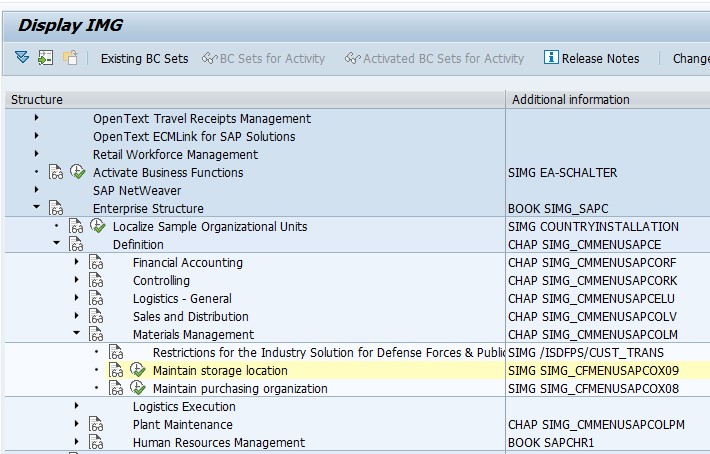
Go to SPRO > Enterprise Structure > Definition > Materials Management > Maintain Storage Location, or execute transaction OX09 directly.
Select the Plant
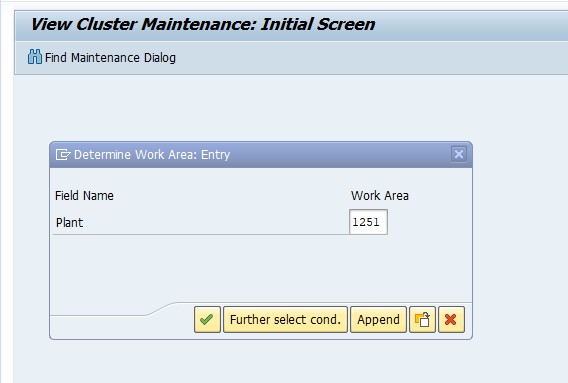
Choose the plant you're configuring for - in this example, Plant 1251. Every storage location you create is scoped to this plant and cannot be shared across plants.
Create a New Entry
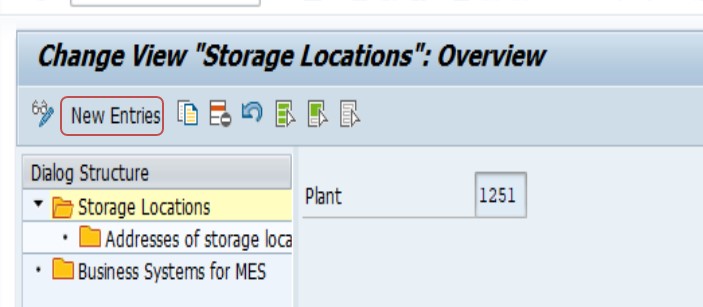
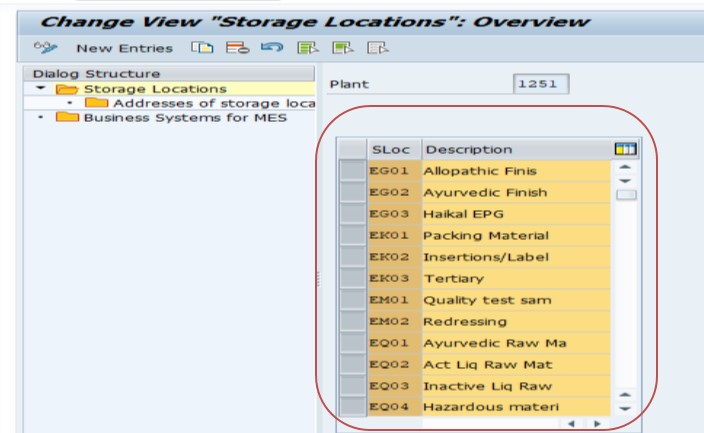
Click New Entries, enter a storage location code (typically 4 characters, e.g. FIN, RAWM, QINS) and a clear description. Keep the naming convention consistent across plants so reporting stays readable.
Save and Assign to a Transport Request
Click Save. Since this is a configuration (customizing) change, SAP will prompt you to assign it to a transport request so the storage location moves correctly from your development system through quality assurance and into production.
📝 Storage Location Naming Conventions and Best Practices
Storage location codes are only 4 characters long, which forces you to think carefully about naming before rollout, since renaming a storage location after transactions have been posted against it is disruptive. A few practices that hold up well across most SAP MM implementations:
- Use short, self-explanatory codes: RAWM (raw material), FGDS (finished goods), QINS (quality inspection), SCRP (scrap)
- Keep the same convention across every plant so cross-plant reporting is consistent
- Avoid embedding the plant code inside the storage location code - the plant is already captured separately on every transaction
- Document the storage location list centrally (a shared spreadsheet or wiki page) before go-live so business and consulting teams aren't creating duplicates independently
- Reserve a small block of codes for future storage areas so you don't run into naming conflicts as the warehouse footprint grows
📋 Storage Location vs Plant vs Warehouse Number - How They Relate
One of the most common points of confusion for consultants new to SAP MM and WM is understanding how these three organizational levels fit together. Here's a quick comparison:
| Level | Represents | Configured Via |
|---|---|---|
| Plant | A factory, distribution center, or major site | OX10 |
| Storage Location | A physical storage area within a plant | OX09 |
| Warehouse Number (WM) | The WM organizational unit tracking detailed bin-level or Lean WM stock movement | SPRO > Logistics Execution > Warehouse Management |
A storage location does not automatically get detailed physical stock-movement tracking - that only happens once it is linked to a WM warehouse number. If your project scope includes Warehouse Management, this link (maintained via table T320, Assignment of MM Storage Location to WM Warehouse Number) is what determines whether transactions like goods issue require a confirmed Transfer Order before posting. If you're troubleshooting an error where a delivery is stuck waiting on warehouse confirmation, see our related guide on the SAP WM "Delivery has not yet been put away/picked" error (message VL609), which walks through exactly how that link plays out in a live delivery scenario.
💼 Real-World Scenario: Setting Up Storage Locations at Arjun Industries
When Arjun Industries went live with SAP for its Pune manufacturing plant, Vikram Nair - the SAP MM consultant on the project - was responsible for defining the storage location structure before any master data (materials, BOMs, or stock) could be loaded. Rather than creating storage locations ad hoc as departments requested them, Vikram first walked the physical site with Suresh Mehta, the warehouse supervisor, and mapped out every distinct physical storage zone: raw material receiving, the main production floor buffer, a quality-hold cage, and the finished goods dispatch area.
From that walk-through, Vikram defined four storage locations - RAWM, PROD, QINS, and FGDS - using OX09 exactly as described above, entering each one against plant 1251 and transporting the configuration together as a single change request. Later, when the WM rollout for the finished goods warehouse began (covered in our VL609 troubleshooting guide), only the FGDS storage location needed to be linked to the new Lean WM-enabled warehouse number WH9, since that was the only zone requiring detailed pick/putaway confirmation - the other three continued operating at simple storage-location level without WM. This staged approach - defining storage locations first, then selectively enabling WM only where the business actually needs bin-level tracking - is a pattern worth reusing on most implementations, since it avoids forcing WM overhead onto storage areas that don't need it.
❌ Common Mistakes When Defining Storage Locations
Creating storage locations reactively, department by department
This leads to inconsistent naming and duplicate zones that represent the same physical area under two different codes.
Forgetting to assign the storage location to a transport request
The change works fine in the current client but never reaches quality assurance or production, causing "it works in dev but not in QA" tickets.
Assuming a storage location automatically gets WM tracking
Creating a storage location via OX09 alone does not enable Warehouse Management. It must be separately linked to a warehouse number if bin-level or Lean WM tracking is required.
Deleting a storage location that already has transactions posted against it
This can cause inconsistencies in historical stock and movement records. It's almost always safer to stop using a storage location going forward than to delete it outright.
📚 Relevant Tables and Follow-Up Configuration
| Table / Transaction | Purpose |
|---|---|
| T001L | Storage Locations master table, linked to plant |
| T001W | Plants/Branches master table |
| T320 | Assignment of MM Storage Location to WM Warehouse Number |
| OX10 | Define/maintain plant |
| OX18 | Assign plant to company code |
| LT03 / LT12 | Create and confirm Transfer Orders once a storage location is WM-relevant |
Once your storage location structure is defined, the typical next configuration steps are assigning the plant to a company code (OX18) if not already done, and - if Warehouse Management is in scope - linking the relevant storage locations to a warehouse number and activating Lean WM or full WM as needed.