Assign Standard Purchasing Organization to Plant in SAP MM (T-code OMKI)
Procurement teams cannot raise a single purchase order until SAP knows which buying office is responsible for which plant. This guide walks through the full OMKI configuration path, the business logic behind it, and the mistakes that cause defaulting issues later.
⚠ What Is a Purchasing Organization and a Plant in SAP MM?
A purchasing organization is an organizational unit in Materials Management that procures materials or services, negotiates purchasing conditions with suppliers, and takes legal responsibility for those transactions. A plant is the physical location - a factory, warehouse, or distribution centre - where materials are received, consumed, or stored. Neither object is very useful to procurement on its own until the system knows which buying office serves which site, and that's exactly the link that OMKI creates.
Three Common Purchasing Organization Models
- Centralized - one purchasing organization handles buying activity for every plant across the company code
- Plant-specific - each plant has its own dedicated buying office with full local autonomy
- Cross-company - a single purchasing organization procures on behalf of several company codes, common in shared-service arrangements
The model a business chooses shapes how many purchasing organizations exist in the system and how those organizations get mapped against plants during configuration. Plant fundamentals are covered in our plant definition tutorial, worth reviewing before this assignment step.
📋 Standard vs Reference Purchasing Organization - Why the Distinction Matters
SAP recognizes two different purchasing-organization-to-plant relationships, and mixing them up is one of the most common mistakes made by new consultants.
| Type | Behavior |
|---|---|
| Standard Purchasing Organization | The default buying office proposed automatically whenever a purchase order or requisition is created for that plant. Configured via OMKI. |
| Reference Purchasing Organization | Used purely to share purchasing conditions, contracts, and source lists across multiple purchasing organizations, without acting as a transactional default. |
OMKI configures the standard relationship - the one that pre-fills automatically on transactional documents. Getting this default wrong means buyers either see the wrong purchasing group populated on every PO, or get no default at all and must select manually, slowing down high-volume procurement teams.
💼 Business Scenario: Why This Configuration Matters
Picture a manufacturing group with three factories - Pune, Chennai, and Hyderabad - each with its own local buying team negotiating independently with regional vendors due to freight costs and supplier availability. Without a standard purchasing organization assigned to each plant, a buyer creating a purchase order for the Chennai factory could accidentally select the Pune purchasing organization, leading to incorrect vendor pricing, wrong incoterms, and delivery delays.
Assigning the correct standard purchasing organization to each plant through OMKI eliminates this risk by making the right buying office appear automatically the moment a procurement document is initiated for that location - especially important in decentralized landscapes where dozens of plants each report to a different regional purchasing office.
✅ Prerequisites Before Running OMKI
OMKI simply links two objects that must already exist, so confirm the following before starting:
- The company code has been created and activated
- The plant has been defined and assigned to the correct company code
- The purchasing organization has been created under the enterprise structure definition node
- The purchasing organization has already been assigned to the relevant company code, where applicable
- You hold authorization to edit client-level customizing tables, since this is a cross-client change
Skipping any of these either blocks OMKI from saving the entry, or lets you save an entry that later causes inconsistent master data errors once materials or vendors are extended to that plant.
🛠️ Step-by-Step: Assigning Standard Purchasing Organization to Plant Using OMKI
Open the Configuration Path
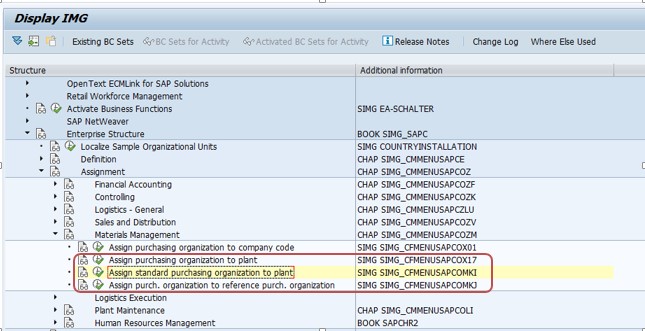
Log in with a user ID that has customizing access, then type OMKI directly into the transaction box, or follow SPRO > Enterprise Structure > Assignment > Materials Management > Assign Standard Purchasing Organization to Plant. Both routes reach the same customizing screen.
Create a New Entry
On the overview screen, click New Entries. This opens an editable table where you'll build the plant-to-purchasing-organization mapping row by row.
Enter the Plant Code
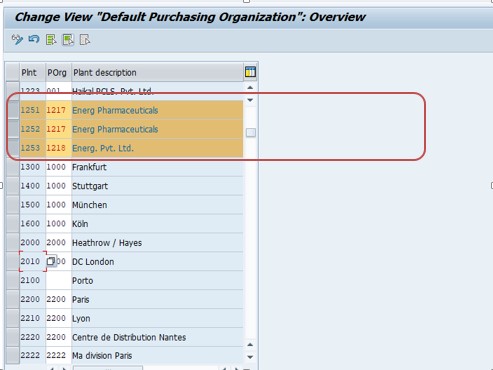
Enter the four-character plant code exactly as defined earlier in the enterprise structure. Use the F4 input-help dropdown to search by description if you're unsure of the exact code, since a typo here silently creates a mapping to the wrong location.
Enter the Purchasing Organization
In the adjoining column, enter the purchasing organization code that should be treated as the default buying office for that plant. Again, F4 search helps confirm the correct selection in landscapes with many similarly named purchasing offices.
Save and Assign to a Transport Request
Click Save. SAP prompts you to record the change under a customizing transport request. Assign it to an appropriate request with a meaningful description, for example "Assign standard purchasing org 3000 to plant 3005."
Verify the Assignment
Reopen OMKI and confirm the entry appears exactly as intended. Create a test purchase requisition or purchase order for that plant afterward to confirm the purchasing organization field defaults correctly, rather than relying purely on the customizing table view.
📝 Understanding the Fields in the OMKI Table
| Field | Purpose |
|---|---|
| Plant | The physical or logical site for which a default buying office is being defined |
| Purchasing Organization | The buying office that automatically populates whenever a procurement document is created for the specified plant |
| Plant Description | Read-only text pulled from plant master data, useful for visually confirming the correct site |
| Purch. Org. Description | Read-only text describing the buying office, helpful when multiple purchasing organizations share similar codes |
⚠️ Common Errors and How to Resolve Them
"Purchasing organization is not assigned to company code"
This occurs when the purchasing organization hasn't been assigned to the company code that owns the plant. Complete the purchasing-organization-to-company-code assignment first, then return to OMKI.
"Plant does not exist"
The plant code entered either has a typo or was never created. Double-check the code using transaction OX10 before attempting the OMKI entry again.
Purchase order still shows the wrong default purchasing organization
If OMKI is configured correctly but the wrong buying office still appears, check whether a user parameter (like EKO for purchasing organization) has been set at the user profile level, since a personal default can override the plant-level default on certain screens.
Entry saves without a transport request
If your system is a sandbox or standalone client, changes may save locally without prompting for a transport. In a proper development-to-production landscape, always confirm the change was captured in a request, otherwise it won't migrate forward.
🔗 Related SAP MM Transaction Codes
| T-code | Purpose |
|---|---|
| OMKI | Assign standard purchasing organization to plant |
| OX10 | Display or create plants |
| OX08 | Create purchasing organization |
| OX01 | Create company code |
| OX18 | Assign plant to company code |
| OX17 | Assign purchasing organization to plant (non-standard, multiple assignments) |
Reviewing this table alongside your project's blueprint document confirms every dependent configuration node has been completed in the right sequence.
🏢 Centralized vs Decentralized Procurement - A Deeper Comparison
The choice between centralized and decentralized procurement directly changes how many rows you'll end up creating in the OMKI table and how those rows are maintained over time.
Centralized Procurement
One purchasing organization is mapped as the standard default for every plant across the enterprise. This suits businesses negotiating bulk contracts with a small number of strategic suppliers and wanting consistent pricing regardless of which factory places the order. Fewer purchasing organizations mean easier spend consolidation and stronger vendor leverage, at the cost of local flexibility.
Decentralized Procurement
Each plant, or cluster of nearby plants, gets its own purchasing organization mapped as the standard default. This suits businesses spread across regions where regulations, currencies, or supplier ecosystems differ. The trade-off is more customizing entries, more authorization roles to secure, and a harder time consolidating enterprise-wide spend analytics.
Hybrid Procurement
Many large enterprises land in between - certain categories are bought centrally for cost leverage, while others are sourced locally for speed. A plant might still show only one standard purchasing organization in OMKI, but multiple non-default purchasing organizations get linked for category-specific sourcing.
🔒 Authorization Considerations for Maintaining OMKI
Because this transaction changes cross-client customizing tables, access should be tightly controlled. Typically only functional consultants or configuration leads carry the authorization object tied to enterprise structure table maintenance. Grant this access sparingly in production, and route every change through a formal change request process rather than allowing ad-hoc edits directly in the productive client. Even a small mistake here - swapping two plant codes - can silently misroute purchasing activity for weeks before finance or procurement teams notice the anomaly in their spend reports.
📅 How OMKI Fits Into a Broader Implementation Timeline
Company codes are created first, followed by plants, storage locations, and purchasing organizations. Only after all of these individual objects exist does the project team move into the assignment phase, where nodes like plant-to-company-code, purchasing-organization-to-company-code, and finally purchasing-organization-to-plant (OMKI) get configured. Teams that try to configure OMKI before its prerequisite objects exist will hit blocking errors, which is why most project plans place this activity inside the "organizational structure" work stream, well before material or vendor master data loading begins.
This configuration also resurfaces during a merger, acquisition, or plant expansion project, where new factories are added to an already-live SAP landscape. In these brownfield scenarios, the new plant's standard purchasing organization should match the intended sourcing strategy for that specific site, rather than simply copying whatever default was used for the nearest existing plant.
✅ Testing Checklist After Configuring OMKI
- Create a purchase requisition for the newly configured plant and confirm the purchasing organization defaults correctly
- Convert that requisition into a purchase order and verify the same default carries through
- Extend a test material master record to the plant's purchasing view and confirm no inconsistency warnings appear
- Check that the plant appears correctly under the purchasing organization's assigned sites in organizational structure reports
- Ask a business user with standard access to raise a live test transaction, confirming the defaulting works outside the developer's own profile
❓ Common Misconceptions About This Configuration Step
- "OMKI creates the purchasing organization" - it does not; the purchasing organization must already exist before OMKI can reference it
- "Only one purchasing organization can ever serve a plant" - not true; a plant can work with several, but only one is marked standard
- "Changing the standard assignment retroactively updates old purchase orders" - it doesn't; historical documents keep whatever was active at creation time
- "This setting controls pricing conditions" - pricing lives in condition records tied to purchasing info records and contracts, not in the OMKI table
📖 Glossary of Key Terms
| Term | Meaning |
|---|---|
| Enterprise Structure | The organizational skeleton in SAP consisting of company codes, plants, sales areas, and purchasing organizations |
| Purchasing Organization | The buying entity legally responsible for negotiating and issuing procurement documents |
| Purchasing Group | A smaller team or buyer within a purchasing organization handling specific categories or vendors |
| Plant | A physical or logical site where goods are produced, stored, or maintained |
| Standard Assignment | The default relationship that automatically populates on new transactional documents |
| Reference Purchasing Organization | A purchasing organization whose contracts and conditions are shared with other purchasing organizations |
| Transport Request | The change-tracking mechanism used to move customizing settings between SAP systems |
🔍 Case Study: Diagnosing a Misrouted Purchase Order
A mid-sized consumer goods company reported that purchase orders raised for their newly opened Hyderabad plant kept defaulting to the purchasing organization used by their older Chennai facility. The procurement team initially suspected a bug in the purchase requisition transaction. Tracing the issue, the support consultant discovered that the OMKI entry for the Hyderabad plant had never actually been created - the plant had simply been copied from Chennai during system build, carrying forward an outdated reference in a custom reporting table, while the genuine OMKI customizing entry was blank.
Because no standard purchasing organization existed for Hyderabad, SAP fell back on a much older configuration node that happened to point at Chennai's buying office. The fix took less than five minutes: a fresh entry was added in OMKI mapping Hyderabad to its correct purchasing organization, the change was captured in a transport request, and a test purchase requisition immediately confirmed the correct default. This illustrates why it's worth checking OMKI directly whenever a plant shows unexpected purchasing organization defaults, rather than assuming the root cause is more complex.
💡 Key Takeaways
- OMKI links a plant to its default, automatically populating purchasing organization for new procurement documents
- The purchasing organization and plant must already exist before this assignment can be made
- A plant can technically work with multiple purchasing organizations, but only one is ever marked as standard
- Changes here affect only future documents, never historical ones already saved in the system
- Testing with a live purchase requisition is the most reliable way to confirm the configuration is working as intended
- Every configuration change should move through a transport request and a proper change management process