Material 200072 Is Not Defined for Sales Org. 2001, Distr. Chan. 31, Language EN
This error appears when a material has not yet been extended with Sales views for the specific sales organization and distribution channel combination being used. Follow the steps below to resolve it using MM50. This guide also explains what a Sales Area actually is, walks through a real business scenario, lists related transactions, and gives you a prevention checklist so this error does not keep coming back for new materials.
🔍 Understanding This Error in Detail
The message "Material 200072 is not defined for sales org.2001, distr.chan.31, language EN" is one of the most common errors new SAP SD users encounter, and it looks more alarming than it actually is. SAP is simply telling you that while the material exists in the system - it has Basic Data, and possibly Purchasing or Accounting views - it has never been given a Sales view for the exact sales organization and distribution channel combination your sales order, quotation, or delivery is trying to use.
This distinction matters because materials in SAP are extended level by level. A material can be fully usable for procurement and inventory purposes in one plant while being completely invisible to the sales process, simply because nobody has extended it to the relevant sales area yet. The fix, in the overwhelming majority of cases, does not require any configuration change - it is a straightforward material extension using MM50, available to any user with material master maintenance authorization.
📦 What Is a Sales Area, and Why Does It Matter Here?
To understand this error properly, it helps to know exactly what a Sales Area is in SAP SD, since the error message references two of its three components directly.
| Component | What It Represents | Example |
|---|---|---|
| Sales Organization | The highest organizational unit responsible for selling and distributing goods, often a legal entity or major business unit | 2001 |
| Distribution Channel | The way products reach the customer - wholesale, retail, direct sales, e-commerce, and so on | 31 |
| Division | A product-line grouping used for reporting and, in some configurations, separate pricing | (not shown in this error, but part of the full Sales Area) |
A Sales Organization, Distribution Channel, and Division together form a Sales Area. Every material that needs to be quoted, ordered, or delivered through a specific Sales Area must be explicitly extended with a Sales view for that combination - SAP does not assume that because a material works in one Sales Area, it should automatically work in every other one a company happens to use.
⚠ Common Reasons
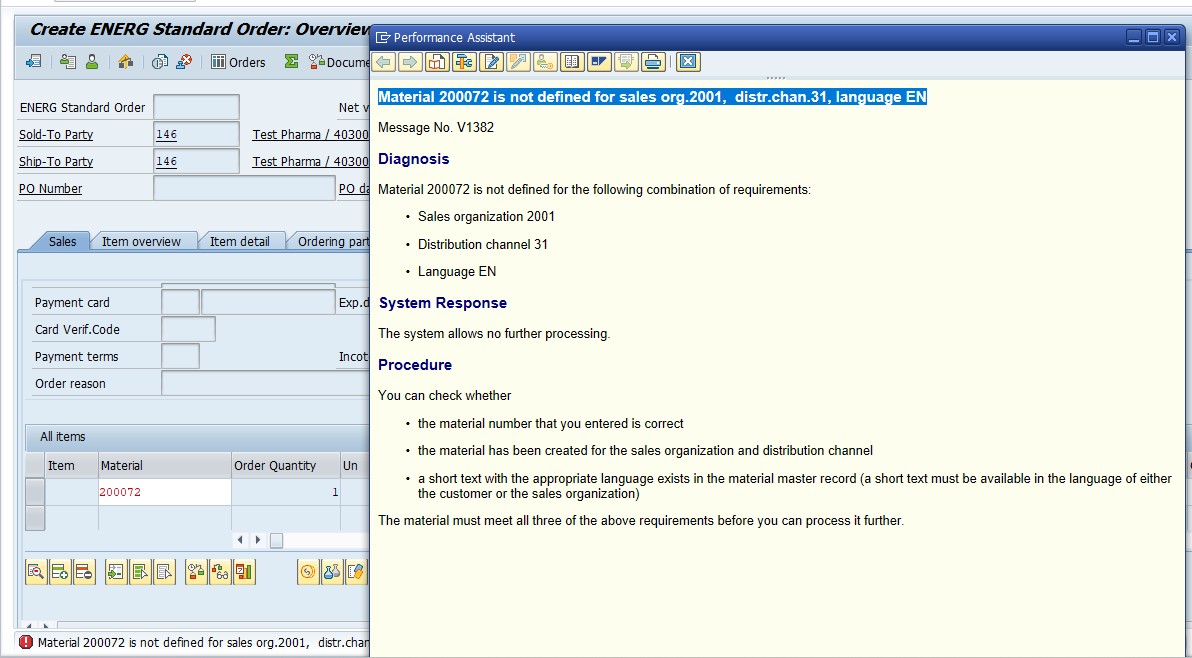
- The material has never been extended with Sales views for the sales organization and distribution channel used in the transaction.
- The material may have been created for a different plant, sales organization, or distribution channel entirely.
- The language-specific text (short text, sales text) for the material may be missing for the language used in the transaction.
✅ How to Fix "Material 200072 Is Not Defined for Sales Org. 2001" in SAP
Solution - TCode MM50
Follow Steps:
- Go to TCode MM50
- Select Sales tab - V
- Select Material No - 200072 - and select Execute button
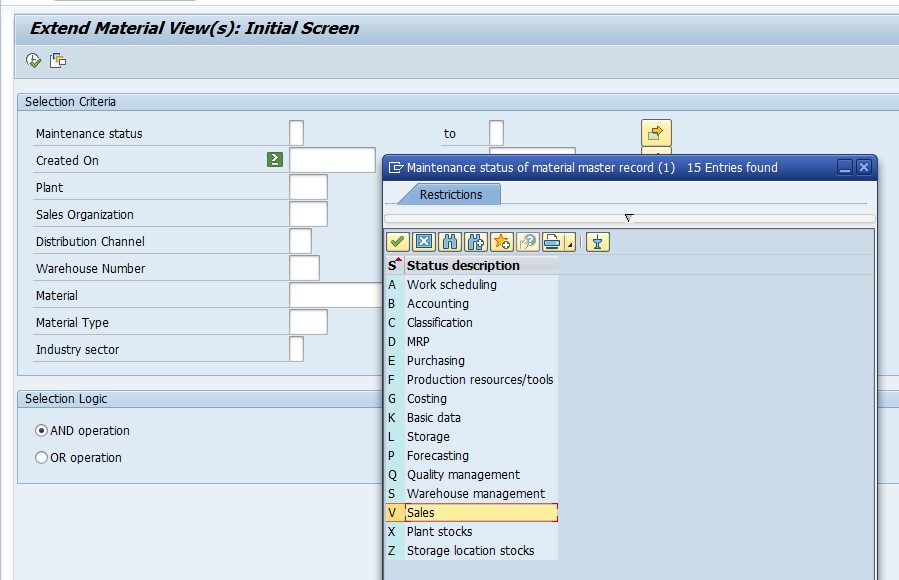
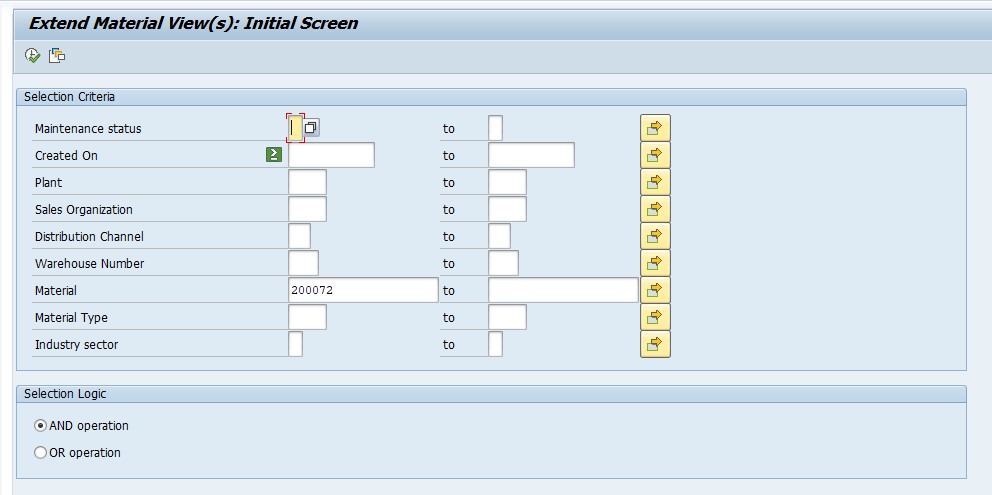
MM50 is specifically built for this situation - rather than opening the full material creation screen, it shows you a filtered list of materials missing a particular view (in this case, the Sales view marked "V") for a given selection. This makes it faster than MM01 or MM02 when you already know exactly which view is missing and just need to add it.
Select - Maintain Material
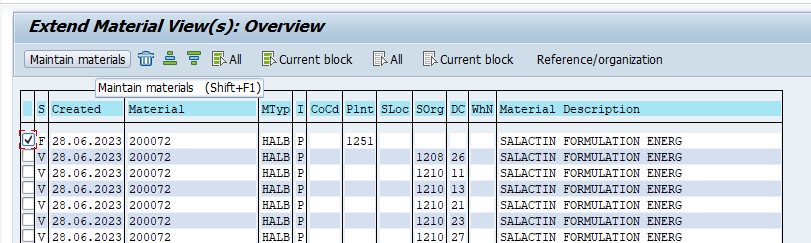
From the results list, selecting Maintain Material opens the material extension screen directly, taking you straight into the organizational level selection needed to extend the material's Sales view - you do not need to separately navigate through MM01 or MM02 to get here.
Then Select - Sales Tab (Sales Org 1)
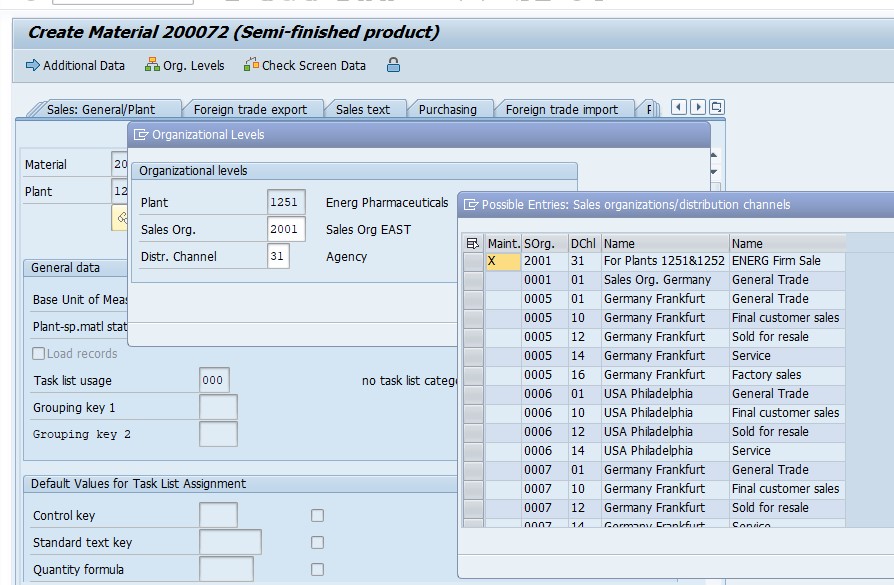
Then Select - Plant 1251, Sales Org 2001, Dist Chan 31
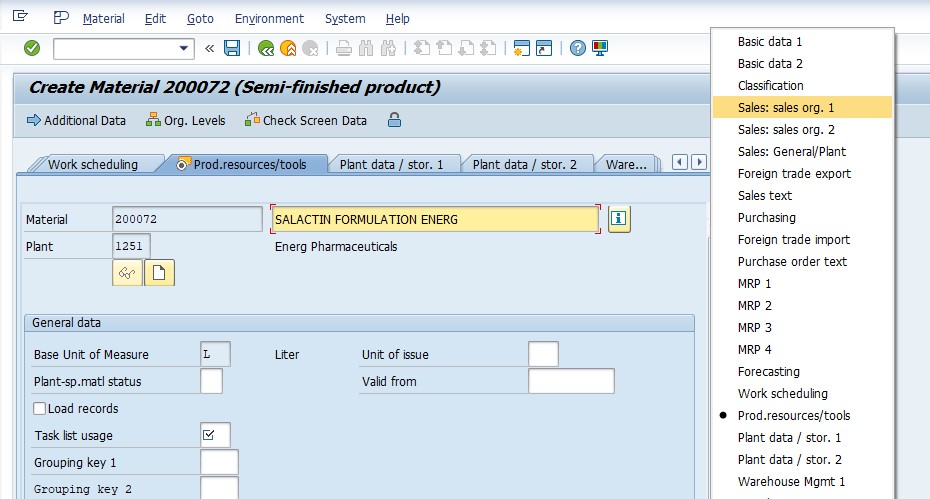
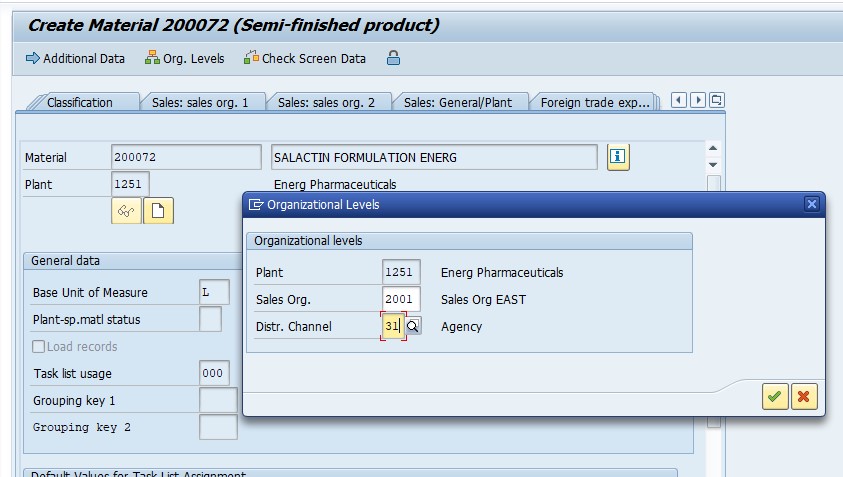
This is the step that actually matters most: the combination of Plant, Sales Organization, and Distribution Channel you select here determines exactly which Sales Area the material becomes usable for. Double-check these three values against the exact combination referenced in your original error message - extending the material to the wrong sales organization or distribution channel will simply move the error to a different combination rather than resolving it.
Then Extend Material - Maintain
Save.
Once the Sales view screen opens for the selected Sales Area, fill in the relevant fields - delivering plant, sales unit, item category group, and any pricing-relevant fields your business requires - before saving. Skipping fields here does not usually block the save, but it can cause a different, more specific error later during sales order creation if a required field (like item category group) was left blank.
💼 Real-World Scenario: How Pooja Mishra Hit This Error
Pooja Mishra, a sales support executive at Enarg Pharma in Pune, was creating a new sales order for a customer buying material 200072 through the company's retail distribution channel, sales organization 2001, distribution channel 31. The material had been in the system for months - it was already being purchased and stocked without any issue - but the moment she tried to add it to the sales order, SAP threw "Material 200072 is not defined for sales org.2001, distr.chan.31, language EN."
Her colleague Vikram Nair explained that the material had originally been set up for a different sales organization used by the company's wholesale channel, and nobody had extended it to the retail sales area yet. Using MM50, Priya selected the Sales tab, entered material 200072, and extended it to plant 1251, sales organization 2001, and distribution channel 31 - filling in the delivering plant and item category group on the Sales view before saving. The sales order processed without any further error on the next attempt, illustrating exactly how a material can be fully functional in one part of the business while still needing a simple extension before it works in another.
📋 Related Transactions Every SD User Should Know
| Transaction | Purpose |
|---|---|
| MM50 | Display materials missing specific views and extend them to new organizational levels, such as a Sales view for a new sales area. |
| MM01 | Create a brand-new material master record, including all relevant views up front. |
| MM02 | Change an existing material's data, including adding a Sales view if it already partially exists. |
| MM03 | Display material master data, useful for confirming which views and sales areas already exist before attempting an extension. |
| VK11 | Create pricing condition records, often needed immediately after a material is newly extended to a sales area. |
| OVXG | Assign sales organization to distribution channel, useful for confirming whether the combination itself is valid in configuration. |
| OVXA | Assign distribution channel to plant, another configuration check relevant if the Sales Area combination looks unusual. |
If you regularly onboard new materials into sales processes, keeping this list handy helps you move quickly from "material not defined" to a fully sellable material, including pricing, without needing to look up each transaction separately.
❗ Common Mistakes That Cause This Error to Reappear
- Extending the material to the wrong sales organization or distribution channel, which simply relocates the error to the combination you actually needed.
- Assuming a material fully set up for procurement or production automatically works for sales - Sales views are maintained completely separately from Purchasing or MRP views.
- Leaving required Sales view fields (such as item category group or delivering plant) blank, which can cause a different error later during sales order or delivery creation.
- Forgetting that a material may need to be extended separately for each distribution channel a company uses, even within the same sales organization.
- Not checking whether the sales organization and distribution channel combination itself is valid in configuration before attempting the material extension.
📋 Related SAP SD Error Messages You May Also Encounter
| Error / Message | Typical Cause |
|---|---|
| Material is not defined for sales org, distr. chan., language | Material never extended with a Sales view for that sales area |
| Sales area is not defined for customers | Customer master, rather than material master, missing the sales area extension |
| No pricing procedure could be determined | Material and customer are extended correctly, but pricing procedure determination configuration is missing |
| Item category cannot be determined | Sales view exists, but item category group or sales document type configuration is misaligned |
If you land on this page after searching for one of these related messages, the diagnostic order is the same: check whether the missing extension is on the material master or the customer master, then check pricing and item category configuration only once the basic extension is confirmed to exist.
💡 Best Practices to Prevent This Error From Recurring
- Standardize a material creation checklist that always includes Sales views for every active sales area a company uses, rather than leaving them to be added reactively.
- When onboarding a new product line, extend materials to all relevant sales organizations and distribution channels in a single batch rather than one at a time as errors appear.
- Train sales support staff on the difference between material master views (Basic Data, Purchasing, Sales, Accounting) so they immediately recognize this as a Sales view gap rather than a system fault.
- Document your company's active sales areas (sales organization, distribution channel, division combinations) so anyone extending a material knows exactly which combinations to check.
- After extending a material's Sales view, immediately verify pricing conditions exist via VK11, since a newly extended material often still needs pricing set up before it can actually be quoted or ordered.
⚙ Other Material Master Views Commonly Needed Alongside the Sales View
Extending a material's Sales view resolves this specific error, but a material being onboarded into an active sales process usually needs a few related views maintained around the same time, and it is worth checking these together rather than discovering each gap separately over the following days.
| View | Why It Matters for Sales |
|---|---|
| Sales: Sales Org Data 1 | Stores delivering plant, sales unit, and tax classification - directly required for this error's fix. |
| Sales: Sales Org Data 2 | Stores item category group and material statistics group, which affect item category determination and reporting. |
| Sales: General/Plant Data | Stores availability check group and transportation group, relevant once the material moves into delivery processing. |
| Foreign Trade Export | Required if the material will be sold cross-border, storing commodity codes and export control data. |
A common pattern is that fixing the immediate MM50 error gets the material into the sales order successfully, only for a new, more specific error to appear later during delivery or billing because Sales Org Data 2 or the availability check group was never populated. Checking all four of these views together during the initial extension avoids this drip-feed of follow-up errors.
📦 How Plant and Sales Organization Relate to Each Other
A detail that trips up newer SD users is that the Plant referenced in the error and fix (1251 in this example) is not itself part of the Sales Area - the Sales Area is Sales Organization plus Distribution Channel plus Division. The Plant instead comes into play because SAP needs a delivering plant assigned to the material's Sales view in order to determine shipping point, availability, and pricing during order processing.
A Sales Organization can be linked to multiple plants, and a single plant can supply multiple Sales Organizations, depending on how a company's distribution network is configured. This is why the material extension screen in MM50 asks for Plant, Sales Organization, and Distribution Channel together - the combination determines both which Sales Area the material becomes sellable in, and which physical location will actually fulfill orders for it.
🌐 Why the Error Message Also Mentions "Language EN"
The language component of this error message is easy to overlook, but it points to a genuinely separate potential cause from the sales area extension itself. Materials carry language-dependent short text and, in some configurations, sales-specific text maintained per language. If a material's Sales view has been correctly extended for the right sales organization and distribution channel, but the short text was never maintained in the specific language your sales document is using, SAP can still raise a similar-looking error referencing that language.
This matters most for companies operating across multiple countries or language regions, where a material extended and fully working for an English-language sales process might still be missing the equivalent short text needed for a French or German language sales document, even though the underlying Sales Area extension is otherwise identical. If MM50 shows the Sales view already correctly extended for the sales area in question and the error persists, checking the material's Basic Data view for missing language-specific text is the next logical diagnostic step.
📈 Business Impact If Left Unresolved
This error tends to surface at an inconvenient moment - right when a sales team is trying to close an order, often for a customer who is ready to buy immediately. If a new product line or a newly onboarded material has not been systematically extended across every active sales area, this error can appear repeatedly across different orders and different sales organizations over the following weeks, each time requiring the same MM50 fix reactively.
Beyond the immediate order delay, a pattern of materials missing Sales views for certain sales areas often signals a gap in the new-product launch checklist rather than a series of unrelated mistakes. A small process change - extending every new material to all active sales areas as a standard step during creation - eliminates this category of error going forward, rather than leaving sales teams to discover the gap order by order.
🧠 A Quick Troubleshooting Decision Tree
- Step A - Does the material have a Sales view at all, for any sales area? Check with MM03. If none exists, the material has likely never gone through sales extension at all.
- Step B - If a Sales view exists, is it for the correct sales organization and distribution channel? Compare against the exact sales area referenced in your error message - a material can have Sales data for one sales area while genuinely missing it for another.
- Step C - If the Sales view exists for the correct sales area, is the language-specific short text or sales text missing? Some errors that look identical to this one are actually about missing translated text rather than a missing organizational extension - check the material's Basic Data view for the language in question.
- Step D - If everything above checks out, is the sales organization and distribution channel combination itself valid in configuration? Check OVXG and OVXA; if the combination is not properly assigned, even a correct material extension may not resolve the error.
Working through these four checkpoints in order resolves the large majority of cases at Step A or B, and rarely requires escalation to a configuration check at Step D.
✅ How to Verify the Fix
After extending the material in MM50 and saving, run MM03 to display the material and confirm the Sales view now shows data for the correct plant, sales organization, and distribution channel. Then retry the original transaction - typically adding the material to a sales order or quotation - and confirm it now processes without the error.
If the material now saves into the sales document without error but pricing does not calculate correctly, that is a separate, expected next step rather than a sign the extension failed - newly extended materials commonly still need pricing condition records created via VK11 before they can be quoted at the correct price.
📚 Quick Glossary of Terms Used in This Guide
- Sales Organization: The highest organizational unit in SAP SD responsible for selling and distributing goods.
- Distribution Channel: The route through which products reach the customer, such as wholesale, retail, or direct sales.
- Sales Area: The combination of Sales Organization, Distribution Channel, and Division that a material or customer must be extended to before being usable in sales documents.
- Material Extension: The process of adding new organizational-level views (such as a Sales view) to an existing material master record.
- Sales View: The material master view storing sales-specific data such as delivering plant, sales unit, and item category group, maintained per sales area.
🎯 Conclusion
"Material is not defined for sales org, distribution channel, language" looks like a serious configuration failure the first time you see it, but it is almost always a simple, one-time material extension gap. Running MM50 to add the missing Sales view for the correct sales organization and distribution channel resolves the overwhelming majority of cases in a couple of minutes. Keep the Sales Area explanation, related transactions, and prevention checklist above in mind, and this error becomes a quick, confident fix rather than a recurring interruption every time a material reaches a new part of the sales organization.
This guide is written for the range of people who typically land on this page: sales support staff like Pooja Mishra extending a material for the first time, SAP SD consultants setting up new sales areas, SAP end users troubleshooting a sales order that will not save, and students learning how SAP's organizational structure connects material master data to the sales process. Whichever group you fall into, the same core principle applies - this error simply means the material and this particular sales area have not been formally introduced to each other yet, and MM50 is how you make that introduction.
If your organization operates across many sales organizations, distribution channels, and languages, it is worth keeping a short internal reference sheet listing every active Sales Area combination alongside the plants that supply each one. New team members extending a material for the first time can then check that reference and extend to every relevant combination in one pass, rather than discovering each missing Sales Area reactively, one customer order at a time, over the weeks following a new product launch.