✅ How to Read SAP Functional Documents Step-by-Step Guide for Beginners
SAP TUTORIALS-
How to Read SAP Functional Documents Step-by-Step Guide for Beginners
Introduction-
Introduction: Today we are discuss How to read SAP functional documents is one of the most important skills for SAP functional consultants, business analysts, and technical teams. These documents work as a bridge between business requirements and technical implementation. If you can read and explain them correctly, you can reduce errors, speed up project delivery, and communicate more effectively with partner. This tutorial or document breaks down the process step by step, using simple language and real-world examples to help you master the skill.
🔹What Is an SAP Functional Document?
🔸 In SAP functional document explains what the business needs and how SAP should fulfil those needs — without diving deeply into technical code
🔹Purpose of SAP Functional Documents Define
🔸SAP functional documents ensure correct understanding, implementation, testing, and support of business requirements in SAP systems..
🔹Purpose of SAP Functional Documents
🔹1) Translate business requirements into SAP processes.
🔹2) Guide ABAP and technical consultants.
🔹3) Ensure your partner agree on scope and behaviour.
🔹4) Testing and go-live.
✅Who Uses These Documents?
🔹1) SAP Functional Consultants.
🔹2) ABAP / Technical Consultants.
🔹3) Business Users.
🔹4) QA & Testing Teams.
🔹5) Project Managers.
🔹 Types of SAP Functional Documents
SAP User Understanding the document type helps you know how to read it.
🔸1)Business Requirement Document (BRD)
🔹It is a high-level overview written in plain business language—no SAP patter allowed. It outlines what the business wants to achieve (e.g., "We need to automate customer credit checks") without worrying about how the software will actually do it..
I) High-level business needs, II) Written in business language, III) Focuses on what is required.
🔸2)Functional Specification Document (FSD)
🔹It is the most critical document for consultants and developers. It translates the BRD into SAP-speak, detailing specific logic, data mapping, and configuration.
I) Detailed functional behaviour, II) Explains SAP configuration and logic, III) Most important document to master.
🔸3)Gap Analysis Document
🔹This document identifies the gaps between standard SAP features and the business requirements.
I) Compares standard SAP vs business needs, II) Highlights custom developments
🔸4)User Stories & Process Documents
🔹Common in swift projects, these focus on specific user roles and scenarios (e.g., "As a Warehouse Clerk, I want to scan a barcode to update inventory").
I) used in swift SAP projects, II) Scenario-based explanations
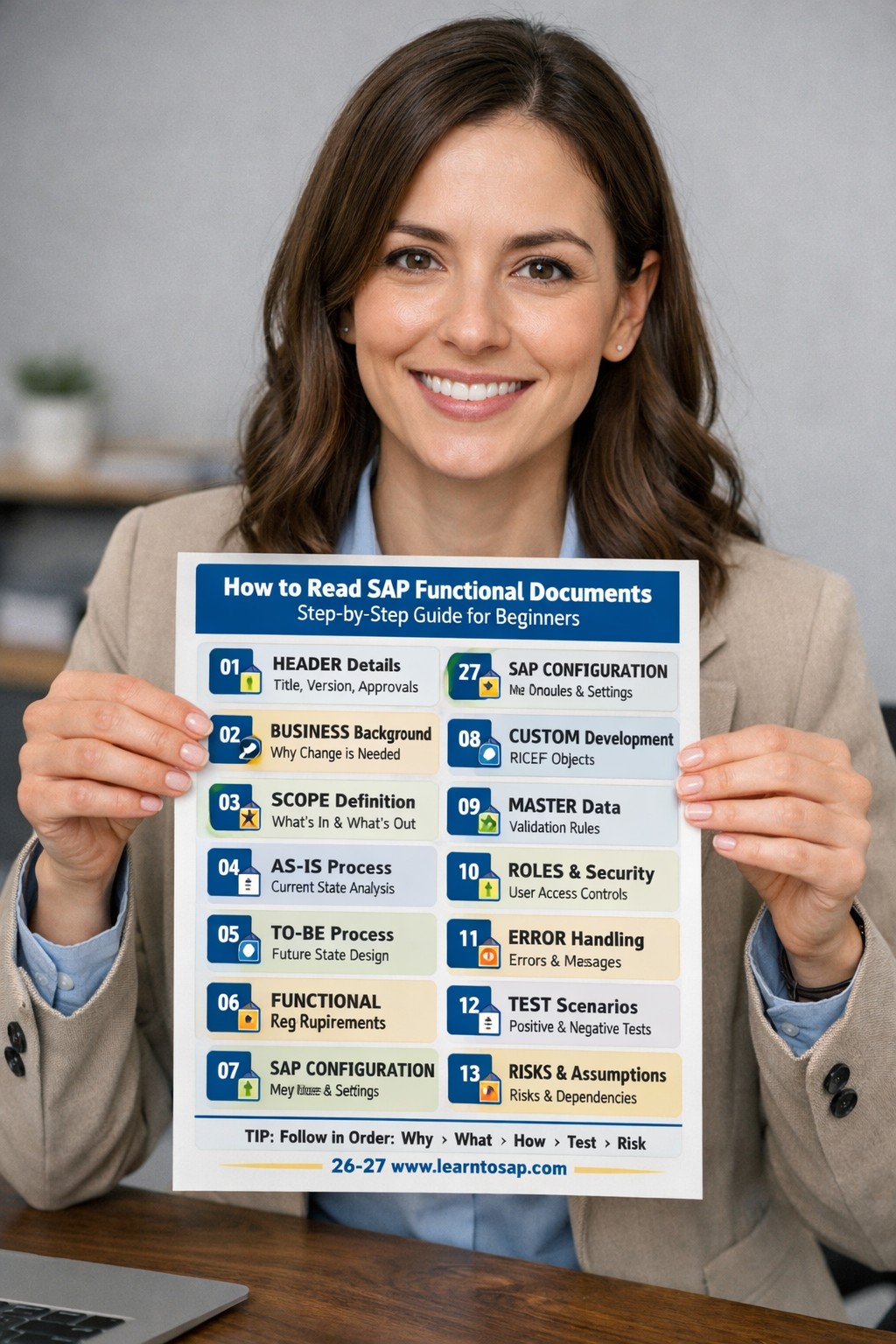
🔹Standard Structure of an SAP Functional Document
🔸When reading an SAP Functional Specification Document (FSD), following a standard sequence ensures you capture the critical logic before getting lost in technical details.
🔸1) Document Header-
🔸Key Functions-
I)Document title-Name of the solution or change
II) Version history-Tracks updates made over time
III) Author & approvals. And Change log- Who created and approved the document
🔸2) Business Background & Objective-
🔸Key Functions-
I)Why the change is needed-New requirement, issue, or improvement
II)Current business pain points-Problems in the existing process
🔸3) Scope Definition-
🔸Key Functions-
I)What SAP will cover?-Included processes and features
II)What SAP will NOT COVER?-Out-of-scope items
🔸4) AS-IS Process-
🔸Key Functions-
I)How the process works today-
II) Manual steps or legacy systems and Existing issues
🔸5) TO-BE Process (Future State)-
🔸Key Functions-
I) New SAP process flow
II)Roles and responsibilities and Automation points
🔸6) Functional Requirements Section-
🔸Key Functions-
I) Requirement ID and Description-Clear and traceable requirements
II)Priority (High/Medium/Low)-High / Medium / Low
🔸7) SAP Configuration Details-
🔸Key Functions-
I)Lists involved SAP modules such as MM, SD, FI, CO, PP, WM, etc.-
II)Shows cross-module integration (example: SD billing → FI accounting).
🔸8) Custom Developments & Enhancements-
🔸Key Functions-
I)) RICEF objects (Reports, Interfaces, Conversions, Enhancements, and Forms)
II) Workflow logic-Approval flows,Trigger conditions,Escalation rules
🔸9) Master Data & Transaction Data-
🔸Key Functions-
I)) Validation rules AND Mandatory vs optional values-Validation checks (example: cost center mandatory)
II) Data fields-Master data fields (Vendor, Customer, Material),Master data fields (Vendor, Customer, Material)
🔸10) Roles, Authorizations & Security-
🔸Key Functions-
I) User roles AND Approval controls-Example-Business roles (Requester, Approver, Accountant) also Approval levels based on value or hierarchy
II)Access restrictions-Who can create, change, approve, or display documents
🔸11) Error Handling & Exception Scenarios-
🔸Key Functions-
I) Possible errors-Example-Missing master data,Incorrect configuration,Authorization issues
II)System messages-Example-Error, warning, and information messages and User guidance on corrective actions
🔸12) Test Scenarios & Test Cases-
I) Positive test cases AND Negative test cases-Example-Normal business flow,Successful end-to-end process and Negative-Invalid data,Authorization failures
🔸13) Assumptions, Risks & Dependencies-
I) Business assumptions-Process assumptions and Dependencies on other teams or projects