SAP Account Determination Wizard - OMWW Complete Step-by-Step Guide
Automatic account determination is what lets every goods receipt, invoice, and stock movement post to the correct G/L account without manual entry. This guide walks through the full OMWW wizard, explains the transaction keys and valuation classes behind it, and covers the errors this configuration causes when something's missing.
⚠ What is Account Determination in SAP?
The Account Determination Wizard, accessible through transaction OMWW, simplifies the process of configuring account determination settings in SAP MM. Account determination is the process of mapping specific financial accounts to Materials Management transactions -assigning General Ledger (G/L) accounts to various transaction keys, such as goods receipt, invoice receipt, or goods issue, and specifying the relevant account assignments for each posting. Proper account determination ensures that financial data is correctly recorded, tracked, and reported every time a material movement happens, without requiring a user to manually pick a G/L account on each transaction.
Rather than configuring this directly through the raw OBYC transaction (covered further below), the OMWW wizard walks a consultant through the same underlying configuration in a structured, sequential, question-and-answer format -making it considerably more approachable for someone setting up account determination for the first time.
✅ Step-by-Step: Using the Account Determination Wizard (OMWW)
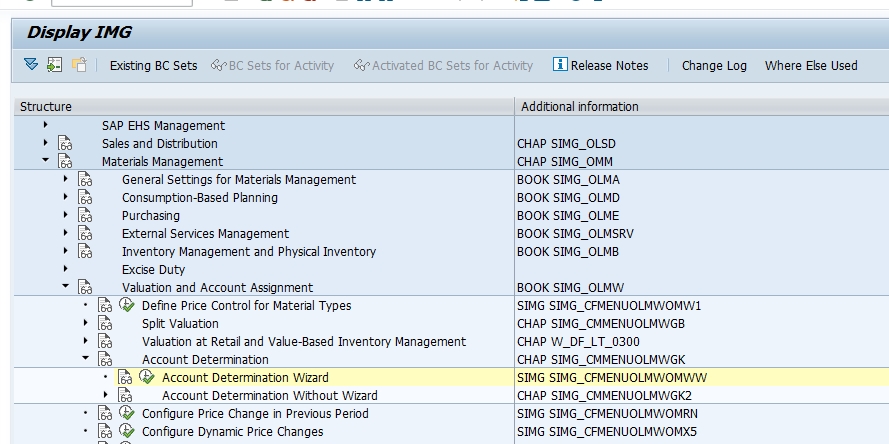
Navigate to the Wizard
Go to SPRO > Materials Management > Valuation and Account Assignment > Account Determination Wizard, or execute transaction OMWW directly.
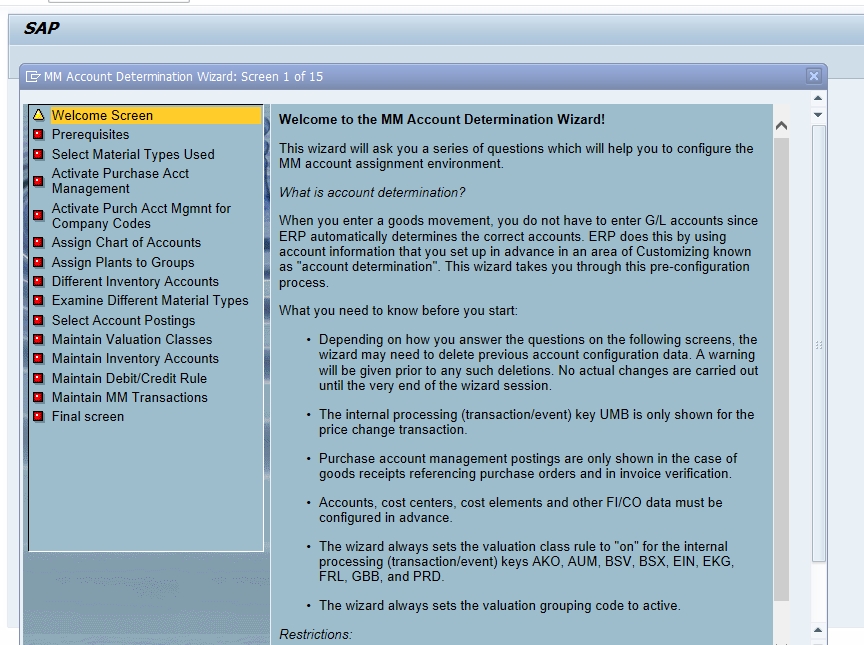
Review Prerequisites
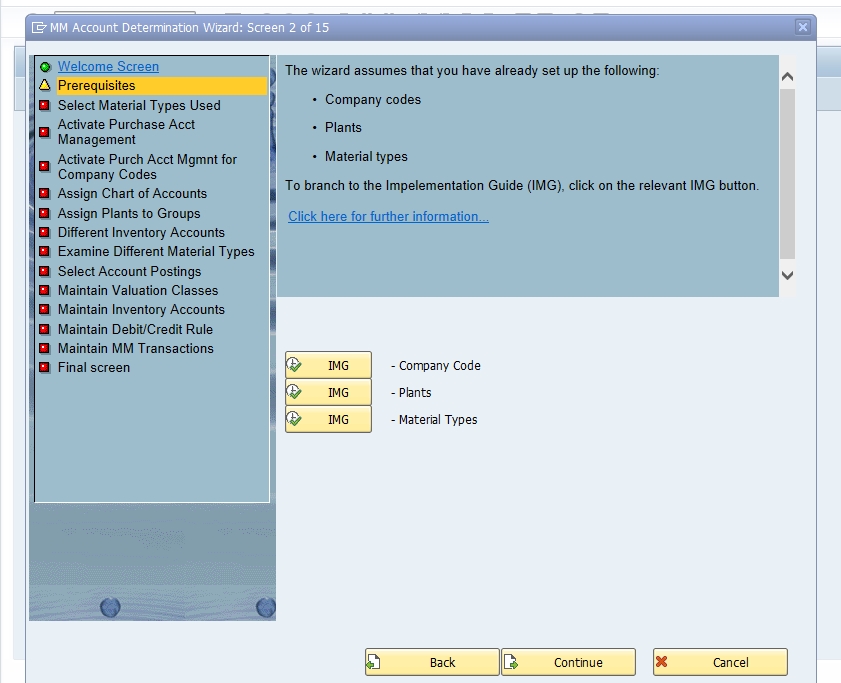
Click Continue, then review 1) Prerequisites -confirming chart of accounts, valuation area, and material type setup are ready before the wizard proceeds.
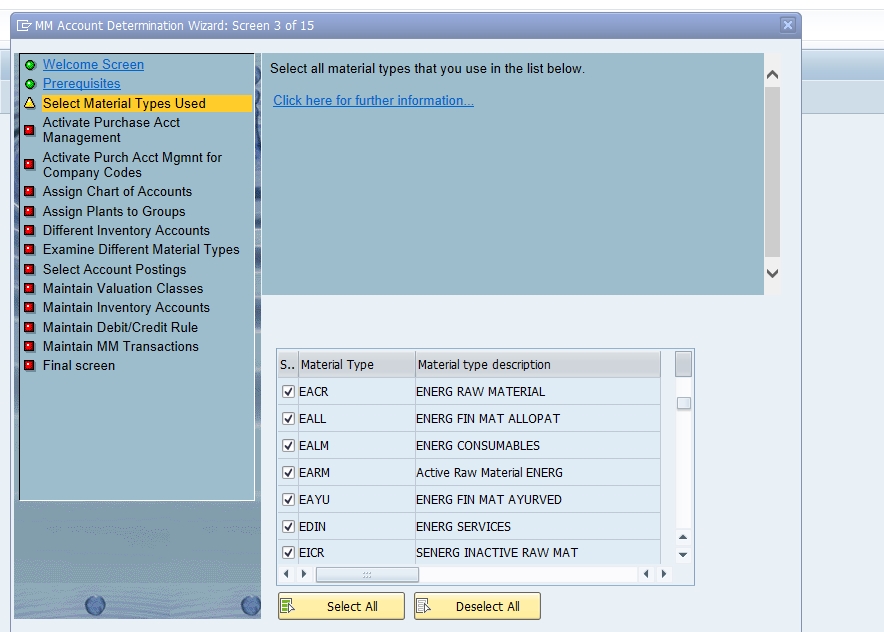
Select Material Types Used and Activate Purchase Account
At 2) Select Material Types Used, Activate Purchase Acct, identify the material types your organization uses, since different material types may require different account determination settings -for example, EACR - Energy Raw Material.
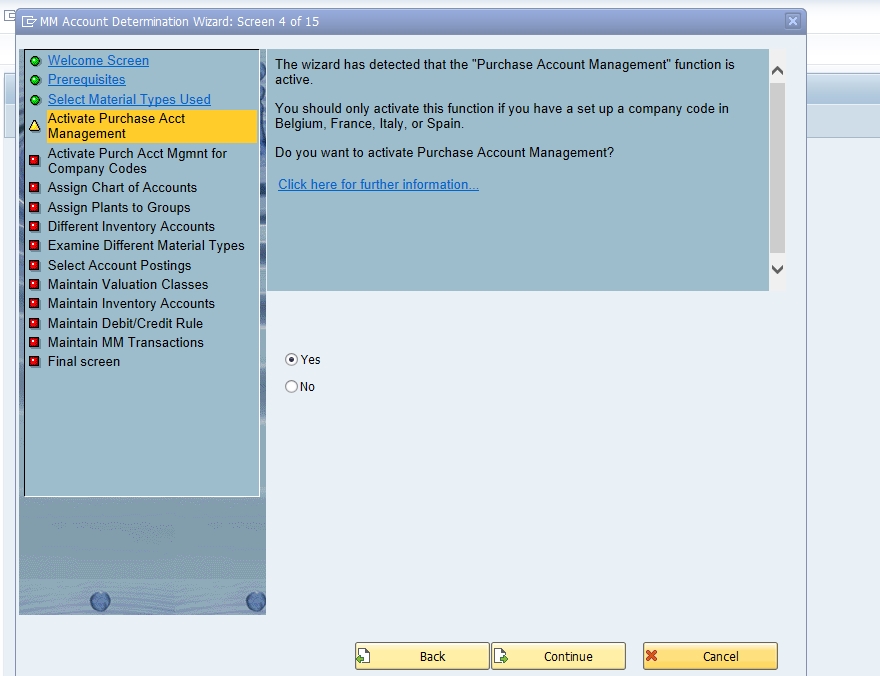
Activate Purchase Account Management
Click Continue, then at 3) Activate Purchase Account Management, confirm whether purchase account management should be activated -select Yes if your organization needs this integration between financial transactions and procurement processes.
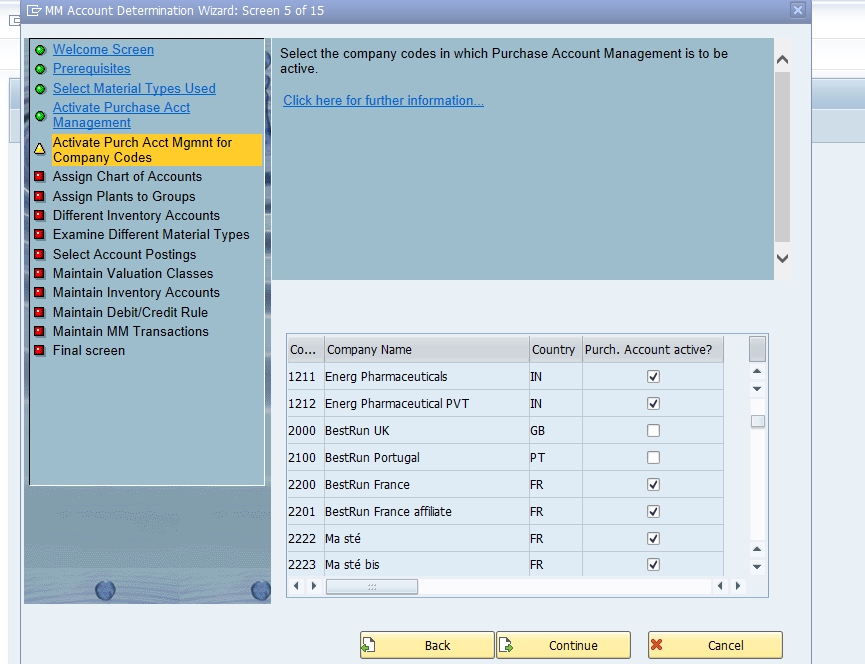
Activate Purchase Account Management for Company Codes
Click Save, then at 4) Activate Purchase Account Management for Company Codes, verify activation for the relevant company codes where procurement takes place -for example, Company Code 1211 (tick) and Company Code 1212 (tick).
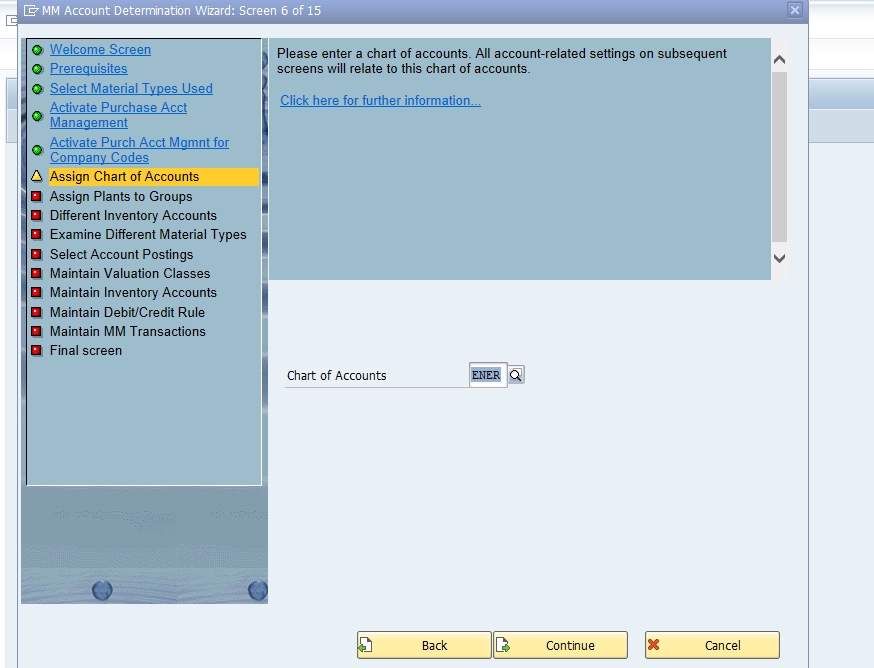
Assign Chart of Accounts
At 5) Assign Chart of Accounts, assign the relevant chart -for example, ENER.
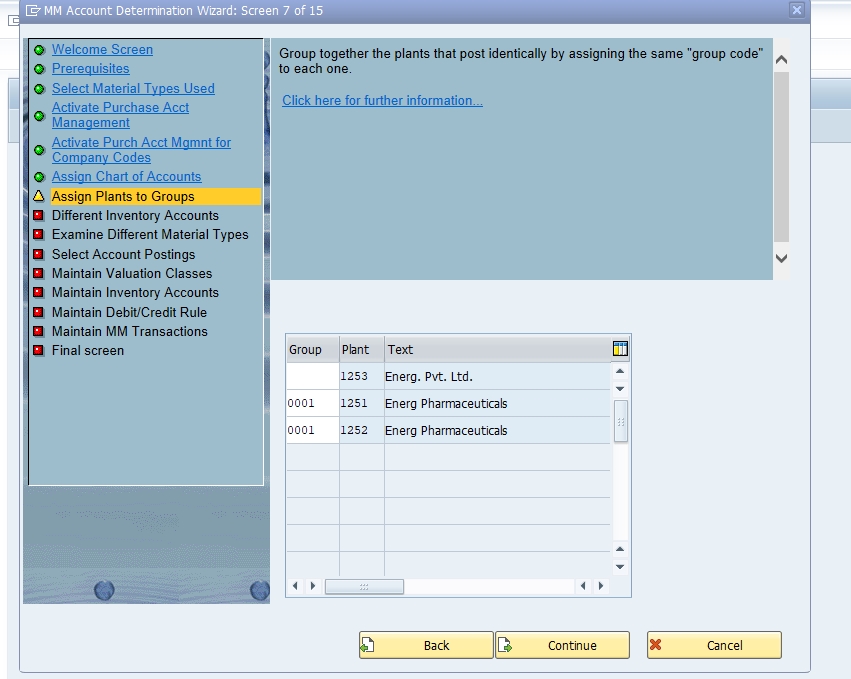
Assign Plant to Groups
Click Continue, then at 6) Assign Plant to Groups, group your plants for valuation grouping purposes -for example, 001 to 1251 and 001 to 1252.
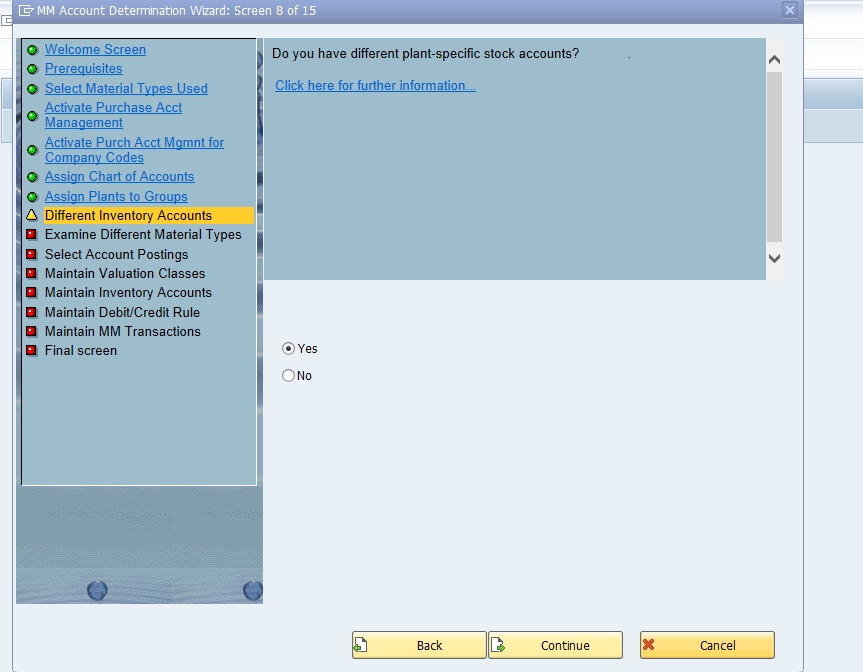
Different Inventory Accounts
At 7) Different Inventory Accounts, select Yes if different material categories should post to different inventory G/L accounts rather than sharing one.
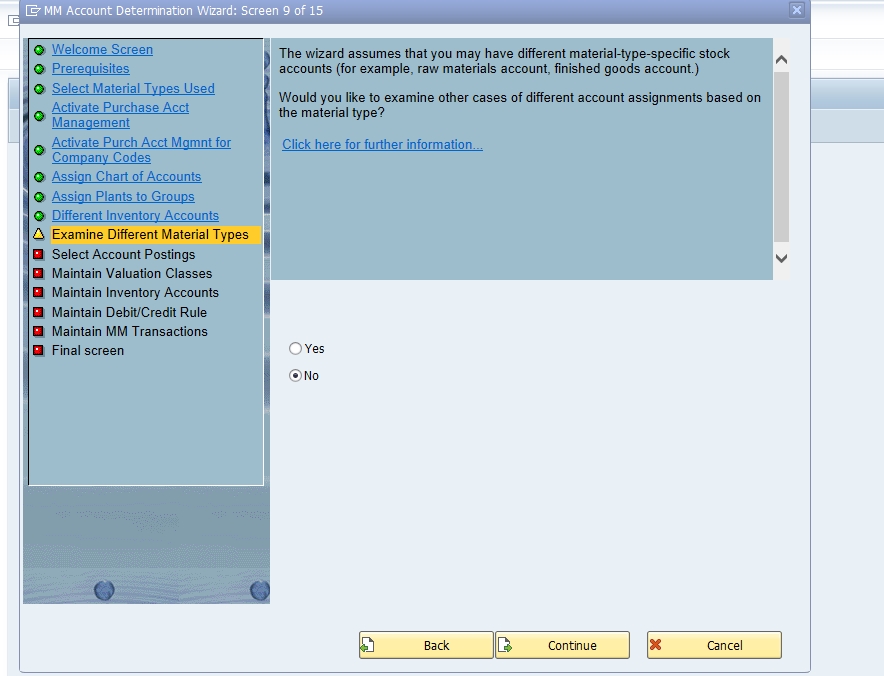
Examine Different Material Types
At 7) Examine Different Material Types, select No if a further material-type-level breakdown isn't needed beyond what's already been configured.
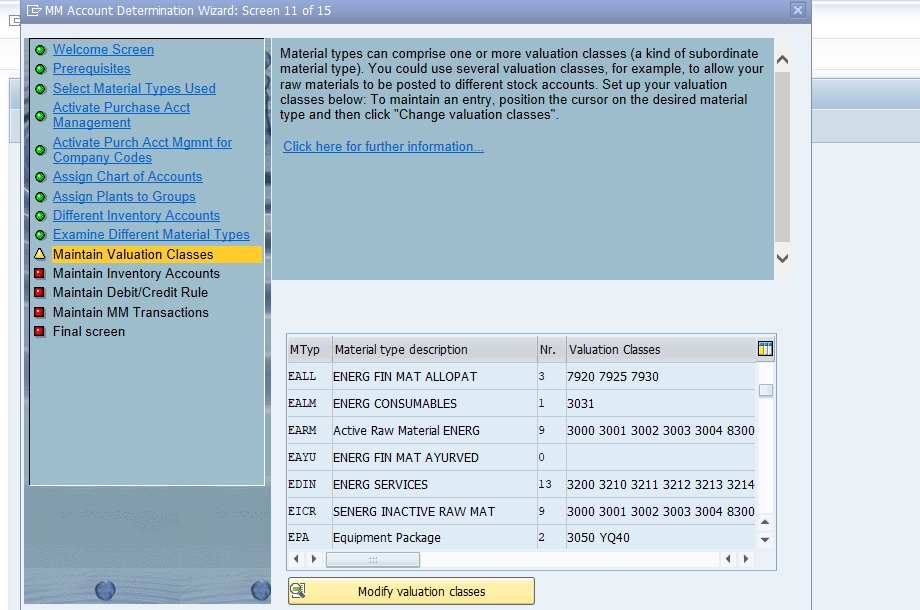
Maintain Valuation Classes
At 8) Maintain Valuation Classes, assign valuation classes to material types -for example, Material Type EALL with valuation classes 7920, 7925, 7930.
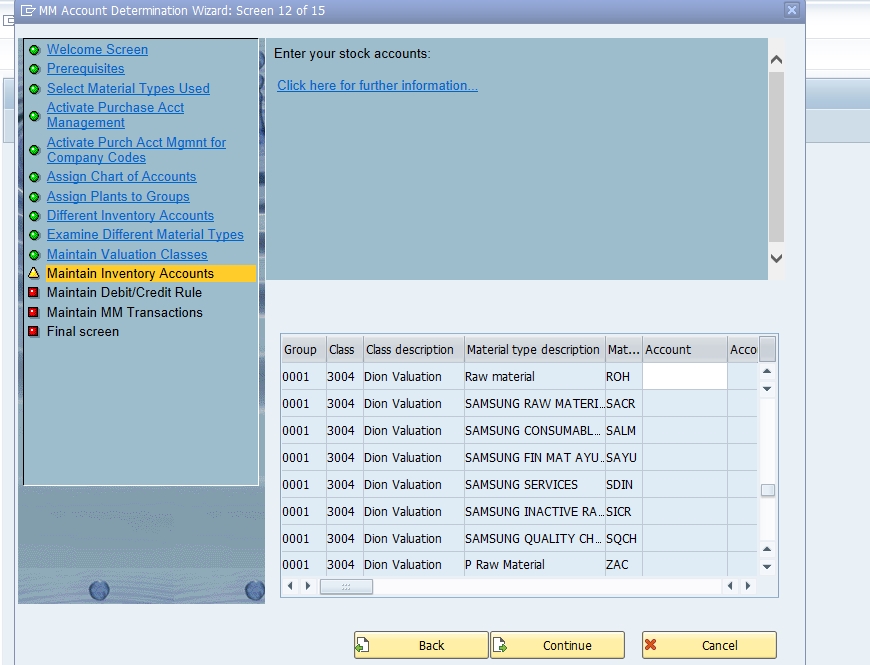
Maintain Inventory Accounts
At 9) Maintain Inventory Accounts, set up the G/L accounts used for inventory transactions -specifying accounts for stock-in, stock-out, and other inventory movements based on the valuation classes and material types configured in the previous step.
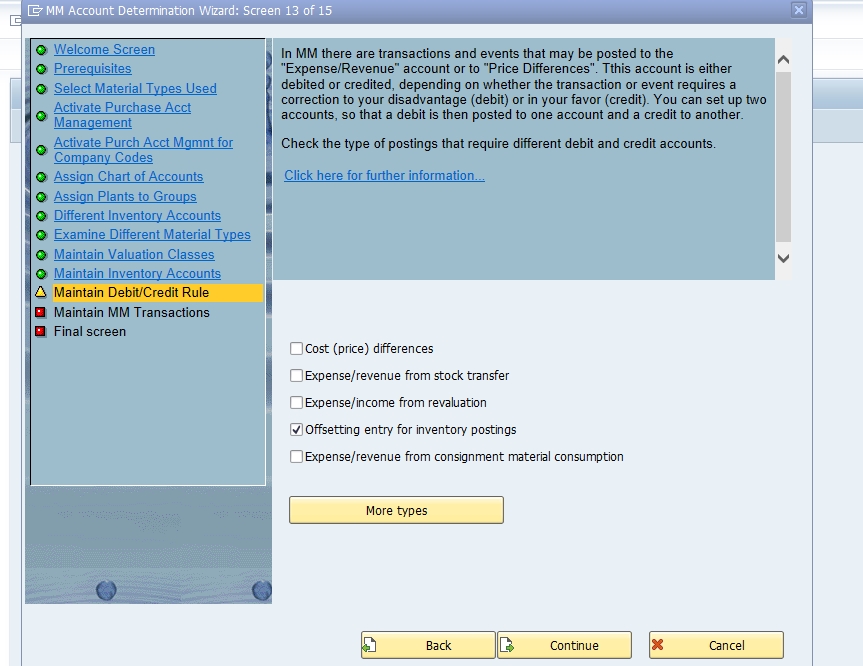
Maintain Debit/Credit Rules
At 10) Maintain Debit/Credit Rules, tick Select Offsetting Entry where an automatic offsetting posting is required for the relevant transaction.
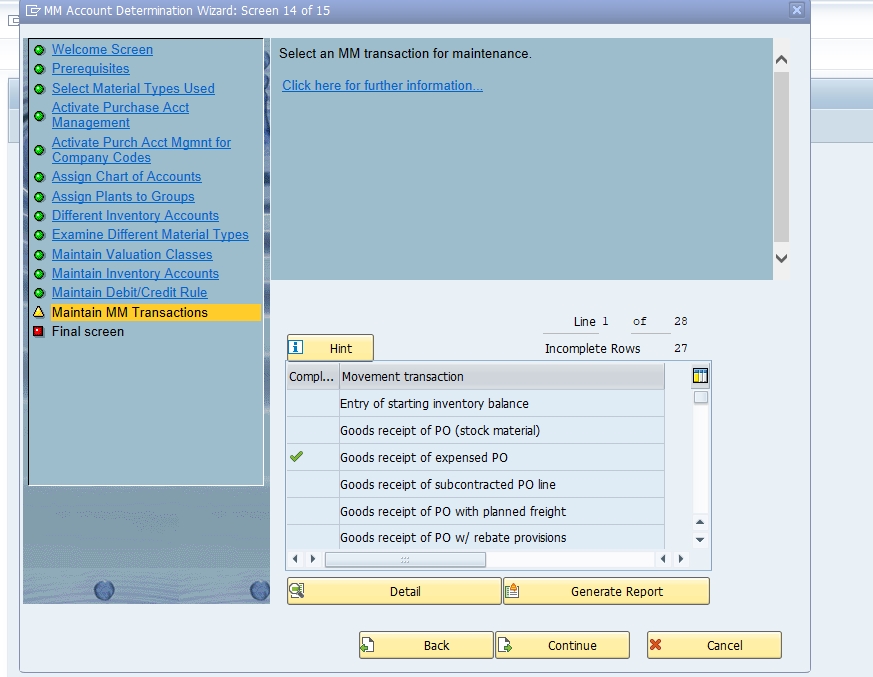
Maintain MM Transaction
Review and confirm the MM Transaction mapping generated by the wizard so far, verifying it matches your intended account determination logic.
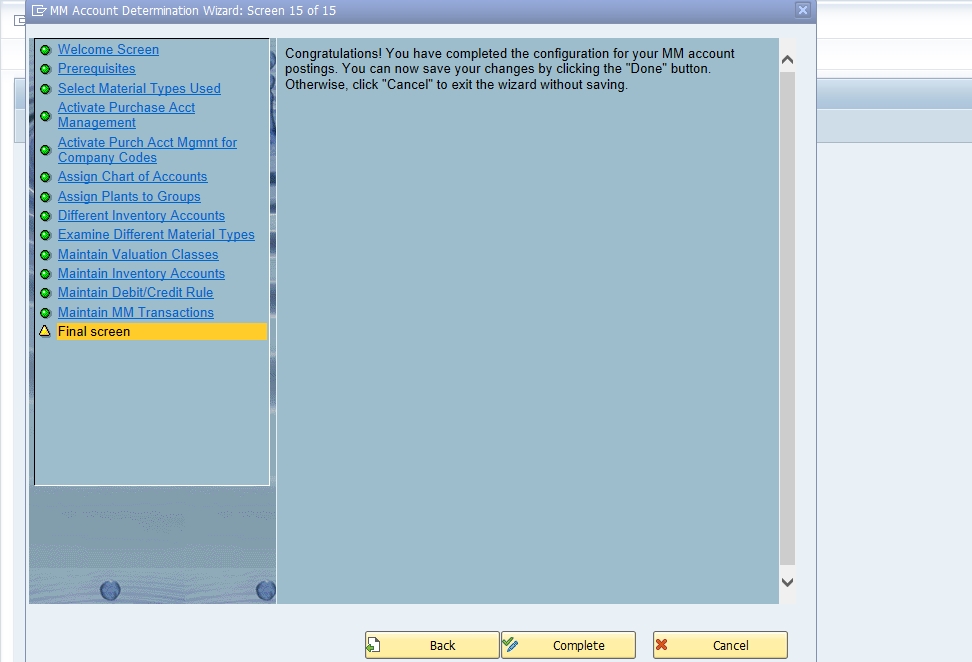
Complete the Wizard
On the final screen, review the summary and select Complete to finish the wizard. As with all customizing changes, confirm the configuration is captured in a transport request so it moves correctly through your landscape.
📋 OMWW vs OBYC: Two Doors to the Same Configuration
It's worth being clear about how OMWW relates to the more commonly referenced transaction OBYC, since both ultimately configure the same underlying account determination tables.
| Aspect | OMWW (Wizard) | OBYC (Direct Configuration) |
|---|---|---|
| Format | Guided, sequential question-and-answer wizard | Direct table maintenance per transaction/event key |
| Best For | Initial setup, consultants newer to account determination | Experienced consultants making targeted changes to specific transaction keys |
| Speed for Small Changes | Slower -walks through the full sequence each time | Faster -jump directly to the relevant transaction key |
| Underlying Data | Same tables (e.g. T030) | Same tables (e.g. T030) |
A practical pattern many consultants follow: use OMWW for the initial, comprehensive setup of account determination for a new company code or valuation area, then switch to OBYC for smaller, targeted adjustments afterward -such as adding a single new valuation class or correcting one transaction key's G/L account mapping -rather than re-running the full wizard sequence for a minor change.
📋 Common Transaction/Event Keys in Account Determination
Underneath both OMWW and OBYC, SAP account determination is built around transaction/event keys -standard, non-modifiable codes each representing a specific type of automatic posting. Understanding the most common ones makes troubleshooting account determination errors far faster:
| Key | Meaning |
|---|---|
| BSX | Inventory posting -the stock account debited/credited during goods movements |
| WRX | GR/IR clearing account -used for goods receipt/invoice receipt clearing |
| GBB | Offsetting entry for inventory postings -varies further by general modification (e.g. AUA, VBR, ZOB) |
| PRD | Price differences -posted when actual price differs from standard/moving average price |
| KDM | Exchange rate differences in materials management |
| FRL / FRE | Freight clearing (planned/unplanned delivery costs) |
| UMB | Gain/loss from revaluation |
Each of these keys is configured against a combination of chart of accounts, valuation modification (grouping), and valuation class -exactly the layered structure the OMWW wizard walks you through building up step by step in the sequence covered above.
📦 Valuation Class: The Central Grouping Key
A valuation class, assigned in the material master's accounting view, groups materials that share similar accounting requirements -for example, raw materials, semi-finished goods, and finished goods might each have their own valuation class, even if they're all technically the same material type. Account determination rules are configured against the combination of valuation class and transaction/event key, meaning every material sharing a valuation class posts to the same G/L accounts for the same type of movement.
This is why step 10 in the wizard walkthrough above -maintaining valuation classes against material types -is such a pivotal moment in the configuration sequence: get the valuation class structure right, and every material assigned to it inherits correct, consistent account determination behavior automatically. Get it wrong, or leave materials without a properly mapped valuation class, and postings will fail with an account determination error the very first time a transaction is attempted.
💼 Real-World Scenario: Configuring Account Determination at Arjun Industries
When Arjun Industries expanded into personal care products, Priya Mehta, supporting the FI/MM configuration, used the OMWW wizard to set up account determination for the new product line's material types, since it was her first time configuring this area of the system and the guided sequence reduced the risk of missing a required step. She activated purchase account management for the two company codes running the new business (1211 and 1212), assigned the ENER chart of accounts, and grouped the new plants together under a shared valuation grouping code.
A few weeks later, when a new sub-category of packaging material needed its own distinct inventory G/L account, Vikram Nair handled the change directly through OBYC rather than re-running the full wizard, since it was a small, targeted addition to an already-working configuration -illustrating the practical division of labor between OMWW for comprehensive initial setup and OBYC for smaller, ongoing maintenance covered in the comparison above.
❌ Common Mistakes in Account Determination Configuration
Leaving a material's valuation class unmapped to any account determination rule
The most frequent root cause of "account determination not possible" errors -every valuation class used by a material needs a corresponding entry for the transaction key being posted.
Assuming purchase account management is always required
It's a specific, optional feature relevant mainly to certain countries with statutory requirements -activating it unnecessarily adds complexity without benefit for organizations that don't need it.
Re-running the full wizard for small changes
Once initial configuration is complete, small adjustments are usually faster and safer via OBYC directly rather than walking through the entire wizard sequence again.
Not testing with representative transactions before go-live
Account determination configuration should be validated with actual goods receipt, invoice, and issue postings covering every valuation class and material type combination in scope, not just reviewed on the configuration screen.
🔍 Common "Account Determination Not Possible" Errors
This family of errors is one of the most frequently searched SAP MM/FI issues, and it almost always traces directly back to a gap in the OMWW/OBYC configuration covered in this guide. A few real examples from common support tickets:
- "Account determination for entry ENER BSX not possible" -a missing BSX (inventory posting) mapping for the ENER chart of accounts and the relevant valuation class
- "Account determination for entry 1003 BSX 0001_3050 not possible" -a missing mapping for a specific valuation modification and valuation class combination
- "Account determination for entry NCAN GBB ____ BSA 7900 not possible" -a missing GBB (offsetting entry) mapping, often for a specific general modification like BSA
- "Account determination for entry 1003 GBB 0001 VAX 7920 not possible" -the same GBB pattern surfacing from the SD side during a goods movement tied to a sales process
In every one of these cases, the fix is the same in principle: identify the exact chart of accounts, valuation modification, valuation class, and transaction key combination the error message references, then add the missing entry via OBYC (or re-run the relevant step of the OMWW wizard) to map it to a valid G/L account.
📚 Relevant Tables and Transactions
| Table / Transaction | Purpose |
|---|---|
| T030 | Standard Accounts Table -the core account determination configuration table |
| OBYC | Direct account determination configuration by transaction/event key |
| OMWW | Account Determination Wizard (this guide) |
| OMSK | Define valuation classes |
| OMWD | Define valuation grouping code and activate it per valuation area |
| MARC / MBEW | Material master plant data and valuation data, including valuation class |
💬 Common SAP MM/FI Interview Questions on Account Determination
What is the Account Determination Wizard used for?
Guiding a consultant step by step through configuring automatic account determination in SAP MM, covering material types, valuation classes, and G/L account mapping for transaction keys.
What's the difference between OMWW and OBYC?
Both configure the same underlying tables; OMWW presents it as a guided wizard, while OBYC is direct, transaction-key-by-transaction-key configuration.
What does transaction/event key BSX represent?
The inventory posting key -the stock G/L account debited or credited during goods movements.
What causes "Account determination for entry ... not possible" errors?
A missing G/L account mapping for the specific combination of chart of accounts, valuation modification, valuation class, and transaction key involved in the posting.
What is a valuation class, and why does it matter here?
A grouping key assigned in the material master that determines which G/L accounts a material posts to for each transaction key, since account determination rules are configured against valuation class combinations.
📋 Valuation Grouping Code: The Layer Between Plant and Valuation Class
Step 6 in the wizard walkthrough above -assigning plants to groups -is actually configuring what SAP calls the valuation grouping code (also called valuation modification), maintained via transaction OMWD. This is a genuinely important layer of the account determination hierarchy: rather than configuring account determination separately for every single plant, the valuation grouping code lets multiple plants that should share identical account determination behavior be grouped together under one code (in the wizard example above, both plant 1251 and plant 1252 were grouped under code "001").
This matters practically because most organizations have several plants that genuinely do want identical accounting treatment for the same materials -there's rarely a good reason for two domestic manufacturing plants under the same company code and chart of accounts to post inventory differently. Grouping them under a shared valuation grouping code means account determination only needs to be configured once for the group, rather than duplicated per plant, significantly reducing configuration effort and the risk of inconsistency creeping in between plants that should behave identically.
📋 General Modification: The Extra Layer Behind GBB and Similar Keys
Some transaction keys -most notably GBB (offsetting entry) -support an additional layer called general modification, which further subdivides the key by the specific business scenario driving the posting. This is why the error examples referenced in the troubleshooting section above show GBB paired with codes like AUA, VBR, or BSA -each represents a different flavor of offsetting entry:
| General Modification | Scenario |
|---|---|
| AUA | Order settlement |
| VBR | Internal goods issue (e.g. cost center consumption) |
| BSA | Initial stock entry / balance sheet adjustment |
| VAX | Goods issue for sales orders without account assignment |
| ZOB | Goods receipt without purchase order |
Understanding that GBB errors always need both a valuation class and a general modification correctly configured -not just the valuation class alone -resolves a significant share of "why does this specific scenario still throw an account determination error even though I configured GBB" confusion that comes up regularly in support tickets and forums.
💰 Purchase Account Management: When and Why It's Needed
Purchase account management, covered in step 4 of the wizard walkthrough, is a feature specifically designed for certain countries -historically driven by statutory reporting requirements in parts of Europe and elsewhere -where an additional purchase account and purchase offsetting account need to be posted alongside the standard inventory postings, effectively tracking the gross purchase value separately from inventory valuation for statutory reporting purposes.
For organizations operating in countries without this specific statutory requirement, purchase account management can typically be left inactive without any loss of standard MM functionality -the wizard asks the question precisely because it's genuinely optional and country-dependent, not because it's a universal best practice. Activating it unnecessarily adds an extra layer of postings and G/L account maintenance without a corresponding statutory or business benefit, which is why understanding your specific country's requirements before answering "yes" at this step of the wizard matters more than defaulting to activation just because the option is presented.
🔐 SAP S/4HANA and Account Determination
Account determination configuration -including OMWW, OBYC, transaction/event keys, and valuation classes -remains fundamentally unchanged in S/4HANA, since this is foundational MM/FI integration logic that predates the platform shift. What has evolved is the Universal Journal (table ACDOCA), which unifies FI and CO postings resulting from account determination into a single line-item table, giving finance teams a more integrated view of the postings this configuration generates, without changing how the configuration itself is set up.
Organizations migrating from ECC to S/4HANA sometimes use the migration project as an opportunity to review and rationalize account determination configuration that's accumulated inconsistencies over years -for example, consolidating valuation grouping codes that were split unnecessarily across plants that genuinely share identical accounting treatment, similar to the grouping principle covered earlier in this guide.
💬 A Few More Interview Questions on Account Determination
What is a valuation grouping code, and why is it useful?
A grouping (maintained via OMWD) that lets multiple plants sharing identical account determination requirements be configured together once, rather than duplicating configuration per plant.
What is general modification, and which transaction key commonly uses it?
An additional subdivision layer, most notably used with GBB (offsetting entry), distinguishing scenarios like order settlement (AUA), internal goods issue (VBR), or initial stock entry (BSA).
Is purchase account management a universal best practice?
No -it's a country-specific feature relevant mainly where statutory requirements call for tracking gross purchase value separately from inventory valuation; it should only be activated where genuinely needed.
✅ Pre-Go-Live Checklist for Account Determination Configuration
- Confirm chart of accounts, valuation area, and material types are ready before starting the OMWW wizard
- Group plants under a shared valuation grouping code wherever they genuinely share identical account determination requirements
- Confirm valuation classes are correctly assigned to every material type in scope, with no gaps
- Configure general modification correctly for GBB and similar keys where the business scenario requires it
- Only activate purchase account management if your organization has a genuine statutory need for it
- Test with representative postings (goods receipt, invoice receipt, goods issue) covering every valuation class and material type combination before go-live
- Use OBYC for small, targeted adjustments after initial wizard-based setup rather than re-running the full wizard each time
🏆 Conclusion
The OMWW Account Determination Wizard is one of the most useful entry points into a genuinely complex area of SAP MM/FI integration, guiding a consultant through material types, valuation grouping, valuation classes, and the transaction keys that drive automatic G/L posting. In summary: use OMWW for comprehensive initial setup, understand the transaction key and valuation class structure underneath it well enough to troubleshoot "account determination not possible" errors quickly, and switch to OBYC for smaller, targeted maintenance once the initial configuration is stable.
If you're troubleshooting a specific account determination error right now, check our dedicated error pages for ENER BSX, 1003 BSX 0001_3050, and NCAN GBB BSA 7900 -all three trace back to the same underlying configuration gap covered in this guide.
📊 Reviewing and Auditing Account Determination Configuration
Once account determination is live, it's worth building a periodic review habit rather than only revisiting it when an error surfaces. Table T030, the core account determination configuration table, can be reviewed directly (or via a custom report) to confirm every valuation class in active use across your material master has a corresponding, correctly configured entry for each transaction key your business processes actually generate -goods receipt, invoice verification, goods issue, and any others relevant to your operations.
This kind of proactive review is particularly valuable before onboarding a new material type, valuation class, or plant, since testing account determination for a brand-new combination in a controlled review -rather than discovering a gap the first time a real user attempts a live transaction -avoids the disruption of a blocked posting during actual business operations, which is especially costly if it happens during a time-sensitive month-end close or a customer-facing goods issue.
🎓 Onboarding Tip: Teaching New Consultants to Read Account Determination Errors
A practical skill worth building deliberately in new SAP MM/FI consultants: learning to parse an "account determination not possible" error message directly, rather than treating it as an opaque system error to escalate immediately. The message itself typically states the exact chart of accounts, valuation modification, valuation class, and transaction key combination that's missing -for example, "Account determination for entry ENER BSX not possible" tells you precisely that the ENER chart of accounts has no BSX (inventory posting) mapping configured for the valuation class involved in that specific transaction.
Teaching new team members to read these four components out of the error message, then go directly to OBYC and check whether an entry exists for that exact combination, turns what looks like an intimidating, cryptic error into a fast, mechanical diagnostic process -usually resolvable in minutes once the pattern is understood, rather than requiring escalation to a more senior consultant every time it comes up.