SAP Tolerance Limit Configuration – Step-by-Step Guide for MM & FI
"Tolerance limit" actually refers to two related but distinct SAP settings — goods receipt tolerance keys in MM, and posting/payment tolerance groups in FI. This guide covers both, with the full configuration path, real examples, and the mistakes that cause the most confusion for consultants new to the topic.
⚠ Two Kinds of "Tolerance" in SAP — Don't Confuse Them
One of the most common points of confusion when searching for "SAP tolerance limit configuration" is that SAP actually has two separate, unrelated tolerance frameworks that happen to share the same everyday word:
| Aspect | MM Goods Receipt Tolerance | FI Tolerance Groups |
|---|---|---|
| Transaction | OMC0 | OBA3 (G/L accounts), OBA4 (employees) |
| Controls | Acceptable price/quantity variance during procurement (goods receipt, invoice verification) | Acceptable posting differences and payment discrepancies during financial document entry |
| Used By | MM/procurement processes — goods receipt, invoice verification | FI processes — journal entry posting, payment clearing |
| Example | Allowing a 20% over-delivery quantity variance before blocking a goods receipt | Allowing an accounts clerk to post a payment difference of up to a certain amount without additional approval |
This guide covers both, since searches for "tolerance limit configuration" in SAP legitimately mean either one depending on context — the screenshots below walk through the MM goods receipt tolerance key configuration specifically, while a later section covers FI tolerance groups in equal depth.
📦 What is MM Goods Receipt Tolerance?
MM goods receipt tolerance defines the acceptable deviation between what was ordered (on the purchase order) and what was actually received or invoiced, before SAP either warns the user or blocks the transaction entirely. Three main categories fall under this umbrella:
Price Tolerance
Price tolerance controls the acceptable deviation between the purchase order price and the invoice price during invoice verification (MIRO), configured as either a percentage or an absolute amount.
Quantity Tolerance
Quantity tolerance controls the acceptable variance between the quantity ordered and the quantity actually received during goods receipt (MIGO), again specified as a percentage or a fixed quantity.
Over-Tolerance and Under-Tolerance
Over-tolerance refers to the allowed increase in price or quantity beyond what was ordered; under-tolerance allows for a decrease. Both need to be defined explicitly, since a business might reasonably tolerate small over-deliveries (common with bulk materials) while wanting stricter control over under-deliveries (which could indicate a shortage requiring immediate follow-up).
✅ Step-by-Step: Configuring MM Tolerance Limits
Navigate to the Configuration Path
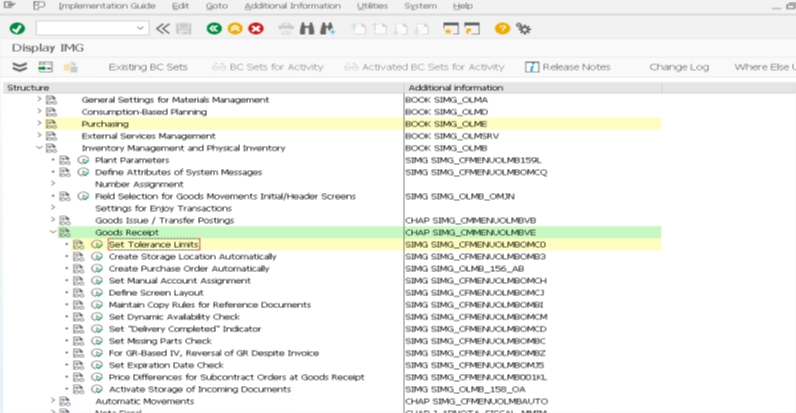
Go to SPRO > Materials Management > Inventory Management and Physical Inventory > Goods Receipt > Set Tolerance Limits, commonly reached via transaction OMC0.
Select the Company Code
Choose the company code you're configuring tolerance limits for — in this example, company code 1211. Tolerance keys are maintained per company code, so each legal entity can have its own acceptable variance thresholds.
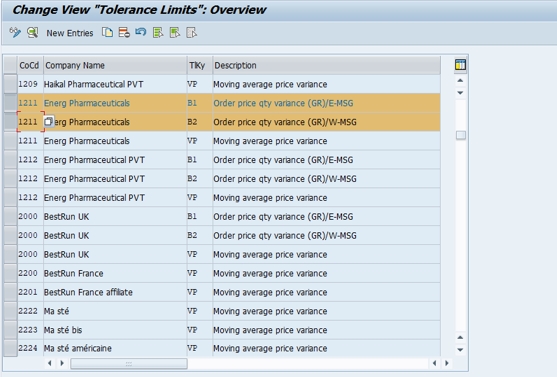
Create Tolerance Key Entries
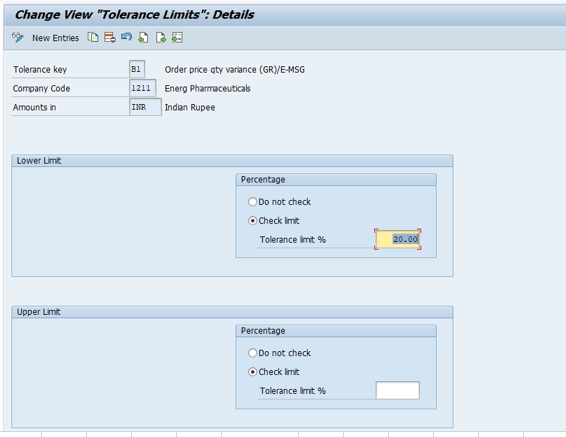
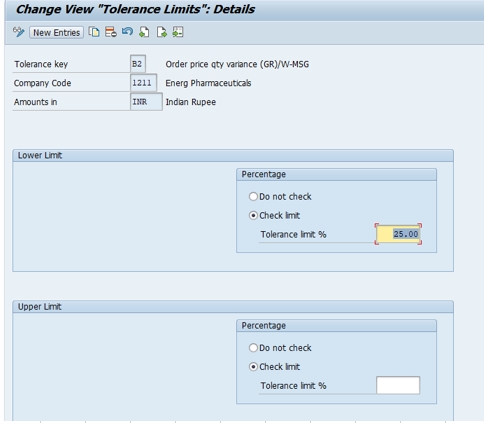
Create entries for the relevant tolerance keys — for example, B1 with a check limit of 20%, and B2 with a check limit of 25%. Each tolerance key can carry both a percentage limit and an absolute value limit, with the system applying whichever is reached first.
Save and Assign to a Transport Request
Click Save. Since this is a configuration (customizing) change, SAP will prompt you to assign it to a transport request so the tolerance configuration moves correctly from development through quality assurance and into production.
📋 Common MM Tolerance Keys and What They Control
| Key | Meaning |
|---|---|
| B1 | Order Price Quantity Variance — controls acceptable quantity/price deviation on a purchase order |
| B2 | Revaluation Allowed — controls whether a revaluation of stock value is permitted within tolerance |
| PP | Price Variance — controls the allowed deviation between purchase order price and invoice price |
| PS | Price Variance: Estimated Price — for materials without a fixed standard price |
| SB | SD/MM: Order Price Quantity Variance — relevant when procurement ties into a sales order |
| VP | Moving Average Price Variance — controls acceptable deviation when a posting would significantly change a material's moving average price |
Not every organization needs to configure every tolerance key — most implementations start with the small set that's actually relevant to their procurement patterns (typically B1, B2, and PP) and add others only if a specific business scenario requires finer control.
💰 FI Tolerance Groups: OBA3 and OBA4
Separately from MM goods receipt tolerance, SAP FI has its own tolerance framework governing how much posting flexibility individual employees or G/L accounts are given during financial document entry.
Tolerance Groups for Employees (OBA4)
Transaction OBA4 defines tolerance groups for employees, specifying the maximum document amount an employee can post, the maximum amount per open item line, and the maximum cash discount percentage they're permitted to grant. Users are then assigned to a tolerance group via their user master record, meaning a junior AP clerk might be restricted to a smaller posting amount than a senior finance manager, all controlled through the same tolerance group framework.
Tolerance Groups for G/L Accounts (OBA3)
Transaction OBA3 defines tolerance groups used specifically for automatic clearing of G/L account open items, controlling the acceptable residual difference the system will write off automatically rather than requiring manual intervention — useful for high-volume accounts where small rounding or timing differences are common and manual clearance of every minor variance would be impractical.
Payment Difference Tolerance
A closely related setting controls acceptable payment differences — the gap between an invoice amount and what a customer actually pays or a vendor actually receives — which can be configured to post automatically to a designated gain/loss account when within tolerance, rather than leaving the difference as an open item requiring manual follow-up.
💼 A Practical Example: Combining MM and FI Tolerance in One Scenario
Consider a purchase order for 1,000 units of raw material, where the vendor delivers 1,150 units instead — a 15% over-delivery. With tolerance key B1 configured at a 20% check limit, this goods receipt posts without any warning, since the variance falls within the configured tolerance. Had the vendor delivered 1,250 units (a 25% over-delivery), the system would issue a warning or block the goods receipt entirely, depending on whether the tolerance was configured as a warning or an error.
Now suppose the vendor's invoice arrives showing a slightly different total than the purchase order and goods receipt would suggest — a small rounding difference of a few currency units. If this falls within the payment difference tolerance configured for the relevant company code, the accounts payable clerk can clear the invoice with the difference posting automatically to a small gain/loss account, rather than the payment sitting as an unresolved open item purely because of an immaterial rounding gap. Both examples illustrate the same underlying principle from two different tolerance frameworks: letting genuinely minor variances flow through automatically, while still catching and flagging anything significant enough to warrant a human decision.
💼 Real-World Scenario: Setting Up Tolerance Limits at Arjun Industries
When Arjun Industries began scaling up procurement volume across its raw material suppliers, Vikram Nair, supporting the MM configuration, noticed that even small, routine over-deliveries — common with bulk raw materials measured by weight — were being blocked at goods receipt, creating unnecessary friction for the warehouse team. Working with the procurement team, he configured tolerance key B1 at a 20% check limit and B2 at 25%, reflecting the business's actual tolerance for reasonable delivery variance in bulk materials, while keeping tighter tolerance on higher-value finished components sourced from precision suppliers.
On the finance side, Priya Mehta configured employee tolerance groups via OBA4, giving junior AP clerks a lower maximum posting amount and cash discount percentage than senior finance staff, and set up a modest payment difference tolerance so that small rounding differences on vendor payments — common with foreign currency invoices subject to minor exchange rate timing gaps — could clear automatically rather than piling up as unresolved open items requiring manual research each month.
❌ Common Mistakes in Tolerance Configuration
Confusing MM tolerance keys with FI tolerance groups
These are two entirely separate configuration frameworks (OMC0 vs OBA3/OBA4); assuming one controls the other's behavior leads to troubleshooting the wrong area entirely.
Setting tolerance limits too loose
Overly generous tolerance percentages can mask genuine procurement or data entry errors, letting real discrepancies flow through unnoticed rather than being flagged for review.
Setting tolerance limits too tight
Overly strict tolerance blocks routine, harmless variances (common in bulk materials or foreign currency rounding), creating unnecessary friction and support tickets for what are genuinely non-issues.
Applying the same tolerance uniformly across very different vendor or material types
A single blanket tolerance percentage rarely fits both bulk raw materials and precision-manufactured components well — consider differentiated tolerance by material group or vendor category where the business case justifies it.
Forgetting employee tolerance groups entirely
Organizations sometimes configure MM tolerance carefully but never revisit FI employee tolerance groups (OBA4), leaving every AP clerk with the same posting authority regardless of seniority or role — a segregation-of-duties gap worth closing.
🔍 Common Errors Related to Tolerance Configuration
- "Quantity variance exceeds tolerance" during goods receipt — the delivered quantity falls outside the configured tolerance key limit; check OMC0 configuration for the relevant tolerance key and company code
- "Price variance exceeds tolerance" during invoice verification (MIRO) — the invoice price differs from the purchase order price beyond the configured PP tolerance key limit
- Posting blocked due to amount exceeding user's tolerance — check the employee's assigned tolerance group (OBA4) and the maximum document/line item amounts configured for it
- Payment difference posting to the wrong account or not clearing automatically — check the payment difference tolerance configuration and the designated gain/loss account setup
📚 Relevant Tables and Transactions
| Table / Transaction | Purpose |
|---|---|
| T169G | MM Goods Receipt Tolerance Key configuration (OMC0 result) |
| T043 | FI Tolerance Group configuration for G/L accounts and employees |
| T043T | FI Tolerance Group descriptions (language-dependent) |
| OBA3 | Define tolerance groups for G/L accounts |
| OBA4 | Define tolerance groups for employees |
| OMC0 | Set MM goods receipt tolerance limits (this guide) |
💬 Common SAP MM/FI Interview Questions on Tolerance Configuration
What is the difference between MM tolerance keys and FI tolerance groups?
MM tolerance keys (OMC0) control acceptable price/quantity variance during procurement. FI tolerance groups (OBA3/OBA4) control acceptable posting differences and payment discrepancies during financial document entry.
What does tolerance key B1 control?
Order Price Quantity Variance — the acceptable quantity/price deviation on a purchase order during goods receipt.
What is configured via OBA4?
Tolerance groups for employees, specifying maximum document amount, maximum amount per line item, and maximum cash discount percentage a user can process.
What is OBA3 used for?
Defining tolerance groups for automatic clearing of G/L account open items, controlling the acceptable residual difference the system writes off automatically.
Are tolerance keys configured per company code?
Yes, MM tolerance keys are maintained per company code, allowing different legal entities to have their own acceptable variance thresholds.
📊 Percentage Limits vs Absolute Value Limits: How SAP Applies Both
A detail worth understanding more deeply about MM tolerance keys: most support configuring both a percentage limit and an absolute (currency) value limit simultaneously, and SAP applies whichever one is more restrictive at the time of the transaction. This matters because a pure percentage-based tolerance can behave very differently depending on transaction size — a 20% tolerance on a 100-unit order is a small absolute quantity, but the same 20% on a 100,000-unit order represents a much larger absolute variance that a purely percentage-based rule might let through without adequate scrutiny.
A practical configuration pattern: set a reasonable percentage tolerance for typical transaction sizes, but also cap it with an absolute value limit so that unusually large orders don't automatically inherit a proportionally large "acceptable" variance just because the percentage math works out that way. This two-layer approach — percentage for typical cases, absolute ceiling for large transactions — is one of the more mature tolerance configuration patterns worth adopting rather than relying on a single percentage figure across every transaction size.
📦 How Tolerance Keys Interact With Invoice Verification (MIRO)
Price and quantity tolerance keys have a direct, practical impact on invoice verification via transaction MIRO. When an incoming vendor invoice is entered, SAP compares it against the purchase order and goods receipt, and if the variance falls within configured tolerance, the invoice can be posted without additional intervention. If it falls outside tolerance, the invoice is typically blocked for payment, requiring a manual review and release (often via transaction MRBR, Release Blocked Invoices) before payment can proceed.
This blocking mechanism is one of SAP's core financial controls against overpayment or fraud, since it forces human review of any invoice that deviates meaningfully from what was actually ordered and received. Organizations that set tolerance too loosely risk weakening this control; organizations that set it too tightly risk creating an unmanageable backlog of blocked invoices requiring manual release for routine, harmless variances. Getting this balance right is as much a business process decision as a technical configuration one, which is why involving both AP and procurement stakeholders in tolerance design (as covered in the Arjun Industries case study above) tends to produce better outcomes than a purely technical, one-sided configuration exercise.
🔒 Tolerance Groups and Segregation of Duties
FI employee tolerance groups (OBA4) aren't just a convenience setting — they're a meaningful internal control, since they directly limit how large a financial posting or payment difference any individual user can process without additional approval or escalation. Organizations building out segregation-of-duties controls as part of SOX compliance or general financial governance often tier tolerance groups explicitly by role: a junior AP clerk might be capped at a modest document amount, a senior AP specialist at a higher tier, and a finance manager at the highest tier, with genuinely large or unusual transactions routed through a separate approval workflow entirely rather than relying on tolerance group limits alone.
A practical audit point worth building into periodic internal control reviews: confirm that tolerance group assignments in user master records actually match each employee's current role and seniority, since staff turnover and role changes can leave outdated tolerance group assignments in place — a junior employee who was promoted might still be capped at their old, lower tolerance level, or conversely, someone who moved to a less senior role might retain an inappropriately high posting authority from their previous position.
🔐 SAP S/4HANA Notes on Tolerance Configuration
Both MM tolerance keys (OMC0) and FI tolerance groups (OBA3/OBA4) remain fundamentally unchanged in S/4HANA — this is stable, foundational configuration that hasn't been restructured by the platform shift. What has evolved is the surrounding process experience: S/4HANA's Fiori-based invoice management apps (such as "Manage Supplier Invoices" or workflow-driven invoice release apps) present blocked-invoice information more visually than classic MRBR, but the underlying tolerance logic determining what gets blocked in the first place is the same configuration covered in this guide.
Organizations migrating to S/4HANA sometimes use the transition as an opportunity to revisit tolerance configuration that's grown stale or inconsistent over years of on-premise operation — for example, consolidating tolerance keys that were configured slightly differently across company codes due to historical, undocumented decisions, rather than simply carrying forward whatever configuration existed in the legacy system unchanged.
💬 A Few More Interview Questions on Tolerance Configuration
What happens when an invoice exceeds price or quantity tolerance during MIRO?
The invoice is typically blocked for payment and requires manual review and release, often via transaction MRBR, before it can be paid.
Why might a tolerance key have both a percentage and an absolute value limit?
To prevent a purely percentage-based rule from allowing disproportionately large absolute variances on very large transactions; SAP applies whichever limit is more restrictive.
How do tolerance groups support segregation of duties?
By capping how large a posting or payment difference an individual employee can process without escalation, tiered by role or seniority, supporting internal control and audit requirements.
✅ Pre-Go-Live Checklist for Tolerance Configuration
- Clarify with stakeholders whether they mean MM tolerance keys (OMC0) or FI tolerance groups (OBA3/OBA4) before starting configuration — the two are unrelated
- Configure MM tolerance keys per company code, reflecting actual business tolerance for delivery and price variance
- Consider both percentage and absolute value limits together rather than relying on percentage alone for large transactions
- Tier FI employee tolerance groups (OBA4) by role and seniority, supporting segregation-of-duties requirements
- Configure G/L account automatic clearing tolerance (OBA3) for high-volume accounts where minor rounding differences are routine
- Test invoice blocking and release behavior (MIRO/MRBR) end-to-end before go-live, not just the configuration screens in isolation
- Periodically audit tolerance group assignments against current employee roles to catch outdated authority levels
🏆 Conclusion
Tolerance limit configuration in SAP spans two genuinely separate frameworks — MM goods receipt tolerance keys and FI tolerance groups — that happen to share a name but serve very different purposes. In summary: configure MM tolerance keys (via OMC0) to reflect realistic procurement variance for your business, considering both percentage and absolute value limits; configure FI tolerance groups (via OBA3 for G/L accounts and OBA4 for employees) to balance processing efficiency against meaningful internal control; and test both thoroughly, since overly loose tolerance weakens financial controls while overly tight tolerance creates unnecessary operational friction.
For related FI configuration, see our guides on displaying G/L account balances (FAGLB03) and Chart of Accounts (OB13), both of which work alongside tolerance configuration as part of a well-governed financial close process.
📊 Monitoring Tolerance-Related Blocks and Exceptions
Once tolerance configuration is live, it's worth building a lightweight monitoring habit around it rather than only discovering issues when a vendor calls asking why their invoice hasn't been paid. Transaction MRBR (Release Blocked Invoices) doubles as a monitoring tool — reviewing it regularly surfaces which invoices are stuck on tolerance blocks, how often, and for which vendors or material categories, which can highlight whether tolerance limits need adjustment or whether a specific vendor has a recurring, genuine variance problem worth addressing commercially rather than just repeatedly overriding the block.
On the FI side, a periodic review of automatically cleared tolerance differences (from OBA3-configured G/L account tolerance) is worth building into month-end close procedures, confirming that the cumulative value of "small" automatically-cleared differences hasn't quietly grown into something material over time — a pattern that's easy to miss when each individual difference looks negligible in isolation.
🎓 Onboarding Tip: Explaining the Two Tolerance Frameworks to New Consultants
Because the naming overlap between MM and FI tolerance is such a common source of confusion, it's worth explicitly calling it out during onboarding for consultants new to either module: "if someone is blocked from receiving goods or posting an invoice because a delivery or price differs from the purchase order, that's MM tolerance (OMC0). If someone is blocked from posting a journal entry or clearing a payment because the amount exceeds what they're personally authorized to handle, that's FI tolerance (OBA3/OBA4)." Framing the distinction around "what's blocking the user and why" rather than just the transaction codes tends to make the difference click faster than memorizing which T-code belongs to which module in isolation.