Vendor Account Group Configuration in SAP – OBD3 Step-by-Step Guide
Vendor account group is what determines how a vendor gets numbered, which fields appear on the vendor master screen, and whether a vendor is treated as a permanent business partner or a one-time entry. This guide covers the full OBD3 configuration path and how to design a vendor account group structure that stays clean as your vendor base grows.
⚠ What is a Vendor Account Group in SAP?
A vendor account group is a classification key assigned to every vendor master record, configured using transaction OBD3. It controls three important things at once: the number range used to assign the vendor's account number, the screen layout (which fields are required, optional, suppressed, or display-only across the vendor master's general, company code, and purchasing organization views), and whether the vendor is treated as a one-time vendor rather than a permanent master record.
Vendor account group is one of the first decisions made when designing vendor master data governance, since it directly shapes what information gets captured — and enforced — for every vendor created under that group. A well-designed set of account groups makes it easy to distinguish trade vendors from employee vendors, domestic from foreign suppliers, or one-time vendors from long-term partners, both in terms of data quality and in terms of reporting and analysis.
✅ Step-by-Step: Configuring Vendor Account Group Using OBD3
Navigate to the Configuration Path
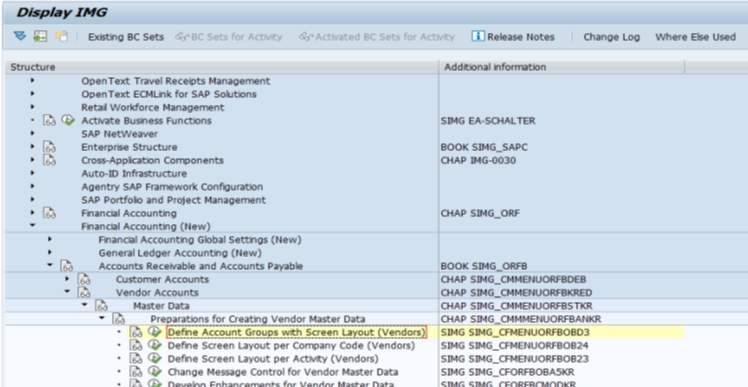
Go to SPRO > Financial Accounting (New) > Accounts Receivable and Accounts Payable > Vendor Accounts > Master Data > Preparation for Creating Vendor Master Data > Define Account Groups with Screen Layout (Vendors), or execute transaction OBD3 directly.
Create a New Entry
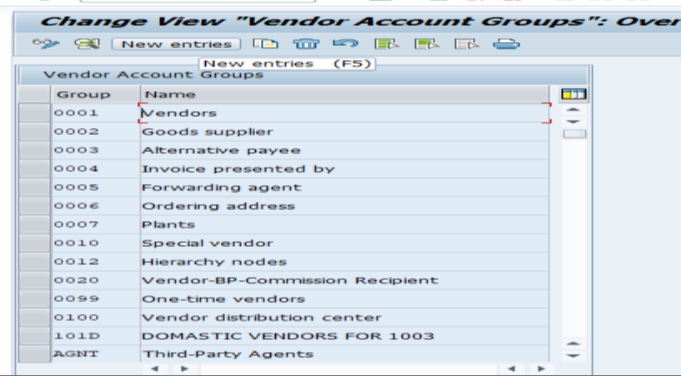
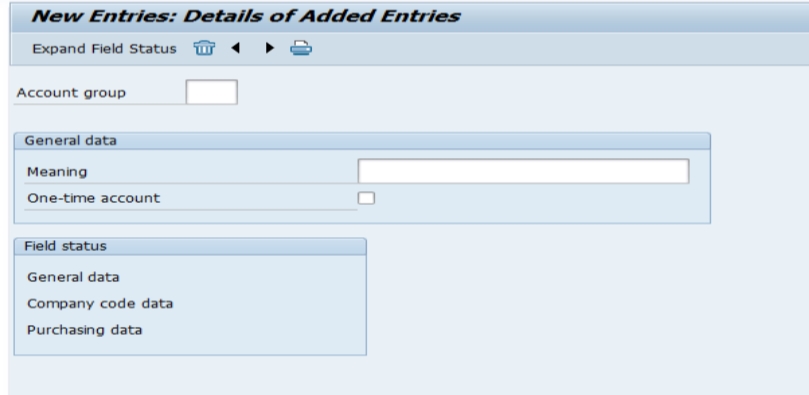
Click New Entries. On the overview and detail screens, you'll configure the account group key, description, and screen layout settings for general data, company code data, and purchasing data.
Define Your Account Groups
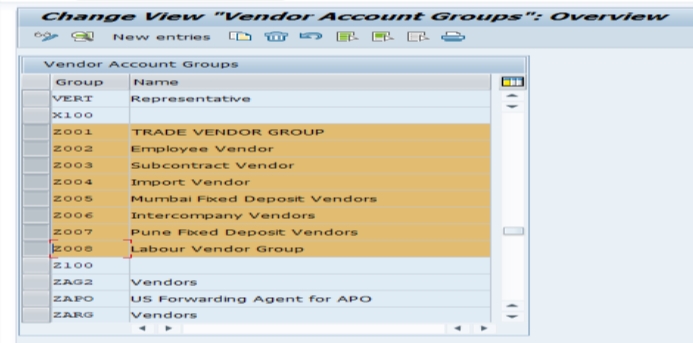
Create meaningful groups for your organization's vendor categories — for example, Z001 for a Trade Vendor Group and Z002 for Employee Vendors. Assign each a clear description so users understand which group to select when creating a new vendor.
Save and Assign to a Transport Request
Click Save. Since this is a configuration (customizing) change, SAP will prompt you to assign it to a transport request so the account group moves correctly from development through quality assurance and into production.
📋 Understanding Screen Layout Control
The screen layout portion of OBD3 is where much of the real configuration effort goes. For each field group (address, tax data, bank details, payment transactions, and more), you can set the field status to one of four options:
| Field Status | Behavior |
|---|---|
| Required Entry | The field must be filled in before the vendor master record can be saved |
| Optional Entry | The field can be filled in but isn't enforced |
| Display | The field is shown but cannot be edited |
| Suppress | The field is hidden entirely from the screen for this account group |
This is where account group design becomes genuinely powerful: a trade vendor account group might require full bank details and tax classification, while a one-time vendor account group suppresses most of those fields entirely, since a one-time vendor's specific bank and address details are entered directly on the transaction rather than stored in the master record.
📋 "Vendor Account Group" vs the Informal Term "Vendor Group"
It's worth clarifying a terminology point that trips up newer SAP consultants: what SAP technically calls a vendor account group (configured via OBD3, controlling number ranges and screen layout) is sometimes referred to informally as simply "vendor group" in conversation or training material — but this shouldn't be confused with looser business language describing vendor categorization by relationship type, risk level, or spend tier, which isn't a distinct SAP configuration object in the same technical sense. When someone says "vendor group" in a business conversation, it's worth clarifying whether they mean the OBD3 account group (a system-level classification) or a more general, non-technical way of segmenting vendors for analysis, which might instead be represented via vendor classification, industry key, or a custom field rather than account group itself.
💼 Common Vendor Account Group Examples
| Account Group | Typical Use |
|---|---|
| KRED (or Z001) | Domestic trade vendors — full master data required |
| LIEF (or Z003) | Foreign/international vendors — may require additional fields for cross-border payment and tax |
| Z002 (Employee Vendor) | Employees who are also set up as vendors, e.g. for expense reimbursement |
| CPD (One-Time Vendor) | Vendors used for a single or infrequent transaction, with vendor-specific data entered at posting time |
| Z004 (Affiliate/Intercompany Vendor) | Vendors representing other group companies for intercompany transactions |
Most organizations don't need more than four or five account groups to cover their full vendor base cleanly — over-segmenting into a dozen near-identical groups tends to create more configuration overhead than reporting benefit, similar to the naming-discipline lessons covered in our guide on defining material groups using OMSF.
💼 Real-World Scenario: Structuring Vendor Account Groups at Arjun Industries
When Arjun Industries began onboarding its expanding vendor base for both its industrial materials and personal care product lines, Priya Mehta, supporting the FI/MM master data workstream, proposed a lean set of vendor account groups rather than letting each department request its own. She defined Z001 (Trade Vendor Group) for the company's regular raw material and packaging suppliers, requiring full bank and tax details; Z002 (Employee Vendor) for staff reimbursement scenarios, with payment fields required but purchasing-specific fields suppressed since employees weren't sourced through standard procurement; and a one-time vendor group for ad hoc, low-value purchases where creating a full master record wasn't justified.
This structure paid off during an internal audit review, when the finance team needed to confirm that all employee-vendor payments had appropriate approval documentation — filtering vendor master records by account group Z002 made this immediate, rather than requiring a manual cross-reference against HR records. Vikram Nair, reviewing the purchasing side, also appreciated that the trade vendor group enforced tax classification as a required field, which had previously been a data quality gap that caused delays during month-end tax reporting.
❌ Common Mistakes in Vendor Account Group Configuration
Creating too many overlapping account groups
Each new department requesting its own account group, rather than reusing an existing, appropriately configured one, leads to inconsistent screen layouts and confusing vendor master governance.
Setting too many fields as required
Making every possible field mandatory for every account group creates friction for legitimate use cases like one-time vendors, where full master data genuinely isn't needed or available.
Assuming account group can be freely changed later
Since account group determines the number range and screen layout used at creation, changing a vendor's account group after the fact typically requires a dedicated conversion process, not a simple master data edit — plan the account group correctly at creation time rather than expecting an easy fix later.
Not assigning a distinct number range per account group
Without distinct number ranges, it becomes much harder to identify a vendor's category just from its vendor number, losing a quick visual cue that's otherwise very useful for master data teams and auditors alike.
📚 Relevant Tables and Related Configuration
| Table / Transaction | Purpose |
|---|---|
| T077K | Vendor Account Group configuration (OBD3 result) |
| LFA1 | General Vendor Master Data, including the account group field (KTOKK) |
| LFB1 | Vendor Master Company Code Data |
| LFM1 | Vendor Master Purchasing Organization Data |
| XKN1 / OBAS | Number range configuration for vendor accounts |
Number ranges are configured separately from OBD3 itself (via the number range maintenance transactions), then linked to the relevant account group during the OBD3 configuration screen — both pieces need to be completed together before a vendor can actually be created under a new account group.
🔍 Common Errors Related to Vendor Account Group
- "Number range not defined for account group" — the account group has been created via OBD3, but no number range has been assigned or maintained for it yet
- Field unexpectedly required/missing during vendor creation — check the screen layout configuration for the relevant account group; a field status set as "Required" or "Suppress" incorrectly is the most common cause
- Cannot change a vendor's account group — this is expected behavior; account group conversion requires a specific process rather than a direct master data edit
- One-time vendor postings behaving unexpectedly — confirm the account group used is genuinely flagged as a one-time vendor group, since a standard account group won't allow entering vendor-specific details directly at posting time
💬 Common SAP FI/MM Interview Questions on Vendor Account Group
What transaction is used to configure vendor account groups?
OBD3, found under SPRO > Financial Accounting (New) > Accounts Receivable and Accounts Payable > Vendor Accounts > Master Data > Preparation for Creating Vendor Master Data > Define Account Groups with Screen Layout (Vendors).
What three things does vendor account group control?
Number range for vendor numbering, screen layout (field status per field group), and whether the vendor is a one-time vendor.
What is a one-time vendor account group used for?
Vendors used for a single or infrequent transaction, where vendor-specific details are entered directly at posting time rather than stored permanently in a full master record.
Can a vendor's account group be changed after creation?
Not directly — it typically requires a specific account group conversion process rather than a simple field edit, since account group determines number range and screen layout at creation time.
Which table stores vendor account group configuration?
Table T077K, while vendor master records referencing their account group are stored in LFA1 (field KTOKK).
🔢 Number Ranges and Vendor Account Group: How They Work Together
Every vendor account group needs a number range assigned to it before vendors can actually be created under that group. SAP supports two numbering approaches: internal number assignment, where the system automatically assigns the next available number from the range, and external number assignment, where the user manually enters the vendor number (common when migrating legacy vendor numbers from a predecessor system).
A practical design decision worth making deliberately: reserve distinct, non-overlapping number ranges per account group so a vendor's number alone gives a quick visual signal of its category — for example, trade vendors numbered 100000-199999, employee vendors numbered 200000-299999, and one-time vendors numbered 900000-999999. This kind of numbering discipline is especially valuable for auditors and finance teams doing quick visual scans of vendor lists, and it's far easier to establish this convention at initial configuration than to retrofit it onto a vendor base that's already grown organically without a clear numbering pattern.
📦 Vendor Account Group and the Purchasing Organization Data View
Beyond general and company code data, vendor account group also controls screen layout for the purchasing organization data view — fields like Incoterms, order currency, payment terms, and minimum order value. This matters because a vendor account group intended purely for non-procurement purposes (such as an employee vendor used only for expense reimbursement) typically has these purchasing-specific fields suppressed entirely, since they're not relevant and would only add confusing, unused fields to the master record.
Conversely, a trade vendor account group used for genuine procurement activity needs these purchasing organization fields properly configured as required or optional, since incomplete purchasing data — a missing Incoterm or payment term — can silently cause purchase order creation issues or incorrect default values downstream. This is a good example of why account group screen layout design benefits from involving both the finance/AP team (who care about payment and tax fields) and the procurement team (who care about purchasing organization fields) rather than being configured by only one workstream in isolation.
🔒 Authorization Considerations for Vendor Master Maintenance by Account Group
Organizations that separate master data responsibilities — for example, a dedicated vendor master team versus a broader finance team — can use authorization object F_LFA1_GRP to restrict which users can create, change, or display vendor master records for specific account groups. This is particularly useful for sensitive categories like employee vendors, where HR-adjacent master data might reasonably be restricted to a smaller group of trusted master data specialists rather than being open to the entire AP team.
A practical governance pattern worth adopting: pair broader vendor master maintenance access for trade vendor account groups (used constantly by a larger AP/procurement team) with tighter, more restricted access for employee vendor and one-time vendor account groups, where the risk of inappropriate master data creation or an inadvertent duplicate vendor is proportionally higher relative to the volume of legitimate use.
⚠ Vendor Account Group and Duplicate Vendor Prevention
A well-designed account group structure indirectly supports SAP's duplicate vendor checking functionality (configured separately via transaction OBD3-adjacent duplicate check settings and evaluated at vendor creation), since consistent, correctly scoped account groups make it easier for master data teams to search and confirm whether a similar vendor already exists before creating a new one. Conversely, an overly fragmented account group structure — where similar vendors could plausibly be created under several different groups — makes duplicate detection substantially harder, since a search restricted to one account group might miss an existing vendor sitting under a different one.
This is one more reason the "keep account groups lean and business-meaningful" principle covered earlier in this guide matters beyond just screen layout convenience — it directly supports better master data quality control across the vendor base as a whole.
🔐 SAP S/4HANA and Business Partner Approach
It's worth flagging a significant shift that affects this topic directly in S/4HANA: SAP has moved to a unified Business Partner (BP) model, where vendor (and customer) master data is created and maintained through the Business Partner transaction (BP) rather than the classic XK01/MK01 vendor-specific transactions, with vendor account group data synchronized to a corresponding Business Partner grouping and role configuration behind the scenes. For new S/4HANA implementations, vendor account groups are still configured via OBD3 as covered in this guide, but they now need to be properly linked to Business Partner groupings (via the "Define Number Ranges for Business Partner" and "Vendor Integration: Field Assignment for Vendor Groups" configuration nodes) rather than existing purely on their own.
Organizations migrating from ECC to S/4HANA should treat this integration mapping between vendor account group and Business Partner grouping as a dedicated configuration and testing task, not an assumption that existing OBD3 settings will automatically carry the same behavior forward — inconsistent mapping here is a common source of vendor creation errors during early S/4HANA go-lives.
💬 A Few More Interview Questions on Vendor Account Group
What's the difference between internal and external number assignment for vendor account groups?
Internal assignment lets SAP automatically assign the next available vendor number from the range; external assignment requires the user to manually enter the vendor number, often used when migrating legacy vendor numbers.
Which authorization object restricts vendor master maintenance by account group?
F_LFA1_GRP, which can restrict which users can create, change, or display vendor master records for specific account groups.
How does S/4HANA's Business Partner model affect vendor account group configuration?
Vendor account groups are still configured via OBD3, but must be properly linked to Business Partner groupings, since vendor master maintenance in S/4HANA happens through the unified BP transaction rather than classic XK01/MK01.
✅ Pre-Go-Live Checklist for Vendor Account Group Configuration
- Agree a lean, business-meaningful set of vendor account groups with finance and procurement stakeholders before configuration begins
- Design screen layout collaboratively — finance/AP for payment and tax fields, procurement for purchasing organization fields
- Assign distinct, non-overlapping number ranges per account group for quick visual category identification
- Configure at least one one-time vendor account group with purchasing/tax fields suppressed appropriately
- Restrict maintenance authorization (F_LFA1_GRP) more tightly for sensitive account groups like employee vendors
- If on S/4HANA, confirm vendor account group is correctly linked to the corresponding Business Partner grouping and test vendor creation end-to-end
- Document the full account group list and its intended use centrally so master data teams aren't creating overlapping groups independently
🏆 Conclusion
Vendor account group configuration via OBD3 is a foundational piece of vendor master data governance, controlling number ranges, screen layout, and one-time vendor behavior all in a single configuration object. In summary: keep your account group structure lean and business-meaningful (typically four or five groups covers most organizations cleanly), design screen layout collaboratively across finance and procurement stakeholders, assign distinct number ranges per group, and — if you're on or migrating to S/4HANA — pay close attention to how account group integrates with the Business Partner model rather than assuming classic behavior carries over unchanged.
For related master data configuration, see our guide on defining material groups using OMSF, which follows similar naming and governance principles on the material master side.
📊 Reports and Analysis Using Vendor Account Group
Once vendor account groups are correctly assigned, they become a useful filter across vendor master and payment reporting. Transaction XK03 (display vendor centrally) and the vendor master list report can both be filtered by account group, letting AP and procurement teams quickly pull "all trade vendors" or "all employee vendors" without manually reviewing every vendor number. For custom reporting built in ABAP or QuickViewer, table LFA1's account group field (KTOKK) is the natural join point when combined with payment or open item tables for account-group-level spend or exposure analysis.
This kind of reporting is particularly valuable during internal audits or external statutory audits, where auditors often want to confirm that vendor categories like employee vendors or related-party/intercompany vendors received appropriate scrutiny and approval — filtering cleanly by account group turns what would otherwise be a manual, time-consuming cross-reference into a straightforward report.
🎓 Onboarding Tip: Explaining Account Groups to New Vendor Master Requesters
A practical onboarding approach for business users who submit vendor creation requests: publish a short reference table (similar to the common account group examples table earlier in this guide) showing each account group, its intended use, and 2-3 example vendors already using it, so requesters can self-select the correct group rather than guessing or defaulting to whichever group they used last time regardless of fit. Pairing this with a lightweight review step — where a master data specialist confirms the account group choice before final vendor creation — catches misclassification early, before it becomes a data quality issue that's much more disruptive to correct once the vendor has an active transaction history.