How to Define Material Group in SAP – OMSF Configuration Guide
Material groups are the backbone of procurement reporting and material search in SAP. This guide covers the full OMSF configuration path, how material group differs from material type, and how to design a naming structure that stays useful as your material master grows.
⚠ What is a Material Group in SAP MM?
material group is a classification key used to group materials or services that share common attributes -such as product line, function, or category -regardless of which plant, material type, or vendor they're associated with. Material groups make it possible to run meaningful procurement reports and searches across a category of items (for example, "all packaging materials" or "all electrical components") without needing to know every individual material number in that category.
Material groups are typically used across several areas of SAP: the material master's basic data view, purchasing reports like ME2M and ME2N, purchasing info records, and even in classification and search matchcodes when users are looking for materials by category rather than by exact material number. A well-designed material group structure is one of the most impactful, and most frequently underestimated, pieces of SAP MM master data governance -get it right early, and reporting stays clean for years; get it wrong, and cleanup becomes a large, disruptive project later.
✅ Step-by-Step: Defining a Material Group Using OMSF
Navigate to the Configuration Path
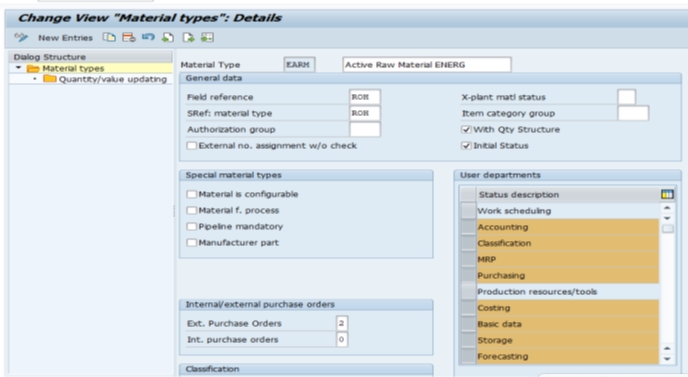
Go to SPRO > Logistics-General > Material Master > Settings for Key Fields > Define Material Groups, or execute transaction OMSF directly.
Create a New Entry
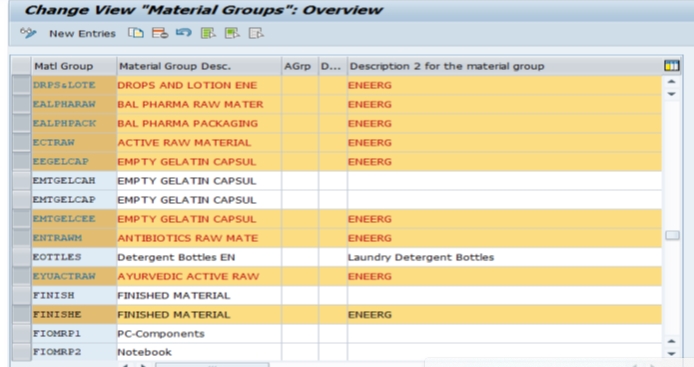
Click New Entries, then enter the material group key (up to 9 characters) and its description. For example: DRPS -Drops and Lotions, ENERG -Energy Products. Choose keys that are short but recognizable, since users will type or search on them regularly.
Save and Assign to a Transport Request
Click Save. Since this is a configuration (customizing) change, SAP will prompt you to assign it to a transport request so the material group moves correctly from development through quality assurance and into production.
📋 Material Group vs Material Type -A Critical Distinction
One of the most common points of confusion in SAP MM master data is mixing up material group with material type. They sound similar and are both assigned to every material master record, but they serve completely different purposes.
| Aspect | Material Type | Material Group |
|---|---|---|
| Transaction | OMS2 | OMSF (this guide) |
| Controls | Number ranges, valuation, allowed views, field selection behavior | Nothing system-behavioral -purely a classification/reporting key |
| Purpose | Defines what kind of material it is at a system level (raw material, finished good, trading good) | Groups similar materials together for search and reporting |
| Example | ROH (Raw Material), FERT (Finished Product), HAWA (Trading Goods) | DRPS (Drops and Lotions), ENERG (Energy Products), ELEC (Electrical Items) |
A useful way to remember the difference: material type answers "what kind of thing is this to the SAP system" (affecting number ranges and valuation), while material group answers "what business category does this belong to for reporting" (affecting nothing except search and analysis). For the material type configuration step, see our companion guide on defining material type using OMS2.
📝 Material Group Naming Conventions and Best Practices
Since material group keys are short (up to 9 characters) and used constantly in reporting and search, naming discipline matters more than it might first appear. A few practices worth adopting:
- Use short, memorable codes with clear descriptions -a code like ELEC with description "Electrical Items" is far more useful than a generic description like "Items" or "Misc"
- Avoid overly broad groups that lose business meaning (e.g. a single "General Materials" group covering everything) -the whole point of material groups is enabling focused analysis
- Avoid overly narrow groups that create hundreds of near-duplicate categories, which fragments reporting rather than simplifying it
- Document the full material group list centrally so purchasing, planning, and master data teams aren't creating overlapping groups independently
- Reserve a naming pattern (e.g. first few characters indicating a broader category) so related groups sort together in searches and reports
💼 Real-World Scenario: Structuring Material Groups at Arjun Industries
When Arjun Industries expanded its product line to include personal care items alongside its core industrial materials, Vikram Nair, the SAP MM consultant supporting the rollout, was tasked with defining a fresh material group structure rather than forcing the new product line into the existing industrial-materials groups. Rather than letting each department propose its own codes, Vikram worked with the purchasing and planning teams to agree on a small, meaningful set of groups: DRPS (Drops and Lotions), ENERG (Energy and Wellness Products), PACK (Packaging Materials), and RAWM (Raw Materials common to both product lines).
This structure paid off almost immediately once reporting began: procurement could run a simple ME2M report filtered by material group to see total spend on packaging materials across both the industrial and personal-care product lines, without needing to manually cross-reference dozens of individual material numbers. Suresh Mehta's warehouse team also found that search matchcodes using material group made it noticeably faster to locate materials during physical inventory counts, since staff could filter by category rather than needing to already know exact material numbers.
❌ Common Mistakes When Defining Material Groups
Confusing material group with material type
Creating a material group meant to control valuation or number ranges -that's the job of material type (OMS2), not material group (OMSF).
Letting departments create their own groups independently
This leads to overlapping, inconsistent categories that undermine cross-departmental reporting -the exact opposite of what material groups are meant to enable.
Forgetting to maintain Description 2
The optional second description field is easy to skip but useful for a longer, more detailed description when the primary description needs to stay short for display purposes.
Forgetting the transport request
Like all customizing changes, a new material group needs to be captured in a transport request to move correctly from development to QA and production.
📦 How Material Group Is Used Downstream
Procurement Reporting
Material group is a standard selection field in purchasing reports such as ME2M (purchase orders by material) and ME2N (purchase orders by PO number), letting procurement teams analyze spend by category without needing exact material numbers.
Authorization
The optional authorization group field (Grp) on the material group configuration screen, combined with authorization object M_MATE_WGR, can restrict which users are allowed to create, change, or display materials belonging to a specific material group -useful for organizations that want to segregate master data maintenance responsibility by product category.
Search and Matchcodes
Material group is commonly included in material master search helps (matchcodes), letting users find materials by category when they don't already know the exact material number -a genuinely practical time-saver for warehouse and purchasing staff working across a large material master.
Default Unit of Weight
The material group configuration screen also includes a Default Unit of Weight (DUW) field, which proposes a weight unit when creating materials from the sales view with status V, reducing repetitive data entry for materials that consistently share the same unit of weight.
📚 Relevant Tables and Related Configuration
| Table / Transaction | Purpose |
|---|---|
| T023 | Material Groups master table |
| T023T | Material Group Descriptions (language-dependent) |
| OMS2 | Define material type |
| ME2M / ME2N | Purchase order reports, both filterable by material group |
| M_MATE_WGR | Authorization object for restricting access by material group |
🔍 Common Errors and Issues Related to Material Groups
- "Material group does not exist" during material master creation -the group entered hasn't been defined via OMSF yet, or was mistyped
- Material group field greyed out or missing -usually a field selection configuration issue tied to the material type, not the material group itself
- Reports returning incomplete results by material group -often traces back to inconsistent group assignment during mass material creation (via LSMW or a Fiori mass maintenance app), where some materials were left with a default or incorrect group
- Authorization errors for specific material groups -check whether authorization object M_MATE_WGR has been configured to restrict access, and confirm the material group's Grp field is set as intended
💬 Common SAP MM Interview Questions About Material Groups
What transaction is used to define material groups?
OMSF, found under SPRO > Logistics-General > Material Master > Settings for Key Fields > Define Material Groups.
What is the difference between material group and material type?
Material type (OMS2) controls system behavior like number ranges and valuation. Material group (OMSF) is purely a classification/reporting key with no system-behavioral impact.
Which table stores material group master data?
Table T023, with descriptions in the language-dependent table T023T.
Can material group be used for authorization control?
Yes, via the Grp (authorization group) field combined with authorization object M_MATE_WGR, restricting which users can maintain materials in a given group.
Where does material group get used in purchasing?
Reports like ME2M and ME2N accept material group as a selection field, letting procurement analyze spend by category rather than individual material number.
🏢 Building a Material Group Hierarchy for Large Material Masters
For organizations with only a few hundred materials, a simple flat list of material groups is usually sufficient. But as a material master grows into the thousands or tens of thousands of materials -common in manufacturing, retail, and distribution businesses -a flat, unstructured list of material groups starts to lose its usefulness, since procurement and planning teams end up scrolling through hundreds of loosely related codes to find the one they need.
A practical pattern that scales better is a lightweight, prefix-based hierarchy within the material group key itself -for example, using the first two or three characters of the key to indicate a broader category (RAW-CHM for raw chemicals, RAW-MET for raw metals, PKG-BOX for box packaging, PKG-LBL for label packaging), so that related groups sort together alphabetically in dropdowns and reports even though SAP's standard material group table itself has no native parent-child hierarchy. For organizations that need a true multi-level hierarchy with parent-child reporting rollups, SAP's Classification System (using class type 001 for materials) is the more robust long-term solution, layered on top of -not replacing -the base material group structure covered in this guide.
📋 Material Group vs the SAP Classification System
It's worth being clear about where material group's simplicity ends and where SAP's more powerful Classification System (transactions CL01/CL02/CL03, with characteristics maintained via CT04) picks up. Material group is a single, flat classification field -every material gets exactly one material group, with no additional attributes attached to the grouping itself. The Classification System, by contrast, allows materials to be assigned to classes with multiple searchable characteristics (color, size, voltage rating, material composition), supporting far richer search and variant configuration scenarios.
| Aspect | Material Group (OMSF) | Classification System (CL01/CT04) |
|---|---|---|
| Structure | Flat, single-value classification | Multi-level classes with multiple characteristics per material |
| Setup Effort | Low -a single table entry per group | Higher -requires defining characteristics, classes, and assigning values per material |
| Typical Use | Basic procurement reporting and search | Variant configuration, detailed technical search, engineering attributes |
Most organizations start with material group as their primary classification tool since it's simple and immediately useful, and only invest in the full Classification System once a specific business need -such as configurable products or detailed technical search -justifies the additional setup effort.
💾 A Note on Material Group Assignment During Data Migration
When materials are loaded in bulk via LSMW or a Fiori-based mass maintenance app, material group is one of the fields most likely to be left blank, defaulted incorrectly, or assigned inconsistently across a large load -since it's easy for a data migration template to treat it as a low-priority field compared to more visibly "important" attributes like material type or valuation class. In practice, inconsistent material group assignment during a bulk load is one of the most common root causes of messy, hard-to-trust procurement reports discovered months after go-live.
A practical safeguard: before any mass material load, require the migration template to include a mandatory, validated material group column cross-checked against the list of groups already defined via OMSF, rather than allowing free-text entry that could introduce typos or entirely new, undocumented groups. Catching this at the template-validation stage is far cheaper than a post-go-live mass correction of thousands of material records.
📊 Building Custom Reports Around Material Group
Beyond the standard ME2M/ME2N purchasing reports, material group is a natural grouping field for custom ABAP or QuickViewer (SQVI) reports built on top of tables MARA (general material data, which carries the material group field directly) joined with EKPO (purchase order items) or MSEG (material document segments) for spend or consumption analysis by category. Because material group sits on MARA rather than a plant-specific table, it's also one of the few classification fields that's genuinely consistent across every plant a material is extended to -a material's material group doesn't change from plant to plant, unlike some other master data attributes that can vary by plant view.
This consistency makes material group a reliable anchor field for group-wide (multi-plant) spend analysis, which is one of the main reasons procurement teams push for disciplined material group governance even in organizations that are otherwise fairly relaxed about other areas of master data quality.
💬 A Few More Interview Questions on Material Groups
Does material group vary by plant?
No. Material group is maintained at the general (client) level on the material master's basic data view, not per plant, making it a consistent field for cross-plant reporting.
How does material group differ from the SAP Classification System?
Material group is a single, flat classification field with no additional attributes. The Classification System (CL01/CT04) supports multiple searchable characteristics per material and is typically used for variant configuration or detailed technical search.
What is the maximum length of a material group key?
Up to 9 characters, though most organizations use shorter 3-5 character codes for ease of entry and readability in reports.
✅ Pre-Go-Live Checklist for Material Group Configuration
- Agree a complete, business-meaningful material group list with procurement and planning stakeholders before configuration begins
- Avoid groups that are too broad (losing reporting value) or too narrow (fragmenting reports across near-duplicate categories)
- Adopt a consistent naming/prefix pattern if the material master is large enough to benefit from lightweight hierarchy
- Document the full material group list centrally so master data teams aren't creating duplicates independently
- Confirm the change is captured in a transport request and moves correctly through QA and production
- Build mandatory, validated material group entry into any mass material load template (LSMW or Fiori-based)
- Decide whether material group alone is sufficient or whether the Classification System is needed for more detailed technical search
🏆 Conclusion
Defining a material group via OMSF is a quick configuration step, but as this guide has covered, the design decisions behind it -naming conventions, granularity, and how it's governed during mass data loads -have a lasting impact on how useful procurement and planning reporting remains as a material master grows. In summary: define material groups with clear, business-meaningful categories (not too broad, not too narrow), keep material group cleanly separate from material type in your team's understanding, document the full list centrally, and enforce consistent assignment during any bulk material creation.
If your project also involves defining material types, see our companion guide on defining material type using OMS2. And if your reporting needs eventually outgrow a flat material group structure, the SAP Classification System is the natural next step for more detailed, multi-attribute material classification.
🏢 Material Group Examples Across Different Industries
Since material group design is highly business-specific, it can help to see a few illustrative examples of how different types of organizations typically structure theirs, beyond the personal-care and industrial example covered in the Arjun Industries case study above.
| Industry | Example Material Groups |
|---|---|
| Manufacturing | RAWM (Raw Materials), WIP (Work in Progress), FGDS (Finished Goods), PACK (Packaging) |
| Pharmaceuticals | API (Active Pharmaceutical Ingredients), EXCP (Excipients), BLST (Blister Packaging), LABL (Labels) |
| Retail / FMCG | PERS (Personal Care), FOOD (Food and Beverage), HOME (Household Goods), SEAS (Seasonal Items) |
| IT / Electronics | HRDW (Hardware), SFTW (Software Licenses), NETW (Networking Equipment), PERI (Peripherals) |
| Facilities / MRO | ELEC (Electrical Supplies), PLMB (Plumbing Supplies), SAFE (Safety Equipment), TOOL (Tools) |
Notice that in every one of these examples, the material groups map to how the business actually thinks and talks about its inventory day-to-day -not to abstract SAP terminology. This is the single most important design principle behind a useful material group structure: the groups should mirror the language your procurement and planning teams already use internally, so that reports built around material group feel intuitive rather than requiring a lookup table just to interpret the codes.
🎓 Onboarding Tip: Teaching New Master Data Requesters About Material Groups
A recurring friction point in growing organizations is master data requesters -the business users who submit requests to create new materials -either leaving the material group field blank, guessing at an existing group that doesn't quite fit, or requesting a brand-new group for what is really just a minor variation of an existing category. A simple, effective onboarding practice is to publish the full material group list (with descriptions and a few example materials per group) somewhere requesters can easily reference before submitting a new material request, rather than expecting them to already know the categorization scheme or to ask the SAP team every time.
Pairing this reference list with a lightweight approval step -where new material group requests go through a small governance review rather than being created ad hoc by whichever consultant happens to be handling that week's material master ticket -is one of the most effective, low-cost ways to keep a material group structure clean and useful for years rather than degrading into an unmanageable sprawl of near-duplicate categories within the first year of go-live.
🔒 Long-Term Governance: Keeping Material Groups Clean Over Time
Material group structures that look clean at go-live often drift over the following two or three years as new product lines, acquisitions, or ad hoc requests introduce overlapping or redundant categories. A practical governance habit worth adopting: schedule a periodic (annual or semi-annual) material group review with procurement and master data stakeholders, checking for near-duplicate groups that could be consolidated, groups with very few materials assigned that may no longer justify their own category, and groups that have grown so large they've lost their original reporting purpose and may need to be split.
This kind of periodic cleanup is far less disruptive than waiting until material group sprawl becomes bad enough to require a large, dedicated master data remediation project -and it keeps the reporting value of material groups intact for the procurement and planning teams who rely on them daily for spend analysis and category-based search.