SAP BOM: What is Bill of Materials in SAP? Types, Examples & TCode CS01
"BILL OF MATERIAL" refers to a crucial component of manufacturing and production processes. A Bill of Material (BOM) is a comprehensive structured list that outlines all the raw materials, components, sub-assemblies, and parts required to manufacture a finished product. This guide covers what a BOM is, the different BOM types used across SAP, and the Step-by-Step Process to create a BOM using transaction CS01. If you encounter any errors while following along, feel free to send a screenshot to pramod@learntosap.com, and I will help you resolve the issue.
✅ Bill of Material SAP - Create BOM in SAP Step by Step
"BILL OF MATERIAL" refers to a crucial component of manufacturing and production processes. A Bill of Material (BOM) is a comprehensive structured list that outlines all the raw materials, components, sub-assemblies, and parts required to manufacture a finished product. Without a well-maintained BOM, SAP has no reliable way to know what actually goes into building a finished product, which makes the BOM one of the foundational master data objects behind production planning, material requirements planning (MRP), and product costing.
It helps to think of a BOM as the "recipe" for a finished product. Just as a recipe lists every ingredient and the quantity needed, a BOM lists every component material and how many units of it are required to produce one unit of the finished item. That structure is what allows SAP to explode a production requirement for, say, 100 finished units into the exact quantities of raw materials and sub-assemblies that need to be available or procured to make that happen.
Types of BOM in SAP
SAP supports several BOM types depending on what the structured list is describing:
- Material BOM: The most common type, describing the components required to produce a specific material or finished product.
- Equipment BOM: Describes the components that make up a piece of equipment, commonly used in Plant Maintenance for spare parts and repair planning.
- Functional Location BOM: Describes the components associated with a functional location rather than a specific piece of equipment, also used in Plant Maintenance.
- Sales Order BOM: A BOM created specifically for an individual sales order, typically used for configurable or made-to-order products.
- Variant BOM: Groups several similar BOMs together under one material number where the components vary slightly between variants.
- Multiple BOM: Used when a single material can be produced through more than one distinct combination of components, such as different production methods.
BOM TCode in SAP
| Transaction | Purpose |
|---|---|
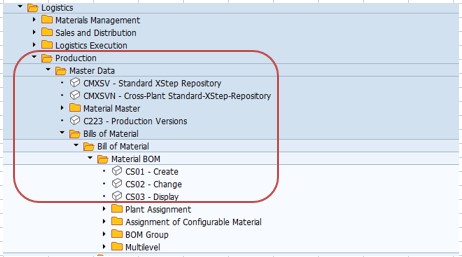
| CS01 | Create BOM. |
| CS02 | Modify BOM. |
| CS03 | Display BOM. |
📋 How a BOM Fits Into the Broader Production Process
BOM Creation: A production or engineering team defines the finished product's structure by creating a BOM in CS01, listing every component and the quantity required.
Material Requirements Planning (MRP): The BOM structure is exploded during MRP runs to calculate exactly how much of each component needs to be procured or produced to meet planned or actual production quantities.
Production Order Creation: When a production order is created for the finished product, the system copies the BOM structure into the order, listing the components that need to be issued to the shop floor.
Component Issue and Production: Components are issued against the production order as production takes place, consuming inventory according to the quantities defined on the BOM.
Product Costing: The BOM structure, combined with component prices, feeds into standard cost calculations for the finished product, giving a bottom-up view of material cost.
🔧 BOM TCode in SAP - TCODE CS01
Go To: Logistics → Production → Master Data → Bill Of Material → Create - CS01.
Follow Steps
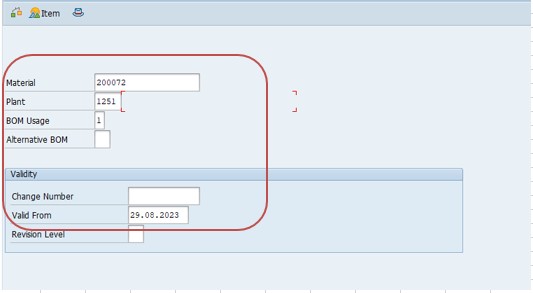
Go to Tcode CS01. Run transaction CS01 to open the Create Bill of Material screen for a finished product or assembly.
Select Material No - 200072. Enter the material number of the finished product or assembly that this BOM will describe.
Select Plant - 1251. Enter the plant where this BOM applies, since BOMs are maintained at plant level and the same material could have different BOMs at different plants.
Select BOM Usage - 1 (Production). BOM Usage identifies the purpose the BOM serves; usage 1 is the standard setting for production scenarios, where the BOM will be used to drive manufacturing.
Select Validity - Date Valid From. Enter the date from which this version of the BOM becomes effective, which matters if the component structure is expected to change at a known future point.
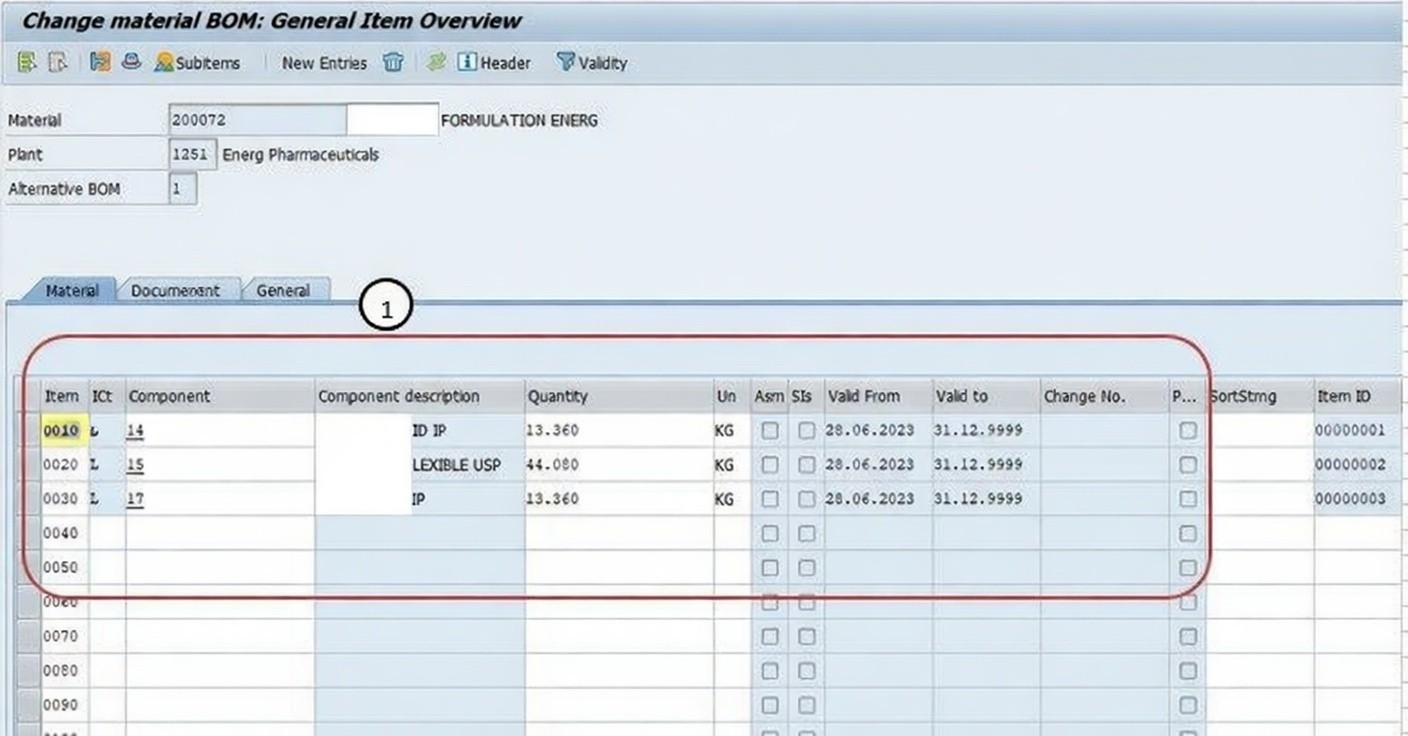
Maintain BOM Details. With the header data set, enter the component-level details that make up the actual structure of the BOM.
1) Item Category
Item category is used to define the characteristics and behavior of items or products in various processes such as sales, Purchasing, and inventory management. Item categories help determine how an item will be processed, managed, and accounted for within the SAP system. For example, in a sales order, the item category determines whether an item is a standard product, a service, or a configurable material - e.g., L (Stock Item).
2) Component
Component refers to a material or item that is part of a larger assembly or product. Components are listed in the Bill of Material (BOM) and represent the individual parts that need to be combined to create the final product.
3) Quantity (Qty)
Quantity (Qty) refers to the numerical value representing the amount of a material or item. It indicates how many units or pieces of a component are required in a specific process, such as manufacturing, sales, or procurement.
4) Validity Details
Validity details refer to the time period during which certain data or settings are applicable or valid. This can apply to various aspects of SAP processes, such as pricing, contracts, agreements, and master data. Validity details help ensure that the right information is used for the right time frame, and they can be set based on specific dates, time periods, or conditions.
Then Save BOM. Once all components, quantities, and validity details are entered correctly, save the BOM. This makes it available for MRP runs and production order creation for the finished material at the selected plant.
📋 Key Fields Involved in Creating a BOM
A quick reference for the main fields captured when creating a Bill of Materials in CS01.
| Field | What It Captures |
|---|---|
| Material Number | The finished product or assembly the BOM describes. |
| Plant | The plant where this BOM structure applies, since the same material can have different BOMs at different plants. |
| BOM Usage | The purpose the BOM serves - usage 1 (Production) is the standard setting for manufacturing scenarios. |
| Validity - Date Valid From | The date from which this version of the BOM structure becomes effective. |
| Item Category | Defines how each component line is processed and accounted for, e.g. L for Stock Item. |
| Component | The individual material or item that forms part of the finished product's structure. |
| Quantity (Qty) | How many units of a given component are required to produce one unit of the finished product. |
| Validity Details | The time period during which the component's inclusion in the BOM is applicable. |
📋 Related SAP Transactions
| Transaction | Purpose |
|---|---|
| CS01 | Create a new Bill of Materials for a material at a specific plant. |
| CS02 | Change or modify an existing Bill of Materials, such as adding or updating components. |
| CS03 | Display a Bill of Materials without allowing changes. |
| CS12 | Display a multi-level BOM explosion, showing all sub-assembly levels for a finished product. |
| MD01 / MD02 | Run Material Requirements Planning, which explodes the BOM to calculate component requirements. |
| CO01 | Create a Production Order, which copies the relevant BOM's component structure. |
| CK11N | Create a standard cost estimate for the finished product, using the BOM structure and component prices. |
❗ Common Mistakes When Creating a BOM
- Selecting the wrong BOM usage, which can cause the BOM to be excluded from the process it was actually meant to support, such as production planning.
- Entering an incorrect quantity for a component, which distorts MRP calculations and can lead to over- or under-procurement of raw materials.
- Forgetting to include a required component, causing production orders created from the BOM to be missing a necessary part.
- Setting an incorrect validity start date, which can cause the wrong BOM version to be active during a production run.
- Using an inconsistent item category for similar components across different BOMs, complicating reporting and reconciliation later.
- Not updating the BOM promptly when an engineering change replaces one component with another, leaving production working from outdated data.
- Creating a BOM at the wrong plant, when the finished product is actually manufactured somewhere else in the organization.
✅ Best Practices for BOM Creation and Maintenance
- Double-check the material number, plant, and BOM usage before entering component details, since correcting these later can be more involved than getting them right the first time.
- Keep component quantities in the same unit of measure as each component's material master to avoid conversion errors during MRP.
- Use validity dates deliberately when a component change is planned for a future date, rather than updating the BOM prematurely.
- Cross-check the BOM against engineering drawings or a bill of engineering data if one exists, to confirm nothing has been missed.
- Review and update BOMs promptly whenever an engineering change notice affects the finished product's structure.
- Use CS12 to review the full multi-level BOM explosion periodically, particularly for complex assemblies with several sub-assembly levels.
- Maintain consistent item categories across similar component types to keep reporting and MRP behavior predictable.
📈 How BOM Data Powers Downstream Manufacturing Processes
The Bill of Materials' influence extends across nearly every stage of the manufacturing cycle, which is exactly why getting the component list and quantities right at creation pays off well beyond the CS01 screen itself. During Material Requirements Planning, the BOM is exploded to calculate exactly what quantity of each component needs to be available, procured, or produced to support planned production. When a Production Order is created, the BOM's structure is copied directly into the order as the list of components to be issued to the shop floor. And when a standard cost estimate is calculated, the BOM's components and quantities, combined with each component's price, form the material cost portion of the finished product's total standard cost.
Because so many processes read from the same BOM structure, an inconsistency here - a missing component, a wrong quantity, an outdated validity period - tends to surface not as an obvious BOM error, but as a shortage during production, an inaccurate MRP proposal, or a costing figure that doesn't reconcile with actual material consumption.
✅ Validating a New BOM Before It Goes Live
Before relying on a newly created BOM for production planning, it's worth running through a short validation checklist. Display the BOM (CS03) and confirm every component required to actually build the finished product has been included. Check quantities against engineering documentation or a known reference build, where available. Confirm the validity start date reflects when the BOM structure should actually take effect. Run a multi-level explosion (CS12) for complex assemblies to confirm sub-assembly BOMs are also correctly structured. Finally, confirm the BOM usage matches the process it's intended to support, typically usage 1 for standard production.
Skipping this validation is one of the more common reasons a production order later runs short of a component, or an MRP run generates a procurement proposal that doesn't match what production actually expects to need.
🎓 Interview-Style Questions and Answers
Q: What is a Bill of Materials, and why is it important in SAP?
A Bill of Materials is a structured list of every raw material, component, and sub-assembly required to manufacture a finished product. It is important because Material Requirements Planning, production order creation, and product costing all depend directly on the BOM's component structure and quantities.
Q: What is the difference between CS01, CS02, and CS03?
CS01 creates a new Bill of Materials, CS02 changes an existing BOM, and CS03 displays a BOM without allowing any changes.
Q: What does BOM Usage mean, and why does it matter?
BOM Usage identifies the purpose a BOM serves - usage 1 (Production) is the standard setting for manufacturing, while other usage values support engineering, costing, or plant maintenance scenarios. Selecting the wrong usage can cause a BOM to be excluded from the process it was meant to support.
Q: What are the main types of BOM in SAP?
The main types include Material BOM, Equipment BOM, Functional Location BOM, Sales Order BOM, Variant BOM, and Multiple BOM, each describing a component structure for a different object or scenario.
📚 Quick Glossary of Terms Used in This Guide
- Bill of Materials (BOM): A structured list of raw materials, components, sub-assemblies, and parts required to manufacture a finished product.
- BOM Usage: A field identifying the purpose a BOM serves, such as usage 1 for Production.
- Component: A material or item that is part of a larger assembly, listed within a BOM as one of the parts needed to build the finished product.
- Item Category: A field defining how a component line is processed and accounted for within the BOM, such as L for Stock Item.
- Validity Details: The time period during which a BOM or a specific component within it is applicable.
- BOM Explosion: The process of breaking a BOM down into all its component quantities, including sub-assembly levels, typically performed during MRP or displayed using CS12.
📝 Governance for BOM Master Data
Because a BOM feeds directly into MRP, production orders, and costing, most manufacturing organizations maintain governance around who is authorized to create or change a BOM, how engineering changes are reflected in the component structure, and how BOM accuracy is periodically reviewed against actual production consumption. This matters because production planning, procurement, and finance all rely on the same BOM data for very different purposes - production planning needs it to sequence work, procurement needs it to plan material purchases, and finance needs it for accurate standard costing.
Data quality governance for BOMs follows the same underlying logic seen elsewhere in SAP master data: a BOM maintained carelessly - a missing component, a wrong quantity, a stale validity period - tends to surface as a production shortage, a costing discrepancy, or an inaccurate MRP proposal well after the BOM itself was created, at which point it is considerably more disruptive to correct. A structured BOM review process, tied to engineering change management, keeps BOM accuracy high even as product complexity grows.
💼 Real-World Scenario: Structuring a New Finished Product's BOM
Production engineer Pooja Mishra at Learn Pharmaceuticals was tasked with setting up the Bill of Materials for a newly approved finished product, material number 200072, ahead of its first production run at plant 1251. Getting the BOM right was critical, since MRP, production order creation, and initial costing would all depend on it.
Pooja opened transaction CS01, entered the material number 200072 and plant 1251, and selected BOM Usage 1 for Production, since this was a standard manufacturing scenario rather than a plant maintenance or sales-order-specific build. He set the validity start date to align with when the product was cleared for production.
Working through the finished product's engineering specification, Pooja entered each required component using item category L for stock items, carefully entering the quantity of each component needed to produce one unit of the finished product. Before saving, he cross-checked his entries against the engineering bill of materials to confirm nothing had been missed, then saved the BOM. Within the same week, the plant's MRP run picked up the new BOM structure automatically, generating accurate procurement proposals for every raw material the finished product would require - proposals that would have been wrong or incomplete had any component been missed at the CS01 stage.
📱 This Configuration in SAP S/4HANA
Transaction CS01 and the underlying BOM data model work largely the same way in SAP S/4HANA as in classic ECC, since the Bill of Materials remains a core master data object shared across Production Planning, Materials Management, and Plant Maintenance. What has evolved in S/4HANA is the availability of Fiori apps for BOM management, such as apps supporting engineering change management and multi-level BOM visualization, alongside improved integration with Product Lifecycle Management for organizations managing complex engineering changes. Many S/4HANA implementations continue to use CS01, CS02, and CS03 for direct BOM maintenance, while Fiori-based tools are increasingly favored for visualizing BOM structures and managing engineering change processes.
🎯 Conclusion
The Bill of Materials is the master data foundation that Material Requirements Planning, production order creation, and product costing all quietly depend on, which is exactly why getting it right in CS01 matters as much as it does. Selecting the correct material, plant, and BOM usage, entering accurate components with the right item category and quantity, and setting a sensible validity period are what separate a BOM that keeps production running smoothly from one that generates shortages, costing errors, or confused MRP proposals down the line. Keep this guide handy the next time your organization needs to structure a new finished product for manufacturing in SAP.