How to Define Storage Location in SAP – OX09 Configuration Guide
Storage locations are the foundation of physical inventory management inside a plant. This guide walks through the full OX09 configuration path, explains how storage locations relate to plants and warehouse numbers, and covers the mistakes that cause the most rework later.
⚠ What is a Plant and Storage Location in SAP MM?
A plant is the highest-level organizational unit in SAP for production, procurement, and logistics - it typically represents a factory, distribution center, or regional site. A storage location is a subdivision within that plant representing a specific physical or geographical area where materials are actually stored and managed, such as a raw material store, a finished goods store, a quality inspection area, or a scrap yard.
Storage locations exist because a single plant is rarely one uniform physical space. Arjun Industries, for example, runs one manufacturing plant in Pune but keeps raw materials in one building, work-in-progress in a separate shed, and finished goods in a third warehouse across the yard - each of these needs to be tracked as a distinct storage location so that stock reports, physical inventory counts, and goods movements reflect where material actually sits, not just which plant it belongs to.
Why Storage Locations Matter for Inventory Management
Every material document in SAP - goods receipt, goods issue, stock transfer, physical inventory count - is posted against a combination of plant and storage location. Without storage locations defined correctly, you lose the ability to answer basic operational questions: how much raw material sits in the receiving dock versus the production floor, which storage area needs a cycle count this week, or which storage location a specific delivery should pick from. Getting this configuration right early in a project avoids painful master data cleanup later.
Where Storage Location Fits in the SAP Enterprise Structure
SAP organizes a business through a nested hierarchy of objects, and it helps to see exactly where a storage location sits inside that chain before configuring one. At the very top sits the client, the self-contained technical environment in which master data and transactions live. Below the client comes the company code, the smallest unit for which a complete, legally required set of financial statements can be produced. Underneath a company code sit one or more plants, and it is at the plant level that most logistics activity - production, procurement, and inventory management - actually happens. The storage location is the next layer down, nested entirely inside a single plant, and it cannot exist independently of one.
This nesting matters because it explains several rules that otherwise seem arbitrary to someone new to SAP MM. A storage location code by itself carries no meaning to the system; it only becomes meaningful when paired with a plant, which is why the same four-character code can be reused in a different plant to represent a completely different physical area. It also explains why a storage location inherits certain plant-level settings - such as the valuation area used for material costing - rather than needing its own separate configuration for every attribute. Consultants sometimes assume a storage location is comparable to a sales organization or a purchasing organization because all three are "organizational units," but the comparison stops there: sales organizations and purchasing organizations sit outside the plant hierarchy and serve sales and procurement processes respectively, while a storage location exists purely to describe physical stock-keeping space inside logistics execution.
Understanding this placement also clarifies a question that trips up a lot of beginners: does a storage location need to be created once per company code, or once per plant? The answer is once per plant. If a company code owns three plants, and each of those plants needs a raw-material storage area, three separate storage location entries must be created - one against each plant - even if all three end up using the identical code and identical description.
✅ Step-by-Step: Creating a Storage Location Using OX09
Navigate to the Configuration Path
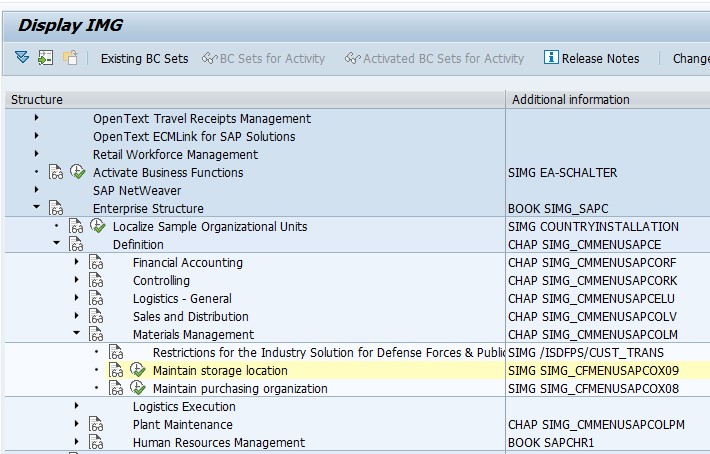
Go to SPRO > Enterprise Structure > Definition > Materials Management > Maintain Storage Location, or execute transaction OX09 directly.
Select the Plant
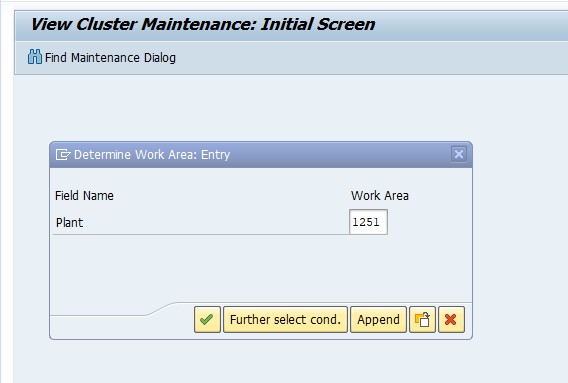
Choose the plant you're configuring for - in this example, Plant 1251. Every storage location you create is scoped to this plant and cannot be shared across plants.
Create a New Entry
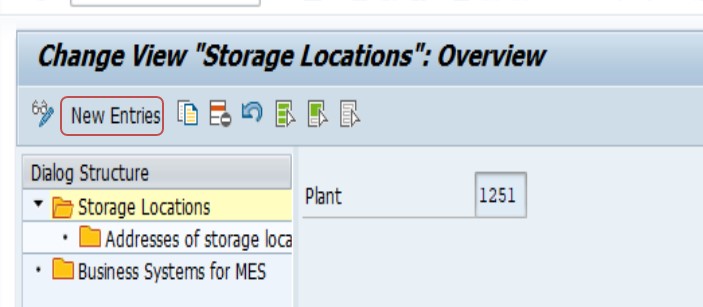
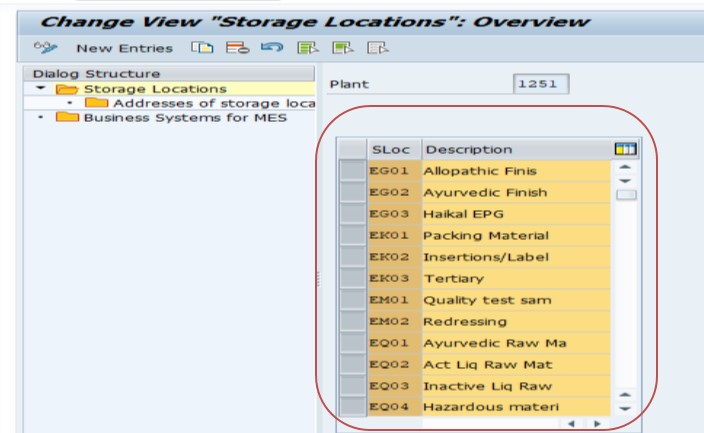
Click New Entries, enter a storage location code (typically 4 characters, e.g. FIN, RAWM, QINS) and a clear description. Keep the naming convention consistent across plants so reporting stays readable.
Save and Assign to a Transport Request
Click Save. Since this is a configuration (customizing) change, SAP will prompt you to assign it to a transport request so the storage location moves correctly from your development system through quality assurance and into production.
📦 Common Storage Location Types Used in SAP MM Projects
Most implementations end up creating a fairly predictable set of storage areas, since the physical flow of material through a manufacturing or distribution site tends to follow the same broad pattern regardless of industry. Knowing this list in advance during blueprint or requirements workshops speeds up the walkthrough with the warehouse team and reduces the number of storage locations invented later as an afterthought.
Raw Material Storage
This is where incoming components and raw inputs sit after goods receipt and before they are issued to production. It is almost always the first storage location created in a new plant, since production cannot be planned or executed until raw stock has somewhere to be booked.
Work-in-Progress or Semi-Finished Storage
Some plants track partially completed assemblies separately from both raw material and finished goods, particularly where a production process has a natural pause point - for example, components that are machined in one shift and assembled in the next. Not every plant needs this level of granularity, but process manufacturers and discrete manufacturers with multi-stage routings frequently do.
Finished Goods Storage
Completed products move here after the final production confirmation, ready to be picked, packed, and shipped against sales orders or stock transfer orders. This storage area is usually the one linked to a warehouse number first, since finished goods dispatch is where bin-level accuracy tends to matter most to the business.
Quality Inspection Storage
Where quality management is active, incoming or produced material is often routed to a dedicated inspection zone before it is released for use or sale. Keeping this physically and systematically separate from unrestricted stock prevents material that has not yet passed inspection from being accidentally picked for a customer order.
Blocked, Scrap, and Rejection Storage
Rejected batches, damaged material, and stock awaiting a scrapping decision are typically isolated in their own storage area rather than left mixed in with usable inventory. This keeps standard availability checks and MRP runs from mistakenly counting unusable stock as available supply.
Returns and Consignment Storage
Businesses that process customer returns, or that hold vendor-owned consignment stock on their premises, generally set up separate storage locations for these categories as well, since the accounting and stock-ownership rules that apply to returned or consignment material differ from standard owned inventory.
None of these categories are hard-coded into SAP - they are simply conventions the industry has settled on because they map cleanly to how goods physically move through a site. A small plant might combine several of these into two or three storage locations, while a large distribution center might split finished goods storage into a dozen zones by product family or storage condition.
⚙️ A Closer Look at the OX09 Configuration Screen
The OX09 screen itself is deliberately minimal - a storage location record only really needs a plant, a four-character code, and a description - but a few surrounding configuration points are worth understanding so the storage location behaves the way the business expects once transactions start flowing.
Short Text and Long Text
The description entered against the storage location code appears throughout the system: in stock overview reports, on goods movement screens, and in dropdown lists during transaction entry. Because this text is what end users actually read (the four-character code rarely means anything to a warehouse operator on its own), it is worth taking the extra minute to write a description that is unambiguous even to someone outside the configuration team - "Finished Goods - Dispatch Bay 2" communicates far more than a generic "FG Store."
Negative Stocks Setting
Separately from OX09, storage locations can be configured to allow negative stock quantities, a setting typically reserved for high-volume, fast-moving environments where goods issue postings sometimes happen slightly ahead of the matching goods receipt posting for operational reasons. Most implementations leave negative stock switched off at the storage location level and only enable it deliberately where a specific process justifies the risk.
Storage Location Without Stock Management (MMSC-Related Behavior)
Not every storage location needs to carry stock quantities in every scenario - some are used purely as a reference for planning or as a dummy location during data migration. While the OX09 transaction itself does not toggle this behavior, it is worth knowing that a storage location's practical use can be narrower than its technical definition, and that downstream configuration (such as movement type restrictions) often does the real work of controlling what can and cannot be posted to a given storage area.
Language-Dependent Descriptions
In a multi-language SAP landscape, the storage location description can be maintained in more than one logon language, which matters for global rollouts where the same plant is operated by teams working in different languages. It is good practice to at least maintain the description in English alongside the primary local language so that global reporting and support teams are not left guessing what a storage location code represents.
📝 Storage Location Naming Conventions and Best Practices
Storage location codes are only 4 characters long, which forces you to think carefully about naming before rollout, since renaming a storage location after transactions have been posted against it is disruptive. A few practices that hold up well across most SAP MM implementations:
- Use short, self-explanatory codes: RAWM (raw material), FGDS (finished goods), QINS (quality inspection), SCRP (scrap)
- Keep the same convention across every plant so cross-plant reporting is consistent
- Avoid embedding the plant code inside the storage location code - the plant is already captured separately on every transaction
- Document the storage location list centrally (a shared spreadsheet or wiki page) before go-live so business and consulting teams aren't creating duplicates independently
- Reserve a small block of codes for future storage areas so you don't run into naming conflicts as the warehouse footprint grows
- Involve the actual warehouse or shop-floor team in naming, not just the consulting team, since the people posting goods movements every day are the ones who need the codes to make intuitive sense
- Where a global template is in use across multiple countries or business units, agree the naming convention once at the template level rather than letting each local rollout invent its own pattern
- Capture the rationale behind each code, not just the code itself, in the master data documentation - a future consultant should be able to understand why QINS exists without asking around
📋 Storage Location vs Plant vs Warehouse Number - How They Relate
One of the most common points of confusion for consultants new to SAP MM and WM is understanding how these three organizational levels fit together. Here's a quick comparison:
| Level | Represents | Configured Via |
|---|---|---|
| Plant | A factory, distribution center, or major site | OX10 |
| Storage Location | A physical storage area within a plant | OX09 |
| Warehouse Number (WM) | The WM organizational unit tracking detailed bin-level or Lean WM stock movement | SPRO > Logistics Execution > Warehouse Management |
A storage location does not automatically get detailed physical stock-movement tracking - that only happens once it is linked to a WM warehouse number. If your project scope includes Warehouse Management, this link (maintained via table T320, Assignment of MM Storage Location to WM Warehouse Number) is what determines whether transactions like goods issue require a confirmed Transfer Order before posting. If you're troubleshooting an error where a delivery is stuck waiting on warehouse confirmation, see our related guide on the SAP WM "Delivery has not yet been put away/picked" error (message VL609), which walks through exactly how that link plays out in a live delivery scenario.
🔗 Why Plant-to-Company-Code Assignment (OX18) Should Happen Before OX09
Storage location configuration rarely happens in isolation on a real project - it sits inside a broader enterprise structure build sequence, and one dependency worth calling out explicitly is the assignment of the plant to a company code, carried out through transaction OX18. While OX09 itself doesn't technically block you from creating a storage location against a plant that hasn't yet been assigned to a company code, most implementation methodologies sequence the two so that OX18 happens first, and there's a practical reason for that ordering.
Financial postings generated by inventory movements - goods receipts, goods issues, stock transfers - ultimately need somewhere to land in the general ledger, and that posting logic is driven by the company code the plant belongs to, not by the storage location itself. If a plant is left unassigned to a company code while storage locations and early stock postings are already being tested, the team will eventually hit account-determination and posting errors that have nothing to do with the storage location setup and everything to do with a missing OX18 assignment further up the structure. Sequencing the build correctly - company code, then plant, then plant-to-company-code assignment via OX18, then storage location via OX09 - avoids chasing symptoms that actually trace back to an earlier, unrelated configuration gap.
This is also a common review point during a configuration walkthrough or a go-live readiness check: before signing off on a storage location structure, it's worth confirming that every plant behind those storage locations has already been correctly assigned to its company code. For the full steps on that assignment, see our companion guide on how to assign a plant to a company code using OX18, which covers the SPRO path and configuration screen in the same step-by-step format used in this guide.
🔗 How Storage Location Fits Alongside Purchasing Organization (OX08)
The other enterprise structure object worth relating back to storage location is the purchasing organization, defined through transaction OX08. While storage location governs where stock physically sits once it's inside a plant, purchasing organization governs who is legally and organizationally responsible for procuring that material in the first place - and the two objects meet at the point where a purchase order line item specifies both a plant and a storage location the incoming goods should be received into.
A purchase order can't be completed without a valid storage location on the item, which is why the storage location structure needs to exist before procurement testing begins, not just before production goods movements are tested. Teams sometimes sequence their build so that purchasing organization and storage location are configured in parallel by different consultants, which works fine functionally, but it's worth a quick cross-check before integration testing starts to confirm the storage locations that procurement expects to receive against actually exist and are named the way the buyers assume they're named. For the steps to configure the purchasing side of this relationship, see our guide on defining a purchasing organization in SAP using OX08.
📊 How Storage Location Affects MRP, Costing, and Availability Checks
Because storage location sits below the plant in the enterprise structure, most planning-relevant settings - including the valuation area used for material costing - are actually maintained one level higher, at the plant. That said, storage location still influences day-to-day planning and stock visibility in several practical ways.
Storage-Location-Level MRP
By default, Material Requirements Planning runs at the plant level, treating all storage locations under that plant as a single pool of available stock. However, SAP also supports storage-location-level MRP for specific storage areas, which is useful when certain stock - project-specific material sitting in a dedicated project storage location, for instance - should be excluded from the general planning run so it isn't accidentally consumed by an unrelated sales order or production order.
Stock Overview and Availability
Transactions such as MMBE (Stock Overview) and CO09 (Availability Overview) break stock figures down by storage location, giving planners and customer service teams a granular view of where usable quantity physically sits. This is precisely why getting the storage location structure right early matters - a plant with poorly defined storage areas produces a stock overview that is technically accurate but operationally useless, since it can't distinguish between stock that's ready to ship and stock still waiting on quality release.
Valuation Stays at Plant Level
A point that regularly confuses newcomers: moving material between two storage locations within the same plant is a stock transfer, not a valuation change, because valuation in standard SAP MM configuration happens at the plant (or company code, depending on organizational design), not at the storage location. Only when material crosses a plant boundary - or when split valuation is separately configured - does a movement typically trigger a valuation-relevant posting.
📋 Storage Location and Physical Inventory Counts
Physical inventory - the periodic process of counting actual stock and reconciling it against the system quantity - is organized around storage location far more than any other single object in SAP MM. A physical inventory document created through MI01 is created for a specific plant and storage location combination, which means the storage location structure directly determines how counting work can be scheduled, assigned, and reported.
A well-designed storage location layout lets a warehouse manager schedule a cycle count for just the finished goods dispatch area this week, and the raw material receiving dock next week, without disrupting operations across the whole plant. A poorly designed layout - for example, one giant storage location covering an entire building - forces the business into all-or-nothing counting exercises, which are disruptive, resource-intensive, and far more likely to be postponed or skipped altogether. This is one of the most concrete, day-to-day business reasons that storage location design deserves careful thought rather than being treated as a five-minute configuration afterthought.
Count results are entered through MI04, and differences are posted through MI07, both of which operate against the storage location captured on the original count document. Any inconsistency between how storage locations are physically used and how the system thinks they're used tends to surface loudly during physical inventory, since count variances are often the first hard evidence that goods movements have been posted to the wrong storage area for months.
🔄 Storage Location Configuration in SAP S/4HANA vs SAP ECC
Consultants moving between SAP ECC and SAP S/4HANA projects often ask whether the storage location setup process has changed. For the core definition step covered in this guide, it largely has not - OX09 still exists in S/4HANA, the SPRO path is the same, and the underlying table T001L still stores the result. Anyone comfortable defining storage locations in ECC can apply that same knowledge directly in an S/4HANA environment.
Where the picture changes is on the warehouse execution side. Classic SAP WM, which this guide references when discussing warehouse numbers and Lean WM, is being phased out in favor of Extended Warehouse Management (EWM), either as an embedded component within S/4HANA or as a decentralized system. EWM introduces its own organizational structures - most notably the warehouse and storage type concept - and the way a storage location links to that structure differs from the classic T320 assignment discussed earlier in this guide. Projects that are still on classic WM inside S/4HANA can continue using the approach described here, but new S/4HANA implementations planning detailed warehouse execution should scope EWM specifically rather than assuming classic WM configuration steps will carry over unchanged.
🔁 Extending a Storage Location's Use to Additional Plants and Materials
Creating a storage location through OX09 makes the code available within a plant, but it does not automatically mean every material in that plant is set up to be stocked there. Material master records carry their own plant-specific and, in some views, storage-location-specific data, and a material generally needs to be extended to a plant (commonly through MM01 or MM50) before goods movements against a new storage location will succeed for that particular material.
This distinction matters most during a rollout to a new plant or a new storage area within an existing plant: the storage location itself might be configured correctly and transported cleanly, but if the relevant materials haven't been extended to that plant, or their storage-location-specific views haven't been maintained, the business will still hit errors the first time they try to post a goods receipt. Coordinating the storage location build with the material master extension timeline is a detail that's easy to overlook in a project plan but expensive to fix under go-live pressure.
🚚 Storage Location Determination in Sales and Delivery Processing
Storage location isn't only relevant to procurement and production - it plays an equally important role once a business starts fulfilling customer orders. During delivery creation, SAP can automatically propose which storage location a line item should be picked from, using a determination procedure that typically considers the shipping point, the plant, and the loading group assigned to the material. This automatic proposal is what allows high-volume shipping operations to create deliveries without a user manually selecting a storage location on every single line.
When storage location determination is not configured, or when the determination rules don't cover a particular combination of shipping point and plant, the storage location field on the delivery is left blank and must be entered manually before the delivery can proceed to picking and goods issue. This is a common root cause of delivery-blocking errors reported by SD teams, and it's directly tied back to how cleanly the storage location structure and its determination rules were built during the original MM and SD configuration - another reason the storage location decisions made at OX09 time ripple forward into processes well outside pure inventory management.
🧩 Batch Management and Special Stock at the Storage Location Level
Two areas that frequently intersect with storage location design but don't get enough attention during blueprinting are batch management and special stock indicators, both of which change how stock is reported and moved even though neither is configured directly through OX09.
Batches Within a Storage Location
Where a material is batch-managed, a single storage location can hold multiple batches of the same material simultaneously, each carrying its own manufacturing date, shelf-life expiry, or quality status. This is precisely why a quality-inspection storage location earns its keep in industries with strict traceability requirements - pharmaceuticals, food and beverage, chemicals - since isolating unreleased batches by storage location, on top of batch-level status control, gives the business two independent safety nets against shipping material that hasn't cleared inspection.
Special Stock Indicators
Consignment stock owned by a vendor, subcontracting stock sitting at a vendor's site, sales-order-specific stock reserved for one customer order, and project stock tied to a WBS element are all tracked using special stock indicators layered on top of the plant and storage location combination. A storage location doesn't need to be uniquely built for every special stock scenario, but larger operations often do dedicate specific storage areas to consignment or project stock purely for physical segregation and easier cycle counting, even though the system itself distinguishes the stock ownership independently of which storage location it sits in.
Serial Numbers
For serialized materials, the serial number profile determines whether individual units are tracked uniquely as they move between storage locations. This adds another layer of granularity beneath the storage location and is worth flagging early in a project if the business deals in high-value or regulated equipment where unit-level traceability, not just batch-level traceability, is a hard requirement.
🚚 Moving Stock Between Storage Locations and Between Plants
Transfers Within the Same Plant
Moving material from one storage location to another inside the same plant - say, from raw material receiving into the production floor buffer - is typically posted with a straightforward one-step or two-step stock transfer using movement type 311 (or its two-step counterpart, 313/315), and does not involve a purchasing document at all. This is the most common storage-location-level transaction a warehouse team will perform day to day, and it's the exact scenario the naming and layout decisions covered earlier in this guide are meant to support.
Transfers Between Plants: The Stock Transport Order
Moving material between two different plants is a different process altogether, usually handled through a Stock Transport Order (STO), which can optionally route through a delivery and goods issue/goods receipt cycle rather than a single direct posting. Because each plant has its own independent set of storage locations, an STO effectively asks the system to reduce stock in a storage location under the supplying plant and increase stock in a storage location under the receiving plant - two entirely separate T001L entries linked only by the transport order itself. Getting the receiving plant's storage location structure right before the first cross-plant STO is tested avoids a scramble to create a missing storage location mid-transaction.
Why This Distinction Trips Up New Consultants
It's a common early mistake to treat a storage-location-to-storage-location move and a plant-to-plant move as the same kind of transaction just because both start with "moving stock somewhere else." They rely on different movement types, different documents, and in the STO case, potentially different accounting entries, which is exactly why understanding the plant/storage-location boundary discussed at the start of this guide pays off well beyond the initial OX09 configuration step.
Cross-Company-Code Transfers
When the supplying and receiving plants sit under different company codes - the exact situation created in the multi-plant case study later in this guide - a stock transport order can additionally be configured as billing-relevant, meaning the movement generates an intercompany invoice rather than a purely logistical posting. This is configured separately from the storage location and plant setup itself, but it's a natural next conversation once two plants under different company codes both have their storage location structures in place and start exchanging stock.
💼 Real-World Scenario: Setting Up Storage Locations at Arjun Industries
When Arjun Industries went live with SAP for its Pune manufacturing plant, Pramod Behera - the SAP MM consultant on the project - was responsible for defining the storage location structure before any master data (materials, BOMs, or stock) could be loaded. Rather than creating storage locations ad hoc as departments requested them, Pramod first walked the physical site with Suresh Mehta, the warehouse supervisor, and mapped out every distinct physical storage zone: raw material receiving, the main production floor buffer, a quality-hold cage, and the finished goods dispatch area.
From that walk-through, Pramod defined four storage locations - RAWM, PROD, QINS, and FGDS - using OX09 exactly as described above, entering each one against plant 1251 and transporting the configuration together as a single change request. Later, when the WM rollout for the finished goods warehouse began (covered in our VL609 troubleshooting guide), only the FGDS storage location needed to be linked to the new Lean WM-enabled warehouse number WH9, since that was the only zone requiring detailed pick/putaway confirmation - the other three continued operating at simple storage-location level without WM. This staged approach - defining storage locations first, then selectively enabling WM only where the business actually needs bin-level tracking - is a pattern worth reusing on most implementations, since it avoids forcing WM overhead onto storage areas that don't need it.
A second scenario played out about eight months after go-live, when Arjun Industries added a second shift and started running a scrap reclamation process that hadn't existed at launch. Rather than repurposing one of the four original storage locations, Pramod created a fifth - SCRP - specifically for rejected and scrap material, keeping it clearly separated from RAWM and PROD so that standard availability checks and MRP runs would not mistake reject stock for usable supply. Because the original naming convention had reserved a block of unused codes exactly for this kind of expansion, the new storage location fit cleanly into the existing structure without forcing a rename of anything already in production - a direct payoff from the naming discipline established during the original rollout.
🏢 Second Scenario: Rolling Out Storage Locations Across a Multi-Plant Group
A different kind of challenge showed up roughly a year later, when Arjun Industries acquired a smaller supplier and brought its Nagpur facility into the same SAP landscape as a second plant, 1252, sitting under a different company code than the original Pune plant. Pramod was again the consultant leading the enterprise structure work, but this time the sequencing mattered more than the storage location codes themselves.
Before touching OX09 for the new plant, the project team first confirmed the new company code existed and completed the OX18 assignment linking plant 1252 to it - the exact dependency covered earlier in this guide - since skipping that step would have meant early stock postings failing on account determination rather than on anything related to storage location naming. Once that assignment was confirmed, Pramod reused the same RAWM, PROD, QINS, and FGDS naming convention from Pune, rather than inventing a new one for Nagpur, specifically so that group-level stock reporting across both plants would read consistently in a single MMBE or stock overview report.
The one deliberate deviation was scope: Nagpur's physical layout didn't include a separate quality-hold area, so QINS was left uncreated for plant 1252 rather than forcing an unused storage location into existence purely for naming symmetry. This illustrates a useful principle for multi-plant rollouts - a shared naming convention keeps reporting clean, but the actual set of storage locations created per plant should still reflect that plant's real physical layout, not a rigid copy-paste of another site's structure.
🗃️ Deactivating, Deleting, and Archiving a Storage Location
Storage locations, like most SAP master data, are rarely deleted outright once a business has been live for any length of time, but there are legitimate reasons a storage location's life cycle needs to be managed rather than left to accumulate indefinitely.
Deletion Flag vs Physical Deletion
Rather than removing a storage location record outright, most projects set a deletion flag against it once it's no longer in active use. This flag doesn't immediately remove the storage location from the system, but it does prevent new transactions from being posted against it and signals to end users, through warnings on relevant transactions, that the storage location is being phased out. Physical deletion - actually removing the T001L entry - is reserved for storage locations that were created in error and never used for a live posting, since deleting one with transaction history risks the same historical inconsistency problems discussed earlier in the common-mistakes section of this guide.
When Archiving Becomes Relevant
Over the lifetime of an SAP system, storage locations tied to closed facilities, discontinued product lines, or completed projects can accumulate. Archiving - moving historical data associated with a storage location out of the live database while preserving it for audit and reporting purposes - is typically handled through SAP's standard archiving objects for material documents and inventory management data, rather than through OX09 itself. This is usually a database administration and data governance decision made well after go-live, but it's worth knowing that a storage location's story doesn't end the day it stops being used - it continues through deactivation and eventually archiving as part of normal system housekeeping.
🔒 Authorization Considerations for Storage Locations
Storage location design also has a security dimension that's easy to overlook during initial configuration but becomes important once a business has more than a handful of warehouse users. SAP allows goods movement authorizations to be restricted by storage location, typically through an authorization field tied to the movement type and storage location combination, which lets a project separate who can post against, say, the quality-hold storage location from who can post against general raw material receiving.
This matters most in environments with segregation-of-duties requirements, where the same person posting a goods receipt shouldn't necessarily be able to release material out of quality-hold status, or where a scrap storage location needs tighter posting restrictions than the rest of the warehouse simply because write-offs have direct financial impact. Building this into the authorization concept alongside the storage location structure - rather than bolting it on afterward - avoids a situation where the physical and system-level structure of the warehouse looks correct on paper, but the actual controls around who can move stock where haven't kept pace with it.
A related, frequently asked question during security reviews is whether authorization can be restricted at the storage location level for display versus change access, and the answer is yes: reporting-only access to a stock overview can be granted broadly, while the ability to actually post a goods movement against a sensitive storage location can be kept to a much smaller group, giving the business visibility without giving everyone the ability to alter stock figures.
❌ Common Mistakes When Defining Storage Locations
Creating storage locations reactively, department by department
This leads to inconsistent naming and duplicate zones that represent the same physical area under two different codes.
Forgetting to assign the storage location to a transport request
The change works fine in the current client but never reaches quality assurance or production, causing "it works in dev but not in QA" tickets.
Assuming a storage location automatically gets WM tracking
Creating a storage location via OX09 alone does not enable Warehouse Management. It must be separately linked to a warehouse number if bin-level or Lean WM tracking is required.
Deleting a storage location that already has transactions posted against it
This can cause inconsistencies in historical stock and movement records. It's almost always safer to stop using a storage location going forward than to delete it outright.
Extending storage locations to a plant without extending the relevant materials
The configuration succeeds, but goods movements still fail because the material master's plant and storage-location data hasn't been maintained for the new area, leading to confusing errors that look like a configuration problem but are actually a master data gap.
Skipping storage-location determination setup on the SD side
Storage locations get created for MM purposes but nobody configures the automatic determination rules used during delivery creation, leaving warehouse staff to manually pick a storage location on every outbound delivery line.
Treating storage location design as purely a technical task
Configuration done without walking the actual physical site, or without input from the people who will use the codes daily, tends to produce a structure that looks fine in SPRO but doesn't match how the warehouse really operates.
📚 Relevant Tables and Follow-Up Configuration
| Table / Transaction | Purpose |
|---|---|
| T001L | Storage Locations master table, linked to plant |
| T001W | Plants/Branches master table |
| T320 | Assignment of MM Storage Location to WM Warehouse Number |
| OX10 | Define/maintain plant |
| OX18 | Assign plant to company code |
| LT03 / LT12 | Create and confirm Transfer Orders once a storage location is WM-relevant |
Once your storage location structure is defined, the typical next configuration steps are assigning the plant to a company code (OX18) if not already done, and - if Warehouse Management is in scope - linking the relevant storage locations to a warehouse number and activating Lean WM or full WM as needed.
📈 Reporting Transactions That Rely on Storage Location
Beyond the configuration transactions already covered, a handful of standard reporting transactions become far more useful once a storage location structure is properly in place, and they're worth knowing as a set since they answer most of the day-to-day questions a warehouse or inventory team will ask.
| Transaction | What It Shows |
|---|---|
| MMBE | Stock overview across plant, storage location, and batch in one screen |
| MB52 | Warehouse stock list broken down by storage location, useful for reconciliation |
| MB5B | Stock on a posting date or valuated stock, split by storage location |
| MC.9 | Storage-location-level stock analysis in Logistics Information System reporting |
| MI01 / MI04 / MI07 | Create, enter counts for, and post differences from a physical inventory document, scoped by storage location |
| CO09 | Availability overview, showing what stock is confirmed and where it physically sits |
A recurring theme across all of these reports is that they're only as useful as the underlying storage location design allows. A stock overview split cleanly by RAWM, PROD, QINS, and FGDS tells a planner exactly where to look; the same report against one undifferentiated storage location per plant tells them almost nothing beyond a total quantity, forcing someone to walk the floor to find out what the system can't tell them.
🔧 Troubleshooting Common Storage Location Errors
"Storage location XXXX is not defined" or similar plant-mismatch errors
This almost always means the storage location code exists somewhere in the system, but not against the specific plant being used in the transaction. Since a storage location is unique to its plant, check OX09 for the exact plant in question rather than assuming the code is globally missing.
Goods movement fails even though the storage location exists in OX09
If the storage location itself is confirmed to exist for the correct plant, the next place to check is the material master. The material may not yet be extended to that plant, or its storage-location-specific view may not have been maintained, both of which will block the posting even though the organizational configuration is technically complete.
Storage location change works in development but not in quality or production
This is the classic symptom of a storage location that was saved without being assigned to a transport request. Check the transport logs for the original OX09 change, and if none exists, the configuration needs to be re-entered and properly captured in a transport this time.
Delivery stuck with no storage location proposed
When a delivery is created and the storage location field is left blank, the storage location determination rules for that shipping point and plant combination either don't exist or don't cover this scenario. This is an SD configuration gap rather than an MM one, and it needs to be resolved in the storage location determination customizing, not in OX09.
Unexpected results in a stock overview after a storage location was added
If figures in MMBE look wrong immediately after a new storage location goes live, confirm whether any opening stock upload or initial stock entry was posted to the new storage location correctly, since a storage location with no stock movements yet will simply show zero rather than an error - which is sometimes mistaken for a configuration fault when it's actually expected behavior.
📖 Quick Glossary of Related SAP Terms
| Term | Meaning |
|---|---|
| Plant | The top-level logistics site - a factory, distribution center, or regional location - under which storage locations are defined. |
| Storage Location | A physical or geographical subdivision of a plant used to track stock at a granular level, defined via OX09. |
| Warehouse Number | The organizational object in classic SAP Warehouse Management responsible for detailed bin-level or Lean WM stock tracking. |
| Storage Bin | The smallest physical stock-keeping unit inside a WM-managed warehouse, sitting beneath the warehouse number and storage type. |
| Movement Type | A three-digit key controlling how a goods movement is posted and which accounts and fields are affected. |
| Valuation Area | The organizational level - typically the plant - at which a material's value is determined for accounting purposes. |
| Transport Request | The mechanism used to move configuration changes, including new storage locations, from one SAP system to another. |
✅ Storage Location Setup Checklist
- Walk the physical site (or interview the warehouse team remotely) before naming a single storage location
- Agree a naming convention that stays consistent across every plant in the landscape
- Create the storage location via OX09 and immediately confirm it has been captured in a transport request
- Extend the relevant materials to the plant and storage location before go-live, not after
- Decide upfront which storage locations, if any, require a WM warehouse number link
- Configure storage location determination on the SD side if the storage location will be used in delivery processing
- Document the full storage location list, including the reasoning behind each code, in a shared master data reference
- Reserve spare codes for future storage areas so growth doesn't force disruptive renaming later
💾 Data Migration Considerations for Storage Location Master Data
Storage locations are usually one of the earliest objects loaded into a new SAP system, since so much other master data - material master plant/storage-location views, opening stock balances, open purchase orders - depends on the storage location structure already existing. This makes storage location a common candidate for tools like LSMW (Legacy System Migration Workbench) or the newer LTMC/Migration Cockpit approach, even though a full storage location list is often small enough to be entered manually through OX09 directly.
Sequencing With Opening Stock Uploads
Whichever migration approach is used, storage locations need to exist and be fully transported through to the target system before any opening stock balances are uploaded against them, since a stock upload referencing a storage location that doesn't yet exist in that client will simply fail. Project teams sometimes underestimate how tightly coupled these two migration steps are and schedule them too close together, leaving little buffer if a storage location transport is delayed.
Reconciling Legacy Storage Locations to New Codes
Where a legacy system already had its own warehouse or storage-area codes, a mapping table between old and new storage location codes is worth building early, both to support the data load itself and to give the business a reference document during user training, so that a warehouse operator who's used to a legacy code for years has a clear bridge to the new SAP terminology.
📑 Handling Storage Location Change Requests After Go-Live
Once a system is live, requests to add, rename, or repurpose a storage location don't stop - new product lines get introduced, warehouses get physically reorganized, and businesses acquire new sites, as illustrated in the multi-plant case study earlier in this guide. How these requests are handled after go-live matters just as much as how the original structure was designed.
Route Requests Through a Formal Change Process
Because OX09 is customizing configuration, not application-level master data, changes to it should go through the same change management and transport process as any other configuration change - impact assessment, testing in a non-production client, and a scheduled transport into production - rather than being made directly by whoever happens to have access. This is especially important because, as covered earlier, adding a storage location can have downstream effects on MRP scope, storage location determination rules, and physical inventory scheduling that aren't always obvious to the person requesting the change.
Avoid Renaming Storage Locations With Transaction History
A request to simply "rename" an existing storage location usually can't be fulfilled as asked, since the code itself is the technical key. The practical alternative is typically to create a new storage location with the desired code and description, transfer any remaining stock across, and apply a deletion flag to the old one going forward - which is exactly why getting the original naming convention right, as discussed earlier, saves so much rework down the line.
🌐 How Storage Location Structures Differ Across Industries
While the underlying OX09 configuration step is identical everywhere, the storage location structures that different industries actually build tend to look quite different, shaped by how each industry physically handles material.
Discrete Manufacturing (Automotive, Machinery)
Typically mirrors the production flow closely - raw component storage, a work-in-progress buffer near the line, and a finished goods marshalling area - often with a dedicated rework or scrap storage location given how frequently non-conforming parts need to be isolated on a production line.
Pharmaceuticals and Food & Beverage
Leans heavily on quality-inspection and quarantine storage locations, frequently combined with strict batch management, since regulatory requirements demand that unreleased material be both systemically and physically separated from saleable stock at all times.
Retail and Distribution
Storage locations often map to functional zones within a distribution center - bulk storage, a fast-pick forward area, returns processing, and a staging zone for outbound trailers - since the priority is throughput and pick efficiency rather than production sequencing.
Process Manufacturing (Chemicals, Oil & Gas)
Frequently separates storage by handling requirement rather than production stage alone - hazardous material storage, bulk tank storage, and packaged goods storage each carry different safety and handling rules, and the storage location structure often reflects those regulatory boundaries directly.
The common thread across every industry is the same principle raised earlier in this guide: storage locations should mirror how material actually moves and is physically separated on site, not an abstract org chart. A structure copied from a different industry's template rarely survives contact with how a specific business actually operates its floor.
🎓 Storage Location Interview and Knowledge-Check Questions
For anyone preparing for an SAP MM consulting interview or reviewing the topic before a certification exam, storage location questions tend to circle back to a handful of core concepts. Working through these before an interview is usually enough to speak confidently on the subject.
Conceptual Questions
Explain the relationship between a client, company code, plant, and storage location. A strong answer walks through the nesting described earlier in this guide - client at the top, company code beneath it for legal reporting, plant beneath that for logistics, and storage location as the innermost layer representing physical stock-keeping space inside a single plant.
Why can't a storage location exist without a plant? Because a storage location is defined as a subdivision of a plant in the SAP data model; the plant-storage location combination is the actual key stored in T001L, so a storage location code has no standalone meaning outside its plant context.
What's the difference between a storage location and a storage bin? A storage location is an MM-level organizational unit representing a general physical area within a plant, while a storage bin is a much more granular WM-level object representing a specific shelf, rack, or slot inside a warehouse managed by a linked warehouse number.
Configuration and Process Questions
Walk through the steps to create a new storage location. This is where the OX09 path covered earlier in this guide comes in directly: navigate via SPRO or run OX09, select the plant, create a new entry with a code and description, then save and assign the change to a transport request.
What must also happen before goods movements can be posted to a newly created storage location? The relevant materials need to be extended to that plant and storage location through the material master, otherwise the storage location exists organizationally but can't actually receive stock for those materials yet.
How would you decide whether a storage location needs to be linked to a warehouse number? A good answer ties the decision to business need rather than defaulting everything to WM - link a warehouse number only where detailed pick/putaway confirmation or bin-level tracking genuinely adds value, as illustrated in the Arjun Industries case study earlier in this guide, where only the finished goods storage location required it.
❓ Frequently Asked Questions
💡 Key Takeaways
- A storage location is a physical subdivision of a single plant, created via OX09, and cannot exist independently of that plant
- Sequence enterprise structure builds correctly: company code, then plant, then OX18 (plant-to-company-code), then OX09 (storage location)
- Storage location structure directly drives how useful stock reports, MRP, and physical inventory counts are - design it around how the site actually operates, not an abstract template
- Linking a storage location to a WM warehouse number is a separate, optional decision that should be scoped by business need, not applied uniformly
- Storage locations are rarely deleted after go-live - deactivation via a deletion flag is the safer, standard path once transactions exist
- Every configuration change to a storage location should move through a transport request and a proper change management process