SAP Document Splitting Configuration – Step-by-Step Guide
Document splitting is what makes complete, zero-balanced financial statements possible at the profit center or segment level, not just the company code. This guide covers the full configuration path, active vs passive splitting, and the mistakes that cause the most rework at period-end close.
⚠ What is Document Splitting in SAP and Why It Matters
Document splitting is a New General Ledger (New GL) function that splits accounting document line items according to characteristics you define -most commonly profit center or segment -so that complete financial statements can be produced for those dimensions, not only for the company code as a whole. Without document splitting, a vendor invoice covering expenses across two profit centers would leave the vendor and tax line items unassigned to either profit center, making it impossible to produce a clean, zero-balanced balance sheet for each profit center individually.
Document splitting is also known as an "online split," since it happens automatically at the moment a document is posted, based on splitting rules configured in customizing. This transparency is vital for both internal management reporting (segment/profit-center-level performance) and external statutory reporting (for example, producing balance sheets that comply with IFRS or US GAAP segment reporting requirements).
🔄 Active vs Passive Document Splitting
| Type | How It Works | Example |
|---|---|---|
| Active (Rule-Based) Splitting | Divides line items based on predefined splitting rules configured in customizing, applied when a document is first posted | Splitting a vendor invoice's tax and vendor lines across the profit centers of the associated expense lines |
| Passive Splitting | Reproduces the account assignments from the original document onto a clearing document | An outgoing payment clearing an invoice inherits the invoice's profit center/segment assignment automatically |
Understanding this distinction matters because troubleshooting an unexpected split (or an unexpected lack of split) requires knowing which mechanism is actually in play -active splitting issues trace back to splitting rule configuration, while passive splitting issues trace back to the original document being cleared.
✅ Step-by-Step: Defining a Document Splitting Method
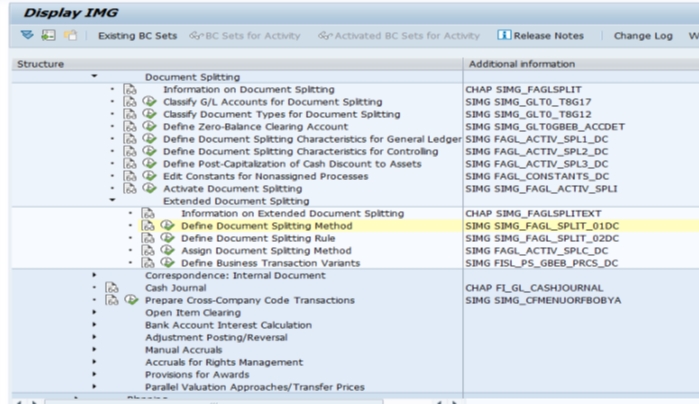
Navigate to the Configuration Path
Go to SPRO > Financial Accounting (New) > General Ledger Accounting (New) > Business Transactions > Document Splitting > Extended Document Splitting > Define Document Splitting Method.
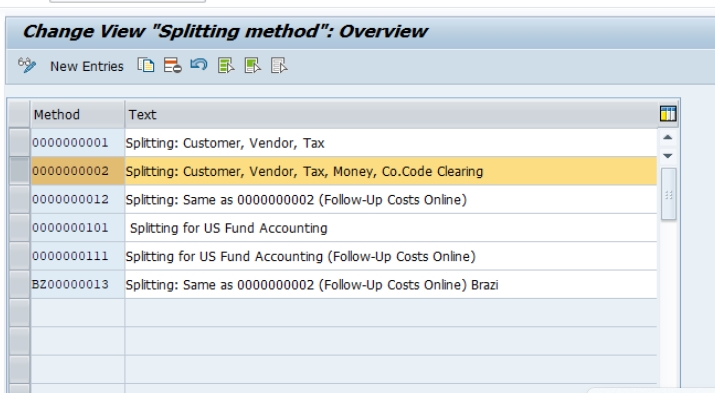
Copy the Standard Method
Select SAP's standard delivered method (0000000012) and use Copy rather than editing it directly -SAP explicitly recommends never changing the standard method, since future support packs and upgrades assume it remains unmodified.
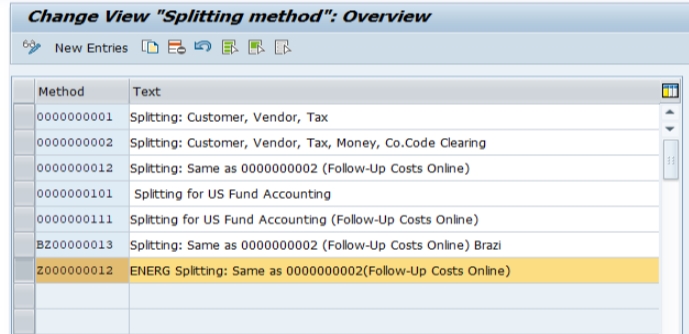
Create Your Customer-Defined Method
Enter a customer namespace key, for example Z000000012, confirming that the splitting rules from the standard method have been copied across as the starting point for any customization.
Save and Continue Configuration
Click Save and assign the change to a transport request. Defining the method is only the first step -classify G/L accounts, classify document types, define zero balance clearing accounts, and activate document splitting still need to follow, as covered below.
📋 The Full Document Splitting Configuration Sequence
Defining a splitting method (covered above) is just one piece of a larger configuration sequence. Here's the complete path most SAP FICO implementations follow:
| Step | IMG Activity | What It Does |
|---|---|---|
| 1 | Classify G/L Accounts for Document Splitting | Assigns each G/L account to an item category, so the system knows how each account should behave during a split |
| 2 | Classify Document Types for Document Splitting | Assigns each document type to a business transaction and business transaction variant |
| 3 | Define Zero Balance Clearing Account | Creates a clearing account used when a document can't otherwise be balanced at the splitting characteristic level |
| 4 | Define Document Splitting Characteristics for General Ledger | Specifies which fields (profit center, segment, etc.) are used as splitting characteristics |
| 5 | Define Document Splitting Method (this guide) | Contains the splitting rules for each business transaction and variant |
| 6 | Activate Document Splitting | Activates the method at the client level, with per-company-code activation control |
These steps are typically configured in roughly this order during an implementation, though classification and method definition are sometimes done in parallel by different team members before the final activation step ties everything together.
📋 Understanding Business Transactions and Item Categories
Two SAP-delivered concepts underpin the entire document splitting framework, and understanding them makes troubleshooting far easier:
Business Transaction and Business Transaction Variant
A business transaction is SAP's standard, non-modifiable classification of a real business process (such as "vendor invoice" or "customer payment"). A business transaction variant is a more specific version of that transaction, tailored to your configuration. Every document type must be classified with a business transaction and variant before document splitting rules can apply to it.
Item Category
An item category is SAP's technical classification of the individual line items that can appear within a document -for example, "vendor," "tax," "expense," or "customer." Item categories are also non-modifiable; if the standard set doesn't cover a scenario your organization needs, SAP recommends contacting SAP support rather than attempting a custom item category. G/L accounts are assigned to item categories during the "Classify G/L Accounts" step, and this assignment is what tells the splitting rule how each account's line items should be handled.
💼 A Classic Example: Splitting a Vendor Invoice Across Two Profit Centers
The clearest way to understand document splitting is through the invoice example that appears throughout SAP training material. Suppose a vendor invoice contains two expense line items -8,000 assigned to Profit Center X and 2,000 assigned to Profit Center Y -plus a vendor payable line and a tax line that are naturally posted as single, undifferentiated amounts. Without document splitting, anyone analyzing Profit Center X's financial performance can't see their share of the vendor liability or tax, since those lines aren't tagged to any profit center at all.
With document splitting active, the system automatically divides the vendor and tax lines proportionally, based on the expense lines' profit center assignment -in this case, 80% to Profit Center X and 20% to Profit Center Y -so that both profit centers show a complete, zero-balanced picture of the transaction. This is exactly the scenario active (rule-based) splitting is designed to solve, and it's the example most SAP FICO trainers use to introduce the concept before moving into the more detailed configuration mechanics.
💼 Real-World Scenario: Enabling Segment Reporting at Arjun Industries
When Arjun Industries expanded into multiple business segments -industrial materials and personal care products -the finance team needed to produce separate, complete balance sheets for each segment to satisfy both internal management reporting and external statutory disclosure requirements. Priya Mehta, supporting the FICO workstream, led the document splitting configuration: classifying relevant G/L accounts, defining "Segment" as a splitting characteristic alongside profit center, and testing the standard splitting method against representative vendor invoices spanning both business segments.
During testing, an initial simulation showed several accounts payable postings failing to balance at the segment level -traced back to a handful of G/L accounts that hadn't yet been classified for document splitting. Priya's team completed the missing classifications, re-ran the test postings, and confirmed zero-balanced results at the segment level before activating document splitting in the production company code. Because document splitting can't be deactivated once live documents are posted using it, the team deliberately ran an extended parallel testing period in the quality assurance system first, rather than treating activation as a quick, low-risk configuration toggle.
❌ Common Mistakes in Document Splitting Configuration
Modifying the standard splitting method directly
SAP explicitly recommends copying the standard method (0000000012) into a customer-defined method before making any changes, since directly modifying the standard delivery risks being overwritten during upgrades.
Over-relying on default account assignment values
Using a constant default value can reduce data quality, since the default silently replaces every missing object, making incorrect splitting rules much harder to identify and correct. SAP recommends testing without default values first to surface any errors.
Activating document splitting before testing is complete
Since document splitting cannot be deactivated for a company code once documents have been posted using it, activating prematurely -before G/L account classification and splitting rules are fully tested -can lock in configuration issues that are expensive to unwind later.
Forgetting to classify newly created G/L accounts or document types
Any new G/L account or document type introduced after go-live needs to be classified for document splitting as well; skipping this step for new accounts is a common cause of unexpected unbalanced postings discovered well after initial configuration.
🔍 Common Errors and Issues in Document Splitting
- Document doesn't balance at profit center/segment level -usually traces back to a G/L account that hasn't been classified with an item category, or a missing zero balance clearing account configuration
- Unexpected default account assignment values appearing -check whether a default/constant value has been configured, which can mask genuine splitting rule gaps
- New document type not splitting as expected -confirm the document type has been classified with the correct business transaction and business transaction variant
- Inconsistent behavior across company codes -remember that document splitting activation happens at the client level but can be deactivated per company code; check the company-code-level deactivation flag if one company code behaves differently from others
💬 Common SAP FICO Interview Questions on Document Splitting
What is the purpose of document splitting?
To split accounting document line items by characteristics like profit center or segment, so complete, zero-balanced financial statements can be produced at that dimension.
What's the difference between active and passive splitting?
Active splitting applies predefined rules at initial posting; passive splitting reproduces account assignments from an original document onto a clearing document.
Can document splitting be turned off after go-live?
Not for a company code that has already posted documents using it -this would create inconsistencies between historical and new documents.
What is a zero balance clearing account?
An account used to absorb differences when the system can't automatically balance a document at a splitting characteristic level on its own.
Can custom item categories be created?
No, item categories are standard and non-modifiable; if the delivered set doesn't cover a needed scenario, SAP recommends contacting SAP support rather than attempting a workaround.
🔄 Inheritance: A Key Setting Alongside Document Splitting
When activating document splitting, one of the most important -and most recommended -settings to enable is Inheritance. Inheritance allows account assignments (like profit center or segment) to be inherited from one line item to others in the same document that don't have their own account assignment, rather than requiring an explicit splitting rule for every possible business scenario.
A common example: a customer invoice created with reference to a revenue line item that already carries a profit center. With Inheritance enabled, the corresponding customer receivable and tax lines automatically inherit that same profit center in the general ledger view, without needing a dedicated splitting rule to explicitly cover that exact combination. SAP recommends activating Inheritance alongside document splitting precisely because it reduces the number of custom splitting rules a project needs to build and maintain -relying on inheritance for straightforward cases and reserving rule-based (active) splitting for scenarios that genuinely require more complex, conditional logic.
📋 Standard Account Assignment: The Fallback When Inheritance Isn't Enough
Sometimes neither an explicit splitting rule nor inheritance can determine the correct account assignment for a line item -for example, when the required information genuinely isn't available yet at the time of posting. For these cases, SAP allows a standard (default) account assignment to be configured as a fallback, ensuring the document can still be posted and balanced even without complete information.
This fallback should be used carefully and sparingly. As covered in the common mistakes section above, over-relying on default account assignment values can quietly reduce data quality, since the default silently substitutes a constant value for every missing object -making genuinely incorrect splitting configuration much harder to detect through normal testing. SAP's own recommendation is to first test a configuration without any default values active, specifically so that the resulting errors surface clearly and can be traced to their real root cause, before considering whether a standard account assignment fallback is genuinely needed for specific, well-understood scenarios.
💰 How Document Splitting Affects Controlling (CO) Integration
Document splitting doesn't just affect how a document displays in the general ledger view -it has real downstream effects on Controlling (CO) processes as well. Because split line items carry accurate profit center and segment assignments, subsequent CO-relevant processes -such as realized exchange rate difference postings during clearing, or CO-relevant account assignments during partial payment processing -can correctly attribute those postings to the right cost objects rather than defaulting to a generic or incorrect assignment.
This is one of the reasons SAP's own documentation and community guidance frequently recommends keeping document splitting inactive until the Controlling module is fully configured and stable -activating document splitting on an incomplete CO configuration risks embedding incorrect cost object assignments into live financial postings, which are far more disruptive to correct after the fact than a delayed activation timeline would have been.
📊 Impact on Closing Operations and Foreign Currency Valuation
Document splitting characteristics also play into period-end closing operations, particularly foreign currency valuation of open items. When document splitting is active, foreign currency valuation postings for open items need to respect the same splitting characteristics as the original document, ensuring that valuation adjustments land against the correct profit center or segment rather than a generic, unassigned bucket.
Finance teams running month-end close in a document-splitting-enabled environment should build validation checks into their close process specifically confirming that valuation and other closing postings are correctly split -since an unnoticed gap here can quietly understate or overstate a specific segment's or profit center's reported position, an error that's much harder to catch after the close has already been finalized and reported externally.
💬 A Few More Interview Questions on Document Splitting
What is Inheritance in the context of document splitting, and why does SAP recommend it?
Inheritance lets account assignments pass from one line item to others in the same document that lack their own assignment, reducing the number of explicit splitting rules a project needs to configure and maintain.
Why might using a default account assignment value be risky?
It silently replaces every missing object with a constant, which can mask genuine splitting configuration errors and make them much harder to detect and correct later.
Why is it recommended to keep document splitting inactive until Controlling is fully implemented?
Because split line items feed downstream CO-relevant processes; activating on an incomplete CO configuration risks embedding incorrect cost object assignments into live financial postings.
✅ Pre-Go-Live Checklist for Document Splitting Configuration
- Confirm document splitting characteristics (profit center, segment, etc.) are agreed with finance stakeholders before configuration begins
- Copy the standard splitting method (0000000012) into a customer-defined method rather than editing it directly
- Classify all relevant G/L accounts and document types for document splitting, including any newly created in parallel with this project
- Configure the zero balance clearing account before testing, since most real-world documents will need it
- Enable Inheritance to reduce the number of explicit splitting rules required
- Test extensively in QA -including foreign currency valuation and clearing scenarios -before activating in production, since activation can't be reversed once documents are posted
- Confirm Controlling (CO) configuration is stable and complete before activating document splitting in production
- Build month-end close validation checks confirming closing postings are correctly split by the configured characteristics
🏆 Conclusion
Document splitting is one of the more powerful -and more consequential -pieces of New GL configuration, since it directly determines whether your organization can produce complete, zero-balanced financial statements at the profit center or segment level. In summary: understand the difference between active and passive splitting, follow the full configuration sequence (classify G/L accounts, classify document types, define the zero balance clearing account, define and activate a customer-defined splitting method), enable Inheritance to reduce rule-building overhead, and test thoroughly in QA before activating in production, since the activation decision can't be reversed for a company code once live documents are posted.
For related FICO enterprise structure configuration, see our guides on Chart of Accounts (OB13) and defining Financial Statement Version, both of which work closely alongside document splitting to produce complete, accurate financial reporting.
🔐 SAP S/4HANA Considerations for Document Splitting
In SAP S/4HANA, New GL functionality -and with it, document splitting -is active by default rather than being an optional add-on module as it effectively was for some ECC customers running classic GL. This means organizations migrating from classic GL in ECC to S/4HANA (via a Brownfield conversion) need to plan a proper document splitting design as part of the migration project, even if their legacy system never used it, since S/4HANA's underlying Universal Journal (table ACDOCA) is built around the New GL data model.
For organizations already on New GL in ECC with document splitting already configured, the core configuration -splitting method, rules, classified accounts and document types -generally carries forward into S/4HANA largely unchanged, though it's worth validating splitting behavior against the Universal Journal's unified table structure during technical testing, since some organizations do encounter edge cases worth confirming during a migration project's regression testing phase.
💼 Other Common Business Scenarios That Rely on Document Splitting
Beyond the classic vendor invoice example covered earlier, a few other everyday business transactions commonly rely on document splitting to produce meaningful segment or profit-center-level reporting:
- Intercompany transactions -splitting ensures each legal entity's share of a shared transaction is correctly reflected at the segment or profit center level within its own books
- Asset acquisitions and retirements -depreciation and asset-related postings need to carry the correct profit center or segment for accurate fixed asset reporting by business unit
- Down payments and their clearing -passive splitting ensures a down payment's original account assignment carries through correctly when it's later cleared against the final invoice
- Goods receipt/invoice receipt (GR/IR) clearing -splitting keeps the profit center or segment assignment consistent between the goods movement and the corresponding vendor invoice
Recognizing that document splitting touches far more than just accounts payable invoices helps project teams scope testing appropriately -a narrow test plan covering only vendor invoices will miss issues that only surface in asset accounting, intercompany, or down payment scenarios.