How to Assign Plant to Company Code in SAP – OX18 Configuration Guide
Assigning a plant to a company code is the link that connects logistics execution with financial reporting. This guide covers the full OX18 configuration path, why this assignment drives valuation and accounting, and the mistakes that cause the most rework later.
⚠ Why Plant-to-Company-Code Assignment Matters
company code is the legal entity for which SAP produces a balance sheet and profit And loss statement -it represents your organization from a pure financial-accounting standpoint. A plant, on the other hand, is a logistics-level organizational unit representing a factory, warehouse, or distribution site. On their own, these two units belong to different SAP modules -company code lives in FI, plant lives in MM/PP/SD -and until they are explicitly linked, SAP has no way to know which company code's books should be updated whenever a goods movement, stock valuation change, or inventory posting happens at that plant.
The OX18 assignment is what bridges this gap. Once a plant is assigned to a company code, every material document posted at that plant -goods receipt, goods issue, stock transfer, physical inventory adjustment -automatically generates the correct accounting entries against that company code's chart of accounts and financial statements. This is why plant-to-company-code assignment is one of the very first configuration steps in any SAP implementation, done immediately after both the plant (OX10) and company code (OX02) have been individually defined.
One Plant, One Company Code
It's worth being precise about the cardinality here, since it trips people up: a single plant can only ever be assigned to one company code at a time. A company code, however, can have multiple plants assigned to it -for example, a single legal entity might operate three manufacturing plants and two distribution centers, all reporting into the same company code's financial statements.
✅ Step-by-Step: Assigning Plant to Company Code Using OX18
Navigate to the Configuration Path
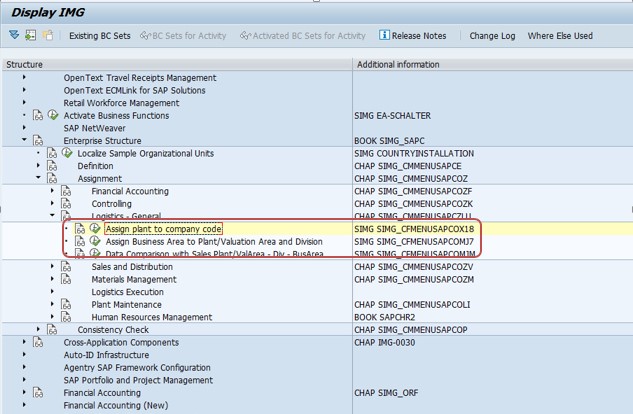
Go to SPRO > Enterprise Structure > Assignment > Logistics-General > Assign Plant to Company Code, or execute transaction OX18 directly.
Create a New Entry
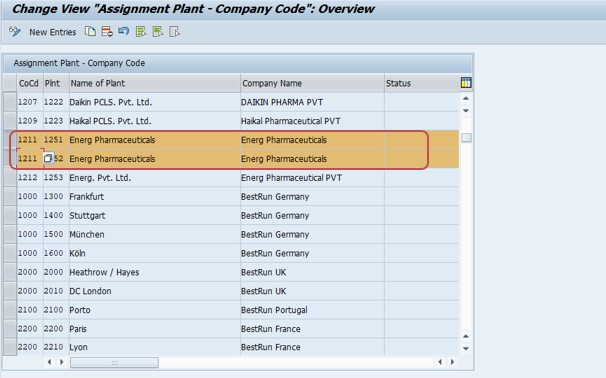
Click New Entries, then enter the company code and the plant you want to assign to it. Double-check that the plant hasn't already been assigned elsewhere, since the one-to-one plant-to-company-code rule means an existing assignment will need to be corrected first.
Save and Assign to a Transport Request
Click Save. Since this is a configuration (customizing) change, SAP will prompt you to assign it to a transport request so the assignment moves correctly from development through quality assurance and into production.
🏢 Where This Fits in the Full SAP Enterprise Structure
Plant-to-company-code assignment is one link in a longer chain of enterprise structure configuration that every SAP MM/FI implementation works through in sequence. Understanding the full chain helps you see why OX18 sits exactly where it does in a typical project timeline.
| Step | Transaction | What It Defines |
|---|---|---|
| 1 | OX02 | Define company code (the legal entity) |
| 2 | OX10 | Define plant (the logistics site) |
| 3 | OX18 | Assign plant to company code -this guide |
| 4 | OX09 | Define storage locations within the plant |
| 5 | OX08 / OX01 / OX17 | Define and assign purchasing organization |
If you're setting up a new plant from scratch, this is typically the order you'd follow: define the company code, define the plant, assign the plant to the company code (covered here), then move on to storage locations and purchasing organization. For the storage location step, see our guide on defining storage location using OX09; for purchasing organization, see defining purchase organization using OX08.
💰 How This Assignment Drives FI-MM Integration
The plant-to-company-code link is what makes SAP's tight FI-MM integration possible. A few of the concrete downstream effects worth understanding:
Valuation Area
SAP maintains a valuation area for every plant (assuming valuation is at plant level, which is the standard and by far most common setup), and this valuation area inherits its company code from the OX18 assignment. Material valuation -moving average price, standard price, stock value -is calculated and posted against the company code that the valuation area's plant is assigned to.
Chart of Accounts and G/L Determination
Every company code is linked to a chart of accounts. Because a plant inherits its company code through OX18, every automatic account determination (via transaction OBYC) for goods movements at that plant resolves G/L accounts from the correct chart of accounts -get the plant-to-company-code assignment wrong, and you risk postings hitting the wrong company's books entirely.
Fiscal Year Variant and Posting Periods
Posting period control (via transaction OB52 / MMPV) is maintained at the company code level. A plant's transactions are only postable within periods that are open for its assigned company code -a common cause of "posting only possible in periods…" errors when a plant's period-end close hasn't been coordinated with its company code's fiscal calendar.
💼 Real-World Scenario: Multi-Plant, Multi-Company-Code Rollout at Arjun Industries
When Arjun Industries expanded from a single manufacturing site into a group with two legal entities -Arjun Industries Pvt Ltd and a newly incorporated subsidiary, Arjun Exports Pvt Ltd -Vikram Nair, the SAP MM/FI consultant leading the rollout, had to plan the plant-to-company-code structure carefully before any transactional configuration could begin. The original Pune plant remained assigned to the parent company code, while a new plant set up specifically for the export business was defined and assigned to the new subsidiary's company code using OX18.
Midway through testing, Suresh Mehta's warehouse team flagged that a stock transport order between the two plants was failing validation. Vikram traced this back to the fact that cross-company-code stock transfers require additional configuration beyond the basic OX18 assignment -specifically, an inter-company billing document type and corresponding pricing procedure, since moving stock between two different company codes is treated as a sale from an accounting perspective, not a simple internal transfer. This is a good illustration of why plant-to-company-code assignment, while a simple three-field entry on the surface, has real downstream implications the moment more than one company code is involved in your enterprise structure -something worth flagging early to a project's finance workstream rather than discovering it during user acceptance testing.
Priya Mehta, reviewing security roles for the new subsidiary, also had to confirm that finance and warehouse users had authorization scoped correctly to their own company code's plants -since without correct authorization group assignment at the plant level, users from one legal entity could technically see or post against the other's plant data, which is both an audit and compliance concern for two-legal-entity group structures.
❌ Common Mistakes When Assigning Plant to Company Code
Attempting to assign a plant to a second company code
A plant can only belong to one company code. If a plant genuinely needs to move to a different company code, this typically requires careful data migration planning rather than a simple re-assignment in OX18.
Doing this assignment before the plant or company code is fully defined
OX18 assumes both organizational units already exist (via OX10 and OX02). Attempting the assignment out of sequence typically just results in a "does not exist" lookup error in the entry screen.
Forgetting the transport request
Like all enterprise structure configuration, this change needs to be captured in a transport request to move correctly from development to QA and production -an easy step to miss under project deadline pressure.
Overlooking cross-company-code implications
If your enterprise structure has multiple company codes, moving stock between plants that belong to different company codes triggers inter-company accounting requirements (billing documents, pricing) that go well beyond the basic OX18 assignment -plan for this early if your organization has more than one legal entity.
🔍 Errors That Trace Back to Missing or Incorrect Plant-Company-Code Assignment
A number of everyday SAP error messages during master data creation or the first transactions at a new plant actually trace back to an incomplete or incorrect OX18 assignment. A few worth recognizing:
- "Plant <plant> is not assigned to a controlling area" -a related but separate assignment (plant to company code to controlling area) is incomplete; see our dedicated guide on this error for the full fix
- "Posting only possible in periods…" -the plant's company code has a closed posting period that doesn't match the transaction date; check OB52/MMPV for the relevant company code
- Account determination errors (e.g. "Account determination for entry… not possible") -often traces back to a plant being assigned to the wrong company code, which points automatic postings at the wrong chart of accounts
- New plant not appearing in expected finance reports -usually means the OX18 assignment was never completed or was assigned to the wrong company code
Whenever a newly created plant throws unexpected errors during its very first transactions, checking the OX18 assignment (and the chain of dependent configuration behind it -controlling area, chart of accounts, posting periods) is one of the fastest ways to rule out enterprise structure gaps before digging into transaction-specific troubleshooting.
📚 Relevant Tables and Follow-Up Configuration
| Table / Transaction | Purpose |
|---|---|
| T001K | Valuation Area -links plant valuation to company code |
| T001W | Plants/Branches master table |
| T001 | Company Codes master table |
| OX02 | Define company code |
| OX10 | Define plant |
| OX09 | Define storage locations within a plant |
| OX06 / OKKP | Assign company code to controlling area |
Once a plant is assigned to its company code, the typical next steps are assigning the company code to a controlling area (if not already done), defining storage locations for the plant (OX09), and configuring the purchasing organization structure so procurement can begin.
📊 Company Code, Controlling Area, and Operating Concern -The Next Layer
Once a plant is correctly assigned to its company code, the next enterprise structure layer most implementations tackle is the assignment of that company code to a controlling area. This is a separate configuration step (transaction OX06 or the IMG node for assigning company code to controlling area) that enables SAP's Controlling (CO) module -cost center accounting, profit center accounting, internal orders, and profitability analysis -to report across one or more company codes consistently.
Two common controlling area setups exist: a 1:1 setup, where a single controlling area is assigned to exactly one company code, and a cross-company controlling area, where a single controlling area spans multiple company codes so that management reporting (cost centers, profit centers) can be consolidated across legal entities even though statutory financial reporting still happens separately per company code. Getting the plant-to-company-code assignment right is a prerequisite for this next step, since controlling area assignment builds directly on top of the company code structure already in place.
Why This Sequencing Matters
A common real-world error message -"Plant <plant> is not assigned to a controlling area" -is really a symptom of this layered dependency: the plant is correctly assigned to its company code via OX18, but the company code itself hasn't yet been linked to a controlling area, so SAP can't determine which controlling area should receive cost postings from that plant's transactions. Fixing the underlying company-code-to-controlling-area assignment resolves the error at its source rather than needing any change at the plant level itself.
📝 Planning Your Plant-to-Company-Code Structure Before Go-Live
Because reassigning a live plant to a different company code is disruptive, it's worth thinking through your organizational structure carefully before the first OX18 entries are created, rather than treating it as a quick five-minute task. A few planning questions worth answering upfront with your finance and business stakeholders:
- How many legal entities (company codes) does the organization actually have, today and in any planned near-term expansion?
- Which physical sites (plants) belong to which legal entity, and are there any sites that are shared or ambiguous?
- Will any stock or materials need to move between plants belonging to different company codes, requiring inter-company billing setup?
- Does the organization need a single cross-company controlling area for consolidated management reporting, or will controlling stay siloed per company code?
- Are there any planned mergers, acquisitions, or divestitures that could require plants to move between company codes in the near future?
Answering these questions before configuration begins avoids the much costlier scenario of discovering, mid-project or post-go-live, that a plant needs to be reassigned to a different company code after transactions and stock values already exist against it.
📋 Plant vs Company Code vs Controlling Area -Quick Comparison
| Unit | Module | Represents | Configured Via |
|---|---|---|---|
| Company Code | FI | A legal entity producing its own financial statements | OX02 |
| Plant | MM/PP/SD | A physical logistics site (factory, warehouse, distribution center) | OX10 |
| Plant-Company Code Assignment | MM/FI | Links logistics activity at a plant to a company code's books | OX18 (this guide) |
| Controlling Area | CO | Management accounting reporting scope, potentially spanning multiple company codes | OX06 / OKKP |
Keeping these four concepts distinct in your head -and knowing which configuration transaction governs each -is one of the fastest ways to correctly triage a configuration or posting error during go-live week, when several enterprise structure layers can all plausibly be the root cause of the same symptom (a failed posting or a missing report line).
🔐 SAP S/4HANA Notes on Plant-to-Company-Code Assignment
The OX18 transaction and the underlying plant-to-company-code assignment concept are unchanged in S/4HANA -this is foundational enterprise structure configuration that has remained stable since classic ECC. What has evolved in S/4HANA is the Universal Journal (table ACDOCA), which unifies FI and CO postings into a single line-item table. This doesn't change how you configure OX18, but it does mean that once a plant is correctly assigned to its company code, the resulting valuation and cost postings flow into a more integrated financial reporting structure than in classic ECC, where FI and CO data lived in more separate tables.
If your organization is planning an S/4HANA migration (via Brownfield conversion or Greenfield reimplementation), it's worth confirming with your Basis/functional team whether existing OX18 assignments, valuation areas, and controlling area setups will carry over as-is (typical in a Brownfield conversion) or need to be redefined as part of a fresh enterprise structure design (more common in a Greenfield project).
💬 Common SAP MM/FI Interview Questions About This Topic
What transaction code is used to assign a plant to a company code?
OX18, found under SPRO > Enterprise Structure > Assignment > Logistics-General > Assign Plant to Company Code.
Can a company code have more than one plant?
Yes. A company code can have multiple plants assigned to it, but each individual plant can only belong to one company code.
What table stores the valuation area, and how does it relate to this assignment?
Table T001K stores the valuation area, which is where the plant's company code assignment is technically reflected for valuation purposes, assuming valuation is at plant level (the standard configuration).
What's required to move stock between plants in two different company codes?
An inter-company stock transport order requires an inter-company billing document type and pricing procedure, since the movement is treated as a sale between legal entities from an accounting standpoint.
What error typically appears if a company code isn't assigned to a controlling area?
"Plant <plant> is not assigned to a controlling area" -even though the plant is correctly assigned to its company code, the missing company-code-to-controlling-area link blocks CO-relevant postings.
📖 Quick Glossary of Terms Used in This Guide
| Term | Meaning |
|---|---|
| Company Code | The legal entity for which SAP produces financial statements |
| Plant | A logistics-level organizational unit -a factory, warehouse, or distribution site |
| Valuation Area | The organizational level at which material stock is valuated -typically the plant |
| Controlling Area | The management-accounting reporting scope, which can span one or more company codes |
| Chart of Accounts | The list of G/L accounts a company code uses for financial postings |
| Inter-Company Stock Transport Order | A stock movement between plants belonging to different company codes, treated as a sale for accounting purposes |
✅ Pre-Go-Live Checklist for Plant-to-Company-Code Assignment
- Confirm the company code (OX02) and plant (OX10) are both fully defined before attempting OX18
- Verify the plant is assigned to exactly one company code -never attempt a second assignment for the same plant
- Confirm the change is captured in a transport request and moves correctly through QA and production
- Check whether the company code has been assigned to a controlling area (OX06/OKKP) to avoid downstream CO posting errors
- If multiple company codes are in scope, plan inter-company billing configuration before go-live if stock will move across plants in different company codes
- Confirm posting period configuration (OB52/MMPV) is aligned with the company code's fiscal year variant before the plant goes live
- Review authorization group assignment at the plant level if multiple legal entities share the same SAP client
🏆 Conclusion
Assigning a plant to a company code via OX18 is a short, three-field configuration step -but as this guide has covered, it's the foundational link that makes SAP's tight integration between logistics (MM) and finance (FI) possible. Every goods movement, stock valuation, and accounting document generated at a plant depends on this assignment being correct. In summary: define the company code and plant first (OX02, OX10), assign the plant to its company code (OX18), then move on to controlling area assignment, storage location definition, and purchasing organization setup as the next layers of enterprise structure configuration.
If your project also involves multiple company codes and cross-plant stock movement, plan the inter-company billing and pricing configuration early rather than discovering the requirement during user acceptance testing. And if you hit the common "Plant not assigned to a controlling area" error immediately after completing this step, see our dedicated troubleshooting guide for the fix.
💾 A Note on Data Migration and Master Data Extension
Once a new plant is correctly assigned to its company code, one practical consequence worth planning for is material master extension. Existing materials that need to be stocked, produced, or sold at the new plant must be extended to that plant (via MM01/MM02, or in bulk via LSMW or a Fiori-based mass maintenance app) before any transactions can be posted there. This is a separate activity from the OX18 assignment itself, but teams frequently underestimate how much lead time it takes -extending thousands of materials to a new plant, complete with correct valuation class, MRP parameters, and accounting views, is often the longest single task on a new-plant go-live checklist, not the enterprise structure configuration itself.
A practical sequencing tip worth sharing with project teams: complete the full enterprise structure chain (company code, plant, OX18 assignment, storage locations, purchasing organization) as early as possible in a project timeline, since material master extension and any LSMW-based mass data loads depend on every one of those organizational units already existing. Starting master data extension before the enterprise structure is finalized is one of the most common causes of rework during SAP MM go-lives, since every load has to be redone if a plant's company code assignment changes partway through the project.
💡 Special Case: Cross-Company Code Stock Transport in Detail
Since cross-company-code logistics comes up repeatedly in growing organizations, it's worth walking through the mechanics a little further than the case study above. When a stock transport order moves material from a plant in Company Code A to a plant in Company Code B, SAP treats the movement as a sale from A's perspective and a purchase from B's perspective -even though physically it may just be a truck moving pallets between two sites of the same corporate group. This means the configuration required includes a delivery type, an inter-company billing document type (typically IV), a corresponding sales pricing procedure specifically for inter-company pricing, and often a dedicated vendor master (representing the supplying plant) and customer master (representing the receiving plant) to support the accounting entries on both sides.
Organizations that anticipate this scenario from day one typically build inter-company pricing conditions early, using cost-based transfer pricing (moving average cost plus a markup, or a negotiated transfer price) rather than trying to retrofit pricing logic after go-live once real transactions are already flowing. If your organization only has a single company code today but is planning future expansion or acquisitions, it's worth having at least a lightweight enterprise structure design conversation with your finance team now, since the plant-to-company-code assignment covered in this guide is the very first configuration decision that determines whether this kind of inter-company complexity will eventually be needed.