SAP ME21N: How to Create a Subcontracting Purchase Order – Step-by-Step
Purchase Order (PO) is a formal document issued by a buyer to a supplier, indicating the intent to purchase specific products or services at predefined terms and conditions. In SAP MM, the Purchase Order process is designed to ensure accurate ordering, efficient communication with suppliers, and seamless integration with other business processes. This guide walks you through creating a Subcontracting Purchase Order specifically, covering item category L and component assignment. If you encounter any errors while following along, feel free to send a screenshot to pramod@learntosap.com, and I will help you resolve the issue.
✅ SAP Subcontracting Purchase Order Step-by-Step
Purchase Order (PO) is a formal document issued by a buyer to a supplier, indicating the intent to purchase specific products or services at predefined terms and conditions. In SAP MM, the Purchase Order process is designed to ensure accurate ordering, efficient communication with suppliers, and seamless integration with other business processes.
A Subcontracting Purchase Order is structurally different from every other PO type covered elsewhere in this series, because the organization isn't simply buying a finished item - it's buying a processing service performed on materials it already owns. This is exactly why a Subcontracting PO carries two layers of material data at once: the finished product the subcontractor will deliver back, tagged with item category L, and the raw material components the organization ships out to make that finished product possible.
Related Transaction Codes
| Transaction | Purpose |
|---|---|
| ME21N | Create Purchase Order (including Subcontracting PO). |
| ME22N | Modify Purchase Order. |
| ME23N | Display Purchase Order. |
📋 Purchase Order Types in SAP
Subcontracting Purchase Order
4) Subcontracting Purchase Order (PO): Subcontracting PO is used when an organization outsources a part of its manufacturing process to a subcontractor. The organization provides the subcontractor with the raw materials, and the subcontractor processes or assembles them to create a finished product. The PO includes the list of materials to be provided to the subcontractor, the quantities, processing charges, and delivery details.
Because the physical flow of goods goes both ways - components out to the subcontractor, a finished product back to the organization - a Subcontracting PO relies on SAP's special stock logic to track which components are physically sitting at the subcontractor's location at any given time, distinct from the organization's own warehouse stock.
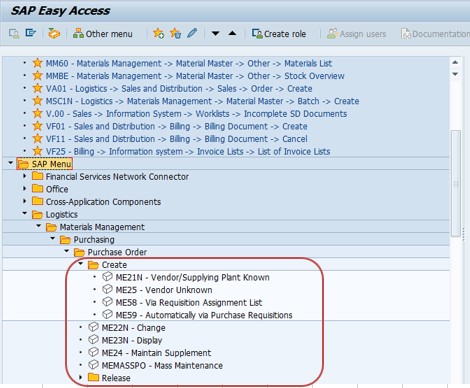
🔧 Go To – ME21N Purchase Order Creation Path
Go To: Logistics → Materials Management → Purchasing → Purchase Order → Create, or run transaction ME21N directly.
🔧 Follow Steps – Create a Subcontracting Purchase Order
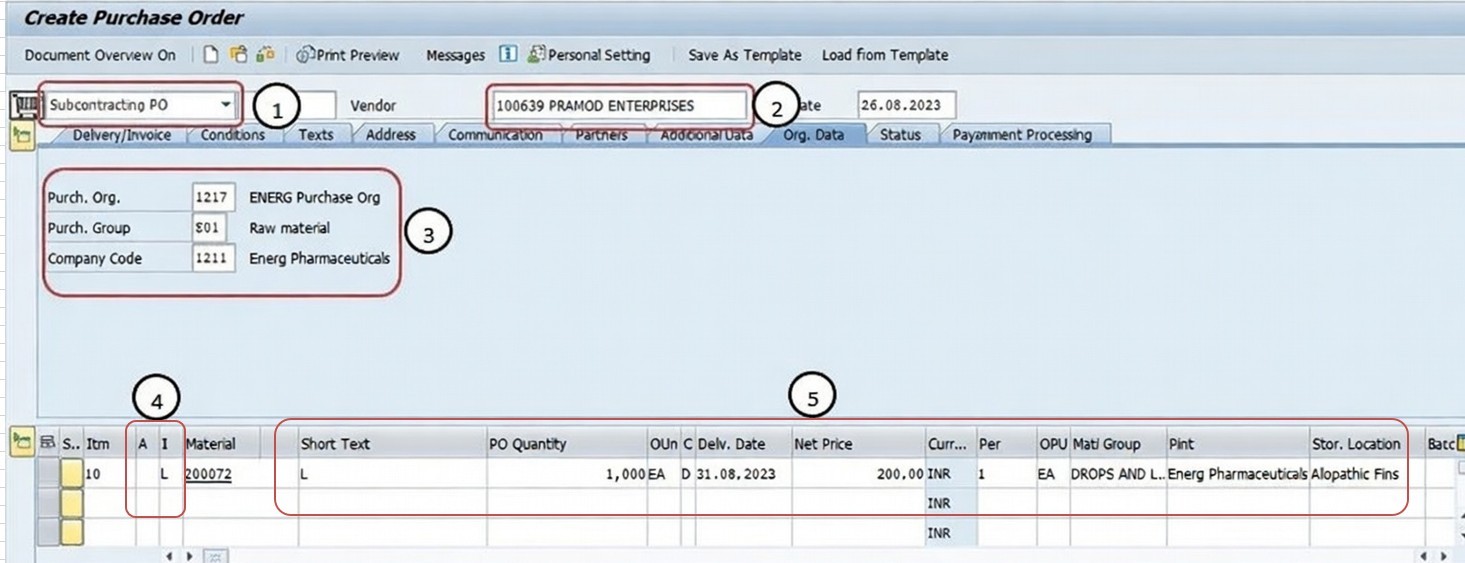
Go To Tcode ME21N. Run transaction ME21N to open the Purchase Order creation screen.
Select Subcontract PO. Choose the Subcontract PO document type, since this order will involve providing materials to a vendor for processing.
Select Vendor - 100369. Enter the vendor number of the subcontractor who will perform the processing or assembly work.
Select Purchase Org - 1217, Purch Group - E01, Company Code - 1211. These organizational fields determine which purchasing unit owns the order and which company code the resulting stock movements will belong to.
Select (A) Account Ass Cat - Blank (Blank), then Select (I) Item Cat - L (Subcontract). Leaving account assignment category blank means the finished product will be received into regular stock like any other material, while item category L tells the system this line item is a subcontracting operation.
Enter Short Text, PO Qty, Delivery Date, Net Price, Material Group, Plant, etc. Fill in the finished product's material description or number, the quantity expected back from the subcontractor, the expected delivery date, the negotiated processing/net price, material group for reporting, and the receiving plant.
✅ Item Category
In SAP MM, the Item Category is a classification used to differentiate between different types of items being procured or managed within a purchase order. This helps the system understand how to process and manage the procurement of different types of items.
L (Subcontracting): This is the main product or material that you want the subcontractor to work on. It is usually assigned the item category "L" (Subcontracting) to indicate that it is a subcontracting component.
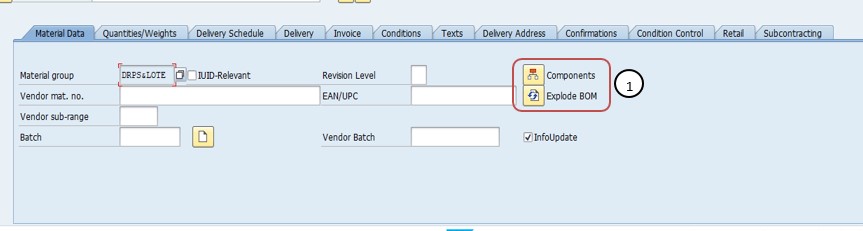
Then Select - Master Data - Components. Navigate to the Master Data tab and select Components to list the raw materials that will actually be shipped to the subcontractor.
✅ Components
These are the materials or components that you provide to the subcontractor for processing or assembly to create the finished product.
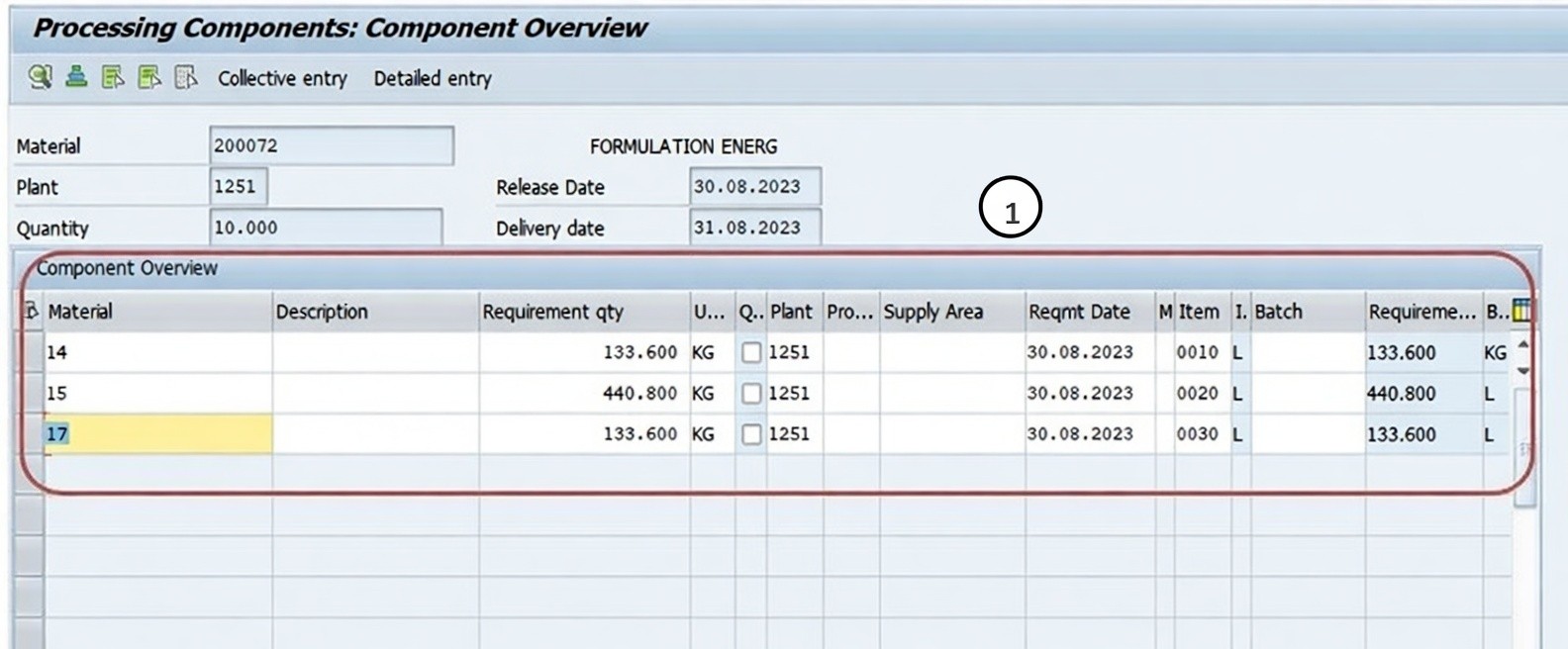
Then Check and Save PO. Running the Check function validates that item category L, the finished product data, and the component assignment are all complete and consistent before the Purchase Order is saved.
📋 Subcontracting PO Key Fields at a Glance
| Field | What It Captures |
|---|---|
| Vendor | The subcontractor who will process or assemble the provided components into a finished product. |
| Purchasing Organization | The organizational unit responsible for negotiating and issuing the order. |
| Purchasing Group | The buyer or buying team assigned responsibility for the order. |
| Company Code | The legal entity whose stock and financial records the transaction affects. |
| Account Assignment Category (Blank) | Indicates the finished product is received into regular stock, valuated as a stock item. |
| Item Category (L) | Tells the system the line item is a subcontracting operation on the finished product. |
| Components | The raw materials or parts shipped to the subcontractor for processing, tracked as special stock at the vendor's location. |
📋 Related SAP Transactions
| Transaction | Purpose |
|---|---|
| ME21N | Create a new Purchase Order, including a Subcontracting PO. |
| ME22N | Change an existing Purchase Order. |
| ME23N | Display a Purchase Order without allowing changes. |
| ME2O | List subcontracting stock monitoring, showing components at the vendor's location. |
| MB1B | Post a transfer posting, sometimes used to move components to subcontracting stock. |
| MIGO | Post the goods receipt for the finished product from the subcontractor, which also consumes the components. |
🎓 Interview-Style Questions and Answers
Q: What makes a Subcontracting PO different from a Standard PO in SAP?
A Standard PO simply buys a finished item from a vendor. A Subcontracting PO buys a processing service - the organization ships raw material components to the vendor, who processes them into a finished product that is then received back, tracked using item category L and a components list.
Q: Why does a Subcontracting PO usually use blank account assignment category?
Because the finished product is received into regular stock and valuated like a standard material, rather than charged directly to a cost object such as a cost center or asset.
Q: What happens if the components list on a Subcontracting PO is incomplete?
The special stock quantities SAP tracks as being held at the subcontractor's location will be inaccurate, which can cause valuation errors or availability check problems at the time of goods receipt.
Q: How does the finished product data relate to the components data on the same PO?
The item category L line represents the finished product the organization expects to receive back, while the components list represents the raw materials sent out to make that finished product possible - both live on the same Subcontracting PO but represent opposite directions of material flow.
📚 Quick Glossary of Terms Used in This Guide
- Subcontracting Purchase Order: A Purchase Order used to outsource part of manufacturing, where the organization provides raw materials to a vendor who processes them into a finished product.
- Item Category L: The classification assigned to the finished product line on a Subcontracting PO, indicating this is a subcontracting operation.
- Components: The raw materials or parts provided to a subcontractor for processing or assembly into the finished product.
- Special Stock: Stock that is owned by the organization but physically located at a subcontractor's premises, tracked separately from regular warehouse stock.
- Account Assignment Category: A classification determining which cost object a PO item's expense is charged against; typically left blank on a Subcontracting PO since the finished product is stock-valuated.
- Goods Receipt: The process of confirming physical receipt of the finished product from the subcontractor, which also consumes the associated components in the system.
📝 Governance for Subcontracting Purchase Order Creation
Because a Subcontracting PO involves shipping company-owned raw materials to an external party, most organizations maintain a documented governance process around which vendors are approved for subcontracting relationships, how component quantities are calculated relative to the finished product ordered, and how special stock at the subcontractor's location is periodically reconciled against what the PO and system records expect. This is particularly important since a discrepancy between actual components at the vendor's site and what SAP believes is there can go unnoticed for some time without regular reconciliation.
Data quality governance matters here for the same reason it does for other PO types: a Subcontracting PO created quickly, with an inaccurate or incomplete components list, tends to surface as an inventory or valuation problem later - once goods receipt for the finished product doesn't match what the components list expected to be consumed. Establishing a clear component assignment checklist, tied to the bill of material for the finished product where one exists, keeps Subcontracting PO quality consistent across a large buying organization over time.
💼 Real-World Scenario: Outsourcing an Assembly Operation
Pooja Mishra, an SAP MM consultant at Learn Pharmaceuticals, was asked to set up a Purchase Order for an assembly operation being outsourced to a subcontractor after purchasing manager Rajesh Pawar confirmed vendor 100369 and the negotiated processing charge. Since this involved sending raw materials out for processing, Pooja used ME21N, selecting Subcontract PO document type and entering the vendor number.
She selected purchasing organization 1217, purchasing group E01, and company code 1211 to establish the organizational context, then selected account assignment category blank and item category L (Subcontracting), since the finished assembly would be received back into regular stock. Pooja entered a short text describing the finished product, the PO quantity expected back, the expected delivery date, the negotiated processing price, the relevant material group, and the receiving plant.
Production planner Anita Shah then worked with Pooja to navigate to Master Data - Components, listing every raw material and part that would actually be shipped to the subcontractor for this assembly job, cross-checking the list against the finished product's bill of material to make sure nothing was missed. Once the components list matched what would physically be shipped, Pooja ran the Check function and saved the Purchase Order. When the components were later sent out and the finished assemblies came back, the goods receipt correctly consumed the special stock components while receiving the finished product into regular inventory.
❗ Common Mistakes When Creating a Subcontracting Purchase Order
- Using item category blank (Standard) instead of L (Subcontracting), which prevents the system from correctly tracking components as special stock at the vendor's location.
- Entering an incomplete or inaccurate components list, causing a mismatch between what's expected at the subcontractor's site and what's actually physically there.
- Failing to cross-check the components list against the finished product's bill of material, missing a required raw material or part.
- Leaving the finished product's quantity or delivery date inconsistent with the subcontractor's actual processing capacity or lead time.
- Skipping the Check function before saving, only to discover missing mandatory fields once component shipment or goods receipt begins.
- Not periodically reconciling special stock quantities at the subcontractor's site against what the system expects.
✅ Best Practices for Subcontracting Purchase Order Creation
- Confirm item category L is selected correctly for the finished product line, since it enables the special stock and component logic the PO depends on.
- Cross-check the components list against the finished product's bill of material to ensure nothing required for processing is missed.
- Verify quantities on both the finished product line and the components list are consistent with what the subcontractor will actually receive and return.
- Run the Check function before saving to catch missing mandatory fields or an incomplete components list early.
- Coordinate with production planning to confirm delivery dates align with the subcontractor's actual processing lead time.
- Periodically reconcile special stock at the subcontractor's location against system records to catch discrepancies early.
📈 How Subcontracting Purchase Order Data Powers Downstream Processes
A Subcontracting PO's influence extends across both inventory management and procurement for as long as it remains open, which is exactly why getting the item category and component assignment right at creation pays off well beyond the ME21N screen itself. The PO's components list determines exactly which special stock quantities are tracked as being held at the subcontractor's location, and the goods receipt for the finished product is what consumes those components in the system while receiving the finished item into regular stock. The finished product's item category L and net price also feed directly into invoice verification once the subcontractor bills for the processing charge.
Because the components list drives special stock accuracy, an inconsistency here - a missing component, a wrong quantity - is one of the more common root causes behind confusing valuation or availability errors when goods receipt is eventually posted against a Subcontracting PO, rather than a problem with the receipt itself.
✅ Validating the New Subcontracting Purchase Order Before Sending to the Vendor
Once a Subcontracting PO is created and saved, it's worth running through a short validation checklist before it's sent to the vendor. Display the PO (ME23N) and confirm item category L is set on the finished product line, along with the correct quantity, delivery date, and processing price. Review the components list and cross-check it against the finished product's bill of material, if one exists, to confirm nothing is missing or duplicated. Confirm the vendor is approved for subcontracting relationships. Finally, confirm plant and storage location settings support special stock tracking for this vendor before components are physically shipped.
Skipping this validation step is one of the more common reasons a newly created Subcontracting PO causes confusion during goods receipt - usually an incomplete components list, an item category set incorrectly, or a quantity mismatch between what was actually shipped and what the PO expected.
📱 This Configuration in SAP S/4HANA
Transaction ME21N and the underlying Subcontracting Purchase Order creation process work largely the same way in SAP S/4HANA as in classic ECC, since item category L and the associated special stock logic remain core Materials Management concepts. What has changed in S/4HANA is the availability of Fiori apps such as "Manage Purchase Orders" and improved subcontracting stock monitoring analytics, which offer better visibility into components held at subcontractor locations alongside the classic ME21N and ME2O transactions. Many S/4HANA implementations continue to rely on ME21N for Subcontracting PO creation, particularly given the complexity of component assignment, while Fiori-based apps are increasingly favored for day-to-day special stock monitoring.
🎯 Conclusion
Creating a Subcontracting Purchase Order in ME21N requires thinking about two directions of material flow at once - the finished product coming back from the subcontractor, tagged with item category L, and the raw material components going out to make that finished product possible. Selecting the correct vendor and organizational data, setting item category L correctly, and maintaining an accurate, bill-of-material-verified components list are what separate a Subcontracting PO that flows cleanly through goods receipt and special stock tracking from one that generates valuation or availability errors downstream. Keep this guide handy the next time your organization needs to outsource part of its manufacturing or assembly process through SAP.