SAP ME21N: How to Create a Service Purchase Order – Step-by-Step
Purchase Order (PO) is a formal document issued by a buyer to a supplier, indicating the intent to purchase specific products or services at predefined terms and conditions. In SAP MM, the Purchase Order process is designed to ensure accurate ordering, efficient communication with suppliers, and seamless integration with other business processes. This guide walks you through creating a Service Purchase Order specifically, covering account assignment category, item category, G/L account, and cost center. If you encounter any errors while following along, feel free to send a screenshot to pramod@learntosap.com, and I will help you resolve the issue.
✅ What is a Service Purchase Order in SAP?
Purchase Order (PO) is a formal document issued by a buyer to a supplier, indicating the intent to purchase specific products or services at predefined terms and conditions. In SAP MM, the Purchase Order process is designed to ensure accurate ordering, efficient communication with suppliers, and seamless integration with other business processes.
A Service Purchase Order sits at the intersection of SAP MM and SAP FI/CO, which is exactly why it needs its own dedicated walkthrough separate from a Standard PO. Because a service has no material master record, no physical stock movement, and no goods receipt in the traditional sense, the system instead relies on account assignment - a G/L account and a cost object such as a cost center - to determine where the expense should be posted. Getting this account assignment correct at creation time is what allows the eventual invoice to post cleanly to Financial Accounting without triggering a determination or valuation error.
Related Transaction Codes
| Transaction | Purpose |
|---|---|
| ME21N | Create Purchase Order (including Service PO). |
| ME22N | Modify Purchase Order. |
| ME23N | Display Purchase Order. |
📋 Types of Purchase Order in SAP
Service PO
2) Service Purchase Order (PO): Service PO is used to procure services rather than physical goods. It is used when the organization needs to purchase non-material services, such as consulting, maintenance, or repair services. In a service PO, the description of the service, quantity (if applicable), unit of measure, and service provider information are specified.
Unlike a Standard PO, which references a material master record, a Service PO typically relies on a short text description of the service being procured, since most services don't have a corresponding material number maintained in the system. This is precisely why item category D (Service) exists - to tell SAP that the line item should be handled using service-specific logic rather than material-based logic.
🔧 Go To – ME21N Purchase Order Creation Path
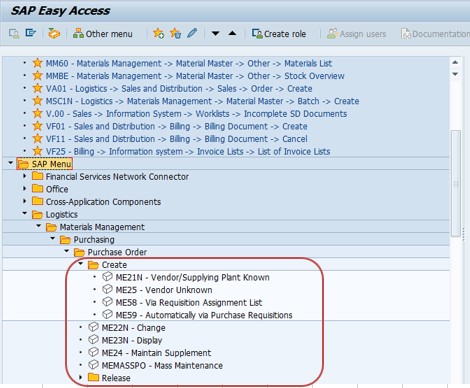
Go To: Logistics → Materials Management → Purchasing → Purchase Order → Create, or run transaction ME21N directly.
🔧 Follow Steps – Create a Service Purchase Order
Go To Tcode ME21N. Run transaction ME21N to open the Purchase Order creation screen.
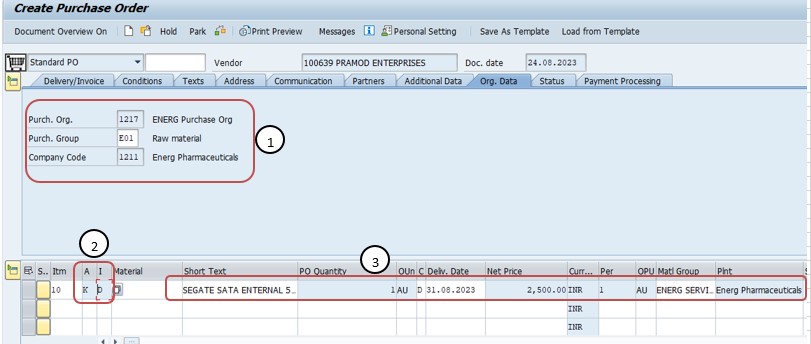
Select Purchase Org - 1217, Purch Group - E01, Company Code - 1211. These organizational fields determine which purchasing unit owns the order and which company code the resulting financial posting will belong to.
Select (A) Account Ass Cat - K (Cost Center), then Select (I) Item Cat - D (Service). Selecting account assignment category K tells the system this item's cost will be charged to a cost center, while item category D tells the system this line item represents a service rather than a physical material.
Enter Short Text, PO Qty, Delivery Date, Net Price, Material Group, Plant, etc. Since a Service PO line typically has no material master to draw from, the short text field carries the description of the service being procured, alongside quantity, expected delivery date, negotiated net price, material group for reporting, and the receiving plant.
✅ Account Assignment Category
Account assignment category is used to determine how the costs incurred on a purchase order item will be assigned or distributed within the organization. In the context of a Service Purchase Order, common account assignment categories include:
K (Cost Center): This category indicates that the cost of the service will be charged to a specific cost center within the organization.
✅ Item Category
In SAP MM, the Item Category is a classification used to differentiate between different types of items being procured or managed within a purchase order. For service-related purchase orders, the item category might be labeled as 'D' (for Services) or something similar. This helps the system understand how to process and manage the procurement of different types of items.
D (Service): This item category is used for services and allows you to enter service-specific details such as service description, service quantity, and service unit of measure.
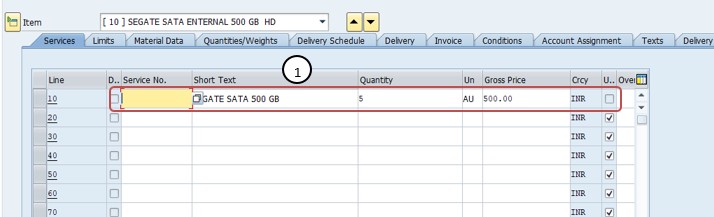
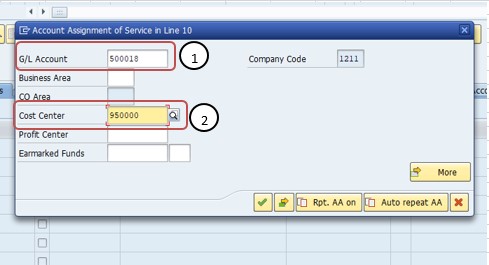
Enter G/L Account - 500018, Enter Cost Center - 95000. Completing the account assignment block with a specific G/L account and cost center is what finalizes where the service's cost will be posted.
✅ G/L Account (General Ledger Account)
G/L Accounts are used to record financial transactions in a company's general ledger. In the context of a Service Purchase Order, G/L accounts are used to track and classify the financial postings related to the services being procured. For example, the G/L account might represent an expense category related to the type of service being purchased.
✅ Cost Center
Cost Center is a specific organizational unit within a company that is responsible for incurring costs. It helps in tracking and controlling expenses related to specific functions or departments. When creating a Service Purchase Order (PO), you can assign a relevant cost center to allocate the costs associated with the services being procured.
Then Check and Save PO. Running the Check function validates that the account assignment, item category, and all mandatory service fields are complete and consistent before the Purchase Order is saved.
📋 Service PO Key Fields at a Glance
| Field | What It Captures |
|---|---|
| Purchasing Organization | The organizational unit responsible for negotiating and issuing the order. |
| Purchasing Group | The buyer or buying team assigned responsibility for the order. |
| Company Code | The legal entity whose books will record the resulting financial posting. |
| Account Assignment Category (K) | Indicates the cost is charged to a cost center rather than valuated as stock. |
| Item Category (D) | Tells the system the line item is a service, enabling service-specific fields like short text and service quantity. |
| G/L Account | The general ledger expense account that classifies the financial posting for the service. |
| Cost Center | The organizational unit responsible for and charged with the cost of the service. |
📋 Related SAP Transactions
| Transaction | Purpose |
|---|---|
| ME21N | Create a new Purchase Order, including a Service PO. |
| ME22N | Change an existing Purchase Order. |
| ME23N | Display a Purchase Order without allowing changes. |
| ML81N | Maintain a Service Entry Sheet to confirm services actually performed against a Service PO. |
| ME2S | List Purchase Orders by service, useful for monitoring open Service PO items. |
| FB60 | Post a vendor invoice directly in FI, relevant when reconciling service costs. |
🎓 Interview-Style Questions and Answers
Q: What makes a Service PO different from a Standard PO in SAP?
A Standard PO procures a physical material referenced by a material master record, valuated through goods receipt. A Service PO procures a non-material service, described by short text rather than a material number, and relies on account assignment - a G/L account and cost object - instead of stock valuation.
Q: Why is account assignment category K commonly used on Service POs?
Because services are typically consumed immediately by a department rather than stocked, so their cost is charged directly to a cost center (category K) rather than to inventory.
Q: What does item category D actually change on the PO screen?
It switches the item entry logic to service-specific fields - short text, service quantity, and unit of measure - rather than requiring a material master reference, and it typically enables the use of a Service Entry Sheet later to confirm the work performed.
Q: What happens if the G/L account or cost center is missing on a Service PO?
The system will not allow the PO item to be saved, or will generate an account determination error, since Financial Accounting needs both the expense classification (G/L account) and the responsible unit (cost center) to post the eventual invoice correctly.
📚 Quick Glossary of Terms Used in This Guide
- Service Purchase Order: A Purchase Order used to procure non-material services such as consulting, maintenance, or repair, rather than physical goods.
- Account Assignment Category: A classification, such as K for Cost Center, determining which cost object a PO item's expense is charged against.
- Item Category: A classification such as D (Service) that determines how a PO line item is processed and which fields are relevant.
- G/L Account: A general ledger account used to record and classify a financial transaction, such as a service expense.
- Cost Center: An organizational unit responsible for incurring and tracking specific costs.
- Service Entry Sheet: A document used to confirm services actually performed against a Service PO, functioning similarly to a goods receipt for materials.
📝 Governance for Service Purchase Order Creation
Because a Service PO's cost posts directly to a cost center rather than through stock valuation, most organizations maintain a documented governance process around which G/L accounts and cost centers are appropriate for which types of services, and who is authorized to approve service spend above a given threshold. This is particularly important since service costs are often less visible to finance than material purchases, given there's no physical goods receipt to reconcile against.
Data quality governance matters here for the same reason it does for other PO types: a Service PO created quickly, with an inconsistent or incorrect G/L account and cost center combination, tends to surface as a cost allocation problem later - once the invoice has already been posted against the wrong department's budget. Establishing a clear account assignment checklist for common service categories keeps Service PO quality consistent across a large buying organization over time.
💼 Real-World Scenario: Procuring an Annual Maintenance Service Contract
Pooja Mishra, an SAP MM/FI consultant at Learn Pharmaceuticals, was asked to set up a Purchase Order for an annual equipment maintenance service after purchasing manager Rajesh Pawar confirmed the vendor and pricing. Since this was a service rather than a physical material, Pooja used ME21N and selected purchasing organization 1217, purchasing group E01, and company code 1211 to establish the organizational context for the order.
She selected account assignment category K (Cost Center) and item category D (Service), then entered a short text describing the maintenance service, the PO quantity, the expected delivery (service) date, the negotiated net price, the relevant material group, and the plant the maintenance would be performed at. Finance analyst Priya Patil helped confirm the correct G/L account - 500018, an expense account for maintenance services - and cost center 95000, the department responsible for the equipment being maintained.
Once the account assignment was complete, Pooja ran the Check function to confirm there were no missing mandatory fields, then saved the Purchase Order. When the maintenance work was later completed, the team used a Service Entry Sheet to confirm the service had been performed, allowing the vendor's invoice to be verified and posted cleanly against the correct cost center.
❗ Common Mistakes When Creating a Service Purchase Order
- Using item category blank (Standard) instead of D (Service), which prevents the system from correctly handling service-specific fields and Service Entry Sheets.
- Selecting the wrong account assignment category, misallocating cost away from the intended cost center.
- Entering an inconsistent or incorrect G/L account and cost center pairing, causing account determination errors at invoice verification.
- Leaving the short text description too vague, making it difficult for approvers or auditors to understand what service was actually procured.
- Skipping the Check function before saving, only to discover missing mandatory account assignment fields once approval or invoice posting begins.
- Forgetting to use a Service Entry Sheet to confirm work performed, leading to invoice verification mismatches later.
✅ Best Practices for Service Purchase Order Creation
- Confirm account assignment category K and item category D are both selected correctly before entering item details.
- Use a clear, specific short text description of the service, rather than a generic label that won't be meaningful to approvers or auditors later.
- Verify the G/L account and cost center combination with finance before saving, especially for new or unusual service categories.
- Run the Check function before saving to catch missing mandatory account assignment fields early.
- Use a Service Entry Sheet to formally confirm work performed before invoice verification, rather than relying on informal confirmation.
- Apply release strategy consistently for higher-value service contracts, so spend above a defined threshold always receives appropriate review.
📈 How Service Purchase Order Data Powers Downstream Processes
A Service PO's influence extends across the rest of the procurement and accounting cycle, which is exactly why getting the account assignment right at creation pays off well beyond the ME21N screen itself. The PO's G/L account and cost center determine exactly where the eventual invoice's expense will post; its item category determines whether a Service Entry Sheet is required to confirm work performed before invoice verification can proceed; and its short text description is often the only record available to anyone later reviewing what the service actually was.
Because service costs skip the usual goods receipt step that materials go through, an inconsistency in the account assignment - a wrong cost center, a mismatched G/L account - is one of the more common root causes behind confusing account determination errors during invoice verification, rather than a problem with the invoice itself.
✅ Validating the New Service Purchase Order Before Sending to the Vendor
Once a Service PO is created and saved, it's worth running through a short validation checklist before it's sent to the vendor. Display the PO (ME23N) and confirm item category D is set correctly and the account assignment shows category K with the intended G/L account and cost center. Confirm the short text description clearly identifies the service, and that quantity, delivery date, and net price all match what was negotiated. If a Service Entry Sheet will be required, confirm the relevant team understands the process for confirming work performed. Finally, confirm any release strategy has triggered correctly if the service value exceeds an approval threshold.
Skipping this validation step is one of the more common reasons a newly created Service PO causes confusion during invoice verification - usually an incorrect G/L account or cost center, or a missing Service Entry Sheet confirming the work was actually performed.
📱 This Configuration in SAP S/4HANA
Transaction ME21N and the underlying Service Purchase Order creation process work largely the same way in SAP S/4HANA as in classic ECC, since account assignment category K and item category D remain core Materials Management concepts. What has changed in S/4HANA is the availability of Fiori apps such as "Create Purchase Order" and "Manage Service Entry Sheets," which offer a more modern, guided creation and confirmation experience alongside the classic ME21N and ML81N transactions, along with improved analytics on service spend by cost center. Many S/4HANA implementations continue to rely on ME21N for Service PO creation, particularly for complex account assignment scenarios, while Fiori-based apps are increasingly favored for day-to-day service entry confirmation.
🎯 Conclusion
Creating a Service Purchase Order in ME21N is a slightly different exercise from a Standard PO, since it depends heavily on getting account assignment category K, item category D, and the G/L account and cost center combination right rather than referencing a material master. Selecting the correct organizational data, entering a clear service description, and completing account assignment accurately are what separate a Service PO that posts cleanly through invoice verification from one that generates account determination errors downstream. Keep this guide handy the next time your organization needs to procure consulting, maintenance, or repair services through SAP, and remember that the account assignment block - not a material master - is what carries most of the weight on this document type.